

Android has become the world's most widely used mobile operating system, powering billions of devices globally. While Android is often associated with personal smartphones and tablets, its role in the enterprise world has grown significantly over the last decade.
Today, organizations across industries rely on Android devices for field operations, retail, healthcare, logistics, manufacturing, education, and corporate mobility. Businesses choose Android because it offers flexibility, affordability, a wide range of device options, and support from multiple manufacturers.
However, managing a growing fleet of Android devices is not always straightforward.
Different Android versions, device models, security requirements, and ownership models can make device management challenging for IT teams. Organizations need a reliable way to secure devices, deploy applications, enforce policies, and protect business data without affecting productivity.
This is where Enterprise Mobility Management (EMM), also known as Mobile Device Management (MDM), plays a critical role.
Modern MDM solutions help organizations manage Android devices remotely, but they rely on Android Enterprise to do so effectively. Android Enterprise provides the APIs, management frameworks, and security controls that allow MDM solutions to communicate with Android devices and enforce management policies.
In this blog, we will explore what Android Enterprise is, how it works, why it was introduced, and how businesses can use it alongside an MDM solution like miniOrange to securely manage Android devices at scale.
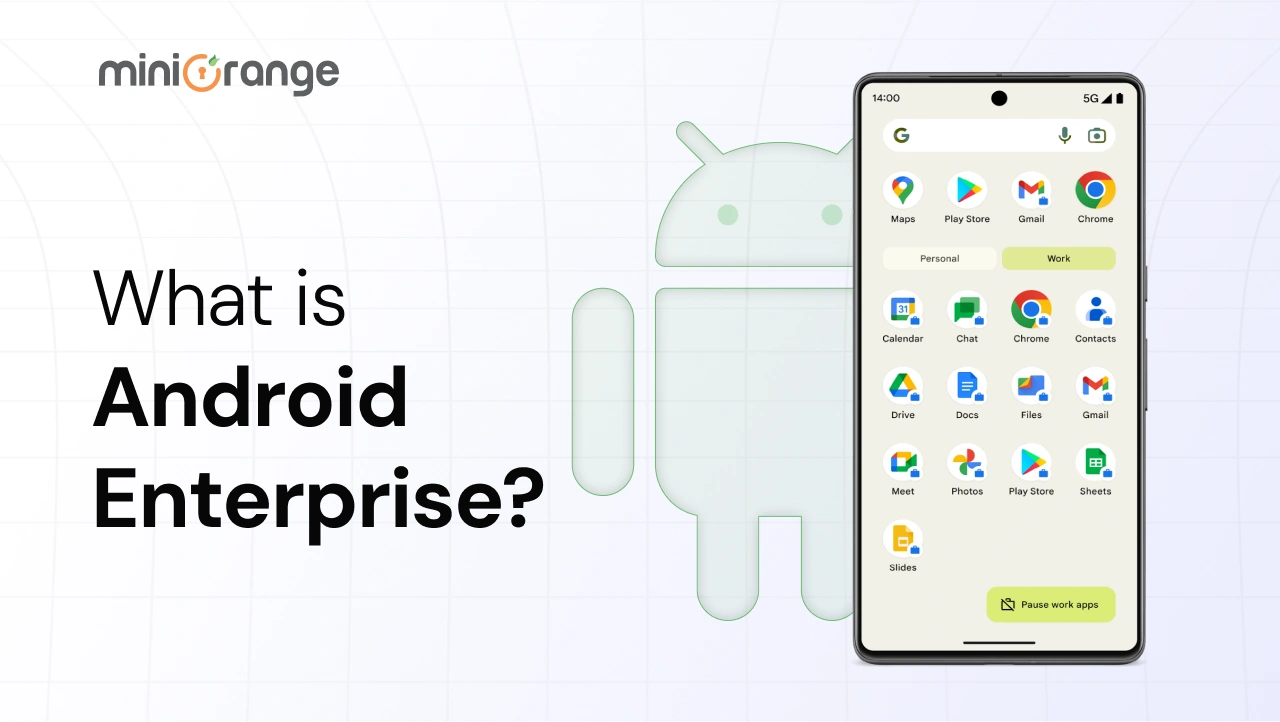
What is Android Enterprise?
Android Enterprise is Google's platform for managing Android devices in the workplace. It provides the built-in tools, security features, and management capabilities that organizations need to secure, configure, and control Android devices through an MDM solution.
Whether a business uses smartphones, tablets, rugged devices, kiosks, or POS systems, Android Enterprise helps IT teams manage these devices while keeping corporate data secure.
At its core, Android Enterprise acts as the bridge between Android devices and Mobile Device Management (MDM) solutions. It provides a standardized framework that allows IT administrators to enroll devices, enforce security policies, deploy applications, manage work profiles, and control device settings from a centralized management platform.
Some of the most common Android Enterprise capabilities include:
- Device enrollment and provisioning
- Work profile management
- Application deployment through Managed Google Play
- Password and security policy enforcement
- Kiosk mode configuration
- Device restrictions and remote management
- Corporate data protection
One important thing to understand is that Android Enterprise is not an MDM solution itself. Instead, it provides the management framework that MDM platforms use to manage Android devices. Without Android Enterprise, Android device management would be far less consistent across different manufacturers, device types, and Android versions.
Android Enterprise vs MDM
One of the most common misconceptions is that Android Enterprise and MDM are the same thing.
While they work closely together, they serve different purposes.
| Android Enterprise | MDM Solution |
|---|---|
| Google's enterprise mobility framework | Platform used to manage devices |
| Provides management APIs and security capabilities | Uses Android Enterprise APIs |
| Built into Android | Third-party management software |
| Enables device management | Performs device management |
| Developed and maintained by Google | Developed by vendors such as miniOrange |
| Cannot manage devices independently | Manages devices through Android Enterprise |
In simple terms, Android Enterprise provides the management capabilities, while an MDM solution provides the interface and controls that IT teams use to manage devices. Think of Android Enterprise as the engine and the MDM platform as the dashboard used to control it. Organizations need both to build an effective Android device management strategy.
How was Android Enterprise Introduced?
Before the Android Enterprise program existed, managing Android devices in business environments was far more challenging.
As Android adoption grew, organizations began using Android smartphones and tablets for work purposes. At the same time, EMM and MDM providers needed a way to remotely manage these devices.
Like other operating systems, Android relied on APIs to allow applications and management tools to communicate with the operating system. APIs make it possible to perform tasks such as configuring settings, sending messages, controlling applications, and enforcing security policies.
The challenge was that Android did not initially provide a standardized set of enterprise management APIs.
Because Android is an open-source operating system, developers often created their own APIs or relied on third-party solutions. As a result, different EMM vendors managed Android devices in different ways.
This created several problems:
- Inconsistent device management experiences
- Limited security controls
- Compatibility issues across manufacturers
- Different management capabilities between vendors
As Android adoption continued to grow in enterprise environments, Google recognized the need for a standardized management framework.
In 2014, with the release of Android 5.0 Lollipop, Google introduced Android for Work (AfW).
Android for Work provided a standardized set of APIs and enterprise management capabilities that allowed authorized EMM providers to manage Android devices consistently.
Key capabilities introduced included:
- Work profiles
- Managed Google Play
- Device management APIs
- Enterprise security controls
- Corporate app management
Over time, Android for Work evolved into what is now known as Android Enterprise.
Since its introduction, Android Enterprise has continued to evolve with every major Android release, adding new management features, stronger security controls, improved enrollment methods, and enhanced support for modern workplace requirements.
Today, Android Enterprise serves as the foundation for Android device management across organizations worldwide.
Who Can Use Android Enterprise?
Android Enterprise is designed for organizations of all sizes. Whether a business manages ten devices or ten thousand devices, Android Enterprise provides the management capabilities needed to secure and control Android endpoints.
Organizations commonly using Android Enterprise include small businesses, large enterprises, educational institutions, healthcare providers, logistics companies, retail organizations, manufacturing businesses, and government agencies.
Any organization that uses Android devices for work can benefit from Android Enterprise.
Getting started is relatively simple. Organizations need:
- A Google account for enterprise registration
- An Android Enterprise setup
- A compatible MDM solution such as miniOrange
Why is Android Enterprise Needed?
As Android devices became increasingly common in business environments, organizations needed a secure and standardized way to manage them. Without a centralized framework, IT teams faced challenges related to security, device provisioning, application management, and compliance. Android Enterprise was introduced to solve these challenges and provide a consistent management experience across Android devices.
1. Standardized Device Management
Before Android Enterprise, management capabilities often varied between Android manufacturers. Android Enterprise introduced a common management approach that allows IT teams to apply policies, deploy apps, and enforce security controls consistently across devices from Samsung, Zebra, Honeywell, Lenovo, and other Android manufacturers.
2. Better Security Controls
Organizations need to protect corporate data without disrupting employee productivity. Android Enterprise provides security capabilities such as:
- Work profiles
- Device encryption
- Password enforcement
- Remote wipe
- Application controls
These capabilities help organizations reduce security risks while maintaining flexibility.
3. Support for BYOD
Many organizations support Bring Your Own Device (BYOD) programs. Android Enterprise allows businesses to separate work data from personal data through Work Profiles. This helps organizations secure business information while respecting employee privacy.
4. Simplified Application Management
Deploying applications manually across hundreds or thousands of devices is not practical. Android Enterprise integrates with Managed Google Play, allowing IT administrators to remotely distribute, update, and manage applications from a central location.
5. Large-Scale Device Deployments
Organizations often need to deploy large numbers of devices quickly. Android Enterprise supports modern enrollment methods such as:
- Zero-touch Enrollment
- QR Code Enrollment
- Token-based Enrollment
These methods simplify provisioning and reduce deployment time.
How Android Enterprise Works?
Android Enterprise works alongside an MDM solution to provide secure device management.
The process generally follows these steps:
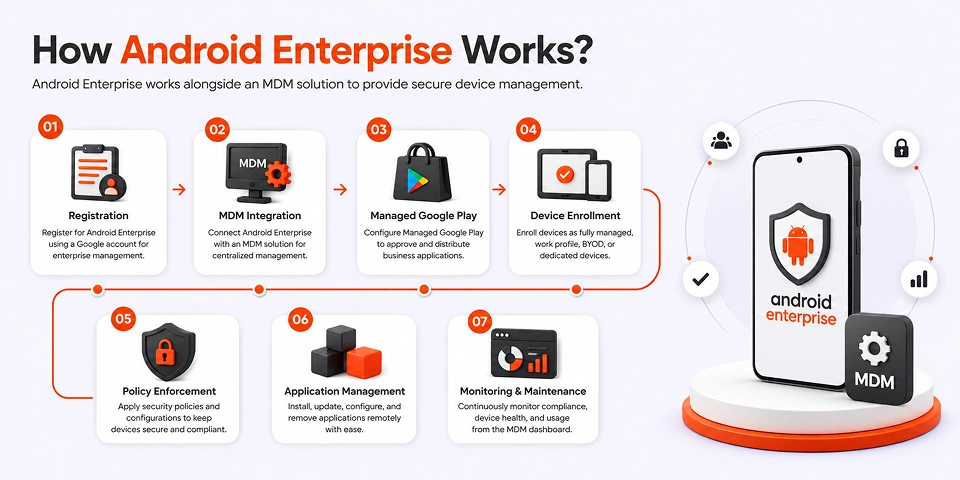
Step 1: Android Enterprise Registration
Organizations first register for Android Enterprise using a Google account designated for enterprise management. This establishes the organization's Android Enterprise environment.
Step 2: MDM Integration
The Android Enterprise environment is connected to an MDM solution such as miniOrange. This allows administrators to manage devices through a centralized management console.
Step 3: Managed Google Play Setup
Managed Google Play is configured to allow administrators to approve, distribute, and manage business applications. Only approved applications can be deployed to managed devices.
Step 4: Device Enrollment
Devices are enrolled into the MDM platform. Depending on the deployment model, devices can be enrolled as fully managed devices, corporate-owned devices with work profiles, BYOD devices, and dedicated devices.
Step 5: Policy Enforcement
Once enrolled into the MDM platform, IT administrators can apply security policies such as password requirements, encryption settings, application restrictions, device restrictions, network configurations, etc.
Step 6: Application Management
Applications can be remotely installed, updated, configured, and removed through the MDM platform. This ensures employees always have access to approved business tools.
Step 7: Ongoing Monitoring and Maintenance
Administrators continuously monitor device health, compliance status, security posture, and application usage through the MDM dashboard. This helps maintain security while ensuring devices remain productive and compliant.
By combining Android Enterprise with an MDM solution, organizations gain the control, visibility, and security needed to effectively manage Android devices throughout their lifecycle.
Key Features of Android Enterprise
Android Enterprise provides a range of capabilities that help organizations securely deploy, manage, and protect Android devices. These features form the foundation of modern Android device management and allow businesses to support different ownership models, security requirements, and deployment scenarios.
1. Device Management
One of the biggest advantages of Android Enterprise is its ability to provide centralized device management.
IT administrators can configure, monitor, and control devices remotely through an MDM solution. This includes enforcing password policies, configuring Wi-Fi settings, deploying certificates, restricting device functionality, and managing security configurations across all enrolled devices.
Instead of manually configuring each device, administrators can apply policies centrally and ensure every device complies with organizational requirements.
This significantly reduces administrative overhead while improving security and consistency across the device fleet.
2. QR Code Enrollment
Android Enterprise simplifies device provisioning through QR Code Enrollment.
Rather than manually entering configuration details on every device, administrators can generate a QR code from their MDM platform. During device setup, users simply scan the QR code, and the device automatically downloads the required management settings and enrolls into the MDM platform.
This enrollment method is particularly useful for organizations deploying devices at scale because it reduces setup time and minimizes user errors.
3. Work Profile
Work Profile is one of the most widely used Android Enterprise features, especially for Bring Your Own Device (BYOD) deployments.
A Work Profile creates a separate, secure workspace on the device where business applications and corporate data are stored. This separation ensures that work data remains isolated from personal applications, photos, messages, and files.
For employees, this provides a familiar user experience while maintaining privacy. For organizations, it ensures business data remains protected and manageable without affecting personal content on the device.
Work Profiles have become a key feature for organizations adopting hybrid work and BYOD strategies.
4. Enterprise-Grade Security
Security is at the core of Android Enterprise.
The platform provides multiple security controls that help organizations protect sensitive business information and maintain compliance requirements.
Key security capabilities include:
- Device encryption
- Password enforcement
- Remote lock and wipe
- Application management
- Work profile separation
- Security patch support
- Restricted device functionality
These capabilities allow organizations to protect corporate data regardless of whether devices are company-owned or employee-owned.
When combined with an MDM solution, Android Enterprise provides a comprehensive security framework for managing Android devices.
5. Deployment Flexibility
Every organization manages devices differently.
Some businesses provide company-owned devices, while others support employee-owned devices. Certain environments require fully managed devices, while others rely on dedicated devices operating in kiosk mode.
Android Enterprise supports multiple deployment models, including:
- Bring Your Own Device (BYOD)
- Corporate-Owned Personally Enabled (COPE)
- Fully Managed Devices
- Dedicated Devices
- Kiosk Deployments
This flexibility allows organizations to choose the management approach that best fits their business requirements while maintaining a consistent security posture.
Does miniOrange Work with Android Enterprise?
Yes. miniOrange MDM is fully integrated with Android Enterprise and supports all major Android Enterprise deployment models. This allows organizations to manage employee-owned devices, company-owned devices, and dedicated-purpose devices from a single console while applying the security and management controls provided by Android Enterprise.
The combination of Android Enterprise and miniOrange MDM gives IT teams the flexibility to choose the deployment model that best fits their business requirements.
Android Enterprise Deployment Models Supported by miniOrange
| Feature | BYOD | COPE (Corporate-Owned, Personally Enabled) | Company-Owned (Fully Managed) | Kiosk Mode |
|---|---|---|---|---|
| Device Ownership | Employee-owned devices used for both personal and work purposes. | Devices owned by the organization but also used for personal activities. | Devices purchased and managed by the organization. | Dedicated company-owned devices for a specific business function. |
| Management Scope | IT manages only the work profile. Personal data remains private. | IT manages the work profile and corporate policies while allowing personal use on the device. | IT manages the entire device, including apps, settings, and restrictions. | IT controls the entire device and limits functionality to approved use cases. |
| Work Profile Support | Yes. A separate work profile keeps business and personal data isolated. | Yes. Work and personal data remain separated on the same company-owned device. | Optional. Can be configured based on business requirements. | Not required. Devices are dedicated to a specific purpose. |
| Privacy for Employees | Personal apps, photos, messages, and files remain inaccessible to IT administrators. | Personal data remains separate from work data, helping balance security and privacy. | Not applicable, as the device belongs to the organization. | Not applicable, as the device is not intended for personal use. |
| Application Management | Only work applications are managed and controlled by IT. | IT manages work apps while personal apps remain outside corporate control. | All applications can be installed, updated, restricted, or removed by IT. | Devices can be locked to a single app or a predefined set of approved apps. |
| Security Controls | Security policies apply only to corporate apps and data. | Security policies are enforced on corporate resources while maintaining separation from personal data. | Full device-level security controls and restrictions can be enforced. | Maximum restrictions can be applied to prevent unauthorized device usage. |
| Remote Wipe | Only the work profile and corporate data can be removed remotely. | Corporate data and the work profile can be removed without affecting personal content. | The entire device can be wiped and reset if lost or compromised. | The entire device can be remotely wiped and reset when required. |
| Best For | Hybrid work environments and BYOD programs. | Organizations issuing company-owned devices while supporting limited personal use. | Corporate workforce, frontline employees, and field teams. | Digital signage, POS systems, self-service kiosks, and dedicated business devices. |
Whether you are managing employee-owned smartphones, company-owned devices, or dedicated kiosks, miniOrange MDM helps simplify Android Enterprise management from a single dashboard. IT teams can enroll devices, deploy applications, enforce security policies, and monitor compliance without the complexity of managing each device individually.
Frequently Asked Questions (FAQs)
1. Is Android Enterprise free?
Yes. Android Enterprise is provided by Google and does not require a separate licensing fee. However, organizations need an MDM solution to use Android Enterprise management capabilities effectively.
2. Is Android Enterprise the same as MDM?
No. Android Enterprise is Google's management framework and set of APIs for Android devices. An MDM solution uses these APIs to manage, monitor, and secure devices.
3. Can Android Enterprise manage employee-owned devices?
Yes. Android Enterprise supports BYOD deployments through Work Profiles, allowing organizations to secure business data while keeping personal data separate.
4. Does Android Enterprise require Google Workspace?
No. Google Workspace is not required to use Android Enterprise. Organizations can register for Android Enterprise using a Google account and connect it to a supported MDM solution.
5. What is the difference between Android Enterprise and Android Device Policy?
Android Enterprise is the overall management framework, while Android Device Policy is Google's management application that helps enforce Android Enterprise policies on managed devices.
6. Which MDM works with Android Enterprise?
Several MDM solutions support Android Enterprise, including miniOrange MDM. These platforms use Android Enterprise APIs to provide device management, security enforcement, application management, and compliance monitoring.
Leave a Comment