
Credential management is the cybersecurity practice of creating, storing, distributing, rotating, and revoking the credentials people and machines use to prove who they are. These include passwords, API keys, SSH keys, certificates, and tokens.
Credential management serves as the foundational infrastructure for identity and access management (IAM) and replaces unsecure storage practices with encrypted, policy-driven controls. A working credential management program evaluates three core security parameters:
- Who or what holds authorization to specific resources.
- How strong is that access?
- How fast can you revoke the access if something goes wrong?
What is a Credential Management System?
A Credential Management System (CMS) is the enterprise software that operationalizes these functions by combining an encrypted secrets vault, a policy enforcement engine, and an audit log into a single platform. Instead of relying on manual spreadsheets, a CMS automates secret rotation, enforces least-privilege access, and logs all access attempts to maintain continuous operational security and compliance.
The Benefits of a Credential Management System
Done right, a credential management system gives you fewer breaches, faster audits, and less manual cleanup work for IT. Password resets drop. Offboarding gets faster because you're revoking access from one place instead of 20. And when something does go wrong, you can trace exactly which credential was used and when, instead of guessing.
Core capabilities of a credential management system include:
- Credential vaulting
- Access control
- Password rotation
- Monitoring
- Audit logging
Types of Credentials Organizations Need to Manage
Most people hear "credentials" and think of passwords. The real list is longer:
- User passwords and passphrases
- API keys and tokens (OAuth, JWT, session tokens)
- SSH keys for server access
- Service account credentials for machine-to-machine communication
- TLS/SSL certificates
- Database connection strings
- Cloud provider secrets (AWS access keys, Azure service principals)
- Hardware tokens and smart cards
Each type behaves differently. A certificate expires on a fixed date. A password needs a rotation policy. A service account key needs to stay invisible to anyone without a specific reason to see it. Treat them the same way, and you'll get the worst of every approach.
Why Credential Management is Important
Rising Credential-Based Attacks
Verizon's 2026 Data Breach Investigations Report found that credential abuse still shows up in 13% of breaches as a standalone entry point, and it's tangled into a much larger share once you count phishing and pretexting alongside it. The report calls stolen credentials a pervasive threat across attack paths, one of the few chokepoints defenders can actually target.
Vulnerability exploitation has now overtaken credential theft as the single most common way attackers get in, according to the same report. That sounds like good news for credential management until you notice the reason: attackers didn't lose interest in stolen credentials. They just found an easier door in unpatched credentials management software.
Credential abuse is still one of the fastest ways to move once an attacker is inside, and it's still a mainstay of ransomware attack chains.
Password Sprawl
The average employee juggles dozens of logins across SaaS tools, internal systems, and vendor portals. Some studies put the number of workplace passwords per person well past 80. Nobody remembers 80 unique, strong passwords. So they reuse them, write them down in a notes app, or save them in a browser with zero oversight from IT.
One leaked password on a low-stakes site can become the key to your CRM if someone reused it there too. Attackers count on that. It's why credential stuffing (testing leaked username and password pairs against other sites) still works as well as it does.
Shadow IT Risks
Teams sign up for tools without telling IT. A marketing team spins up a new analytics platform on a Tuesday afternoon, pays for it on a company card, and never loops in security. Nobody rotates that account when the person who created it leaves 6 months later. The credential sits there, active, unmonitored, sometimes for years, until an audit or a breach forces someone to finally notice it.
Compliance Requirements
GDPR, HIPAA, PCI-DSS, SOC 2: nearly every major framework now requires organizations to show who accessed what, when, and why. Auditors want logs, not promises. Without a credential management system, pulling that data ahead of an audit means chasing down 15 different admin panels by hand, hoping each one kept accurate records.
Get it wrong, and the cost is fines, lost contracts, and, in some industries, the inability to operate at all.
Common Credential Management Challenges
Weak Password Practices
Default passwords left unchanged on network devices. "Password123" with a capital letter to satisfy a policy checkbox. The same password, reused across dev, staging, and production because rotating 3 environments felt like overkill. These are the norm in organizations without enforced policy, and attackers know it.
Hardcoded Credentials
Developers paste an API key into a config file to make something work, plan to remove it before the merge, and forget. That key ends up in a Git repository, sometimes a public one, sometimes sitting there for months before a scanner or an attacker finds it.
Hardcoded secrets show up constantly in code security audits, and they're one of the easiest problems to prevent with the right tooling in place.
Lack of Credential Rotation
Static credentials are a gift to attackers. A stolen API key with no expiration date works just as well a year later as it did the day it leaked. Rotation limits the window of damage, but most organizations skip it because manual rotation is tedious, easy to forget, and rarely feels urgent until something breaks.
Poor Visibility and Credential Sprawl
Credentials pile up across cloud platforms, on-prem systems, third-party tools, and personal devices. Security teams often can't answer a simple question: how many active credentials exist right now, and who owns each one? A merger, a contractor rotation, or a fast-growing team can quietly triple that number in a year.
Without a central inventory, sprawl just keeps growing until an incident forces someone to count.
How Credential Management Works: The Credential Lifecycle
Credential lifecycle management is a cycle that repeats for every user and every machine identity.
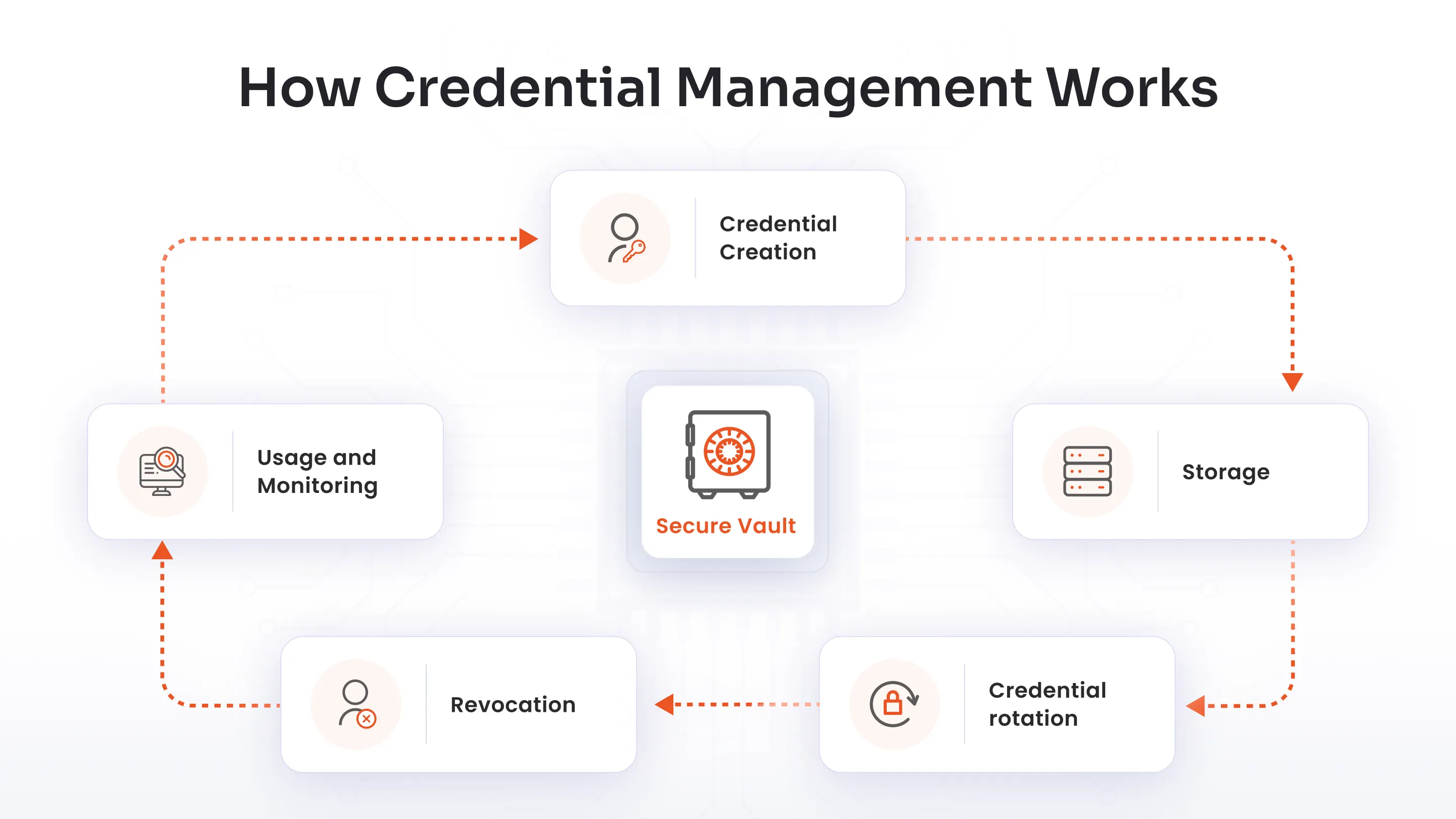
Credential creation: A credential gets created and assigned, whether that's a new employee's password, a fresh API key, or a certificate for a new server.
Storage: The credential lives in an encrypted vault, not a spreadsheet or a sticky note. Access to the vault itself is tightly controlled.
Credential rotation: Credentials get refreshed on a schedule or immediately after a suspected compromise. Automated rotation removes the human tendency to put it off. Though you have to know that how rotation works depends on whether you’re dealing with static or dynamic secrets.
A static secret is a credential that stays the same until someone deliberately changes it. A dynamic secret flips that model. Instead of a long-lived credential, the system generates a short-lived one on demand, scoped to a specific task, and set to expire automatically.
Revocation: When someone leaves, changes roles, or a credential is compromised, access gets cut immediately. No lingering accounts. No orphaned keys are sitting active because nobody remembered to close them out.
Usage and monitoring: Every time the credential gets used, that event gets logged. Unusual patterns (a login from a new country at 3 am, an API key suddenly making 10x its normal call volume) get flagged.
This cycle is what people mean by credential lifecycle management. It is not a separate discipline from credential management. It's credential management described as a process instead of a policy, and it applies the same way to a human employee's login and a background service's API key.
Both get issued, both get monitored, and both get retired eventually. Treat one half of that list as an afterthought, and it becomes the half attackers go after first.
Credential Management vs. Password Management
People use these terms interchangeably, and that's a mistake.
Password management covers one credential type: passwords. Tools like password managers help individuals or teams store and generate strong passwords. Useful, but narrow.
Credential management covers everything: passwords, yes, but also API keys, certificates, tokens, SSH keys, and service account secrets across an entire organization. It includes policy enforcement, automated rotation, lifecycle tracking, and audit logging at scale.
A simple way to think about it: password management is a subset of credential management, built for a narrower job. If your organization only worries about employee passwords, a password manager might cover you.
But most organizations aren't in that position anymore. The moment you're managing machine identities, API integrations, third-party vendor access, or compliance audits, a password manager runs out of road fast. You need something built to handle every credential type, not just the ones humans type into a login box.
| Password Management | Credential Management |
|---|---|
| Focuses on passwords | Covers all credentials |
| User-centric | Human + machine identities (NHIs) |
| LImited scope | Broader security scope |
Credential Management Best Practices
None of this is complicated in theory. It's the discipline of doing it consistently that most organizations struggle with.
Centralize everything
One vault, one source of truth. Scattered secrets in Slack messages, spreadsheets, and browser autofill are how breaches start, because nobody can secure what they can't see.
Enforce strong, unique credentials
Minimum length, complexity requirements, and a hard rule against reuse across systems.
Automate rotation
Set it and let it run. Manual rotation gets skipped the first time someone's busy, which is every week.
Apply least privilege
Least privilege gives people and services the minimum access needed for their job, nothing more. A marketing intern doesn't need production database credentials.
Turn on Multi-Factor Authentication
Enable MFA everywhere it's supported. A stolen password alone shouldn't be enough to get in.
Audit regularly
Review who has access to what on a set schedule, not just when something breaks.
Monitor in real time
Alerts for unusual access patterns catch problems before they become breaches.
Plan for offboarding on day one
Every account created should have a clear owner and a clear process for revoking it.
Most of these fail not because the policy is wrong, but because there's no system enforcing it. Writing "rotate keys every 90 days" in a wiki page changes nothing on its own. Automation is what turns a policy into a habit.
Credential Management in Modern IAM
Credential management doesn't sit off to the side of identity and access management. It's one of the foundations IAM is built on.
Identity and access management covers the bigger picture: who a user is, what they're allowed to do, and how that access changes over time. Credential management is the part that handles the actual keys, how they're issued, stored, rotated, and revoked.
A modern IAM platformties credential management into single sign-on (authorization), multi-factor authentication, and role-based access control, so an organization isn't managing passwords in one tool, certificates in another, and access reviews in a third. That fragmentation is exactly what creates the sprawl and blind spots covered earlier in this article.
There's also a shift happening that makes this pairing more urgent: non-human identities. Service accounts, bots, and AI agents now hold credentials too, often more of them than the human workforce does. An IAM strategy that only accounts for employee logins is already behind.
How miniOrange Strengthens Credential Security
miniOrange builds credential and identity protection into a single identity and access management platform rather than treating it as a bolt-on feature.
- Single sign-on (SSO)
- Multi-factor authentication and adaptive authentication (MFA)
- User lifecycle management (ULM)
- Role-based access control (RBAC)
- Privileged access management (PAM)
- Self-service password reset (SSPR)
The platform has over 30,000 clients and connects to over 6,000 applications and supports cloud, on-premise, and hybrid deployment, which matters for organizations running a mix of modern SaaS and legacy systems that can't be ripped out overnight.
FAQs
What types of credentials need to be managed?
Passwords, API keys and tokens, SSH keys, service account credentials, TLS/SSL certificates, database connection strings, cloud provider secrets, and hardware tokens. Any identifier used to prove identity or grant access counts as a credential.
What is credential lifecycle management?
It's the process a credential goes through from creation to retirement: issuance, secure storage, monitored usage, scheduled rotation, and revocation when it's no longer needed or has been compromised.
What are the common challenges in credential management?
Weak password practices, hardcoded credentials in code, lack of rotation, poor visibility into who has access to what, and credential sprawl across cloud, on-prem, and third-party systems.
How does credential management improve security?
It reduces the attack surface by making sure credentials are strong, stored securely, rotated regularly, and revoked the moment they're no longer needed. It also gives security teams visibility to catch misuse before it becomes a breach.
What is the difference between credential management and password management?
Password management handles one credential type for individuals or teams. Credential management covers every credential type (passwords, keys, certificates, tokens) across an entire organization, with policy enforcement and lifecycle tracking built in.
How does credential management support IAM?
IAM decides who gets access and to what. Credential management handles the actual keys behind that access: how they're issued, stored, rotated, and revoked. Without it, IAM policies have nothing solid to enforce.
About the Author

Content Writer
Stutee writes about cybersecurity and identity security, covering technologies such as MFA, IAM, PAM, and endpoint management. Her work focuses on translating what products do into why audiences should care, ensuring technical depth does not come at the cost of readers clarity.
Leave a Comment