

Email redaction is the permanent removal or masking of sensitive data in an email before it’s sent, shared, or released, so the recipient gets the message without the data. It’s one of the actions an email DLP policy can take on outbound emails.
This article discussed email redaction in detail, along with its importance, implementation steps, and how to evaluate a DLP vendor.
What Is Email Redaction?
Email redaction is the permanent removal or masking of sensitive data inside an email, its attachments, and its quoted thread, so the message can be sent, shared, or released without those details. The reader keeps the context and never receives the Social Security number (SSN).
For exported documents, true redaction removes the selected content rather than placing a visual over it. Hidden information, such as metadata, embedded content, and comments, may require a separate sanitization step.
To understand the gravity of email redaction, let’s take a recent example.
In early 2026, the Justice Department pulled several thousand documents and media files from its Epstein-related release after redaction failures exposed identifying information. Associated Press reports found inconsistent redactions across duplicate records and text that remained recoverable beneath apparent concealment. One email in the files exposed a full credit card number, expiration date, and security code, and the department blamed technical or human error.
Email redaction has three distinct applications:
- Outbound email: A Data Loss Prevention (DLP) policy catches regulated data on its way out and strips it before delivery.
- Public records and FOIA: Agencies release emails with exempt material removed. Federal law requires the released record to show how much was withheld and under which exemption, unless the label would harm the interest the exemption protects.
- Litigation: Unless a court orders otherwise, federal filings may carry only the last four digits of a Social Security or financial account number, a birth year, and a minor's initials. The filer owns the redaction duty.
Redacting a copy does not erase the original message or change copies already held by other people.
How Does Email Redaction Work?
Manual or automated, every redaction follows one practical loop: find the sensitive data, choose a response, redact it, record, and verify what happened.
- Detect: Email DLP engines inspect subject lines, body text, attachments, and metadata using keyword matching, pattern recognition, fingerprinting, and Exact Data Match (EDM), which compares content against records you supply.
- Decide: A policy maps each match to an action: log it, block the message, hold it for review, or redact the matched content and send the rest.
- Remove: True redaction deletes the characters from the message and leaves a placeholder such as [***]. A black rectangle drawn over text hides it on screen and leaves it in the file.
- Verify and Record: The system logs what matched and which action ran. That log is the audit trail compliance teams ask for.
Timing splits the practice in two. Pre-send redaction sits in the outbound mail path and rewrites the message before delivery, which is how miniOrange Email DLP works. Post-hoc redaction works on a copy of an archived message, which is how FOIA offices and legal teams prepare releases.
What Information Should You Redact From an Email?
Use the recipient’s legitimate need as the starting point for deciding what information you should redact. Do note that the following are illustrative review categories, and not a universal list of information that must always be removed.
| Info Type | Email Example | Why Redact It |
|---|---|---|
| Personal information | A customer's Social Security number and date of birth pasted into a support reply | Identifies a person on its own and feeds identity fraud |
| Financial details | A full card or bank account number in a billing dispute | Card numbers sent by email fall under a PCI DSS encryption requirement; removing the number takes the transport question off the table |
| Health information | A diagnosis, patient ID, or claim number sent to a vendor | Among the most sensitive data a message can carry, and HIPAA sets strict rules for de-identifying it |
| Credentials | A password, API key, or one-time code in an IT support thread | Anyone with mailbox access, or a forwarded copy, can use it to log in |
| Confidential business data | Unreleased earnings, deal terms, or contract pricing | Exposure to a competitor or the wrong client costs money and trust, and NDAs often forbid it |
An organization must review the combinations, as well as the individual fields, because removing a name may not prevent identification if the remaining details still point to the person.
Two regulations give concrete baselines:
- HIPAA's Safe Harbor method of de-identification removes 18 identifier types and requires no actual knowledge that what remains could identify the person.
- PCI DSS 4.2.2 requires strong cryptography whenever a card number travels by email. Whether a given message needs either treatment depends on who receives it and why, so involve your privacy officer.
For payment information, the PCI Security Standards Council’s August 2025 FAQ states that sending or receiving a primary account number by email triggers applicable PCI DSS requirements, including Requirements 4.2.1 and 4.2.2. Related email systems may also be in scope.
However, redacting one outgoing copy does not, by itself, resolve the organization’s wider obligations.
Email Redaction Examples: Before and After
The examples below are fictional and are for demonstration.
Example 1: An outbound billing reply
Before
Hi Dana, we found the duplicate charge on card 4111 1111 1111 1111 (exp 08/28). I verified you with SSN 123-45-6789. Your refund posts in three business days.
After
Hi Dana, we found the duplicate charge on card **** **** **** **** (exp **/**). I verified you with SSN 12x-xx-xxxx. Your refund will be posted in three business days.
This revised message preserves the useful answer without disclosing the full payment details. Whether the recipient needs a partial identifier or not should be determined by the organization’s policy and implemented via their data protection software.
Example 2: An email thread prepared for FOIA release
Before
Grants Office: I'll call the applicant on her cell, 614-555-0142.
Earlier reply: Applicant Priya Nair, 88 Pine Court, Columbus, OH, confirmed the budget.
After
Grants Office: I'll call the applicant on her cell, [**** **** **** —Exemption (b)(6)].
Earlier reply: Applicant Priya Nair, ** ** **** ****—Exemption (b)(6), confirmed the budget.
This example assumes the agency has determined that Exemption 6 applies. For federal FOIA release, Department of Justice (DOJ) guidance explains that agencies generally indicate the amount withheld and the exemption asserted, placing the markings at the deletion where technically feasible. It’s subject to protected-interest exceptions.
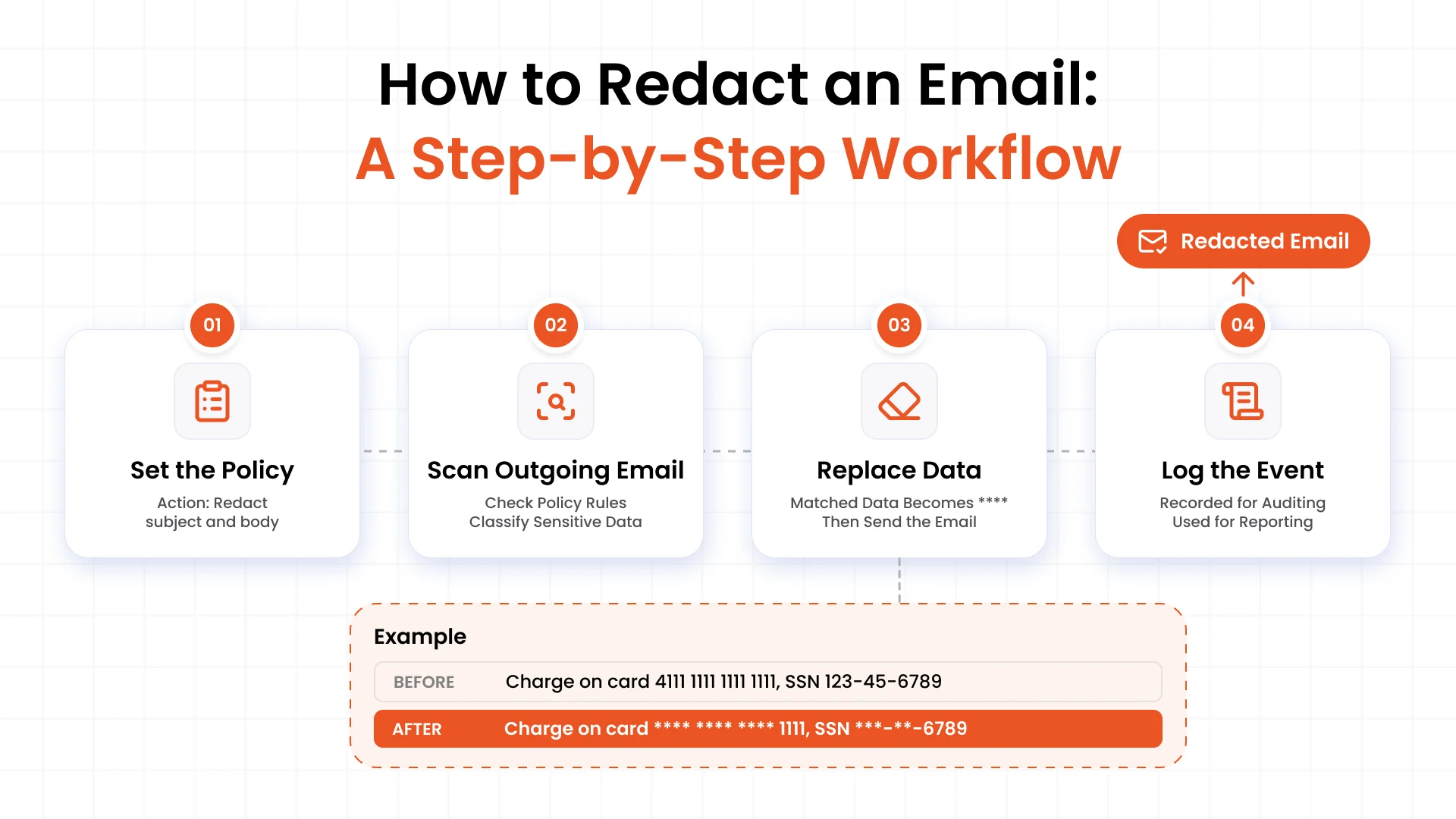
How to Redact an Email: A Step-by-Step Workflow
Here's how redaction runs in an Email DLP software, from policy setup to the delivered message.
- Set the Redact Action in a Policy: An admin creates or edits an Email DLP policy, sets the action to Redact, and chooses which classification to match and where to apply it, such as the email subject and body. Optional restrictions cover domains, attachments, and maximum message size.
- Scan the Outgoing Email: When a user sends a message, Email DLP checks it against the policy's restrictions, then runs the classification rules against the content.
- Replace the Match and Deliver: If the scan finds sensitive content, the system replaces each match in the subject and body with **** and delivers the modified email.
- Log the Event: The action can be logged for audit and reporting, like other policy actions.
Redaction vs. Encryption vs. Data Masking
The key distinction is whether the recipient received the sensitive content at all.
| Technique | What It Does | Reversible? | Best for | Watch for |
|---|---|---|---|---|
| Email redaction | Removes sensitive content and leaves a placeholder | No, once the data is deleted from the sent copy | Recipients who need the message but not the data | Detection misses become leaks |
| Encryption | Scrambles the message so only key holders can read it | Yes, with the key | Recipients who need the full content | Authorized readers can forward it in the clear |
| Data masking | Swaps values for partial or substitute ones, such as XXX-XX-6789 | Depends on the method | Support screens, test data, partial display | Masked values can still identify someone when combined with other fields |
How Does DLP Complement Email Redaction?
DLP is the policy layer, and mail redaction is one of the many things it can enforce. A data protection solution built around DLP matches each risk to the response that fits, which is what combined protection means in practice:
- Block when the recipient or domain isn't approved.
- Redact when the recipient needs the message but not the data.
- Encrypt, using your mail platform's encryption, when the recipient needs the data itself.
- Quarantine when a match is ambiguous, and a person should decide.
Card numbers show why you want the full set. PCI DSS expects strong cryptography on any card number sent by email, and a policy that redacts the number before delivery leaves nothing to protect in transit. Redaction is one control inside a compliance program. Assessors and regulators look at the whole program, including policies, access controls, logging, and training.
miniOrange Email DLP documents these four actions in its Google Workshop setup guide. Its Log action allows the message to be sent while recording the incident, so logging alone should not be described as preventing disclosure.
Encryption may be appropriate when the recipient legitimately needs the full information, but verify how your mail platform or security tools provide it. Do not imply that every DLP product includes every encryption or redaction capability.
Best Practices and Common Mistakes
| Do | Avoid |
|---|---|
| Remove the data from the file | Black boxes, black highlights, and cross-outs |
| Scan quoted history and forwards | Checking only the newest reply |
| Redact each item identically in every copy, version, and attachment | Redacting a name in one file and leaving it in another version |
| Strip metadata and test the output | Assuming a PDF export cleans the file |
| Set policy by data type and recipient | Relying on staff to spot everything by eye |
| Pilot in log-only mode, then tune | Switching on auto-redact company-wide on day one |
| Keep an access-controlled original and an audit log | Overwriting the only copy |
For automated deployments, use a controlled test set and a limited rollout. If you use a log-only policy to understand matches, remember that the messages still go out; use synthetic or otherwise authorized test data rather than deliberately sending confidential information to unauthorized recipients. For example, miniOrange’s documentation explicitly states that its Log action sends the message and records the incident.
What to Look For in Email Redaction Software
The right email redaction tool should do more than find sensitive information. It should remove it reliably, handle the full message and attachments, fit your mail environment, and give your security teams the controls and evidence they need to operate confidently.
When evaluating a solution, use the following criteria:
- True removal: In a demo, paste the output into a text editor and confirm the data is gone.
- Detection depth: Patterns, keywords, fingerprinting, and EDM, plus OCR for text inside images.
- Thread and attachment coverage: Test quoted history and every file type you send. Ask whether attachment content is redacted or only inspected and blocked.
- Your mail platform: Gmail, Outlook, and Microsoft 365, or custom SMTP, without agents on every device.
- A full action set: Redact, block, quarantine, and log, chosen by risk level.
- A review queue: Uncertain matches go to a person.
- Audit logs: Every match, action, and override recorded in a format auditors can read.
- Log-only pilot mode: Tune policies before enforcing them.
- Deployment fit: Cloud, hybrid, or on-premises, matching your data-residency needs.
Organizations need a DLP vendor that provides several of these. For example,
- It should scan outbound email and attachments before delivery
- Apply a Redact action alongside Block, Log, and Quarantine
- Hold flagged messages in an admin review queue
- Log every policy match, and connect to Gmail, Outlook, Zoho Mail, Mithi, Rediff, and custom SMTP with cloud, hybrid, or on-premises deployment.
Bring your own sample messages to a demo and check the output yourself.
Conclusion
Email redaction works when three things hold: the data is removed from the file, the check covers quoted history and attachments, and a policy decides when it runs. Pair it with encryption and access controls, treat it as one control inside your compliance program, and test every release before you trust it.
Frequently Asked Questions
What does redacting an email mean?
Redacting an email means removing or masking its sensitive parts, such as account numbers, personal identifiers, or confidential terms, while the rest of the message stays readable and deliverable.
Can you redact an email after sending it?
No. Because you can't edit a copy that's already in someone's inbox. Gmail's Undo Send holds a message for 5 to 30 seconds. Outlook recall generally requires the sender and recipient to share a Microsoft 365 or Exchange organization, and Microsoft says messages to or from Gmail addresses can't be recalled. If sensitive data has already gone out, redact the copies you control, such as archives and shared files, and start your incident response process.
Is email redaction the same as deleting an email?
Deleting removes the whole message, including the context a recipient needs. Redaction removes only the sensitive fields and leaves the rest readable.
Can email redaction be reversed?
When the data is removed from the file, nothing remains to recover. Visual overlays are different: text under black boxes can resurface. If you need the original later, keep an unredacted copy under access control and within your retention and legal-hold rules.
Can you redact email attachments?
Yes, and each file type needs its own treatment: PDFs can hide text layers, spreadsheets carry hidden sheets and comments, and scanned images need OCR. When you evaluate email redaction software to redact email attachments, ask whether it removes attachment content or only inspects and blocks it.
Can email redaction be automated?
Yes. Automated email redaction applies a policy to every outbound message: detect, redact, log, and hold uncertain matches for a reviewer. Pilot in log-only mode first to tune false positives.
How do you redact an email in Outlook or Gmail?
Neither includes a built-in redaction function, so the work happens before you send. Delete the sensitive text, check the quoted history and attachments, and replace each item with a placeholder. For a copy you plan to share, paste it into a clean document, replace the text, export to PDF, and test the output.
Leave a Comment