

Quick answer A Magento MCP Server is a component you install on your Magento 2 store that lets AI assistants such as Claude, ChatGPT, Cursor, and Gemini read and act on your live store data through one standard interface. Instead of building a custom integration for every AI tool, you set up a single server that any Model Context Protocol client can connect to.
Say a store manager wants to know which orders from last week are still unshipped, and whether any of them contain a product that is now out of stock. Answering that normally means clicking through several admin grids or asking a developer to run a query. A Magento MCP Server closes that gap: it lets an AI assistant answer the question in one go, using your real store data, without anyone building a custom integration first.
This guide covers what a Magento MCP Server is, how it works, where it genuinely helps, how it compares with the Magento APIs you already use, and what to check before connecting one to a live store. It is written for merchants and store managers first, with technical detail where it helps. If you want a working example while you read, miniOrange's Magento MCP Server covers everything described here.
What is a Magento MCP Server?
A Magento MCP Server is a component you install on your Magento 2 store that lets AI assistants read and work with your store data through a single, standard interface. Instead of building a separate integration for every AI tool, you set up one MCP server, and any AI client that supports the Model Context Protocol can connect to it. In plain terms, it works as a translator between your store and the AI tools your team already uses.
What is the Model Context Protocol (MCP)?
The Model Context Protocol (MCP) is an open standard for connecting AI applications to external systems. Anthropic introduced it in late 2024, and it has since been donated to the Agentic AI Foundation, a Linux Foundation fund co-founded by Anthropic, Block, and OpenAI, so no single vendor controls it. The MCP project's own documentation describes MCP as a USB-C port for AI applications: one standard connector that many different tools can plug into. Before MCP, connecting an AI assistant to a system meant writing a custom integration for that specific assistant. With MCP, the system describes its capabilities once, and every compatible client can use them.
The standard is maturing quickly. The revision released on 28 July 2026 rebuilt the protocol around a stateless core, added header-based routing, and tightened authorization — the largest change since authorization was first added. The practical takeaway for merchants: check which revision an extension supports rather than assuming.
What does an MCP server actually do?
An MCP server exposes three things to a connected AI client:
- Tools — actions the AI can perform, such as fetching orders.
- Resources — data the AI can read.
- Prompts — pre-written instructions for common tasks.
A Magento 2 MCP Server typically provides tools that map to the data your store actually holds: products, inventory, orders, customers, invoices, shipments, promotions, and reviews. When you ask a question, the AI chooses the relevant tool, calls it, receives structured data back, and turns it into an answer. One important detail: your data stays in your Magento database. The AI queries it when needed and does not keep its own copy.
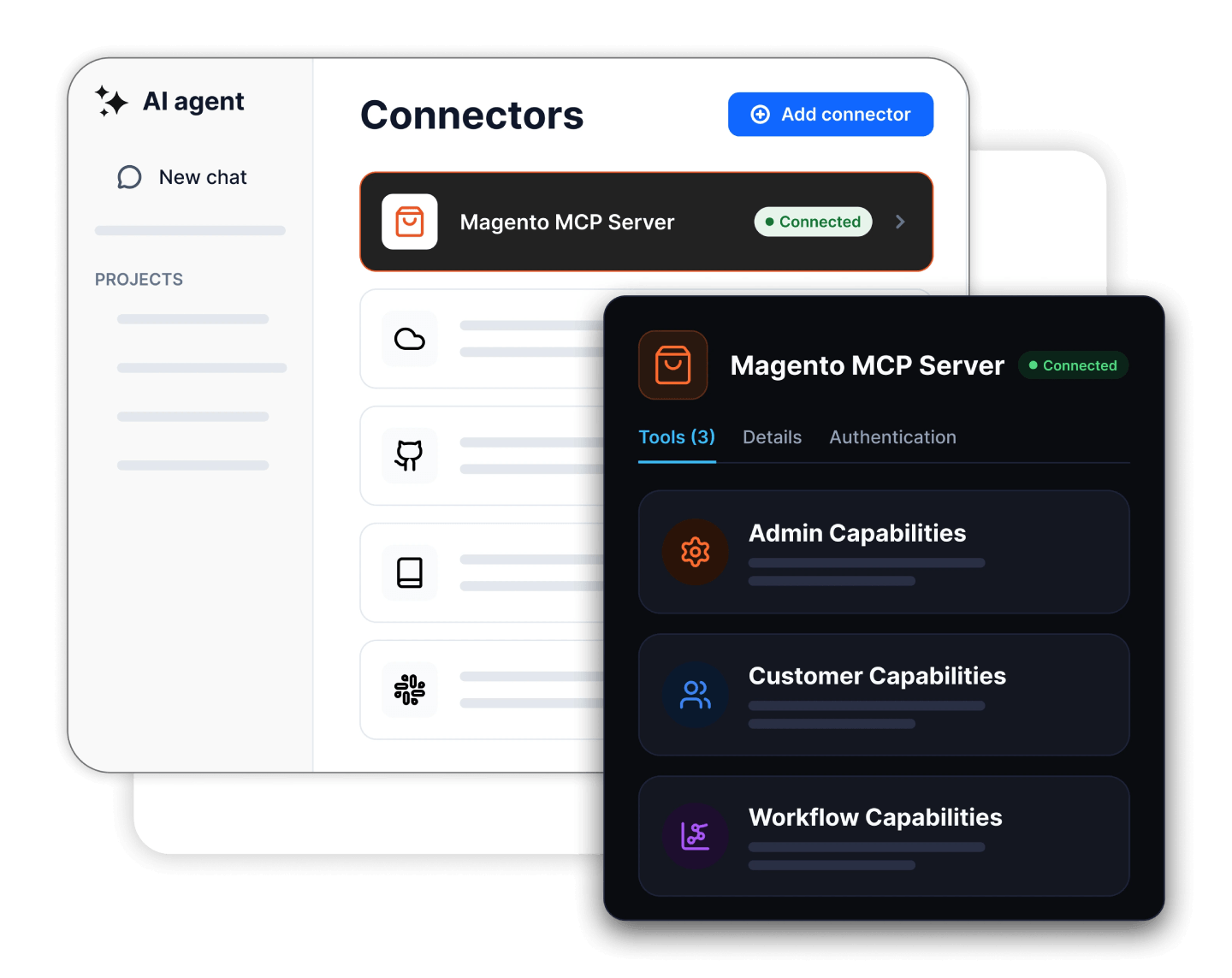
Why a good Magento MCP server exposes many abilities through just three tools
Here is a design detail most guides skip, and it matters more than it sounds. A naive MCP server registers one tool per action, so a store with dozens of operations ends up advertising dozens of tools. Every one of those tool definitions is sent to the AI model on connection and sits in its context window, which bloats the prompt, slows responses, and makes the model more likely to pick the wrong tool.
The miniOrange Magento MCP Server takes the opposite approach. It ships 74 purpose-built abilities across three namespaces but surfaces them through only three discovery tools: discover_abilities (list what the store can do, optionally filtered by keyword or category), get_ability_info (read one ability's full input schema) and execute_ability (run it). The AI first asks what exists, reads the detail for the one it needs, then executes. The full catalogue never sits in context at once.
What those abilities actually cover
| Namespace | Areas covered | Representative abilities |
|---|---|---|
| Admin (44) | Sales, Catalog, Inventory, Customers, Marketing, Content, Reviews, Analytics, System | Search/get/hold/cancel orders and add comments; invoices, shipments, tracking, credit memos, quotes, returns; products, attributes and bulk catalog updates; stock qty and status, bulk inventory updates; customers, groups and order history; cart price rules and coupon generation; CMS pages; review moderation; sales aggregates and order totals by period; store views, groups and websites |
| Storefront (17) | Browse and transact as a guest shopper — for QA, conversion auditing and CX analysis | Category tree, catalog search and product detail (incl. media gallery); URL rewrite and route resolution; guest cart creation, line items, coupons and totals; set shipping and payment method; end-to-end guest checkout simulation; storefront config and CMS policy pages |
| Workflow (13) | Multi-step operational summaries composed from the abilities above | Store overview, daily store summary, sales summary and comparison; bestsellers, catalog analysis, products needing updates; low-stock, out-of-stock and restock candidates; orders needing attention, investigate order, customer order summary |
The result is a lighter connection, faster and more reliable tool selection, and room to grow the ability set without degrading accuracy. When you evaluate any Magento MCP server, ask how it presents its tools, not just how many it has.
Why would a Magento store need an MCP server?
Most teams don't need one. The stores that benefit usually have one of these four problems.
Answering business questions takes too long
Getting a figure that spans orders, inventory and customer groups usually means clicking through several admin grids or asking a developer to run a query. An MCP server turns that into a single sentence: "show me pending orders from the last 7 days" or "list invoices issued this month."
Support is slow because information is scattered
An agent handling a "where is my order?" ticket checks the order, the shipment, sometimes the invoice, and sometimes the customer record. With an MCP server connected to their assistant, all of that becomes one question.
Integration requests outnumber developer time
Every new AI tool your team wanted to use has traditionally meant another custom integration. MCP replaces that with one endpoint that many clients can share, which is the main reason the approach is spreading.
Your developers already work in AI-assisted editors
If your team uses Cursor, Claude Code or GitHub Copilot, they are one connection away from checking store state — "find products named shirt with stock below 10", "which CMS blocks reference the summer sale" — without leaving the editor or accessing production over SSH.
If none of these sound familiar, an MCP server is a solution looking for a problem. It is a real efficiency gain for teams that answer a lot of ad-hoc questions, but it isn't a growth lever on its own.
How do AI agents interact with Magento through MCP?
The process is simpler than it sounds. Here is how Magento AI agents work with your store, from setup to answer.
- Install and enable the MCP server on your store. For a Magento extension, this is a standard install from the Adobe Commerce Marketplace or through Composer, followed by enabling it in the admin.
- Create credentials and decide what the AI can see. This is the step that matters most, and the one people most often skip. Create a dedicated Magento Integration (not your super-admin login), scope its API resources — Catalog, Sales, Inventory and so on — and generate its token, or configure OAuth mapped to an admin user. Admin abilities inherit that token's or user's Magento ACL, so a token scoped to read orders can't touch customer records.
- Connect your AI client to the MCP endpoint. Copy the endpoint URL into ChatGPT, Claude Desktop, Cursor or another MCP-compatible client and add the authorization header. Most clients have a settings panel for this; some use a JSON config file (snippets below).
- The client asks the server what it can do. On connection, the AI client calls
discover_abilitiesand learns, for example, that it can search orders with filters or look up stock by SKU. - Ask a question in plain language. For example: "Which orders from last week are still unshipped?"
- The AI selects an ability and calls it. It reads the ability's schema with
get_ability_info, translates your question into a structuredexecute_abilitycall with the right filters — order status and date range — and sends it to the MCP server. - Magento authorizes and runs the request. The server validates the token, checks the requested action against the ACL resources attached to it and, if permitted, runs the query against your live store data. Anything that writes also requires
confirm=true. - You get your answer. Structured data comes back, and the AI writes it up in readable form. If you ask for a follow-up, it can chain another call.
The whole round trip takes a few seconds. What makes it feel different from a dashboard is the ability-selection step: you never specified how to get the data, only what you wanted to know.
Watch the setup in action
If you'd rather see the flow than read about it, this walkthrough connects an AI assistant to a Magento store over MCP: Magento MCP Server setup video.
Connecting your AI client: quick reference and config snippets
Every MCP-compatible client needs two things from the server: the MCP endpoint URL (copy it from the extension's admin page) and an authorization method. The table gives you the map; the snippets that follow are the actual shape of the config. Confirm menu paths against your client's current version and the installation guide.
| AI client | Auth method | Where you add it | Best for |
|---|---|---|---|
| ChatGPT | OAuth 2.0 — Magento is the authorization server (DCR, admin consent, token issue) | Settings → Connectors | Merchants & support |
| Claude Desktop | Integration token or OAuth | Connectors panel / JSON config | Ops & analysis |
| Claude Code | Integration token or OAuth | claude mcp add (CLI) |
Developers in-editor |
| Cursor | Integration token or OAuth | MCP settings / JSON config | Developers |
| Gemini | MCP endpoint + auth header | MCP client settings | General queries |
| GitHub Copilot | MCP endpoint + auth header | IDE MCP settings | Developers in VS Code |
Claude Desktop / Cursor (remote HTTP server, token auth) — illustrative:
{
  "mcpServers": {
    "magento": {
      "url": "https://<your-store>/<mcp-endpoint-from-admin>",
      "headers": {
        "Authorization": "Bearer <integration-token>"
      }
    }
  }
}
Claude Code (CLI) — illustrative:
claude mcp add --transport http magento \
  https://<your-store>/<mcp-endpoint-from-admin> \
  --header "Authorization: Bearer <integration-token>"
In v3.0.0, ChatGPT connects through OAuth instead: it registers via Dynamic Client Registration, Magento shows an admin consent screen, then issues the token — so your Magento admin credentials never leave the store.
Magento MCP Server vs. Magento REST and GraphQL APIs
This is usually the first thing technical readers ask. The honest answer is that an MCP server does not replace your APIs. It sits alongside them and serves a different kind of consumer.
| Magento REST / GraphQL APIs | Magento MCP Server | |
|---|---|---|
| Built for | Software written by developers | AI agents and assistants |
| Who decides what to call | The developer, at build time | The model, at runtime |
| How you use it | Write code against documented endpoints | Ask a question in natural language |
| Discovery | Developer reads the API docs | Client calls discover_abilities |
| Output | Raw JSON for a program to parse | Structured results the model summarizes |
| Adding a new client | New integration work each time | Connect to the same endpoint |
| Best at | Reliable, repeatable, high-volume operations | Ad-hoc questions and exploratory work |
Two differences are worth a closer look.
Tools are described, not just exposed. A REST endpoint returns data. An MCP ability also carries a description of what it does and which parameters it accepts, written so a model can understand when to use it. That description is what lets the AI pick the right ability without being told.
The model decides at runtime. With a REST integration, a developer decided in advance exactly which calls happen and in what order. With MCP, the model makes that decision while it is answering you. That is where the flexibility comes from — and, as the security section explains, the source of risks that don't apply to a conventional API.
Under the hood, many Magento MCP servers call the same REST endpoints or query the same models your existing integrations already use. With an ACL-scoped Magento 2 MCP extension, the permission model you already understand still applies: the AI can't do anything a token with those permissions couldn't do.
Magento MCP options compared
"Magento MCP server" covers several different things. Here is how the main options line up so you can pick the right one for your team.
| Option | What it is | Best for | Trade-offs |
|---|---|---|---|
| Open-source MCP repos | Community projects on GitHub / Packagist | Prototypes, tinkering | You maintain and secure it; scoping and quality vary; no support |
| In-Magento extension (e.g. miniOrange) | Installed component with ACL scoping, OAuth, confirm=true on writes; free version, GPL-3.0 |
Merchant, ops & dev teams wanting managed, revocable access | Runs on your infrastructure; storefront abilities aren't role-scoped |
| Adobe Commerce Storefront MCP | Adobe's own server for agentic shopping (catalog, cart, checkout) | Devs building shopper-facing assistants | Storefront-focused; aimed at current Adobe Commerce platforms |
| iPaaS MCP (e.g. Zapier) | Hosted automation bridge to many apps | Quick cross-app automations | Store data routed through a third party; less Magento-native depth |
What can you use a Magento MCP Server for?
Store operations and inventory checks
Ask which SKUs are below their reorder threshold, which orders have been sitting in processing longer than usual, or how stock is distributed across sources in a multi-source setup. It is useful for the morning check that currently takes fifteen minutes of clicking.
Customer support
Pull up a customer's order, shipment, and invoice history with one question while you're still on the ticket. Support teams often see the clearest time savings here, because the alternative means three separate admin screens per query.
Merchandising and catalog analysis
Compare sales velocity against stock levels to find products that need reordering. Spot products missing images or descriptions. Check which cart price rules are currently active and which have quietly expired.
Developer troubleshooting
Investigate why a specific order failed without opening a database console. Check configuration values across store views. Compare environment versions. For agencies managing several stores, this use case often justifies the setup on its own.
A realistic note on limits. An AI assistant querying live data can be confidently wrong, particularly with aggregations and date boundaries around time zones. Treat the output as a fast first pass, and verify anything you're about to act on financially.
Is Magento MCP Server secure?
It can be, but it isn't secure by default, and that deserves a straight answer rather than reassurance. MCP introduces a category of risk that conventional API security wasn't designed to handle. Adobe's own MCP documentation carries a notice that MCP is an emerging open-source standard that can introduce security and reliability risks, that connecting MCP clients is a customer-elected configuration, and that customers are responsible for evaluating the security and suitability of any integration. That is a reasonable position, and it applies equally to third-party extensions.
Risks that are specific to MCP
Prompt injection and tool poisoning. Because the model reads data at runtime and then decides what to do next, instructions hidden inside that data can influence its behavior. In documented cases, a malicious tool description on one connected server has hijacked behavior involving other servers. If your store data includes user-submitted content — product reviews, order comments, customer names — that content is reaching a model that also has tools available to it.
Over-broad permissions. The most common real-world failure isn't an exploit. It's a token scoped to full admin access because that was the fastest way to get the demo working.
Credential handling. Long-lived tokens sitting in a config file on a laptop are a familiar problem in a new setting. If a token leaks through a prompt, a log file, or a compromised machine, the store can stay exposed for months. One way to reduce that risk is to avoid handing long-lived tokens to AI clients at all: Magento AI Agents MCP Authentication issues short-lived, signed JWT access tokens to AI agents on demand. The long-lived integration token stays inside Magento, each JWT is mapped to a configured Magento Integration and inherits its permissions, and the token expires automatically even if it's intercepted.
Unintended actions. If the server can write as well as read, an ambiguous instruction can lead to an unwanted change. In the miniOrange extension, write actions additionally require write permissions, and security researchers consistently recommend human confirmation for sensitive or irreversible operations.
This area is well documented. The OWASP Cheat Sheet Series covers MCP security, and the Cloud Security Alliance has published best-practice guidance. Both are worth reading before a production rollout.
What a well-built Magento MCP server should give you
When evaluating an MCP Server for Magento 2, look for these specifically:
- Standards-based authorization. OAuth 2.0 or 2.1 flows with PKCE, or scoped integration tokens, ideally short-lived. Your Magento admin credentials should never be shared with the AI client.
- Granular permission control tied to Magento ACL. You should be able to define exactly which tools a given client can reach, using the permission system you already manage.
- Separate clients with separate permissions. Your support team's assistant and your developer's editor shouldn't share a token.
- Real-time request validation. Each request checks for a valid signature, expiry, and permission scope before it runs, across both REST and GraphQL, with invalid tokens rejected clearly.
- Read-only by default. In the miniOrange extension this isn't a separate switch — you achieve it by scoping the integration's ACL to read permissions, and write actions additionally require write permissions.
- Data that stays in your database. No duplication into a third-party store.
- Simple revocation. Removing access should be one action in the Magento admin, not a support ticket, and it shouldn't require redeploying every client that uses it.
This is ordinary access management applied to a new kind of client, which is why it deserves the same attention as the rest of your Magento security Suite and Magento OAuth Server configuration.
A 10-point Magento MCP security checklist
- Create a dedicated Magento Integration for each AI client; never reuse a super-admin login.
- Scope API resources to the minimum (start read-only: Sales/Catalog/Inventory read).
- Prefer OAuth with admin consent over pasting long-lived tokens into laptops.
- Where tokens are unavoidable, use a short-lived JWT layer so the integration token never leaves Magento.
- Keep
confirm=trueon for every write ability; review before approving. - Test on the sandbox or staging first, with one person, for two weeks.
- Treat user-submitted content (reviews, order comments) as untrusted input to the model.
- Review connected clients on the same schedule as admin users; revoke the ones nobody uses.
- Keep agent logs in Magento and read them weekly for unexpected abilities being called.
- Verify aggregates and date-boundary answers before acting on them financially.
A sensible rollout plan
Start on a staging store or sandbox. Grant read-only access to one data area. Give it to one person for two weeks. Expand the scope only once you know what people actually ask, and review connected clients on the same schedule you review admin users. You can try it on a free Magento sandbox with no setup, then move to your own staging store.
Do you still need an extension now that Adobe has a Commerce MCP Server?
At Adobe Summit in April 2026, Adobe announced its own Commerce MCP Server, which changed the question for many merchants. It is a fair thing to ask, and the answer is that the two are built for different jobs.
What Adobe's Commerce MCP Server is for
Adobe's Commerce MCP is aimed at developers building custom agentic shopping experiences along the discovery-to-checkout path: catalog, cart, pricing, inventory, promotions, checkout, order management, and post-purchase. The focus is the storefront — an AI assistant that turns shopper conversations into orders. Adobe also offers developer-assistance MCP servers for its documentation and App Builder workflows, which are about writing code rather than running a store.
What a merchant-installed Magento MCP extension is for
A merchant-installed extension generally covers the other side of the business: operational and admin data for the people running the store — orders, stock, customers, invoices, support context. For most of these tasks, nobody is checking out; someone is trying to figure out why an order is stuck. That said, the line isn't absolute: the miniOrange extension also ships storefront abilities, including guest cart and checkout simulation you can use to reproduce and QA a storefront issue from an AI client.
There's also a practical availability question. Adobe's agentic commerce tooling is aimed at Adobe Commerce customers on current platforms. If you run Magento Open Source, an extension may simply be the available route.
Which one should you choose?
If you're building an AI shopping assistant for customers, look at Adobe's Commerce MCP. If you want your own team to query the store in plain language, an extension is the more direct fit. Many stores will eventually run both, and because both use the same protocol, that's a supported setup rather than a conflict.
How to get started with a Magento MCP Server
- Decide who it's for. Support, operations, developers, or merchandising — the answer determines which permissions you need.
- Try it somewhere safe first. Explore the miniOrange Magento MCP Server on a free Magento sandbox with no setup, or connect a trial to your own staging store.
- Check compatibility. The miniOrange extension supports Magento Open Source and Adobe Commerce through version 2.4.9, on-premises and PaaS, as well as Adobe Commerce as a Cloud Service.
- Scope permissions before connecting anything. Read-only, one area, one person.
- Connect your client. Copy the endpoint and token into ChatGPT, Claude Desktop, Cursor, or another MCP-compatible tool.
- Ask a real question, not a demo one. Within a day, the value will either be obvious or not there yet for your team.
Connect your Magento store to AI, safely
See the miniOrange Magento MCP Server on a ready-made sandbox, or connect a free trial to your own staging store. ACL-scoped access, OAuth, and read-only by default.
→ Explore the Magento MCP Server → Try the free sandbox
Key takeaways
- A Magento MCP Server lets any MCP client (Claude, ChatGPT, Cursor, Gemini, Copilot) query live store data through one standard interface.
- Good servers expose many abilities through few discovery tools; that keeps the model accurate as the catalogue grows.
- MCP complements REST/GraphQL for ad-hoc questions; it doesn't replace them for high-volume, repeatable work.
- Security is configuration: dedicated integration, least-privilege ACL, OAuth or short-lived JWTs,
confirm=trueon writes, staging first. - Adobe's Storefront MCP is for shopper-facing agents; a merchant extension is for the team running the store. Many stores will run both.
Frequently asked questions
Is a Magento MCP Server safe to use on a live store?
It can be, with the right configuration. Use OAuth or scoped integration tokens instead of admin credentials, restrict permissions with Magento ACL, start read-only, and test on staging first. MCP also introduces risks that conventional APIs don't, including prompt injection through data the model reads, so treat it as a security decision rather than a simple plugin install.
Which AI tools can connect to a Magento MCP Server?
Any MCP-compatible client. In practice that includes ChatGPT, Claude Desktop, Claude Code, Cursor, and Gemini, along with a growing list of other assistants and development tools that support the protocol.
Does a Magento MCP Server work with Adobe Commerce?
Yes. MCP extensions generally support both Magento Open Source and Adobe Commerce. The miniOrange extension supports both through version 2.4.9, including on-premises, PaaS, and Adobe Commerce as a Cloud Service deployments.
Can AI agents change data in my Magento store?
Only if you allow it. Access is scoped through Magento ACL, so write access exists only if you grant it, and in the miniOrange extension write actions additionally require write permissions. Starting read-only is the recommended approach.
How is a Magento MCP Server different from the Magento REST API?
The REST API is built for software written by developers, who decide in advance exactly which calls happen. An MCP server is built for AI agents, which decide which tool to call at runtime based on the question asked. MCP servers usually sit on top of the same data and permissions rather than replacing the API.
How do I avoid giving AI agents long-lived Magento tokens?
Use an authentication layer that issues short-lived tokens. Magento AI Agents MCP Authentication, for example, gives each AI agent a signed JWT that expires automatically and inherits the permissions of a specific Magento Integration, so your long-lived integration tokens never leave your store.
Do I need custom development to use MCP with Magento?
No. An extension provides ready-made tools, so you install it, configure permissions, and connect your AI client. The point of a standard protocol is that you don't need to write a new integration for each tool.
What data can an AI assistant see through a Magento MCP Server?
Whatever you permit. That can include products, inventory, orders, customers, invoices, shipments, promotions, reviews, and store analytics, but the ACL permissions attached to the token determine the actual scope.
How do I revoke an AI assistant's access to my Magento store?
Remove the MCP configuration from the AI client and revoke the integration credentials in the Magento admin. Once the integration is revoked, its token can no longer authorize any requests.
Does Adobe have its own MCP server for Commerce?
Yes. Adobe announced a Commerce MCP Server at Summit 2026, aimed at developers building agentic shopping experiences from discovery through checkout. It addresses a different need from merchant-facing extensions that give internal teams access to operational and admin data.

Leave a Comment