
Windows Authentication is a built-in mechanism used in Windows-based environments to verify user and computer identities, typically through the Kerberos or NTLM protocols, validating credentials against a directory service like Active Directory so a single sign-in grants access across connected systems, applications, and servers without repeated logins.
Windows authentication connects everything through a shared identity system. So when a user signs in once, that identity carries across the environment, whether they're opening an internal app, accessing a database, or connecting to a server.
The result is simple but powerful: fewer login prompts, more consistent access control, and a setup that scales as the organization grows. Windows Authentication quietly sits at the center of it all, keeping access both seamless and secure.
Why Windows Authentication Still Matters in Modern Access Control
Despite the rise of cloud-first identity solutions, Windows Authentication remains a critical component of enterprise access control. It provides seamless, secure access within domain environments while integrating tightly with existing identity infrastructure.
1. Seamless Access Across Enterprise Systems
Windows Authentication enables users to sign in once and access multiple systems without having to re-enter credentials. This integrated experience reduces friction in daily workflows and allows employees to move between applications, servers, and resources without interruption. In large organizations, this directly improves productivity while maintaining secure access.
2. Centralized Identity and Access Management
By relying on a directory service like Microsoft Active Directory, Windows Authentication centralizes identity verification and access control. IT teams can manage user accounts, permissions, and policies from a single location, ensuring consistency across systems. This reduces administrative complexity and minimizes the risk of misconfigured access.
3. Deep Integration with Microsoft Infrastructure
Windows Authentication is natively built into the Microsoft ecosystem, making it the default choice for environments using Windows Server, IIS, and SQL Server. This tight integration allows authentication to flow seamlessly from the operating system to applications without requiring additional configuration layers.
4. Strong Foundation for Hybrid Environments
Even as organizations adopt cloud technologies, many still operate hybrid infrastructures. Windows Authentication continues to serve as the foundation for identity in these setups, bridging on-premises systems with cloud-based services. It ensures that domain-based trust extends beyond internal networks, supporting modern access requirements.
5. Efficient in Controlled Network Environments
Within trusted enterprise networks, Windows Authentication provides a fast and efficient way to validate users without excessive overhead. Because systems trust the domain, authentication can happen quickly and securely, making it ideal for internal applications and resources.
What Windows Authentication Actually Does?
1. Validates User Identity
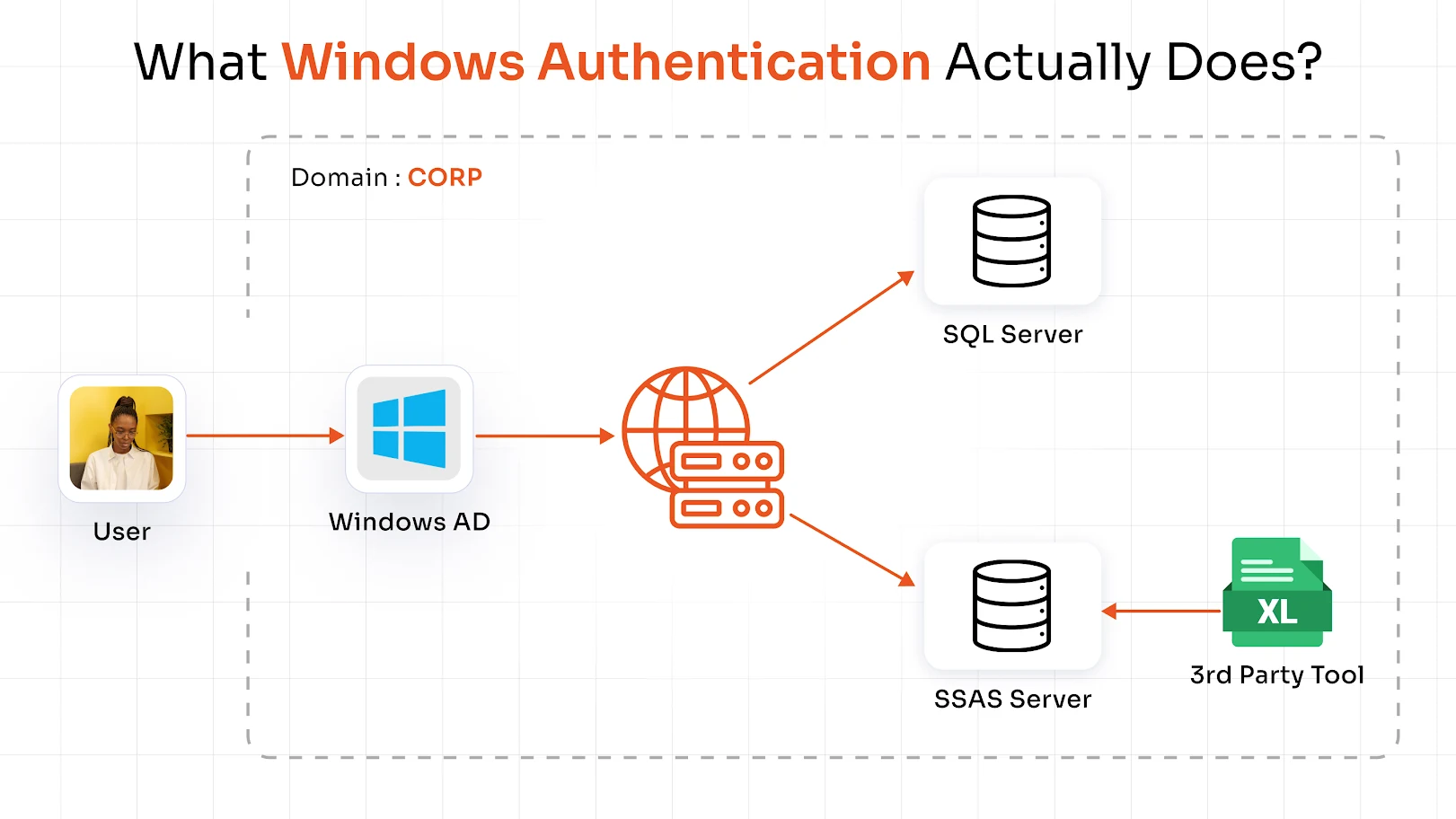
The authentication process begins when a user logs into a domain-joined device using their Windows credentials. These credentials are securely verified by a domain controller against the directory. Once validated, the user is recognized as a trusted identity within the network, forming the basis for all future access decisions.
2. Establishes Trust with Authentication
After the initial login, Windows Authentication uses secure methods like Kerberos tickets or NTLM challenge-response to confirm the user’s identity across systems. Instead of repeatedly asking for credentials, it relies on these mechanisms to maintain trust, ensuring both security and a smooth user experience.
3. Enables Access Once
Once authenticated, users can access enterprise resources without logging in again. This includes applications, databases, file systems, and network services. The authentication proof is passed securely between systems, allowing seamless access across the environment.
4. Connects Applications and Resources
Windows Authentication ensures that all domain-connected systems recognize and trust the same user identity. Whether accessing an internal web application, a database, or a file share, the authentication process remains consistent. This interconnected trust model is what enables unified access control across the enterprise.
5. Supports Authorization
Authentication is only the first step; authorization determines what users can actually do. Windows Authentication works alongside group memberships and policies defined in Microsoft Active Directory to enforce access control. This ensures users only access resources they are permitted to use.
Types of Windows Authentication
When people talk about types of Windows Authentication, they’re usually referring to the underlying protocols that handle how identity is verified. Each one serves a slightly different purpose depending on the environment.
1. Kerberos for Domain-Based Authentication
Kerberos is the default and most secure protocol used in modern Windows authentication setups. It works using a ticket-based system, which means users don’t have to send their credentials every time they access a resource.
Here’s the idea:
- When a user logs in, they receive a secure ticket
- That ticket is used to request access to applications and services
- The system trusts the ticket instead of asking for credentials again
This makes Kerberos:
- Faster
- More secure (no repeated credential transmission)
- Ideal for domain-joined environments
In most enterprise setups using Windows Server authentication, Kerberos is the preferred choice.
2. NTLM for Legacy and Fallback Scenarios
NTLM (NT LAN Manager) is an older authentication protocol that’s still used when Kerberos isn’t available. Instead of tickets, NTLM uses a challenge-response mechanism:
- The server sends a challenge
- The client responds with a hashed version of the credentials
- The server verifies the response
While it still works, NTLM has limitations:
- Less secure compared to Kerberos
- More vulnerable to certain attack techniques
- Common in legacy systems or non-domain environments
You’ll often see NTLM appear as a fallback in Windows authentication when modern configurations aren’t fully in place.
3. SPNEGO as the Negotiation Mechanism
SPNEGO (Simple and Protected GSSAPI Negotiation Mechanism) acts like a decision-maker between Kerberos and NTLM.
Instead of forcing one protocol, SPNEGO:
- Checks what both the client and server support
- Automatically selects Kerberos if available
- Falls back to NTLM if needed
This ensures that Windows authentication works smoothly without users needing to know which protocol is being used.
How Windows Authentication Works on Windows Server
While the earlier flow explains authentication from a user perspective, this section looks at how Windows Server authentication actually enforces and manages access at the infrastructure level.
1. Domain Membership and Active Directory Trust
For Windows authentication to work properly, systems need to be part of a domain managed by Microsoft Active Directory.
Here’s what happens:
- Servers join the domain
- Trust relationships are established
- The domain controller becomes the authority for identity verification
This trust is what allows users to access multiple systems without logging in repeatedly.
2. IIS, SQL Server, and Integrated Authentication
One of the biggest advantages of Windows Server authentication is how it integrates directly with applications.
For example:
- IIS can use Windows Authentication to automatically log users into web apps
- SQL Server can validate users based on their domain identity
- Applications can rely on OS-level authentication instead of managing credentials themselves
This is often called integrated authentication, and it’s a key reason why Windows-based environments feel so seamless.
3. Policy Enforcement Through Group Policy
Authentication alone isn’t enough; access needs to be controlled. That’s where policies come in. Using Group Policy in Windows Server authentication, organizations can enforce:
- Password complexity rules
- Account lockout policies
- Login restrictions
- Access permissions
These policies ensure that authentication isn’t just convenient, but also secure and compliant with enterprise standards.
4. How It All Comes Together
At the server level, Windows authentication connects identity, trust, and access control into a single system:
- Identity is verified through the domain
- Trust is maintained across systems
- Access is controlled through policies and permissions
This is what makes Windows Server authentication so effective. It’s not just about logging in, but about managing access consistently across the entire environment.
Strengths and Weaknesses of Windows Authentication
Windows Authentication is a solid foundation for enterprise access control, but like any system, it works best when you understand both its strengths and where it can fall short.
1. Strengths in Enterprise and Internal Application Environments
One of the biggest advantages of Windows authentication is how well it fits into Microsoft-based enterprise environments.
- Seamless user experience Users log in once and can access multiple systems without repeated prompts. This makes everyday workflows smoother and more efficient.
- Centralized identity management With Microsoft Active Directory at the core, IT teams can manage users, permissions, and policies from a single place.
- Strong domain-based trust model Systems within the domain trust each other, which allows authentication to flow naturally across applications, servers, and resources.
- Native integration with enterprise tools It works out of the box with Windows Server, IIS, SQL Server, and other Microsoft technologies, reducing setup complexity.
In controlled environments, this makes Windows Server authentication both efficient and reliable.
2. Security Gaps in Password-Dependent or Legacy Setups
That said, relying only on Windows authentication, especially in older or less secure setups, can introduce risks.
- Credential-based attacks If attackers gain access to user credentials, they can potentially move across systems within the domain.
- NTLM-related vulnerabilities Since NTLM is still used in some environments, it can expose systems to attacks like pass-the-hash or relay attacks.
- Limited context awareness Traditional Windows authentication focuses on verifying identity but doesn’t always consider context like device health, location, or risk level.
- Increased risk in remote access scenarios With more users accessing systems remotely (RDP, VPN), password-only authentication becomes a weak point.
So while Windows authentication is strong at verifying identity, it often needs additional layers to handle modern threats.
Why Windows Server MFA Changes the Security Equation
This is where Multi-Factor Authentication (MFA) comes in, not as an optional add-on, but as a critical upgrade to Windows Server authentication.
1. MFA for Server Logins and RDP Access
One of the most sensitive areas in any enterprise is server access, especially through Remote Desktop Protocol (RDP).
With an MFA solution in place:
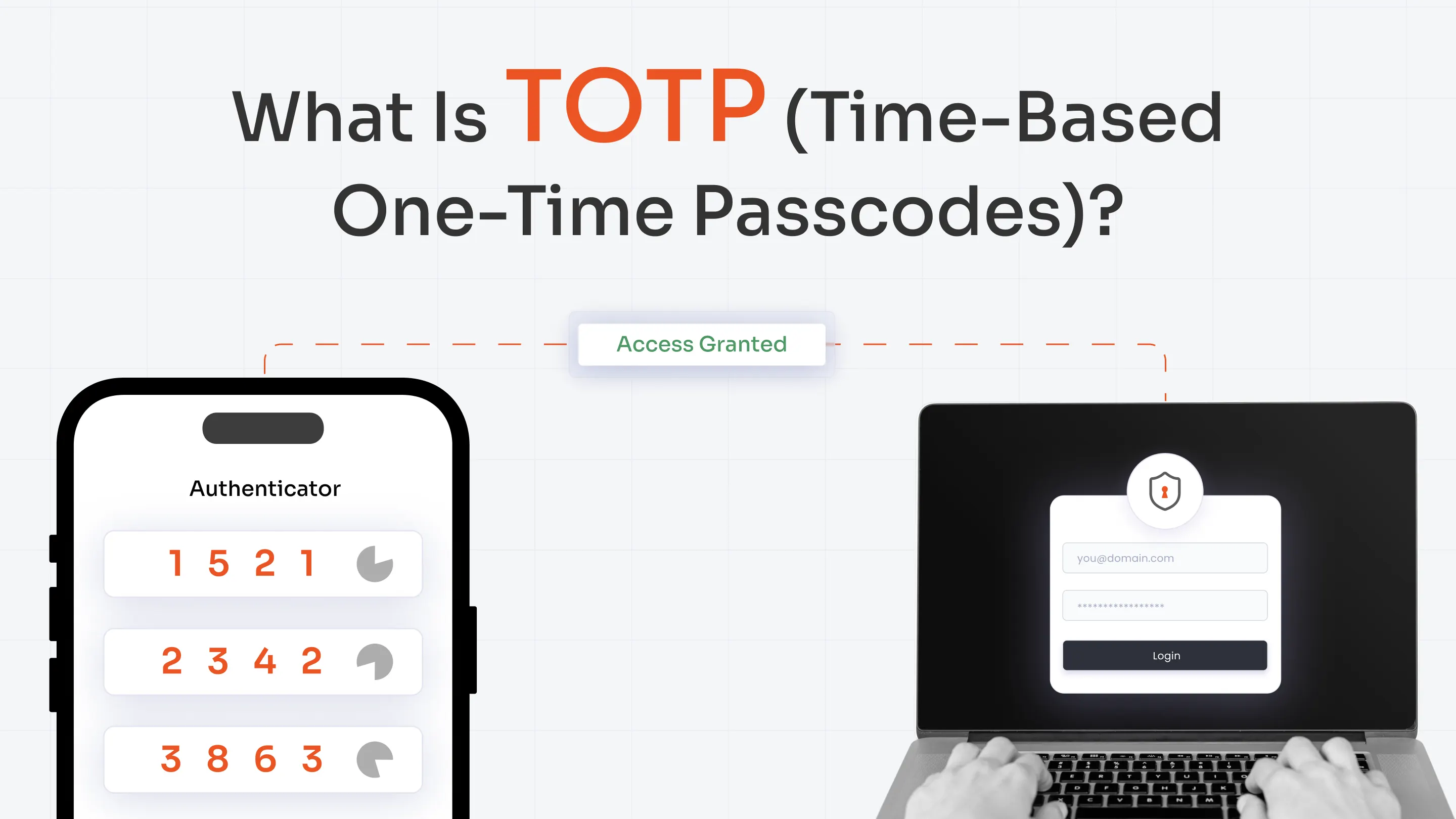
- Users must verify their identity with a second factor (One-Time Password (OTP), push notification, biometrics)
- Even if credentials are compromised, access is blocked without the second step
This significantly strengthens Windows Server authentication at its most vulnerable entry points. Deploying MFA for Windows login ensures that server access, whether through RDP, the local console, or domain sign-in, cannot be granted with a compromised password alone.
2. Preventing Credential-Based Attacks
Most modern attacks don’t break systems; they exploit stolen credentials. MFA helps prevent:
- Unauthorized logins using leaked passwords
- Lateral movement within the network
- Phishing-based account takeovers
In short, it ensures that Windows authentication is no longer dependent on just a username and password.
3. Adding Context with Adaptive Authentication
Modern MFA goes beyond just adding a second step; it adds intelligence to the process. An adaptive MFA solution can evaluate:
- Device trust (Is this a known device?)
- Location (Is this login expected?)
- Risk signals (Is this behavior unusual?)
Based on this, the system can:
- Allow access
- Require additional verification
- Block the attempt entirely
This turns Windows Server authentication into a more dynamic and context-aware security system.
4. Why MFA Is No Longer Optional
As environments become more distributed and threats more sophisticated, relying only on traditional Windows authentication is no longer enough.
Adding MFA:
- Strengthens access control
- Protects critical systems
- Aligns with modern security best practices
In many enterprise scenarios, especially for admin access and remote logins, MFA has become non-negotiable.
Choosing the Right Authentication Path for Your Environment
Choosing the right authentication path depends on how your environment is structured and where your users operate. A balanced approach that combines traditional methods like Windows Authentication with modern IAM controls helps ensure both security and usability.
1. When Kerberos Should Be the Default
In most modern enterprise environments, Kerberos should be the default choice for Windows authentication. It is built for domain-based systems and uses a secure ticketing mechanism that avoids repeatedly transmitting credentials.
This makes authentication both faster and more secure. In well-configured environments, Kerberos becomes the core of Windows server authentication, enabling seamless and trusted access across applications and services.
2. When NTLM Still Appears in Real Deployments
NTLM typically appears in environments where legacy systems or older applications are still in use. It acts as a fallback when Kerberos cannot be applied, such as in non-domain setups or incomplete configurations.
While it helps maintain compatibility, NTLM introduces known security limitations. For this reason, organizations should aim to minimize their use and gradually transition toward stronger authentication methods within their Windows authentication setup.
3. How to Strengthen Windows Authentication in Modern Environments
Instead of choosing between protocols alone, modern enterprises need to think about strengthening their overall authentication strategy. This means building on top of Windows Server authentication with additional security controls, improving visibility into access patterns, and ensuring consistent policy enforcement across systems.
As environments become more distributed, combining strong authentication protocols with layered security measures becomes essential for maintaining secure and reliable access.
Windows Authentication vs Modern Identity Solutions
As identity systems evolve, it’s natural to ask how Windows authentication compares to newer approaches.
- Windows Authentication Best for domain-based, internal environments where systems trust a centralized directory like Microsoft Active Directory.
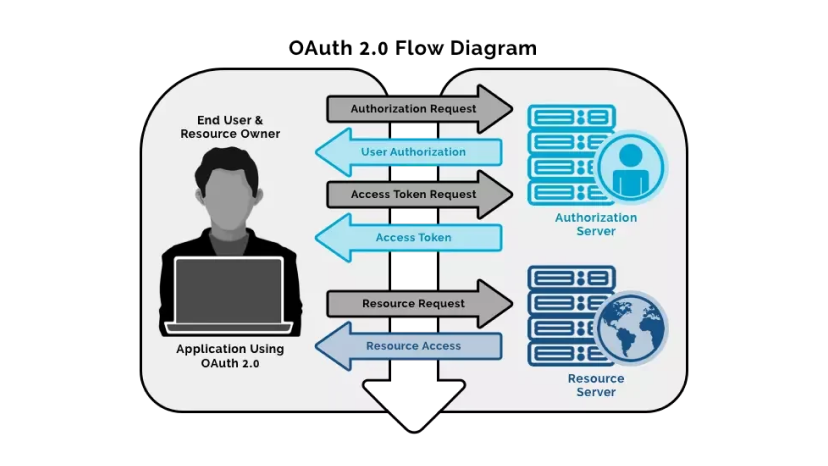
- Modern protocols (SAML, OAuth, OpenID Connect) Designed for web and cloud applications, enabling secure authentication across external and distributed systems.
- Cloud IAM platforms Offer features like adaptive authentication, identity federation, and broader visibility across environments.
The key takeaway isn’t that one replaces the other. In most enterprises, Windows authentication continues to handle internal access, while modern identity solutions extend that access securely to cloud and external applications.
Common Use Cases of Windows Authentication in Enterprises
To make this more concrete, here’s where Windows authentication is typically used in real-world environments:
- Internal web applications (IIS) Automatically logs users into web apps using their domain credentials
- Database access (SQL Server) Controls access to data based on user identity and permissions
- File shares and network resources Allows secure access to shared drives without repeated logins
- Domain-based workstation login Authenticates users when they sign into their devices
These use cases highlight why Windows Server authentication remains deeply embedded in enterprise workflows.
Final Takeaway
At its core, Windows authentication provides a strong foundation for enterprise access control by enabling seamless, domain-based identity verification across systems. It simplifies how users access applications, servers, and network resources while maintaining centralized control through Microsoft Active Directory.
However, on its own, it is not enough to address modern security challenges. When combined with MFA, policy enforcement, and context-aware controls, Windows Server authentication becomes significantly more resilient, ensuring that access remains both efficient for users and secure against evolving threats.
FAQs
What is Windows Authentication?
Windows Authentication is a domain-based method that verifies users using their Windows credentials, allowing seamless access to systems without repeated logins.
What are the main types of Windows Authentication?
The main types of Windows Authentication are Kerberos, NTLM, and SPNEGO, each used based on environment and system compatibility.
How does Windows Authentication work on a server?
In Windows Server authentication, user credentials are verified through a domain controller, and access is managed using trust relationships and policies.
Why is Windows Server MFA important?
Windows Server MFA adds an extra layer of security by requiring additional verification, helping prevent unauthorized access even if credentials are compromised.
Is Kerberos more secure than NTLM?
Yes, Kerberos is generally more secure than NTLM because it uses ticket-based authentication and avoids repeated transmission of credentials.
About the Author

Content Writer
Minal is an experienced B2B content writer. She has written over 250 articles across industries like UI/UX, real estate, automotive, digital marketing, SaaS, AI & ML, and cybersecurity. She brings her interest in cybersecurity to life by creating clear, engaging content tailored for technical, non-technical, and creative pieces. Her aim is to simplify complex topics, highlight product value, and connect with both technical and non-technical audiences.
Leave a Comment