

Employees need access to multiple applications to get their work done. And that access has to be granted, updated, and removed as people join, change roles, or move on.
Multiply that across every employee and every application, and managing it manually stops being practical. That's where Identity Governance and Administration (IGA) helps. It brings all of it onto one platform, and IGA connectors make that possible.
A connector links an application to your IGA platform. It keeps accounts and access rights in sync. So when you grant or revoke access in IGA, the app updates automatically.
You can connect an application in two ways. Out-of-the-box connectors give you ready-made integrations for common applications like Microsoft 365 or Salesforce. Custom connectors handle applications with specific requirements, like internal tools or legacy systems.
Both connect your applications to the IGA platform, but they differ in setup time, cost, and maintenance. Which one fits your business better?
Let's break it down.
What Does an IGA Connector Actually Do?
Simply put, an IGA connector is the bridge between your IGA platform and one of your business systems. That system could be an application, a database, a cloud service, or a user directory. Every system manages accounts and permissions differently, and the connector knows how that particular one works.
But connecting a system is only half the job. How well you can control access comes down to two things the IGA connector handles:
- Identity correlation: The IGA connector finds every account in its system and matches each one to a person in the IGA platform's records. This matching is what makes orphaned account management possible. An account with no owner gets flagged right away instead of staying active in the application with no one watching it.
- Entitlement granularity: This is how much detail the connector can see about what each account can do. Some IGA connectors only see a role, like admin. Others see exact permissions, like who can view payroll data or download customer records. The more detail an IGA connector brings back, the easier it is to catch access someone should not have.
Here's an example: A manager approves an employee's access to the HR application in the IGA platform. The IGA connector passes that approval to the application, creates the account with the right permissions, and matches it to the employee's identity record.
From then on, the account shows up under their name, and your team can see exactly what it is allowed to do during access reviews
When the employee changes roles or leaves, the connector updates or removes that access. One change in IGA happens in the application on its own.
Most IGA connectors support four main tasks:
- Account discovery: Finds user accounts, roles, groups, and permissions in an app.
- Access provisioning: Creates user accounts and gives users the access they need.
- Access deprovisioning: Disables accounts or removes access when users leave or change roles.
- Reconciliation: Compares app records with IGA records to find missing accounts or unexpected changes.
Note: A connector can only do what the connected system allows. If an application's API offers no way to create accounts or read permissions, no connector can add that ability. Check what the application supports before judging what the connector can't do.
Which Types of IGA Connectors Are Available?
IGA connectors can be grouped into two main types based on how they are built and configured: out-of-the-box (prebuilt) connectors and custom connectors.
What Are Out-of-the-Box IGA Connectors?
Imagine your business uses Microsoft 365, Google Workspace, Salesforce, and other popular applications. Your IGA platform might already offer ready-made connectors for these systems.
These are called out-of-the-box IGA connectors. The IGA vendor builds them to work with specific applications. Your team only needs to configure the connection and set up the required access rules.
Why Do Organizations Choose Prebuilt Connectors?
Prebuilt IGA connectors save time because your team does not need to build every integration from scratch. They also offer other benefits:
- Faster setup: Connect supported applications with less development work.
- Ready-made features: Manage user accounts, groups, and permissions through supported actions.
- Vendor support: Get connector updates and fixes from the IGA provider.
- Less maintenance: Let the vendor handle many connector updates.
However, a ready-made connector does not always support every feature in an application. Check what it covers before choosing one.
For instance, an IGA connector might read user accounts but not support account creation or access removal. Another might manage accounts but offer limited details about user roles and permissions.
Check these details before selecting a connector:
- Does it support account creation, updates, and deletion?
- Does it read user roles, groups, and permissions?
- Does it support access reviews and reconciliation?
- Does it work with your application's version and license?
Ask the vendor for a list of supported actions. Test the connector with a few accounts before connecting it to your live environment.
What Are Custom IGA Connectors?
Custom IGA connectors connect your IGA platform to applications that have no ready-made connector or need features the existing connector does not offer. Your team builds them to match how the application works and the access you need to manage.
For example, your company may use an internal HR application with no ready-made connector. Your team can build a custom connector to help your IGA platform manage user accounts and permissions in that application.
Standard Integration Methods to Consider Before Building a Custom Connector
Before building an IGA connector from scratch, check which integration standards your application supports.
Many applications support standards such as:
- SCIM (System for Cross-domain Identity Management) 2.0: Supports SCIM provisioning, allowing an IGA platform to create, update, and delete user accounts and groups through standard API requests.
- REST API (Representational State Transfer Application Programming Interface): Lets an IGA platform exchange data with an application's API and perform actions such as retrieving user details or updating permissions.
- LDAP (Lightweight Directory Access Protocol): Gives an IGA platform access to user accounts, groups, and other information stored in company directories such as Active Directory.
- JDBC (Java Database Connectivity): Connects an IGA platform to a database so it can retrieve user accounts and other records stored in database tables.
Your IGA platform might already support these standards through configurable IGA connectors. Your team can map user details and set up the required actions without building a connector from scratch.
What Goes Into Building a Custom Connector?
Building a custom connector involves more than connecting two systems. Your team needs to understand how the application stores user information and handles access changes.
Here are some key areas to consider:
- API authentication: Set up secure authentication so the IGA platform can communicate with the application.
- User attribute mapping: Match fields such as employee ID, email address, department, and job title between systems.
- Entitlement mapping: Identify how the application defines roles, groups, and permissions.
- Provisioning actions: Configure account creation, updates, and access removal based on business rules.
- Error handling: Account for failed requests, API limits, and connection issues.
- Ongoing updates: Adjust the connector when the application changes its API, authentication method, or data structure.
Before developing a custom connector, evaluate the application's existing integration options. Check whether its APIs support standard protocols such as SCIM or whether your IGA platform offers configurable connectors.
Standards-based integrations typically require less custom development and ongoing maintenance. If these options do not support your requirements, custom development offers greater control over data mapping, provisioning logic, and access management.
Custom vs. Out-of-the-Box IGA Connectors: Key Differences
Both IGA connector types connect applications to your IGA platform, but they differ in setup, flexibility, and maintenance.
| Comparison Factor | Out-of-the-Box IGA Connectors | Custom IGA Connectors |
|---|---|---|
| Setup Time | Faster setup with ready-made configurations | Requires development, testing, and configuration |
| Application Coverage | Supports applications covered by the IGA vendor | Supports applications with unique or unsupported integration requirements |
| Entitlement Mapping | Offers predefined mappings for supported roles and permissions | Allows mappings based on your application's data structure |
| Provisioning and Deprovisioning | Supports actions available in the connector | Supports actions your team builds and configures |
| Initial Cost | Often included in the IGA license or available at an additional cost | Includes development, testing, and implementation costs |
| Maintenance | The vendor provides updates for supported connectors | Your team or implementation partner manages updates |
The right choice depends on the application's integration options and the level of control your business needs.
What Does Each IGA Connector Type Cost?
The initial setup cost does not tell you how much an IGA connector will cost over time. Consider the work involved in keeping the integration reliable as your applications and access requirements change.
Costs of Out-of-the-Box Connectors
Prebuilt connectors reduce development work, but check what your IGA license includes. Some vendors charge extra for specific connectors or advanced features.
You might also face limitations such as:
- Additional licensing fees: Some vendors charge extra for specific connectors, applications, or advanced integration capabilities.
- Manual workarounds: When an IGA connector does not support an operation, your team needs to complete it outside the IGA platform. For example, IT staff might need to create accounts, update user attributes, assign permissions, or revoke access manually. These tasks add recurring labor costs and create gaps in automated provisioning.
- Limited entitlement visibility: If the connector cannot retrieve all application roles, groups, and permissions, your team might need additional processes to review and govern those access rights.
- Version compatibility and maintenance: Application updates might affect connector functionality. Check whether the IGA vendor handles compatibility updates, connector fixes, and ongoing maintenance or charges extra for these services.
- Vendor support: Clarify support hours, response times, and escalation procedures. When provisioning fails at 2 AM, who investigates the issue and restores the integration? Check whether your support agreement covers urgent incidents or requires additional fees.
Costs of Custom Connectors
Custom connectors require an initial investment in design, development, and testing. Your organization also assumes responsibility for keeping the integration functional as the application and its APIs evolve.
Include these recurring expenses in your maintenance budget:
- Development and testing: Account for the initial effort required to understand the application's APIs, authentication methods, identity attributes, and provisioning operations.
- Per-release retesting: Every relevant application release requires compatibility testing, even when the release does not introduce an obvious API change. Your team needs to verify account creation, attribute updates, entitlement assignments, and access removal. Budget for this testing as a recurring maintenance expense.
- API and authentication updates: Changes to API endpoints, permissions, authentication methods, or data structures require connector updates and regression testing.
- Troubleshooting and incident response: Assign a developer or support team to monitor the integration and resolve provisioning failures. Define who handles urgent incidents outside business hours, how quickly they respond, and what emergency support costs.
- Maintenance ownership and developer dependency: Your organization owns ongoing connector maintenance unless you outsource it. If only one developer understands the integration, their availability becomes a risk. Maintain technical documentation and assign backup ownership so provisioning issues do not depend on one person's availability.
Compare licensing, manual workarounds, maintenance responsibilities, recurring testing, and incident response before choosing a connector type. These costs give you a more realistic picture of the total cost of ownership.
Tip: Before choosing either option, consider the full cost of setup, licensing, support, and long-term maintenance.
How to Choose the Right IGA Connector
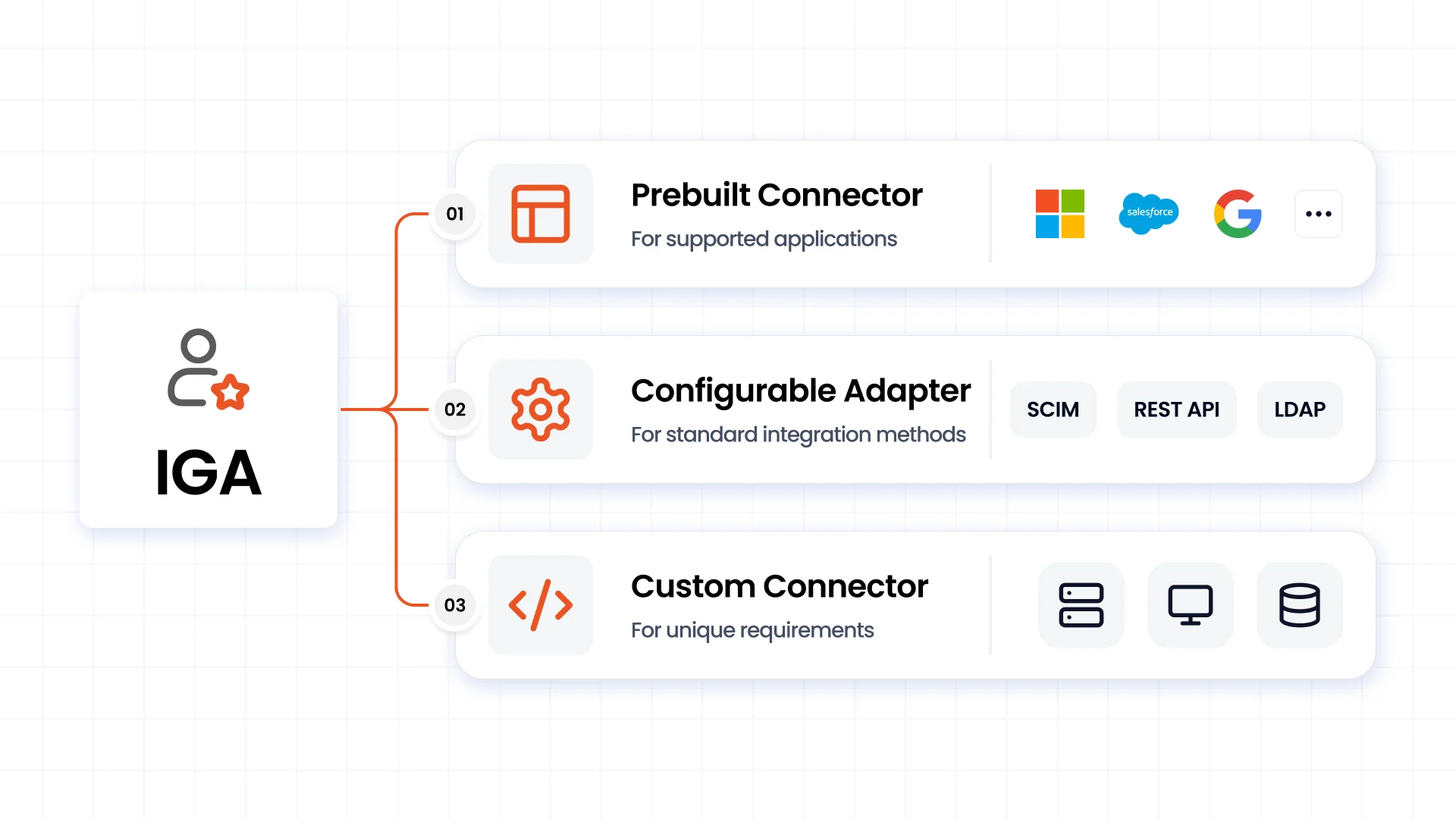
Start with the application's integration options and the access tasks your business needs. These three guidelines can help narrow down your choice.
1. Choose a Prebuilt Connector for Supported Applications
If your IGA platform already supports the application, check whether its connector covers your requirements.
For example, if your business uses Microsoft 365 and the available connector supports account discovery, provisioning, deprovisioning, and access reviews, a prebuilt option makes sense.
2. Choose a Suitable Standard Integration Method for Your IGA Connector
Check whether your application supports SCIM, REST API, LDAP, or JDBC. Your IGA platform might already offer a configurable adapter for one of these methods.
This option works well when the standard integration supports the user attributes and access actions your business needs.
3. Build a Custom Connector for Special Requirements
Choose custom development when the application has no supported integration method or your requirements go beyond what standard adapters offer.
For instance, an internal business application might use a unique API or follow specific rules when assigning permissions. A custom connector lets your team account for these requirements.
Seven Checks Before Going Live
Before connecting an application to your IGA platform, test how the integration handles user accounts and permissions.
Here are seven areas to review:
- Identity matching: Confirm that the IGA platform matches accounts to the correct employees.
- Attribute mapping: Check whether user details such as employee ID, department, and job title match across systems.
- Entitlement visibility: Verify that the IGA connector retrieves the roles, groups, and permissions your team needs to review.
- Provisioning and deprovisioning: Test account creation, updates, and access removal.
- Reconciliation: Compare application records with IGA records to identify missing accounts or unexpected access changes.
- Error alerts and logs: Confirm that your team receives useful information when a request fails.
- Access controls: Test whether the connector follows least-privilege rules and prevents unauthorized access changes.
Run these tests with a small set of accounts in a non-production environment before connecting the application to your live systems.
How miniOrange IGA Connects Applications With Prebuilt and Custom Connectors
Your IGA strategy is only as strong as the applications it connects. miniOrange Identity Governance gives you both out-of-the-box IGA connectors and custom IGA connectors to handle different integration requirements.
With 200+ integrations, you get a wide range of options for connecting popular business applications and specialized systems.
Here's what you get with miniOrange IGA:
- Ready-made application connectors: Connect popular platforms such as Active Directory, Microsoft Entra ID, Salesforce, SAP SuccessFactors, Zoho CRM, Google Workspace, AWS, and many more.
- Standards-based integration: Configure connections through SCIM, REST API, and LDAP when your applications support these methods.
- Custom connector development: Connect applications with unique APIs, authentication methods, or business rules through tailored integrations.
- Flexible application coverage: Bring SaaS platforms, enterprise systems, legacy applications, and in-house software into your IGA environment.
You don't have to settle for an IGA connector that only covers part of your requirements or build every integration from scratch. Choose the approach that fits each application.
Have an application you want to connect? Talk to our IGA team about the right prebuilt or custom connector for your requirements.
FAQs
1. What is the difference between custom and out-of-the-box IGA connectors?
Out-of-the-box IGA connectors come ready to integrate with supported applications. Custom IGA connectors require development to meet specific application or business requirements.
2. When do I need a custom IGA connector?
You need a custom connector when your application lacks a supported integration or standard adapters cannot handle your required access actions, authentication, or business rules.
3. Do out-of-the-box IGA connectors support provisioning and deprovisioning?
Yes, many prebuilt connectors support account creation, updates, and removal. However, available actions vary by application and connector. Check the vendor's supported operations before choosing one.
4. Do SCIM and REST API integrations always require custom development?
No, your IGA platform might already support SCIM and REST API through configurable adapters. Custom development is relevant when the available adapter does not support your application's requirements.
5. What should I test before deploying an IGA connector?
Test identity matching, attribute mapping, entitlement discovery, provisioning, deprovisioning, reconciliation, error handling, and access controls.
6. Who maintains a custom IGA connector?
Your internal IT team or implementation partner typically handles custom connector maintenance. They need to monitor application updates, API changes, authentication requirements, and integration errors.
7. Can IGA connectors retrieve detailed user permissions?
Yes, if the application and connector expose those details. Check whether the connector retrieves individual roles, groups, and permissions rather than only basic account information.
8. Can I connect legacy or in-house applications to an IGA platform?
Yes, depending on the application's available interfaces. Your team can explore REST API, LDAP, JDBC, or custom integration methods based on the application's architecture.
Leave a Comment