

Most corporate work still revolves around documents. Invoices, contracts, onboarding forms, compliance records, and reports are used across teams every day. But a large portion of this information still exists as scanned files, PDFs, or even physical paper.
And that creates a problem.
You can store documents, but you cannot easily search, analyze, or automate them when the data is locked inside images or scanned files.
That is where Optical Character Recognition (OCR) can help.
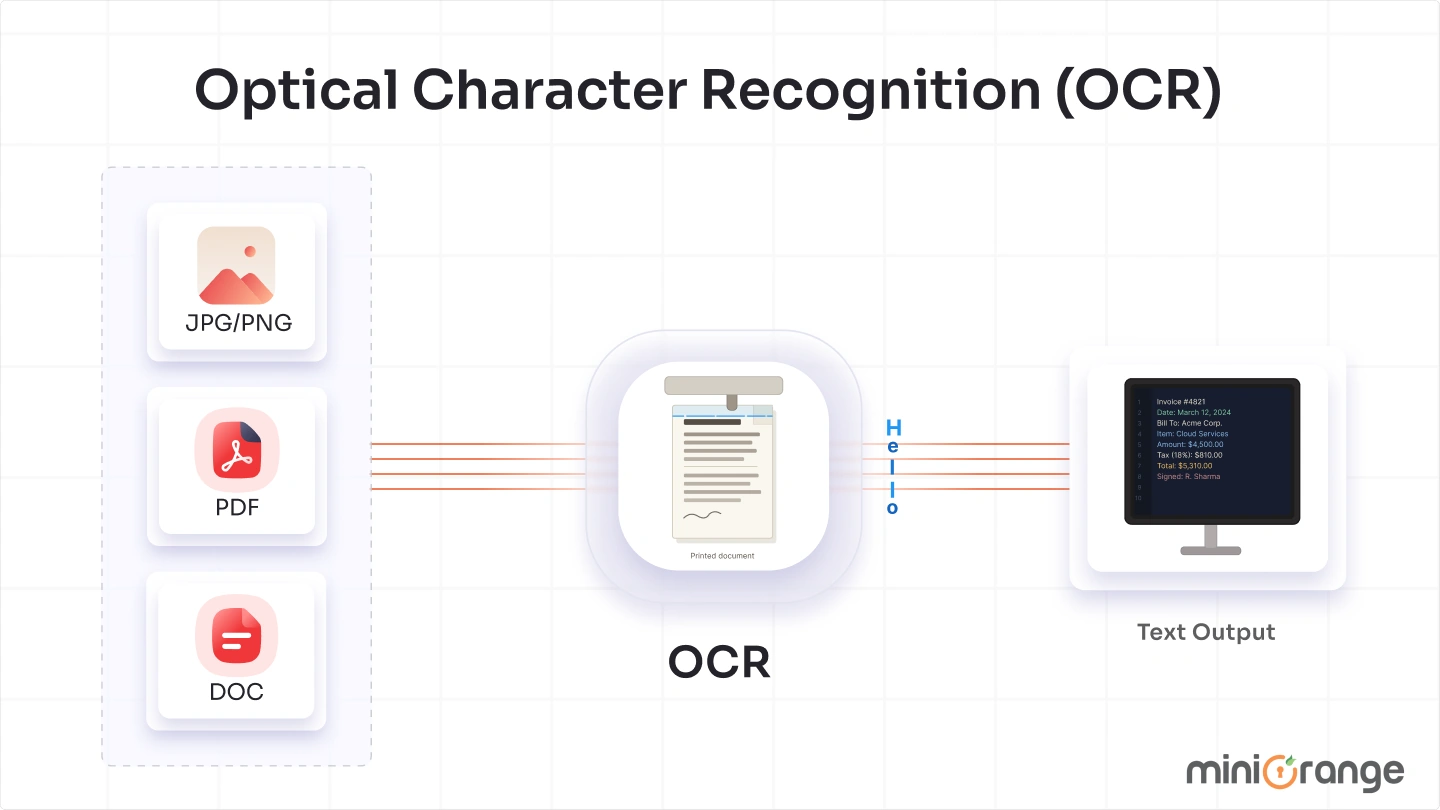
OCR technology is used across industries to convert printed or handwritten text into machine-readable data. From digitizing records to automating workflows, it plays a critical role in how organizations manage information today.
At the same time, the rise in data leaks and document-based fraud has made it even more important to understand and process document content accurately. Organizations are not just digitizing documents anymore. They are also securing them.
In this blog, we will explore what OCR is, its types, how it works, its benefits, and real-world use cases.
What is Optical Character Recognition (OCR)?
Optical Character Recognition (OCR) is a technology that converts text from images, scanned documents, or PDFs into machine-readable and editable text. It bridges the gap between physical or image-based documents and digital systems.
In simple terms, OCR allows computers to read text from images and turn it into usable data. Instead of viewing documents as static files, systems can extract and process the actual content within them.
Instead of manually typing information from a document, OCR automatically extracts the text and converts it into a structured format. This makes the content searchable, editable, and ready for further processing, analysis, or integration with other systems.
Different Types of Optical Character Recognition (OCR)
Optical Character Recognition is not a single approach. It includes multiple techniques depending on the type of document and the level of accuracy required.
Here are some of the different types of OCR:
1. Simple OCR
Simple OCR works by comparing each character in a scanned document with stored patterns or fonts. It performs character-by-character matching, which makes it suitable for clean, typed documents. However, it struggles with different fonts, handwriting, or complex layouts.
2. Optical Mark Recognition (OMR)
OMR is used to detect marks such as checkboxes, bubbles, or signatures in forms. It is commonly used in surveys, exams, and structured forms. Instead of reading text, it identifies predefined marks or symbols based on their position.
3. Intelligent Character Recognition (ICR)
ICR uses machine learning to recognize handwritten text. It learns from patterns and improves over time, similar to how humans recognize writing. It can handle variations in handwriting, making it useful for forms and manual entries.
4. Intelligent Word Recognition
This is an advanced version of ICR where the system recognizes entire words instead of individual characters. It improves speed and accuracy by understanding context rather than processing text letter by letter.
How Does Optical Character Recognition (OCR) Work?
Optical Character Recognition (OCR) works through a series of steps that convert an image into readable and usable text. Instead of simply capturing what a document looks like, the system processes and analyzes the content to extract meaningful information.
Here is a step-by-step explanation of how OCR works:
Step 1: Image Acquisition
The process begins by scanning or capturing a document using a scanner, camera, or mobile device. The captured image is then converted into binary data, where light areas are treated as background and dark areas are identified as text.
This separation helps the system clearly distinguish characters from the background, forming the foundation for accurate text recognition.
Step 2: Preprocessing
Before the system reads the text, the image is cleaned and optimized to improve accuracy. Raw scanned images often contain noise, distortions, or alignment issues that can affect recognition.
This stage includes tasks such as correcting tilted images, removing unwanted spots or noise, refining text edges, and identifying different scripts or languages. These adjustments ensure that the text is clear and properly structured for the next stage.
Step 3: Text Recognition
Once the image is prepared, the system begins identifying characters and words. OCR uses two primary methods to recognize text, depending on the complexity of the document.
Pattern matching compares each character against stored templates, making it effective for documents with standard fonts and formats. Feature extraction takes a more advanced approach by breaking characters into elements like lines, curves, and intersections, then identifying the closest match. This method works better for varied fonts and complex text.
Step 4: Postprocessing
After the text is recognized, the extracted content is converted into machine-readable formats such as text files, Word documents, or searchable PDFs. At this stage, the system may also correct minor errors and refine the output.
Some OCR solutions preserve the original layout of the document while making the text searchable, allowing users to retain both structure and functionality.
What Are the Benefits of OCR Technology?
OCR is not just about converting documents. It changes how organizations manage data, streamline workflows, and handle information at scale.
Here are some of the key benefits of using OCR technology in enterprises:
- Reduced Manual Effort: OCR removes the need to manually type data from documents by automatically extracting text from images and files. Employees no longer spend time entering information line by line, which speeds up routine tasks. It also reduces the chances of human errors that often occur during manual data entry.
- Faster Workflows: Documents can be processed and converted into usable data within seconds instead of hours. Information moves quickly between systems without waiting for manual input or verification. Teams can complete tasks faster and make decisions without delays.
- Automated Processing: OCR enables organizations to automate how documents are handled, from data extraction to routing and storage. Extracted data can be directly integrated into business systems such as CRM or ERP platforms. As a result, processes remain consistent and require minimal manual intervention.
- Reduced Storage Costs: Physical documents require storage space, maintenance, and ongoing management. Converting them into digital formats reduces dependency on paper storage and related infrastructure. Digital storage also makes it easier to organize and retrieve documents when needed.
- Improved Data Security: Paper documents can be lost, damaged, or accessed without proper control. Digital files can be encrypted, access-controlled, and backed up to prevent unauthorized access. As a result, sensitive information remains protected and easier to manage.
- Better Accessibility: OCR converts static documents into searchable and accessible content across systems. Employees can quickly locate specific information without reviewing entire files manually. It also supports assistive technologies that help visually impaired users interact with digital content.
- Improved Accuracy: Manual data entry often leads to inconsistencies and mistakes, especially when handling large volumes of documents. OCR extracts data in a consistent format, reducing variation and errors. Over time, data remains more reliable across systems and workflows.
What Are the Different Use Cases of Optical Character Recognition (OCR) Technology?
OCR is widely used across industries to simplify document handling and improve efficiency. It helps convert unstructured document data into usable information, making processes faster and more reliable. It also enables organizations to automate document-driven tasks and reduce dependency on manual processes.
Here are some of the key use cases of OCR technology:
Invoice Processing
OCR extracts key details such as invoice numbers, dates, amounts, and vendor information directly from documents. It enables faster data capture and reduces manual entry in financial workflows. In finance and accounting teams, this helps speed up payment processing and improves accuracy in records.
KYC and Identity Verification
OCR reads and extracts information from identity documents such as passports, driver’s licenses, and ID cards. It allows systems to automatically capture user details and verify them against required fields. In banking and fintech, this supports faster KYC processes and reduces onboarding time.
Records Management
OCR is used to digitize physical documents and convert them into searchable and structured digital records. It helps organize large volumes of data and makes information easier to access and manage. In healthcare and enterprise environments, this is commonly used to maintain patient records, employee files, and compliance documents.
Document Processing
OCR processes documents by extracting relevant data and converting it into usable formats for further analysis or workflows. It allows organizations to handle large volumes of documents without manual review. In legal and corporate environments, this is used to process contracts, agreements, and reports more efficiently.
Data Extraction from Operational Documents
OCR extracts critical information from documents such as shipping labels, invoices, and delivery notes. It enables automatic data capture, reducing errors and improving processing speed. In logistics and supply chain operations, this helps track shipments, update records, and maintain real-time visibility.
How Optical Character Recognition (OCR) Helps in Cybersecurity?
As organizations handle more digital documents, Optical Character Recognition (OCR) is increasingly used in cybersecurity to analyze and protect sensitive information. A large portion of critical data today exists in unstructured formats such as scanned files, images, and PDFs, which traditional security tools often cannot inspect effectively. OCR bridges this gap by converting hidden text within these files into readable data, allowing security systems to analyze, classify, and protect it.
Here is how OCR technology helps in cybersecurity:
1. Threat Detection and Phishing Prevention
Attackers often use phishing attacks to hide malicious content inside images or scanned attachments to bypass traditional security controls. Since these files are not easily readable by standard tools, they can carry hidden links or instructions without being flagged. Optical Character Recognition (OCR) identifies text from such files, making it possible to scan and analyze their content for phishing attempts, malicious URLs, or suspicious messaging that would otherwise remain undetected.
2. Data Loss Prevention (DLP)
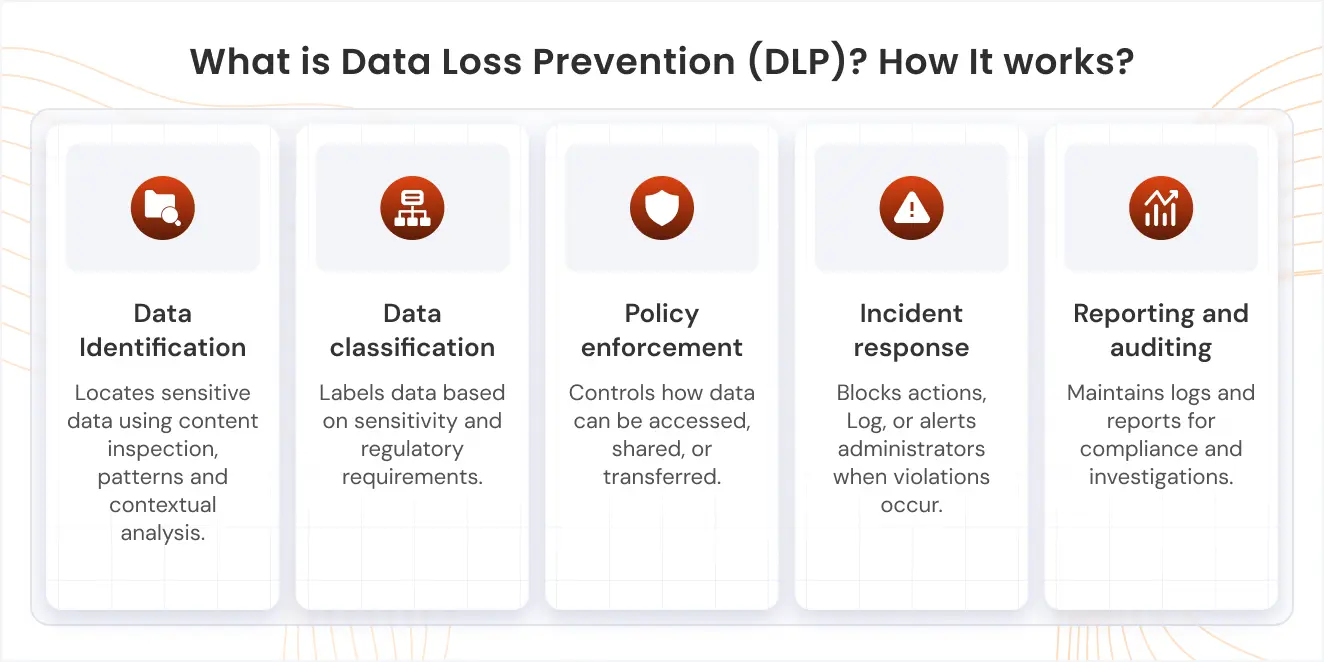
Sensitive information such as financial data, personal records, or confidential business details is often shared through documents and images. OCR is widely used in Data Loss Prevention (DLP) because it helps in data discovery by identifying and extracting this information from unstructured files across endpoints, email, and cloud environments. Once discovered, the data can be classified and labeled based on its sensitivity, allowing organizations to enforce policies that prevent unauthorized sharing and reduce the risk of data leaks.
Read more: How to Stop Data Leaks Using DLP and OCR?
3. Monitoring and Incident Response
Optical Character Recognition enables continuous monitoring of document content by making hidden text visible to security systems. It helps identify unusual data movement, access patterns, or attempts to transfer sensitive information across systems. With better visibility into document-level activity, security teams can detect incidents earlier and respond faster, reducing the potential impact of security breaches.
Strengthen Your Cybersecurity Posture with miniOrange DLP Solution’s OCR Capabilities
Data leaks are becoming more common across organizations, and their impact goes beyond security. In many cases, they also lead to compliance violations, which can result in heavy penalties, reputational damage, and operational disruption, making data protection a critical priority for modern enterprises.
Addressing these risks requires more than basic controls. Organizations need a solution that can identify, monitor, and protect sensitive data across endpoints, email, and cloud environments in a consistent and scalable way.
This is where a Data Loss Prevention (DLP) solution becomes essential.
Among the available approaches, solutions that combine visibility with deeper data understanding are more effective in managing modern risks. The miniOrange DLP solution builds on this by going beyond basic measures like USB blocking and granular policy enforcement. It leverages OCR technology for data discovery, classification, and labeling, helping organizations identify sensitive information even within unstructured files such as images and scanned documents.
By combining visibility with control, organizations can monitor how data is being used, enforce policies effectively, and reduce the risk of accidental or intentional data leaks while maintaining compliance.
FAQs
1. What is OCR software used for?
OCR software is used to convert text from scanned documents, images, and PDFs into editable and searchable formats. It is commonly used for tasks like document digitization, data extraction, invoice processing, and identity verification across industries.
2. Can OCR read handwritten text?
Yes, OCR can read handwritten text using advanced techniques like Intelligent Character Recognition (ICR). While accuracy depends on handwriting clarity, modern OCR systems trained with machine learning can recognize and process handwritten inputs more effectively.
3. How accurate is OCR technology?
OCR accuracy depends on factors such as image quality, font type, and document clarity. For clean, printed documents, accuracy can be very high, often above 95 percent. However, handwritten or low-quality scans may result in lower accuracy.
4. Is OCR secure for processing sensitive data?
OCR itself is a processing technology, but when combined with secure systems, it can safely handle sensitive data. Many enterprise solutions use encryption, access controls, and data classification to ensure that extracted information remains protected.
5. What is the difference between OCR and text recognition?
OCR is a type of text recognition specifically used to extract text from images or scanned documents. Text recognition is a broader term that includes other methods of identifying and processing text, including speech-to-text and digital text parsing.

Leave a Comment