
Higher education institutions manage identity information across systems such as Enterprise Resource Planning (ERP) platforms, Student Information Systems (SIS), and HR systems. These records determine whether someone is a student, employee, faculty member, researcher, alumnus, or another type of campus user.
Integrating these systems with Identity and Access Management (IAM) lets institutions use those records to manage digital identities and access throughout the user lifecycle. When a student is admitted, an employee is hired, or a user's role changes, IAM can use that information to update their accounts and application access.
But the hard part is the set of decisions behind the integration: who owns each fact, how records join up, when access starts, and when it ends. This article discusses the same.
What Is ERP and SIS Integration in IAM?
An ERP system manages institutional business information, which can include employee and workforce records. A SIS in education manages student information such as enrollment, academic programs, and student status.
IAM sits between these authoritative systems and the applications users need to access. It consumes relevant identity information from the ERP or SIS platform, creates or updates the corresponding identity, and applies access rules based on that person's current relationship with the institution.
This makes the Source of Authority an important part of the integration. When multiple systems contain information about the same person, the institution needs clear rules about which system owns each attribute or lifecycle event.
How ERP and SIS Integration with IAM Works
Each stage has a specific job.
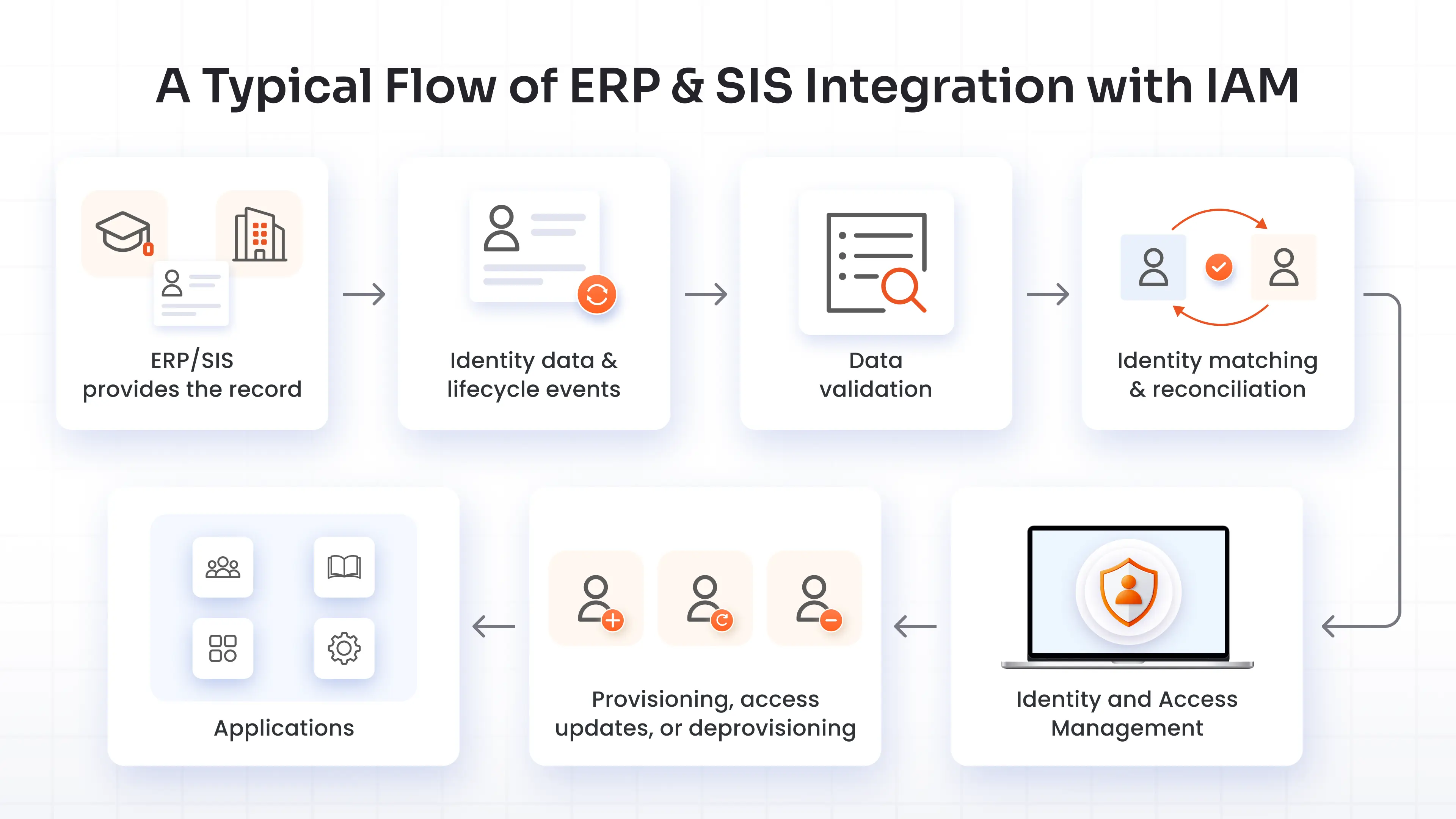
- ERP or SIS provides the record: A student is admitted, an employee is hired, or an existing user's status changes.
- The integration passes relevant data to IAM: This can happen through scheduled synchronization or event-based updates, depending on the systems involved.
- The data is validated: IAM or the integration layer checks whether required attributes are present and usable.
- The record is matched to an identity: IAM determines whether the record belongs to an existing person or requires a new identity.
- The identity is created or updated: Relevant attributes, groups, roles, and status are updated.
- Access changes are applied: IAM provisions new access, changes existing permissions, or removes access according to lifecycle rules.
- Connected applications receive the change: The user's access across campus systems reflects their current institutional relationship.
Consider a student who has just been admitted:
SIS: Student admitted → IAM: receives the record → Identity: record is created or matched → Provisioning: required access is assigned → Applications: LMS, student portal, library, and other required systems
The same flow can work in reverse. When a student graduates or withdraws, the change in the SIS can trigger access updates or removal.
What Identity Data Should ERP and SIS Provide to IAM?
IAM doesn't need every field stored in an ERP or SIS. It needs the information required to identify a person, understand their current institutional relationship, and determine what access they should have.
Depending on the institution and integration, relevant attributes can include:
- Name and unique identity identifier
- Student or employee ID
- Contact information
- Student or employment status
- Academic program or department
- Enrollment information
- Employment information
- Role or institutional affiliation
- Start and end dates
- Other attributes used for access decisions
For example, a student's program or department may determine which groups or applications they need. An employee's department and job role may determine access to HR, finance, research, or collaboration systems.
The quality of these attributes matters because IAM uses them to make identity and access decisions.
Establish a Reliable Source of Authority
Higher education institutions can have several systems containing information about the same person. The SIS may own student status, while an HR or ERP system may own employment status.
This becomes more complicated when one person has multiple relationships with the institution.
Consider a student who becomes a teaching assistant. The SIS may identify the person as a student, while the HR system records them as an employee. IAM needs to recognize that these records belong to one person and apply the appropriate roles without creating a second, unrelated identity.
A reliable integration should define:
- Which system is authoritative for each identity attribute
- Which system controls each lifecycle event
- How conflicting records are resolved
- Which system takes precedence when information differs
- How multiple institutional roles are represented
A useful model is:
One person → one governed identity → multiple institutional roles
This prevents different source systems from independently creating identities or changing the same lifecycle attributes without defined rules. Once you know who owns what, you can check whether what they own is any good.
Ensure Clean and Consistent Identity Data
Identity automation depends on the quality of the records it receives.
Names, identifiers, status values, departments, and other attributes should follow consistent formats. The integration should also account for incomplete records, invalid identifiers, missing attributes, and other exceptions before those records drive access changes.
Four checks catch most of it:
- A unique ID on every record, plus a rule for what happens when one is missing
- Status values mapped to one shared set, so "Enrolled" in the SIS and "Active" in HR mean what your rules think they mean
- Names and dates in one standard format
- Validation at the door, with failed records sent to an exception queue that has a named owner
Identity matching is another important part of this process.
-
Suppose the SIS contains:
Jane Baker, Student ID 12345
-
And the employee system contains:
Jane Baker, Employee ID 98765
IAM needs enough information to determine whether these records belong to the same person. Matching can use multiple attributes and identifiers rather than relying on a name alone.
Good matching and reconciliation rules help prevent duplicate identities while still allowing one person to hold multiple institutional roles.
The relationship is simple: clean source data makes identity matching more reliable, and reliable matching makes lifecycle automation safer.
Automate Student and Employee Provisioning
Once IAM can identify a person and understand their institutional relationship, it can automate account and access provisioning.
Student Lifecycle
Admission → Enrollment → Identity creation → Provisioning → Access
When a student becomes eligible for access, IAM can create the identity and assign the groups, roles, applications, and resources required for that student's status or program.
Employee Lifecycle
Hiring → Employee record → Identity creation → Provisioning → Access
An employee's department, role, employment status, and other attributes can determine which resources they receive.
The important distinction is between creating an identity and granting access. Creating a student identity doesn't mean giving that student access to every connected application. Access should follow the institution's defined rules and the attributes associated with the person's current role.
Manage Identity Lifecycle and Role Changes
Higher education identities can change frequently.
A student can become a teaching assistant, change programs, graduate, become an employee, or later return as an alumnus. An employee can change departments, take on a new role, retire, or leave the institution.
IAM needs to respond to these changes without creating duplicate identities or leaving outdated access behind.
Student to Employee
When a student becomes an employee, the IAM platform can retain appropriate student access while adding the permissions required for the employee role.
The person should continue using the existing governed identity where the institution's identity model permits it.
Student to Alumni
After graduation, student-specific access can be removed while approved alumni services remain available.
The timing can depend on institutional policies and any required grace periods.
Employee to Retiree
When an employee retires, employee privileges can be removed, and any approved retiree access can be applied according to institutional rules.
Course or Department Change
A student's academic program or department can change the groups and applications they need. IAM can update those assignments and remove access that no longer matches the person's current role.
These transitions are where lifecycle rules become particularly useful. The institution can define what should happen when a specific attribute or status changes instead of handling every change manually.
Automate Deprovisioning and Access Removal
The stakes are there, and they are high.
The 2026 Verizon DBIR found stolen credentials in 65% of education breaches that involved hacking, as per the University of Wisconsin's summary of the report.
The same identity data that triggers automated user provisioning can trigger access removal or automated deprovisioning.
Examples include:
- Graduation: Remove student-specific access.
- Withdrawal: Disable or remove access according to institutional policy.
- Termination: Revoke employee access.
- Role change: Remove permissions associated with the previous role.
- Program change: Remove access that no longer applies.
Institutions may use immediate or scheduled user provisioning and deprovisioning depending on the event. Some situations may require a grace period, while others may require access to be removed as soon as the source record changes.
Exceptions should be handled through defined processes rather than allowing stale access to remain indefinitely.
Audit trails also help institutions track what changed, when the change occurred, and which identity or access records were affected.
Manage Access Across Multiple Applications
Once ERP and SIS data is connected to the IAM platform, the same identity information can drive access across multiple campus applications.
These can include:
- Learning management systems
- Student portals
- Library systems
- Research applications
- SaaS applications
- HR applications
- Collaboration platforms
The basic relationship is:
Institutional relationship → Identity attributes → Roles or groups → Application access
For example, a student's academic program may determine membership in a group that receives access to a specific learning or research application. When the student's program changes, the IAM software can update that group membership and the resulting application access.
This gives institutions a consistent way to manage access as users move through different stages of their relationship with the institution.
ERP and SIS Integration
ERP and SIS systems can contain sensitive student and employee information, so the integration itself is a sensitive system and needs appropriate security controls.
Key areas include:
- Secure data transfer between systems
- Authentication between integrated systems
- Least-privilege access to source data
- Protection of sensitive identity information
- Monitoring of integration activity
- Audit logging
- Exception handling
- Controlled provisioning and deprovisioning
There's also the legal side. In the US, the Department of Education says institutions must use reasonable methods so school officials see only the education records where they have a legitimate educational interest.
Security should apply to the entire identity flow. An institution needs to protect the source data, the integration process, the IAM system, and the applications receiving identity and access updates.
Best Practices for ERP and SIS Integration with IAM
A successful ERP and SIS integration depends as much on lifecycle rules and data governance as it does on the technical connection between systems.
Follow these practices:
- Define the Source of Authority: Decide which system owns each identity attribute and lifecycle event.
- Create clear lifecycle rules: Define what should happen when someone joins, changes roles, or leaves.
- Define precedence for overlapping identities: Establish how records from different systems are combined when they belong to the same person.
- Automate provisioning and deprovisioning: Use institutional events to trigger appropriate access changes.
- Test role transitions: Test scenarios such as student-to-employee, department changes, graduation, and termination.
- Maintain audit trails: Record important identity and access changes for investigation and compliance needs.
- Review lifecycle rules regularly: Institutional roles, applications, and policies change, so lifecycle rules need periodic review.
Benefits of ERP and SIS Integration with IAM
When institutional records and IAM processes work together, institutions can:
- Automate Identity Lifecycle Management: New identities, role changes, and departures can trigger defined actions without relying entirely on manual updates.
- Provision Access Faster and More Accurately: Students and employees can receive the applications and resources associated with their current institutional roles.
- Reduce Duplicate and Stale Identities: Identity matching and automated lifecycle rules help prevent duplicate accounts and remove access that no longer applies.
- Improve Access Governance and Auditability: Institutions can trace identity and access changes back to defined lifecycle events and source records.
- Maintain Consistent Access Across Applications: Users can receive access based on current institutional attributes instead of separate manual decisions in every application.
Why Choose miniOrange IAM for ERP and SIS Integration for Higher Educational Institutes?
miniOrange gives higher education institutes one place to run the lifecycle this guide describes.
Identity lifecycle management automates joiner, mover, and leaver workflows, with HR-driven provisioning, birthright access, RBAC, and access removal when a status ends. Audit trails record each change, and access certification keeps the rules honest. Orphaned account management finds the accounts that slipped through. SSO and MFAcover the login, and the platform governs service accounts and APIs too.
It supports students, faculty, staff, and third-party users on campus. The team can walk through how your SIS and ERP feeds fit.
Talk to miniOrange about your SIS and ERP lifecycle rules.
FAQs
How does SIS integration help with identity management?
SIS integration gives IAM access to authoritative student information such as enrollment and status. IAM can use those records to create identities, provision access, update roles, and remove access when a student's institutional relationship changes.
What is a Source of Authority in IAM?
A Source of Authority is the system designated as authoritative for specific identity attributes or lifecycle events. For example, a SIS may own student status while an HR system owns employee status.
How does IAM handle students who also become employees?
An IAM platform can match the student's and employee's records to the same person and apply the appropriate roles. This helps the person retain required student access while receiving the additional access associated with their employee role.
What identity data should be synchronized from a SIS system?
Relevant data can include a student's unique ID, name, status, enrollment information, academic program, department, role, and dates used to determine identity and access lifecycle actions.
About the Author

Content Writer
Stutee writes about cybersecurity and identity security, covering technologies such as MFA, IAM, PAM, and endpoint management. Her work focuses on translating what products do into why audiences should care, ensuring technical depth does not come at the cost of readers clarity.
Leave a Comment