
Your phone is bombarded with notifications each day. You accept, deny, read, ignore, or delete these notifications every day. The Business of Apps statistics state that on average, a US smartphone receives 46 app push notifications in one day.
These notifications can be overwhelming and become repetitive after some time, and reach a point where you don’t even pay attention to them anymore. You tend to take action on the notification without thinking because it is an everyday task.
When you’re overwhelmed or distracted by messages, cybercriminals attack because the actions you take without thinking are easy to exploit. This leads to a deadly attack known as an MFA fatigue attack.
You can counter these attacks with the diverse 15+ Multi-Factor Authentication (MFA) methods offered by miniOrange, a pioneer of the cybersecurity domain.
This blog targets the crux of MFA fatigue and bombing, how this attack unfolds, and the types of attacks used in MFA fatigue. This blog also touches upon resilient methods to tackle MFA bombing attacks.
What is MFA Fatigue and Bombing?
MFA fatigue and MFA bombing are essentially the same thing, but are different in terms of functionality. Let’s have a look.
- MFA Fatigue: Also known as push fatigue and MFA spamming, is a social engineering attack strategy. Here, repeatedly, Two-Factor Authentication (2FA) requests are sent to the target’s phone. The objective is to coerce the victim into authenticating their identities.
- MFA Bombing: Also known as prompt bombing or MFA flooding, is a tactic that threat actors use for account takeover attacks. Here, attackers send rampant push notifications till the point users get annoyed and approve requests.
In the MITRE ATT&CK framework, MFA fatigue is defined as a method to ‘bypass Multi-Factor Authentication (MFA) mechanisms and access accounts by generating MFA requests sent to the users.’
How Does MFA Fatigue and Bombing Unfold?
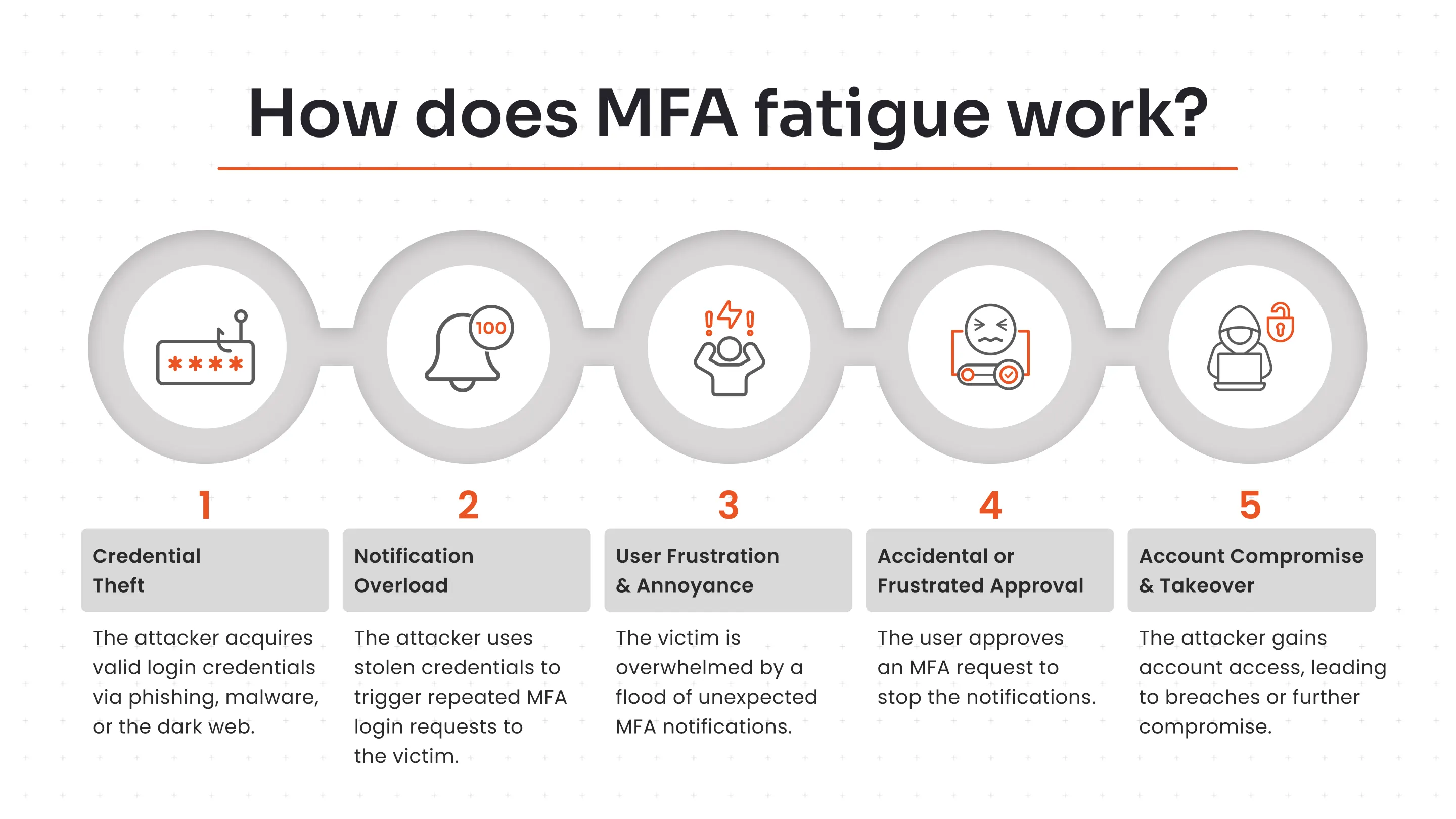
The attack typically unfolds in the following steps:
- Credential Theft: The attacker first obtains the victim's valid username and password, often through phishing, malware, or purchasing them on the dark web.
- Notification Overload: Using the stolen credentials, the attacker repeatedly attempts to log in. Each attempt triggers an MFA request (usually a push notification or phone call) to the victim's registered device.
- User Frustration and Annoyance: The victim receives a flood of unexpected notifications, which can be confusing, annoying, or occur at inconvenient times (like the middle of the night). The goal of the attacker is to overwhelm the target.
- Accidental or Frustrated Approval: Eventually, out of frustration, confusion, or the mistaken belief that the prompts are a system glitch, the user approves a request just to make the notifications stop.
- Account Compromise and Takeover: The attacker gains access to the account and associated systems, which can lead to data breaches, financial loss, or further infiltration of the network.
In some cases, the attacker may combine the spamming with a direct phone call, posing as IT support to further trick the user into approving the request.
Cyberattack Tactics Used in MFA Fatigue
Threat actors usually go for the following four types of cybercriminal activities:
1. Social Engineering
Social engineering attacks comprise a broad range of malicious activities to trick individuals into giving away sensitive information. Threat actors exploit human feelings like curiosity, fear, or trust to commit the attack.
Common types of social engineering attacks are phishing, tailgating, quid pro quo, baiting, pretexting, and more.
- How to Evade: Use MFA software that comes with FIDO2, biometrics, or hardware tokens. Also, enable two-way authentication techniques and secure communication channels between employees.
2. Push Spam Attacks
Push spam attacks involve bombarding users with repeated MFA or push notification requests, hoping that users will get frustrated and approve them. So, attackers can gain access to their accounts and data.
- How to Evade: Users can temporarily block notifications and enforce contextual MFA, like device recognition, geolocation, time of access, user behavior, and IP address, to ascertain the identity of the users trying to log in.
3. Credential Stuffing
Credential stuffing is an attack where malicious actors exploit compromised credentials to gain access to accounts.
- How to Evade: Have strong password policies that mandate employees/users to create unique passwords. Also, implement an account lockout mechanism that automatically locks a user account after a certain number of failed login attempts.
4. Man-in-the-Middle (MitM) Attacks
Man-in-the-Middle (MITM) attacks are a tactic where malicious entities intercept communication between two parties (user and server/app), and steal valuable data.
Types of attacks included in MITM attacks are SSL stripping, rogue wi-fi networks, and DNS spoofing.
- How to Evade: Make use of HTTPS for all communication between employees and systems to avoid SSL stripping attacks. Integrate MFA for VPN to strengthen access over remote networks.
Learn the most common cybersecurity attacks and how they work.
Real-World Cases of MFA Bombing Attacks
Here’s a list of top cases that were in the news lately:
1. Chinese-Linked Botnet Bypasses MFA in Microsoft 365
As per an article published in Infosecurity Magazine, a massive Chinese-linked botnet of over 130,000 compromised devices is conducting global password spraying attacks on Microsoft 365 accounts using stolen infostealer credentials, bypassing MFA.
Targets include finance, healthcare, government, and tech sectors for data access, emails, and tools; it enables lateral movement like internal phishing and causes disruptions via account lockouts.
2. GhostFrame Powers Over 1M Hidden Phishing Attacks
GhostFrame, detected in September 2025, uses a basic HTML file that looks innocent but embeds an iframe to secretly direct victims to fake Microsoft 365 or Google login pages for credential theft.
The iframe hides malicious content on the main page, enabling quick swaps of phishing targets or regions without altering the outer site, which evades security scans.
3. Spiderman: Full-Stack Phishing Framework Targeting European Banks
Spiderman enables cybercriminals to target customers of numerous European banks and online financial services, including Blau, CaixaBank, Comdirect, Commerzbank, Deutsche Bank, ING, O2, Volksbank, Klarna, and PayPal.
It is a full-stack phishing framework that mimics the login pages of many European banks and even some government portals, providing an organized interface for attackers to launch phishing campaigns, harvest credentials, and manage stolen session data in real time.
Deep Dive into MFA Fatigue Resilient Methods
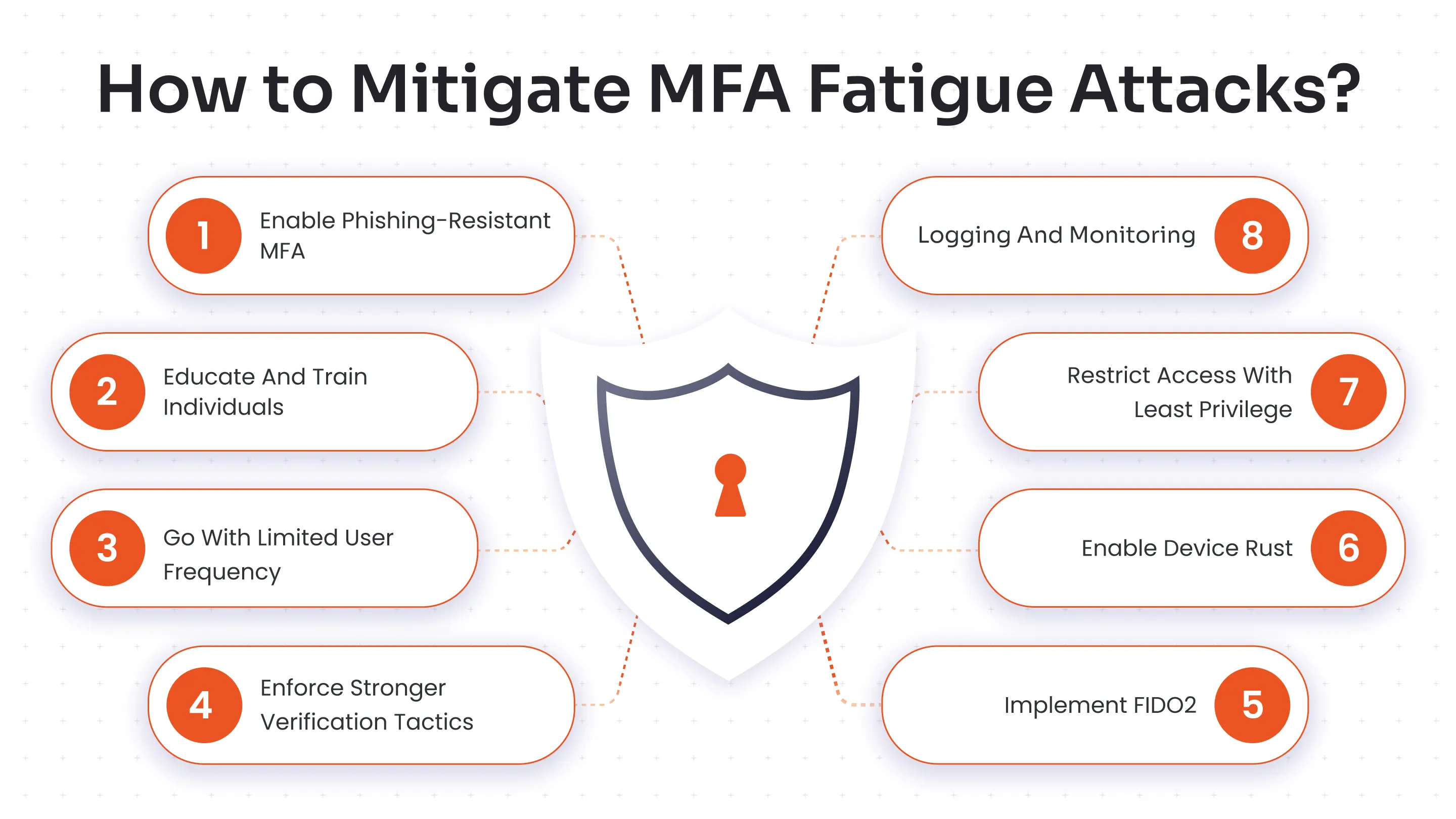
We’ve compiled a list of potential MFA fatigue resilient methods that organizations can implement to avoid MFA fatigue attacks.
1. Enable Phishing-Resistant MFA
Adopt phishing-resistant MFA solutions, such as hardware-based authenticators like YubiKeys or display tokens that require physical presence and resist phishing, unlike push notifications that can be remotely triggered.
Also, go for biometric authentication techniques and grid pattern matching to evade phishing altogether.
2. Educate and Train Individuals
Teach users to never approve MFA requests they didn't initiate and to report them immediately. Train employees to ignore and report unsolicited MFA prompts immediately, verifying requests through separate channels like phone calls to build a reporting culture.
3. Go with Limited User Frequency
Configure multi-factor authentication systems to limit prompts per time window (e.g., 3 prompts per hour per user), blocking floods that could lead to MFA fatigue attacks.
4. Enforce Stronger Verification Tactics
Replace simple approvals via push notifications with number matching (enter displayed code), biometrics, or PINs during prompts to confirm user intent actively. Additionally, use context-based MFA to ensure the identities of the users.
5. Logging and Monitoring
Keep a track of user logins, only to spot anomalies like spikes in login attempts, sign-in failures, or unusual behavior of users after login. This can be conducted in real-time to detect and spot threats before they escalate.
6. Restrict Access with Least Privilege
Apply Role-Based Access Controls (RBAC) and Principle of Least Privilege (PoLP), so even compromised accounts have minimal permissions, limiting damage from accidental approvals.
7. Enable Device Trust
Register and trust known devices only, rejecting prompts from unrecognized hardware or browsers to block attacks from new endpoints. For instance, users receive a ‘Security Alert’ email in case there is a login attempt from a device other than the regular one.
8. Implement FIDO2
Deploy FIDO2 for passwordless, phishing-proof logins using public-key cryptography on trusted devices. Its cross-platform access and privacy protection policies help to avoid MFA bombing and fatigue attacks.

What to Do During an Attack?
Here’s a to-do that you can easily follow during an attack.
- Don't Approve: Do not tap "Approve" or "Yes" on any notification unless you just initiated the login.
- Report It: Inform your IT/security team immediately.
- Change Password: If it's your personal account, change your password and review connected devices.
By following these basic tactics, you can avoid attacks easily.
Best Practices to Keep MFA Fatigue and Bombing at Bay
A combination of technical controls and user education is crucial for defence:
For End Users
- Never Approve Unexpected Requests: Only approve an MFA request if you initiated the login attempt yourself.
- Report Suspicious Activity: Immediately report any unusual or excessive MFA prompts to your organisation's IT or security department.
- Reset Passwords: If you receive unexpected MFA requests, assume your password is compromised and change it immediately.
- Be Aware of Social Engineering: Recognize that attackers might call or text, posing as IT support, to convince you to approve a request.
For Organizations
- Enable Number Matching: Configure MFA systems (like Microsoft Authenticator) to require users to enter a specific number shown on the login screen into their app, preventing "blind" approvals.
- Use Context-Aware Authentication: Implement policies that consider context like user location, device, and time of day, requiring additional verification for unusual login patterns.
- Provide Regular Awareness Training: Continuously educate employees about MFA fatigue attacks and best practices for secure authentication.
- Monitor and Alert the Authorities: Use tools to monitor authentication logs for signs of abuse, such as multiple failed attempts followed by an immediate success.
Which Push Notification MFA Methods are Most Susceptible to MFA Fatigue?
Standard "Approve/Deny" push notifications (e.g., simple yes/no taps on mobile apps like DUO or Okta Verify) are highly vulnerable to MFA fatigue, as attackers spam them until users approve out of annoyance.
- Why They're Targeted: These one-tap prompts lack verification details like numbers or device info, enabling reflexive approvals without scrutiny, unlike OTPs or hardware tokens.
Learn how vulnerability attacks happen and why unpatched systems are easy targets.
Go the Extra Mile with More Resilient MFA Methods
Methods that add an extra layer of required user interaction are much more resilient to MFA fatigue:
- Grid Pattern Matching: Select specific cells on a grid and create a unique pattern during setup; replicate this sequence to verify user identity.
- Hardware Tokens: Hardware tokens are physical devices like USB keys or key fobs that generate time-based OTPs or numeric/alphabetic codes for authentication, often combined with other factors for high-security environments.
- Biometric Authentication: Requiring a fingerprint or facial scan within the app adds a layer of identity verification that is harder to bypass remotely.

Stay Vigilant with miniOrange MFA Methods
miniOrange counters MFA fatigue with phishing-resistant methods like hardware tokens (YubiKey), grid pattern matching, and adaptive MFA that triggers challenges only on high-risk logins based on IP, device, location, and behavior.
To know more about our 15+ MFA methods, just connect with us or sign up for a free 30-day trial.
FAQs
What is an MFA fatigue attack?
An MFA fatigue attack bombards users with repeated authentication prompts to exploit weariness, tricking them into approving unauthorized access.
What is the best course of action to defend against an MFA fatigue attack?
Implement phishing-resistant MFA solutions, limit prompt frequency, educate users on suspicious requests, and use adaptive authentication with behavioral analytics.
What do hackers do after a successful MFA fatigue attack?
Hackers gain initial access to steal session cookies, escalate privileges, deploy malware, exfiltrate data, or pivot to other systems.
Leave a Comment