
An employee receives what looks like a routine email. Maybe it’s a shared document link, a shipment update, or a tool they already use. Nothing feels off. They click.
Within seconds, a malicious script runs in the background. No warning. No alert. And the firewall? It didn’t block it. This isn’t an edge case. It’s how many modern attacks actually begin. Not by breaking in, but by being let in.
Traditional network defenses were built to block external threats at the perimeter. But today’s attacks often come disguised as normal user activity. That’s why relying only on firewalls is no longer enough.
Organizations now need multiple layers of protection that work together.
Two of the most commonly used layers are web filtering and firewalls. They’re often mentioned together, sometimes even confused with each other. But in reality, they solve very different problems.
Understanding the difference is important, especially when designing a security strategy that actually works in real-world conditions.
Let’s break down what each one does, how they work, and why using both together makes a stronger defense.
What is a Firewall?
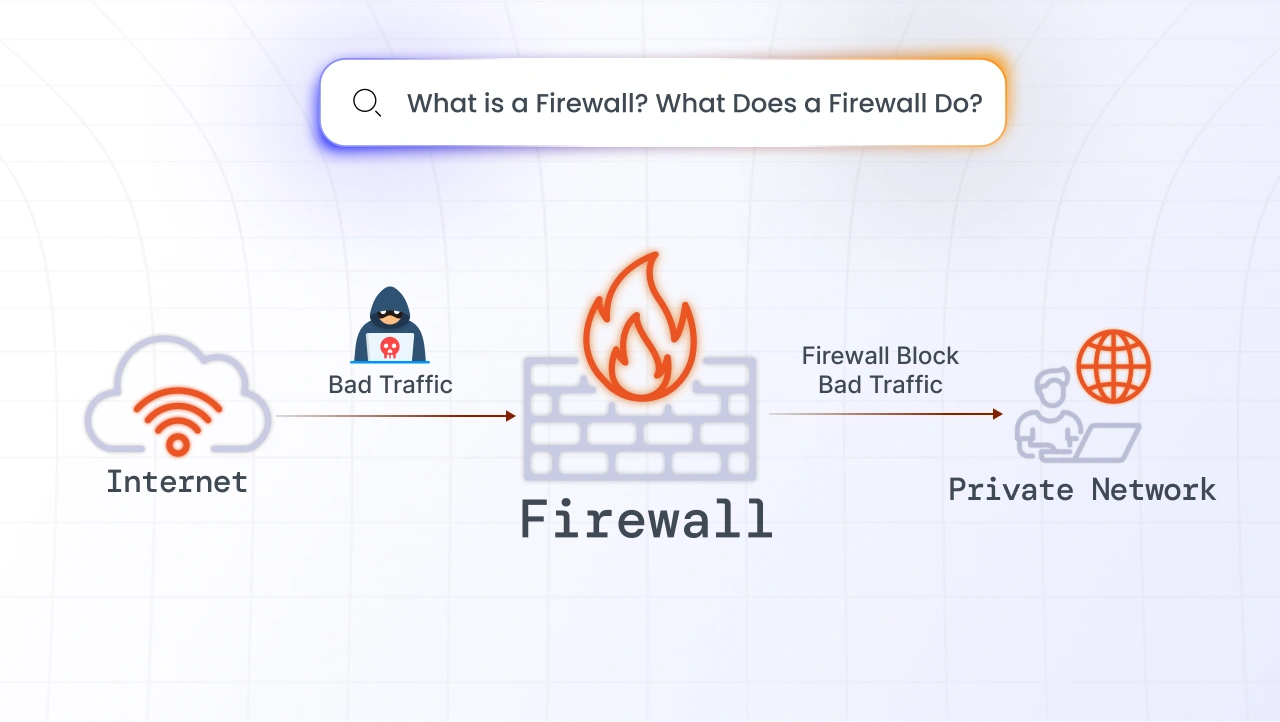
A firewall is a network security system that monitors and controls incoming and outgoing traffic based on predefined rules.
Think of it as a gatekeeper. It decides which traffic is allowed to enter or leave your network and which should be blocked.
Firewalls operate at the network level. They look at things like IP addresses, ports, and protocols to determine whether a connection is safe. For example, if an unknown source tries to access your internal system, the firewall can block that request before it reaches your network.
This makes firewalls essential to:
- Prevent unauthorized access
- Protect against network-based attacks
- Block suspicious incoming connections
However, firewalls are not designed to understand what a user is actually doing on the web. And that’s where their limitations begin.
Key Features of a Firewall
A firewall provides several core capabilities that help secure a network. It does more than just block traffic. It controls how data moves, who can access what, and how threats are handled at the network level.
- Traffic Filtering: At its core, a firewall filters incoming and outgoing traffic. It checks data packets against predefined rules and decides whether to allow or block them. This helps prevent unauthorized or suspicious traffic from entering the network.
- Access Control: Firewalls enforce access policies by controlling which users or systems can access specific resources. For example, access to internal systems can be restricted while allowing only necessary services to remain open. This reduces unnecessary exposure.
- Network Segmentation: Firewalls can divide networks into smaller zones. If a threat enters one segment, it can be contained without spreading across the entire network. This limits the impact of potential breaches.
- Intrusion Prevention: Modern firewalls can detect and block known attack patterns. They analyze traffic for suspicious behavior and stop threats like malware or exploits before they cause damage.
- Logging and Monitoring: Firewalls maintain logs of network activity, including allowed and blocked traffic. These logs help security teams monitor behavior and investigate incidents when something goes wrong.
What are the Different Types of Firewalls?
Firewalls are not a one-size-fits-all solution. As network environments and cyber threats have evolved, so have firewalls.
Early firewalls focused on basic traffic control, deciding whether to allow or block data based on simple rules. Modern firewalls operate at different layers and offer varying levels of visibility and control.
Some prioritize speed and basic filtering, while others provide deeper inspection and advanced threat detection.
1. Packet-Filtering Firewalls
Packet-filtering firewalls represent the most basic form of firewall protection. They are designed for environments where speed and simplicity are the priority. Instead of analyzing the full context of communication, they make quick decisions based on predefined rules, which makes them efficient but limited against modern threats.
What it does: Packet-filtering firewalls examine individual data packets and decide whether to allow or block them.
How it works: They check basic attributes such as source IP address, destination IP address, port number, and protocol type. If the packet matches predefined rules, it is allowed through.
Use case example: A small organization may use packet filtering to allow only essential traffic such as HTTP and HTTPS while blocking unused ports.
Strengths: They are fast, lightweight, and easy to implement.
Limitations: They do not inspect the content of traffic or track connections, which means malicious data can pass through if it appears legitimate at the surface level.
2. Stateful Inspection Firewalls
Stateful inspection firewalls improve upon packet filtering by adding context to traffic analysis. Instead of treating each packet independently, they track active connections and evaluate whether incoming traffic is part of a legitimate session.
What it does: These firewalls monitor ongoing sessions and make decisions based on the state of those connections.
How it works: They maintain a record of active connections and ensure that incoming packets belong to an established and trusted session before allowing them through.
Use case example: In enterprise environments, they are used to ensure that only valid responses to initiated requests are allowed back into the network.
Strengths: More secure than basic packet filtering because they understand connection behavior.
Limitations: They lack visibility into application-level content and cannot fully detect threats hidden within legitimate sessions.
3. Proxy Firewalls (Application-Level Gateways)
Proxy firewalls take a more controlled approach by acting as an intermediary between users and the internet. They provide deeper inspection by analyzing traffic at the application level rather than just the network level.
What it does: They intercept user requests, inspect them, and forward them to the destination on behalf of the user.
How it works: The firewall creates two separate connections, one between the user and the firewall, and another between the firewall and the external server. This allows it to fully inspect both requests and responses.
Use case example: Used in environments where strict control over web traffic is required, such as corporate networks handling sensitive data.
Strengths: Provides deep visibility into application-level traffic and stronger control over what data is exchanged.
Limitations: Can introduce latency and requires more complex configuration compared to simpler firewall types.
4. Next-Generation Firewalls (NGFWs)
Next-generation firewalls are designed to handle modern cybersecurity challenges. They combine traditional firewall capabilities with advanced features like intrusion prevention, application awareness, and threat intelligence.
What it does: NGFWs provide multi-layered security by analyzing traffic across different levels and identifying threats more effectively.
How it works: They inspect traffic at the network, transport, and application layers. They can identify specific web applications, detect suspicious behavior, and apply policies based on context rather than just ports or IP addresses.
Use case example: Used in modern enterprises where users access cloud applications, SaaS platforms, and external services, requiring deeper visibility and control.
Strengths: Offers advanced threat detection, better visibility, and stronger control over applications and traffic.
Limitations: Even with advanced capabilities, NGFWs are still primarily focused on network traffic and may not fully prevent user-driven threats such as phishing links or malicious websites.
What is Web Filtering?
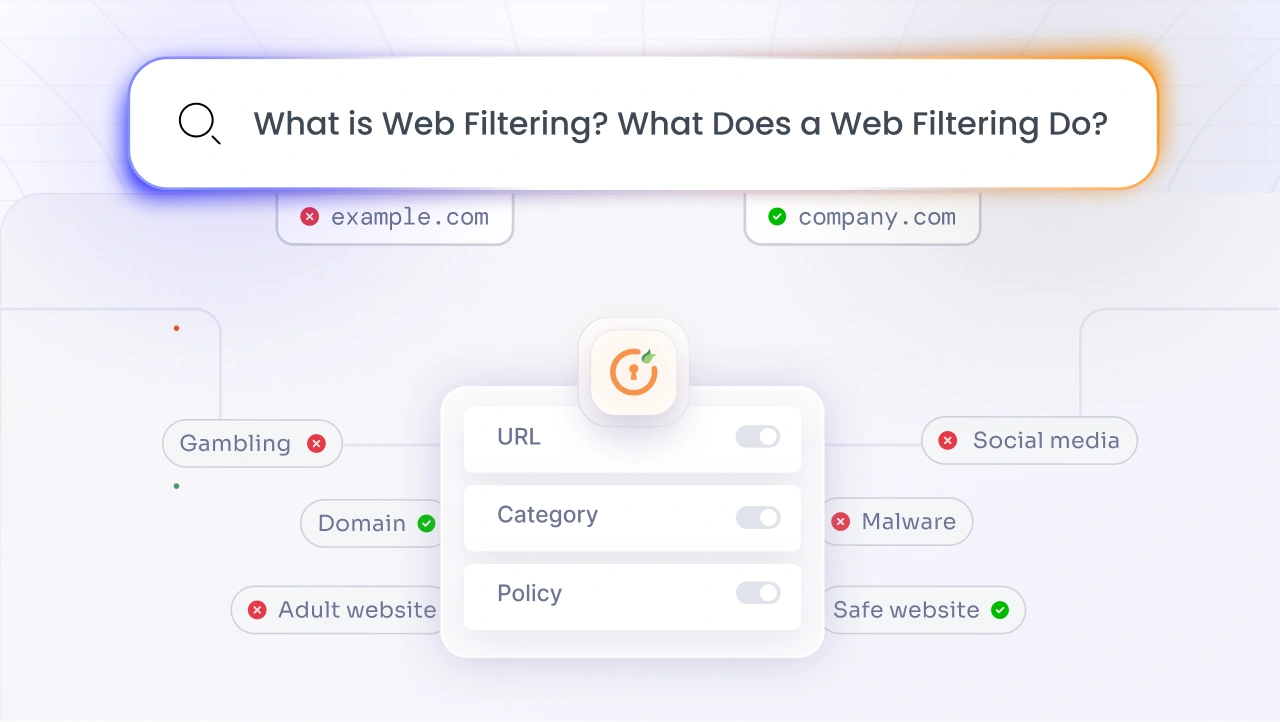
While firewalls focus on controlling network traffic, web filtering focuses on controlling what users can access on the internet. It works by analyzing websites, URLs, and content before allowing users to access them.
Instead of asking, “Is this traffic allowed?”, web filtering asks, “Should the user be allowed to visit this site?”
For example, if an employee clicks on a phishing link or tries to access a known malicious website, web filtering can block that request instantly. This makes web filtering especially useful for preventing:
- Phishing attacks
- Malicious downloads
- Access to unsafe or inappropriate websites
Unlike firewalls, web filtering operates at the user and content level, not just the network level.
Key Features of Web Filtering
Web filtering solutions provide capabilities that directly protect users from risky online behavior. Instead of focusing on network traffic alone, they control what users can access and how they interact with web content.
- URL-Based Blocking: Web filtering can block access to specific websites or URLs. It checks requested URLs against known databases of malicious or restricted sites and prevents users from accessing them if they are flagged. This helps stop phishing and malware at the entry point.
- Content Inspection: Beyond URLs, web filtering can analyze the actual content of web pages. This allows it to detect harmful scripts, suspicious behavior, or hidden threats, even if the website itself is not yet categorized as malicious.
- Category-Based Filtering: Organizations can block entire categories of websites based on policy. For example, access to gambling, adult content, or high-risk domains can be restricted to maintain security and productivity across the organization.
- Real-Time Threat Detection: Modern web filtering solutions continuously update threat intelligence. This allows them to identify and block newly discovered malicious websites in real time, reducing the risk of zero-day attacks.
- User-Level Policies: Web filtering can apply different rules based on users, roles, or devices. This means access policies can be customized. For example, stricter controls can be applied to certain departments while allowing more flexibility for others.
What are the Different Types of Web Filtering?
Web filtering is not a single technique. It uses different approaches depending on what needs to be controlled, whether that’s blocking known malicious websites, analyzing content, or restricting access based on user behavior.
Each type focuses on a different stage of how users access the internet. Some act early by blocking domains before a connection is made, while others inspect the actual content after a page loads.
Understanding these types helps clarify how web filtering works in practice and why multiple techniques are often used together.
1. URL Filtering
URL filtering is the most widely used and foundational approach to web filtering. It focuses on controlling access based on the address of a website rather than what is inside it. This makes it a practical starting point for organizations that want quick control over internet usage. It is especially useful for enforcing policies at scale, as entire categories of websites can be allowed or blocked without deep inspection of each page.
What it does: URL filtering blocks or allows access based on specific website URLs or predefined categories.
*How it works: The system checks the requested URL against a database of categorized websites. If the URL falls under a blocked category or is flagged as malicious, access is denied.
Use case example: An organization may block access to phishing domains, gambling sites, or other high-risk categories to reduce security risks and improve productivity.
Strengths: Simple to implement and highly effective for blocking known threats and restricted categories.
Limitations: It relies on existing databases, so newly created malicious websites may not be detected immediately.
2. DNS Filtering
DNS filtering operates at an earlier stage than most other filtering techniques. Instead of waiting for a website to load, it stops access at the domain lookup stage itself. This makes it one of the fastest ways to block threats, as the connection is never fully established. It is often used as a first layer of defense to prevent access to known malicious infrastructure.
What it does: It prevents users from accessing malicious or unwanted domains during the DNS resolution stage.
How it works: When a user tries to access a website, the system checks the domain name before translating it into an IP address. If the domain is flagged, the request is blocked immediately.
Use case example: Organizations use DNS filtering to stop access to malware-hosting domains or command-and-control servers used in cyberattacks.
Strengths: Stops threats early and works even before a connection is established, making it fast and efficient.
Limitations: It does not inspect the actual content of a website, so it cannot detect threats hidden within otherwise safe domains.
3. Content Filtering
Content filtering takes a deeper and more dynamic approach by analyzing what is actually present on a web page. Instead of relying only on known lists, it evaluates the behavior and structure of content in real time. This makes it particularly useful in identifying threats that are new, disguised, or not yet categorized in threat databases.
What it does: It inspects web content to detect harmful elements such as malicious scripts, suspicious behavior, or restricted material.
How it works: Instead of relying only on domain reputation, the system scans the page content in real time before allowing access. This helps identify different types of threats that may not yet be categorized.
Use case example: Blocking access to websites that contain hidden malware or harmful scripts, even if the domain itself appears legitimate.
Strengths: Effective against unknown or zero-day threats that traditional filtering methods may miss.
Limitations: Requires more processing power and may introduce slight delays compared to simpler filtering methods.
4. Keyword Filtering
Keyword filtering focuses on the intent behind what users are searching for or accessing. Instead of targeting specific websites, it looks at the presence of certain words or phrases within content. This makes it useful for enforcing internal policies, especially in environments where controlling the type of content accessed is more important than blocking specific domains.
What it does: It blocks access when predefined keywords match restricted terms within a page or query.
How it works: The system scans web pages or search queries for specific keywords and applies policies if those keywords are detected.
Use case example: Organizations may use keyword filtering to restrict access to sensitive or inappropriate content based on internal policies.
Strengths: Useful for enforcing organizational rules and maintaining compliance with content policies.
Limitations: Can sometimes block legitimate content if it contains flagged keywords, leading to false positives.
Firewalls vs Web Filtering Solutions
At a high level, both web filtering and firewalls are security tools, but they operate at completely different layers.
| Aspect | Firewall | Web Filtering |
|---|---|---|
| Primary Purpose | Controls network traffic | Controls user access to websites |
| Focus Area | Network-level security | User and content-level security |
| Decision Basis | IP address, ports, protocols | URL, content, categories |
| Threat Coverage | Network attacks, unauthorized access | Phishing, malicious websites, unsafe content |
| User Awareness | Not user-focused | Directly controls user activity |
| Works Outside Network | Limited | Yes, especially for remote users |
A firewall is designed to protect the network boundary. It decides which traffic is allowed in or out based on predefined rules. It is effective against external threats trying to enter the network.
However, it does not fully understand the intent behind user actions.
For example, if an employee clicks on a malicious link that appears legitimate, the firewall may allow the connection because it does not see anything suspicious at the network level.
This is where web filtering comes in. Web filtering focuses on user activity and content. It analyzes what the user is trying to access and blocks harmful or inappropriate websites before they load.
In simple terms:
- Firewalls protect the network
- Web filtering protects the user
- Both are essential, but they solve different problems.
When Should You Use a Firewall?
A firewall is necessary for protecting the network itself. It is designed to control traffic entering and leaving your systems, making it essential for:
- Blocking unauthorized access
- Protecting internal systems from external threats
- Securing network infrastructure
If your focus is on network-level protection, a firewall is the first line of defense. However, it should not be the only one.
When Should You Use Web Filtering?
Web filtering becomes essential in environments where user behavior can introduce risk. If employees frequently access the internet for work, there is always a chance of:
- Clicking on phishing links
- Downloading malicious files
- Visiting compromised websites
Web filtering helps reduce this risk by controlling what users can access.
It is especially useful for:
- Protecting remote or hybrid work environments
- Enforcing internet usage policies
- Preventing phishing and malware downloads
In short, if your security risks involve user activity, web filtering is critical.
Why Should Organizations Use Both Web Filtering and Firewalls?
The concept of defense in depth is foundational in cybersecurity. No single security solution can provide complete protection. Each layer addresses a different type of risk.
If you rely only on a firewall, your network may be protected from external threats, but users can still access harmful websites or fall for phishing attacks.
If you depend only on web filtering, users may avoid malicious sites, but your network could still be exposed to vulnerabilities that only a firewall can detect.
In both cases, gaps remain.
Cyber threats today are not one-dimensional. They target both systems and users. Combining web filtering and firewalls helps close these gaps by covering both network-level and user-level risks.
Here’s why using both helps to build a stronger security posture:
- Network + User Protection Together: Firewalls secure the network perimeter, while web filtering protects users from risky actions like clicking malicious links or downloading unsafe files.
- Better Phishing Protection: Firewalls may allow network traffic based on IP and port, but web filtering can block access to phishing URLs before users interact with them.
- Stronger Defense Against New Threats: Content filtering can detect suspicious behavior on newly created websites, even if they are not yet part of threat databases.
- Improved Remote Work Security: Web filtering continues to protect users outside the corporate network, filling the gaps where traditional firewalls have limited visibility.
- Compliance and Monitoring: Web filtering helps enforce internet usage policies and provides visibility into user activity, which is essential for meeting regulatory requirements.
When used together, web filtering and firewalls create a more complete and resilient security strategy that protects both your infrastructure and your users.
Strengthen Your Network Security with miniOrange Web Content Filtering
As organizations move beyond traditional perimeter-based security, protecting users has become just as important as protecting networks. This is where a web content filtering solution plays a key role.
Solutions like miniOrange Web Content Filtering help organizations control internet access, block malicious websites, and enforce security policies across devices and users.
By combining web filtering with authentication methods and identity-based controls, organizations can:
- Prevent access to harmful websites
- Reduce phishing risks
- Enforce secure browsing policies
- Protect users across remote and on-site environments
When integrated with miniOrange’s broader offerings like identity and access management solutions, web filtering becomes part of a unified security approach rather than a standalone tool.
Frequently Asked Questions
1. What is a web application firewall (WAF)?
A web application firewall (WAF) protects web applications by filtering and monitoring HTTP traffic between users and the application. It helps block attacks like SQL injection, cross-site scripting (XSS), and other application-layer threats that traditional firewalls may not detect.
2. What is a network firewall?
A network firewall is a security system that monitors and controls incoming and outgoing network traffic based on predefined rules. It acts as a barrier between trusted internal networks and untrusted external sources like the internet.
3. Does web filtering provide web content filtering capabilities?
Yes, web filtering includes web content filtering capabilities. It not only blocks access to specific websites but can also analyze page content to detect harmful elements, enforce policies, and prevent access to unsafe or inappropriate material.
4. How does a web filter work differently from a firewall?
A firewall works at the network level, deciding which traffic is allowed or blocked. A web filter works at the user and content level, controlling access to websites and analyzing web content to prevent risky behavior and threats.
5. Why is a firewall not a replacement for a web filter?
A firewall focuses on controlling network traffic based on IP addresses, ports, and protocols. It does not fully understand website content or user intent. A web filter, on the other hand, specifically controls what users can access online, making both tools necessary for complete protection.
Leave a Comment