

When someone visits an online store for the first time, the goal is usually simple: find a product and check out quickly.
But the process often changes the moment they reach checkout. Instead of completing the purchase, they are asked to create an account. A form appears asking for a name, email address, password, and sometimes additional details. Some shoppers go through with it, but many decide it’s easier to leave and buy later or somewhere else. Others hesitate because they are unsure how their personal information will be used, or worry about sharing their data with another website. For privacy-conscious customers, creating a new account can feel like an unnecessary risk.
For eCommerce businesses, this moment matters more than it seems. Account creation is one of the most common points where shoppers drop off. Customers want the path from product discovery to payment to feel quick and effortless. Every extra step increases the chance of abandonment.
Social login helps remove that friction.
With BigCommerce social login, customers can sign in using accounts they already have, such as Google, Facebook, Apple, or LinkedIn. Instead of filling out registration forms, they simply choose a familiar account and continue. From a data privacy and cybersecurity perspective, this reduces the number of separate credentials stored in your store’s system and can lower the risk associated with password reuse and weak passwords.
For merchants, this small change can make a noticeable difference. Login becomes faster, checkout feels smoother, and more visitors continue through the purchase flow instead of leaving midway.
At its core, social login removes one of the biggest interruptions between discovering a product and completing the purchase.
Why Social Login Matters for BigCommerce Stores?
Online shopping habits have changed over the years. Customers now expect convenience at every step of the buying process.
When a website requires users to create a brand-new account before making a purchase, it interrupts that convenience. Many users do not want to remember another password or spend time completing registration forms.
This is where one-click social login functionality makes a meaningful difference. Below are the key reasons why social login matters for BigCommerce stores.
1. Convenience for Customers
Social login removes the need for shoppers to create yet another account. Instead of filling out registration forms, they can sign in using a profile they already use every day.
In most cases, the login takes just a single click. Since many people are already signed in to services like Google or Facebook on their phones or laptops, access to the store happens almost instantly. The result is a smoother experience, especially for first-time visitors who simply want to continue shopping.
2. Increased Trust and Familiarity
Familiar login options also make a difference in how comfortable customers feel on a new website. When shoppers see familiar options such as Google or Apple sign-in, the process immediately feels more standard and reliable.
This sense of familiarity helps reduce hesitation, especially for first-time buyers who may not want to create a new account on a store they have just discovered.
3. Higher Conversion Rates
The checkout process is one of the most critical stages of an online purchase. Even small delays or complications can cause customers to abandon their carts.
Social login reduces the number of steps required to access the store. With fewer barriers between the customer and checkout, conversion rates often improve.
4. Accurate Customer Information
Social login can also improve the quality of customer data collected during registration. When users sign in through platforms like Google or Apple, basic details such as their email address are usually already verified by the provider.
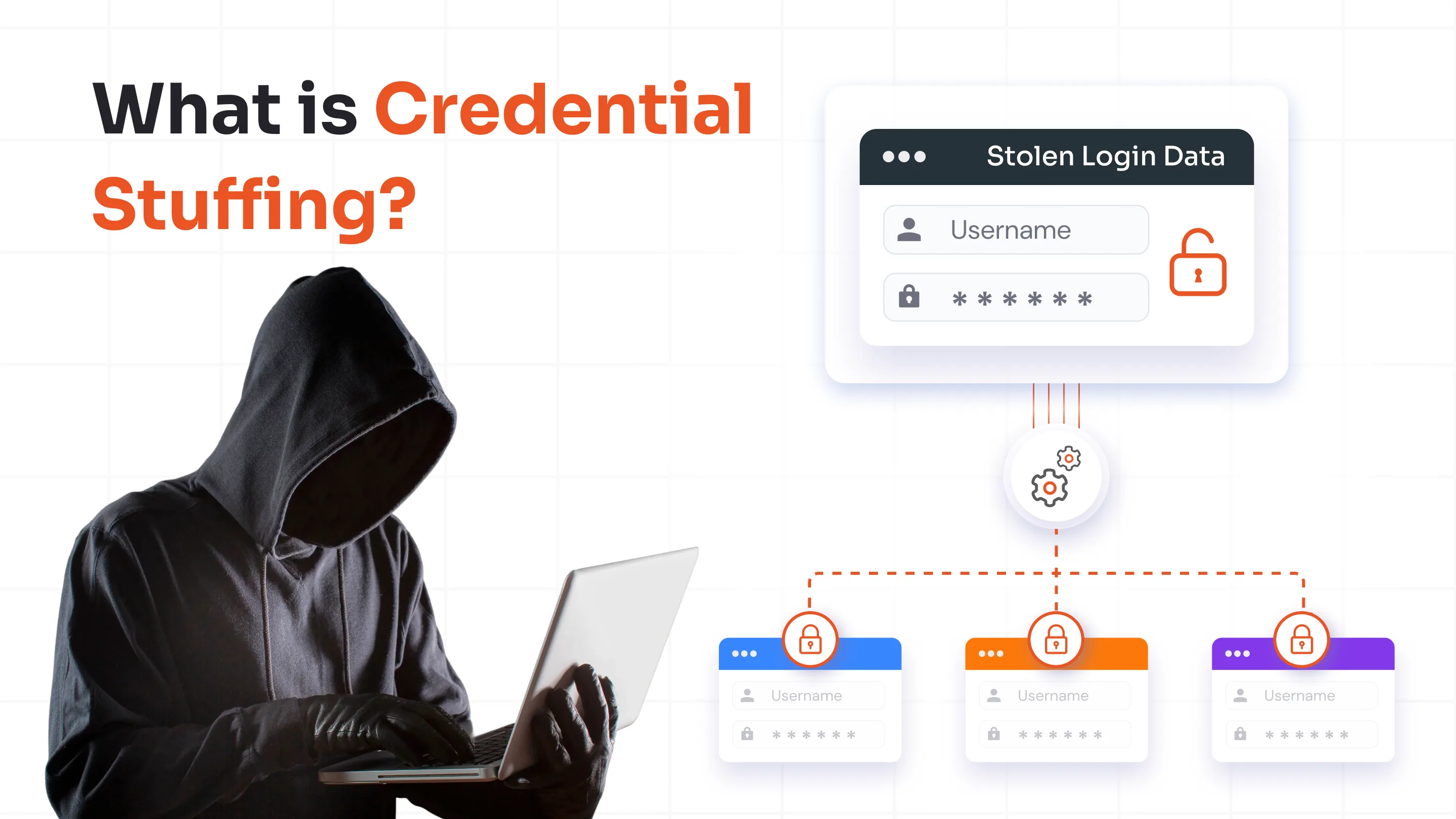
For merchants, this reduces the chances of incorrect or fake information being entered through manual forms. It can also help limit issues such as bot signups, fake account creation, or credential stuffing attacks that often target eCommerce login systems. When customer identities are verified through trusted providers, merchants are more likely to collect reliable information. This makes it easier to communicate with customers and run more effective marketing campaigns later.
Benefits of BigCommerce Social Login for Merchants
Social login is usually discussed from the customer’s perspective, but it also brings practical advantages for store owners. When login becomes easier for shoppers, it often improves several operational aspects of running an online store.
1. Faster Customer Acquisition
When signing up takes only a few seconds, more visitors are willing to create an account. Long registration forms often discourage shoppers, especially when they are visiting a store for the first time.
Allowing customers to use an existing Google, Facebook, or Apple account removes that barrier. In many cases, this leads to more visitors completing registration and continuing through the purchase process.
2. Better Customer Insights
Social login can also provide basic profile details that help merchants better understand who their customers are. Even simple information, such as verified email addresses or profile names, can help create a clearer view of the customer base.
With better customer information, merchants can personalize recommendations, improve communication, and run more targeted marketing campaigns.
3. Reduced Password Support Requests
Password-related problems are a common source of support requests in eCommerce stores. Customers forget passwords, request resets, or unintentionally create multiple accounts.
When shoppers log in through their social accounts, many of these issues disappear. Since authentication is handled through the external provider, merchants often see fewer password-related support tickets.
4. Stronger Security for Customer Accounts
Social login can also improve account security for both merchants and shoppers. Since authentication happens through trusted identity providers, fewer passwords are stored directly in the BigCommerce store, which reduces the risk of password theft.
Many stores also add multi-factor authentication on top of social login, ensuring that a stolen password alone is not enough to access an account. Some merchants even enable passwordless login options such as magic links or one-time passcodes, helping avoid weak or reused passwords entirely.
5. Competitive Advantage
In highly competitive markets, user experience can become a deciding factor. Stores that offer fast and convenient login options stand out from competitors that rely only on traditional registration methods. A smooth login process can encourage customers to return to the store in the future.
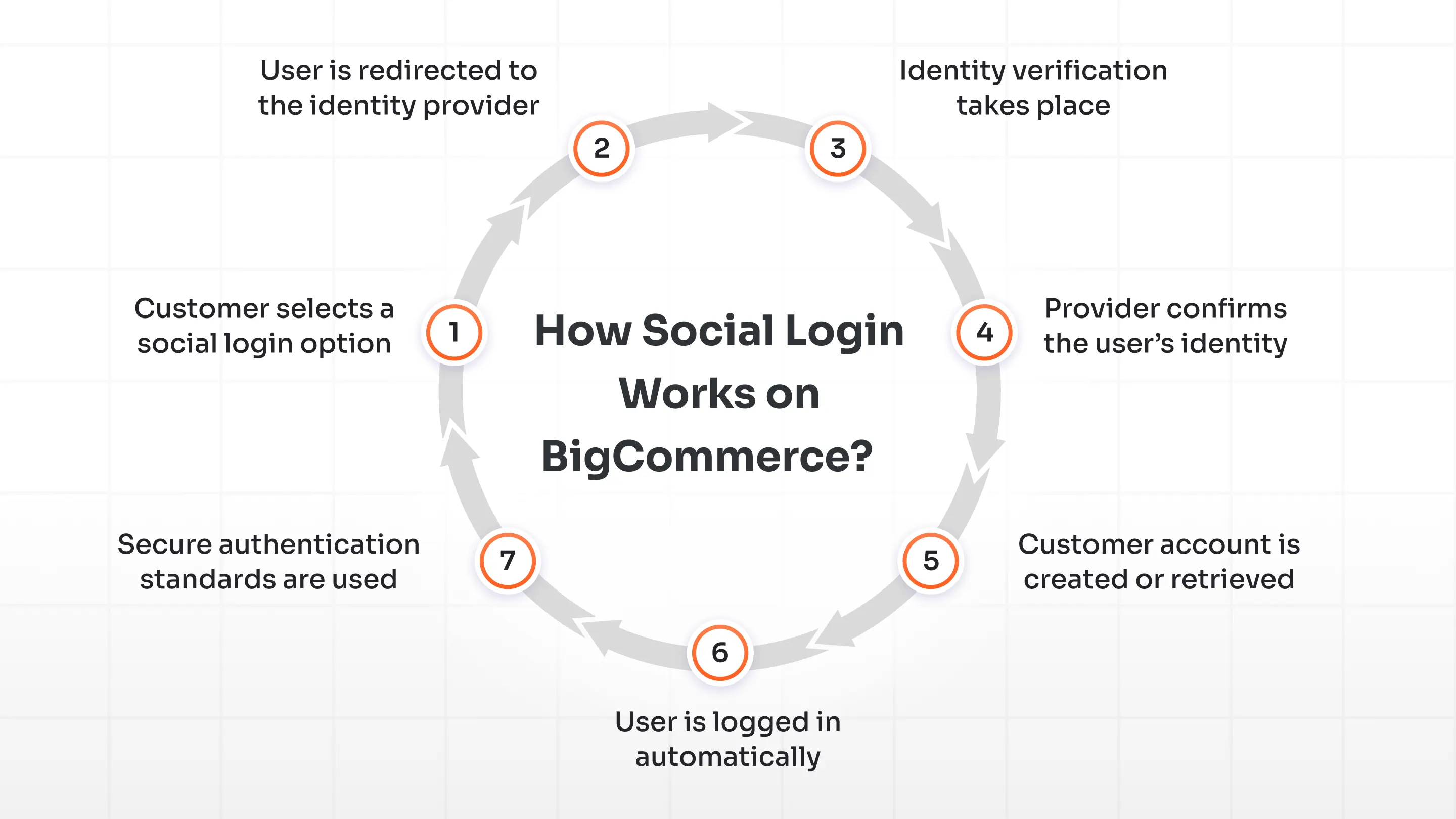
How Social Login Works on BigCommerce?
From the customer’s perspective, social login is very simple. They choose a familiar login option and are signed in within seconds. Behind the scenes, however, a secure authentication flow verifies the user’s identity.
Here’s what typically happens during the process:
1. Customer selects a social login option
The shopper clicks a button such as “Continue with Google” or “Sign in with Facebook” on the BigCommerce storefront.
2. User is redirected to the identity provider
The store temporarily redirects the user to the selected platform, which acts as the identity provider responsible for verifying the user’s identity.
3. Identity verification takes place
If the user is already logged in to that platform on their device, verification usually happens instantly. Otherwise, the provider asks the user to authenticate.
4. Provider confirms the user’s identity
Once verification is complete, the identity provider sends a secure response back to the BigCommerce store.
5. Customer account is created or retrieved
The store either creates a new customer account or retrieves the existing account linked to that social identity.
6. User is logged in automatically
The shopper is signed into the store and can continue browsing or proceed to checkout without filling out additional login forms.
7. Secure authentication standards are used
Most social login implementations rely on authentication standards such as OAuth 2.0. Instead of sharing passwords with the store, the identity provider verifies the user using encrypted authentication tokens.
How to Set Up BigCommerce Social Login?
Enabling social login on BigCommerce is straightforward when using a dedicated integration like the miniOrange Social Login app available in the BigCommerce marketplace. The application provides pre-built connections with popular identity providers and helps merchants add social login without complex development.
Step 1: Install the miniOrange Social Login App
Begin by installing the miniOrange BigCommerce Social Login app from the BigCommerce marketplace. After installation, the app becomes available inside the BigCommerce admin dashboard, where authentication settings can be configured.
The application already includes support for several social identity providers, allowing merchants to activate login options without building custom integrations.
Step 2: Configure Social Login Providers
Once the app is installed, merchants can select the social platforms they want to enable, such as Google, Facebook, Apple, or LinkedIn.
Each provider requires basic credentials, usually a Client ID or API key, generated from the provider’s developer console. These credentials are then added to the configuration panel inside the miniOrange app. The interface guides merchants through the process so the setup can be completed without extensive technical work.
Step 3: Customize Login Buttons on the Storefront
After the providers are configured, merchants can decide how and where social login buttons appear on the storefront.
With the miniOrange app, login buttons can be displayed in several common locations, including:
- Login pages
- Registration pages
- Checkout pages
Button styles, icons, and placement can also be adjusted to match the store’s design.
Step 4: Test the Social Login Flow
Before enabling the feature for customers, it is important to run a quick test of the login process. This ensures that each configured provider works correctly and that customers can sign in without interruptions.
Using the miniOrange app, merchants can verify that:
- Users can authenticate successfully through social providers
- New customer accounts are created correctly in BigCommerce
- Returning users can log in without issues
Once testing is complete, the BigCommerce social login feature can be enabled for customers and integrated directly into the storefront experience.
Best Practices for Implementing Social Login for BigCommerce
Enabling social login on a BigCommerce store can make the sign-in process much easier for shoppers. However, the impact depends on how the application is configured and presented to customers. A few practical adjustments can make social login far more effective in real shopping scenarios.
Below are several practices that help merchants get better results from BigCommerce social login.
1. Offer Multiple Social Login Options
Customers don’t all rely on the same platforms. Some shoppers use Google accounts, while others prefer Facebook, Apple, or LinkedIn. Providing several login options increases the chances that customers will find a method they already use regularly. When that happens, they can sign in immediately instead of filling out a registration form.
Most BigCommerce social login apps support providers such as Google, Facebook, Apple, LinkedIn, and Twitter. Offering three or four popular options usually covers the majority of users.
2. Keep Email Login Available
While social login is convenient, some customers still prefer creating an account with an email address and may simply not want to link a social profile with an online store. Keeping traditional login available ensures that every shopper can choose the method they feel comfortable using. Social login should complement the existing login process rather than replace it entirely.
3. Place Social Login Buttons Where Customers Expect Them
Placement plays an important role in whether shoppers actually use social login. If the option is difficult to find, many customers will default to filling out forms. On BigCommerce storefronts, social login buttons are commonly placed in areas such as:
- Customer login pages
- Account registration pages
- Checkout login sections
Visible placement reminds shoppers that signing in can be quick and simple.
4. Ensure Privacy Compliance and Transparency
Social login involves receiving certain customer information from identity providers. This usually includes details such as name and email address. Because of this, merchants should ensure their login process follows privacy regulations such as GDPR, PCI DSS, SAMA, and more.
Customers should understand what information is collected and how it will be used. Clear privacy policies and transparent data practices help customers understand how their information is used and build trust in the login process.
5. Optimize the Experience for Mobile Users
A significant portion of BigCommerce traffic comes from mobile devices. Social login buttons should therefore be easy to tap and clearly visible on smaller screens. Testing the login experience on smartphones and tablets helps ensure that mobile shoppers can sign in quickly without struggling with layout or placement issues.
6. Monitor Login Usage and Customer Behavior
After enabling social login, it is useful to observe which authentication methods customers actually choose. Many BigCommerce social login apps provide basic analytics that show usage trends.
Some stores may find that Google login is the most common, while others may see stronger adoption of Facebook or Apple login. Tracking this behavior helps merchants prioritize the providers their customers use most often.
Simplify BigCommerce Social Login with miniOrange
Adding social login to a BigCommerce store can make the sign-in process much easier for customers. The key is choosing a solution that integrates smoothly with the store and supports the identity providers customers already use.
The miniOrange BigCommerce Social Login app helps merchants enable social authentication without complicated setup. Customers can sign in using accounts they already have, such as Google, Facebook, Apple, or LinkedIn, instead of creating new login credentials.
Beyond basic social login, the platform also supports additional identity features. Merchants can enable Single Sign-On integrations, passwordless authentication, and Multi-Factor Authentication (MFA) to strengthen account security when needed.
miniOrange also provides tools that help merchants manage customer identities more effectively. Capabilities like progressive profiling allow stores to collect customer information gradually instead of asking for everything during registration, which keeps the login experience simple.
For BigCommerce merchants trying to reduce login friction, social login can make a noticeable difference. When customers can access a store quickly, they are more likely to continue browsing and complete their purchase.
With miniOrange, merchants can introduce secure authentication and flexible Identity and Access Management (IAM) without disrupting the shopping experience.
FAQs
What is BigCommerce social login?
BigCommerce social login allows customers to sign in to an online store using existing accounts from platforms like Google, Facebook, Apple, or LinkedIn instead of creating a new username and password. This simplifies the login process, speeds up checkout, and improves the overall customer experience.
Does BigCommerce support social login by default?
BigCommerce does not provide native social login functionality out of the box. Merchants typically enable BigCommerce social login using third-party apps or integrations from the BigCommerce marketplace, which allow customers to authenticate using popular social identity providers.
How does BigCommerce social login improve conversion rates?
BigCommerce social login reduces friction during registration and checkout by eliminating the need for customers to create new accounts or remember passwords. A faster login process encourages more shoppers to complete their purchases, which can help reduce cart abandonment and improve overall conversion rates.
Leave a Comment