
Enterprises on average manage 275 SaaS applications, in addition to numerous data sources and devices, making identity and access management (IAM) more crucial than ever. IAM checks who users are and gives them only the access they need, stopping hackers from breaking in. The primary principle that IAM works on is the right user, right resource, and right time.
It fights common threats, such as stolen passwords and risky insiders, with simple tools like multi-factor authentication. Rules like GDPR now demand strong controls, and IAM helps meet them easily. Security teams use IAM to keep things safe, cut risks, and run smoothly in busy hybrid setups.
Changing Dynamics of Identity Management in 2026
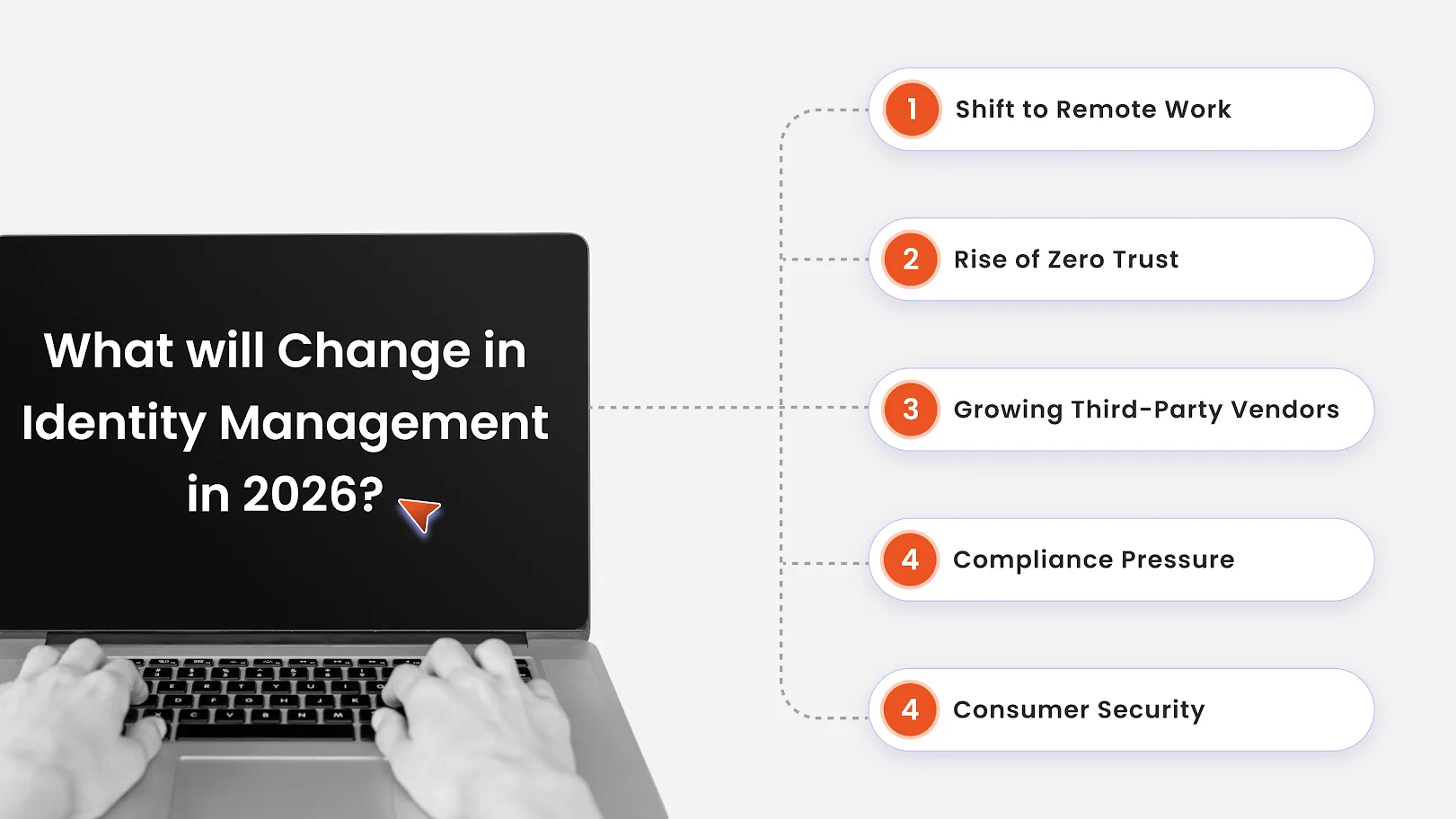
Shift to Hybrid and Remote Work
The move to hybrid and remote work means people log in from home networks, personal devices, and multiple locations. IAM now has to verify users and devices continuously and deliver secure access to SaaS, VPNs, and on-prem apps through cloud IAM. Security teams need stronger controls like MFA, device checks, and context-based policies to keep this distributed workforce safe.
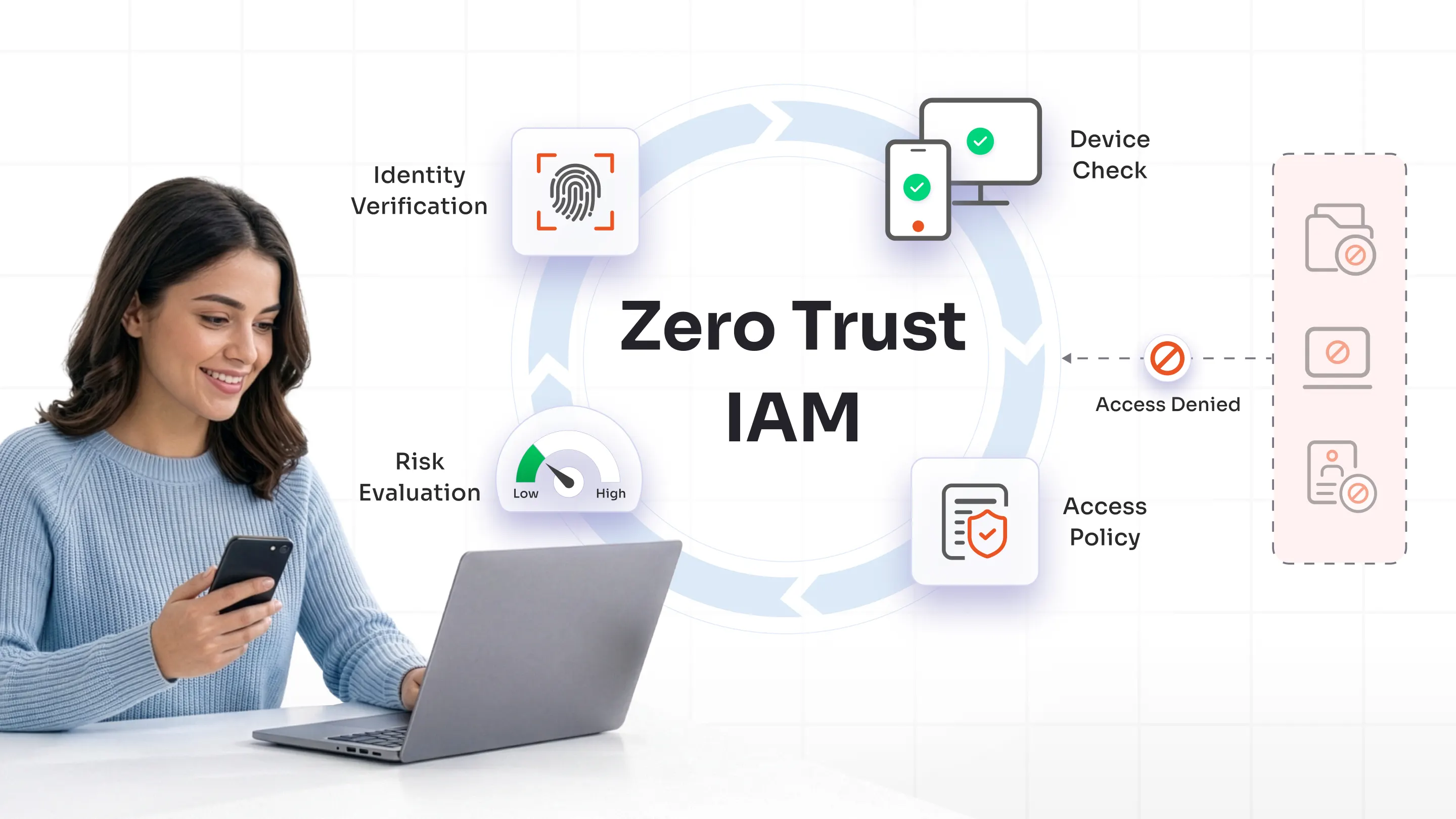
Rise of Zero Trust and Adaptive Authentication
Zero trust replaces the old “trusted network” model with “never trust, always verify.” IAM uses adaptive MFA and conditional access to assess each login based on risk signals such as location, device, behavior, and time of access. Low-risk users get a smooth experience, while high-risk actions trigger extra verification or are blocked entirely.
Growing Third-Party and Vendor Risk
Organizations now depend on partners, contractors, and suppliers who often need deep access to systems and data. This increases risk if vendor identities are not managed tightly. Modern IAM must provide dedicated vendor access management, just-in-time access, and clear offboarding to stop dormant or overly broad third-party accounts from becoming an attack path.
Regulatory and Compliance Pressure
Privacy and security laws like the DPDP Act, GDPR, HIPAA, and PCI DSS demand strict control over who can access personal and sensitive data. IAM systems help by enforcing least privilege, maintaining detailed access logs, and generating audit reports. This reduces manual effort for compliance teams and lowers the risk of fines, breaches, and legal issues.
Consumer IAM and Digital Experience
On the customer side, businesses need to secure logins without adding friction. Consumer IAM (CIAM) supports features like social login, passwordless authentication, and step-up verification only when risk is high. This helps deliver fast, smooth onboarding and consistent user experiences across web and mobile apps, while still protecting accounts and personal data.
15 Things Security Teams Must Check Before IAM Adoption
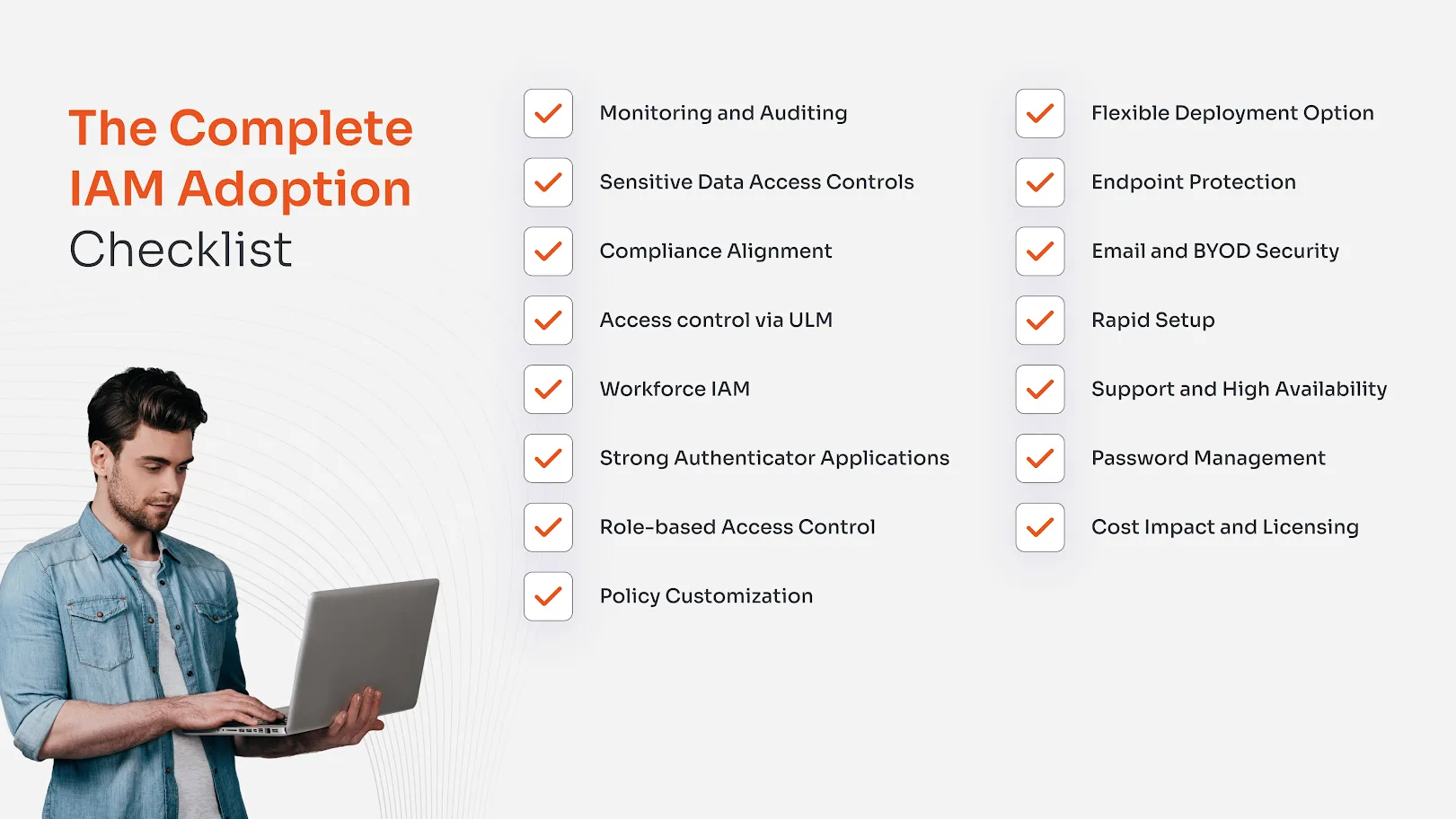
1. Monitoring and Auditing
Strong monitoring and auditing should be at the top of your IAM checklist. It lets security teams see who accessed what, when, from where, and whether that behavior looked normal or risky. Continuous logging and real-time alerts help spot account takeover, privilege abuse, and policy misconfigurations early.
Look for identity analytics, clear dashboards, and easy export to SIEM tools. The solution should support configurable alerts for high-risk events like failed logins, privilege changes, or access to sensitive systems. This gives teams the visibility needed to react fast and meet audit and forensics needs.
2. Sensitive Data Access Controls
Next, you need tight control over who can touch sensitive data such as Personally Identifiable Information (PII), financial records, or health information. IAM must enforce least privilege and fine-grained access policies so only the right roles and users have access to high-impact systems.
Support for data-aware policies, attribute-based rules, and strong approvals around high-risk actions is crucial. Combined with regular access reviews, this reduces insider risk and limits damage if an account is compromised. Strong controls here directly support privacy, compliance, and breach impact reduction.
3. Compliance Alignment
Compliance alignment is a must-have, not a nice-to-have attribute. IAM should help you meet frameworks like GDPR, CCPA, HIPAA, and PCI DSS by enforcing access controls and providing clear evidence.
Look for built-in reporting for audits, clear access logs, and support for consent and data-subject rights processes where relevant. When IAM maps neatly to regulatory requirements, you spend less time preparing for audits and reduce the risk of fines, gaps, and non-compliance findings.
4. Access control via ULM
User lifecycle management (ULM) ensures users get the right access on day one and lose it the moment they leave or change roles. It connects HR, IT, and business apps so provisioning and deprovisioning happen automatically.
This reduces orphaned accounts and “access creep” over time. Look for automated workflows, role-based templates, and integrations with HRIS and directories. Strong ULM cuts manual effort, closes security gaps, and improves both security and user experience.
5. Workforce IAM and Third-Party Security
Employees, contractors, and vendors all need controlled access, but they carry very different risks. The workforce IAM should let you define clear policies for each type, with time-bound and scope-bound access for external users.
Key features include separate identity stores or groups for contractors, approval flows for vendor access, and quick offboarding. This avoids long-lived external accounts and limits what third parties can see or do, which is critical for reducing supply chain risk.
6. Strong Authenticator Applications
Authentication is your first line of defense. The platform should support MFA, authenticator apps, hardware keys, and ideally passwordless login for high-risk accounts. This blocks most basic credential-based attacks.
Check support for major business apps, SSO, and standards like FIDO2/WebAuthn. Also, ensure the experience is simple for users and admins, with backup methods and self-service password reset capabilities. Good authentication balances strong security with low friction.
7. RBAC for Employee Access Governance
Role-based access control (RBAC) is essential for managing employee permissions effectively, preventing operational errors, and privilege creep. By aligning access strictly to job roles, organizations eliminate ad-hoc permissions and conflicting role combinations that lead to unauthorized data exposure.
The IAM solution should enable dynamic role models, segregation of duties (SoD) enforcement, and automated certification campaigns tied to HR systems. When implemented correctly, RBAC ensures employees only access resources needed for their duties, streamlining onboarding/offboarding and supporting compliance with least privilege principles.
8. Policy Customization
Every organization has unique processes and risk appetite. Your IAM must allow custom policies rather than only generic templates.
Look for support for both role-based and attribute-based controls (e.g., location, department, device), conditional access, and context-aware rules. Flexible policies let you secure sensitive scenarios tightly while keeping everyday access smooth.
9. Flexible Deployment and Integration
An IAM platform must fit into your current stack. It should support cloud, on-prem, and hybrid models, plus standard protocols (SAML, OIDC, SCIM, LDAP, APIs).
Smooth integration with HR systems, directories, business apps, SIEM, and EDR tools is vital. This ensures you get consistent identities and policies across environments and can scale without re-architecting everything.
10. Endpoint Protection
Identity alone is not enough if the device is compromised. IAM should integrate with device and endpoint management tools to consider device health in access decisions.
Features like blocking rooted/jailbroken devices, enforcing OS versions, or tying access to MDM enrollment add strong protection. This is especially important for laptops, mobiles, and IoT devices used outside the corporate perimeter.
11. Email and BYOD Security
Email accounts and personal devices are frequent entry points for attackers. Your IAM strategy should protect email identities with MFA and conditional access, and support secure use of BYOD.
Look for integration with email platforms, mobile app management, and controls to limit data exposure on personal devices. This reduces the risk of phishing-led takeovers and data leakage from lost or stolen phones.
12. Rapid Setup and Ease of Use
Security that is hard to deploy or use often gets bypassed. Choose an IAM that offers guided setup, clear workflows, and templates for common use cases.
A simple admin experience and intuitive user flows reduce support tickets and speed adoption. Faster rollout means you close security gaps sooner and get quicker value from your investment.
13. Support and High Availability
IAM is mission-critical; if it goes down, users may not be able to work. Strong SLAs, high availability, and 24/7 support are important.
Look for clear uptime commitments, global redundancy, and proven incident response. Good vendor support helps you handle outages, upgrades, and integrations with less risk to day-to-day operations.
14. Password Management and Rotation
While passwordless is growing, passwords still exist in many systems. Centralized password management and rotation help reduce risk from weak or reused credentials.
Features may include a secure vault, automatic rotation for shared or service accounts, and strong password policies. This is especially useful during transition phases where legacy systems cannot yet adopt modern auth.
15. Cost Impact and Licensing
Finally, evaluate pricing, licensing models, and total cost of ownership. An IAM solution that meets your needs but is too expensive to scale will cause problems later.
Consider per-user vs. per-app pricing, add-on modules, and hidden costs such as professional services. Also, weigh the savings from reduced breaches, audits, and manual work to see the true ROI.
Scale IAM with miniOrange
miniOrange IAM helps security teams scale without adding complexity by combining SSO, MFA, user provisioning, and AD management in a single, centrally managed platform. It supports cloud, on-prem, and hybrid deployments, so you can plug it into existing directories, HR systems, and business apps with standard protocols like SAML, OAuth, OIDC, and SCIM. Our PAM capabilities can significantly reduce insider threats, control access to sensitive data, monitor and audit logs, and so much more.
The platform’s adaptive MFA, risk-based policies, and strong access governance make it easier to enforce zero trust, secure a large SaaS estate, and protect privileged accounts. Low-code setup, pre-built connectors, and audit-ready reporting further reduce deployment time, administrative effort, and compliance overhead.
Leave a Comment