
A hardware token, also known as a security token or hard token, is a small physical device used to verify users' identities. The security token is one of the popular authenticator methods, typically used in either Two-Factor Authentication (2FA) or Multi-Factor Authentication (MFA).
There is a growing need for hardware tokens, particularly USB tokens, due to the surge in cloud adoption and the rise of the remote work culture. In fact, by 2035, the USB tokens segment is projected to hold 42.9% market share due to their tamper-resistant nature and easy deployment in legacy or offline environments.
In this blog, we will take a deep dive into comprehending hardware security tokens, their types, how they work, and the pros and cons of hard tokens.
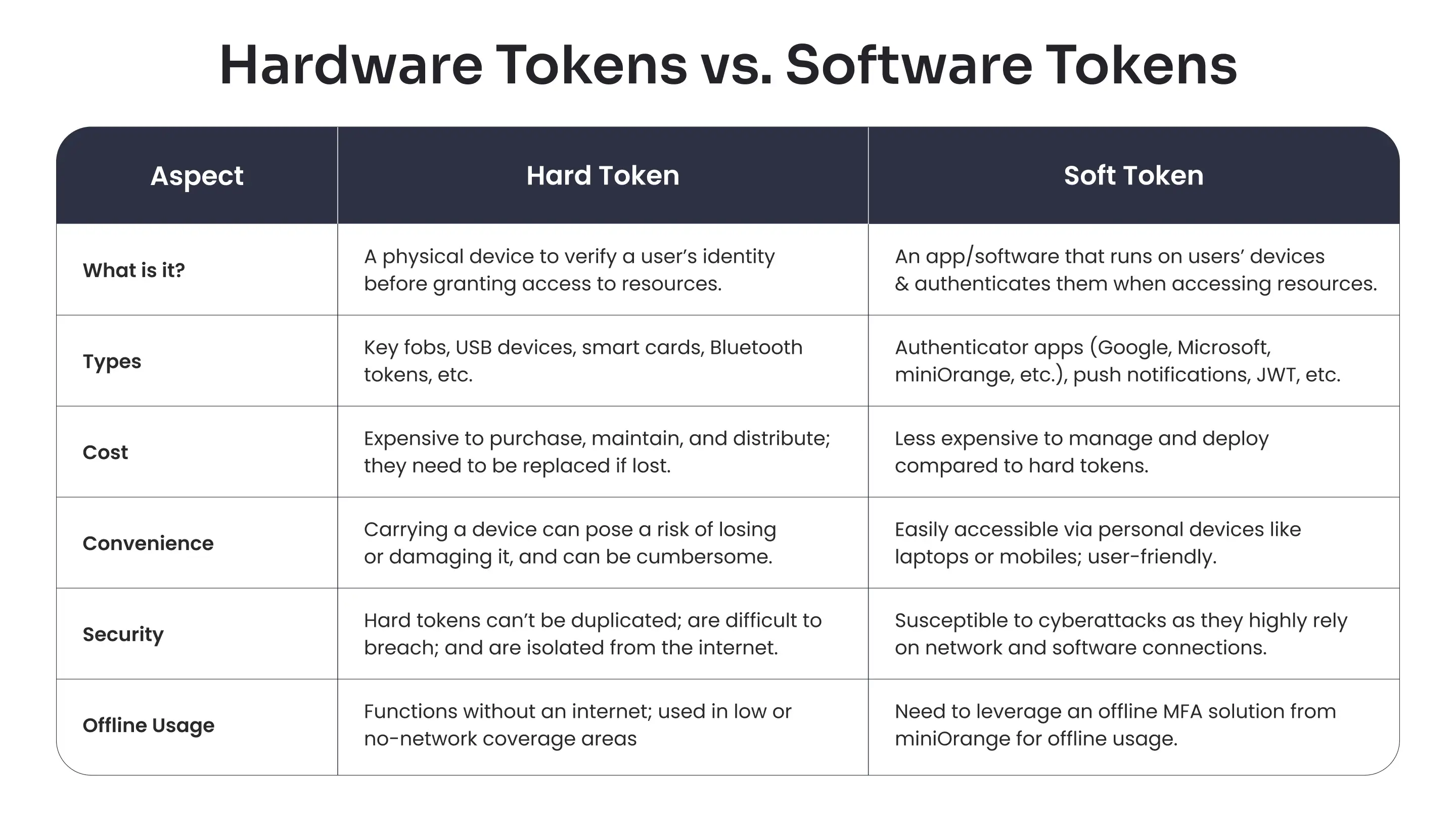
Hardware Tokens vs. Software Tokens
We’ve already understood what exactly a hardware token is, but how are they different from software tokens? Let’s explore.
How a Hardware Token Works?
Hardware security tokens offer an extra layer of security for authenticating users during the login process. Usually, an OTP or TOTP is produced over the device, and the users input the code for verification.
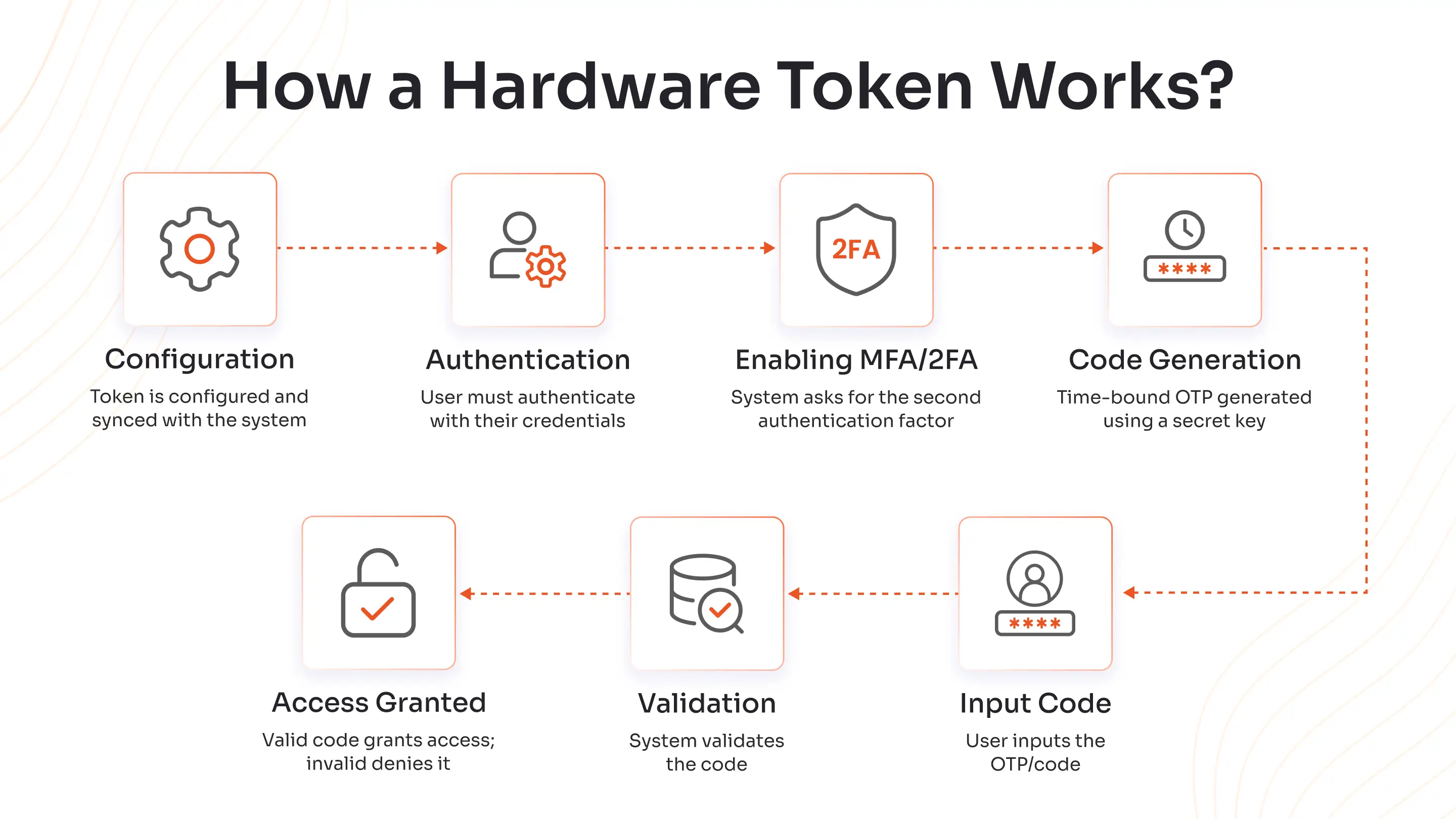
The hard tokens work in the following way:
- Configuration: During the initial setup process, the hard token is configured and synced with the system (network or server). The token includes a unique seed value or a secret key to create different codes every time a user tries to log in to the system.
- Authentication: When a user tries to gain access to a secured resource of a system, they’re asked to enter their credentials, just like any other system.
- Enabling MFA/2FA: Once the user’s credentials are confirmed, the system asks for the second authentication factor, which is the code generated by the hardware security token.
- Code Generation: The device uses the seed value or secret key, along with a cryptographic algorithm, to create a code, such as TOTP or an OTP. The token usually combines the secret key with the current time to produce a unique code that’s valid for a short duration (30 to 60 seconds).
- Input Code: The user inputs the generated code into the system.
- Validation: The code is validated by the system, also check whether the code is valid within the stipulated timeframe.
- Access Granted: If the code matches the expected code, access is granted. In case the code is invalid or expired, access is denied, and the user has to try again.
By following the above steps, the hardware token ensures that only valid users gain access to the resources, preventing unauthorized entries, including potential cybersecurity attacks.
Core Categories of Hardware Security Tokens
There are three major categories of hard tokens, which are as follows:
1. Connected Tokens
Connected tokens require a physical link, like sliding a card or dongle into a reader. Once connected, the token sends authentication details directly to the system, meaning you won’t have to enter codes manually.
These are popular in secure corporate and government settings for hassle-free access.
2. Disconnected Tokens
Disconnected tokens are standalone devices that display one-time codes for users to enter manually.
There’s no need to plug them in or pair them; perfect for remote logins or locations with limited connectivity. Their independence from computers and networks keeps users’ login process flexible and secure anywhere.
3. Contactless Tokens
Contactless tokens use wireless technologies like NFC or Bluetooth, allowing users to authenticate themselves by simply tapping or bringing the token near their device.
Think wireless keychains or cards that make the login process almost magical; ideal for frictionless access at home or work.
What are the Types of Hardware Security Tokens?
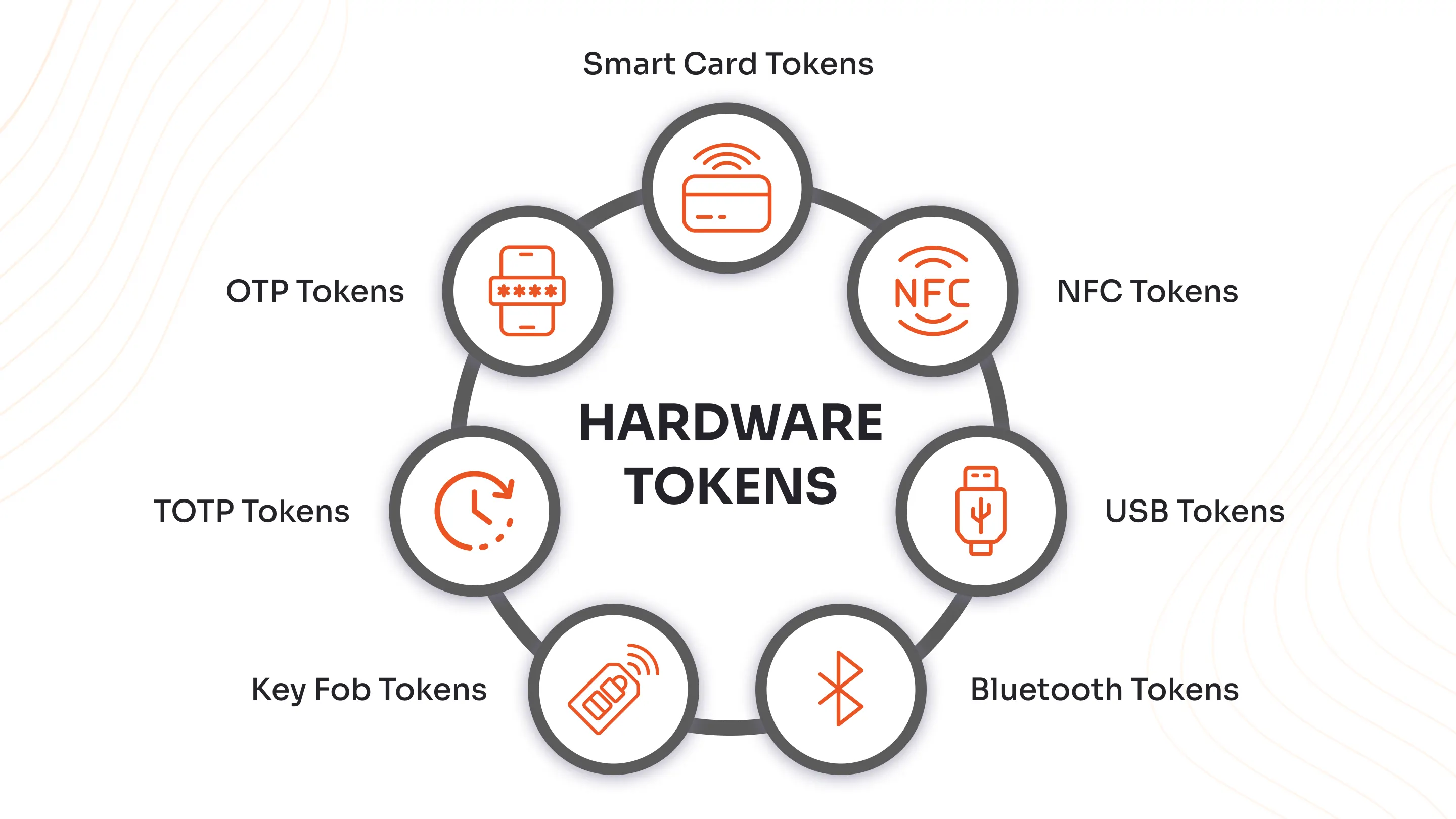
Hardware security tokens come in various shapes and styles, each designed to make secure access easy and reliable for users across different environments.
Here’s a user-friendly guide to the main types, including value-added insights on how they work and why they matter:
1. Key Fob Tokens
Key fob tokens are small, portable devices, and are designed to fit in a keychain. They have a display screen or a button at the bottom that shows the login code (OTP/TOTP).
Whenever you need to authenticate, you glance at your fob’s screen and type in the code. Their portability and simplicity make them ideal for everyday use and help prevent unauthorized access even if your password is leaked.
2. OTP Tokens
OTP (One-Time Password) tokens generate special codes (usually numeric) that can only be used once, kind of like a disposable digital key. The users enter this code into the system to gain access to resources or accounts.
These tokens greatly increase security because even if someone intercepts a code, it can't be reused. OTP tokens are effective in banking, enterprise login, and high-assurance situations where data protection is critical.
3. TOTP Tokens
TOTP (Time-Based One-Time Password) works similarly to OTP, but it combines a secret key with the current time to create codes that expire within seconds.
This makes it nearly impossible for hackers to hijack a login session, since the short-lived codes vanish quickly. TOTP tokens show real-time codes right on their screens for manual entry.
4. Smart Card Tokens
Smart card tokens look just like a credit card but have an embedded microchip that is capable of performing cryptographic functions.
Slide the card into a card reader, which is connected to another device or a computer, and enter a PIN, letting the chip handle complex cryptographic checks behind the scenes. Smart cards are valued for roles that demand the highest assurance, like healthcare and finance.
5. NFC Tokens
NFC (Near Field Communication) tokens operate via simple short-range wireless technology. Simply tap or bring them close to an NFC-compatible device, such as a smartphone or card reader, and you’re in, a fast and hands-free method.
These tokens combine convenience with high-tech security for effortless authentication in the office or on the go.
6. USB Tokens
USB tokens plug directly into your computer’s USB port and store cryptographic secrets or digital certificates securely. Some, like YubiKey or Token2 programmable TOTP tokens, may even support fingerprint authentication for an extra layer.
Just plug in the USB token, unlock, and access your device or service; there are no connectivity worries, only instant protection for critical accounts.
7. Bluetooth Tokens
Bluetooth tokens wirelessly connect to your device, providing authentication automatically, sometimes by simply being nearby, or by using biometrics for identity verification.
There is no need to type anything in; pairing the token with your laptop or phone delivers a quick, convenient login, perfect for busy professionals.
Pros and Cons of Hardware Security Tokens
Hardware tokens can have both benefits and drawbacks. These are explained below:
Pros of Using Hard Tokens
Security tokens offer several advantages over traditional securities, bringing innovation and efficiency to the investment landscape.
- Simplified User Management: Organizations use hardware tokens to manage user access speedily across all levels, and delete and update codes faster.
- High Security: The hardware security tokens offer a second factor authentication, an extra layer of security to reduce the risk of unauthorized access, augmenting security levels on devices, systems, and servers.
- Works Offline: Hard tokens produce codes both in online and offline conditions, making it a go-to solution for remote workers, travellers, or regions with network fluctuations.
- Offers Phishing Resistance: OTP and TOTP codes created by devices offer an additional authentication solution, making it difficult for hackers to steal or intercept codes.
- Maintains Trust: Builds trust amongst users and organizations because they cannot be hacked easily, are used everywhere in the world (even in offline conditions), and can be connected over all kinds of devices.
- Better Workflow: They make the authentication process predictable as the employees follow the same method. This decreases confusion during time-sensitive tasks.
- Complete Hardware Isolation: The private keys stay inside the token; malware doesn’t reach them, keeping them completely isolated.
Cons of Using Hard Tokens
The drawbacks of hard tokens are explored and briefly explained below:
- Data Breaches: Hard tokens are difficult to hack, but if compromised, they can pose serious security threats.
- Costly Method: Organizations have to pay for purchase, installation, maintenance, and support, which isn’t the case for software tokens.
- Loss of Hardware Token: Tokens like USB, smart cards, or NFC can be easily lost or stolen, making them a huge risk for the organizations using them.
- Limits to Integration: Hard security tokens may not be compatible with all systems, devices, or platforms.
Enhance Your Security with the miniOrange MFA Solution
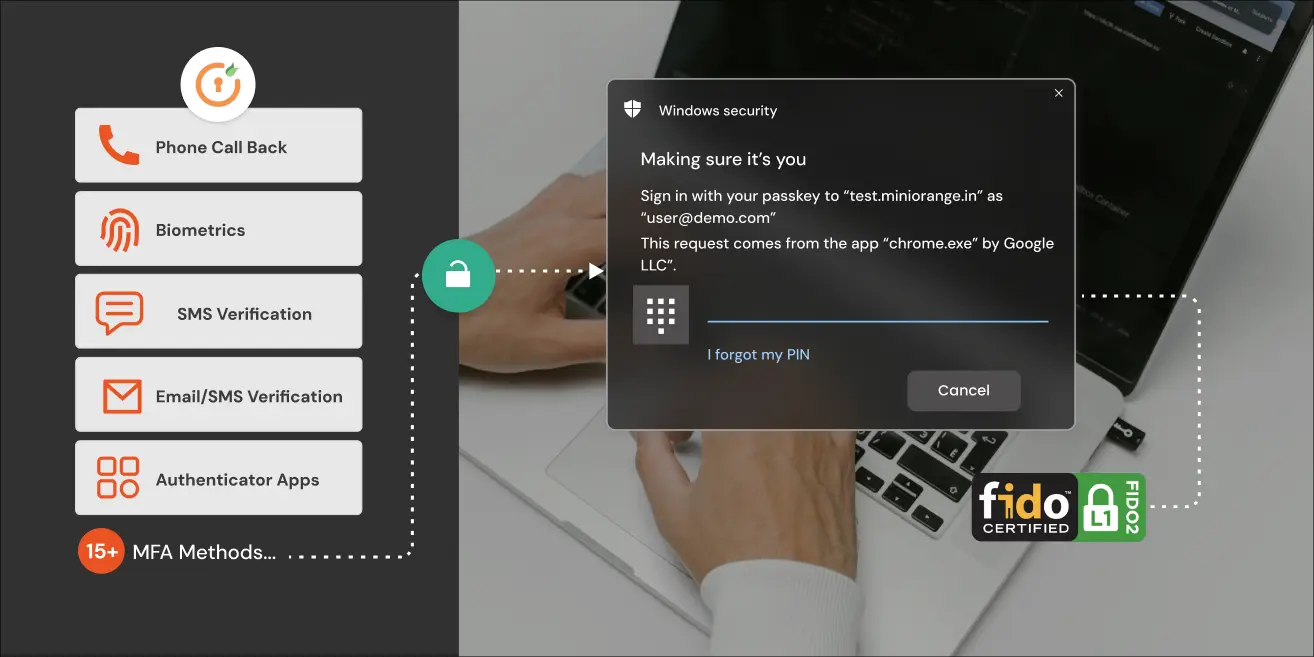
Amplify your organization’s security with the miniOrange MFA Software, which offers over 15 flexible authentication methods, including OTPs, hardware tokens, biometrics, and push notifications to keep your accounts, data, and resources safe from threats like phishing and credential theft.
Adaptive policies adjust the authentication process based on user location, device, and risk level, providing strong protection without disrupting productivity. With simple integration for VPNs, apps, and servers, and compliance with standards like GDPR and HIPAA, miniOrange makes security strong and hassle-free for every user.
To know more about the dynamic miniOrange MFA products or our Identity and Access Management (IAM) offerings, please connect with us, and don’t forget to check our flexible pricing options. In case you find our products useful, sign up for a free 30-day trial.
FAQs
How do I set up a hardware token?
To set up a hardware token, simply enroll it with the organization’s system. Usually, this involves pairing the token with your user account and activating it via a portal, often needing a code for verification.
What is the difference between a hardware token and a security key?
A hardware token usually generates an OTP, while a security key, like YubiKey, follows standards such as FIDO2 and uses cryptography to authenticate via USB, NFC, or Bluetooth, offering a phishing-resistant sign-in experience.
What is a USB hardware token?
A USB hardware token is a physical device that can be plugged into your computer’s USB port, and it stores secret keys securely and verifies users’ identities.
How does a hard token improve third-party risk management?
Hard tokens offer tamper-resistant authentication, decreasing the risk of credential compromises among third-party vendors and users.
What is the lifespan of a security token?
The lifespan of a security token lasts from 3 to 7 years, depending on the battery life.
What are the examples of security tokens?
Examples of security tokens include familiar devices like car remotes, which use secure wireless signals to authenticate and unlock your vehicle. Other common examples are YubiKey, RSA SecurID, smart cards, and programmable TOTP tokens like Token2.
What happens if a hardware token is lost?
If you lose a hardware token, then notify the security or the IT team immediately, so they can deactivate it to prevent misuse, and help with the re-enrollment or issuing a replacement.
How to use a hardware token?
Always carry the hardware token with you, either plug it in, tap it, or read the OTP from its display and enter it.
Leave a Comment