

Attackers figured out a long time ago that encrypting your files is only half the job. Taking out your ability to recover without paying, that's the real play. Veeam’s global survey of 1,300 organizations found that ransomware attacks targeted backup repositories in 89% of cases, proving that attackers now focus on backups as much as primary data.
Offline backups are the standard response to counter this number. Physically disconnected drives can't be encrypted over a network. But having one isn't enough. Most organizations set one up, check the box, and assume the hard part is done.
This blog, therefore, covers what those gaps are, what compliance frameworks actually say about offline backup, protection, and what access controls have to be in place before an offline backup can do its job.
What is a Backup?
A backup is a copy of your data saved at regular intervals so your organization can recover from data loss. Ransomware attacks, hardware failure, accidental deletion, natural disaster, etc. Backups are the recovery mechanism for all of it.
The baseline standard most security teams follow is the 3-2-1 rule: 3 copies of your data, stored on 2 different media types, with 1 copy kept offsite. Many frameworks have updated this to 3-2-1-1, adding a 4th requirement: 1 offline or immutable copy.
The 3 core backup types are full (a complete copy every time), incremental (only what changed since the last backup), and differential (only what changed since the last full backup). Most organizations use a combination. A common setup is a full backup weekly with incremental backups running daily.
What is an Offline Backup?
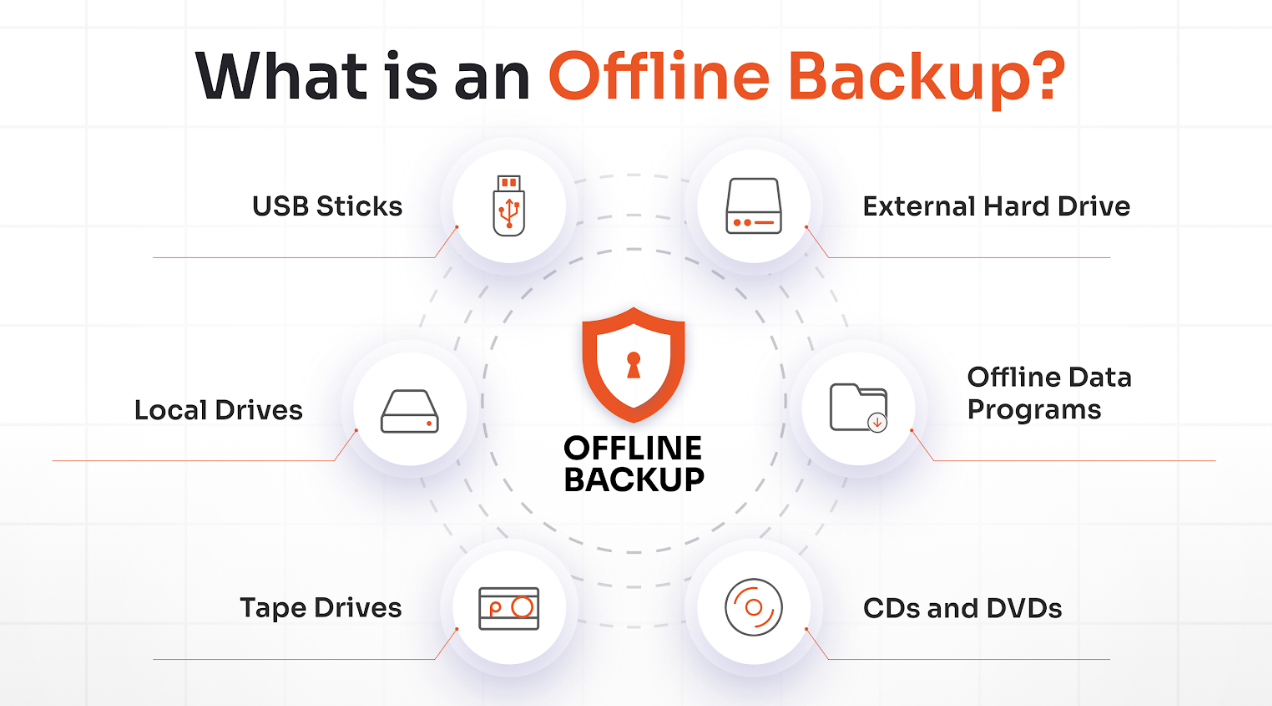
An offline backup is data stored on a device that's physically disconnected from any network. The common thread between external hard drives, LTO tape cartridges, USB drives, and offline NAS devices is that the storage medium gets unplugged after the backup completes.
Because it's physically separated, ransomware can't reach it through the network paths it used to compromise your systems in the first place.
Offline Backups vs. Air-Gapped Backups vs. Immutable Backups
These 3 terms get used interchangeably in the industry. But they shouldn't.
| Aspect | Offline Backup | Air-Gapped Backup | Immutable Backup |
|---|---|---|---|
| Core idea | Disconnected after backup | Isolated from the production network | Cannot be changed/deleted for a set time. |
| Network connection | Only during backup/restore | None or strictly segregated | Usually stays online/connected |
| Protection mechanism | Physical/logical disconnection | Physical/logical air gap | WORM (Write once, read many) |
| Change/delete risk | Editable when reconnected | Editable by authorized admins only | Not editable/deletable until retention expires |
| Ransomware resilience | Strong, except when connected | Strong against remote attacks | Strong even with stolen admin credentials |
| Typical use case | General 3-2-1 or 3-2-1-1–0 backups for SMBs and enterprise | Critical infrastructure, high security environments | Cloud/enterprise ransomware & insider threat defence |
| Main drawback | Manual handling; risky when plugged in | Higher cost & complexity | Depends on correct retention; still needs access control |
Most organizations need at least one offline backup at a minimum. But high-risk environments should layer all 3.
Pros and Cons of Offline Backups
The main advantage of offline backups is that they are genuinely unreachable through network attacks. No internet dependency either, so your backup works when connectivity doesn't. But they also come with limitations like longer restore times and physical vulnerabilities.
Pros of Offline Backups
- Strong protection from cyber threats
- Full ownership and a predictable one-time cost
- No dependency on the internet to access files
Cons of Offline Backups
- Physical risk and hardware failures
- Manual effort for syncing and human error
- Slower restores and limited storage capacity
Why Offline Backups Still Get Compromised
An offline backup protects your data from remote encryption. It doesn't protect the window before it disconnects, the data it captured before a ransomware attack was detected, or the software console that manages it. Understanding these gaps is what shapes every security control strategy that follows.
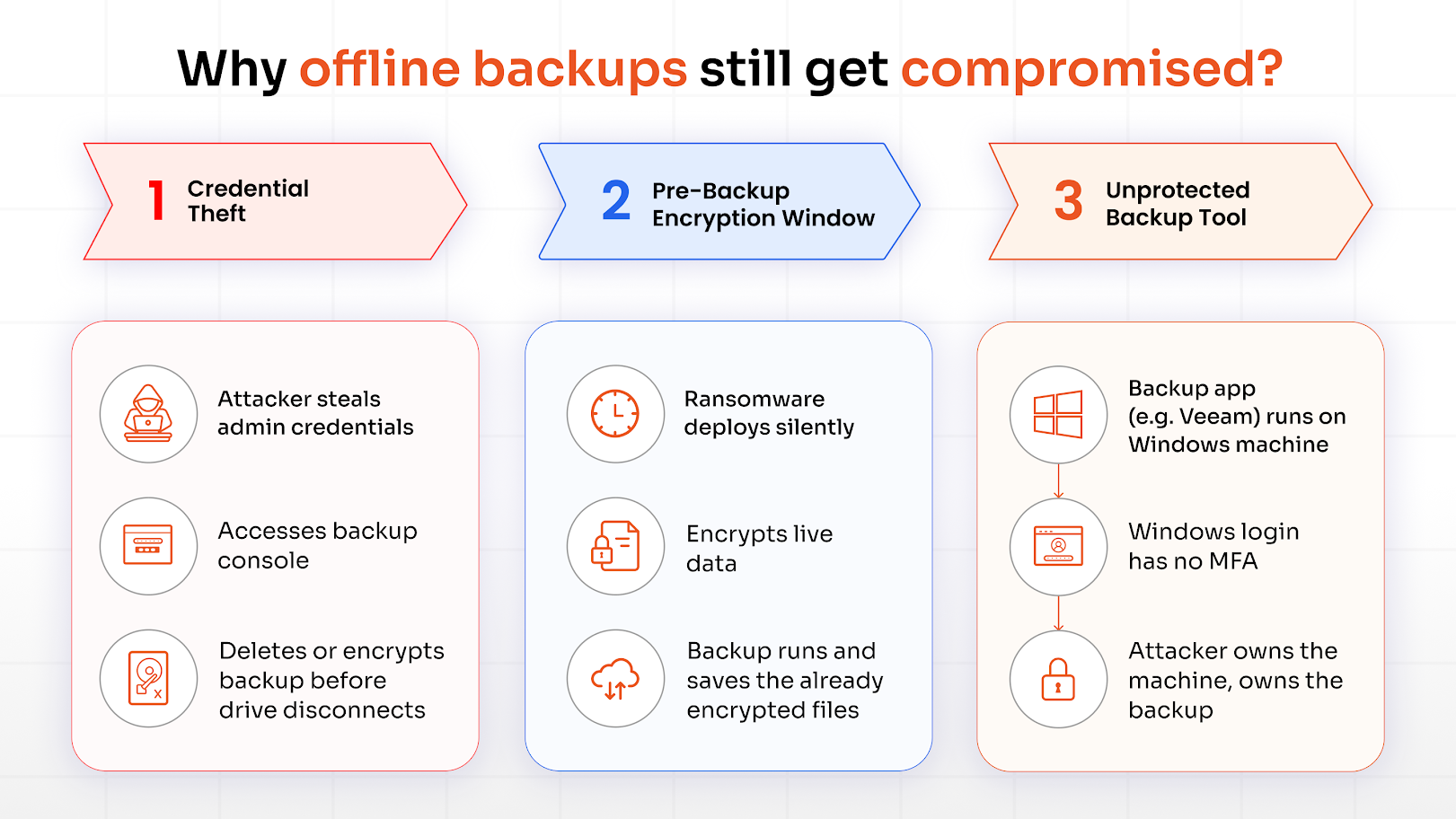
Path 1: Credential Theft Before Disconnection
Most backup schedules have a window (typically overnight) when the drive is connected and the backup is running. If an attacker has compromised a privileged account, they can access the backup console during that window and delete or encrypt the backup before it disconnects.
Path 2: The Pre-Backup Encryption Window
Sophisticated ransomware attacks sit dormant for weeks before detonating. By the time it activates, the compromised files have already been backed up multiple times. Your offline backup is a clean copy of already-encrypted data.
This is why keeping multiple backup versions and regular checks matter alongside physical isolation.
Path 3: The Unprotected Backup Tool
Most backup tools run on Windows machines. If that Windows machine has no MFA on its login or RDP access, an attacker with a stolen password can log directly into the machine and access the backup files at the system level.
The drive being unplugged is beside the point if the software managing it is unprotected. And so, all 3 paths share the same thread: the backup was physically secure, but the access layer wasn't.
Compliance Standards for Offline Backups
Several security frameworks and regulations have specific requirements around backup protection.
NIST SP 800-209
This is a guidance document for storage infrastructure. It recommends air-gapped backups for high-value systems, out-of-band management, and zero tolerance for data corruption during recovery testing.
NIST SP 800-53
This is a catalog of security and privacy controls. It includes control families for access control and contingency planning. Organizations subject to FISMA use it as a control baseline.
ISO/IEC 27001 (Annex A 8.13)
that organizations implement information backup procedures with appropriate testing. Offsite storage and redundant copies are common implementation choices that satisfy this control, but the standard itself defines the outcome, not the exact method. Certification requires an auditor to verify that the control works.
GDPR
GDPR affects how organizations design backup retention and deletion. Organizations typically handle this through retention policies and scheduled deletion cycles, though the legal balance between retention obligations and deletion rights requires careful design.
Offline Backups and Cyber Insurance
Cyber insurance providers have become considerably more specific about what they require. Most major insurers now ask for offline or immutable backup copies as a minimum.
Insurance providers increasingly validate backup controls through technical evidence: configuration logs, telemetry, and active user-adoption data. They want to see that the backup console requires MFA to access, that restore tests are documented, and that backup systems are protected with the same controls as production systems.
But if a ransomware attack compromises an account that had access to your backup system and that account wasn't protected by MFA, the insurer may partially or fully deny the claim. SMS and push-notification MFA is being scrutinized, too. A Phishing-Resistant MFA solution like FIDO2 hardware keys is what many insurers now specifically look for in high-privilege account coverage.
How to Protect Offline Backups: A Layered Approach
Physical isolation is one layer of protection. You need three. Physical security, digital security, and access control each cover different attack vectors. Remove anyone, and the others carry more weight than they're designed to.
Physical and Storage Security
Store offline media in a fireproof, waterproof safe. For anything genuinely critical, keep a second copy in a separate physical location. Maybe an off-site storage facility, a secondary office, a safety deposit box.
Use a drive rotation schedule. Daily, weekly, and monthly drives, with at least 1 always disconnected. Log every time a drive is handled, connected, or transported. That chain-of-custody record matters during compliance audits.
For the highest assurance against ransomware attacks: write-once media like M-Discs or write-protected LTO tape cartridges. These can't be overwritten even by someone with physical access.
Encryption and Immutability
Encrypt every offline backup at rest using AES 256-bit. If the drive walks out the door, the data is unreadable. VeraCrypt works well for local volume encryption on Windows.
For any backup tier that stays connected (NAS, cloud), enable object immutability or WORM storage. This locks the backup for the retention period you define. Even an admin account can't delete it. Some tools, like Macrium Reflect, use file-permission restrictions to achieve similar protection without requiring full WORM storage.
MFA for Backup Systems (Windows login and RDP)
Backup tools run on Windows servers, and that creates 2 separate authentication surfaces that both need MFA: the backup application itself, and the Windows machine it runs on.
Securing the backup tool by implementing an MFA solution is a start. But that Windows server is still accessible through local login and RDP. An attacker with a stolen domain admin password can log directly into the server and access backup files at the file system level, without ever touching the backup application's login screen.
You need MFA at both layers: the backup application and the Windows machine it runs on.
For Windows login MFA, you can integrate through RADIUS using an NPS extension, or use a dedicated Windows MFA solution that covers both local and RDP logins. This is all because a server with MFA on RDP, but an unprotected local console is still an open door.
MFA for Privileged Access
Ransomware reaches backups through privileged accounts about as often as through software vulnerabilities. Stolen domain admin credentials are the most common path in incident reports.
Backup admin accounts should be separate from regular admin accounts, which means different credentials, minimal permissions, and MFA required on every login. Apply the principle of least privilege strictly: backup operators should be able to read and write to backup storage, and that's it.
Though auditing in the case of shared admin accounts is difficult. Because you can't tell who accessed what, and you can't enforce MFA properly when there's no individual identity to attach it to. RBAC (Role-Based Access Control) is the framework that solves this issue.
FA: Protecting Access When the Network is Down
Ransomware attacks often disrupt internet connectivity as part of the attack, sometimes deliberately, sometimes as collateral damage. If your MFA relies on cloud-based push notifications, your team gets locked out right when they need access most.
Offline MFA solves this. TOTP-based authenticator apps generate time-based codes locally with no network required. Security keys work entirely offline through cryptographic challenge-response. And pre-generated backup codes are a last-resort option if both fail.
From a cyber insurance standpoint, FIDO2 keys are worth the investment. They're phishing-resistant, offline-capable, and most carriers now treat them as the gold standard for high-privilege access. An attacker who steals your password still can't log in without the physical key.
Conclusion
The attackers who went after the backup repositories of 89% of the organizations were counting on one thing: that the backup existed, but the controls around it didn't.
Physical isolation protects the drive from remote encryption. It doesn't protect the access window, the backup console, or the admin credentials that reach it. That's the gap. And it's an access control problem as much as a storage problem.
MFA on the backup application, MFA on the Windows machine running it, separate backup admin credentials, offline-capable MFA for when the network goes down, and documented restore tests. Each layer covers what the others don't.
That's the full picture.
If you're looking specifically at offline MFA for backup system access, miniOrange's offline MFA solution is built for exactly this scenario. Get in touch to see how it would work for your organization.
FAQs
What is the 3-2-1 rule for backups?
The 3-2-1 rule recommends keeping three copies of your data on two different storage media, with one copy stored offsite. A modernized 3-2-1-1-0 approach adds one immutable or air-gapped copy and emphasizes verified, error-free recovery testing
Why should backups be kept offline?
Ransomware attacks actively target connected backup systems. An offline backup on a physically disconnected drive can't be reached through the network paths attackers use to access your systems; it's the copy they can't encrypt remotely.
What is the most secure place to store backups?
A fireproof, waterproof safe for the on-site copy. A second copy at a separate physical location (off-site storage facility, safety deposit box, or secondary office). This is because fire or flood can destroy both copies if they’re in the same location.
Does cyber insurance require offline backups?
Most major providers treat offline or immutable backups as a minimum requirement. They also increasingly require MFA on backup systems and documented restore tests, and they validate through configuration logs, not just self-reported questionnaires.
What is offline MFA, and why does it matter for backup security?
Offline MFA is an authentication step that works without an internet connection. TOTP apps, FIDO2 hardware keys, and pre-generated backup codes all come under offline MFA. Offline MFA means your team can still authenticate and access systems to begin recovery even if the internet is down.

Leave a Comment