
Every employee, contractor, and partner who touches your systems creates a paper trail of accounts, permissions, and access rights that has to be managed from the day they join to long after they leave. Identity lifecycle management is the process of creating, updating, and retiring a user's digital identity and access rights across that entire span — from onboarding through role changes to offboarding. Get this process wrong, and you end up with orphaned accounts, excessive privileges, and audit findings that keep security teams up at night. Get it right, and access simply follows the person — granted when needed, adjusted as roles change, and revoked the moment it's no longer required.
That's the promise of identity lifecycle management best practices: a structured approach to provisioning, maintaining, and retiring digital identities across their entire tenure with an organization. Manually managing this lifecycle — spreadsheets, email approval chains, IT tickets for every access change — doesn't scale past a handful of employees, let alone thousands of identities across dozens of applications. The result is predictable: delayed onboarding, privilege creep, and security gaps that attackers are increasingly quick to exploit.
This guide breaks down what identity lifecycle management actually involves, why it matters for security and compliance, the challenges organizations run into, and ten best practices you can apply today. We'll also walk through a real-world example and the most common mistakes to avoid.
What Is Identity Lifecycle Management?
Identity lifecycle management (ILM) is the process of creating, maintaining, and retiring digital identities and their associated access rights throughout a user's relationship with an organization — from the day they join to the day their access is fully revoked.
It matters because every identity represents a potential entry point into your systems. An identity that's provisioned too slowly delays productivity. One that's provisioned with excessive access creates unnecessary risk. And one that isn't deprovisioned promptly after someone leaves becomes a standing security liability — often invisible until it's exploited.
Identity governance is the discipline that operationalizes ILM through policy, oversight, and process design. An IGA (Identity Governance and Administration) solution is the software that enforces those policies at scale — policy engines, approval workflows, access certifications, and audit reporting. Where identity lifecycle management describes the what — the stages an identity moves through — an IGA solution provides the how, and only to the extent it's been properly configured and integrated with your HR and application stack. Lifecycle transitions don't become automatic on their own; they're automatic because a governance policy was built to trigger them.
It's worth distinguishing identity lifecycle from account lifecycle. An identity is the authoritative representation of a person (or machine) within your organization — typically sourced from HR or an authoritative directory. An account is the credential or login instance tied to that identity within a specific application. One identity can span dozens of accounts across email, CRM, ERP, and other systems, which is exactly why manual, application-by-application account management breaks down. Organizations need lifecycle automation to keep identity and account state synchronized as people join, move, and leave.
The Identity Lifecycle Explained
The identity lifecycle unfolds in six stages, each with its own governance requirements.
1. Joiner (Onboarding). When a new employee, contractor, or partner joins, an identity is created — ideally sourced automatically from an authoritative system like HR — and baseline access is provisioned so they're productive from day one.
2. Role Changes (Mover). Promotions, department transfers, and reporting-line changes all require access to be updated: new permissions granted for the new role, old ones revoked from the previous one.
3. Temporary Access Changes. Project assignments, short-term elevated privileges, or time-boxed access to specific systems fall here. This access should be granted with an expiration date built in, not left to expire manually.
4. Leave of Absence (Optional). For extended leave — medical, parental, sabbatical — access is typically suspended rather than fully revoked, preserving the account for reactivation on return.
5. Leaver (Offboarding). When someone exits the organization, all access needs to be revoked, ideally on their last active day, not days or weeks later.
6. Identity Archival or Deletion. After offboarding, the identity record is retained for audit and compliance purposes for a defined retention period, then archived or deleted according to policy.
Why Identity Lifecycle Management Is Important
Organizations that invest in mature identity lifecycle management see benefits across security, operations, and compliance:
- Faster onboarding — new hires get access to the tools they need on day one instead of waiting on manual IT tickets
- Stronger security — access is tied to current role and status, closing the gap that stale or excessive permissions create
- Better user productivity — employees aren't blocked waiting for access requests to work through approval chains
- Reduced IT workload — automated provisioning and deprovisioning eliminates repetitive manual tickets
- Regulatory compliance — frameworks like GDPR, HIPAA, and SOC 2 Type II require demonstrable control over who has access to what
- Consistent access policies — role-based rules apply uniformly instead of varying by whoever happens to process the request
- Lower insider risk — least-privilege access limits what any single compromised or malicious account can do
- Improved audit readiness — complete lifecycle records mean audit requests are answered with reports, not scrambling
Common Challenges in Identity Lifecycle Management
Despite the clear benefits, many organizations struggle to execute ILM well. Common obstacles include:
- Manual provisioning that relies on IT tickets and spreadsheets instead of automated workflows
- Delayed onboarding, where new hires wait days for basic system access
- Orphaned accounts left active after an employee departs
- Privilege creep, where employees accumulate access across role changes without prior permissions being removed
- Inconsistent access policies that vary by department, manager, or approver
- Poor HR data quality feeding incorrect or outdated identity attributes downstream
- Shadow IT, where employees provision their own access to unsanctioned applications
- Lack of visibility into who has access to what across a growing application portfolio
- Application sprawl that multiplies the number of systems requiring separate provisioning
- Compliance gaps that surface only during an audit, when it's too late to fix retroactively
10 Best Practices for Managing the Identity Lifecycle
1. Use a Single Authoritative Identity Source
Identity should originate from one authoritative source — typically the HR system — rather than being created independently in each application. When HR data drives identity creation, every downstream system inherits consistent, accurate attributes: job title, department, manager, employment status. This eliminates the data-quality drift that happens when identities are created manually and independently across different platforms, and it gives you a single point of truth when access needs to be validated or audited.
2. Automate Joiner, Mover, and Leaver (JML) Workflows
The joiner-mover-leaver (JML) process is the operational backbone of identity lifecycle management. When JML workflows are automated through an IGA solution, access is provisioned the moment HR marks someone as active, adjusted when their role changes, and revoked when their employment ends — without waiting on a manual ticket at any stage. Automated user provisioning and deprovisioning closes the gap between an employment event and its corresponding access change, which is exactly where security risk accumulates in manual environments.
3. Follow the Principle of Least Privilege
Grant users only the minimum access required to perform their current role — nothing more. Least privilege access limits the blast radius of a compromised account or insider threat, since an attacker who gains control of a low-privilege identity can't move laterally into systems that identity was never entitled to touch. This principle should apply not just at onboarding but continuously, as roles evolve.
4. Implement Role-Based and Attribute-Based Access Controls
Role-Based Access Control (RBAC) assigns permissions based on job function, while Attribute-Based Access Control (ABAC) adds context — department, location, clearance level, project assignment — to make access decisions more granular. Together, RBAC and ABAC replace ad hoc, person-by-person access decisions with policy-driven rules that scale consistently as headcount grows, reducing both administrative overhead and the risk of inconsistent access grants.
5. Standardize Birthright Access
Birthright access is the baseline set of permissions that an IGA solution assigns to every user based on their role, department, or location the moment their identity is created — think email, core collaboration tools, and standard business applications. The IGA solution decides and provisions this access into each connected application; the applications themselves don't determine what a new hire should get. Standardizing birthright access ensures new hires are productive immediately without requiring individual access requests for the tools everyone in their role needs, while still keeping that baseline narrow enough to respect least privilege.
6. Conduct Regular Access Reviews
Access that was appropriate at onboarding isn't guaranteed to stay appropriate. Regular access certifications — reviews conducted by managers, application owners, or both — verify that existing permissions still match current job responsibilities. These reviews should be scheduled on a defined cadence (quarterly is common for higher-risk systems) rather than left to happen only when an auditor asks for evidence.
7. Continuously Remove Unused or Excessive Access
Privilege creep happens gradually: an employee picks up temporary access for a project, changes teams, or is granted an exception — and the old permissions never get revoked. Left unchecked, this results in identities holding far more access than their current role justifies. Continuously identifying and removing stale, unused, or excessive permissions keeps the access footprint aligned with actual need rather than accumulated history.
8. Enforce Separation of Duties (SoD)
Separation of duties (SoD) prevents any single identity from holding a combination of permissions that would let them execute a fraudulent or unauthorized action end-to-end — for example, the ability to both create a vendor and approve payment to that vendor. Enforcing SoD policies at the point of access request, not just during periodic audits, stops conflicting access from being granted in the first place.
9. Monitor Identity Changes and User Activity
Provisioning events, role changes, policy violations, and unusual access patterns all need continuous monitoring, not just point-in-time reviews. Real-time visibility into identity changes lets security teams catch anomalies — an account suddenly requesting access far outside its normal pattern, for instance — before they escalate into incidents.
10. Maintain Complete Audit Trails
Every access grant, change, and revocation should be logged in a way that's retrievable for compliance reporting and incident investigation. Complete audit trails turn "prove who had access to this system on this date" from a multi-day scramble into a report you can generate on demand — a requirement built into frameworks like SOC 2 Type II, ISO 27001, and HIPAA.
Identity Lifecycle Management Workflow
A mature identity lifecycle typically flows as follows:
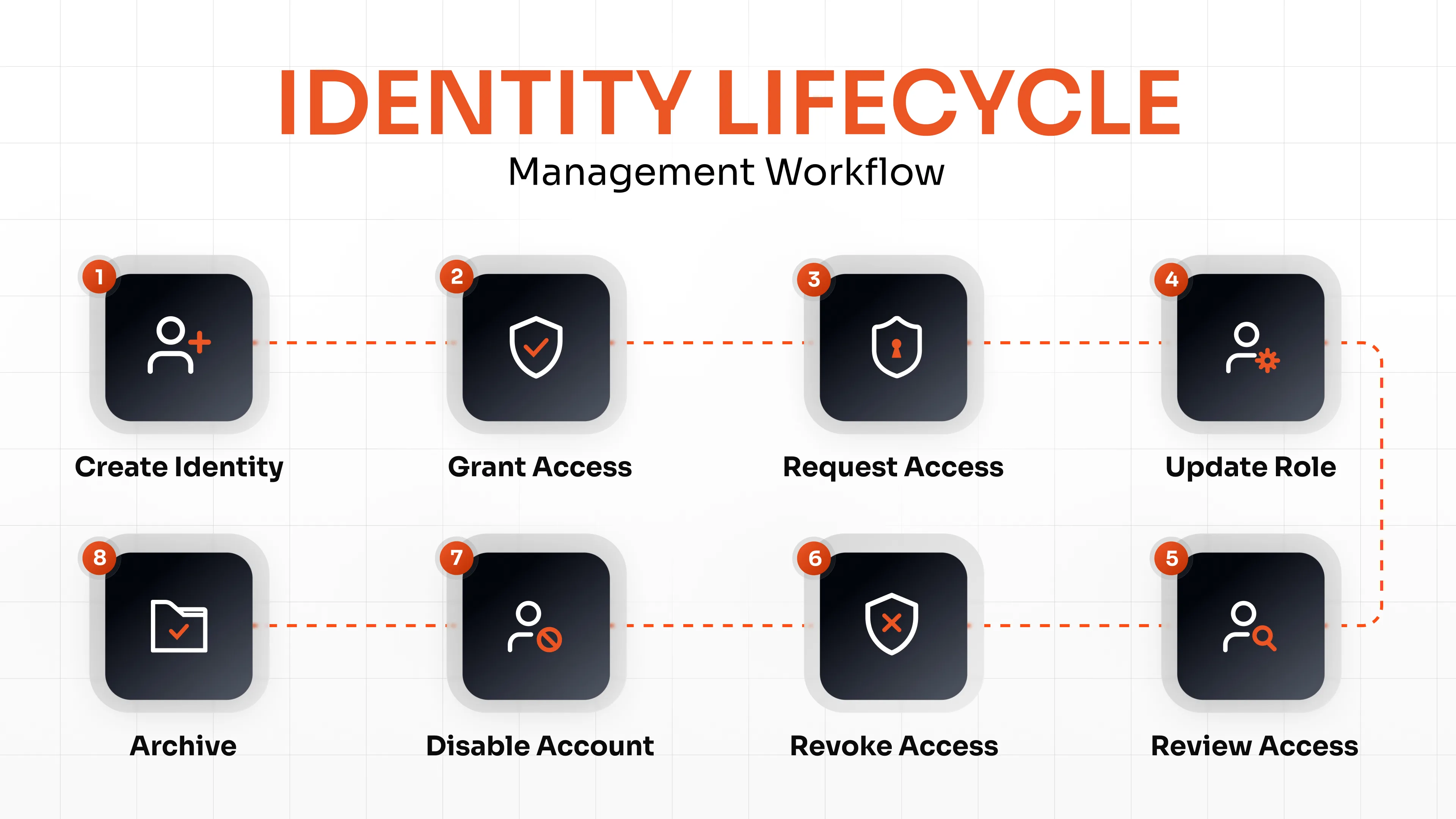
When this workflow is backed by a properly configured IGA solution, each step hands off to the next with minimal manual intervention: HR data triggers identity creation; identity creation triggers birthright provisioning; additional access is requested and approved as needed; role changes trigger corresponding access adjustments; periodic reviews catch anything that's drifted out of alignment; and offboarding triggers revocation, account disabling, and eventual archival. Without that configuration in place, each of these handoffs reverts to a manual ticket.
How Identity Governance Supports Identity Lifecycle Management
An IGA solution is what makes the workflow above operate with minimal manual effort rather than through disconnected manual tickets. IGA platforms enable:
- Automated provisioning tied directly to HR events
- Identity synchronization across connected applications
- Self-service access requests with defined approval paths
- Approval workflows that route requests to the right manager or owner
- Access certification campaigns run on a recurring schedule
- SoD enforcement checked at request time, not after the fact
- Policy-based provisioning that applies RBAC and ABAC rules consistently
- Compliance reporting mapped to frameworks like GDPR, HIPAA, and SOC 2
- Continuous governance that treats access review as an ongoing process, not an annual event
Identity Lifecycle Management Example
Here's how this plays out once JML automation is configured in an IGA solution. Consider a Marketing Manager joining a mid-sized company. HR creates the employee record on the start date, which triggers identity creation in the IGA platform. The IGA solution assigns birthright access — email, collaboration tools, the marketing department's shared drive — into each connected application immediately. A week later, the manager requests access to the CRM for a campaign project; the request routes to the application owner for approval.
Six months in, the employee transfers to the Sales team. The JML workflow automatically removes marketing-specific access and grants the standard Sales team entitlements, without a manual ticket being filed for either the removal or the grant. Two years later, the employee resigns. On their last working day, HR marks the employee as terminated, which triggers automatic revocation of all access and disabling of all accounts — CRM, email, shared drives, and any systems provisioned along the way. The identity record is retained for the compliance-mandated retention period before being archived.
Common Mistakes to Avoid
- Treating onboarding as the entire lifecycle — provisioning is only the first stage; role changes and offboarding matter just as much
- Delaying offboarding — even a short gap between an employee's last day and access revocation is a security exposure
- Ignoring role changes — failing to adjust access when someone moves teams is one of the most common sources of privilege creep
- Granting excessive default access — overly broad birthright access defeats the purpose of least privilege
- Skipping access reviews — without periodic certification, stale permissions accumulate unnoticed
- Managing identities manually — spreadsheets and email approvals don't scale and introduce human error
- Not integrating HR with IGA — disconnected systems mean identity data drifts out of sync with employment reality
- Failing to monitor privileged accounts — the highest-risk identities deserve the tightest oversight, not the same default monitoring as standard users
Conclusion
Treating onboarding as the finish line is the most common way identity lifecycle management breaks down. Start by auditing where your current process actually fails — delayed offboarding, unreviewed permissions, or role changes that never trigger an access update — and fix that gap first. Then build outward: automate JML workflows, enforce least privilege, standardize birthright access, and run access reviews on a fixed schedule. An IGA solution ties these practices together with centralized policy, automated workflows, and continuous oversight, so access stays accurate without a manual ticket at every step.
FAQs
What is identity lifecycle management?
Identity lifecycle management is the process of creating, maintaining, and retiring digital identities and their access rights from onboarding through role changes to offboarding.
Why is identity lifecycle management important?
It reduces security risk, improves compliance posture, speeds up onboarding, and eliminates the manual overhead of managing access ticket by ticket.
What is the Joiner-Mover-Leaver process?
The JML process describes the three key identity events — joining an organization, moving into a new role, and leaving the organization — and the corresponding access changes each event triggers.
What are the stages of the identity lifecycle?
Joiner (onboarding), role changes (mover), temporary access changes, leave of absence, leaver (offboarding), and identity archival or deletion.
What are identity lifecycle management best practices?
Key practices include using a single authoritative identity source, automating JML workflows, enforcing least privilege, implementing RBAC/ABAC, standardizing birthright access, conducting regular access reviews, removing unused access, enforcing separation of duties, monitoring identity activity, and maintaining audit trails.
How does Identity Governance improve lifecycle management?
An IGA solution automates provisioning, routes approvals, runs access certifications, enforces SoD, and generates compliance reporting — turning identity governance policy into enforced, repeatable processes rather than manual effort.
What is the difference between identity lifecycle management and access management?
Identity lifecycle management governs how identities are created, changed, and retired over time. Access management (authentication and authorization) governs how those identities log in and what they can do at any given moment. The two work together but address different problems.
How does automated provisioning improve identity security?
Automated provisioning ties access changes directly to employment events, closing the delay between a role change or departure and the corresponding access adjustment — the exact window where orphaned accounts and privilege creep take hold.
About the Author

Content Writer
Minal is an experienced B2B content writer. She has written over 250 articles across industries like UI/UX, real estate, automotive, digital marketing, SaaS, AI & ML, and cybersecurity. She brings her interest in cybersecurity to life by creating clear, engaging content tailored for technical, non-technical, and creative pieces. Her aim is to simplify complex topics, highlight product value, and connect with both technical and non-technical audiences.
Leave a Comment