

An employee signs in once and reaches every app IT assigned to them. Then your team rolls out an AI assistant that needs to pull that employee’s Jira tickets, and the sign-in has no say in that API call.
That gap sits at the center of SSO vs. cross-app access. Single Sign-on (SSO) authenticates the user. Cross-App Access authorizes one application to call another application’s API on that user’s behalf, with the identity provider making the decision. You run SSO first, and cross-app access builds on the same identity provider trust.
This article discusses SSO vs. cross-app access, how each works, how they fit together, and how to decide where your organization needs each one.
What is Single Sign-On?
SSO lets a user verify once with an Identity Provider (IdP) and open every application assigned to them without signing in again. The IdP verifies who the user is, usually with Multi-Factor Authentication (MFA) and hands the application a token or an assertion of that identity. It could be a SAML 2.0 assertion or an OIDC ID token.
Organizations deploy SSO first because the return is almost immediate. For example, after SSO, your IT team needs to enforce MFA at one door only; when someone leaves, disabling one identity-based access cuts off every assigned app; users juggle fewer sign-in prompts and pages.
How Does SSO Work?
The SSO flow runs in four steps:
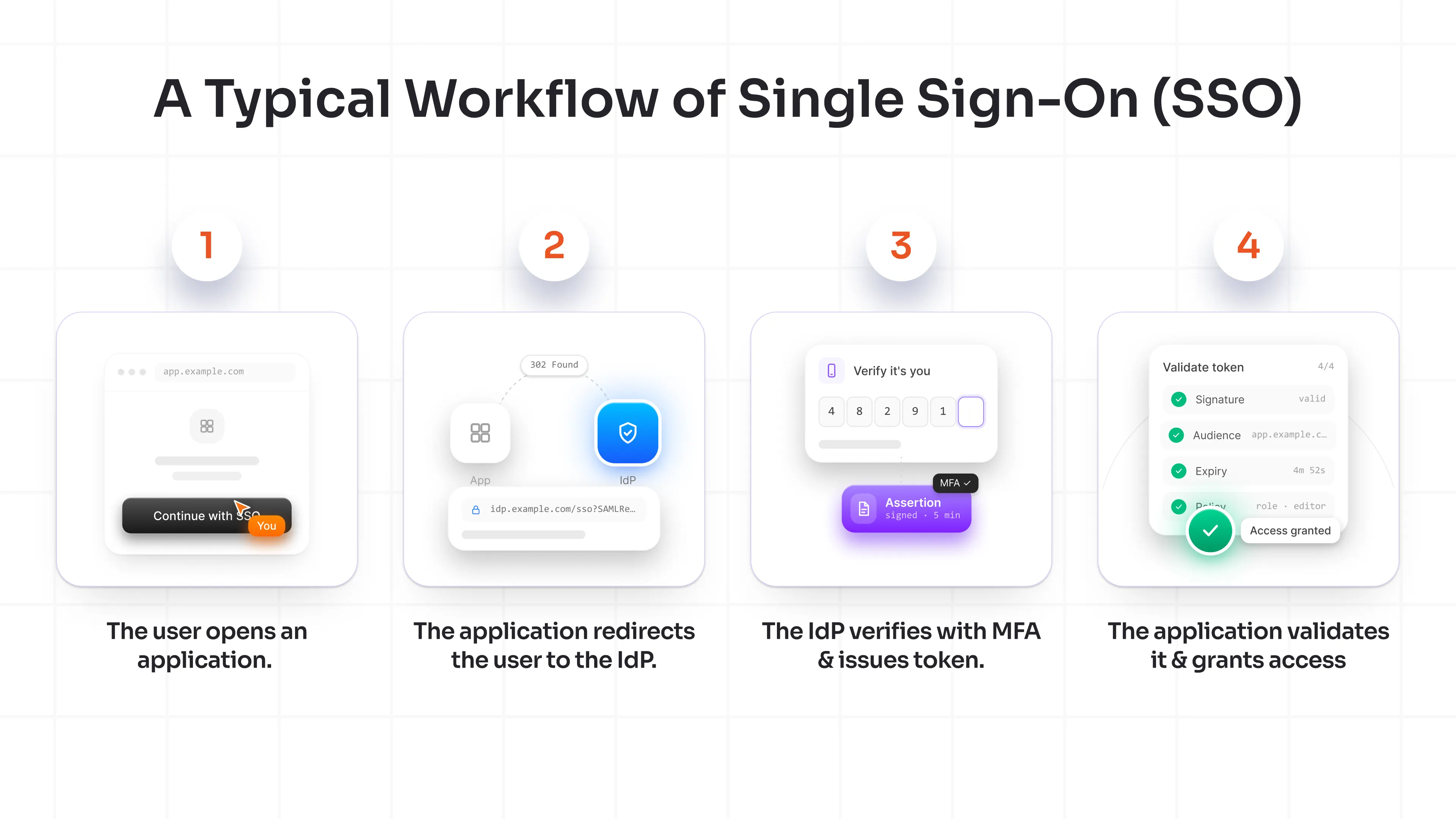
1. The user opens an application.
2. The application redirects the user to the IdP.
3. The IdP verifies the user, often with MFA, and issues an assertion or token.
4. The application validates it and grants access under its own policies.
Every step here involves a person/identity at a browser/application. But API authorization calls for application-to-application access have no such person in the process. This is where cross-app access comes in.
The flow ends once the user is in the app. If you want the full SSO picture, this guide to single sign-on covers it.
What is Cross-App Access?
Cross-App Access (XAA) lets one application call another application’s API on behalf of a signed-in user, with the organization’s IdP deciding whether that connection is allowed. Three parties take part here.
- Requesting application (say, an AI assistant)
- The resource application that owns the API (say, Jira)
- The IdP that both apps already trust.
The requesting app trades the user’s SSO token at the IdP for a short-lived ID-JAG (Identity Assertion JWT Authorization Grant), which is commonly also known as Cross-App Access. The IdP checks whether that app may act for that user, against that target, with those scopes. And admins set those rules centrally using SSO software.
If policy allows it, the IdP issues the ID-JAG. The requesting app presents it to the resource app’s authorization server, which validates it, applies its own policy, and issues an access token. The user never sees a consent screen.
This pattern is defined in an IETF draft; ID-JAG is still an IETF working group draft, not a published RFC. The Model Context Protocol (MCP) built its enterprise-managed authorization extension on it, which is why cross-app access comes up whenever AI agents do.
Read this ID-JAG guide for a walkthrough of the flow and its limits.
Single Sign-On vs. Cross-App Access: Key Differences
These two mostly differ in who is involved, what gets checked, and what the IdP hands back.
| Comparison factor | Single Sign-On (SSO) | Cross-App Access |
|---|---|---|
| Primary purpose | Authenticate users across multiple applications | Authorize one application to access another application's resources on behalf of a user |
| Main interaction | User-to-application | Application-to-application |
| Main function | User authentication | API and resource authorization |
| Identity Provider role | Authenticates users and provides identity assertions | Checks configured connections and user assignments before issuing authorization grants |
| Access mechanism | Authentication assertions or tokens | Identity assertions, authorization grants and token exchange |
| User involvement | User participates in the sign-in process | Configured backend authorization can happen without an interactive consent prompt |
| Typical use case | Employee signs in once to access assigned business applications | AI agent retrieves permitted employee data from another application |
| Access control | Application access policies and assignments | Configured application connections, user eligibility and resource-level permissions |
Read the table by output. SSO produces a session inside an application and cross-app access produces a short-lived access token for an API, scoped to one user and one connection.
How SSO and Cross-App Access Work Together
Cross-App Access picks up from the identity assertion SSO already produced: the requesting app exchanges that token at the IdP to get the ID-JAG.
Take an employee who signs in to an organization’s AI assistant, for example. The assistant needs to read her assigned Jira tickets.
1. SSO: She signs in through the IdP and the assistant receives an ID token.
2. Token Exchange: The assistant sends that token to the IdP and asks for access to Jira’s API.
3. Policy Check: The IdP checks whether the assistant may act for her against Jira, with the requested scopes. If yes, it returns an ID-JAG.
4. Redemption: The assistant presents the ID-JAG to Jira’s authorization server, which validates it and issues an access token.
5. API Call: The assistant calls Jira’s API. Jira enforces its own permissions before returning data.
Without step 1, nothing starts. Without steps 2 to 4, the assistant has a signed-in user and no sanctioned path to Jira’s API. Which means, without cross-app authorization, teams fall back on two options:
1. Per-user OAuth consent screen
2. Static Credentials
But know that both are hard to see and revoke from one place.
When Should You Use SSO, and When Cross-App Access?
Start with SSO authentication. Ideally, every workforce application should sit behind it: one sign-in policy, MFA, and fewer password resets. It’s the foundation, and Cross-App Access has nothing to build on without it.
Add Cross-App Access when an application calls another application’s API for a signed-in user. AI agents are an obvious case, since each tool the agent touches would otherwise mean another consent screen or API key. Integrations between SaaS apps that share your IdP fit too.
User-delegated cross-app access always starts from the user’s SSO sign-in, so SSO has to be in place first. Agents that act as themselves, with no user behind them, need another mechanism such as client credentials or workload identity.
But before you adopt this, check these four things:
1. Your IdP can issue ID-JAGs through token exchange.
2. The apps you want to reach accept ID-JAGs. Check this because support among target apps is still limited.
3. Both apps trust the same IdP. Access across organizations that don’t share one falls outside the pattern.
4. Your team is comfortable building against a draft spec that can still change.
How miniOrange Supports SSO and Cross-App Access
At miniOrange, Cross-App Access is a capability of the Identity Provider you already run for SSO. So with us, you get one IdP that handles both layers.
miniOrange SSO supports SAML 2.0, OAuth 2.0, OpenID Connect (OIDC), JWT, and WS-Federation, with 6,000+ integrations across cloud, on-prem, and custom apps. miniOrange MFA with access policies based on device, IP, and location, running inside the sign-in flow, helps strengthen your deployment.
As the IdP, miniOrange can also issue ID-JAGs, which are given to signed-in users and the AI agents acting for them a governed path to other apps’ APIs.
Conclusion
SSO and Cross-App Access answer different questions. SSO confirms who the user is and lets them into assigned apps. Cross-App Access decides whether one app can call another app's API for that user, and it starts from the SSO sign-in.
As AI agents and integrations reach across more of your applications, the gap between "signed in" and "allowed to call that API" gets wider. Keep SSO as the base and add Cross-App Access where apps talk to apps.
FAQs
What is the main difference between SSO and cross-app access?
SSO authenticates a user once so they can reach many applications. Cross-app access authorizes one application to call another application's API on that user's behalf. SSO answers who the user is. Cross-app access answers whether this app may act for this user in that app.
Does SSO provide application-to-application API access?
No. SSO gives the user a session in each app. An API authorization call from one app to another needs an access token issued by the target app's authorization server, and SSO alone doesn't produce one. Cross-app access or a per-user OAuth consent flow fills that role.
Can cross-app access work without SSO?
In the ID-JAG pattern, no. The requesting app starts from an identity assertion (an OIDC ID token or SAML assertion) issued when the user signed in through the IdP, and the resource app's authorization server must already trust that IdP.
Does cross-app access replace SSO?
No. SSO authentication stays the front door for users. Cross-app access takes over when an application needs to call another application's API for that user.
How does an identity provider manage cross-app access?
The IdP checks the configured connection between the requesting and resource apps and the user's eligibility under admin policy, then issues a short-lived ID-JAG. It also records the request, which gives IT one place to review and revoke connections.
What is the role of ID-JAG in cross-app access?
The ID-JAG is a signed JWT issued by the IdP. It tells the resource app's authorization server which user, which requesting app and which scopes the IdP approved. The resource app validates it and issues its own access token. The grant is defined in an IETF Internet-Draft that is still in progress.
Can SSO and cross-app access work together?
Yes. SSO signs the employee into the requesting app. Cross-app access then handles that app's calls to other apps for the same employee, using the same IdP.
Leave a Comment