

Endpoint security is a cybersecurity practice that protects every device connected to your network from unauthorized access, malware, and data theft. These devices are called endpoints, and each one is a possible entry point for an attacker.
It combines three things: preventing threats from reaching your devices, detecting anything that slips through, and responding fast when something does go wrong.
In this blog, you will learn what endpoint security is, how it protects every device on your network, and what tools and strategies keep your organization safe from modern cyber threats.
What is Endpoint Security?
Endpoint security means placing protective controls directly on every device that connects to your network. The software installed on each device monitors activity in real time, blocks threats as they appear, enforces your security rules, and alerts your IT team when something needs attention.
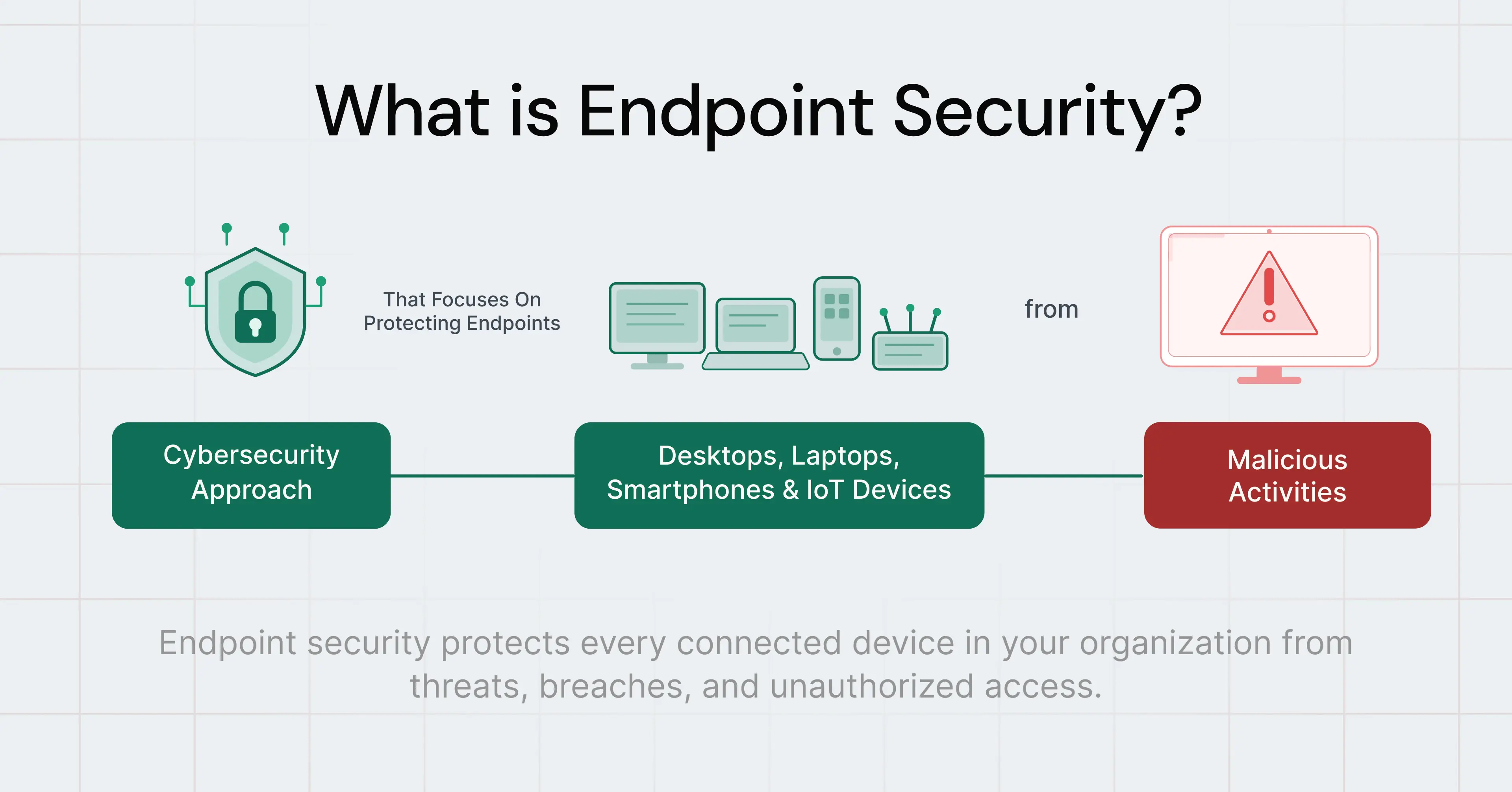
This matters because most cyberattacks do not target your servers or databases first. They start at the device level, where a real person is working.
An endpoint can become the starting point for a major breach very quickly.
For example:
- An employee clicks on a phishing email on a laptop
- A stolen phone contains unencrypted business data
- A remote workstation misses a critical security patch
- A contractor connects an unmanaged device to the network
Attackers look for weak endpoints because these often lack consistent security controls. Once they compromise a device, they usually try to:
- Steal credentials
- Escalate privileges
- Move laterally across the network
- Access sensitive systems or data
- Deploy ransomware
- Exfiltrate company information
Endpoint security exists to stop that chain of events at the device level before the attack spreads further.
What Devices are Classified as Endpoints?
An endpoint is any device that connects to your organizational network and can send or receive data. BYOD (bring-your-own-device) environments introduce additional complexity. Personal phones and laptops that employees use for work sit outside your direct IT management.
The full list covers more than most people expect:
- Laptops
- Cell phones
- Tablets
- Printers
- Servers
- Medical devices
- Handheld scanners
- Robots
- All Internet of Things (IoT) devices
Types of Endpoint Security Software
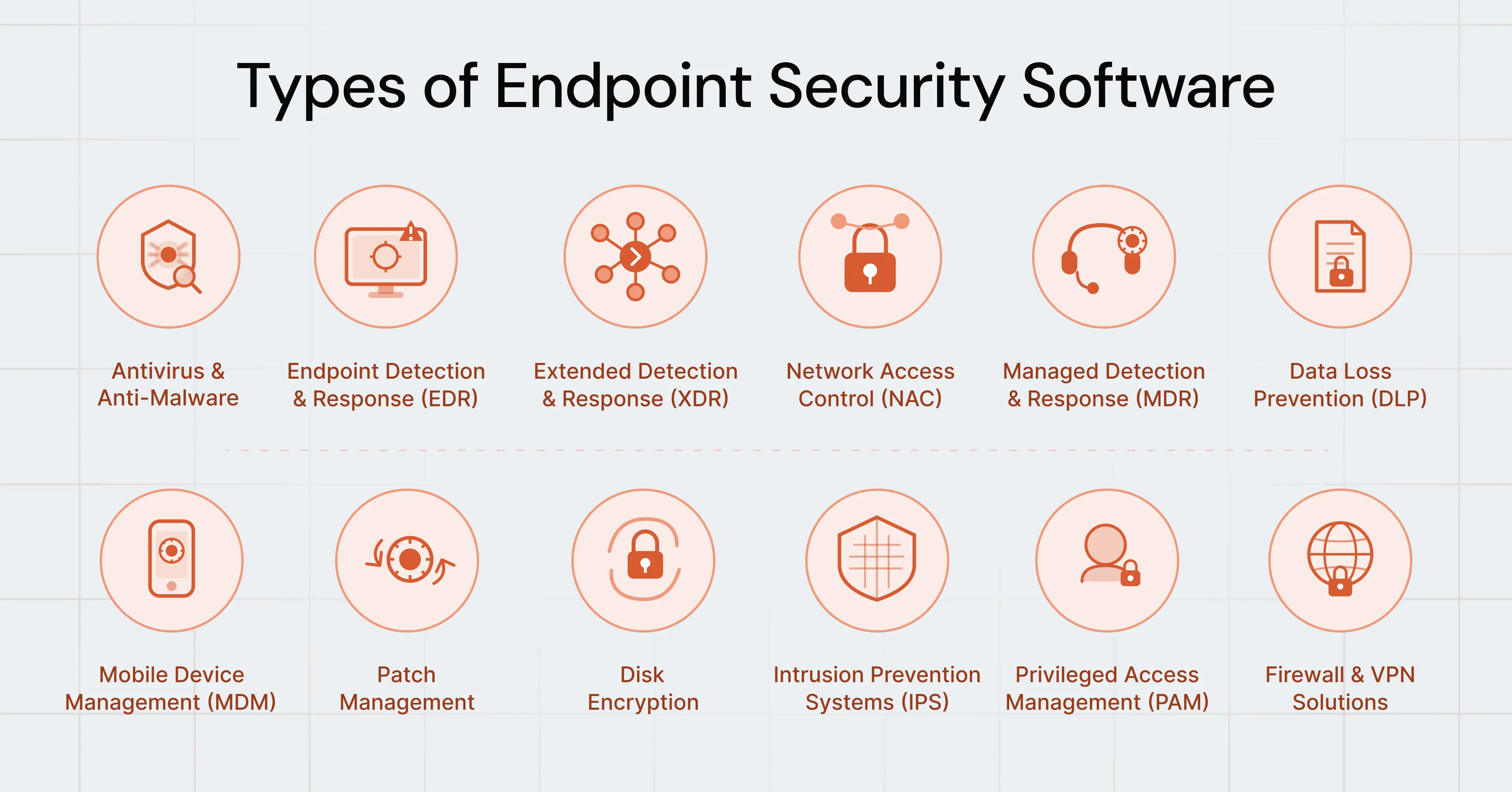
Endpoint security is not a single product. It is a set of tools working together, each one targeting a different category of threat. Here are the main types and what each one does.
1. Antivirus and Anti-Malware Software
This is the most fundamental layer of endpoint security. It scans files and applications on each device for known malicious content and removes threats automatically when detected. Modern antivirus tools go beyond matching files to a database of known threats.
They also use behavioral detection, which means they watch what software actually does on the device. If a file starts acting like malware, even if it has never been seen before, the tool flags and quarantines it.
Example: An employee downloads a file disguised as a PDF invoice. The antivirus matches it to a known ransomware signature and blocks it before it opens.
2. Endpoint Detection and Response (EDR)
EDR goes deeper than antivirus. It monitors everything happening on a device continuously, recording file changes, running processes, and network connections. When activity deviates from what is normal for that device, EDR raises an alert and gives your security team a full, timestamped record of what happened and in what order.
Example: An attacker runs malware that lives entirely in memory and writes no files to disk. Standard antivirus finds nothing to scan. EDR detects the unusual process behavior and alerts the security team within minutes.
3. Extended Detection and Response (XDR)
XDR connects data from across your entire environment, including devices, email systems, cloud platforms, and networks, into one unified view. Where EDR focuses on individual devices, XDR correlates activity across all of these sources to give your team the full picture of an attack rather than isolated fragments.
Example: A phishing email is clicked, and minutes later, the same device starts making unusual outbound connections. XDR links both events into a single, connected alert so your team sees the complete attack chain.
4. Network Access Control (NAC)
NAC acts as a checkpoint for devices requesting access to your network. Before granting a connection, NAC checks whether the device meets your defined security requirements. Devices that fail the check get blocked or redirected to a restricted zone until they meet the standard.
Example: A contractor brings a personal laptop to a client meeting and tries to connect to the office WiFi. NAC finds the operating system is two versions out of date and blocks the connection until updates are applied.
5. Managed Detection and Response (MDR)
MDR is a service rather than a tool. An external team of security professionals monitors your environment around the clock and handles threat response on your behalf. Organizations without a large internal security team use MDR to get continuous protection without recruiting and training dedicated security staff.
Example: A mid-sized company without a security operations center uses MDR to get 24/7 monitoring. When a threat appears at 2 a.m., the MDR team investigates and contains it without escalating to internal staff.
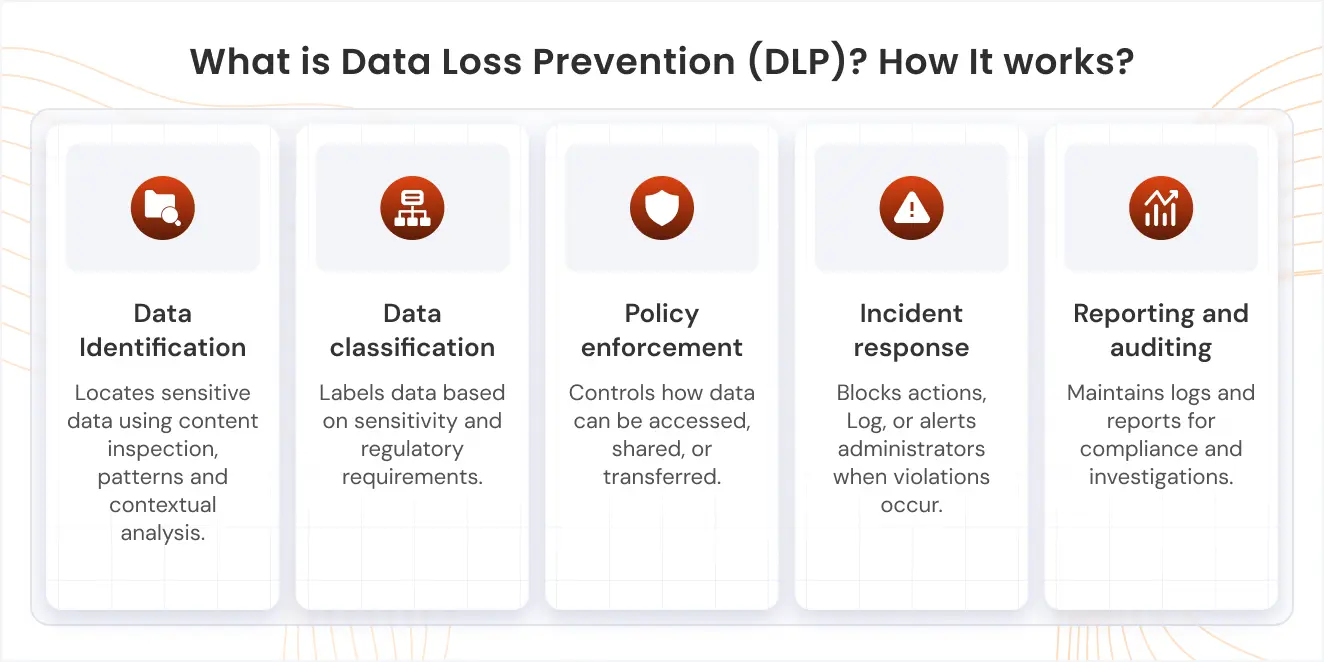
6. Data Loss Prevention (DLP)
DLP software monitors and controls what data leaves your organization. It watches file transfers, email attachments, cloud uploads, and print jobs and blocks any transfer that violates your data policies before the data exits your control.
Example: An employee tries to email a spreadsheet containing customer payment details to a personal Gmail address. DLP identifies the sensitive content, blocks the email, and logs the attempt for the security team.
7. Mobile Device Management (MDM)
MDM gives IT administrators centralized control over smartphones and tablets connected to company systems. Admins enforce security policies, control which apps are installed, and can remotely wipe a device clean if it is reported lost or stolen.
Example: An employee reports their work phone stolen at an airport. The IT admin triggers a remote wipe through MDM, erasing all company data from the device before anyone else accesses it.
8. Patch Management
Patch management keeps every piece of software on every device up to date. When software vendors discover a security flaw, they release a patch to fix it. Attackers watch for these announcements and immediately scan for devices that have not yet applied the fix. Automated patch management pushes updates to all devices as soon as they are available, closing that window as quickly as possible.
Example: If a critical vulnerability affects a widely used application, automated patch management helps organizations update devices quickly before attackers exploit the weakness.
9. Disk Encryption
Disk encryption converts all data stored on a device into an unreadable format that requires a specific decryption key to access. Even if an attacker gains physical possession of a laptop, encrypted data stays completely protected without the key.
Example: An employee's laptop is stolen from a coffee shop. The hard drive is fully encrypted. The attacker cannot read any of the data on it. No breach occurs.
10. Intrusion Prevention Systems (IPS)
IPS monitors all network traffic flowing to and from your devices and blocks traffic that matches known attack patterns. It acts on the network layer, stopping threats before they reach their target rather than responding after they arrive.
Example: An attacker tries to exploit a known vulnerability in a web application. IPS recognizes the traffic pattern as a known attack type and drops the connection before it reaches the server.
11. Privileged Access Management (PAM)
PAM controls and monitors access to the most sensitive systems in your environment. Not every employee needs access to everything, and PAM enforces that principle. It also flags immediately when anyone attempts to access a system outside their normal permissions, which is a common move after an attacker gains a foothold inside your network.
Example: An attacker compromises a standard employee account and then tries to escalate to administrator-level access. PAM blocks the escalation attempt and sends an alert to the security team.
12. Firewall Solutions and Virtual Private Networks (VPNs)
A host-based firewall sits on each device and filters incoming and outgoing network traffic. It blocks unauthorized connections and allows only traffic that matches approved rules. A VPN encrypts the connection between a remote device and your corporate network so that traffic intercepted on a public or untrusted network cannot be read.
Example: An employee works from a hotel's WiFi. The VPN encrypts all traffic between the laptop and the company network. Anyone intercepting that traffic on the hotel network gets nothing but unreadable data.
Endpoint Security vs. Endpoint Management: What's the Difference
Endpoint security and endpoint management support devices in different ways.
Endpoint security protects devices and the data stored on them from cyber threats, malware, ransomware, unauthorized access, and data leaks.
Endpoint management, on the other hand, enables IT teams to set up, organize, update, and manage company devices such as laptops, desktops, and mobile phones.
In simple terms, endpoint security keeps devices and business data safe, while endpoint management keeps devices organized, updated, and running smoothly.
| Parameter | Endpoint Security | Endpoint Management |
|---|---|---|
| Main Purpose | Detecting and preventing security threats | Setting up, updating, and maintaining devices |
| What It Includes | Antivirus, EDR, DLP, encryption, threat detection | Device setup, patch management, software deployment, and remote management |
| Team Ownership | Security teams | IT Teams |
| Risks Covered | Malware, ransomware, phishing, unauthorized access, and data breaches | Outdated systems, missing updates, and operational issues |
| Common Tools | EDR, XDR, MDR, firewalls, and SIEM tools | RMM, MDM, and UEM solutions |
Key Features of Endpoint Security Software
These are the capabilities that separate a complete endpoint security platform from a basic one.
1. Real-Time Threat Detection
Continuously monitors device activity to detect and respond to threats instantly instead of relying on scheduled scans.
2. USB and Peripheral Blocking
Control and restrict unauthorized USB drives, external storage devices, printers, and other peripherals to prevent data theft, malware transfer, and unapproved device access.
3. Centralized Management
A single console where IT teams manage all devices, apply policy changes, review alerts, and track compliance across the organization. Without centralization, managing security at scale becomes operationally impractical.
4. Automated Patch Management
Automatic deployment of software updates to all devices the moment vendors release them. This eliminates the gap between a vulnerability becoming public and your devices receiving the fix, which is the period of highest exploitation risk.
5. Alerts and Reports
A complete record of what occurred during a security event, including which files changed, which processes executed, and which network connections were made. Without this data, security teams investigate incidents without evidence.
How Does Endpoint Security Work?
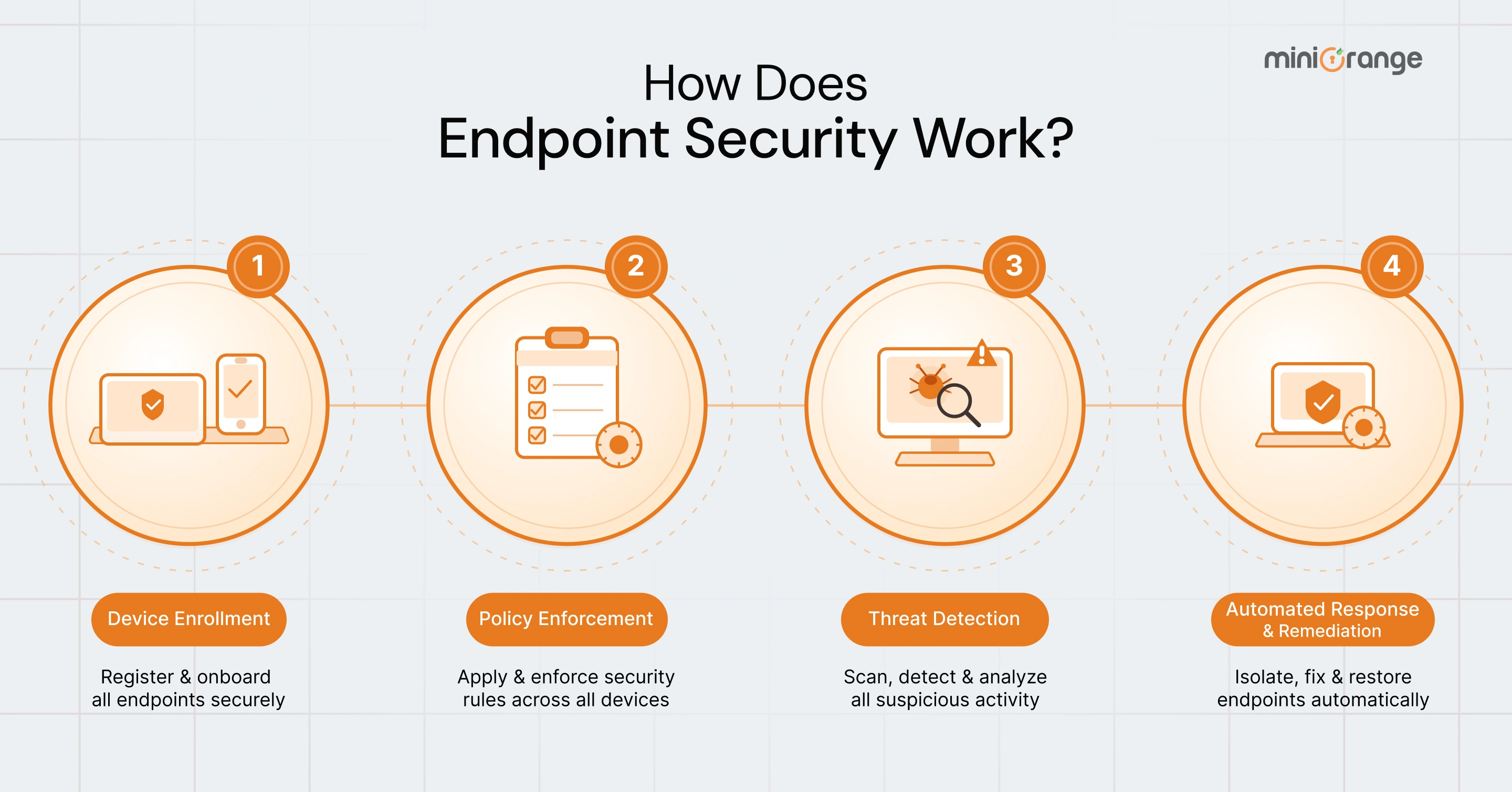
Most endpoint security software operates through four main stages: device enrollment, policy enforcement, threat detection, and automated response.
1. Device Enrollment
Before a device connects to company systems, the platform checks whether it meets security requirements. This includes verifying software updates, antivirus status, encryption settings, and overall compliance.
Suppose an employee tries to access company applications from a personal laptop that is missing critical security patches. The platform can automatically block or restrict access until the device becomes compliant.
This helps prevent vulnerable devices from entering the network.
2. Policy Enforcement
Once approved, the platform applies security policies to the device. These policies control what users can access and what actions devices can perform.
This may include:
- Restricting USB devices
- Blocking unsafe applications
- Limiting admin access
- Enforcing multi-factor authentication
- Controlling file sharing permissions
For instance, a contractor may only access limited systems, while an IT administrator receives broader permissions based on their role.
3. Threat Detection
After the device becomes active, the platform continuously monitors its behavior in real time. Modern endpoint security solutions use multiple detection methods to identify both known and unknown threats.
These methods include:
- Signature-based malware detection
- Behavioral analysis
- Threat intelligence feeds
- Network activity monitoring
For example, if a process suddenly starts encrypting files rapidly, the platform may identify it as ransomware behavior even if the malware has never been seen before.
This allows organizations to detect advanced threats much faster.
4. Automated Response and Remediation
When suspicious activity is detected, the platform automatically responds based on predefined security rules.
The system can:
- Isolate the affected device
- Quarantine malicious files
- Stop suspicious processes
- Alert security teams
- Block network connections
Suppose ransomware begins spreading on an employee's laptop. The platform can disconnect the device from the network immediately to stop the attack from reaching other systems.
After containment, security teams investigate the incident, remove threats, patch vulnerabilities, and restore the device before allowing it back into the network.
Endpoint Security Threat Prevention
The primary objective of endpoint security is to prevent threats from executing, not to respond after damage has occurred. Here is how it addresses the most common attack categories:
| Threat Type | How Endpoint Security Stops It |
|---|---|
| Ransomware | Behavioral detection flags abnormal encryption activity before any files are locked |
| Phishing Payloads | File scanning blocks malicious attachments before they execute on the device |
| Zero-Day Exploits | Behavioral analysis detects abnormal process activity without requiring a known signature |
| Insider Data Theft | Device control blocks unauthorized USB transfers and unapproved file exports |
| Fileless Malware | Memory-level monitoring detects attacks that never write a file to disk |
| Credential Attacks | MFA blocks login attempts even when the attacker presents a valid password |
Why is Endpoint Security Important?
Every organization with connected devices carries endpoint risk. Company size and industry vertical do not change that exposure.
Attackers prioritize endpoints because they are the most accessible entry point into any corporate network. A single compromised device gives an attacker authenticated access to the internal network, from which they move laterally, escalate privileges, and reach higher-value systems. Without endpoint security controls, this movement goes undetected until significant damage has been done.
Remote work has substantially expanded this exposure. Employees connect from home networks and public locations that operate entirely outside corporate network controls. Endpoint security maintains consistent protection on every device, regardless of connection location.
Regulatory frameworks across multiple industries require endpoint security as a compliance condition:
- HIPAA (Health Insurance Portability and Accountability Act): Mandatory for healthcare organizations handling protected patient data
- PCI DSS (Payment Card Industry Data Security Standard): Required for any organization processing, storing, or transmitting payment card data
- CMMC (Cybersecurity Maturity Model Certification): Required for US Department of Defense contractors and subcontractors
- SOC 2: Required for organizations managing customer data, demonstrating continuous device monitoring and access control
Non-compliance following a breach results in regulatory fines, contract loss, and reputational damage that directly affects customer retention and revenue.
Benefits of Endpoint Security
Some common benefits of endpoint security are as follows:
1. Monitoring Device Activity
Endpoint security tracks processes, network connections, file changes, and user activity in real time to identify suspicious behavior early.
2. Enforcing Access Policies
The platform applies security rules and blocks unauthorized actions such as unsafe file transfers, restricted applications, or unapproved access attempts.
3. Detecting Threats
Endpoint security identifies malware, ransomware, suspicious behavior, and known attack patterns using real-time monitoring and behavioral analysis.
4. Isolating Compromised Devices
If a device becomes infected or behaves suspiciously, the system can isolate it from the network to stop threats from spreading.
5. Alerting Security Teams
The platform sends alerts whenever threats, suspicious activity, or compliance issues are detected so security teams can respond quickly.
6. Reporting Compliance Status
Endpoint security provides visibility into device compliance and helps organizations identify systems missing updates, security tools, or required policies.
Real-World Examples of Endpoint Security
The following are some of the most common scenarios where endpoint security helps prevent threats and reduce security risks across an organization.
1. Ransomware Stopped Before Files are Encrypted
An employee opens a fake invoice attachment received through email. The file contains ransomware designed to encrypt files on the device. The endpoint security platform detects unusual encryption activity immediately and quarantines the file before it spreads. The IT team receives an alert within seconds, and no files are affected.
2. Non-Compliant Device Blocked Before Network Access
A sales employee tries to access company systems from a personal laptop while traveling. The device is missing required updates and security software. Network Access Control (NAC) detects the issue and blocks the connection automatically until the device meets security requirements.
3. Insider Data Transfer Blocked in Real Time
An employee attempts to copy confidential customer files to a personal USB drive. The endpoint security platform blocks the transfer instantly based on the organization's device control policies. The security team receives an alert, and no sensitive data leaves the organization.
Protect Every Endpoint with miniOrange
Organizations now handle sensitive business data across laptops, desktops, and remote devices every day. To reduce data exposure and maintain better control over endpoint activity, teams need stronger visibility and security policies across all devices.
The miniOrange Endpoint Data Loss Prevention (DLP) solution helps organizations monitor and secure endpoint devices through centralized policy enforcement and real-time activity tracking.
With miniOrange Endpoint DLP, teams can:
- Block unauthorized USB devices and file transfers
- Monitor sensitive data movement across endpoints
- Restrict screenshots, copy-paste actions, and external sharing
- Enforce security policies across remote and hybrid environments
- Track device activity through centralized alerts, logs, and audit reports
As part of the broader miniOrange DLP suite, organizations can also protect cloud applications, email platforms, and user activity through centralized data security controls. To know more about our DLP and endpoint solutions, contact us at uemsupport@xecurify.com.
Frequently Asked Questions
1. What is the difference between an API and an endpoint?
In APIs, an endpoint is a URL that receives requests. In cybersecurity, an endpoint is a physical device like a laptop or phone, connected to your network. Same word, two different meanings.
2. Is antivirus the same as endpoint security?
No. Antivirus scans for known threats. Endpoint security adds behavioral detection, access control, patch management, and incident response. Antivirus alone misses most modern attacks.
3. What is the difference between endpoint security and network security?
Network security monitors traffic at the perimeter. Endpoint security protects the device itself, wherever it connects. A remote laptop sits outside your network perimeter, but endpoint security on that device stays active.
4. Do small businesses need endpoint security?
Yes. Attackers target small businesses because defenses are typically weaker. A single compromised device gives attackers access to your data and your clients. Cloud-based platforms make deployment affordable for any team size.
5. What happens if an endpoint gets compromised?
The endpoint security platform isolates the device immediately, quarantines malicious files, and stops suspicious processes. Your team receives a full incident report. After the incident clears, the device passes a compliance check before returning to use.
6. What is a zero-day exploit, and how does endpoint security stop it?
A zero-day targets an unpatched software vulnerability. Antivirus misses it because no signature exists. Endpoint security catches it through behavioral analysis, flagging abnormal process activity on the device regardless of whether the threat is known.
7. How is endpoint security different from endpoint management?
Endpoint management handles device configuration, software deployment, and updates. Endpoint security focuses on threat protection and policy enforcement. Most modern platforms combine both into one solution.

Leave a Comment