
Privileged Access Management (PAM) is a cybersecurity approach that secures and controls access to critical systems by managing high-risk privileged accounts. It enforces least privilege and grants time-bound, task-specific access, ensuring that elevated permissions are used only when needed and fully audited.
Every organization has accounts that carry more system access than the average employee login. These accounts can install software, reconfigure infrastructure, access sensitive databases, and affect entire networks. These are privileged accounts, and they are, by design, the most powerful identities in your environment.
That power is also what makes them the highest-value target for attackers.
And so, managing who holds that power, when they hold it, and what they do with it, is what Privileged Access Management is about. But before we talk about managing privileged access, let's first see what privileged access is.
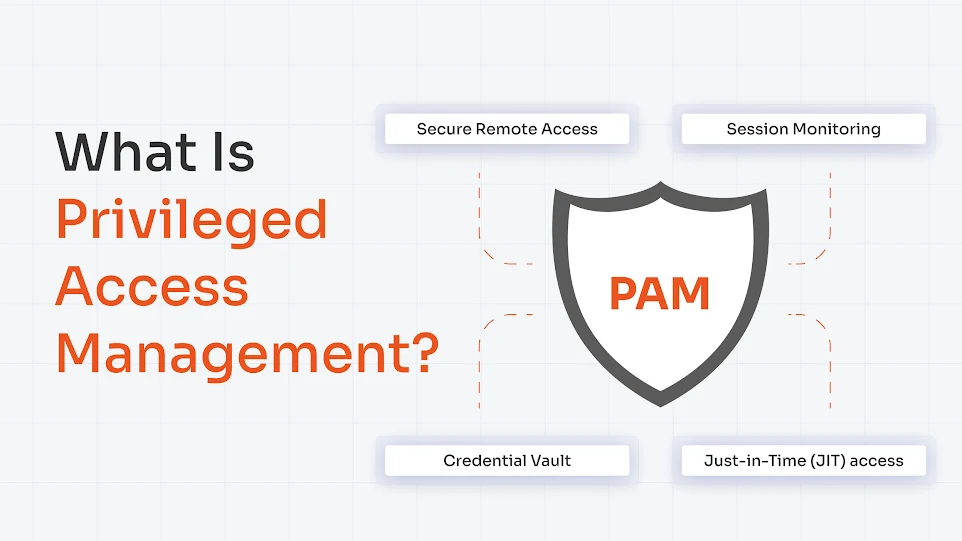
What is Privileged Access?
Privileges are special rights that allow users, applications, or systems to do things that standard users can't. They're the difference between being able to read a database and being able to delete it.
Types of Privileged Accounts
Not all privileged accounts are created equal. But they all do carry serious risks. Types of privileged accounts include:
- Admin and root accounts: These carry unrestricted control over systems and can change anything. A domain admin, for instance, can change anything across an entire AD environment.
- Service accounts: These are system-level accounts. Apps use them to communicate with databases, run scheduled tasks, or authenticate between services.
- Application accounts: These accounts are tied to specific software to access external APIs, databases, or third-party platforms. In DevOps environments, these are often called "secrets," and tracking them is a non-stop challenge for the technical teams.
- Cloud roles: IAM roles in AWS, Azure, and GCP with broad permissions across infrastructure. These accounts are often provisioned quickly and reviewed rarely.
Why Privileged Accounts are High-Risk
There are two reasons privileged accounts are attackers' favorite targets.
First, these accounts are powerful by design. They're also trusted by default, which makes them particularly dangerous. If a hacker compromises an admin account, they don't need to escalate privileges or move laterally through your network. They can extract data, install backdoors, modify logs, and destroy evidence of their presence.
Second, privileged accounts are everywhere but invisible. Many organizations don't even know how many privileged accounts exist in their environment. This invisibility is called shadow privileges, and is a massive vulnerability. And that's why privileged access management is extremely important.
Now, let's see how to manage and secure these privileged access accounts.
What is Privileged Access Management?
By definition, Privileged Access Management (PAM) is a cybersecurity discipline or solution that controls, secures, monitors, and audits how privileged accounts are used.
PAM ensures that privileged accounts can only be accessed by authorized people, for specific tasks, for limited amounts of time, and with complete visibility into what they do.
Think of it like a secure server room. You don't just leave the door unlocked. You need an ID badge, log who went in and when, restrict access to certain areas, and disable badges when someone leaves the company. PAM does the same thing—digitally—for your most critical access.
The core principle behind PAM is the principle of least privilege (PoLP). It shows that users should have only the specific access they need to do their job. And nothing more. If a database admin needs to patch a server, they get access to that server for the duration of the patch only.
And therefore, PAM in cybersecurity actively manages the lifecycle of privileged access. This includes who gets it, when, for how long, under what conditions, and what they do with it.
How Does Privileged Access Management Work?
Modern identity-centric PAM solutions like miniOrange control access based on user identity rather than static privileges. The workflow of most PAM solutions is as follows:
- Request access: A user or automated system requests access to a privileged resource. The request is logged and routed through the PAM platform.
- Authenticate (MFA): The system verifies the request through multi-factor authentication methods. Once approved, PAM logs the approval.
- Grant temporary (JIT) access: PAM grants access for a defined scope and time window. Just long enough to do the job.
- Monitor the session: PAM records every activity. This is for compliance audits and for detecting suspicious activity as it happens.
- Revoke and rotate: When the session ends or the time window closes, PAM automatically revokes access and rotates credentials, eliminating the risk of credential reuse or lateral movement.
To execute this access effectively, PAM uses Just-in-Time (JIT). It's the modern gold standard for PAM. Yet study shows that only 1% of organizations have fully implemented it. Most are still managing standard privileges manually.
Key Features of Privileged Access Management
When you implement a PAM, it secures your infrastructure with multiple built-in features. Some common PAM features across most platforms are as follows:
1. Credential Vaulting
An encrypted PAM vault stores all privileged credentials (passwords, keys, tokens). When someone needs a credential, they don't get the actual password. They get a temporary session that uses that credential on their behalf. And since they cannot actually see the password, they can't steal it.
2. Session Monitoring and Recording
Every keystroke, command, and action within a privileged session is captured and stored. Not just for compliance, though that's useful. But for real-time threat detection. If someone suddenly runs commands that are way outside their normal pattern, the system flags it.
3. Least Privilege Enforcement
PAM's least privileged policies define exactly what each role can do and when. A database admin gets database access. A server admin gets server access. A contractor gets access to a single application for 8 hours. The system enforces these boundaries automatically.
How Does Least-Privilege Work?

4. Just-in-Time (JIT) Access
JIT eliminates standing privilege entirely. In this case, the users request access when they need it. The request includes what they need access to, why, and for how long. Once approved, they get temporary credentials that expire automatically.
5. Secure Remote Access
This is for vendors, contractors, or remote admins. By applying vendor access management best practices, PAM handles secure access without exposing your network. They connect through a hardened gateway. Their session is monitored, and their access disappears when the contract ends.
Also read: Must Have Features for Every PAM Solution
Why is Privileged Access Management Important Now?
The hard truth about PAM is that most organizations don't actually know how many privileged accounts are active in their environment right now. And of the ones they do know about, a large portion are always-on, available around the clock, whether anyone needs them or not. That means:
- A developer who left 6 months ago might still have admin rights somewhere
- A service account running a deprecated application is still logging in daily.
- A contractor's access is still active after their engagement ended.
- An over-privileged application has more permissions than it actually needs.
All these opportunities are what attackers look for, and why Privileged Access Management is important.
And if compromised, the damage includes immediate data loss, regulatory fines (GDPR, HIPAA, SOX), incident response costs, reputational damage, and the months it takes to figure out what an attacker actually did in your environment.
PAM reduces that risk in two ways.
- Visibility — You know what privileged access exists and who's using it.
- Control — You limit when and how that access can be used.
Benefits of Privileged Access Management
PAM directly addresses many cyberthreats. The benefits of Privileged Access Management include:
Reduced Attack Surface
By eliminating standing privileges and rotating credentials automatically, you dramatically shrink the window of opportunity for attackers to exploit.
Better Visibility and Control
Security teams gain a real-time, unified view of all privileged activity across on-prem, cloud, and hybrid environments. Anomalous behavior is flagged instantly, turning visibility into actionable intelligence.
Operational Efficiency
Manual credential management is a productivity killer. PAM automates password vaulting, access provisioning, and session management, freeing IT teams from repetitive tasks.
Improved Regulatory Compliance Posture
Frameworks like SOC 2, HIPAA, PCI-DSS, and ISO 27001 all mandate strict controls over privileged access. PAM helps you meet these requirements and hands you a complete, tamper-proof record of who accessed what, when, and why.
Reduces Long-Term Costs
Effective privileged access management reduces the likelihood of costly data breaches, minimizes downtime, and lowers the risk of regulatory fines. Additionally, it can lead to reduced cyber insurance premiums, ultimately saving your organization money.
Real-World Use Cases of PAM
PAM isn't theoretical. Here's how it actually benefits across industries.
Finance and banking
Segregation of duties (SoD) under SOX and PCI DSS is non-negotiable in finance. You can't have the same person who approves a payment also execute it. PAM enforces this by controlling who can access payment systems, under what conditions, and for how long.
Healthcare
Patient data is among the most sensitive information in the world. HIPAA requires organizations to log all access to patient records and be able to explain who accessed what and why. PAM makes this automatic.
SaaS and DevOps
Cloud infrastructure gets provisioned fast. Developers get broad permissions to get things working. And nobody removes those permissions later. PAM ties access to specific tasks. For example, a DevOps engineer provisioning infrastructure gets temporary elevated access for that deployment. Once it's done, access expires. The next deployment requires a new approval. It slows things down just enough to prevent chaos.
Third-party and vendor access
Large organizations have IT admins, database admins, security teams, and third-party vendors. Each of them needs access to different systems. PAM gives each team the access they need without creating overlapping, redundant, or over-privileged accounts.
PAM vs. IAM: What's the Difference?
Here's where the confusion usually starts. PAM and IAM sound like they do the same thing. They don't.
Identity and Access Management (IAM) is the broad framework. It manages all identities across your organization. It covers who your employees are, what applications they should access, multi-factor authentication, password policy, and single sign-on.
Privileged Access Management (PAM) is a focused subset of IAM. It specifically manages the highest-risk accounts: the ones with elevated permissions. It's the difference between controlling access to Slack and controlling access to your production database.
IAM governs who can log in. PAM governs what happens after your most powerful accounts log in.
| Aspect | PAM | IAM |
|---|---|---|
| Scope | Privileged identities only. | All identities (users, apps, services) |
| Focus | Control, monitoring and auditing of elevated access | Authentication and access provisioning |
| Time window | Temporary time-bound access | Ongoing persistent access |
| Monitoring | Real-time session monitoring and analysis | Basic access logs |
| Use cases | Admins, service accounts, and contractors accessing critical systems | Everyone accessing normal apps |
And while we're on terminology, PAM also differs from Privileged Identity Management (PIM). Even though the two overlap in practice. PIM focuses on managing the lifecycle of privileged identities themselves.
PAM covers identity management, session monitoring, credential management, and enforcement. And PIM is part of the PAM puzzle, not the whole picture.
Here's a detailed breakdown of PAM vs. PIM.
Common Challenges in PAM Implementation
Here's the big question. If PAM is so important, why don't more organizations have it? Mostly because implementation feels overwhelming.
1. Complexity
PAM touches your infrastructure, your applications, and your approval workflows. Getting it right requires understanding your entire privileged access landscape, which many organizations have never mapped.
2. Visibility gaps at the start
You can't manage what you don't see. Many organizations don't know how many privileged accounts exist, who's using them, or what they're doing. Starting from this point of darkness is hard.
3. Legacy system integration
Your oldest systems might not play well with modern PAM solutions. Integrating PAM with legacy databases, mainframes, or custom applications requires custom work.
4. Cloud complexity
Cloud environments add another layer. IAM roles in AWS, Azure, or GCP aren't the same as traditional admin accounts, so PAM has to evolve to cover them. Many organizations are still figuring this out.
These aren't reasons to skip PAM. They're the reasons to start early, with a clear scope and realistic timelines.
Best Practices for Implementing PAM Effectively
If you're implementing PAM (or improving what you already have), here are 6 best practices of PAM that actually work:
1. Start with Discovery
Map every privileged account in your environment. Humans and machines. On-premises and cloud. It's tedious but essential. You can't protect what you don't know about.
2. Enforce Least Privilege by Default
Start with zero access and grant only what's needed. It's the opposite of how most organizations currently work, but it's more secure.
3. Replace Standing Privileges
Implement JIT (Just-in-Time). This is the most structurally impactful change your organization can make. A credential that only exists for the duration of a task cannot be exploited after the fact.
4. Automate credential rotation
Passwords should be changed frequently, and credentials should never be reused. Let PAM handle this automatically instead of relying on manual processes that fail.
5. Run Access Reviews on a Schedule
Roles change. Projects end. People move teams. So at least quarterly. Ask every team, "Do these people still need this access?" Most of the time, the answer is no. Remove the excess.
6. Integrate PAM with your SIEM and IAM tools
PAM shouldn't be an island. Connect it to your SIEM (Security Information and Event Management) to correlate privileged activity with broader security events. Integrate it with your IAM system so access requests flow through the same approval workflows.
Closing the Privilege Gap with miniOrange PAM
For most organizations, the challenge is execution. The gap between what your access policies say should happen and what is actually running in your environment right now.
As a cloud-first, identity-centric modern platform, miniOrange PAM is built to close that gap across hybrid, cloud, and on-premises environments, without requiring your team to rip and replace existing infrastructure.
The platform covers the full privileged access lifecycle:
- Enterprise Password Vault with AES-256 encryption and automated rotation for SSH, RDP, VNC, Active Directory, and database credentials
- Privileged Session Monitoring with live streaming, session recording, playback, and real-time termination capabilities
- Just-in-Time Access that provisions temporary access rights dynamically and revokes them automatically when the task or time window ends
- Privilege Elevation and Delegation Management (PEDM) for assigning time-limited access to restricted resources, eliminating standing privileges at the task level
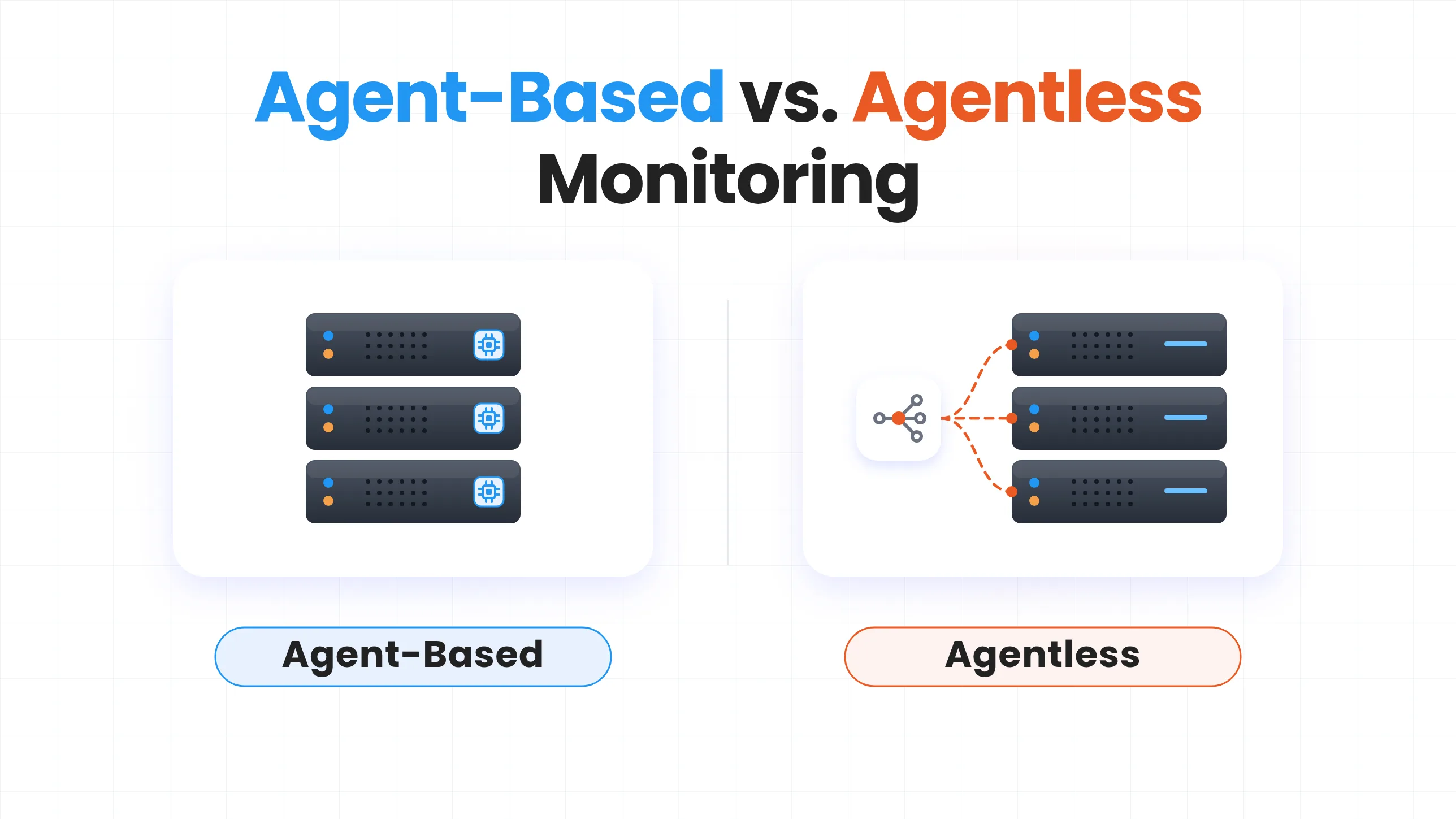
- Agentless deployment across servers, cloud, and hybrid infrastructure, with no endpoint agents required and no infrastructure disruption during setup
- Endpoint Privilege Management that enforces least privilege at the workstation level and blocks unauthorized elevations
- Native integrations with IAM, SIEM, and directory services
miniOrange PAM automatically generates the audit trails, session recordings, and access logs your team needs for HIPAA, SOX, PCI DSS, and GDPR compliance. No manual record assembly before every audit cycle. It's built into how the platform operates.
And whether your organization is setting up privileged access controls for the first time or moving away from a tool that's become too complex to run, miniOrange gives you enterprise-grade PAM without the heavy licensing costs and lengthy implementation that usually come with it.
miniOrange is rated an impressive 5.0 rating based on multiple reviews on G2 and other review platforms, indicating strong customer satisfaction with its PAM solution.
Frequently Asked Questions
What is a privileged access management example?
An admin needs to patch a production server. Instead of having standing admin access, they request temporary access for 2 hours. The request is approved. They log in, patch the server, and their access automatically expires. If an attacker compromised their credentials, the window of exposure is 2 hours, not indefinite.
What is the difference between IAM and PAM?
IAM manages identity and access broadly across all users in your organization. PAM focuses on the highest-risk accounts, those with elevated permissions over critical systems.
What features are used in PAM?
PAM features include credential vaults, session monitoring and recording, JIT access provisioning, privilege elevation management, and endpoint privilege controls. They integrate with your SIEM, IAM, and identity governance platforms.
Is PAM the same as IAM?
PAM is a subset of IAM focused specifically on privileged accounts. IAM governs all identities. PAM governs the most powerful ones, those that carry the broadest consequences when compromised.
Why is PAM important in cybersecurity?
Privileged accounts are the primary target in most sophisticated attacks. Compromising one admin credential can expose an entire environment. PAM limits that exposure through access that is controlled, monitored, time-bound, and fully auditable.
About the Technical Expert

PAM Engineering Lead
Pradeep is a Senior Software Engineer at miniOrange, bringing over 7 years of experience in designing and securing enterprise access infrastructures. He leads the architecture and implementation of miniOrange’s Privileged Access Management solutions that help organizations enforce least-privilege controls, secure critical systems, and reduce identity-based risk across cloud and on-prem environments. He works closely with security and IT teams to build scalable privilege governance frameworks aligned with compliance and operational requirements. His expertise spans PAM architecture, secure system design, and identity-first security engineering for modern enterprises.
About the Author

Content Writer
Stutee writes about cybersecurity and identity security, covering technologies such as MFA, IAM, PAM, and endpoint management. Her work focuses on translating what products do into why audiences should care, ensuring technical depth does not come at the cost of readers clarity.
Leave a Comment