

A phishing attack is a scam where someone impersonates a trusted person or organization to trick a victim into handing over sensitive information, clicking a malicious link, or transferring money.
It sounds simple, and that's exactly why it works so well. Attackers don't need to break through a firewall when they can convince an employee to open the door for them.
This matters more today than ever.
According to Microsoft Threat Intelligence, roughly 8.3 billion email-based phishing threats were detected in the first quarter of 2026 alone, and QR code phishing attempts more than doubled during that same period. The Anti-Phishing Working Group recorded a 13.8% jump in phishing attacks quarter over quarter in early 2026, with smishing (SMS-based phishing) rising sharply during the same stretch.
Phishing isn't slowing down. It's evolving faster than most security teams can keep pace with.
In this guide, we'll break down what a phishing attack actually is, how attackers pull it off step by step, and the many forms phishing takes today. We will also highlight real incidents that made headlines, how to spot an attempt before it costs you, and what actually works to stop it, including where Multi-Factor Authentication (MFA) helps.
What Is a Phishing Attack?
A phishing attack is a form of social engineering in which a cybercriminal impersonates a trusted person, brand, or institution to manipulate a victim into taking an action that benefits the attacker. That action might be clicking a malicious link, entering login credentials on a fake website, opening an infected attachment, or wiring money to a fraudulent account.
Social engineering is the psychological core of phishing. Rather than exploiting a software vulnerability, attackers exploit human behavior, our tendency to trust familiar names, respond quickly to authority, and act on urgency without pausing to verify.
For instance, a phishing email pretending to be from your bank, your CEO, or your IT department works because it borrows the credibility of that trusted source.
Attackers who run phishing campaigns are usually after one or more of the following:
- Login credentials for email, banking, or corporate systems
- Financial information, including card numbers and bank account details
- Personal information that can be used for identity theft
- Access to internal systems and networks
- The ability to install malware or ransomware on a device
Phishing doesn't discriminate by target size. Individuals get phished through fake delivery notifications and prize scams. Organizations, from small businesses to Fortune 500 companies and government agencies, get phished through fraudulent invoices, spoofed executive emails, and fake vendor requests.
Why Are Phishing Attacks So Effective?
Phishing has survived for decades, despite widespread awareness, because it's built on psychological triggers that are hard to override in the moment.
- Human trust: People are wired to believe messages that look like they come from colleagues, banks, or well-known brands. Attackers exploit that default trust rather than trying to defeat it.
- Urgency: A message that says your account will be suspended in 24 hours, or that a wire transfer needs to go out immediately, pushes people to act before they verify.
- Fear: Threats of legal action, tax penalties, or account suspension trigger a stress response that makes people less likely to scrutinize details.
- Curiosity: Gets exploited through subject lines like "Your package couldn't be delivered" or "Someone viewed your profile," which tempt recipients to click before thinking.
- Familiar brands: A phishing email spoofing Microsoft, Amazon, or a company's own HR department looks familiar at a glance, which is exactly the point.
- Personalization: When a message includes a real name, job title, or recent transaction detail pulled from a data breach or social media, it feels authentic.
- Compromised accounts: Lets attackers phish from inside an organization's trusted contacts, meaning the email genuinely comes from a real colleague's hijacked inbox.
- AI-generated convincing messages: Generative AI tools now let attackers write flawless, context-aware emails in seconds, and even generate convincing voice clones or video deepfakes for vishing and BEC scams.
How Does a Phishing Attack Work?
Phishing attacks generally follow a predictable five-step process, whether the target is a single employee or an entire organization.
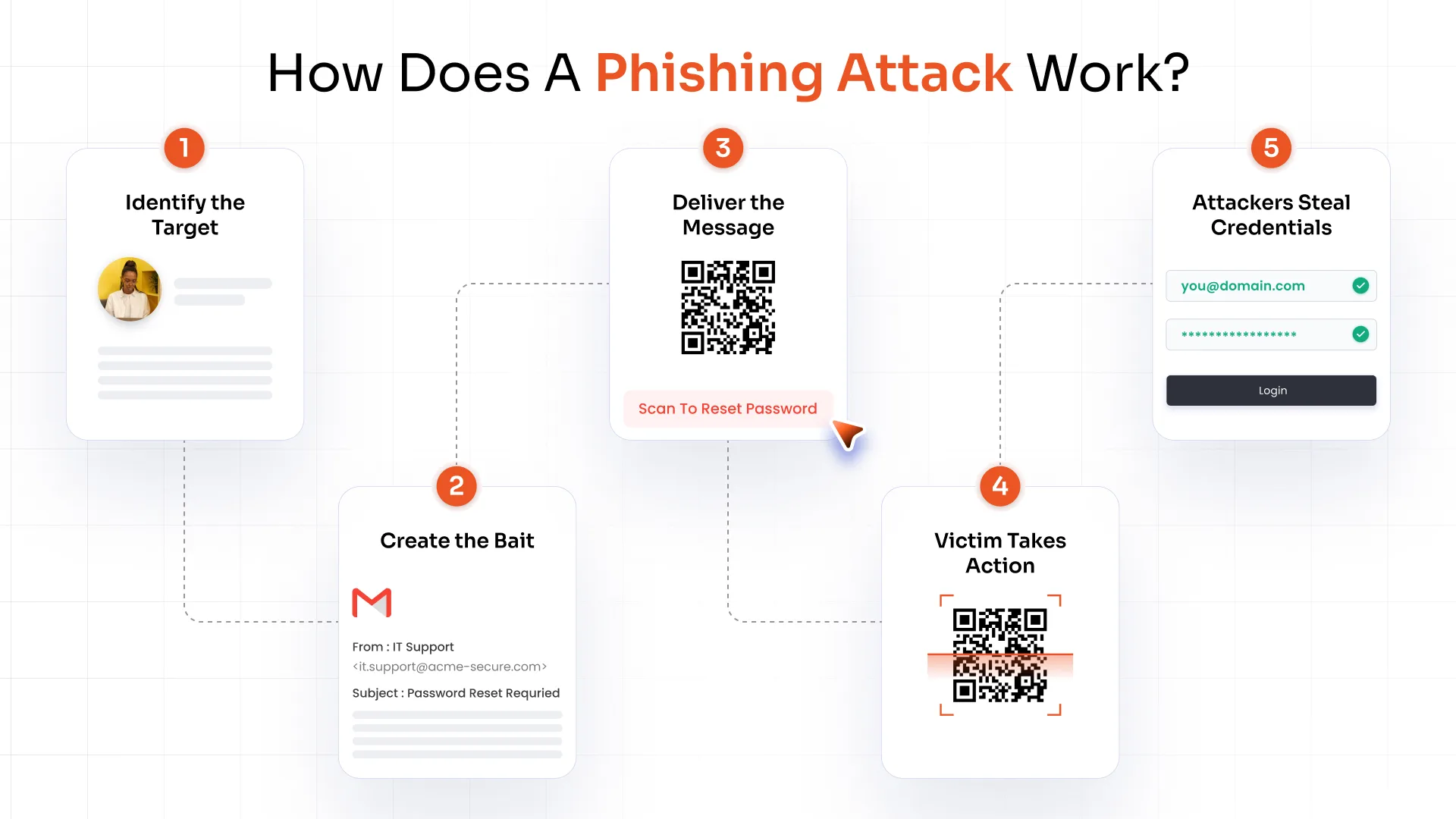
1. Identify and Research the Target
Before sending a single message, attackers gather intelligence.
This includes:
- Email addresses harvested from data breaches or public directories
- Full names and job titles scraped from LinkedIn
- Social media details that reveal personal interests or relationships
- Company information such as an organization’s charts, vendor relationships, and recent news
The more specific the research, the more convincing the eventual bait.
2. Create the Phishing Bait
With research in hand, attackers craft a message designed to feel routine and urgent at the same time.
Common bait includes:
- A fake password reset notice
- A fraudulent invoice awaiting approval
- An account security warning
- A fake delivery notification
- An HR request such as a benefits update or policy acknowledgment, or a financial request like an urgent wire transfer
Each of these mimics a legitimate business process, which is what makes them dangerous.
3. Deliver the Phishing Message
Attackers no longer rely on email alone.
Delivery now spans:
- Emails
- SMS text messages (smishing)
- Phone calls (vishing)
- Social media direct messages
- Messaging apps like WhatsApp or Slack
- QR codes embedded in emails, flyers, or even parking meters
Spreading an attack across multiple channels increases the odds that at least one message gets through.
4. Trick the Victim Into Taking Action
This is the moment the attacker is engineering for.
- The victim might click a malicious link
- Open an infected attachment
- Submit login credentials on a fake page
- Authorize a payment
- Share confidential business information over the phone
Everything up to this point exists to make this single action feel safe and routine.
5. Steal Credentials or Deliver Malware
Once the victim interacts with the phishing attempt, the payoff for the attacker kicks in.
Credentials entered on a fake login page get captured instantly and used to access real accounts. A malicious attachment or link can silently install malware, ransomware, or a remote access tool.
From there, attackers often move quickly, sometimes within minutes, to lock the victim out, exfiltrate data, or pivot deeper into the network before anyone notices.
What Are the Different Types of Phishing Attacks?
Phishing has splintered into many specialized forms, each suited to a different channel or target profile.
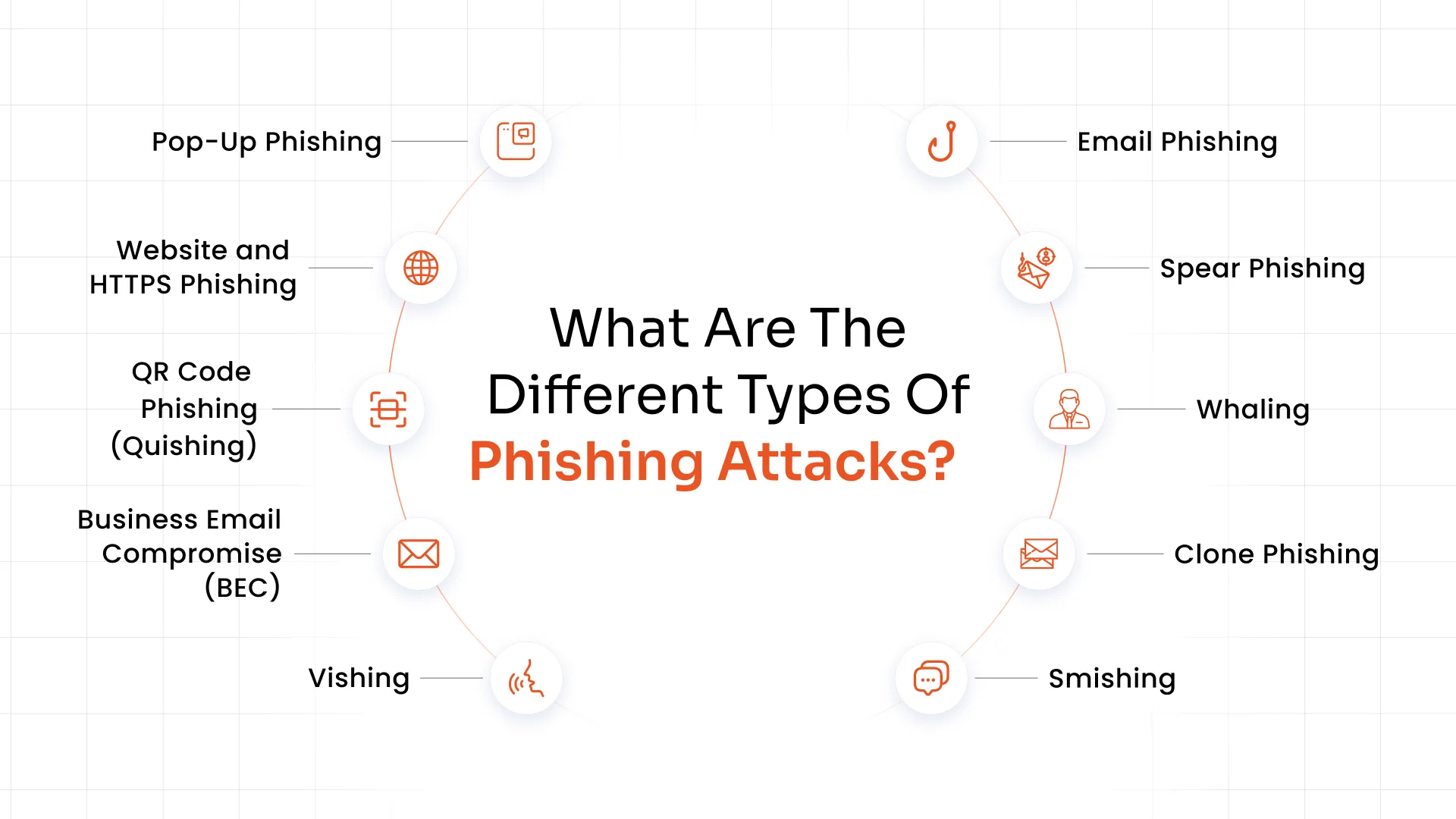
1. Email Phishing
The original and still most common form. Attackers send mass emails impersonating banks, software vendors, or well-known brands, hoping a percentage of recipients click through without checking.
2. Spear Phishing
A targeted version of email phishing aimed at a specific individual or department. Attackers use researched details, like a name, project, or manager, to make the message feel personally relevant, which significantly raises the success rate compared to generic campaigns.
3. Whaling
A subset of spear phishing that targets senior executives, finance leaders, or other high-value individuals. Whaling emails often impersonate a CEO or CFO requesting an urgent wire transfer, exploiting the authority of the sender to bypass normal scrutiny.
4. Clone Phishing
Attackers copy a real, previously sent email and swap out the legitimate link or attachment for a malicious one, then resend it from a spoofed address. Because the content looks identical to something the recipient has already trusted, clone phishing is unusually effective.
5. Smishing
Phishing is conducted through SMS text messages, often impersonating delivery services, banks, or IT departments. A typical smishing message includes a shortened link and a false urgency hook, like a locked account or a missed package.
6. Vishing
Voice-based phishing, where attackers call victims while posing as tech support, government officials, or bank representatives. Vishing often works in tandem with other channels, for example, a text message that tells the victim to expect a "verification call."
7. Business Email Compromise (BEC)
A highly targeted form of email fraud in which attackers compromise or spoof a legitimate business email account, often an executive's, to request fraudulent wire transfers or redirect vendor payments.
BEC doesn't always involve malware or fake links, which makes it harder for traditional security tools to catch.
8. QR Code Phishing (Quishing)
Attackers embed malicious QR codes in emails, flyers, or physical locations like parking meters. Scanning the code redirects the victim to a fake login page.
Quishing has grown sharply because QR codes bypass traditional email link scanning and are scanned on personal mobile devices that often have weaker security controls.
9. Website and HTTPS Phishing
Fake websites, sometimes secured with a valid HTTPS certificate and padlock icon, mimic legitimate login pages to harvest credentials. The presence of HTTPS no longer signals a safe site; it only confirms the connection is encrypted, not that the destination is legitimate.
10. Pop-Up Phishing
Malicious pop-up windows appear while browsing, mimicking security alerts or login prompts, and trick users into entering credentials or downloading fake "security updates" that are actually malware.
Why Do Attackers Use Phishing?
Phishing persists because it's cheap, scalable, and reliably effective, giving attackers a direct path to several distinct objectives.
Most phishing campaigns aim to steal login credentials, which attackers then use to take over accounts, whether that's a personal email inbox, a corporate Microsoft 365 account, or a banking portal. From there, the objective often shifts to committing financial fraud, either through direct account access or by impersonating a trusted party to redirect a payment.
Phishing is also a preferred method for stealing sensitive data, including customer records, intellectual property, and internal communications, which can be sold or used for further attacks. Many campaigns exist purely to deploy malware or ransomware, using a phishing email as the delivery mechanism for a payload that encrypts systems or opens a backdoor.
For attackers targeting organizations specifically, phishing is often the first step toward gaining initial access to a corporate network, after which they can conduct business email compromise, sell stolen information on dark web marketplaces, or move laterally across systems to expand their foothold before launching a larger attack.
What Happens if a Phishing Attack Is Successful?
The consequences of a successful phishing attack rarely stop at the initial compromise. One stolen password can cascade into a much larger security incident.
| Attack Outcome | Potential Impact |
|---|---|
| Credential Theft | Account takeover and unauthorized access to systems |
| Account takeover | Fraudulent transactions, data exposure, further phishing from the compromised account |
| Financial Fraud | Direct monetary loss, often unrecoverable once funds are transferred |
| Malware Infection | Device compromise, loss of control over endpoints |
| Ransomware Deployment | Operational disruption, downtime, and costly recovery |
| Data Theft | Privacy violations, regulatory penalties, and reputational damage |
| Lateral Movement | Broader network compromises and prolonged attacker presence |
The financial scale here is significant. Business email compromise and other credential-driven attacks have collectively driven billions of dollars in reported losses across organizations of every size, and wire-transfer fraud tied to phishing continues to climb year over year.
Beyond the immediate financial hit, organizations face regulatory scrutiny, customer trust erosion, and the operational cost of incident response, which is why prevention is far cheaper than remediation.
Real-World Phishing Attack Examples
Real incidents show how these tactics play out in practice and why even well-resourced organizations remain vulnerable.
1. Twilio Smishing Attack
- Attack type: SMS phishing (smishing) and corporate credential harvesting.
- What happened: Attackers texted employees fake IT warnings to trick them into entering login data on cloned Okta pages. They used these stolen credentials to access internal systems and view customer data.
- How the victim was targeted: Employees received texts about expired passwords or schedule changes with malicious links (like twilio-sso.com) mimicking the real sign-in portal.
- Impact: Compromised 209 corporate customer accounts and 93 Authy users, allowing attackers to register unauthorized secondary devices.
- Key lesson: Basic passwords and text verification codes are not enough. Companies must use hardware-based phishing-resistant FIDO2 security tokens to fully block cloned login pages.
2. Booking.com Phishing Attack
- Attack type: Credential phishing and account takeover targeting hotel administration portals.
- What happened: Hackers infected hotel computers with malware to hijack their Booking.com profiles. They used real guest reservation data to send fake, urgent payment messages from the hotel's legitimate account.
- How the victim was targeted: Travelers received messages inside the official Booking.com chat app containing their exact trip details. They were told their booking would be canceled unless they clicked a link to input credit card info or transfer money.
- Impact: Reports skyrocketed by nearly 600% in one year, costing Australian victims alone over $337,000 in stolen funds and fraudulent charges.
- Key lesson: Never click links in app chats to verify payment. Always verify urgent requests by calling the hotel directly using a number found on their official, standalone website.
3. Eagle Mountain City, Utah BEC Attack
- Attack type: Business Email Compromise (BEC) and email thread hijacking.
- What happened: Fraudsters hacked an external vendor's systems and intercepted an ongoing email thread with city staff. They impersonated the vendor and tricked staff into redirecting payment instructions.
- How the victim was targeted: City staff managing a major road-widening project received an email that perfectly spoofed their active construction contractor. The message requested a routine bank detail update for an upcoming invoice payment.
- Impact: The city unwittingly wired nearly $1.13 million via a single fraudulent ACH transfer directly to the scammers. This sparked a multi-year legal battle with the contractor before a settlement was finally reached.
- Key lesson: Never change vendor payment routing based solely on email requests. Organizations must always verbally verify bank account changes over a trusted phone number before processing funds.
How Can You Spot a Phishing Attack?
Most phishing attempts leave behind clues, if you know where to look.
Common Signs of a Phishing Email
- Suspicious sender address: The display name may look legitimate, but the actual email address often contains extra characters, misspellings, or an unrelated domain.
- Unexpected requests: A message asking you to do something you weren't expecting, especially involving money, credentials, or sensitive files, deserves a second look.
- Urgency or threats: Phrases like "act now" or "your account will be suspended" are designed to rush you past careful thinking.
- Unusual payment requests: Wire transfers, gift cards, or changes to existing payment details are classic red flags, particularly when requested outside normal processes.
- Suspicious links: Hover over any link before clicking to see where it actually leads; mismatched or shortened URLs are a warning sign.
- Unexpected attachments: Unsolicited invoices, resumes, or shipping documents are common malware delivery vehicles.
- Incorrect domains: Look closely for subtle misspellings, like "rnicrosoft.com" instead of "microsoft.com."
- Requests for credentials: Legitimate organizations rarely ask you to confirm your password via email or text.
- Poor or unusual wording: While AI has reduced obvious grammar mistakes, tone that feels slightly off from how a colleague or vendor normally writes is still worth noticing.
- Unexpected MFA or password-reset requests: A prompt you didn't initiate is often a sign someone else is trying to access your account.
How to Check a Suspicious Link or Website
- Inspect the domain carefully before entering any information, letter by letter if needed.
- Don't rely only on HTTPS or the padlock icon, since encrypted connections say nothing about whether a site is legitimate.
- Avoid clicking unexpected links in emails, texts, or messages, even if they appear to come from someone you know.
- Visit the official site directly by typing the URL yourself or using a saved bookmark, rather than clicking through.
- Verify requests through another channel, such as calling a known phone number, before acting on anything that feels off.
What Should You Do if You Click a Phishing Link?
Acting quickly limits the damage if you've already clicked or entered information on a suspicious page.
- Stop interacting with the page immediately. Don't enter any more information, and close the browser tab.
- Disconnect or isolate the affected device from the network if there's a chance malware was downloaded, to prevent it from spreading.
- Don't enter additional credentials, even if the page prompts you again or redirects to what looks like a legitimate login screen.
- Change compromised passwords right away, starting with the account that was targeted and any account that shares the same password.
- Revoke or reset active sessions where possible, so any session token an attacker may have captured becomes useless.
- Enable multi-factor authentication on the affected account if it isn't already active.
- Report the incident to your IT or security team immediately, even if you're not certain anything was compromised. Early reporting gives responders more time to contain the damage.
- Monitor the affected account for unusual login activity, password changes, or unauthorized transactions over the following days and weeks.
- Investigate whether other accounts or data were exposed, particularly if you reused the same password elsewhere or if the compromised account had access to other systems.
How Can Businesses Prevent Phishing Attacks?
Effective phishing defense works in layers. No single control catches everything, but combined, they close most of the gaps attackers rely on.
1. Security Awareness Training
Ongoing, practical training keeps phishing top of mind rather than treating it as a once-a-year compliance checkbox.
Regular phishing simulations test whether employees actually apply what they've learned. Also, building a strong reporting culture ensures suspicious messages get flagged before they cause damage rather than getting quietly ignored.
2. Email and Web Security
Technical controls catch a large share of phishing before it ever reaches an inbox.
This includes:
- Email filtering that blocks known malicious senders
- Malicious URL detection that scans links in real time
- Attachment scanning that inspects files for hidden payloads
- Domain protection measures like DMARC, DKIM, and SPF that make it harder for attackers to spoof a company's own domain
3. Limit Access and Privileges
Even if an account is compromised, the damage should be contained.
Applying the principle of least privilege, supported by Privileged Access Management (PAM) and role-based access controls, ensures a compromised account can't automatically reach sensitive systems it never needed access to in the first place.
4. Use Multi-Factor Authentication (MFA)
If an attacker steals a password through phishing, multi-factor authentication (MFA) software adds another authentication layer before that stolen password translates into account access. This is one of the most impactful controls available, since credential theft alone is no longer enough for an attacker to get in.
That said, it's important to make a critical distinction here: not all MFA methods provide the same level of phishing resistance.
Modern reverse-proxy phishing kits can intercept one-time passcodes and even push notification approvals in real time, relaying them to the legitimate service before the code expires. Security keys and biometric authentication, by contrast, are built to resist exactly this kind of attack.
Can Multi-Factor Authentication Stop Phishing?
MFA doesn't stop a phishing message from arriving, and it won't prevent someone from clicking a malicious link. What it can do, when implemented correctly, is dramatically reduce the damage caused by stolen credentials by requiring a second factor the attacker doesn't have.
But the strength of that protection depends entirely on which type of MFA is in use.
- Traditional MFA: These include SMS one-time passcodes, email OTPs, and some push-notification workflows. They add meaningful friction but remain vulnerable to reverse-proxy phishing kits like EvilProxy.
- Phishing-Resistant MFA: This category includes FIDO2 authentication, passkeys, and hardware security keys, all of which rely on device-bound cryptographic credentials rather than a code that can be intercepted and replayed. This is built to close the gap that traditional MFA cannot fill.
Why Is Phishing-Resistant MFA More Effective?
FIDO2 and WebAuthn form the foundation of a phishing-resistant MFA solution and work fundamentally differently from code-based MFA. Instead of generating a shared secret that a user types in, the device creates a unique cryptographic key pair for each website it registers with. The private key never leaves the device, and every login is bound to the exact domain that requested it.
If an attacker sets up a fake login page, even a pixel-perfect copy, the authenticator simply won't respond, because the domain doesn't match what it's cryptographically bound to. There's no code for a proxy to intercept and relay, because there's no code involved at all. This origin-binding mechanism is what the security industry means when it calls FIDO2 "phishing-resistant" rather than just "more secure."
Phishing Trends That Rule Today’s Systems
Phishing tactics shift constantly, and a few patterns stand out.
1. AI-Powered Phishing
Generative AI has removed the grammatical tells that used to make phishing emails easy to spot. Attackers now produce polished, context-aware messages, personalized lures built from scraped social media data, and even AI-generated voice or video impersonation for vishing and executive fraud attempts.
2. Multi-Channel Phishing
Attackers increasingly combine channels within a single campaign, pairing an email with a follow-up SMS, a phone call, or a social media message to reinforce legitimacy. This coordinated, multi-channel approach is one of the harder patterns for security teams to detect.
3. QR Code Phishing
Quishing volumes have surged dramatically, with Microsoft reporting QR code phishing attempts more than doubling during the first quarter of 2026 alone. Because QR codes are scanned on mobile devices, often outside the reach of corporate email security tools, they've become an attractive way to bypass traditional defenses.
4. Business Email Compromise
BEC remains one of the costliest phishing variants, and the average amount attackers attempt to steal per wire-transfer BEC attack has continued climbing. It remains a top priority for finance and executive teams specifically.
How miniOrange Helps Protect Against Phishing
Since stolen credentials are the outcome attackers want most from a phishing attack, the strongest layer of defense you can add is authentication that can't be phished in the first place.
1. Phishing-Resistant MFA
miniOrange supports FIDO2 and passkey-based authentication, along with hardware security keys and biometric verification. These methods rely on cryptographic, device-bound credentials rather than codes or push approvals, closing the exact gap that reverse-proxy phishing kits exploit.
2. Multiple MFA Methods
Not every team is ready to move to hardware keys overnight, and miniOrange supports a flexible range of methods to match your rollout, including authenticator apps, TOTP codes, push notifications, hardware tokens, FIDO2 security keys, and biometric authentication.
This lets you start where your organization is today and move toward stronger, phishing-resistant methods as adoption matures.
3. MFA Across Enterprise Access Points
Phishing doesn't just target email; it targets whatever system a stolen credential can unlock.
miniOrange extends MFA protection across Active Directory, on-premises servers, Windows and RDP logins, VPN access, Microsoft 365, custom web applications, and virtual desktop infrastructure (VDI). So a single compromised password doesn't become an open door across your environment.
4. Secure Access Even When Credentials Are Compromised
The reality every security team has to plan for is that some credentials will eventually be phished. The goal of a strong MFA strategy isn't to prevent that from ever happening; it's to make sure a stolen password alone is never enough to get an attacker in.
The Bottom Line on Phishing Defense
Phishing works because it targets people, not systems, and no single tool eliminates that risk. The organizations that hold up best combine ongoing awareness training, strong email and web security, tightly controlled access, and authentication that can't simply be phished away.
As attackers lean harder on AI and multi-channel tactics, closing the credential gap with phishing-resistant MFA is quickly becoming less of an upgrade and more of a baseline expectation.
FAQs
What is Business Email Compromise (BEC)?
Business email compromise (BEC) is a targeted phishing scam in which an attacker compromises or spoofs a legitimate business email account, often belonging to an executive, to trick an employee into transferring funds or sharing sensitive information.
What is phishing-resistant MFA?
Phishing-resistant MFA refers to authentication methods, primarily FIDO2 and passkeys, that use device-bound cryptographic credentials instead of codes or approval prompts. Because each login is cryptographically bound to the legitimate website's domain, these methods can't be intercepted or replayed by a fake login page, even a highly convincing one.
How do I know if I have been phished?
Watch for signs like unexpected password-reset emails, unfamiliar login alerts, accounts locking you out, unrecognized transactions, or contacts reporting strange messages sent from your account.
Leave a Comment