
The shift from traditional office setups to remote and hybrid work has changed how IT teams operate.
Employees are no longer working from a single location. They use laptops, smartphones, tablets, and even rugged devices across homes, offices, and field environments. Managing all of this securely is not simple.
IT teams now have to balance speed, security, and support without physical access to devices. When something breaks, they cannot walk up to a desk and fix it. This often leads to delays, reduced productivity, and higher operational costs.
Remote device management solves this problem.
It gives IT teams real-time visibility and control over devices, whether they are company-owned or part of a BYOD setup. From onboarding to troubleshooting, remote mobile device management allows teams to manage devices without being physically present.
In this blog, we will break down everything you need to know about remote device management and how it fits into modern IT environments.
What is Remote Device Management (RDM)?
Remote device management (RDM) is the process of monitoring, managing, and securing devices from a central system without needing physical access.
In simple terms, it allows IT teams to control devices remotely.
Instead of handling devices manually, IT administrators can configure settings, install applications, push updates, and troubleshoot issues from a single dashboard. This applies to laptops, smartphones, tablets, and other connected endpoints.
Remote Device Management (RDM) is not just about access. It ensures devices remain secure, compliant, and operational no matter where they are used.
Why Do Businesses Need Remote Device Management?
Device management has changed completely. What worked when devices were limited to office desktops no longer works in today's distributed environments.
Here are the key reasons businesses need remote device management tools:
1. Devices Operate Outside IT Control
Devices are no longer restricted to office networks. They move across locations, networks, and usage environments. Without remote management, IT teams lose direct control over how these devices are configured, updated, and used.
2. No Single System to Manage Everything
Most businesses use multiple operating systems and device types. Without a centralized tool, each platform ends up being managed separately. This creates fragmented workflows and increases the chances of configuration gaps across devices.
3. Reactive IT Becomes the Default
Without remote access and control, IT teams can only act after issues are reported. Troubleshooting depends on user input or delayed access. This slows down response times and makes issue resolution inconsistent.
4. Policies Cannot Be Enforced Consistently
Security and usage policies often depend on where the device is and how it is being used. Without remote management, enforcing these policies uniformly becomes difficult, leading to inconsistencies across devices.
5. Device Volume Becomes Hard to Manage
As organizations scale, the number of devices increases rapidly across teams and locations. Managing a large volume of devices manually or across multiple systems becomes difficult and creates operational bottlenecks.
Key Features of Remote Device Management
Remote device management tools are designed to give IT teams control over devices without needing physical access. They allow administrators to monitor device activity, enforce policies, and take action in real time from a central system. This makes it easier to manage devices consistently, regardless of where they are being used.
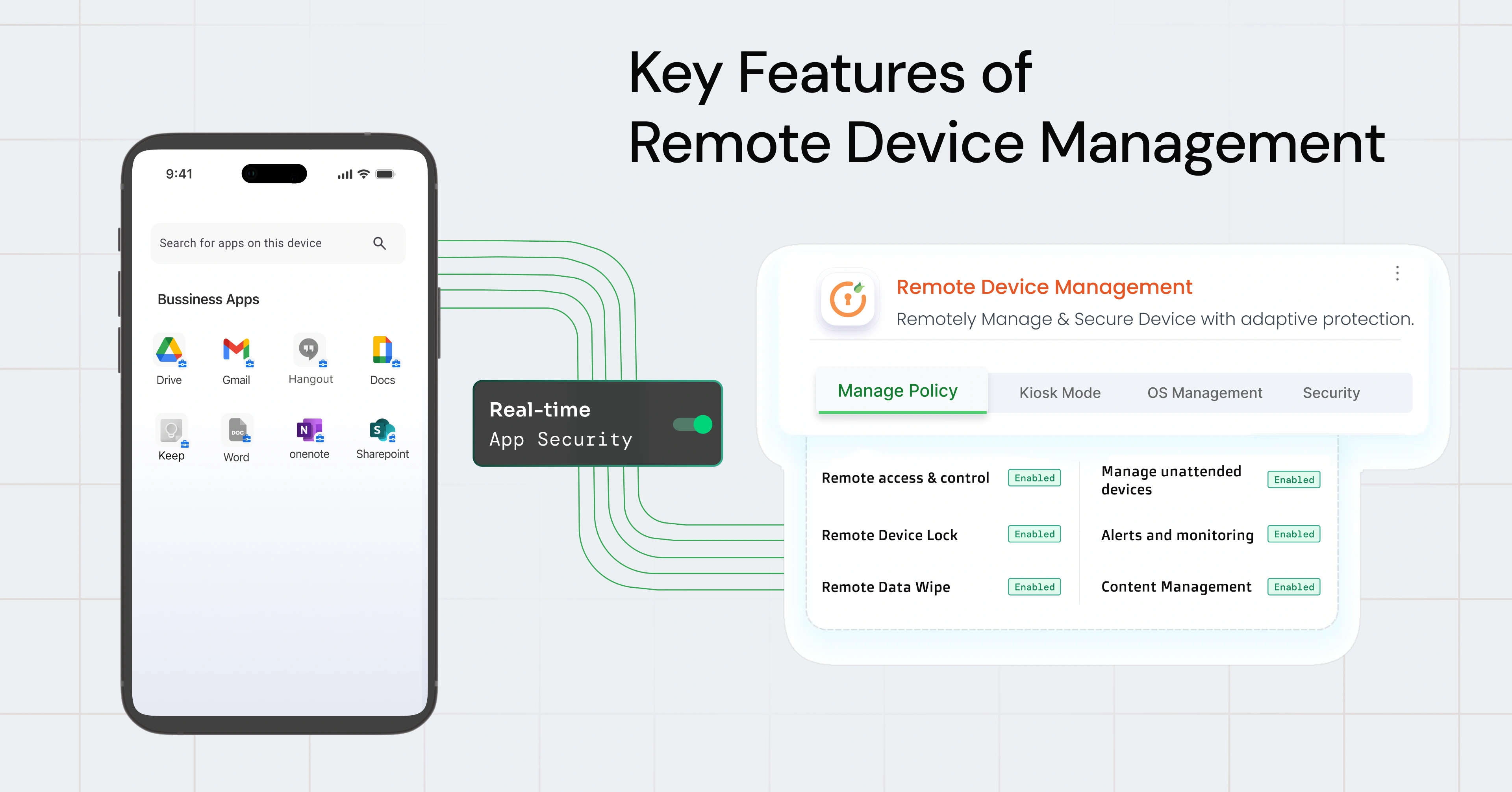
Here are some of the key features of remote device management (RDM):
- Remote access & control: IT teams can access and control devices remotely to troubleshoot issues in real time. This eliminates the need for physical intervention and reduces downtime.
- Device lock: Devices can be locked remotely if lost or misused. This prevents unauthorized access until the device is recovered.
- Remote data wipe: Sensitive data can be erased remotely from lost or compromised devices. In BYOD setups, only work-related data is removed without affecting personal files.
- Manage unattended devices: Devices like kiosks or POS systems can be configured and managed remotely. IT teams can restart or troubleshoot them without visiting the location.
- Alerts and monitoring: IT teams get real-time insights into device health, usage, and compliance. Alerts help detect issues early and take action quickly.
- Content management: Content management allows IT teams to remotely distribute and update files across devices. It ensures the right content is available on the right devices at the right time.
Benefits of Remote Device Management
Remote device management brings structure and efficiency to how IT teams handle devices at scale. It reduces dependency on manual processes and helps teams manage devices more consistently and with less effort.
Here are some of the key benefits of remote device management (RDM):
- Device management at scale: IT teams can manage large numbers of devices across different operating systems without geographical limitations. Handling large device fleets becomes more structured and easier to maintain.
- Reduced downtime: Issues can be resolved remotely without waiting for physical access. Faster resolution means fewer interruptions in day-to-day work.
- Centralized control: All devices can be monitored and managed from a single dashboard. Operations become more streamlined without switching between systems.
- Better security: Devices can be locked or wiped in case they are lost or compromised to prevent unauthorized access to sensitive data. IT admins can remotely push updates and patches to fix vulnerabilities and keep devices protected.
- Cost efficiency: Remote management reduces the need for on-site visits and manual intervention. Operational expenses remain lower over time.
- Faster device onboarding: New devices can be configured and deployed remotely without manual setup. Onboarding becomes quicker and more consistent across teams.
- Real-time monitoring and visibility: IT teams get insights into device health, usage, and compliance status. Issues can be identified early before they turn into bigger problems.
- Improved policy enforcement: Security and usage policies can be applied consistently across devices. This reduces configuration gaps and keeps environments aligned.
What's the Difference between RDM and RMM?
Remote device management (RDM) and Remote monitoring and management (RMM) are closely related but serve different roles in IT operations. While both deal with managing systems remotely, the way they operate and what they focus on is quite different.
| Feature | Remote Device Management (RDM) | Remote Monitoring and Management (RMM) |
|---|---|---|
| Primary Focus | Managing and controlling devices | Monitoring and maintaining IT infrastructure |
| Device Coverage | Mobile devices, laptops, tablets, endpoints | Servers, desktops, network systems |
| Core Use Case | Endpoint management and control | System performance and infrastructure monitoring |
| Approach | Policy-driven control and enforcement | Agent-based monitoring and automation |
| Remote Actions | Remote access, remote control, lock, wipe, app control, updates | Patch management, system updates, alerts, scripting |
| User Context | Focuses on end-user devices and mobility | Focuses on IT environments and backend systems |
| Visibility | Device-level visibility (apps, usage, compliance) | System-level visibility (CPU, memory, uptime, logs) |
| Best Fit | Managing distributed devices and remote workforces | Managing IT infrastructure and server health |
Remote Device Management (RDM) focuses on managing and controlling end-user devices. It gives IT teams the ability to access, secure, and manage smartphones, laptops, and tablets, especially in remote or hybrid work environments. The goal is to maintain control over how devices are used, configured, and secured across different locations.
Remote Monitoring and Management (RMM), on the other hand, is built for monitoring and maintaining IT infrastructure. It helps track the health and performance of servers, desktops, and network systems. IT teams use it to detect issues, automate maintenance tasks, and ensure systems remain stable and available.
In practical terms, RDM is used when the priority is managing devices and user endpoints, while RMM is used when the focus is on keeping backend systems and infrastructure running smoothly. Many organizations use both together to cover the full scope of device management and IT operations.
Challenges in Remote Device Management
Remote device management helps bring control, but it also introduces its own set of challenges. As device environments become more diverse and distributed, managing them consistently becomes more complex for IT teams.
Here are some of the key challenges that enterprises most commonly face with remote device management:
1. Policy Conflicts Across Platforms
Different operating systems support different levels of control, which makes policy enforcement inconsistent. A restriction that works on Android may not apply the same way on iOS or Windows. This creates gaps in how policies are implemented across devices. Over time, these inconsistencies make it harder to maintain uniform security and compliance.
2. Offline Devices
Devices are not always connected to the network. They may be switched off, out of coverage, or operating in restricted environments. This delays updates, policy enforcement, and remote actions until the device comes back online. As a result, IT teams cannot guarantee that all devices are updated or compliant at the same time.
3. User Privacy Concerns
Employees may be uncomfortable with device monitoring, especially in BYOD environments. Concerns around personal data access and tracking can create resistance during adoption. If not addressed properly, this can impact user acceptance of remote management tools. IT teams need to clearly define boundaries between personal and work data to avoid conflicts.
4. Alert Overload
Remote device management systems can generate a high volume of alerts. Not all alerts are critical, but they still require attention and filtering. This makes it difficult for IT teams to identify which issues need immediate action. Important alerts can get missed if the signal-to-noise ratio is too high.
5. Configuration Drift
Over time, device configurations can change due to updates, user actions, or policy changes. These small variations gradually create inconsistencies across devices. Without regular monitoring, devices may drift away from the defined standards. This can lead to security gaps and operational inefficiencies.
Best Practices to Implement Remote Device Management (RDM)
Implementing remote device management is not just about deploying a tool. It requires a structured approach to ensure devices are managed consistently, securely, and at scale. Without clear processes, even well-equipped teams can face gaps in control and visibility.
Here are some best practices enterprises should follow while implementing remote device management (RDM):
1. Use the Right Tool
You cannot manage devices remotely without a proper RDM solution. The tool should support multi-OS management and provide centralized control over all endpoints. It should also offer features like remote access, policy enforcement, monitoring, and security controls. Choosing a solution that aligns with your device environment is critical for long-term scalability. A limited or mismatched solution can create operational challenges as your device footprint increases.
2. Integrate Systems
Remote device management (RDM) tools should not operate in isolation. It needs to be connected with identity providers, directory services, and security tools to ensure consistent access and policy enforcement. Integration helps streamline authentication, user management, and device-level controls. It also improves visibility by bringing device data into a broader security ecosystem. Without integration, IT teams end up managing devices and access separately, which increases complexity.
3. Define Enrollment Strategy
Remote device management starts the moment a device is enrolled into the system. If onboarding is inconsistent, devices may not have proper configurations or policies. An enrollment strategy ensures every device is registered correctly with the RDM platform from the start. Whether it is a corporate-owned or BYOD, automated enrollment helps apply settings, restrictions, and access controls immediately. Without this, devices remain unmanaged or partially controlled, which defeats the purpose of remote device management.
4. Set Compliance Baselines
RDM is not just about accessing devices, it's about ensuring they meet defined security standards. Compliance baselines act as the rules that every managed device must follow. These include OS versions, encryption, password policies, and application restrictions. The RDM tool continuously checks devices against these baselines and flags any deviations. Without clearly defined standards, remote device management becomes inconsistent and difficult to enforce.
5. Automate Monitoring
Remote device management (RDM) relies heavily on visibility. Manually tracking device status across locations is not practical. Automation ensures the RDM platform continuously monitors device health, usage, and compliance in real time. Alerts notify IT teams when something goes wrong, such as missing updates or policy violations. This allows teams to act immediately without waiting for issues to be reported.
Which Remote Device Management Software Should You Choose?
Choosing the right remote device management solution depends on how your IT environment is structured and what needs to be managed. Different tools are designed for different layers of IT operations, from device control to infrastructure monitoring.
Here are the main types of remote device management (RDM) software:
Unified Endpoint Management (UEM)
Unified Endpoint Management (UEM) platforms are designed to manage all types of endpoints from a single system. This includes smartphones, tablets, laptops, desktops, kiosks, IoT, and other connected devices across Android, iOS, Windows, and macOS. They allow IT teams to enforce security policies, deploy applications, push updates, and monitor device health in real time. Everything is managed from a centralized console, which improves visibility and simplifies operations.
UEM platforms also support remote troubleshooting, device lock, and data wipe, making them suitable for distributed environments. They provide consistent control across devices, regardless of where they are located. These platforms are commonly used by organizations that need a unified way to manage diverse device ecosystems. They help standardize configurations and reduce manual effort in day-to-day device management.
Remote Monitoring and Management (RMM)
Remote Monitoring and Management (RMM) tools are built for monitoring and maintaining IT infrastructure. They are commonly used to manage servers, desktops, and network systems in enterprise environments. These tools focus on system performance, uptime, and health monitoring. IT teams can track metrics like CPU usage, memory, disk activity, and network performance.
RMM platforms also support patch management, scripting, and automated maintenance tasks. This allows teams to identify issues early and resolve them before they impact operations. They are widely used by IT teams that need continuous visibility into infrastructure. RMM tools help maintain system stability and ensure systems remain operational over time.
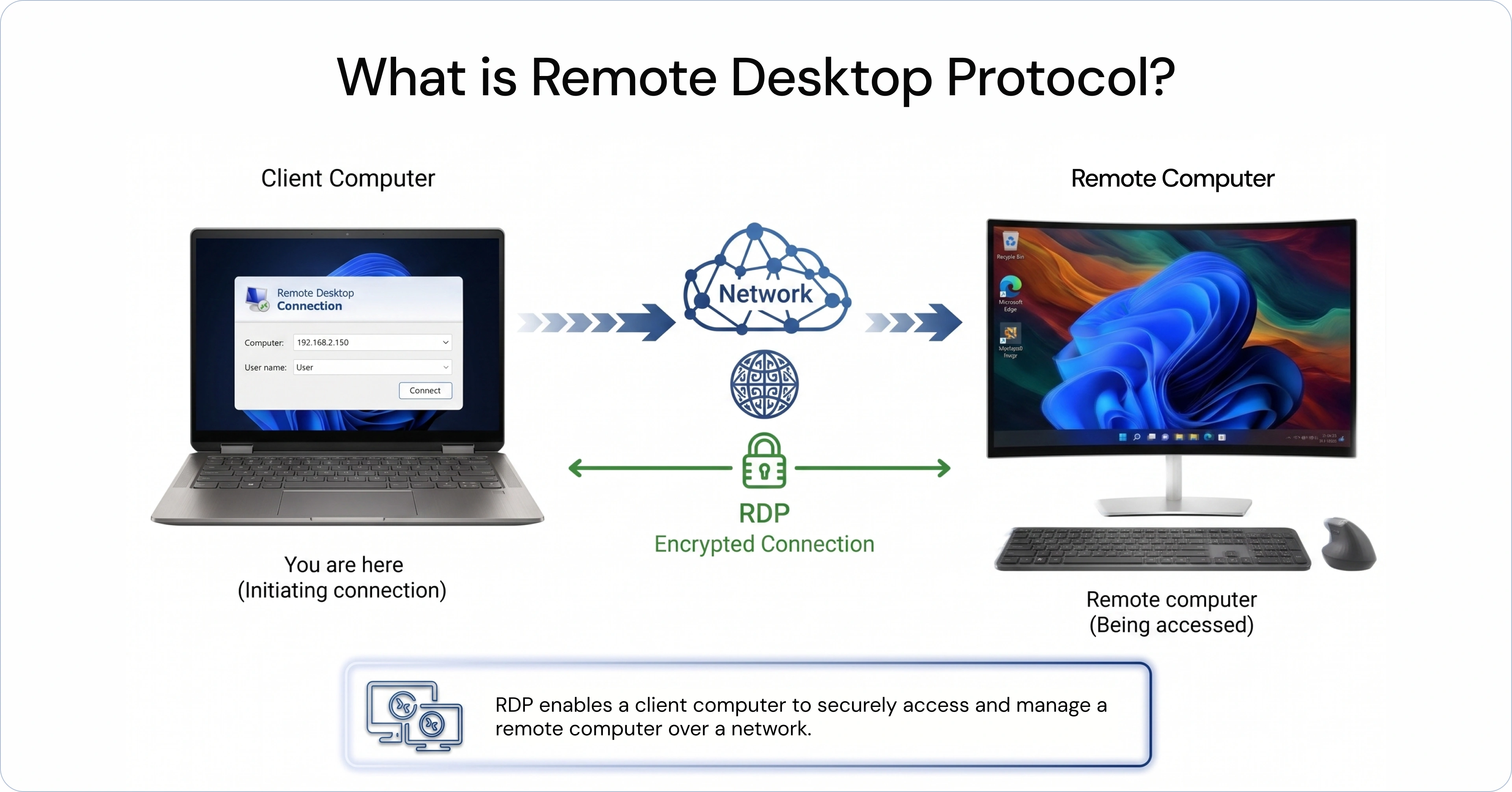
Remote Desktop Protocol (RDP)
Remote Desktop Protocol (RDP) is a protocol that allows IT teams to remotely access and control a device as if they were physically present. It is commonly used for troubleshooting, system access, and administrative tasks. It works well in controlled environments, especially for Windows-based systems. IT teams can log into a device, run applications, and fix issues in real time.
RDP provides a direct way to interact with a system without needing physical access. This makes it useful for quick support scenarios and system-level operations. It is typically used as a remote access tool within IT environments where direct system access is required. Many organizations use it as part of a broader device management setup.
Why UEM is the Right Choice for Your Remote Device Management Needs?
Remote Desktop Protocol (RDP) is designed for remote access, and Remote Monitoring and Management (RMM) tools are built for monitoring systems and infrastructure. Both solve specific problems, but neither provides complete control over devices across a modern, distributed environment.
Unified Endpoint Management (UEM) brings these capabilities together into a single platform. It allows IT teams to manage devices, enforce security policies, monitor activity, and provide remote support without relying on multiple tools.
With UEM, devices across different operating systems can be managed in a consistent way from one centralized console. This reduces operational complexity and ensures policies are applied uniformly across all endpoints.
For businesses managing a mix of devices across locations, Unified Endpoint Management (UEM) offers a more practical and scalable approach to remote device management.
Simplify Your Remote Device Management with miniOrange UEM
Remote access alone is no longer enough. IT teams today need consistent control across devices, operating systems, and locations. Managing diverse environments requires more than just connecting to devices, it requires continuous visibility, control, and the ability to act instantly.
miniOrange UEM simplifies remote device management by bringing everything into a single, unified platform. Instead of managing devices separately or relying on multiple tools, IT teams get centralized control over their entire device environment. This makes it easier to monitor device health, enforce policies, push updates, and resolve issues without delays or manual effort.
miniOrange UEM provides capabilities like:
- Remote cast and control: IT teams can view and control device screens in real time. This makes troubleshooting faster without depending on user input.
- Remote troubleshooting: Issues can be diagnosed and resolved instantly, reducing downtime and improving support efficiency.
- Multi-OS remote management: Android, iOS, Windows, macOS, and other devices can be managed from a single console, simplifying operations across environments.
- Remote updates: IT admins can push OS and application updates remotely without manual intervention, ensuring devices stay secure and up to date.
- Remote wipe and lock: Secure lost or stolen devices with remote lock and remote wipe capabilities to prevent sensitive data exposure and reduce security risks.
By bringing device control, monitoring, and support into one place, miniOrange UEM reduces operational complexity and improves response times. IT teams spend less time managing tools and more time resolving actual issues, while maintaining consistent control across all endpoints.
See how miniOrange UEM simplifies remote device management. Schedule a demo or start your free trial today!
FAQs
1. What is the difference between Mobile Device Management (MDM) and Remote Device Management (RDM)?
MDM is a management platform focused on securing and managing mobile devices. Remote device management refers to the ability to access and control devices remotely, supporting remote work and helping IT teams assist end users without physical access.
2. What are the most common remote device management use cases?
Remote device management is commonly used to manage remote devices for troubleshooting, pushing updates, and supporting distributed employees. IT teams also use it to manage remote kiosks, digital signage, and unattended devices across multiple locations.
3. What features should you look for in a remote device management platform?
A remote device management platform should offer remote access, real-time monitoring, and centralized visibility. It should also support remote updates, device lock and wipe, policy enforcement, along with multi-OS support and automation for scalability.
4. Who needs remote device management?
Remote device management is essential for organizations with distributed teams, multiple device types, or remote work environments. It is especially useful for IT teams managing field devices, BYOD setups, or multi-location operations.
5. Does remote device management help manage device lifecycles?
Yes, remote device management supports the entire device lifecycle, from onboarding and configuration to monitoring and updates. It also allows IT teams to remotely secure, reset, or decommission devices when needed.
Leave a Comment