Hello there!

Need Help? We are right here!

miniOrange Support Chat - Get Help and Support
miniOrange Email Support
Success Checkmark - Form Submitted Successfully

Thanks for your Enquiry.

If you don't hear from us within 24 hours, please feel free to send a follow-up email to uemsupport@xecurify.com

Search Results:

×

Multi OS Device Management

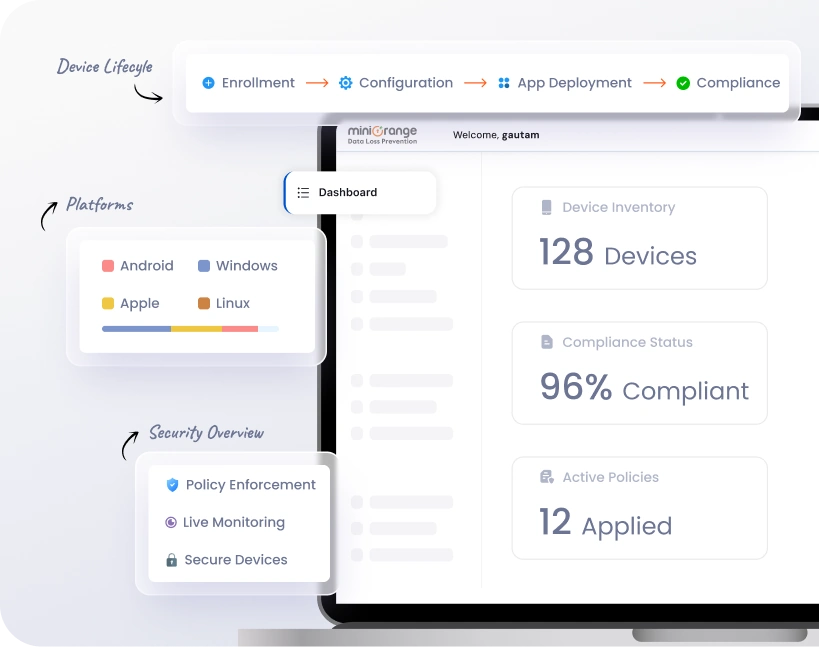
Simplify control of enterprise endpoints with Multi OS Device Management from miniOrange. Manage Android, Windows, iOS, iPadOS, and macOS devices from a single dashboard. This system offers centralized policy enforcement, real-time monitoring, and strong security.
From zero-touch enrollment to automated compliance and app management, our multi-platform MDM guarantees smooth and efficient device management across all operating systems.

Schedule a Demo Try Now for Free
multi-device management

Key Capabilities of Our Multi-Platform MDM

miniOrange’s multi-platform MDM solution simplifies the management of devices running Android, iOS, macOS, and Windows.


cross platform mdm

Kiosk & Device Lockdown
Modes

Transform devices into secure, single-purpose kiosks or control device functionality fully. Restrict access to apps, websites, and device settings to protect sensitive information.

multi platform mdm

Remote Monitoring & Troubleshooting

Monitor device health, track performance, and troubleshoot issues remotely. Reduce IT downtime and provide real-time support to employees without physical device access.

cross-platform mobile device management

Automated Device Enrollment & Provisioning

Simplify onboarding with zero-touch enrollment and automated provisioning. Pre-configure devices, assign users, and enforce corporate policies during the setup process.

apple multi-device management

Unified App Distribution

Deploy, update, and manage corporate apps across all devices from a single dashboard. Enforce app compliance, whitelist/blacklist applications, and prevent data leakage.

multi-device management

Real-Time Reporting & Analytics

Gain insights into device compliance, usage trends, and operational risks. Generate detailed reports to support audits and maintain enterprise security standards.

cross platform mdm

Role-Based Admin Control

Define granular permissions for IT admins, managers, and support staff. Assign responsibilities based on roles to ensure secure and accountable device management.

Manage Every OS with One Multi-Platform MDM

miniOrange’s cross-platform mobile device management ensures IT teams can manage all operating systems from
a single dashboard without switching tools.
multi platform mdm

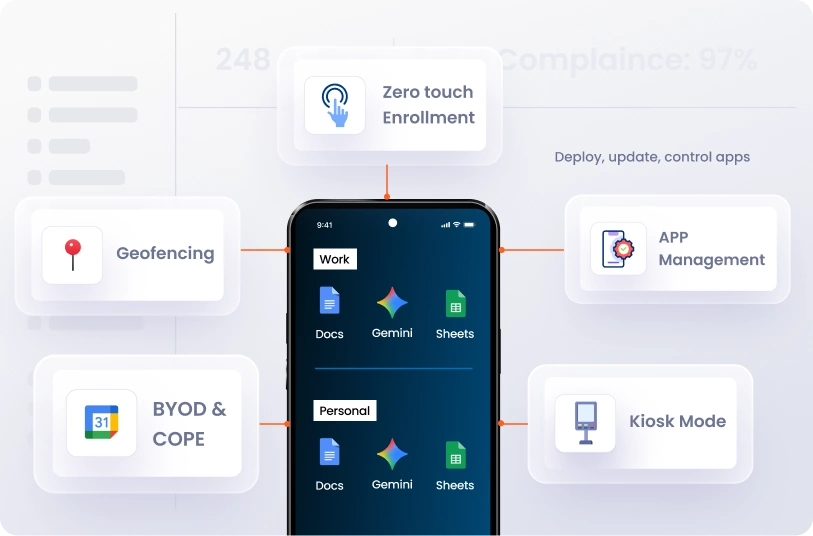
Android Device Management


  • Zero-touch enrollment: Deploy devices without manual setup.
  • BYOD & COPE support: Manage personal and corporate devices securely.
  • Kiosk mode: Lock devices for single-purpose usage.
  • App management: Deploy, update, and control apps remotely.
  • Geofencing: Set location-based policies and access controls.

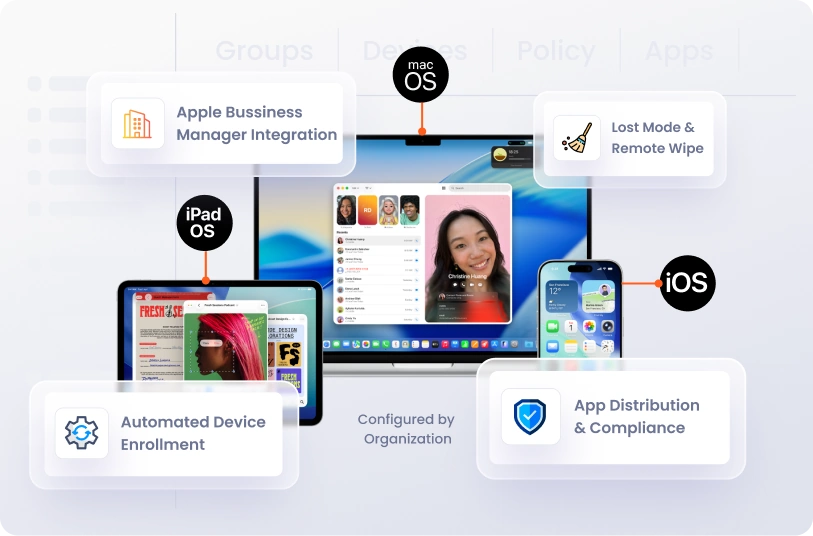
Apple Multi-Device Management (iOS, iPadOS & macOS)


  • Apple Business Manager integration: Automate device enrollment for large-scale deployments.
  • Automated device enrollment: Pre-configure devices for employees.
  • Lost mode & remote wipe: Secure data if devices are lost or stolen.
  • App distribution & compliance enforcement: Deploy apps and enforce corporate policies seamlessly.
cross-platform mobile device management


apple multi-device management

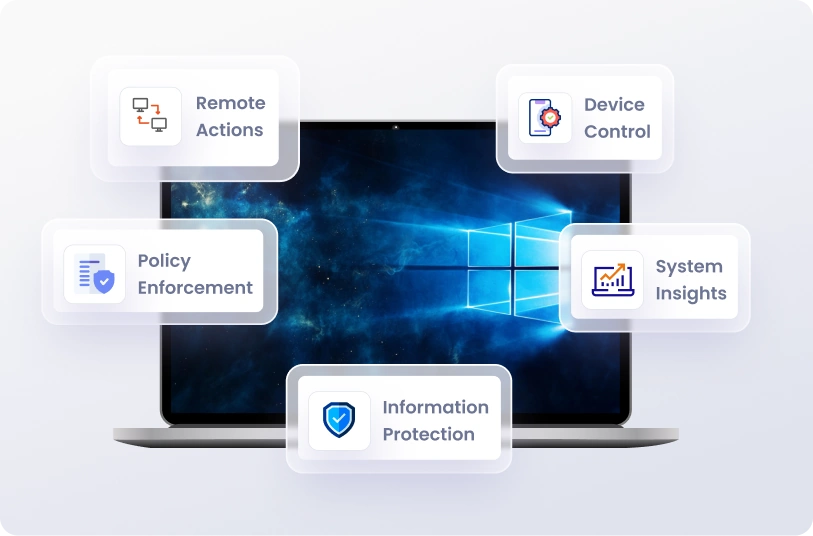
Windows Device Management


  • Remote actions: Lock, restart, shutdown, and enable location tracking
  • Device control: Manage USB storage, hardware peripherals, and camera hardware.
  • Policy enforcement: Apply policy relaxations, printer control, screenshot restrictions, and file activity tracking.
  • Information protection: Secure sensitive data and monitor user device events in real time.
  • System insights: View storage, installed RAM, processor, and other Windows specifications.

Why Choose miniOrange for Multi-Device Management?


Unified Dashboard

Control all devices on Android, iOS, Windows, and macOS platforms from a single, unified interface, simplifying operations and increasing efficiency.

Centralized Policy

Define, enforce, and monitor policies for all devices centrally. Ensure regulatory compliance and consistent security across your organization.

Enterprise-Grade Security Framework

All device communications, data transfers, and management actions are fully encrypted and monitored. Maintain a secure IT ecosystem without compromising productivity.

Reduced IT Overhead

Enrollment, application, and policy management are automated, reducing manual IT effort and allowing teams to focus on higher-level tasks while keeping operational expenses low.


Industries We Support

Powering secure and scalable Multi OS Device Management across every sector.


Retail
Healthcare
Logistics & Transportation
Education
Hospitality
Non-Profit Organizations

Multi OS Device Management for retail ensures secure POS systems, handheld scanners, and in-store tablets across all locations.

  • Lock POS devices into approved retail and payment applications.
  • Push app updates and pricing tools remotely to maintain operational consistency.
  • Prevent unauthorized usage and protect customer payment data with centralized controls.
Know More →

Multi OS Device Management for healthcare helps hospitals and clinics secure medical devices, staff smartphones, and shared workstations while maintaining regulatory compliance.

  • Protect patient health information (PHI) across Android, iOS, Windows, and macOS devices.
  • Enforce HIPAA-aligned policies with remote wipe, device encryption, and access controls.
  • Enable secure app deployment for EHR systems, telemedicine apps, and internal tools.
Know More →

Multi OS Device Management for logistics helps manage fleet tablets, rugged devices, and warehouse scanners efficiently.

  • Track and manage field devices with real-time monitoring and geofencing controls.
  • Lock devices into operational apps for delivery, dispatch, and inventory management.
  • Reduce downtime with proactive monitoring and remote troubleshooting capabilities.
Know More →

Multi OS Device Management for education empowers schools and universities to manage student and faculty devices securely.

  • Lock devices into learning-only kiosk modes and block distracting applications.
  • Deploy educational apps and updates instantly across tablets, laptops, and desktops.
  • Monitor usage, enforce safe browsing, and maintain compliance across campuses.
Know More →

Multi OS Device Management for hospitality enables secure management of guest-facing and staff devices across properties.

  • Lock hotel kiosks and tablets into check-in, booking, or concierge applications.
  • Protect guest data with centralized policy enforcement and remote wipe features.
  • Manage devices across multiple properties from a single unified dashboard.
Know More →

Multi OS Device Management helps non-profits securely manage devices for staff and volunteers across Android, iOS, Windows, and macOS.

  • Enforce centralized policies and remote monitoring for field and office devices.
  • Protect donor and beneficiary data with secure access controls.
  • Enable efficient, compliant, and low-cost device management for non-profit operations.
Know More →

Frequently Asked Questions (FAQs)

Get the clarity you need before you commit.

More FAQ's →


What is Multi-Device Management?

Can I manage Windows, macOS, Android, and iOS from one dashboard?

Can I apply different policies to different OS types?

How secure is cross-platform mobile device management?

Can MSPs manage multiple clients with miniOrange MDM?

Does miniOrange support BYOD and corporate-owned devices?


Want To Schedule A Demo?

Request a Demo