License Optimization for IdP-Synced Users and Licensed Groups
Most enterprises connect Jira Cloud to an Identity Provider so users and groups come from a single source of truth. That keeps access consistent, but it creates a blind spot for license management. When the licensed group itself is synced from the IdP, Atlassian Cloud treats it as read-only. Inactive users stay in the group, keep consuming paid seats, and admins can't remove them from inside Atlassian.
Business Challenge
Organizations that sync both users and licensed groups from their IdP face these problems:
- Read-Only Licensed Groups: Groups synced from an IdP, such as Microsoft Entra ID with group jira-software-users, can't be edited in Atlassian Cloud. Admins can't add or remove members directly.
- API Limitations: Atlassian blocks membership changes on synced groups, so third-party apps can't manage those memberships through Atlassian Cloud APIs either.
- Silent License Leakage: Users who left projects, changed roles, or stopped logging in stay in the licensed group and keep occupying paid Jira seats.
- Split Ownership: License cost sits with Atlassian admins, but group membership is controlled by the identity team. Every cleanup turns into manual tickets between two teams.
An Atlassian administrator at a global enterprise described it this way:
"Our licensed groups come straight from Entra ID, so we can't touch them in Jira. Every quarter we export inactive users and send a list to the identity team, then wait for them to clean up the groups."
Solution Overview
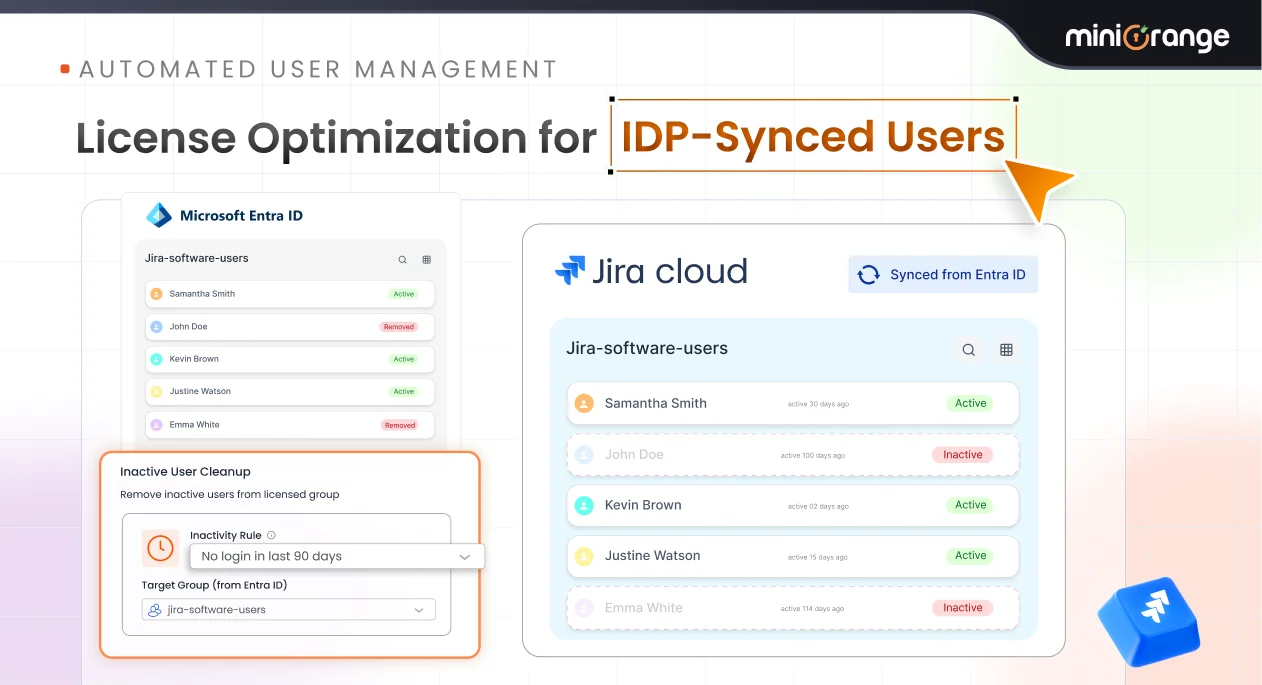
miniOrange solves this by managing license group membership at the source, in the IdP, (here, Microsoft Entra ID), instead of in Atlassian Cloud. When a cleanup rule flags an inactive user, miniOrange removes that user from the corresponding licensed group in Entra ID. The next group sync carries the change into Atlassian Cloud and releases the Jira license. The IdP remains the source of truth, and no one has to edit groups manually.
How It Works
1. Inactivity Detection
- The scheduler in miniOrange user management app evaluates users against your configured cleanup rule, such as no login in the last 90 days.
- Users who match the rule are flagged for license reclamation.
2. Synced Group Identification
- The app checks whether the flagged user belongs to a licensed group synced from the IdP.
- The Atlassian licenses are assigned to the synced group in Atlassian.
3. Membership Removal in Entra ID
- The app then removes the user from the matching licensed group directly in Microsoft Entra ID.
- The user account itself is not changed in the IdP. Only the licensed group membership is removed.
4. Sync to Atlassian Cloud
- On the next provisioning cycle, group sync reflects the membership change in Atlassian Cloud.
- The user no longer holds Jira product access, and the license is released.
Real-World Example
An enterprise running Jira Cloud with 1,000+ users synced all user accounts and licensed groups from Microsoft Entra ID. Because the licensed groups were read-only in Atlassian Cloud, inactive users kept consuming paid seats. Every cleanup depended on manual coordination with the identity team.
After adopting miniOrange:
- Inactive users were identified automatically based on a defined inactivity rule.
- Their membership in the licensed group was removed directly in Entra ID, with no manual tickets between teams.
- Group sync released their Jira licenses without any manual group edits in Atlassian.
- License cleanup moved from a quarterly manual exercise to a scheduled, rule-based process.
Important Note
In this scenario, managing the IdP-synced group is mainly about license management.
User suspension and application-specific license reclamation serve different purposes. Suspending a user restricts their access to the organization and its applications, whereas removing product access allows you to reclaim a specific application license while keeping the user's access to other applications within the organization.
Key Benefits
The solution provides the following key benefits:
License Optimization Without Manual Effort
Release Jira licenses from inactive users even when the licensed group is read-only in Atlassian Cloud.
IdP Stays the Source of Truth
Membership changes happen in Microsoft Entra ID, so your identity governance model stays intact.
No Cross-Team Cleanup Tickets
Atlassian admins no longer need to send inactive-user lists to the identity team every cycle.
Lower License Costs
Keep active seat counts accurate and avoid early license tier upgrades at renewal.
Consistent, Auditable Access
Every cleanup follows a defined rule, and access changes stay traceable at the IdP level.
Conclusion
When both users and licensed groups are synced from the IdP, Atlassian Cloud alone can't save license cost for inactive users. miniOrange closes that gap by managing licensed group membership directly in Microsoft Entra ID, and group sync carries the change into Atlassian Cloud to release the license. For organizations, this means lower license spend, less manual coordination, and no compromise to the identity architecture.