

Many IT teams use SAML and SSO interchangeably. In practice, they refer to two different things - one is a goal, the other is a mechanism to reach it.
Single Sign-On (SSO) is the user experience outcome: one login that opens access to multiple applications. SAML (Security Assertion Markup Language) is a technical protocol - one of the most widely used ways to make that experience possible, especially in enterprise environments.
Understanding this distinction is more than a technical detail. Whether you're deploying enterprise applications, integrating with an external identity provider, or evaluating authentication options for your organization, knowing where SAML fits into an SSO strategy helps you make better architectural and security decisions.
SAML vs SSO at a Glance
- SSO = the goal (Users log in once and access multiple apps without repeated authentication)
- SAML = the protocol (The technical standard that enables secure, federated identity exchange between systems)
- Relationship: SAML is one well-established way to implement SSO, particularly in enterprise and B2B environments
What Is SAML?
Security Assertion Markup Language (SAML) is an open XML-based standard for exchanging authentication and authorization data between two parties: an Identity Provider (IdP) and a Service Provider (SP). It was developed by the OASIS standards body, with SAML 2.0 - the version in widespread use today - released in 2005.
At its core, SAML SSO works by having the IdP vouch for the user's identity to the SP using digitally signed XML documents called SAML assertions. The SP trusts these assertions without ever directly handling the user's credentials.
Key Features of SAML
- XML-based token format for structured, machine-readable identity claims
- Digital signatures and encryption on assertions for end-to-end security
- Federated identity across organizational and domain boundaries
- Support for attribute-based authorization - carries roles and permissions alongside identity claims
- Browser-based SSO flow using HTTP redirects and POST bindings
Where SAML Is Used
SAML-based SSO is the standard choice across enterprise environments that require high assurance and cross-domain federation. Common use cases include:
- Connecting enterprise apps (Salesforce, Workday, ServiceNow) to an IdP like Active Directory, Okta, or miniOrange
- Government and healthcare portals requiring federated access with strict audit trails
- B2B SaaS platforms that need to support enterprise customers' existing identity infrastructure
- Compliance-driven environments where HIPAA, SOC 2, or ISO 27001 mandate strong authentication controls
What Is SSO?
Single Sign-On (SSO) software is an authentication method that allows users to access multiple applications with a single set of credentials - log in once, and the session carries across every connected system without prompting for credentials again.
SSO is a user experience pattern, not a protocol. It can be implemented using several different underlying technologies, including SAML, OAuth 2.0, OpenID Connect (OIDC), or LDAP. What ties them together is the end result: frictionless access across systems.
Key Features of SSO
- One login, many applications - eliminates repeated credential entry
- Centralized session management - log out once and the session terminates everywhere
- Reduced password fatigue - fewer credentials mean fewer weak or reused passwords
- Faster onboarding and offboarding - access provisioning and deprovisioning happen at a single point
- Protocol flexibility - organizations can choose SAML, OIDC, or other standards based on their stack
Where SSO Is Used
SSO and SAML often appear together in enterprise contexts, but SSO applies broadly across both consumer and enterprise environments:
- Employee portals that connect HR systems, project tools, and communication platforms
- Consumer apps using social login (Google, Facebook) - a form of SSO via OAuth and OIDC
- SaaS platforms offering seamless navigation between modules without re-authentication
- Any organization looking to reduce helpdesk load from password reset requests
SAML vs SSO: Side-by-Side Comparison
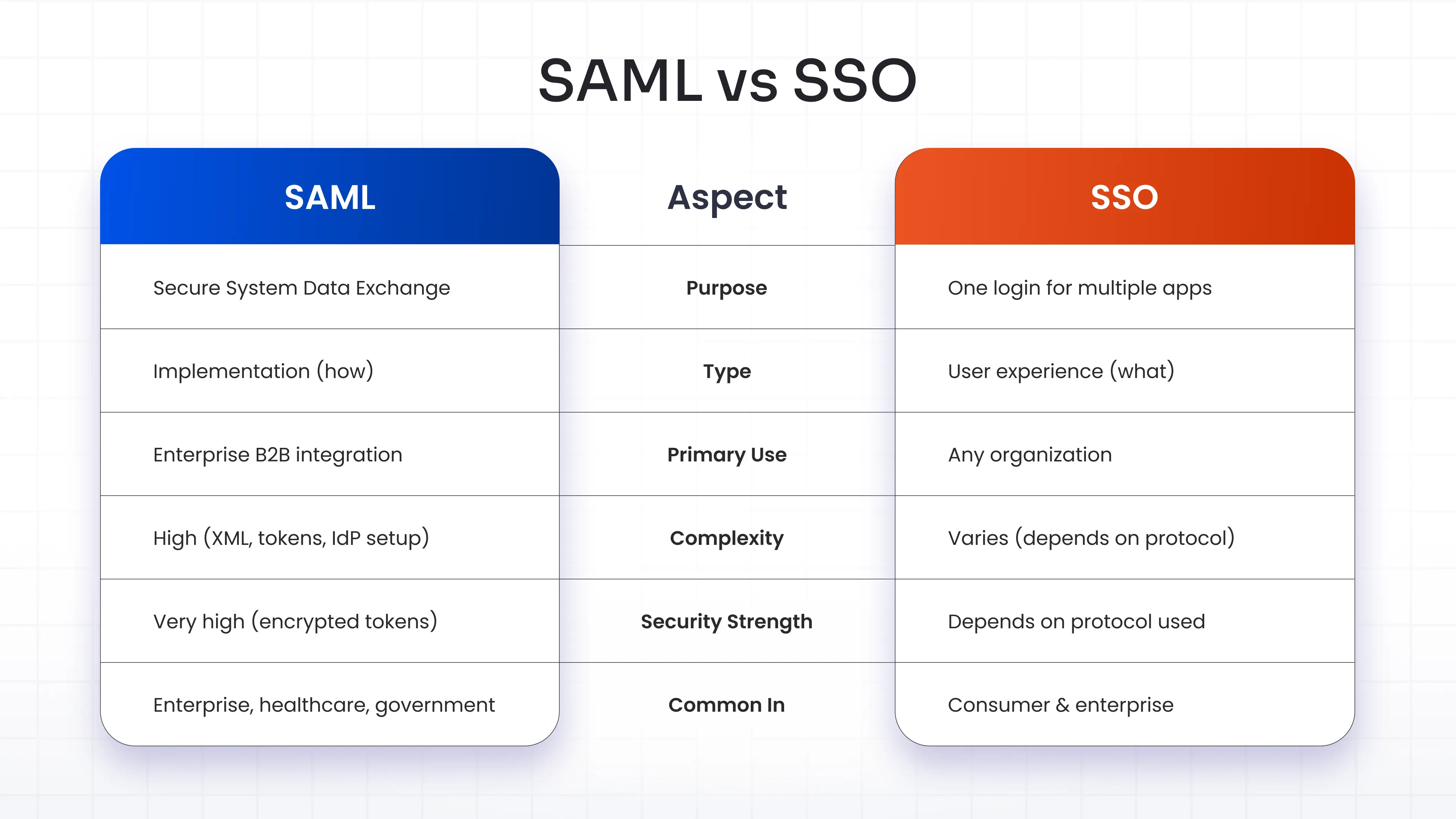
Bottom line: Asking "is SAML the same as SSO?" is like asking if a highway is the same as travel. One is the infrastructure, the other is the outcome.
How SAML SSO Works
Understanding how SAML SSO works requires following a structured exchange between three parties: the user, the Identity Provider, and the Service Provider.
Here is the standard SAML SSO flow, step by step:
1. User requests access - The user attempts to access a Service Provider (e.g., Salesforce) without an active session.
2. SP generates a SAML request - The SP creates an authentication request and redirects the user's browser to the IdP.
3. IdP authenticates the user - If the user is not already authenticated, the IdP prompts for credentials (password, MFA, etc.).
4. IdP issues a SAML assertion - After successful authentication, the IdP generates a digitally signed XML assertion containing the user's identity and attributes.
5. Assertion is sent to the SP - The browser carries the SAML response (via HTTP POST or redirect) back to the Service Provider.
6. SP validates and grants access - The SP verifies the signature, checks the assertion, and grants the user access to the application.
This entire SAML SSO authentication exchange happens in seconds, invisibly to the end user. The user sees only one login prompt - everything else is handled behind the scenes.
It is also worth noting that SAML SSO can operate in two modes:
- SP-initiated flow: The user starts at the Service Provider and gets redirected to the IdP
- IdP-initiated flow: The user starts at the IdP dashboard and clicks through to the SP
SAML Architecture and Core Components
To understand SAML architecture, you need to know the four building blocks that make the system function.
Identity Provider (IdP)
The Identity Provider is the authoritative source of user identity. It stores credentials, handles authentication, and issues SAML assertions. Common IdPs include Active Directory Federation Services (ADFS), Okta, Microsoft Entra ID, Keycloak, miniOrange, and more. The IdP is the trust anchor - Service Providers rely on it to vouch for the user.
Service Provider (SP)
The Service Provider is the application the user wants to access - Salesforce, Workday, GitHub, or any SAML-enabled tool. The SP does not authenticate users directly. Instead, it delegates that responsibility to the IdP and accepts assertions as proof of identity.
SAML Assertion
A SAML assertion is an XML document issued by the IdP and consumed by the SP. It carries three types of statements:
- Authentication statements - confirm that the user was authenticated at a specific time using a specific method
- Attribute statements - carry user attributes like email, role, or department that the SP can use for authorization decisions
- Authorization decision statements - indicate whether the user is permitted to access a specific resource
Assertions are digitally signed using X.509 certificates and can be encrypted for additional confidentiality.
Authentication Flow
The SAML SSO flow is built on a trust relationship established during configuration: the SP is pre-configured with the IdP's metadata (signing certificate, endpoint URLs), and the IdP is configured with the SP's details. This mutual setup ensures that assertions are only trusted from known, verified sources - which is a key reason SAML-based SSO carries such a strong security posture in enterprise deployments.
Why Are SAML and SSO Often Confused?
There are a few reasons the difference between SSO and SAML gets blurred in everyday usage:
They work closely together. In enterprise IT, most SSO deployments rely on SAML under the hood. When admins say "we've set up SSO," they often mean "we've configured SAML SSO" - the term SSO has come to implicitly mean SAML in many enterprise conversations.
The phrase "SAML SSO" is everywhere. Vendor documentation, compliance checklists, and product settings routinely use "SAML SSO" as a compound term. That close association makes the two feel synonymous even when they are not.
Other protocols are less visible. SSO can run on OAuth 2.0, OpenID Connect, or LDAP as well - but because SAML is the enterprise default, the alternatives are less commonly discussed. This makes SAML feel like SSO itself rather than one implementation path.
SAML Is Not the Only Way to Implement SSO
Several other protocols can deliver SSO outcomes, each with different strengths:
SAML vs OpenID Connect (OIDC)
OpenID Connect is a modern identity layer built on top of OAuth 2.0. It uses JSON Web Tokens (JWT) instead of XML, making it lighter and better suited for mobile apps and modern web applications. OIDC is the preferred choice for consumer-facing SSO and developer-built applications. SAML remains the enterprise standard for federated B2B scenarios where security and compliance requirements are stringent.
SAML vs OAuth
OAuth 2.0 is an authorization framework, not an authentication protocol - a distinction worth preserving. OAuth governs what a user or application is allowed to do (access scopes, API permissions), while SAML governs who the user is. When people use "OAuth for SSO," they typically mean OIDC on top of OAuth. SAML handles both identity and attribute exchange in a single, tightly governed assertion.
SAML vs LDAP
LDAP (Lightweight Directory Access Protocol) is a directory query protocol used to look up user information stored in directories like Active Directory. LDAP itself does not natively support SSO across web applications - it requires additional integration layers. SAML, by contrast, is purpose-built for web-based SSO with built-in federation and encryption. Many organizations use LDAP as the user directory while SAML handles the federated authentication layer on top.
Advantages and Limitations of SAML
Advantages
- High security: Assertions are signed and optionally encrypted, preventing tampering or interception
- Mature standard: SAML 2.0 has over 15 years of production use and broad vendor support
- Federated access: Works across organizational and domain boundaries without credential sharing
- Fine-grained attribute exchange: Supports role, department, and permission data alongside identity
- Compliance-ready: Widely referenced in HIPAA, SOC 2, ISO 27001, and NIST frameworks as an approved authentication mechanism
Limitations
- Implementation complexity: SAML configuration requires XML handling, certificate management, and precise metadata exchange between IdP and SP
- XML overhead: Verbose XML payloads are heavier than JSON-based alternatives like JWT
- Browser dependency: The standard SAML flow assumes a browser-based redirect mechanism - it is less suited for native mobile apps or API-to-API authentication
- Debugging difficulty: When SAML fails, diagnosing assertion errors can be time-consuming without specialized tooling
- Initial setup time: Configuring a new SAML integration requires coordination between the IdP admin and the SP's IT team
Common SAML SSO Use Cases
SAML-based single sign-on is the go-to choice in specific scenarios where security, compliance, and cross-domain federation are non-negotiable:
- Enterprise SaaS access: Connecting employees to cloud applications (Salesforce, Jira, Zoom) through a central IdP without managing separate credentials per app
- Healthcare identity federation: Hospitals and clinics using federated SAML SSO to enable secure access across care systems while maintaining HIPAA compliance
- Government and education portals: Cross-agency or cross-institution access where each organization maintains its own IdP but users need seamless access to shared resources
- B2B SaaS platforms: Product teams that need to onboard enterprise customers who already have their own SAML-compliant IdPs (Okta, Entra ID, ADFS)
- Contractor and partner access: Granting temporary, attribute-based access to external users without provisioning accounts in the organization's own directory
When to Use SAML vs Other SSO Protocols
Choosing between SAML and other SSO implementations comes down to your audience, use case, and technical environment.
Use SAML SSO when:
- Enterprise customers require federated identity with their own IdP
- You are integrating with Active Directory, Okta, Microsoft Entra ID (Azure AD), or similar enterprise IdPs
- High security and compliance standards apply - HIPAA, SOC 2, ISO 27001, PCI-DSS
- You are building a B2B SaaS product and need to support enterprise customer onboarding
- Cross-domain federation across organizations or departments is required
Use SSO with other protocols (OIDC, OAuth) when:
- Your users are consumers or SMB customers who do not have enterprise IdP infrastructure
- The priority is a lightweight, frictionless login experience over complex federation
- You are building internal employee portals with modern, API-first architecture
- Mobile-first or native app SSO is the target - OIDC handles this better than SAML
- Developer speed and integration simplicity outweigh enterprise compliance requirements
Many mature organizations run both: SAML for enterprise customer federation, OIDC or OAuth for internal developer tools and consumer-facing products.
FAQs
Is SAML and SSO the same thing?
No. SSO is an authentication concept - the ability to log in once and access multiple applications. SAML is a protocol - one of the technical standards used to implement SSO. SAML is one way to achieve SSO, but SSO can also be implemented using OpenID Connect, OAuth 2.0, or LDAP. The two terms are closely related but not interchangeable.
Can I have SSO without SAML?
Yes. SSO does not require SAML. OpenID Connect (OIDC) is a widely used alternative for modern web and mobile applications. OAuth 2.0 with OIDC is particularly common in consumer apps and developer platforms. LDAP-based SSO also exists in internal network environments. SAML is the preferred choice for enterprise and B2B scenarios, but it is not the only path to SSO.
What is SAML 2.0 SSO?
SAML 2.0 is the current version of the SAML standard, released in 2005 and still in active use. SAML 2.0 SSO refers to implementing Single Sign-On using the SAML 2.0 protocol. It introduced improvements over SAML 1.1, including support for multiple federation use cases, better encryption options, and broader IdP/SP interoperability. Nearly all enterprise SAML implementations today use SAML 2.0.
Why do enterprises prefer SAML SSO?
Enterprises prefer SAML SSO for several reasons. It supports federated identity across organizational boundaries, meaning a company can allow employees to access partner or vendor systems using their own corporate credentials. SAML assertions carry rich user attributes (roles, departments, clearance levels) that support fine-grained authorization. It also has deep support across enterprise software vendors and aligns with compliance frameworks like HIPAA, SOC 2, and ISO 27001.
How does SAML SSO work?
When a user tries to access an application (the Service Provider), the SP redirects them to the Identity Provider with a SAML authentication request. The IdP verifies the user's identity - through password, MFA, or an existing session - then generates a signed XML document called a SAML assertion. This assertion is sent back to the SP via the user's browser. The SP validates the signature using the IdP's certificate, reads the user's identity and attributes from the assertion, and grants access.
Leave a Comment