

Healthcare workers move between EHRs, clinical applications, imaging systems, telehealth platforms, and administrative tools throughout the day. When every system requires separate authentication, access becomes a recurring interruption and identity management becomes fragmented.
SSO for healthcare brings authentication into a centralized identity layer, allowing authorized users to access multiple applications through one authentication experience. But healthcare SSO has to account for clinical workflows, legacy systems, MFA, HIPAA safeguards, emergency access, and availability.
What Is SSO in Healthcare?
Single Sign-On (SSO) authentication allows users to authenticate once through a trusted identity provider and access multiple connected applications without repeatedly entering credentials.
In healthcare, this can connect EHRs, clinical systems, imaging platforms, telehealth tools, communication applications, and administrative services to a common authentication layer. Instead of each application independently handling the user's login, the identity provider establishes the user's identity and passes the authentication result to the requested application.
The basic flow is:
User → Application → Identity Provider → Authentication → Authentication Response → Application Session
When a clinician opens an SSO-enabled application without an existing session, the application redirects the user to the identity provider. The IdP authenticates the user using the organization's configured policy, which may involve a password, MFA, passkey, biometric authentication, or another method. It then returns an authentication response to the application.
Healthcare SSO solutions commonly use SAML, OAuth 2.0, and OpenID Connect (OIDC). SAML typically uses a signed assertion, while OIDC uses an ID token within an OAuth 2.0-based flow.
SSO handles authentication, not authorization. It establishes who the user is; the application or access-control system still determines what that user can access.
Why Is SSO Important for Healthcare Organizations?
The healthcare access problem is not simply the number of passwords. It is the fragmentation created when authentication and identity management are handled separately across a complex application environment.
A hospital can have separate systems for EHR management, laboratory information, radiology, pharmacy, scheduling, communication, billing, and clinical decision support. Users also have different access requirements. A physician, nurse, contractor, and billing employee should not receive the same application access.
Without centralized authentication, every application can become another place to create accounts, manage credentials, enforce authentication policies, and remove access when a user changes roles or leaves.
SSO software creates a common authentication layer across these systems. It gives users a consistent way to reach authorized applications while giving IT teams a central point for authentication policies.
Healthcare also adds a workflow constraint. Clinicians may move between several systems while treating a patient, so authentication must strengthen security without becoming another source of interruption.
A healthcare SSO architecture therefore needs to balance security, clinical usability, interoperability, and availability.
How Does SSO Authentication Work in Healthcare?
An SSO solution for healthcare typically connects an identity provider with directories, authentication methods, applications, and access policies. The identity provider may integrate with existing sources such as Active Directory or LDAP, allowing organizations to use established identities rather than creating another user database.
SAML-Based SSO
SAML is widely used for enterprise application federation. The healthcare application acts as the service provider while the identity provider handles authentication.
When a clinician requests access without an existing session, the application sends an authentication request to the IdP. The IdP authenticates the user and returns a digitally signed SAML assertion containing relevant identity information. The application validates the assertion before creating a session.
This separation means the application does not need to maintain another application-specific password. Authentication policies can be managed centrally while the application continues to control its own permissions.
OIDC-Based SSO
Modern web and mobile applications may use OpenID Connect. OIDC adds an identity layer to OAuth 2.0, allowing applications to obtain authenticated identity information from the identity provider.
The technical flow differs from SAML, but the architectural objective is similar: establish trust between the application and identity provider so the application does not have to independently authenticate every user.
For healthcare organizations running modern SaaS applications alongside older clinical systems, support for multiple protocols is therefore an important consideration when selecting SSO software.
Authentication Is Not Authorization
Once the application receives a valid authentication response, it still needs to determine what the user can access.
That decision may depend on role, department, group membership, application permissions, or other policies. SSO can establish that a physician and billing employee are both authenticated members of the organization, but it does not mean they should have access to the same systems.
This separation allows SSO to centralize authentication without eliminating application-level authorization.
How Does SSO Support HIPAA and Healthcare Security?
SSO should not be treated as a standalone HIPAA compliance solution. HIPAA compliance depends on an organization's complete administrative, physical, and technical safeguards.
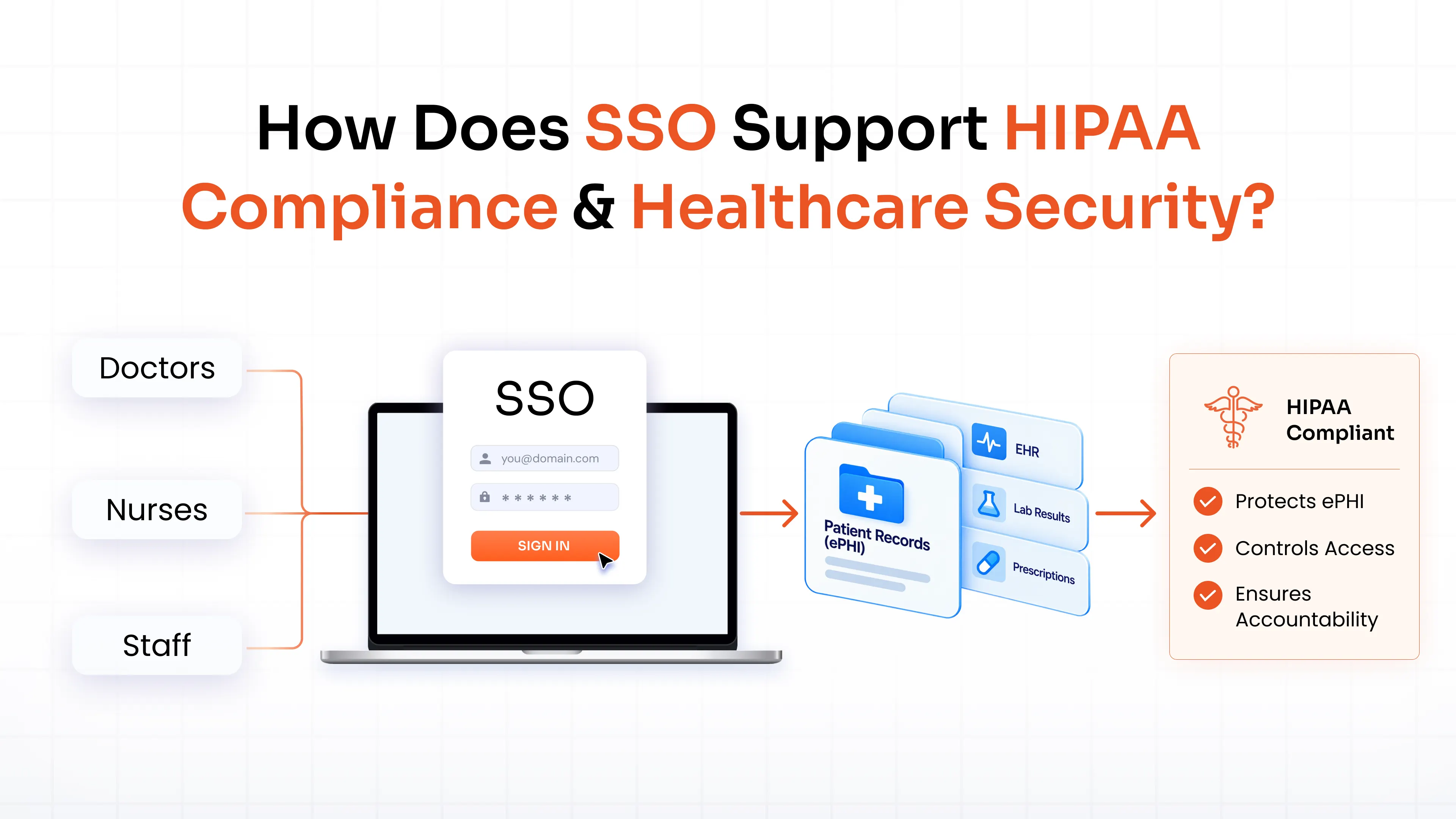
However, a properly implemented SSO solution can support identity and access controls relevant to protecting electronic protected health information.
Unique User Identification and Access Management
Healthcare organizations need to associate access to sensitive systems with identifiable users. When applications maintain independent credentials, the same employee can exist as separate accounts across multiple systems, making access management harder to control consistently.
Centralized authentication provides a common identity layer. When connected with provisioning and deprovisioning, it can also support the identity lifecycle. If an employee changes roles, their access requirements can change; when they leave, access can be revoked through centralized processes rather than manual changes in every application.
MFA and Stronger Authentication
Centralizing authentication creates a practical enforcement point for MFA. A healthcare organization can require an additional factor before granting access to sensitive applications. Depending on its requirements, that factor could be an OTP, push notification, hardware security key, passkey, biometric method, or another approved mechanism.
SSO and MFA solve different problems. SSO reduces repeated authentication across applications, while MFA strengthens the authentication event itself. Using both can simplify access without making the centralized identity dependent on a single password.
Access Control and Least Privilege
Authentication answers who the user is. Authorization answers what the user is allowed to access.
That distinction is especially important in healthcare because access often depends on job responsibilities. Role-based access control can help organizations assign application access according to those responsibilities, while provisioning and access reviews help keep permissions current.
SSO should therefore work alongside access governance rather than replace it. Centralizing authentication should not result in centralized over-permissioning.
Auditability, Session Management, and Emergency Access
Centralized authentication can improve visibility into identity events. Security teams can review authentication activity, investigate unusual sign-ins, and correlate identity events with other security information.
Session management also matters, particularly on shared clinical workstations. Organizations should establish appropriate timeout, reauthentication, and termination policies.
Emergency access requires separate planning. If normal authentication services are unavailable or a clinician needs immediate access during a critical situation, organizations need controlled break-glass procedures that provide necessary access while preserving accountability through appropriate logging and review.
SSO can support these areas, but it does not replace other HIPAA safeguards such as risk analysis, encryption, incident response, workstation security, and administrative policies.
Where Are SSO Solutions Used in Healthcare?
SSO for EHR and Clinical Applications
EHRs rarely operate in isolation. Clinicians may move between patient records, laboratory information, imaging, prescribing, scheduling, and clinical reference systems.
An SSO solution can connect these applications to a common authentication layer while preserving their individual authorization models. Integration capability is therefore central to healthcare SSO.
Organizations should determine whether critical applications support SAML, OIDC, or other authentication methods and identify how systems without modern federation will be handled. For platforms such as Epic, Oracle Health, athenahealth, or NextGen, the surrounding clinical application ecosystem matters as much as the EHR integration itself.
SSO for Hospital Networks
Large hospital networks may span multiple facilities, departments, directories, and user populations. Centralized authentication can provide consistency across these environments, but only if identities are mapped correctly.
Duplicate accounts, inconsistent attributes, and multiple identity sources can undermine an implementation. Teams should establish which identity source is authoritative, how users are matched across systems, and how changes to roles or employment status are propagated.
SSO for Telehealth and Remote Access
Telehealth extends healthcare access beyond traditional networks. Clinicians and other healthcare workers may connect to applications from different locations and devices.
SSO can provide centralized authentication for supported telehealth and remote applications. MFA and contextual policies can add controls based on factors such as the user, device, location, or application.
This keeps remote authentication within the organization's broader identity strategy instead of creating another access environment.
SSO for Clinics and Smaller Providers
Smaller providers may have fewer applications, but authentication can become fragmented as new SaaS platforms and clinical tools are introduced.
An SSO platform allows supported applications to connect to a common identity layer rather than creating another independent credential store. For growing practices, this provides a scalable foundation for adding applications and users without increasing standalone credential-management requirements at the same rate.
What Are the Challenges of Implementing SSO in Healthcare?
The basic SSO flow is straightforward. The complexity comes from making it work across an environment with legacy technology, sensitive data, clinical workflows, and strict availability requirements.
Legacy Applications and Interoperability
Not every healthcare application supports modern federation standards. Older clinical systems may use proprietary authentication methods or have limited support for SAML and OIDC.
Organizations need to identify these systems before designing the integration architecture. An application inventory can show which systems support modern protocols, which require alternative integration methods, and which may need modernization.
Clinical Workflows and Shared Devices
Healthcare workers may use shared clinical workstations or move quickly between applications. Authentication that works well on an office laptop may not translate directly to a clinical environment.
Testing should therefore happen within real workflows. Teams need to examine how sessions are created, how users switch between applications, how inactive sessions terminate, and what happens when another clinician uses the same workstation.
Identity Fragmentation
SSO cannot automatically resolve inconsistent identities. If the same employee exists under different identifiers across multiple systems, those identities need to be correlated before authentication can be centralized reliably.
Directory integration, identity synchronization, provisioning, and deprovisioning should therefore be treated as part of the SSO implementation.
Availability and Downtime
Once several applications depend on an identity provider, its availability becomes an architectural consideration. Healthcare organizations should determine what happens if the IdP, network, or an integrated application becomes unavailable.
Critical environments may require redundancy, recovery mechanisms, and tested downtime procedures. Emergency access should be designed alongside these scenarios rather than added after deployment.
How Should Healthcare Organizations Implement SSO?
A successful SSO deployment starts with understanding the existing identity and application environment.
1. Map applications and identities: Inventory users, directories, applications, authentication methods, and existing integrations. Prioritize systems based on clinical importance, sensitivity, user population, and integration complexity.
2. Define the identity architecture: Determine the identity provider, authoritative identity sources, federation protocols, MFA requirements, session policies, and authorization model. Identify legacy applications that require different integration approaches.
3. Integrate in phases: Start with a controlled group of applications. Validate authentication, authorization, user experience, logging, session handling, and application behavior before expanding.
4. Connect SSO to the identity lifecycle: Provisioning, role changes, deprovisioning, and access reviews should work with authentication so application access stays aligned with current responsibilities.
5. Test clinical and downtime scenarios: Validate real clinical workflows and realistic failure scenarios. Confirm that emergency procedures work and critical users can obtain necessary access when normal authentication is unavailable.
What Should You Look for in Healthcare SSO Software?
When evaluating SSO solutions for healthcare, integration count is only one consideration. The platform needs to fit the organization's identity architecture, application environment, and operational requirements.
| Capability | Why it matters |
|---|---|
| SAML and OIDC | Supports federation across modern applications |
| MFA and passwordless authentication | Strengthens authentication for sensitive systems |
| EHR integrations | Supports core clinical workflows |
| Directory integration | Connects existing identity sources |
| Provisioning and deprovisioning | Keeps access aligned with the identity lifecycle |
| Role-based access | Aligns application access with job responsibilities |
| Session management | Supports controlled access on clinical devices |
| Logging and reporting | Improves visibility into authentication activity |
| Legacy application support | Extends SSO to applications without modern federation |
| Deployment flexibility | Supports cloud, on-premises, and hybrid environments |
Organizations should also evaluate scalability, implementation support, service-level commitments, and how the platform handles applications that cannot natively support modern federation.
The right SSO Solution is not simply the one that provides one login for the largest number of applications. It should provide a reliable authentication layer across users, applications, security policies, and clinical workflows.
What Is the Future of SSO in Healthcare?
Healthcare authentication is moving toward less dependence on passwords and stronger, more contextual identity verification.
Passwordless authentication, passkeys, biometrics, risk-based authentication, and Zero Trust principles are increasingly relevant to healthcare identity strategies. Cloud adoption and interoperability standards such as HL7 and FHIR are also connecting more applications and services.
As these environments become more interconnected, identity becomes the layer that determines who can access systems and under what conditions. SSO provides the authentication foundation that connects healthcare users with the applications and services they are authorized to use.
FAQs
Is SSO HIPAA compliant?
SSO itself is not a HIPAA compliance certification. A properly configured SSO solution can support authentication, access control, and accountability requirements, but HIPAA compliance depends on the organization's complete safeguards, policies, procedures, and implementation.
How does SSO protect patient data?
SSO centralizes authentication and can help organizations apply consistent authentication policies across connected applications. When combined with MFA, access controls, session management, and monitoring, it can strengthen security around applications containing patient information.
What is the difference between SSO and MFA in healthcare?
SSO allows users to authenticate once and access multiple authorized applications. MFA strengthens that authentication by requiring additional verification. They address different parts of identity security and can be implemented together.
Can SSO support remote healthcare workers and telehealth?
Yes. SSO can provide centralized authentication for supported telehealth and remote applications. Organizations can combine it with MFA and contextual access policies to strengthen authentication for remote users.
What should healthcare organizations look for in an SSO solution?
Organizations should evaluate EHR and healthcare application integrations, SAML and OIDC support, MFA, access controls, provisioning, session management, reporting, scalability, deployment options, legacy application support, availability, and vendor support.
Leave a Comment