

According to a recent report, Android is the world's most widely used mobile operating system, powering over 3.9 billion devices and holding more than 73.9% of the global smartphone market. From smartphones and tablets to rugged devices used in logistics, healthcare, retail, and field services, Android remains the preferred choice for businesses of all sizes.
The flexibility and affordability of Android make it easy for organizations to equip employees with the devices they need. However, managing hundreds or thousands of Android devices can quickly become a challenge.
Without proper controls, devices can become security risks, business data can be exposed, and IT teams may struggle to maintain compliance.
This is where Mobile Device Management (MDM) becomes essential.
An Android MDM solution helps organizations secure devices, deploy applications, enforce policies, monitor device health, and remotely manage devices from a centralized dashboard. But before any of these capabilities can be used, devices must first be enrolled into the MDM platform.
Android device enrollment is the process of registering a device with your MDM solution so it can receive management policies and security configurations. It is the foundation of Android device management and the first step toward securing corporate devices at scale.
In this guide, we'll explain what Android device enrollment is, the prerequisites required, and how to enroll Android devices using different enrollment methods supported by miniOrange MDM.
What is Android Device Enrollment?
Android device enrollment is the process of registering an Android device with a Mobile Device Management (MDM) solution so that IT administrators can remotely manage, monitor, and secure it.
In simple terms, enrollment creates a trusted connection between the Android device and the MDM platform. Once enrolled, administrators can push applications, enforce security policies, configure Wi-Fi settings, restrict device functionality, track inventory, and remotely troubleshoot devices.
Without enrollment, an MDM solution cannot manage the device.
Depending on the organization's requirements, Android devices can be enrolled as:
- Fully managed corporate-owned devices
- Dedicated kiosk devices
- Corporate-owned devices with a work profile
- Employee-owned (BYOD) devices
Android Enterprise provides several enrollment methods to support these different deployment scenarios.
Prerequisites for Android Device Enrollment
Before enrolling Android devices into miniOrange MDM, make sure the following requirements are completed.
1. Android Enterprise Registration
Before enrolling Android devices, your organization must complete Android Enterprise registration.
This links your Android Enterprise account with miniOrange MDM and enables enterprise features such as:
- Work Profiles
- Fully Managed Devices
- Kiosk Mode
- Zero-touch Enrollment
- Managed Google Play
2. Factory Reset (For Company-Owned Devices)
Some Android enrollment methods require devices to be factory reset before enrollment.
These include:
- Android Zero-touch Enrollment
- QR Code Enrollment
- NFC Enrollment
Starting with a clean device ensures that Android Enterprise provisioning can be completed successfully.
3. Internet Connection
A stable internet connection is required during enrollment.
Devices must communicate with:
- Google servers
- Android Enterprise services
- miniOrange MDM servers
Wi-Fi is generally recommended during setup.
4. Android Enterprise Recommended Device
If you are using Zero-touch Enrollment, make sure the device supports Android Enterprise and is purchased through an authorized reseller.
Android Enterprise Recommended (AER) devices provide the best compatibility with enterprise management features.
5. Google Workspace or Microsoft Entra ID Account
For BYOD deployments and identity-based enrollment scenarios, users may need:
- Google Workspace accounts
- Microsoft Entra ID accounts
These accounts help authenticate users and associate devices with the correct employee.
6. miniOrange MDM Configuration
Before device enrollment, ensure:
- Admin dashboard access is available
- Device licenses are active
- Device groups are created
- Android policies are configured
- Android Enterprise integration is complete
- Enrollment tokens or QR codes are generated (if required)
Android Device Enrollment Methods in miniOrange MDM
Android offers multiple enrollment methods to support different business requirements.
The right enrollment method depends on:
- Device ownership
- Deployment scale
- Device type
- Management requirements
For example, a business deploying thousands of corporate-owned devices may prefer Zero-touch Enrollment, while organizations supporting employee-owned devices typically choose BYOD enrollment.
miniOrange MDM supports multiple Android enrollment methods to simplify deployments across different business environments.
Android Enrollment Methods Comparison
| Enrollment Method | Best For | Factory Reset Required | Device Ownership |
|---|---|---|---|
| Zero-touch Enrollment | Bulk deployments | Yes | Corporate-owned |
| EMM Token Enrollment | Dedicated devices | No/Optional | Corporate-owned |
| QR Code Enrollment | Small and medium deployments | Yes | Corporate-owned |
| BYOD Enrollment | Employee-owned devices | No | Personal devices |
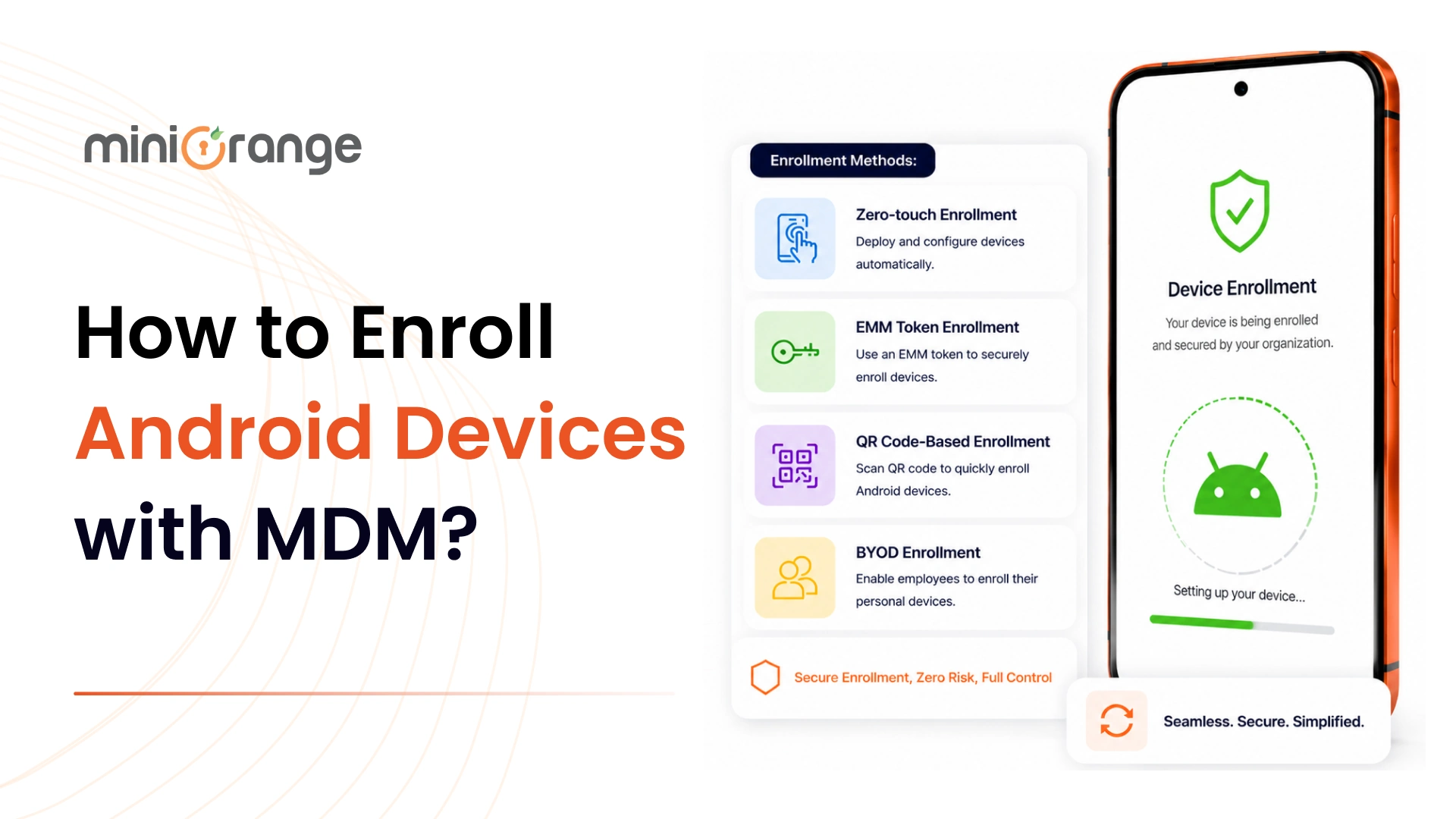
1. Android Zero-touch Enrollment
Android Zero-touch Enrollment is Google's automated provisioning method for corporate-owned Android devices. It allows IT teams to preconfigure devices before they reach employees, eliminating the need for manual setup.
Once a device is linked to your organization's Zero-touch portal and assigned to miniOrange MDM, the user simply powers on the device and connects to the internet. The enrollment process happens automatically, and all required policies, applications, and configurations are applied.
This method is best suited for large-scale deployments where hundreds or thousands of devices need to be provisioned quickly. For example, a logistics company shipping rugged Android devices to drivers across multiple cities can have every device automatically enroll into miniOrange MDM without requiring IT involvement at each location.
2. EMM Token Enrollment
EMM Token Enrollment uses a unique enrollment token generated from the MDM platform to enroll Android devices. The token contains enrollment information and automatically associates the device with the correct management profile, policies, and device group.
This method is commonly used for dedicated devices, frontline worker devices, shared devices, and kiosk deployments where users do not need individual login credentials. For example, a retail business deploying Android-based self-service kiosks can simply enter the enrollment token during setup to automatically configure each device with the required kiosk settings and applications.
3. QR Code-Based Enrollment
QR Code Enrollment allows administrators to enroll Android devices by scanning a QR code during the device setup process. The QR code contains all the information required to connect the device to miniOrange MDM, making enrollment faster than manual configuration.
This method is ideal for small to medium-sized deployments where Zero-touch Enrollment is unavailable. For example, an organization rolling out 50 corporate-owned Android tablets for field technicians can generate a QR code from miniOrange MDM and have each device enrolled within minutes simply by scanning it during setup.
4. BYOD Enrollment
BYOD (Bring Your Own Device) Enrollment allows employees to use their personal Android devices for work while keeping personal and corporate data separate. This is typically achieved through Android Work Profile, which creates a secure container for work applications and business data without giving IT access to personal content such as photos, messages, or personal apps.
This method is ideal for organizations supporting remote work, hybrid work, or employee-owned devices. For example, a sales team working remotely can enroll their personal Android phones into miniOrange MDM and securely access corporate email, documents, and business applications while maintaining complete privacy for personal data.
Simplify Android Device Enrollment and Management with miniOrange MDM
Android device enrollment is the first step toward effective Android device management. Whether you are deploying corporate-owned smartphones, rugged devices, kiosk devices, or employee-owned devices, choosing the right enrollment method helps streamline deployment and improve security.
miniOrange MDM supports multiple Android enrollment methods, making it easy to onboard devices based on your business requirements. Once enrolled, organizations can manage applications, enforce security policies, monitor compliance, separate work and personal data, and remotely control devices from a centralized dashboard.
With support for Android Enterprise, Work Profiles, Kiosk Mode, and advanced security controls, miniOrange MDM helps organizations simplify Android device management at scale.
Leave a Comment