
Certificate-based authentication verifies users and devices using trusted digital certificates instead of relying solely on passwords.
Think of a digital certificate as an electronic passport. Just as a passport is issued by a trusted authority, tied to one specific person, and hard to forge, a digital certificate is issued by a trusted Certificate Authority (CA). It is tied to one specific user, device, or application, and backed by cryptography that makes it virtually impossible to fake.
Instead of proving identity through something a user knows (a password), certificate-based authentication proves identity through something a user or device has: a signed credential paired with a private key that never leaves the device.
Learn how certificate authentication works, its role in Zero Trust security, and best practices for implementing secure, passwordless access across modern IT environments.
Why Certificate-Based Authentication Is Becoming Essential
For decades, password-based login was the default, but it was never designed for today's threat landscape, and the numbers back that up.
According to Verizon's 2025 Data Breach Investigations Report, the primary hacking activity is the use of stolen credentials, with 32% in large organizations and 33% in SMBs.
Infostealer malware compounds the problem: the same report found company credentials present in infostealer logs on 30% of corporate-managed devices and 46% of unmanaged devices, giving attackers a ready supply of valid logins before they ever attempt a breach.
Beyond the raw attack numbers, security teams are also managing business realities that passwords were never built for:
- A growing number of managed and unmanaged devices connecting to corporate resources
- Hybrid and remote work models that erase the traditional network perimeter
- Machine and workload identities that need to authenticate without a human typing a password
- Password fatigue that drives weak, reused credentials across dozens of accounts
- Zero Trust initiatives that require continuous, verifiable proof of identity, not a one-time login check
Certificate authentication addresses each of these directly. Because the private key never leaves the device and can't be shared, phished, or memorized, certificates close off the attack paths that credentials leave open. Combined with passwordless authentication, certificates give organizations a way to verify identity that's stronger than what a user knows and far harder for an attacker to steal remotely.
How Does Certificate-Based Authentication Work?
Understanding how certificate-based authentication works starts with public/private key cryptography. Every certificate holder has a key pair: a public key embedded in the certificate and a private key that stays securely on the device and is never transmitted.
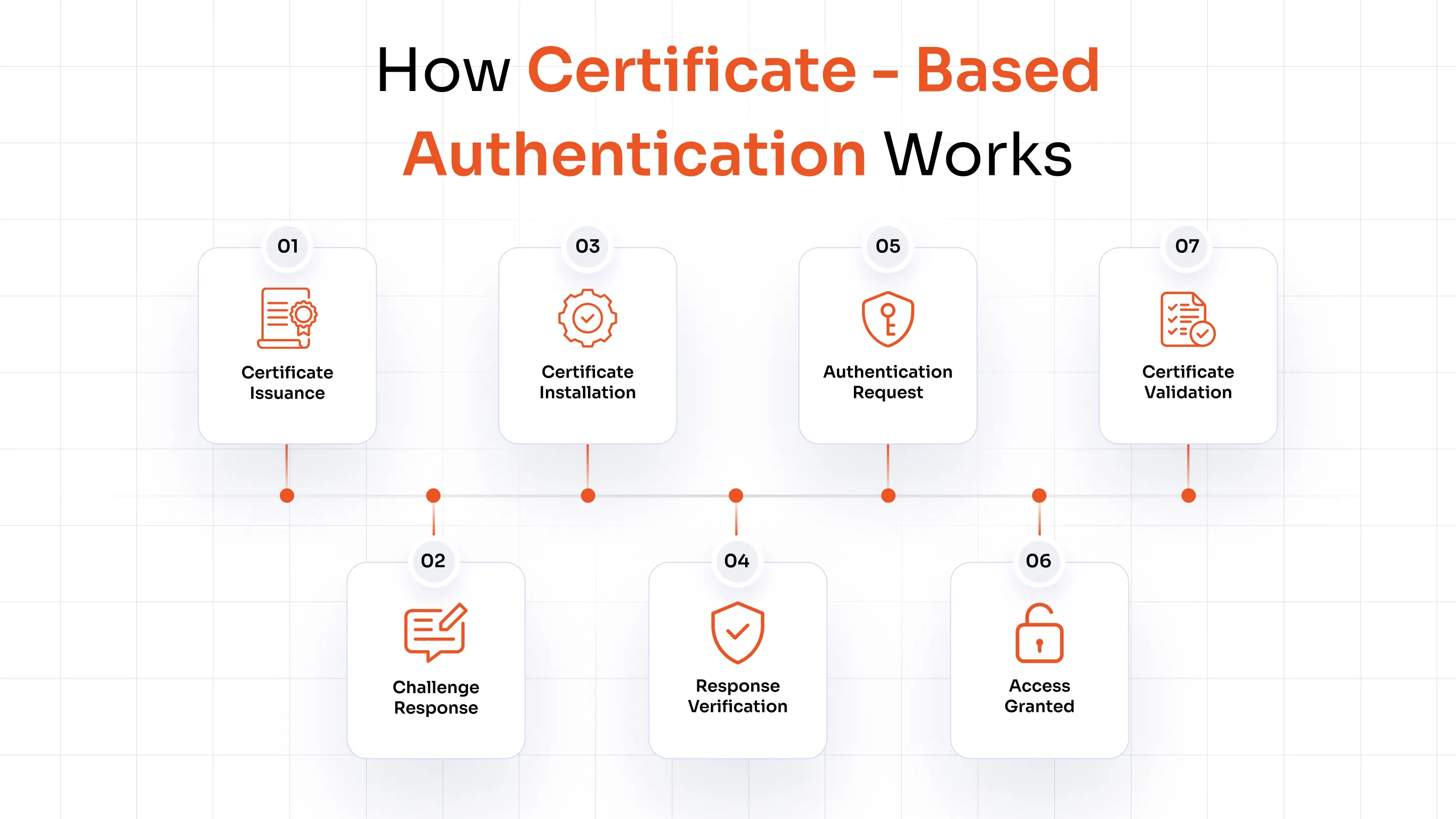
Here's how certificate authentication works step by step:
- The client initiates a connection to a server or application.
- The server presents its own certificate so the client can confirm it's talking to a legitimate destination.
- The server requests a certificate from the client in return.
- The client signs a random challenge using its private key and sends back the signed challenge along with its public certificate.
- The server uses the client's public key to verify the signature, proving the client genuinely holds the matching private key.
- The server confirms the certificate hasn't expired or been revoked, and checks that it was issued by a trusted Certificate Authority (CA).
- If every check passes, the server maps the certificate to a known identity and grants access.
This is possible because of digital signatures: data signed with a private key can only be verified with its paired public key, and vice versa.
The trust chain from the end-entity certificate up through intermediate CAs to a trusted root CA is what allows a server to trust a certificate it has never encountered before, as long as it recognizes the issuing authority.
Understanding the Role of PKI in Certificate-Based Authentication
Public Key Infrastructure (PKI) is the foundation that makes certificate-based authentication possible at enterprise scale. PKI consists of several core components working together:
- Certificate Authority (CA): The trusted entity that issues, signs, and manages digital certificates. Public CAs (such as DigiCert or IdenTrust) are used for internet-facing services, while private/internal CAs are common for enterprise use cases like device or Wi-Fi authentication.
- Registration Authority (RA): Verifies the identity of a certificate requester before the CA issues the certificate, acting as a gatekeeper for certificate requests.
- Root certificates: Self-signed certificates at the top of the trust hierarchy. Root CAs are highly protected because their compromise would undermine every certificate issued beneath them.
- Intermediate certificates: This sits between the root CA and end-entity certificates, allowing organizations to issue certificates without directly exposing the root CA.
- Trust relationships and certificate chain validation: A server validates a certificate by walking up the chain from the presented certificate to intermediates to the root confirming each signature along the way until it reaches a CA it already trusts.
Without PKI, there would be no reliable way to issue certificates, verify their legitimacy, or revoke them when compromised. It's the trust framework, not just the cryptography, that makes certificate authentication viable for large, distributed organizations.
Types of Certificate-Based Authentication
Certificate-based authentication takes several forms depending on what's being verified and where it's deployed.
1. User Certificates
Issued to individual users to verify their identity when logging into applications, email systems, or VPNs. Often paired with smart cards or secure key stores.
2. Device Certificates
Bound to a specific machine laptop, mobile phone, or IoT sensor so the network can verify the device itself before granting access. Device certificate authentication is central to enterprise Wi-Fi, MDM-managed endpoints, and BYOD policies.
3. Client Certificates
Presented by a client application or endpoint to a server to prove its identity, commonly used in VPNs, secure web sessions, and API access.
4. Server Certificates
Used by servers to prove their identity to connecting clients — the same mechanism behind HTTPS and TLS, ensuring users are connecting to a legitimate, unaltered destination.
5. Mutual TLS (mTLS) Authentication
Both the client and server exchange and validate certificates, authenticating each other before any data is exchanged. This bidirectional trust model is widely used in B2B integrations, microservices, and financial transactions where both parties must be verified.
Certificate Lifecycle: From Issuance to Revocation
A digital certificate isn't a "set it and forget it" credential it has a defined certificate lifecycle that must be actively managed to maintain trust:
- Request: A user, device, or system submits a Certificate Signing Request (CSR) to a CA.
- Issuance: The CA verifies the request and issues a signed certificate containing the public key and identity details.
- Deployment: The certificate is installed on the device, browser, or application, alongside the securely stored private key.
- Renewal: Before expiration, the certificate must be renewed to avoid access disruptions.
- Rotation: Certificates and their underlying keys are periodically replaced to reduce the risk of long-term key compromise.
- Expiration: Every certificate has a defined validity window, after which it's no longer trusted.
- Revocation: If a certificate is compromised or the user/device is no longer authorized, it must be revoked immediately.
Revocation status is checked using a Certificate Revocation List (CRL), a published list of revoked certificate serial numbers, or the Online Certificate Status Protocol (OCSP), which allows real-time revocation checks against the CA.
Where Is Certificate-Based Authentication Used?
Certificate-based authentication shows up across nearly every layer of enterprise infrastructure:
1. Enterprise Wi-Fi (802.1X)
Certificates authenticate devices connecting to corporate wireless networks, replacing shared Wi-Fi passwords that are easy to leak or reuse.
2. VPN Authentication
Remote users and devices authenticate to the corporate network using certificates instead of, or in addition to, a password.
3. Device Authentication
Corporate-managed devices present certificates to prove they're compliant and authorized before accessing sensitive resources.
4. Endpoint Security
Certificates help endpoint security tools confirm a device's identity and posture before allowing it onto the network.
5. Remote Workforce Access
Hybrid and remote employees authenticate securely without depending on passwords that can be phished outside the office perimeter.
6. Cloud Applications
Cloud platforms use certificates to secure API access, service-to-service communication, and user logins without password exposure.
7. IoT Devices
Each connected device is issued a unique certificate so networks can verify legitimacy before allowing communication critical given the scale of IoT deployments.
8. Machine-to-Machine Authentication
Non-human identities: services, workloads, and automated systems authenticate to each other using certificates, since machines can't type in a password.
Benefits of Certificate-Based Authentication
Passwords ask users to remember a secret and ask organizations to trust that the secret stays secret, an assumption that breaks down constantly. Certificate-based authentication replaces that assumption with cryptographic proof, and the outcomes show up across security, compliance, user experience, and IT operations:
- Stronger security posture: Certificates are cryptographically signed and tied to a specific identity, so there's no password to guess, phish, or brute-force, closing off the attack paths responsible for roughly a third of breaches industry-wide.
- Built-in phishing resistance: Certificate authentication is a phishing-resistant MFA solution by design with no password to trick a user into entering on a fake login page, it removes the most common entry point attackers rely on. This sets it apart from passwords, even when paired with SMS or app-based OTPs, which can still be phished or intercepted.
- Simplified regulatory compliance: Certificate-based controls support requirements under frameworks like HIPAA, SOC 2 Type II, ISO 27001, and PCI-DSS that call for strong authentication and demonstrable access controls, making audits faster and evidence easier to produce.
- Better user experience: Once installed, certificates authenticate silently in the background, no passwords to remember, no OTPs to type, no lockouts from mistyped credentials.
- Verified device trust: Certificates confirm not just who a user is, but whether the device itself is authorized and compliant, something password-only authentication can't do.
- Lower operational overhead: Certificates can be issued, renewed, and revoked centrally across thousands of users and devices, cutting the password-reset tickets that consume a large share of helpdesk time and cost.
The contrast with traditional password authentication is direct: passwords rely on a shared secret that can be phished, reused, or leaked in a breach, while certificates rely on a private key that never leaves the device and can't be extracted through social engineering.
That difference is what makes certificate-based authentication a stronger long-term control, not just a different login method.
Challenges of Certificate-Based Authentication
Certificate-based authentication isn't without friction, and organizations should plan for these realistic challenges:
- PKI deployment complexity: Standing up a CA hierarchy, RA processes, and validation infrastructure requires specialized expertise and planning.
- Certificate lifecycle management: Tracking issuance, renewal, and revocation across a large user and device base can become unmanageable without automation.
- Expired certificates: A missed renewal can silently lock users out of critical systems.
- Revocation management: Ensuring every system checks CRLs or OCSP promptly is an ongoing operational burden.
- Legacy system compatibility: Older applications and protocols may not support modern certificate-based authentication out of the box.
- BYOD considerations: Personal devices complicate certificate issuance and require clear policies for enrollment and removal.
- Initial deployment effort: Rolling out PKI and certificate provisioning takes more upfront work than enabling a password policy.
These challenges are manageable with the right approach: automating certificate lifecycle tasks, using a centralized certificate management platform, and integrating certificate issuance into existing device and identity provisioning workflows rather than treating it as a separate process.
Certificate-Based Authentication Best Practices
- Automate certificate lifecycle management: Deploy a certificate management platform that auto-issues, auto-renews, and auto-revokes certificates on defined triggers (device offboarding, role change, expiry window) instead of relying on manual spreadsheets or tickets.
- Protect private keys: Store private keys in secure hardware or software key stores (such as a TPM or HSM), and set policy to block export or copying of private keys under any circumstance.
- Monitor certificate expiration continuously: Set automated alerts at 30/14/7-day thresholds before expiry, and route them to the team responsible for renewal so lapses don't turn into outages.
- Use trusted Certificate Authorities: Route public-facing services through a publicly trusted CA and keep an internal CA scoped strictly to internal-only applications and devices.
- Implement and test certificate revocation: Configure systems to check CRLs or OCSP on every authentication attempt, and periodically test that a revoked certificate is actually rejected in practice, not just in policy.
- Combine with MFA for high-risk access: Require an additional factor alongside certificate authentication for admin accounts, privileged systems, or financial transactions.
- Secure managed and unmanaged devices separately: Apply stricter certificate issuance and monitoring policies to BYOD and unmanaged endpoints than to corporate-issued, MDM-enrolled devices.
- Run regular certificate audits: Schedule quarterly reviews to catch orphaned, expired, over-privileged, or improperly scoped certificates before they become an audit finding or an attack surface.
- Follow Zero Trust principles: Treat every certificate-based authentication event as one signal in a continuous verification model paired with device posture and risk signals rather than a one-time login check.
How Certificate-Based Authentication Supports Zero Trust Security?
Zero Trust is built on one core idea: "never trust, always verify." Certificate-based authentication fits naturally into that model because it enables:
- Continuous identity verification for users, devices, and machine identities at every access request, not just at initial login.
- Device trust as a first-class signal Zero Trust access decisions can factor in whether a device holds a valid, unrevoked certificate.
- Least privilege enforcement, since certificate attributes can be mapped to specific access scopes rather than broad, static permissions.
- Conditional access, where certificate validity becomes one of several signals alongside device posture, location, and risk score used to grant or deny access.
- Passwordless authentication removes a credential type that's inherently vulnerable to phishing and reuse.
- Secure device onboarding, issuing certificates automatically as part of device enrollment so new endpoints are trusted from day one.
- Identity-centric security shifts the security perimeter from the network to the identity of the user, device, or workload requesting access.
Because certificates are difficult to forge, tied to specific identities, and centrally revocable, they give Zero Trust architectures a reliable, verifiable signal to build access decisions on.
How Certificate-Based Authentication Works with IAM, MFA, RADIUS, and MDM?
Certificate-based authentication doesn't operate in isolation it strengthens the identity infrastructure organizations already run.
- Identity and Access Management (IAM): Certificates can be mapped to identities within an IAM platform, tying certificate validation to existing user records, roles, and access policies.
- Multi-Factor Authentication (MFA): Certificates serve as a strong possession factor and can be combined with another factor such as a password, OTP, or biometric for high-risk transactions, rather than replacing MFA entirely. Pairing certificate-based authentication with an MFA Solution adds an extra layer of verification, ensuring that even if one factor is compromised, unauthorized access is still prevented.
- RADIUS authentication and 802.1X: RADIUS servers validate device and user certificates during network access requests, commonly used for enterprise Wi-Fi and wired network authentication.
- Single Sign-On (SSO): Certificate-based login can serve as the initial authentication step within an SSO solution, establishing a trusted session that gives users seamless access across all connected applications without repeated logins.
- Mobile Device Management / Unified Endpoint Management (MDM/UEM): These platforms handle certificate provisioning, renewal, and removal directly on managed devices, keeping the certificate lifecycle tied to the device lifecycle.
- Conditional Access: Certificate status becomes one more signal that access policies evaluate alongside device compliance, location, and user risk.
Rather than replacing these technologies, certificate-based authentication makes each of them stronger by grounding access decisions in a credential that's far harder to compromise than a password.
How miniOrange Simplifies Certificate-Based Authentication?
Most security teams don't struggle with the idea of certificate-based authentication. They struggle with running it alongside everything else they already manage: a separate PKI project, device enrollment that doesn't talk to the IAM system, certificates that expire without warning, and VPN MFA or Wi-Fi access that still falls back to a shared password when something breaks. That operational fragmentation, not the cryptography, is usually what stalls a certificate authentication rollout.
miniOrange is built to close that gap by bringing certificate-based authentication into the same console as your broader IAM solution, instead of running it as a disconnected project.
The result is certificate-based authentication that works with your existing stack rather than requiring a rebuild giving both SMBs and large enterprises a faster, less disruptive path to passwordless, phishing-resistant access.
Conclusion
Certificate-based authentication replaces the weakest part of most security stacks the password with a cryptographically verifiable credential tied to a real identity. It is backed by PKI, supported by a well-managed certificate lifecycle, and extended across Wi-Fi, VPNs, cloud apps, and machine identities.
It gives organizations a phishing-resistant, scalable way to verify who and what is accessing their systems. Paired with MFA, IAM, and Zero Trust principles, certificate authentication isn't just an alternative to passwords, it's a foundational control for modern identity security.
Ready to move your organization toward passwordless, certificate-based access? Talk to the miniOrange team to see how certificate-based authentication fits into your existing IAM stack.
FAQs
How does certificate-based authentication work with 802.1X and RADIUS?
In 802.1X-based network access, a RADIUS server validates the certificate presented by a connecting device or user before granting access to enterprise Wi-Fi or wired networks — replacing shared network passwords with individually verifiable credentials.
What are the benefits of certificate-based authentication over passwords?
Certificates are phishing-resistant, cannot be reused or guessed the way passwords can, support mutual authentication, scale more easily across large user and device populations, and reduce password-related helpdesk costs.
Can certificate-based authentication replace passwords completely?
Yes, in many environments, certificate-based authentication can fully replace passwords for login, VPN, and Wi-Fi access. For high-risk transactions, it's often combined with an MFA solution rather than used as the sole factor.
What should I do if a digital certificate expires or is compromised?
An expired certificate should be renewed promptly to avoid access disruption. A compromised certificate should be revoked immediately through the issuing CA, and its status published via a CRL or checked in real time through OCSP so systems reject it going forward.
About the Author

Content Writer
With a background in Journalism and extensive experience in SaaS and cybersecurity content writing, Chaitali Avadhani has contributed to creating various forms of impactful content pieces across multiple verticals. At miniOrange, her role is to craft SEO-friendly and lead-generating content around Identity and Access Management (IAM) products and cybersecurity as a whole.
Leave a Comment