
A strong authentication method can still leave an account exposed if the recovery path is much easier to compromise.
Consider a user who signs in with a passkey or FIDO2 security key. If they lose that authenticator and can regain access by receiving an SMS code or convincing a helpdesk agent to reset MFA, an attacker may target that recovery process instead of the primary authentication method.
Backup authentication is a strategy that uses alternative authentication methods to let users access their accounts when their primary authenticator isn’t available. This article explains why backup authentication methods fail, how different recovery options compare, and how organizations can build safer authentication recovery processes.
Backup Authentication vs. Fallback Authentication vs. Account Recovery
Backup authentication is closely related to, but different from, account recovery and fallback authentication. But all three of these describe different parts of the authentication process.
| Term | What it Means | Example |
|---|---|---|
| Backup Authentication | An alternate authentication method used when the primary method isn’t available. | Using a second security key. |
| Fallback Authentication | An alternate method used when the preferred authentication method can’t be completed. | Using another available MFA method. |
| Account Recovery | The process of restoring access or replacing an unavailable authenticator | Verifying identity and registering a new authenticator. |
Account recovery can involve changing the authentication state of an account. That makes the recovery process particularly important to secure.
NIST's Digital Identity Guidelines address authentication and authenticator lifecycle management, including the processes surrounding authenticators and their replacement.
Why do Backup Authentication Methods Fail?
Backup authentication usually fails when organizations focus on making account recovery easy without giving the recovery path the same security consideration as normal authentication.
Several problems can cause this.
Weak Fallback Methods
An organization may deploy phishing-resistant authentication for normal sign-in but retain weaker methods for recovery.
For example:
Primary authentication: Passkey
↓
Authenticator lost
↓
Recovery: SMS OTP
↓
Attacker targets the phone number
The attacker doesn't need to defeat the passkey if the organization provides another way to establish access.
SMS, email, and security questions can be useful in some situations, but they don't provide the same protection against every threat. The right choice depends on the account's risk, how the method is protected, and what an attacker would need to compromise it.
CISA's guidance on phishing-resistant MFA methods is useful here because it distinguishes stronger authentication methods from those that remain susceptible to phishing.
Recovery Channels Can Be Compromised
A recovery method is only as trustworthy as the channel behind it.
Email recovery creates a problem when the user's email account has already been compromised. SMS recovery has risks associated with phone-number takeover, SIM swapping, phishing, and interception. A recovery device can also be compromised or stolen.
The question organizations need to ask is simple:
Could an attacker who has already compromised the account also control the recovery method?
If the answer is yes, the backup method may provide little additional protection.
Helpdesk Recovery Can Be Abused
Human-assisted recovery creates another point where attackers can target the authentication process.
An attacker may impersonate an employee, contact the helpdesk, claim that their phone or authenticator has been lost, and request an MFA reset. If the support process relies on weak identity checks, the attacker may convince an agent to remove the legitimate authentication method and register one they control.
Helpdesk recovery therefore needs its own security controls, including appropriate identity verification, approval requirements for high-risk accounts, audit trails, and monitoring for unusual authenticator changes.
Backup Methods That Aren't Actually Available
A backup method can't protect an account if the user can't access it when needed.
Common problems include:
- The user never enrolled a second authenticator.
- Recovery codes were generated but never stored safely.
- The backup device was lost or damaged.
- A recovery method expired.
- The recovery process depends on an administrator who isn't available.
- The identity provider or authentication service is unavailable.
- The recovery process hasn't been tested since it was deployed.
This creates an availability problem alongside the security problem. Users who can't use their intended recovery method may turn to weaker alternatives, such as contacting support and requesting an emergency reset.
Recovery isn’t Planned or Tested
Authentication is often designed around the normal login journey:
Enroll → Authenticate → Access
Real environments are messier:
Enroll → Authenticate → Lose or replace authenticator → Recover → Replace authenticator → Re-enroll → Monitor
Organizations that don't plan for the second journey can end up bolting weaker recovery mechanisms onto otherwise strong authentication systems.
Which Backup Authentication Methods Are Most Vulnerable?
No backup method is universally secure or insecure. Its security depends on how it's implemented, what it protects, and how much assurance it provides.
| Backup Method | Main Risk | Enterprise Considerations |
|---|---|---|
| SMS OTP | SIM-related attacks, interception, and phishing. | Avoid relying on it as the only recovery path for high-risk accounts. |
| Email Recovery | Compromise of the email account. | Security depends heavily on the security of the email account. |
| Security Questions | Guessable or publicly available information. | Weak choice for high-assurance recovery. |
| Recovery Codes | Theft, exposure, or poor storage. | Stronger when generated securely and protected like authentication credentials. |
| Secondary Authenticator | Device loss or incomplete enrollment. | Strong option when properly enrolled and managed. |
| Helpdesk Recovery | Social engineering. | Requires strong identity verification and controlled procedures. |
| Backup Security Key | Loss or failure to maintain a second key. | Strong option when users securely maintain a second key. |
The comparison changes when an organization can give users 2 independent strong authenticators.
For example, a passkey paired with a backup FIDO2 security key gives the user another phishing-resistant authentication option. That's a different security model from a passkey that falls back to SMS.
FIDO's passkey guidance provides background on how passkeys use public-key cryptography and device-based authentication to resist common phishing attacks.
What Happens When the Backup Method Is Weaker Than the Primary Authentication?
The security of an authentication system can also be undermined when its backup path provides a much lower level of assurance than the primary method.
Consider a user who signs in with a passkey or FIDO2 security key. If that authenticator is lost, the user may be allowed to regain access through SMS, email, or a helpdesk reset. An attacker who compromises that weaker recovery path may gain access without defeating the primary authenticator.
This creates an assurance downgrade. This can lead to:
- MFA Bypass: An attacker can use the recovery process instead of compromising the primary authenticator
- Lower Authentication Assurance: The account may be protected by a strong authenticator during normal sign-in but a weaker method during recovery
- Greater Social Engineering Risks: Manual recovery can give attackers another opportunity to impersonate users or manipulate support staff.
The same issue can arise when users aren’t required to register a backup authenticator before losing their primary one. Organizations may then rely on emergency procedures that weren’t designed to provide the same level of assurance.
A secure backup MFA method therefore should provide an appropriate level of protection for the account it recovers. The next section looks at what makes a backup method secure enough for its intended use.
What Makes a Backup Authentication Method Secure?
A strong backup method isn't simply the method with the best reputation. Organizations should evaluate the entire recovery path.
1. It Provides an Appropriate Level of Assurance
Start with the primary authentication method.
A recovery mechanism for a privileged administrator shouldn't automatically have the same requirements as one for a low-risk user. If the primary authenticator provides strong phishing resistance, replacing it through a method that an attacker can easily phish creates an assurance downgrade.
2. It is Independent From the Primary Authenticator
Two authentication methods provide more useful redundancy when compromising one doesn't automatically compromise the other.
For example, keeping a second security key in a secure location can provide useful backup for someone whose primary key is lost.
By contrast, storing the primary and backup authentication capability on the same compromised device can leave both paths exposed.
3. It has Strong Identity Verification
Recovery can change who controls an account.
Before an organization removes an old authenticator or registers a new one, it needs confidence that the person requesting the change is the legitimate account holder.
The verification process should become stronger as account risk increases.
4. It Can Be Used When Normal Authentication Isn't Available
Recovery should account for realistic failure scenarios.
If the identity provider is experiencing an outage, the user's phone is lost, or an administrator is unavailable, the organization needs a documented process that doesn't force users toward improvised workarounds.
5. It is Monitored
Authenticator replacement and recovery can be high-risk account events.
Organizations should monitor:
- New authenticator enrollment
- Authenticator replacement
- Recovery attempts
- Repeated failed recovery attempts
- Changes to recovery information
- Recovery followed by unusual login activity
How to Build a Secure Backup Authentication Process?
A secure backup authentication process should account for the full recovery journey, from choosing a backup method to replacing a lost authenticator. The following steps help organizations build recovery controls that maintain the same level of security as the primary authentication process.
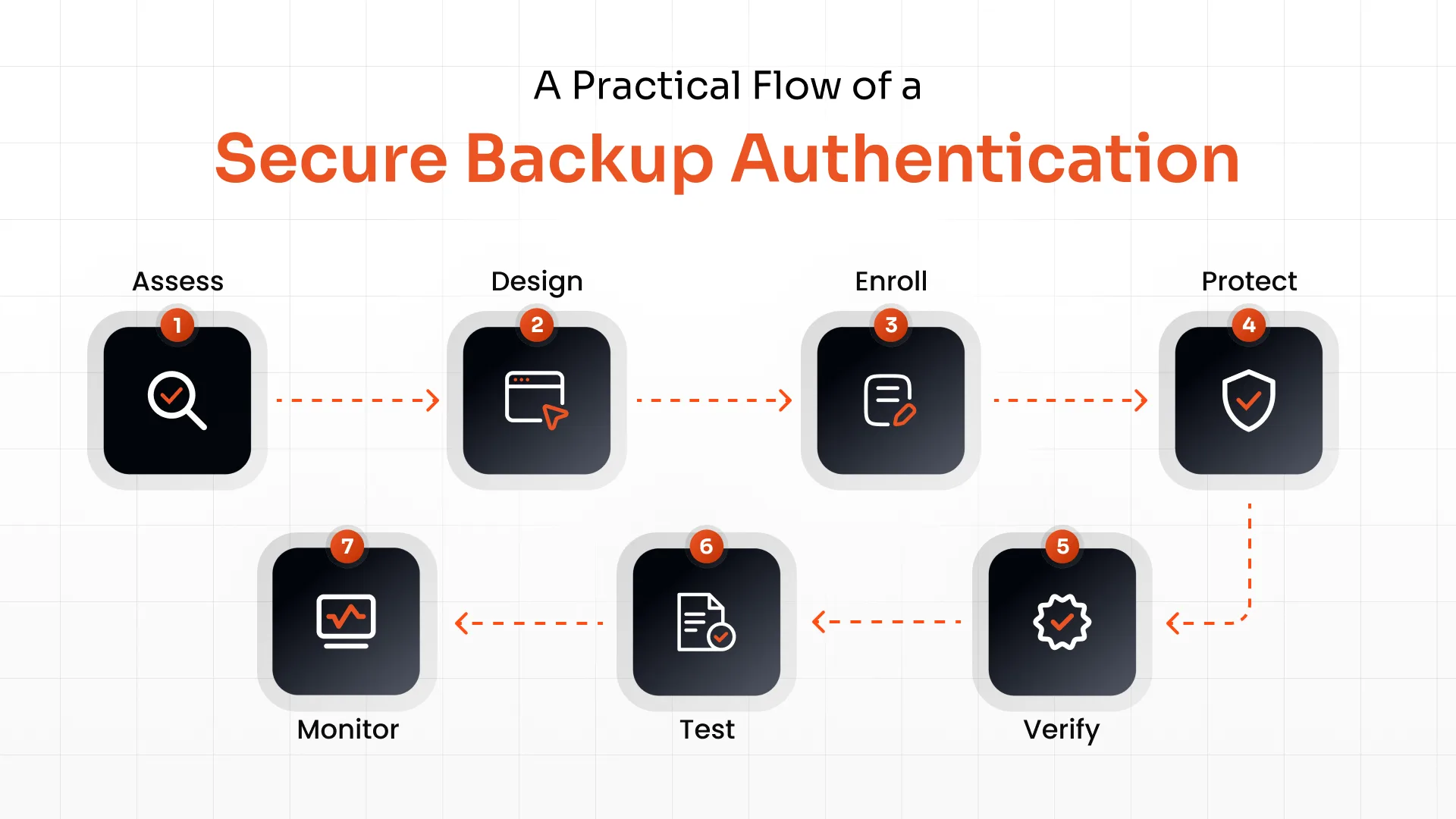
1. Assess the Primary Authentication
Identify the assurance level of the primary authentication method and the risk associated with the account.
A standard employee account, administrator account, and privileged infrastructure account may need different recovery controls.
2. Design a Strong Backup
Choose a backup authentication method that doesn't create unnecessary security risks.
Where practical, organizations should consider maintaining multiple strong authenticators rather than making a weaker method the automatic fallback.
For example, a user could have:
- Primary: Passkey Backup: FIDO2 security key
The exact combination will depend on the organization's environment, user population, and risk requirements.
3. Enroll Backup Authenticators
Make backup enrollment part of the authentication setup process.
Users should know what to do if they lose their primary device before that incident happens. For workforce environments, administrators can also define which authentication methods users are allowed or required to register.
4. Protect Recovery Credentials
Recovery codes, backup devices, and other recovery information should be treated as sensitive authentication material.
Recovery codes shouldn't be left in shared documents or unsecured notes. Backup security keys should be stored where authorized users can access them when necessary without exposing them unnecessarily.
5. Verify Identity Before Replacing an Authenticator
Authenticator replacement deserves special attention because it can change who controls the account.
For helpdesk-assisted recovery, organizations can require stronger verification, additional approval for privileged accounts, and documented procedures for high-risk requests.
Microsoft Entra, for example, provides authentication method management and Temporary Access Pass capabilities that can support controlled authenticator registration and recovery scenarios.
6. Test Recovery Before an Incident
Run recovery exercises instead of assuming the process works.
Test scenarios such as:
- Lost phone
- Lost security key
- New device
- Device reset
- Employee locked out
- Primary authentication service unavailable
- Helpdesk social-engineering attempt
- Administrator unavailable
Testing should cover both security and availability. The organization needs to know whether the legitimate user can recover access and whether an attacker can manipulate the same process.
7. Monitor Recovery Activity
Recovery events should generate enough information for security teams to investigate suspicious activity.
Pay particular attention to authenticator changes followed by new devices, unfamiliar locations, unusual application access, or other signs of account takeover.
FFIEC's updated authentication and access guidance also reinforces the need to consider authentication across different users, systems, and access scenarios rather than treating authentication as a single login event.
Make Backup Authentication a Part of Your MFA Lifecycle
Backup authentication works best when it's treated as part of the complete MFA lifecycle. Every stage, from enrolling an authenticator to replacing a lost one, creates a different security requirement.
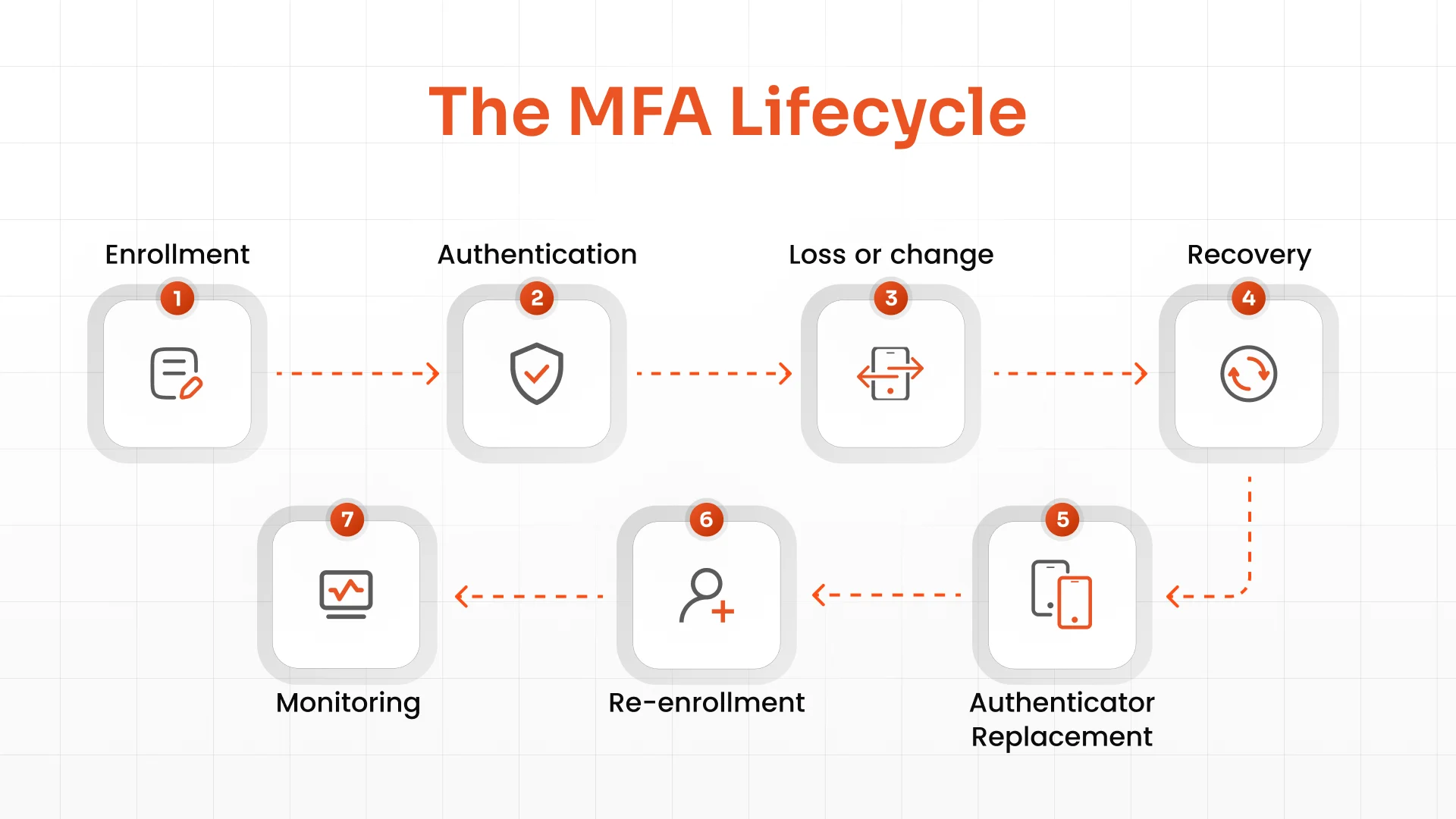
During enrollment, organizations need to establish trusted authenticators. During recovery, they need to verify that the person requesting access is authorized to regain control of the account.
Risk should also influence the recovery process. A privileged administrator may need stronger verification and additional approval before an authenticator is replaced, while a standard workforce account may use a different process.
MFA policy should therefore cover how users enroll and replace authenticators, what happens when devices are lost, and how recovery events are monitored.
Centralized MFA administration helps here. Platforms such as miniOrange MFA software let admins approve the methods users can enroll in, so enrollment and fallback follow one policy.
How miniOrange Helps Secure Authentication and Recovery
Authentication security also needs to account for lost devices, authenticator changes, and account recovery.
Secure the recovery path, not just the primary login.
miniOrnage helps organizations manage authentication methods, enrollment, recovery, and authenticator replacement through centralized authentication policies.
miniOrange supports MFA and phishing-resistant methods such as passkeys and FIDO2, along with contextual and adaptive authentication. Centralized administration helps organizations manage authentication methods and replacement across workforce applications, while monitoring and reporting features provide visibility into authentication activity and changes.
Conclusion
A backup authentication method shouldn't become an easier route into an account.
Organizations need to evaluate recovery with the same security mindset they apply to primary authentication. That means choosing appropriate backup methods, protecting recovery channels, verifying users before replacing authenticators, testing recovery procedures, and monitoring changes.
The strongest recovery strategy is one that keeps legitimate users moving without giving attackers a simpler way around the authentication controls protecting the account.
FAQs
What is the most secure backup authentication method?
There isn't one universal answer. A second phishing-resistant authenticator, such as a FIDO2 security key, can provide strong backup when it's securely enrolled and stored. The right choice depends on account risk, implementation, and recovery requirements.
Can backup authentication bypass MFA?
Yes. If an attacker can use a weaker recovery method to replace or bypass the user's registered MFA, the recovery process can undermine the protection provided by the primary authentication method.
Is SMS a secure backup authentication method?
SMS can provide account recovery in some environments, but it has risks including SIM swapping, phishing, and phone-number takeover. Organizations shouldn't automatically treat SMS as equivalent to a phishing-resistant authenticator.
What happens if a user loses their primary MFA device?
The user should follow a predefined recovery process. Depending on the organization's policy, this may involve using a registered backup authenticator, recovery code, or verified recovery procedure before registering a replacement authenticator.
How should organizations test backup authentication?
Test both legitimate recovery and attack scenarios. Include lost devices, lost security keys, new devices, unavailable administrators, authentication-service outages, and helpdesk social-engineering attempts.
Can backup authentication be phishing-resistant?
Yes. Organizations can use phishing-resistant authenticators as backup options, such as a second FIDO2 security key or another supported passkey. The backup method should be securely enrolled and independently protected.
About the Author

Content Writer
Stutee writes about cybersecurity and identity security, covering technologies such as MFA, IAM, PAM, and endpoint management. Her work focuses on translating what products do into why audiences should care, ensuring technical depth does not come at the cost of readers clarity.
Leave a Comment