Domain-Based SSO Redirection for Seamless Multi-IdP Login Across Atlassian Applications
Managing user identities across different systems can quickly become complicated—especially when a growing organization relies on multiple Identity Providers (IdPs). Enterprises using Jira, Confluence, and Bitbucket often struggle to deliver a unified login experience for users spread across various business units or regions.
Business Challenge
When an organization uses several IdPs (such as Azure AD, Okta, Ping, or ADFS), employees might belong to different user domains based on their geography, subsidiary, or department. This introduces a few key problems:
- Multiple IdPs Across the Organization: Users have identities across different IdPs depending on their business unit (e.g., @apac.company.com in Azure AD, @emea.company.com in Okta).
- Inconsistent Experience Across Atlassian Apps: Admins want a seamless SSO experience across Jira, Confluence, and Bitbucket—but different login paths break the user journey.
- User Confusion at Login: Users are often asked to choose their IdP from a dropdown list or remember a specific login URL—not ideal in a fast-paced work environment.
- Risky Access Control: Manually selecting the wrong IdP can lead to failed authentication or, worse, unauthorized access.
As one IT admin from a global tech firm noted:
“We had to send step-by-step login instructions to every new joiner. People were always choosing the wrong IdP, and we were constantly resetting login sessions.”
Solution Overview
To address these challenges, a domain-based SAML SSO redirection solution was implemented. Instead of asking users to choose their IdP, the system does it for them—automatically, based on the domain in their email address.
This delivers a faster, more intuitive login experience and helps maintain stricter security and access control without adding IT overhead.
How It Works
1. Smart Email Domain Capture
Users are presented with a clean, custom login screen on Jira, Confluence, or Bitbucket. They simply enter their email address—no IdP dropdowns or multiple login URLs.
2. Automatic Domain Check
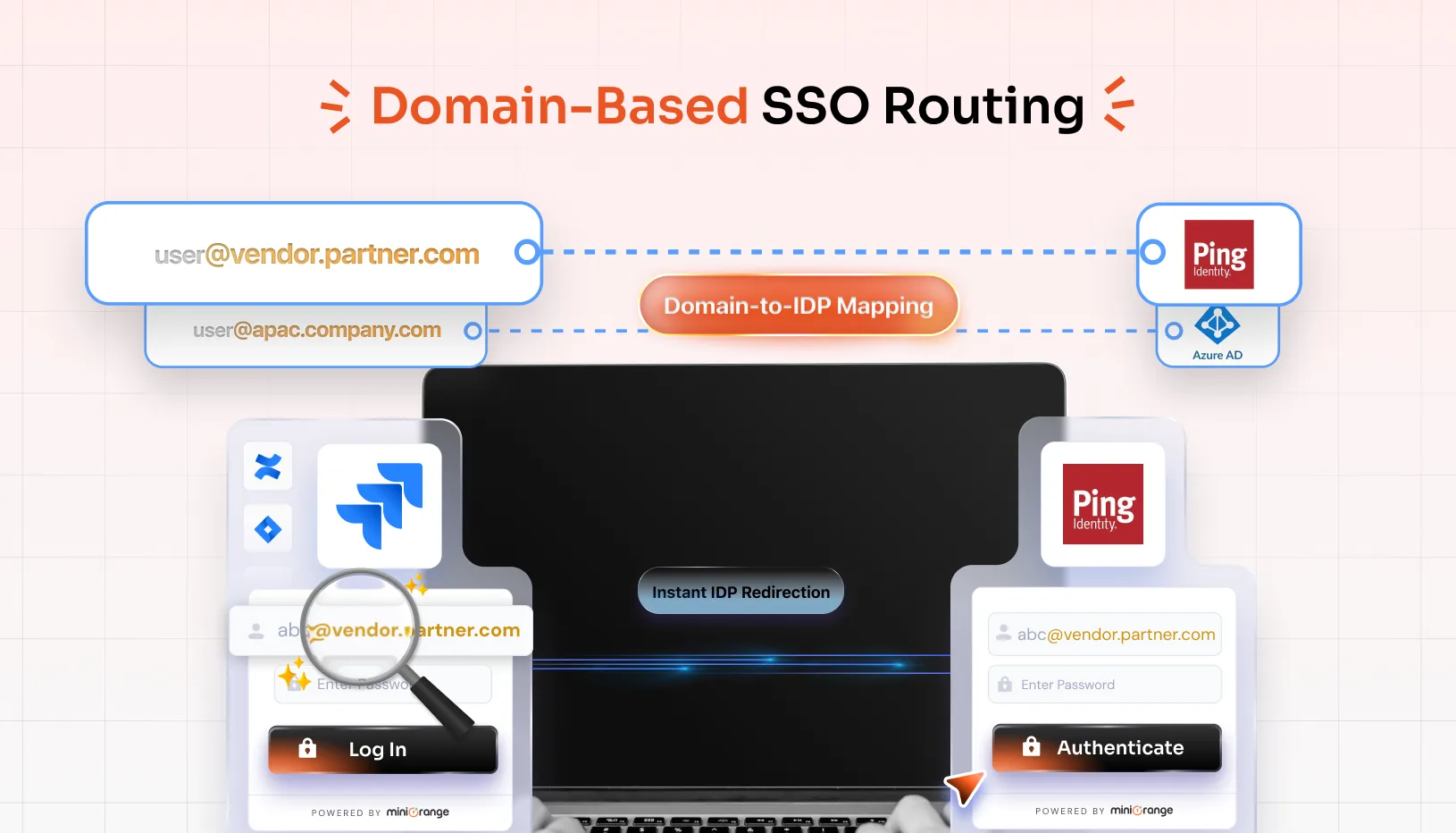
Behind the scenes, the system checks the domain of the entered email (e.g., @emea.company.com, @partners.org) and matches it with the appropriate IdP.
Example:
- @emea.company.com → Okta
- @apac.company.com → Azure AD
- @vendor.partner.com → Ping
3. Instant IdP Redirection
Based on the identified domain, users are automatically redirected to the correct IdP’s login portal. No buttons to click or portals to choose from.
4. Seamless Authentication Across All Atlassian Apps
Once authenticated, the user gains access to the Jira, Confluence, or Bitbucket instance they intended to use—completing the loop with a secure and efficient experience.
Real-World Example
A global energy company using three different IdPs across five continents implemented domain-based SSO to manage 10,000+ users.
Before:
- Employees frequently chose the wrong IdP, resulting in failed logins.
- External contractors needed help remembering which portal to use.
- Admins spent hours each week resolving login tickets.
After:
- All users simply typed their email and were redirected to the correct IdP.
- Login support tickets dropped by 85%.
- Admins could update domain–IdP mappings without touching individual user settings.
Key Benefits
The solution provides the following key benefits:
Simplified Login Process
Users no longer need to know or select their IdP—email domains do it for them.
Enhanced User Experience
Fewer steps mean faster access and less frustration, especially for new users or contractors.
Stronger Security Controls
Prevents unauthorized or misdirected login attempts by enforcing correct IdP usage.
Centralized Admin Control
Admins can easily map and maintain domain-to-IdP logic, scaling access securely as the business grows.
Cross-Application Consistency
Works across Jira, Confluence, and Bitbucket—giving users a unified experience no matter the Atlassian tool.
Conclusion
Domain-based SSO redirection is the modern answer to IdP sprawl and login confusion in multi-IdP environments. It delivers the right balance of user convenience and IT control, making it a must-have for any enterprise scaling across multiple teams, regions, and platforms.