REST API Authentication
What is REST API?
A REST API, or Representational State Transfer Application Programming Interface, is a standardized architectural style for designing networked applications that communicate over the internet. REST APIs provide a uniform and consistent means for different software systems to interact. In a RESTful architecture, resources, such as data or services, are identified by unique URIs, and interactions with these resources are facilitated through standard HTTP methods like GET, POST, PUT, and DELETE. REST APIs are widely employed in web development, serving as a foundational technology for enabling seamless communication between diverse applications and services.
Securing APIs
Data can easily be accessed using REST API, but not everyone can access it. You can access the data by providing your username and password for authentication in the Authorization parameter in the header of the request. But is it safe to use your login credentials to access REST APIs?
No, you should avoid sharing your credentials. You can use API tokens or Access Tokens instead. REST API Plugin does this for you.
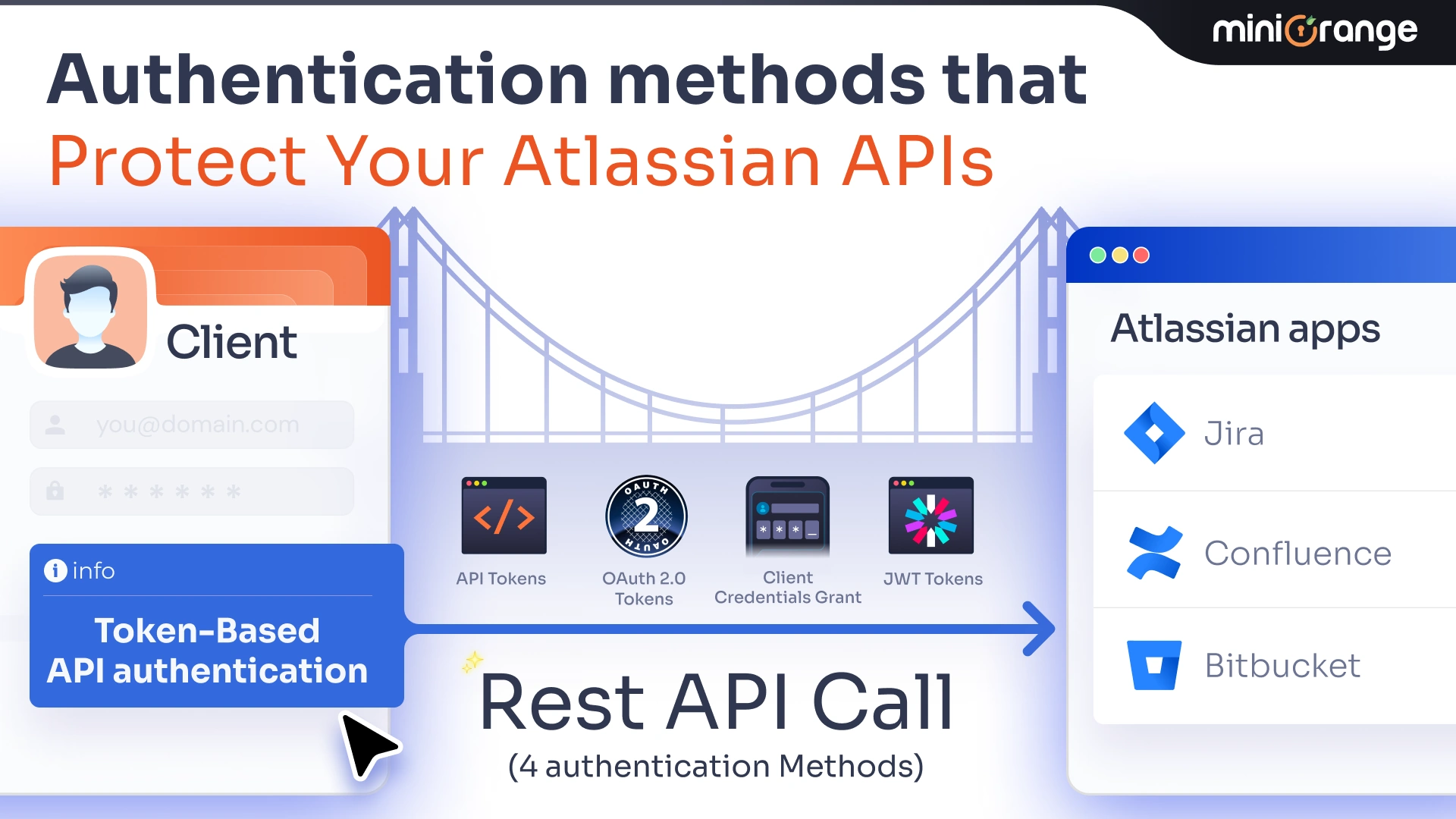
Using the REST API Plugin you can Authenticate APIs using the following tokens:
- API Tokens
- OAuth 2.0 Access Tokens
- JWT
Here we are going to describe each of the above methods with their appropriate use cases.
Authentication Methods
API Tokens
If you want to protect your REST APIs from unauthenticated users but you don't want to share login credentials to authenticate the REST API, then you can use an API token, which is a randomly generated token for you.
OAuth 2.0 Tokens
If you are looking to protect your REST APIs using the access token from a third-party provider / identity provider, then you should go for the OAuth 2.0 Tokens.
In this, you can configure third-party authentication using the following ways:
- Authorization Grant — It is fundamentally a more secure approach, as it reduces the risk of exposing user credentials and supports access revocation, providing a more secure and flexible solution for scenarios where you are integrating third-party applications.
- Client Credentials Grant — It can be used when APIs are accessed by trusted clients, without any user involvement. It can be used for server-to-server communication or machine-to-machine interactions.
Tokens from the provider can be used to authenticate Jira / Confluence / Bitbucket REST APIs.
JWT
If you want to protect REST API using JWT Tokens, then you can opt for this method. JWTs can either be generated using private keys or from a third-party provider.
API Tokens
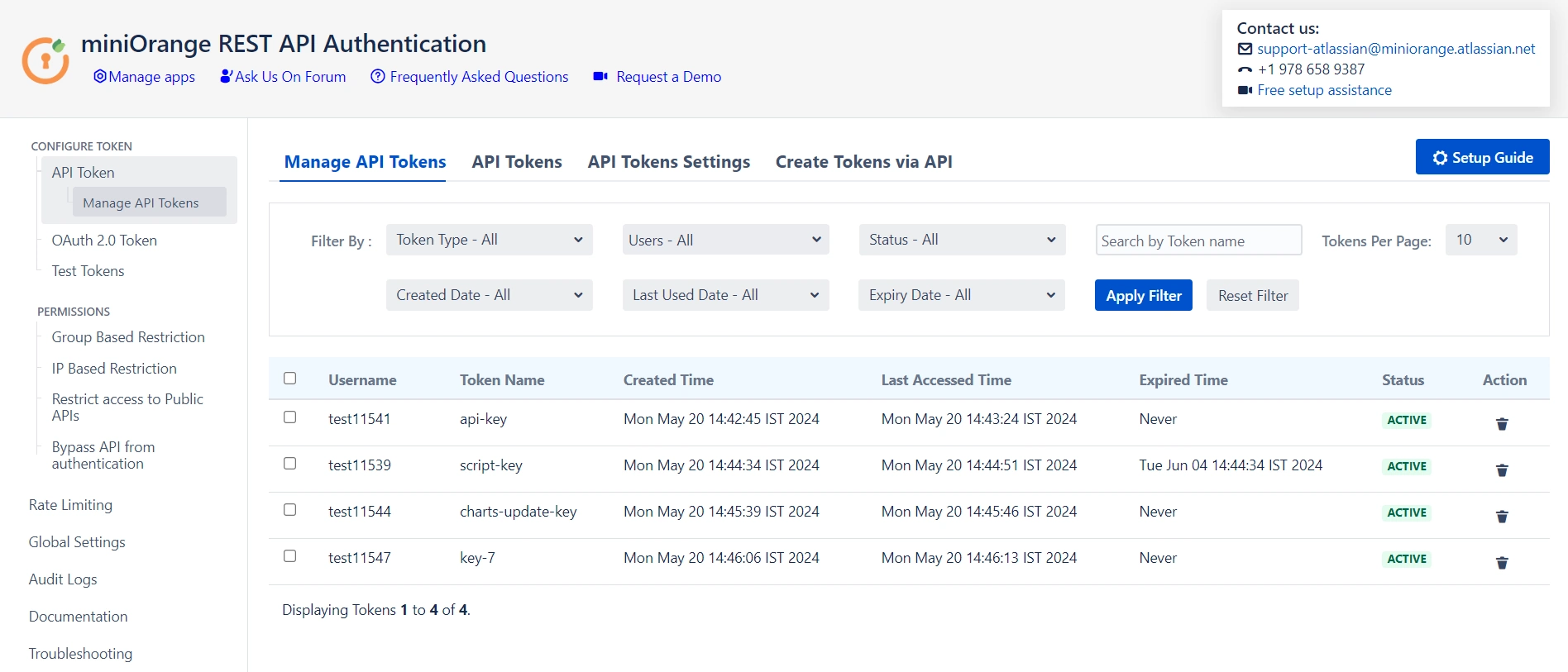
Securing your REST APIs from unauthorized access is necessary. When safeguarding your APIs, sharing login credentials poses security risks. Instead, utilizing API tokens offers a secure alternative. An API token is a randomly generated string that serves as a unique identifier for authentication. By employing this method, you can enhance the security of your REST APIs without the need to disclose sensitive login information. This approach not only streamlines the authentication process but also minimizes potential vulnerabilities associated with traditional credential-sharing practices.
Two types of API Tokens can be generated through the plugin: Basic and Bearer. These tokens are passed in the Authorization Header.
Sample Request
## For Basic Tokens

Request: GET /rest/api/2/myself
Header:  Authorization : Basic Base64encoded(<username:token>)

## For Bearer Tokens

Request: GET /rest/api/2/myself
Header:  Authorization : Bearer <token>
API Tokens Restrictions
To maintain security and prevent misuse, several restrictions can be applied to API tokens. These include setting a maximum expiry time for tokens, limiting the number of tokens per user, and scheduling automatic deletion of expired tokens.
- Maximum Expiry Time: Tokens can be configured to expire after a set duration, ensuring that access is temporary and reducing the risk of unauthorized access through unused or forgotten tokens.
- Maximum Tokens per User: To prevent overuse and improve manageability, there is a configurable limit on the number of tokens each user can have at a time. This restriction helps reduce potential security risks by ensuring each user has only the tokens they actively need.
- Delete Expired Tokens Scheduler: A scheduler can be enabled to automatically delete expired tokens after a specified number of days. This automated cleanup not only improves security by removing inactive tokens but also keeps token management streamlined by reducing the number of expired tokens retained in the system.
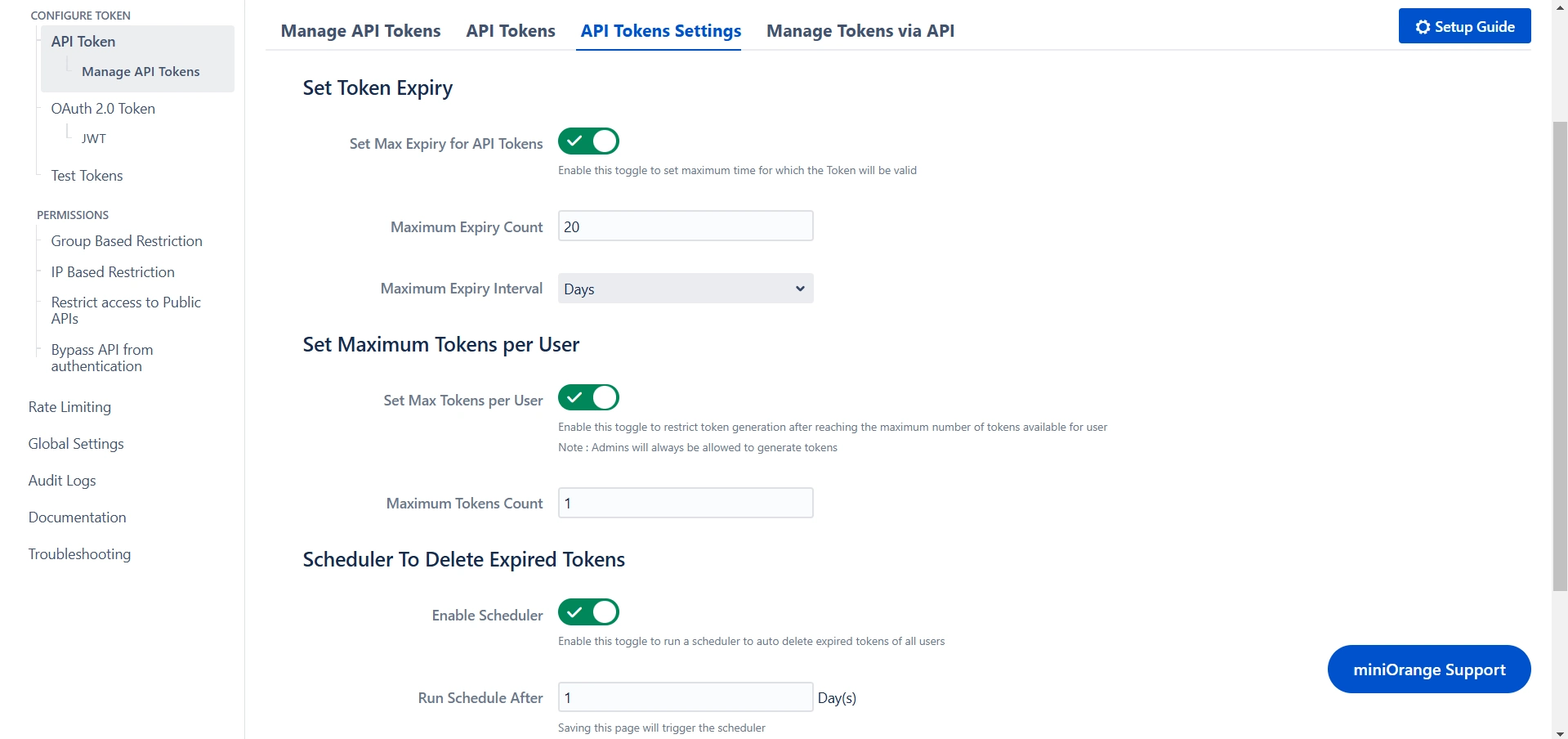
These restrictions contribute to a more secure, manageable approach to API authentication, enhancing the protection of your REST APIs.
Manage API Tokens via API
Managing API tokens programmatically provides flexibility and control over token creation, expiration, and deletion. Through the API, you can manage tokens effectively using the following methods:
- GET Method: The GET request allows you to retrieve the expiry details of a specific token. This method helps you track the status and expiration time of existing tokens, ensuring you can monitor their validity and take necessary actions if needed.
- POST Method: The POST request enables you to create a new API token. This method generates a fresh token for authentication, providing a secure way to grant access to your REST APIs without compromising sensitive login credentials. You can specify relevant details such as the token name and expiration time when creating the new token.
- DELETE Method: The DELETE request allows you to remove all expired tokens associated with a user. This method helps in cleaning up expired tokens, ensuring that your system remains secure by preventing the accumulation of inactive tokens.
By using these API methods, you can manage API tokens more efficiently, maintaining better control over authentication and security in your system.
Success Response
| Code | Error | Description |
|---|---|---|
| 200 | Ok |
{
  "self": "http://localhost:8080/rest/api/2/user?username=admin",
  "key": "JIRAUSER10000",
  "name": "admin",
  "emailAddress": "admin@gmail.com",
  "displayName": "admin",
  "active": true,
  "deleted": false,
  "timeZone": "Asia/Calcutta",
  …………
}
|
Error Response
| Code | Error | Description |
|---|---|---|
| 401 | UNAUTHORIZED |
{
  "error": {
    "status": "ERROR",
    "message": "Provided API key is invalid"
  }
}
|
OAuth Tokens
Authorization Grant
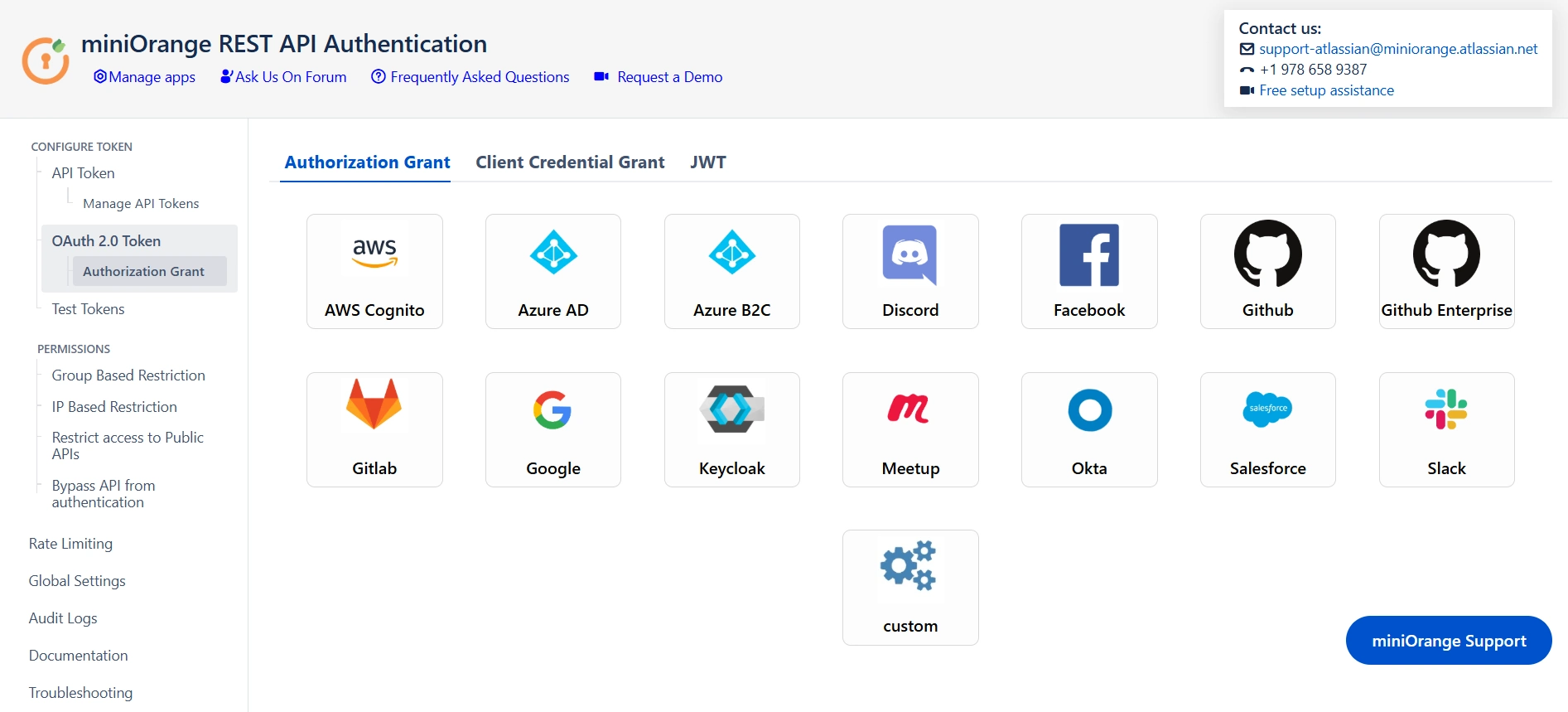
Implementing third-party access tokens for authenticating REST APIs is a robust and secure approach that mitigates the risk of exposing user credentials. This method not only enhances security but also facilitates access revocation, offering a flexible solution for scenarios involving the integration of third-party applications. By utilizing third-party access tokens, you establish a more streamlined and scalable authentication process. This not only improves the overall security posture of your REST APIs but also ensures a level of flexibility that is essential when dealing with diverse and dynamic third-party integrations. Overall, adopting this method contributes to a more resilient and secure ecosystem for your API interactions.
You can effortlessly configure popular third-party providers or use the custom provider option if you have your provider.
Sample Request
Request: GET /rest/api/2/myself
Header:  Authorization : Bearer <token>
Success Response
| Code | Error | Description |
|---|---|---|
| 200 | Ok |
{
  "self": "http://localhost:8080/rest/api/2/user?username=admin",
  "key": "JIRAUSER10000",
  "name": "admin",
  "emailAddress": "admin@gmail.com",
  "displayName": "admin",
  "active": true,
  "deleted": false,
  "timeZone": "Asia/Calcutta",
  …………
}
|
Error Response
| Code | Error | Description |
|---|---|---|
| 400 | BAD REQUEST |
You will get this error when the user with username returned from the provider is not present in the user directory
{
  "error": {
    "status": "ERROR",
    "message": "No user found with this username/email address"
  }
}
|
Client Credentials Grant
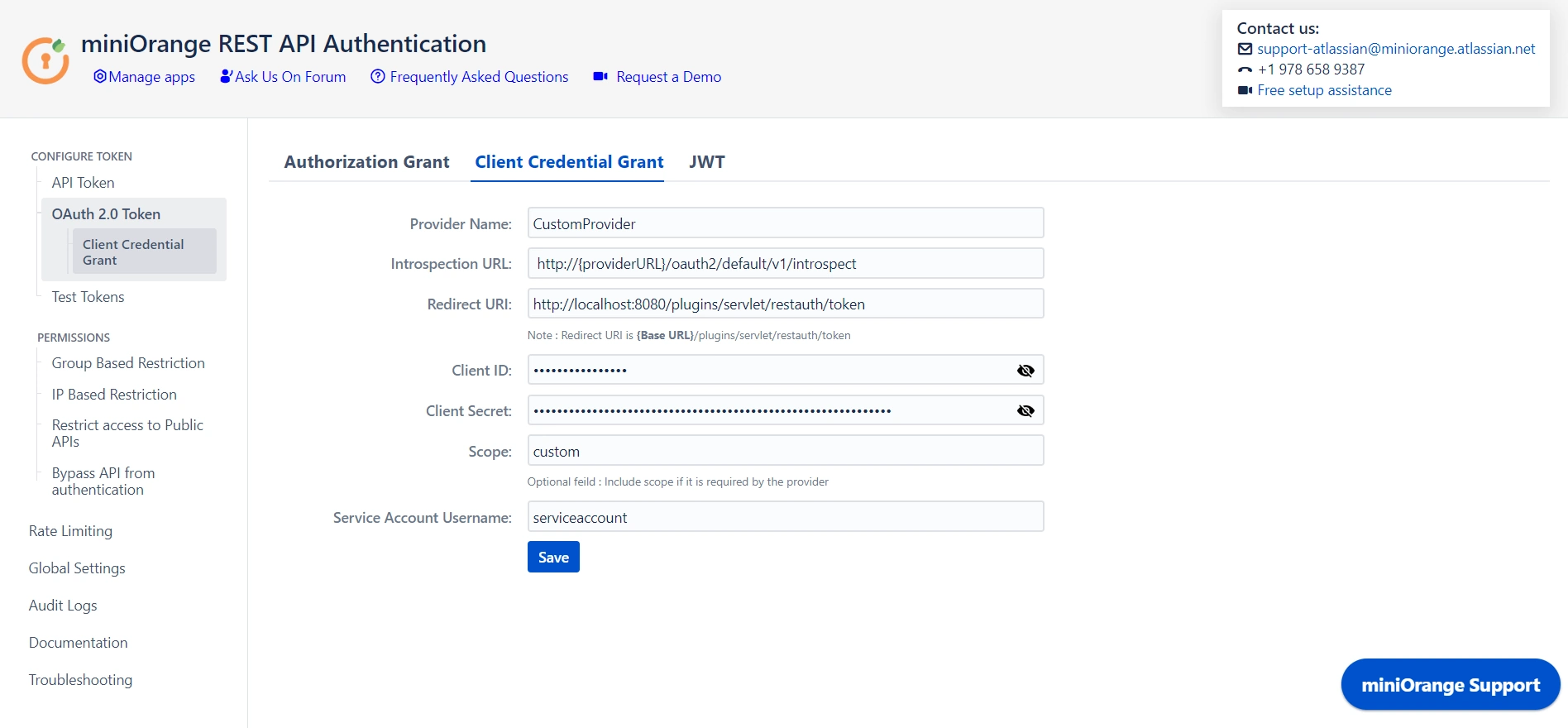
The Client Credentials Grant is a valuable authorization mechanism designed for scenarios where APIs are accessed by trusted clients without the need for user involvement. This grant type is particularly suitable for server-to-server communication or machine-to-machine interactions, offering a streamlined and secure approach to authentication. Since this grant type operates without direct user interaction, it is well-suited for backend processes and services that require secure and seamless access to API resources. The Client Credentials Grant enhances the efficiency of server-to-server communication, providing a robust foundation for authenticating trusted clients within the API ecosystem.
You can configure the token provider and set up a service account to use the client credential grant.
Success Response
| Code | Error | Description |
|---|---|---|
| 200 | OK |
{
  "self": "http://localhost:8080/rest/api/2/user?username=admin",
  "key": "JIRAUSER10000",
  "name": "admin",
  "emailAddress": "admin@gmail.com",
  "displayName": "admin",
  "active": true,
  "deleted": false,
  "timeZone": "Asia/Calcutta",
  ……………
}
|
Error Response
| Code | Error | Description |
|---|---|---|
| 401 | UNAUTHORIZED |
You will get this error when configured client ID / client secret is wrong or you are accessing API using an expired token
{
  "error": {
    "status": "ERROR",
    "message": "Expired Token / invalid_client_ID"
  }
}
|
JWT
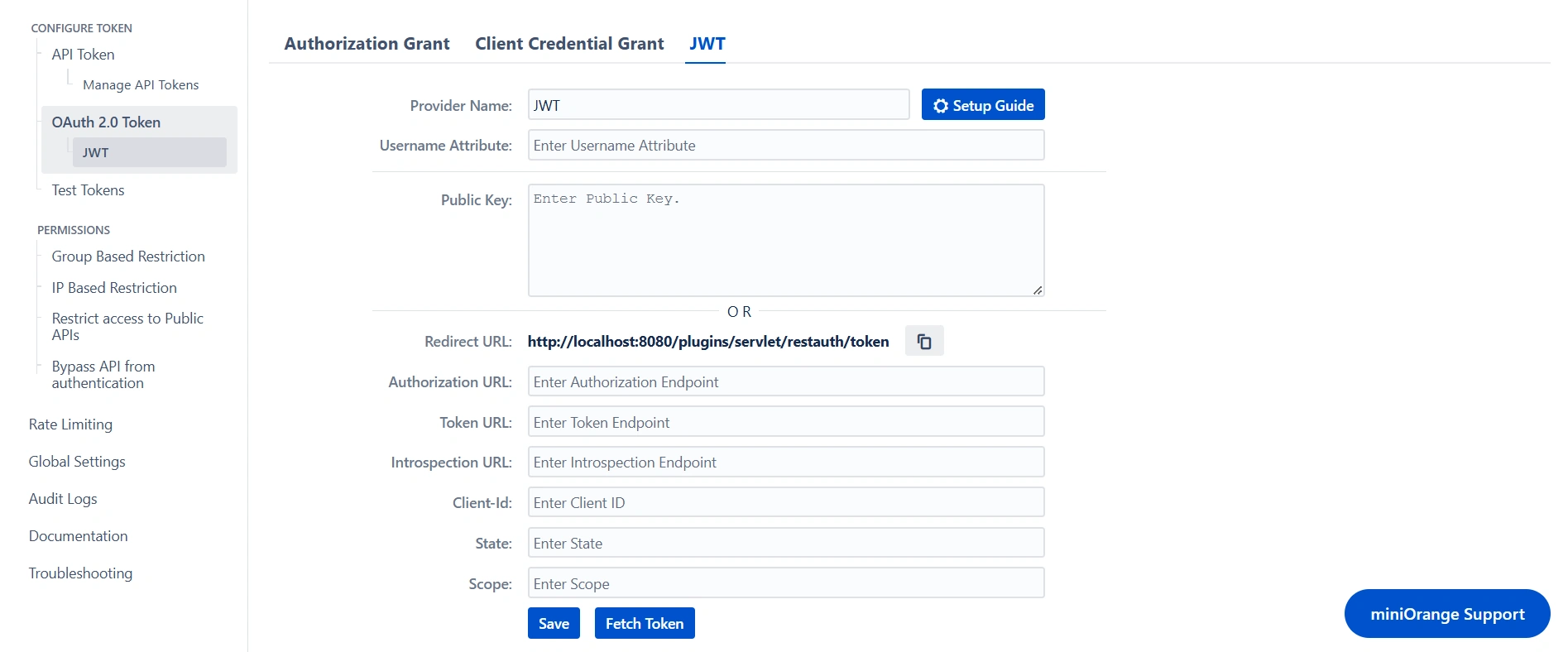
JSON Web Tokens (JWTs) are widely used for representing claims and securely transmitting information related to the client or user's identity. When securing REST API, using JWT is a reliable option. This method allows for the generation of JWTs using private keys or obtaining them from a trusted third-party provider and then using them to access REST APIs. By incorporating JWTs into the authentication process, you enhance the integrity of your REST API, as they serve as a secure and efficient means of conveying identity-related data.
To authenticate REST APIs using JWTs, you need to configure either the public key for decoding the token or set up a third-party provider that will provide the tokens and validate them using the introspection endpoint.
Sample Request
Request: GET /rest/api/2/myself
Header:  Authorization : Bearer <token>
Success Response
| Code | Error | Description |
|---|---|---|
| 200 | OK |
{
  "self": "http://localhost:8080/rest/api/2/user?username=admin",
  "key": "JIRAUSER10000",
  "name": "admin",
  "emailAddress": "admin@gmail.com",
  "displayName": "admin",
  "active": true,
  "deleted": false,
  "timeZone": "Asia/Calcutta",
  …………
}
|
Error Response
| Code | Error | Description |
|---|---|---|
| 400 | BAD REQUEST |
You will get this error if you have entered an invalid token, there is an error while parsing the JWT.
{
  "error": {
    "status": "ERROR",
    "message": "Token Invalid: Error while validating the token."
  }
}
|
| 400 | BAD REQUEST |
You will get this error if a user with the username fetched from JWT does not exist.
{
  "error": {
    "status": "ERROR",
    "message": "No user found with this username/email address"
  }
}
|
| 401 | UNAUTHORIZED |
You will get this error if you are accessing API using an expired token.
{
  "error": {
    "status": "ERROR",
    "message": "Token Expired: The token provided is expired."
  }
}
|
REST API Group-based restrictions
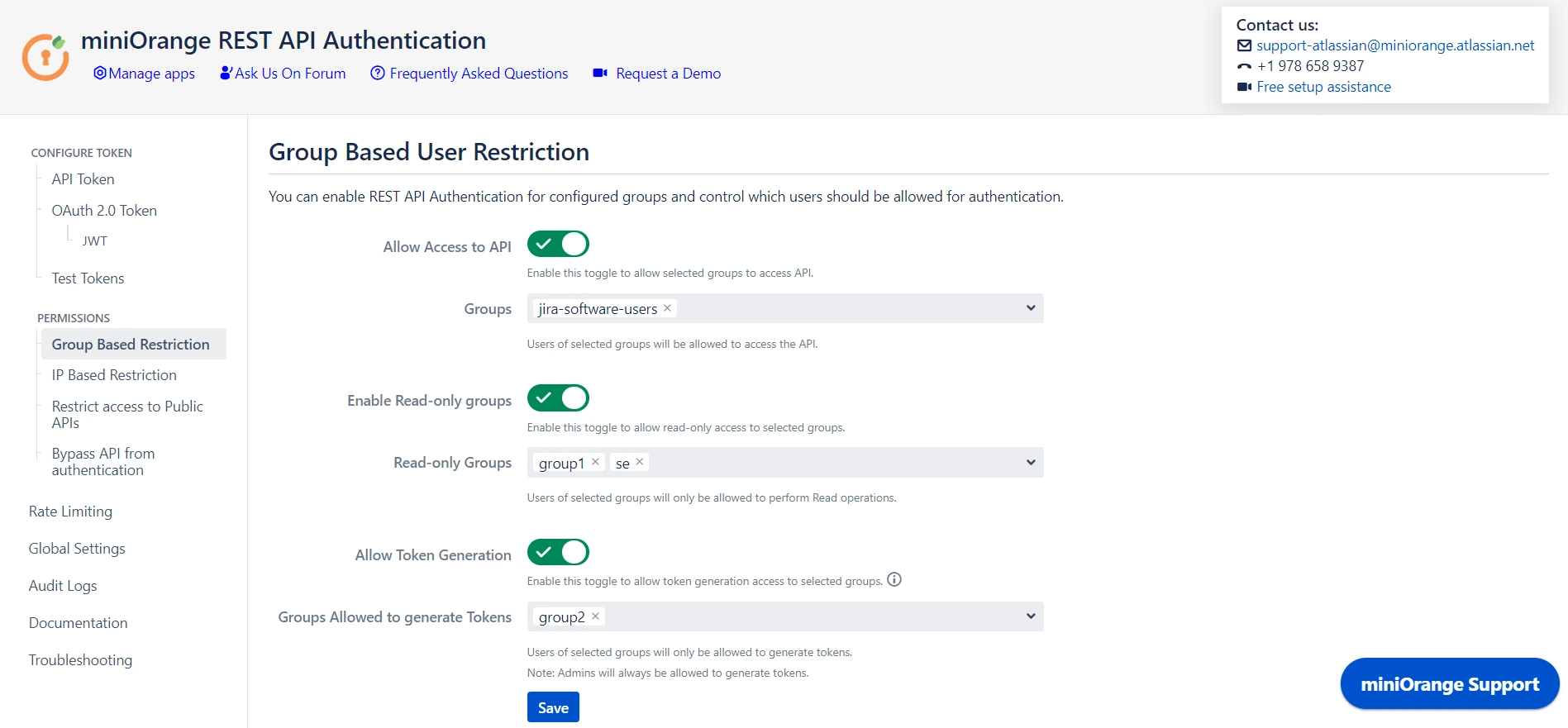
Want to allow only specific groups to access API or generate tokens? You can do it using group-based restrictions.
Group-based restrictions provide a flexible and organized means of implementing access control, contributing to a more efficient and secure system. This provides the option for managing permissions based on groups rather than at the individual level.
Allow API access
Enabling the "Allow API access" feature provides admins the privilege to select groups who can access API. Users outside the selected groups will be unable to access the APIs, ensuring that only selected groups can interact with API resources. This feature enhances the security by limiting the API exposure to defined user groups.
| Code | API Response |
|---|---|
| 403 |
{
  "error": {
    "status": "ERROR",
    "message": "User is not allowed to authenticate"
  }
}
|
Enable Read-only Groups
Enabling the "Enable Read-only Groups" feature allows admins to designate certain groups with read-only permissions for API interactions. By selecting specific groups, admins can ensure that users within these groups have access solely to read APIs, preventing them from performing any write operations.
| Code | API Response |
|---|---|
| 401 |
{
  "error": {
    "status": "ERROR",
    "message": "User does not have permission to execute this operation"
  }
}
|
Allow Token Generation
Enabling the "Allow Token Generation" feature allows admins to designate specific groups with token generation privileges. This feature adds a layer of security and access control, restricting token generation to designated groups and preventing users outside of these groups from creating tokens.
| Code | API Response |
|---|---|
| 403 |
{
  "error": {
    "status": "ERROR",
    "message": "User does not have permission to execute this operation"
  }
}
|
IP-based restrictions
Want to allow API Access through a specific IP range? You can do it using IP-based restrictions.
Enabling the "Restrict Access to API by IP Address" effectively controls API access, permitting connections only from specified networks. By configuring this restriction, you enhance the security of your API by limiting access to trusted IP addresses, reducing the potential exposure to unauthorized entities. API access will only be allowed from the configured API networks.
When using IP-based restrictions in an environment where your instance is behind a reverse proxy, enabling "Reverse Proxy Compatibility" ensures that the client's real IP address is correctly detected. By specifying the appropriate header name, such as X-Forwarded-For, which the reverse proxy uses to forward the client's IP, you can ensure that IP-based restrictions are enforced based on the actual client IP rather than the proxy's address.
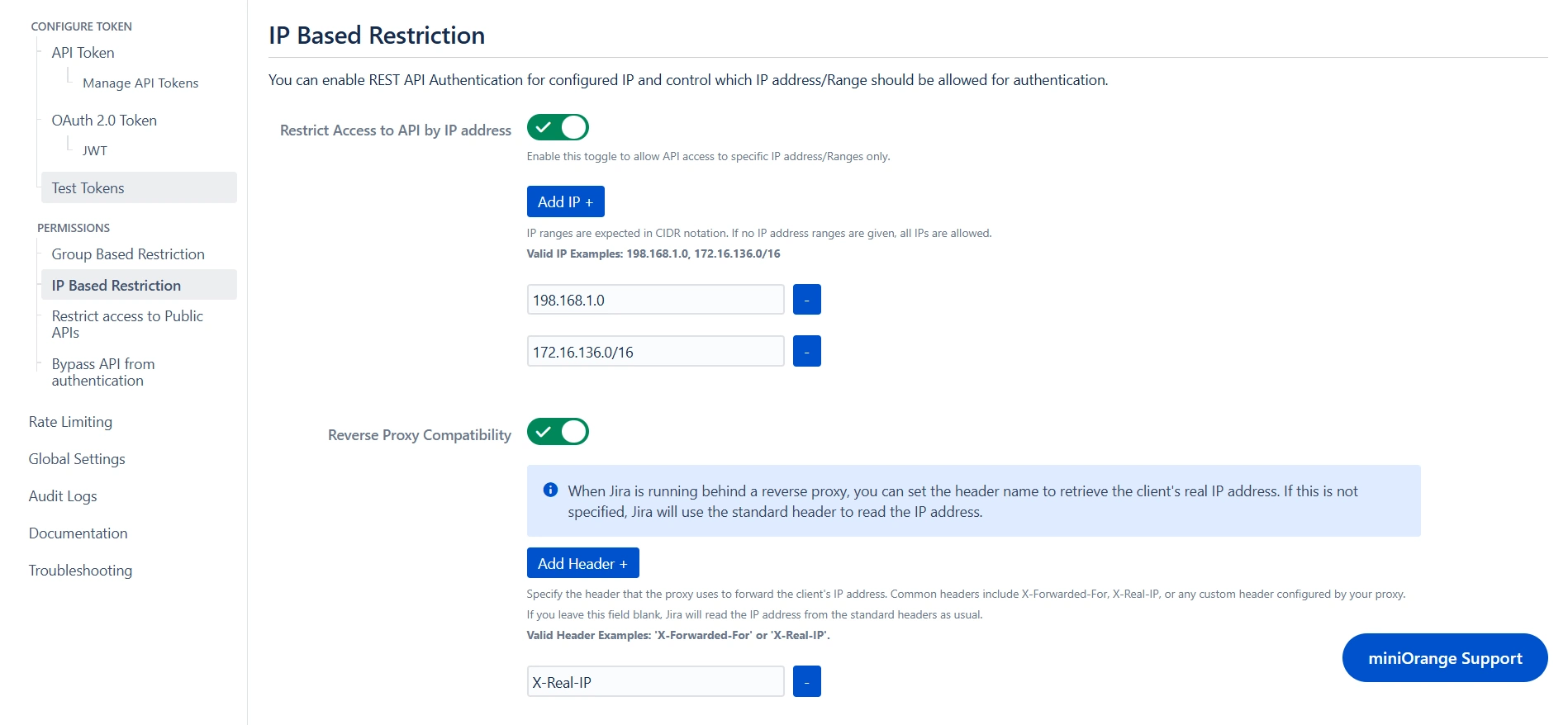
| Code | API Response |
|---|---|
| 403 |
{
  "error": {
    "status": "ERROR",
    "message": "Not valid IP address/Range"
  }
}
|
Public APIs Access
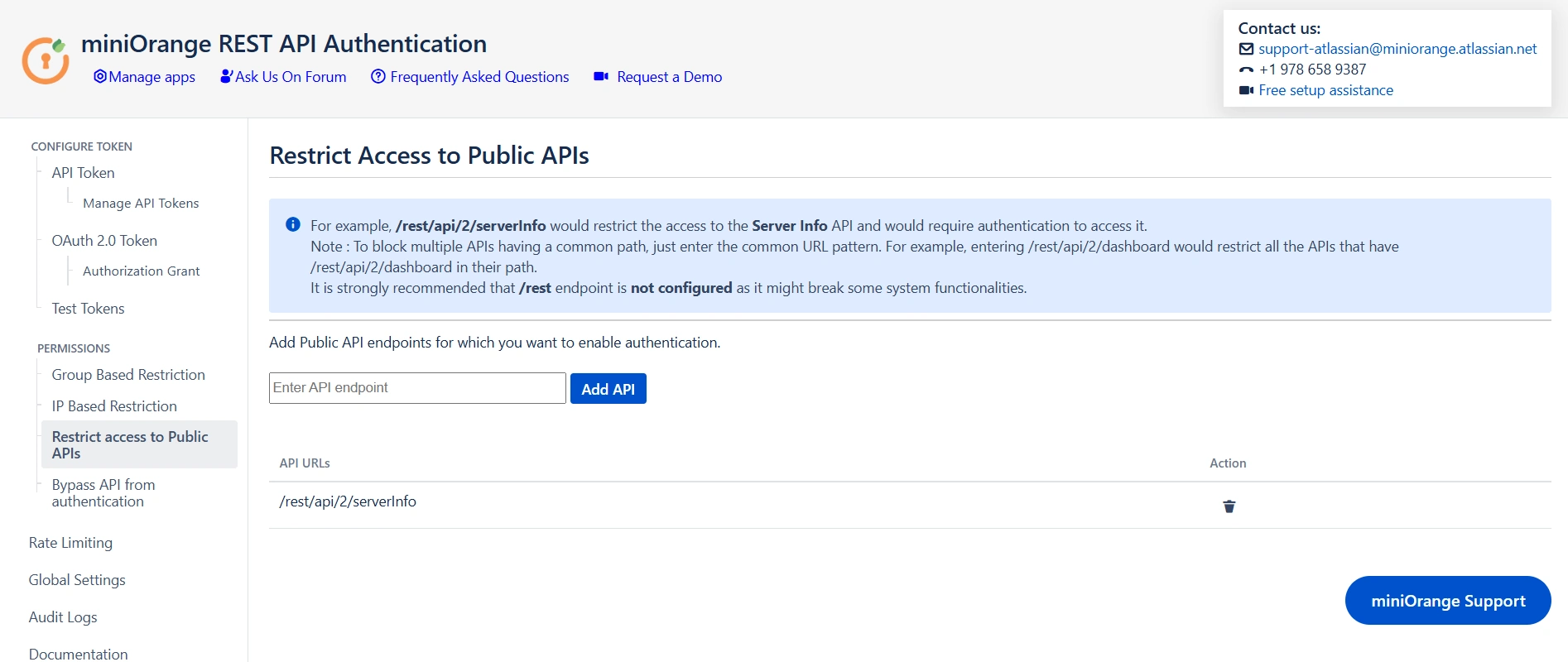
Want to restrict the direct access to public APIs, or disable plugin authentication on some specific API? You can do it using the following options:
Restrict Access to Public APIs
Public APIs typically allow anonymous access without the need for authentication, promoting ease of use and openness. However, for added security or specific use cases, you have the option to configure the API with the "Restrict Access to Public APIs" feature, which introduces a layer of authentication. By enforcing authentication on a public API, you can implement controlled access and gain additional insights into user interactions.
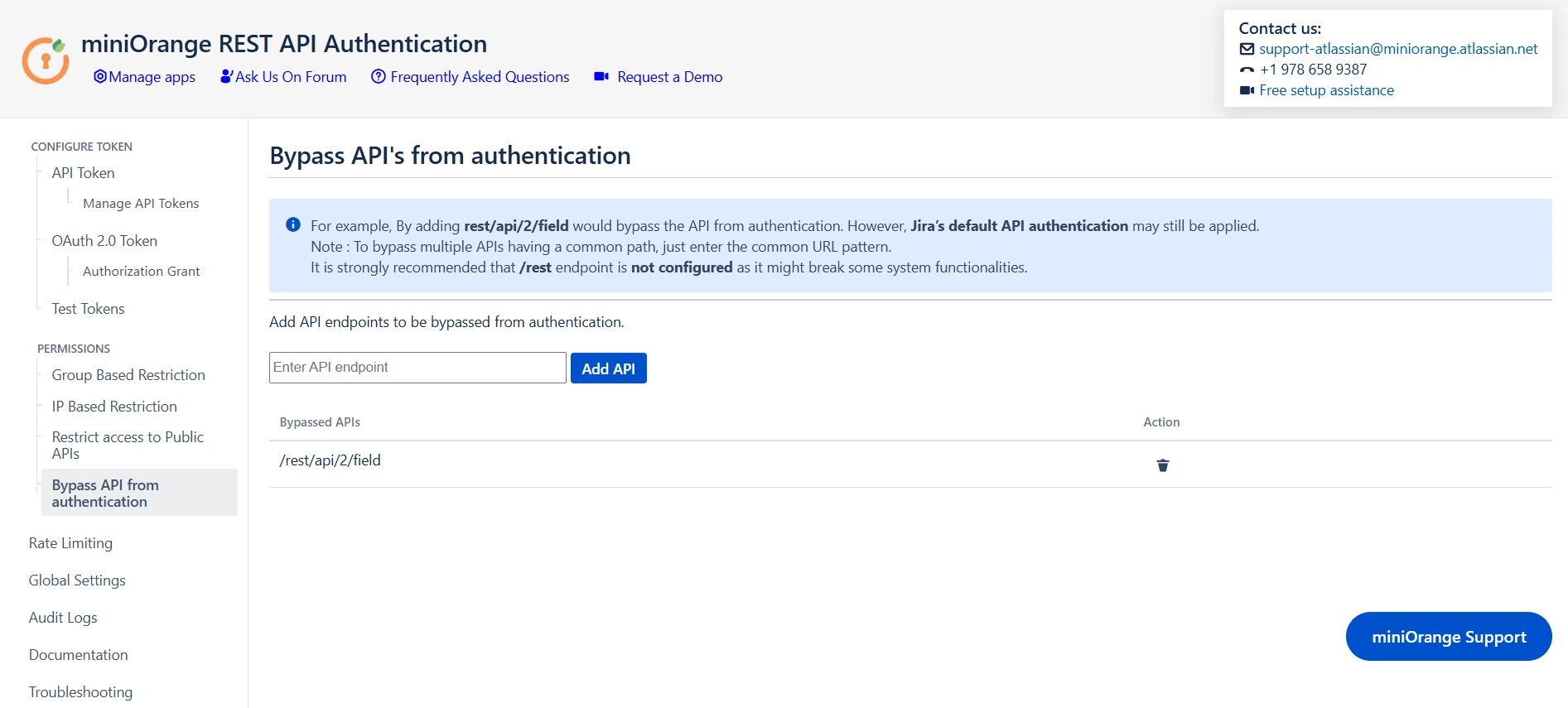
Bypass API from Authentication
The option to "Bypass API Authentication" disables authentication for specific APIs through the plugin. It's important to note that even when authentication from the plugin is bypassed for specified APIs, default authentication settings may still apply. This ensures a layered security approach, allowing organizations to selectively exempt certain APIs from authentication requirements.
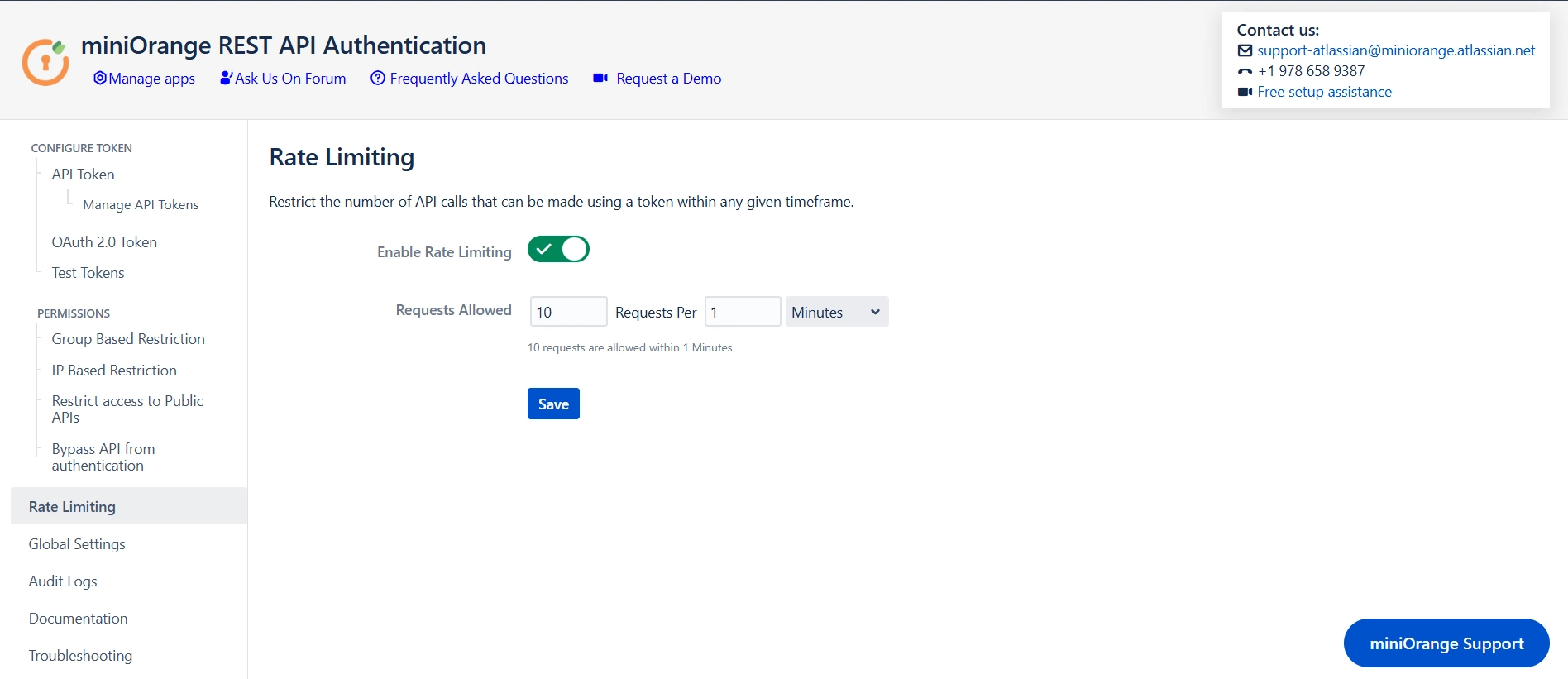
Rate Limiting
Enabling Rate Limiting allows administrators to specify how many API calls can be made within a defined timeframe using a single token. By configuring this feature, you can effectively manage the load on your API, ensuring that no single token exceeds the set limits. This helps prevent abuse, improves the overall performance of your system. With rate limiting in place, any attempts to exceed the defined number of requests within the allowed period will be blocked.
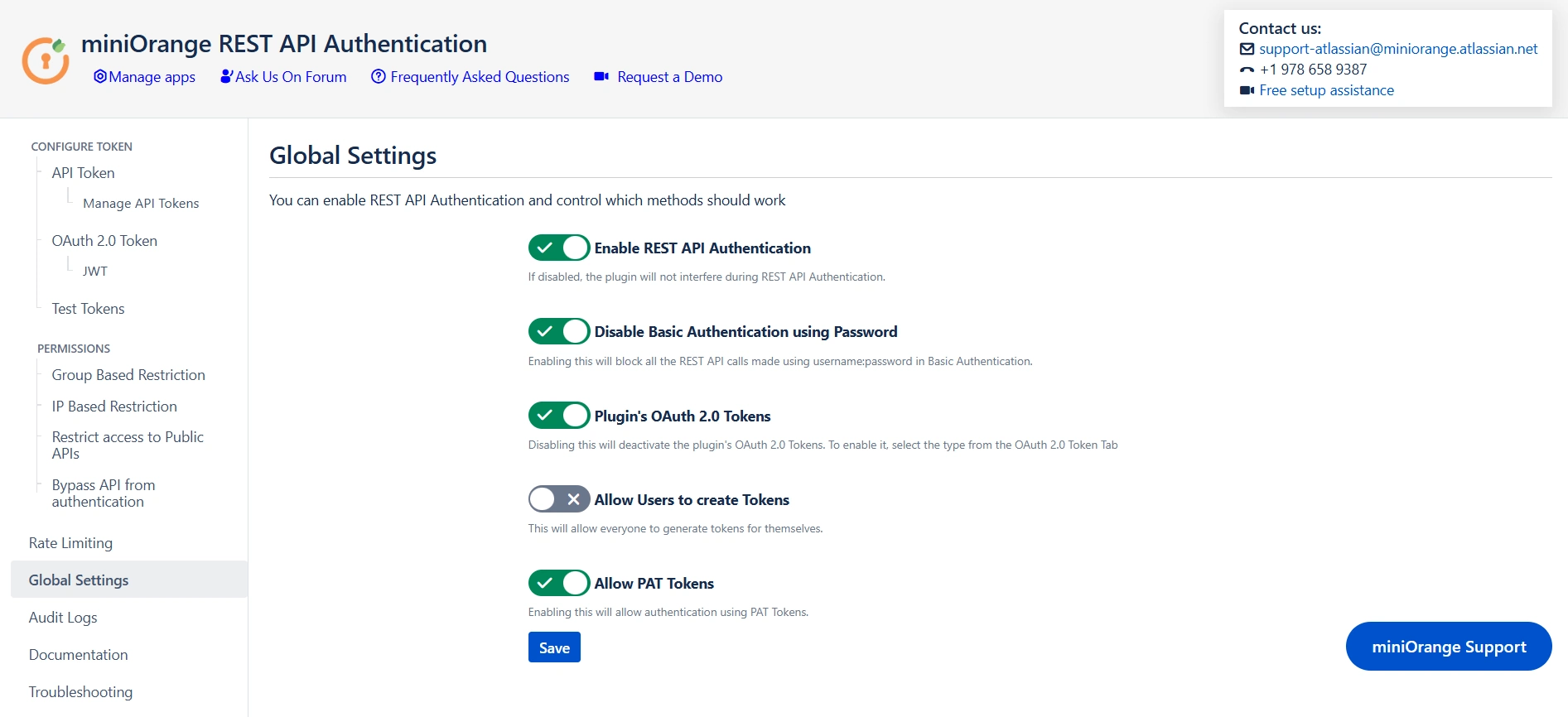
Global Settings
Enable REST API Authentication
The "Enable REST API Authentication" toggle ensures API authentication through the plugin. When activated, this toggle allows the plugin to play a central role in the API authentication process, implementing security measures as specified. If disabled, the plugin will no longer be engaged in API authentication.
Disable Basic Authentication
The "Disable Basic Authentication" toggle allows you to enforce authentication through the plugin, specifically targeting the restriction of basic authentication using usernames and passwords. When this toggle is enabled, it actively prevents the use of basic authentication methods, emphasizing a more secure and controlled approach to user verification.
Plugin's OAuth 2.0 Tokens
If OAuth 2.0 tokens are not being used for authentication, you can disable the plugin's OAuth 2.0 tokens toggle. Disabling OAuth tokens if not in use eliminates the possibility of exploiting unused authentication mechanisms. This feature ensures that your system remains streamlined and secure by only enabling the authentication methods that are actively in use.
Allow users to create Tokens
Enabling the "Allow users to create Tokens" toggle extends the ability to generate tokens at the user level, promoting a more decentralized approach. In contrast, disabling the toggle restricts token generation to admins exclusively. If the toggle is disabled, admins will be allowed to generate tokens for users. Also, if you have enabled "Allow groups to generate tokens" from group-based restrictions, you need to keep the toggle on.
Allow PAT Tokens
The "Allow PAT Tokens" toggle introduces a flexible authentication option by enabling users to utilize Personal Access Tokens (PAT) generated by Jira/Confluence for API access. However, to enforce authentication through the plugin and restrict the use of PAT tokens, admins can disable the toggle.
Audit Logs
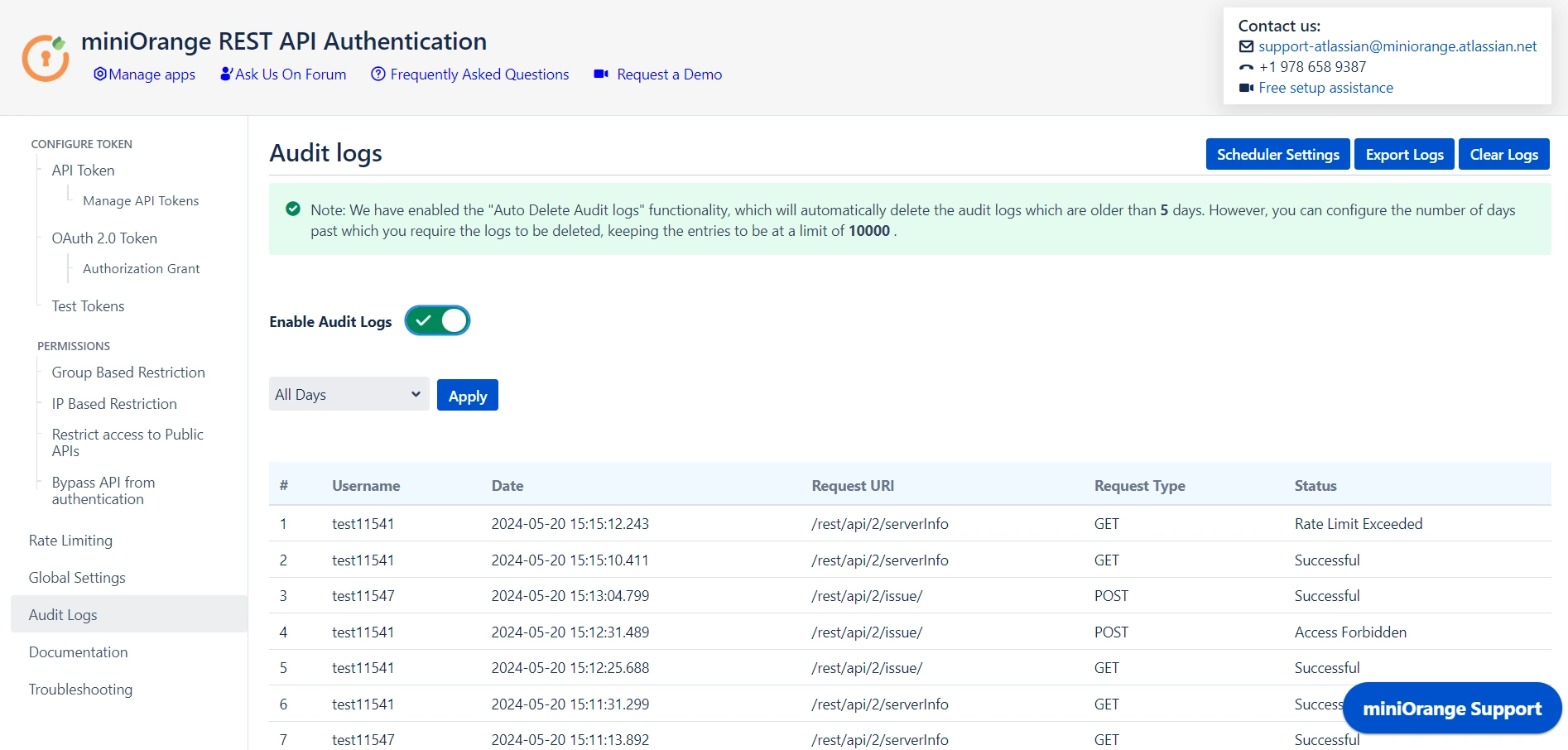
Audit logs provide a detailed record of API access, tracking which users access specific REST APIs, along with the date and time and the status of each request. They capture whether the request was successful, unauthorized, rate-limited, or forbidden. This information is essential for monitoring API usage, identifying security issues, ensuring compliance, and troubleshooting access problems, contributing to a more secure and well-managed system.