Getting started
Organisations collaborate with people outside their company — contractors, vendors, partners, customers — and give them access to Jira projects. As that population grows, admins lose visibility into a small set of questions:
- Who are the external users with access to our Jira projects?
- Which of them have access to sensitive projects?
- Are users being classified as internal or external correctly, or are some ambiguous?
- Which users need review right now?
- How do we exclude service accounts and automation identities that aren't people?
Why review external access
Contractors, vendors, partners, and customers may need access to Jira projects for collaboration. However, as projects, teams, and business relationships change, administrators need visibility into which external users currently have access to important projects.
Manually checking users, groups, email domains, and project access can be time-consuming.
Access Reviewer360 helps administrators define which users should be considered external and which Jira projects should be included in the review.
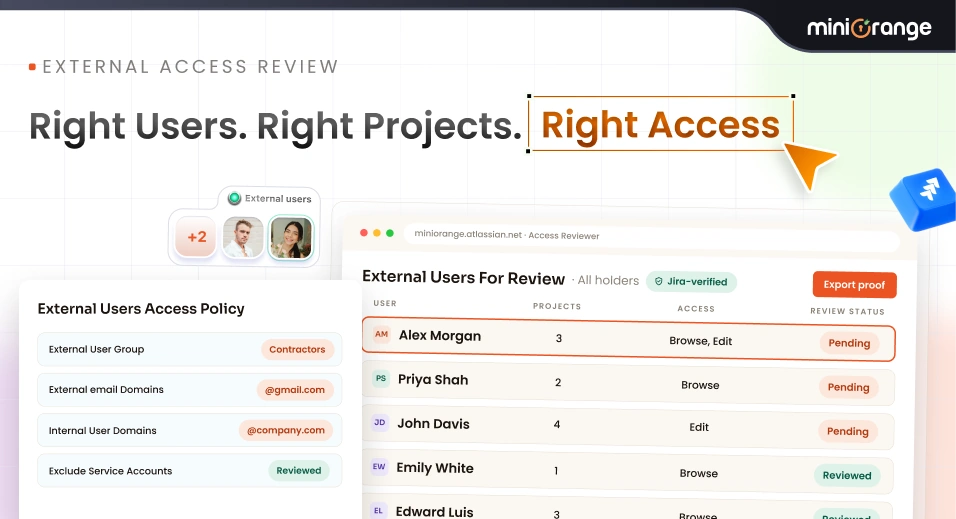
The External User Access policy in Access Reviewer360 helps Jira administrators identify external users who have access to selected Jira projects and include them in an access review based on the organisation's defined criteria.
How external users are identified
Not every organisation manages outsiders the same way. Some keep contractors and vendors in dedicated Jira groups; others recognise them by the email domain they sign in with. The policy supports both and both together.
| Setting | What it does | Use it when |
|---|---|---|
| External user groups | Treats every member of the named Jira groups as external. | You manage contractors, vendors, or customers in their own groups. |
| External email domains | Treats any user on those domains as external. | Outsiders arrive without a group — freelancers on @gmail.com, say. |
| Internal user domains | Marks your own domains as internal so members are not flagged. | Always — it is what keeps the findings list short and credible. |
| Exclude service accounts | Leaves automation and integration accounts out of the review. | You have bots or integration users that are not people. |
This allows organisations to define external users based on their own user-management structure.
Scenario: Reviewing Contractor Access to a Sensitive Project
A company works with several external contractors.
The contractors need access to Jira projects to work with the company's engineering teams. The Jira administrator wants to identify external users who have access to these projects and review whether their access is still appropriate.
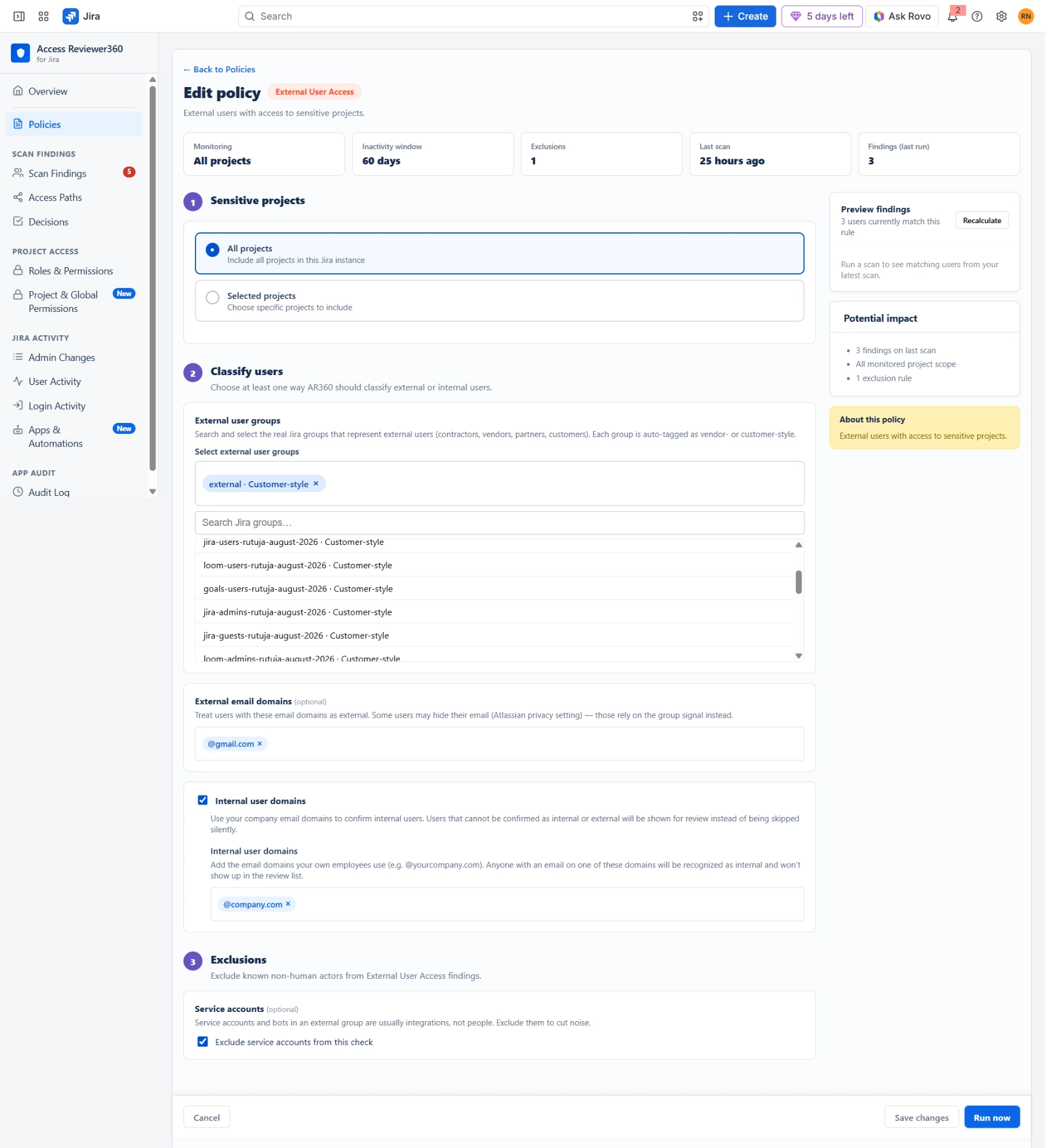
Instead of manually checking every project and user, the administrator creates an External User Access policy.
- Projects — the company's sensitive projects only, rather than all projects.
- External user groups — the existing contractors Jira group.
- External email domains — @gmail.com, to catch individuals who were never added to that group.
- Internal user domains — @company.com, so staff are excluded.
- Service accounts — Exclude service accounts from this check enabled, so integration users stay out.
Setup, step by step
- Install Access Reviewer360 from the Atlassian Marketplace as a Jira administrator.
- Open Policies → Create Policy and create a new External User Access policy.
- Choose the projects. Select all projects or narrow them to the sensitive ones — a tight scope makes the findings list something people will actually read.
- Name your external groups. Add the Jira groups that represent contractors, vendors, partners, or customers.
- Add external email domains. Cover the outsiders who never land in a group.
- Add your internal domains. This is what stops your own staff appearing as findings.
- Enable excluding service accounts from this check if you run integration or automation for users.
- When the definition is correct, click Run now to perform the review.
What Access Reviewer360 Does
The policy does not automatically determine whether a user's access is appropriate. Instead, it identifies users who match the configured criteria so administrators can review their access and make the appropriate decision.
- A finding is a question, not a verdict. Review the user and decide whether the access still fits the engagement.
- Too many findings usually means the internal domains are incomplete, or the project scope is wider than the review needs.
- Too few usually means an external group is missing — a vendor group nobody remembered, most often.
- Use Recalculate freely. Tuning the rule is part of the work; it is cheaper than reviewing the wrong list.
What Administrators Get
The result is a focused list of external users who require attention instead of requiring the administrator to manually search through Jira users and projects.
For each finding, the administrator can review the user and determine whether the identified access is appropriate.
This allows the organisation to make informed access-review decisions based on its own definition of an external user.
When to use this policy
Use the External User Access policy when your organisation:
- Works with contractors, vendors, partners, or customers.
- Has external users accessing Jira projects.
- Wants to review external access to sensitive projects.
- Uses Jira groups to manage different types of external users.
- Wants to identify external users using email domains.
- Wants service accounts excluded from the review.
- Needs a centralised view of external-user access findings.
- Needs to review contractor, vendor, customer, or third-party access.
- Wants to review external access to specific or sensitive Jira projects.
Tips
- The External User Access policy is designed for organisations that need visibility into external users with access to Jira projects.
- By defining the projects to monitor and the rules used to identify external users, administrators can quickly identify relevant users and review their access.
- The goal is simple: identify external access that needs review without manually checking every Jira user and project.
Contact
If you need help or want to ask questions, please contact us through miniOrange Support or via email at atlassiansupport@xecurify.com