
CISA calls phishing-resistant MFA the standard every organization should be working toward. For DoD components, federal agencies, defense contractors, and other organizations operating at NIST's highest authenticator assurance level (AAL3), that guidance narrows to two paths: FIDO2/WebAuthn, or PKI-based smart cards like CAC and PIV.
If you manage identity for a Department of Defence (DoD) agency, a federal contractor, or any organization that touches government systems, that second option is probably already sitting in your employees' wallets.
This guide is for IT and security teams evaluating CAC authentication as part of a broader MFA strategy. What it is, how it actually works, where it fits (and where it doesn't), benefits, challenges, and risks before you commit engineering hours and budget to it.
What Is CAC Authentication?
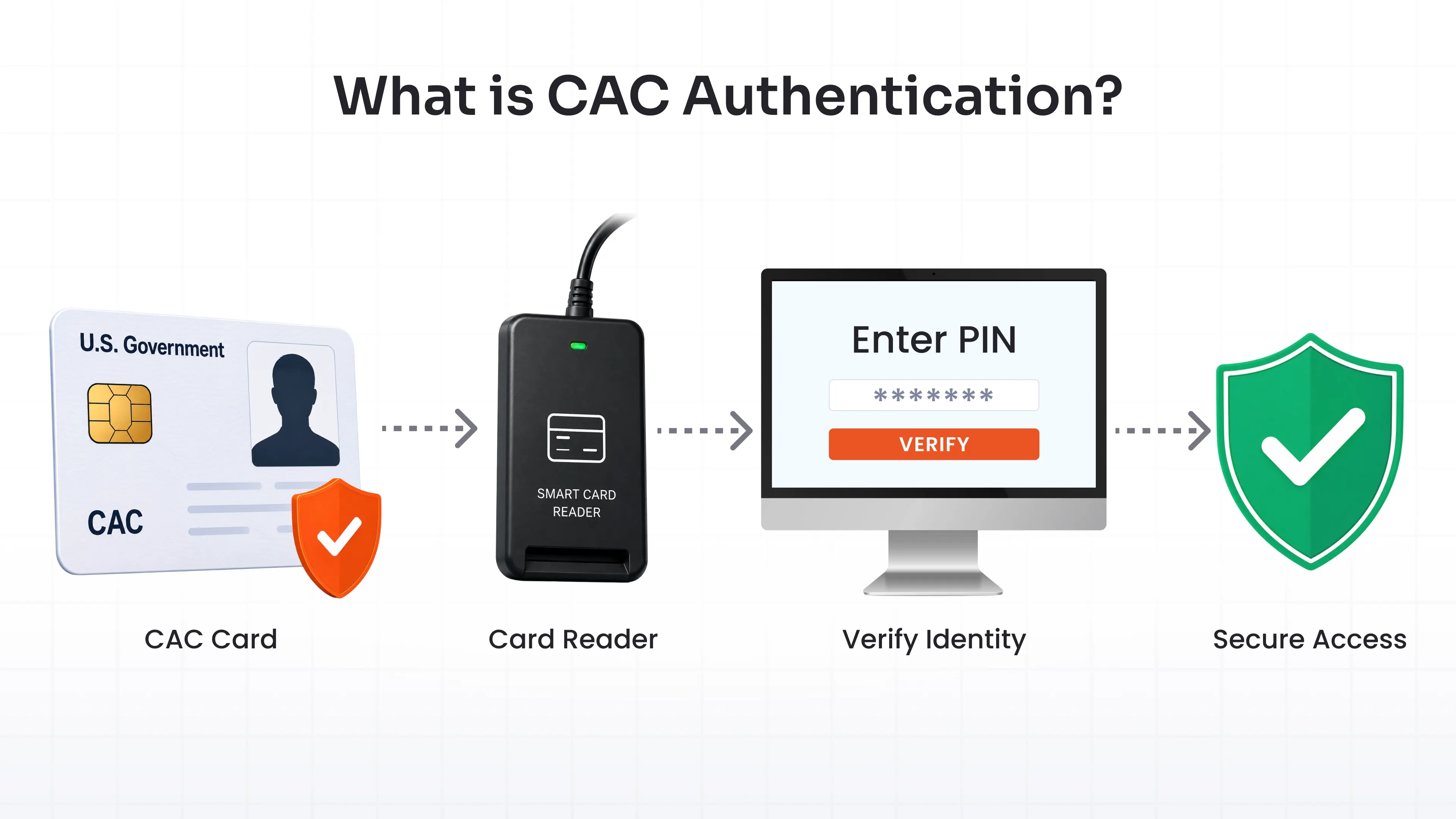
CAC authentication is the process of using a Common Access Card, a smart card issued by the U.S. DoD, to prove identity instead of typing a password.
The card is about the size of a credit card. Inside sits an embedded chip holding 144 KB of data: digital certificates, cryptographic keys, a photo, two fingerprints, and identification details tied to one specific person.
Insert the card into a reader, enter a PIN, and the card proves who you are through cryptography instead of a shared secret. The DoD calls this cryptographic logon, or CLO, and it has replaced password logins across most DoD networks.
CAC smart card authentication is two-factor authentication (2FA) by design: something you have (the card) plus something you know (the PIN). No app, no extra token, no code.
Why Is CAC Authentication Important?
Passwords get phished, reused, and leaked in breach dumps by the billions. A CAC can't be phished the same way. The private key never leaves the chip, so there's nothing to steal over email or a fake login page.
That's a big reason CAC (and its civilian cousin, PIV) stands out as a phishing-resistant MFA solution, the kind referenced as the standard in NIST SP 800-63-3 and pushed hard in CISA guidance on strong authentication.
Here's a question worth answering directly, since it trips people up: doesn't relying on PKI just mean trusting more things? A root CA (Certificate Authority), intermediate CAs, dozens of certificates, all vouching for each other.
A password system trusts one static secret, and once it leaks, there's no way to check its current status short of resetting it. A PKI system trusts a chain where every CA signs the next link down, and every certificate in that chain is checkable in real time through OCSP (Online Certificate Status Protocol) queries or CRL (Certificate Revocation List) checks. Compromise one certificate, and revocation propagation kills it within minutes.
Every link in that chain is verifiable, dated, and revocable. That's a different kind of trust than hoping nobody guessed your password, and for agencies and contractors under FISMA, DFARS, or CMMC obligations, it's fast becoming the baseline auditors expect rather than a nice-to-have.
How Does CAC Authentication Work?
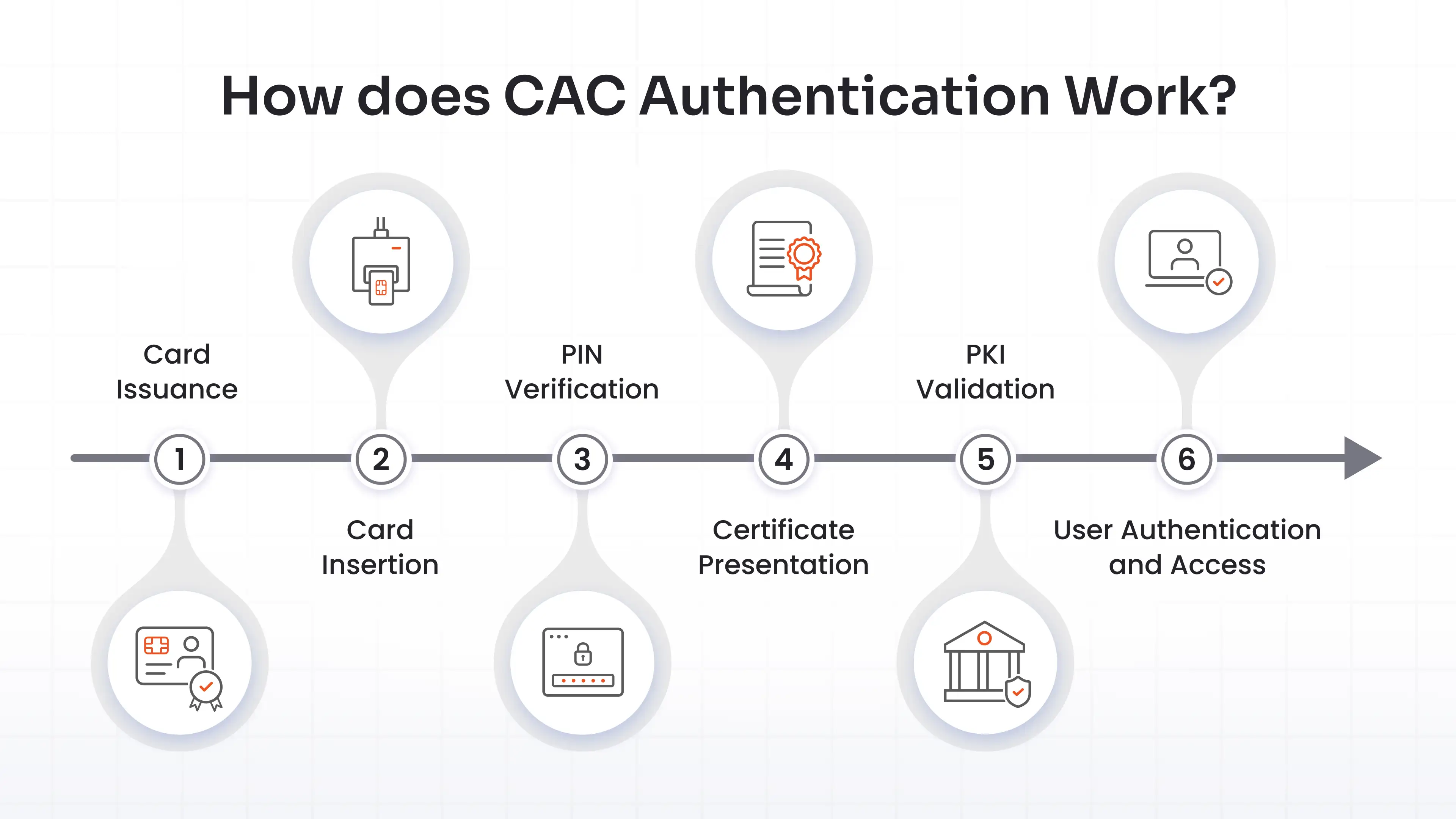
Here's the CAC authentication process end to end, broken into six steps.
1. Card Issuance
Before authentication happens, the card has to exist. A sponsor vouches for the applicant, DEERS registration enrolls them in the Defense Enrollment Eligibility Reporting System, a background check runs, and a RAPIDS site verifies identity and captures biometrics. Only then does the card get personalized and issued. None of this sits under the control of whatever platform later validates the card.
2. Card Insertion or Reader Detection
The user plugs the card into a contact reader, USB, or built into a laptop. Middleware on the machine detects the card and reads its certificate store.
3. PIN Verification
The user enters a PIN, unlocking access to the private keys on the chip. Too many wrong attempts and the card locks itself. The PIN never leaves the card and never touches the network.
4. Certificate Presentation
The relying system, a domain controller, a VPN gateway, or a web app, requests the identity certificate. The card presents it along with a cryptographic challenge response, signed using the private key that never left the chip.
5. PKI Validation
The system checks the certificate against DoD PKI root and intermediate CAs, confirms it hasn't expired, and queries OCSP or checks a CRL to confirm it hasn't been revoked. All three checks have to be cleared.
6. User Authentication and Access
Once validation passes, the system maps the certificate's subject to a user account, often through Active Directory or LDAP, and grants access. A password never enters the picture.
What Certificates Are Stored on a Common Access Card?
A CAC typically carries several certificates, and CAC certificate authentication depends on all of them tracing back to a trusted root.
Identity Authentication Certificate
This is the one that matters most for network and system login. It proves who's holding the card during CLO. Newer cards align this with the PIV-Auth certificate, a modernization move that makes CACs interoperable with federal PIV-based systems instead of staying DoD-only.
Email Signing Certificate
Digitally signs outgoing email and documents, proving they came from the cardholder and weren't altered in transit.
Email Encryption Certificate
Encrypts messages so only the intended recipient, holding the matching private key, can read them. Government email leans on this constantly for anything sensitive.
PKI Certificates for Secure Authentication
Underneath all of this sits the broader PKI structure: root and intermediate certificate authority certificates that anchor trust. Every certificate on the card traces back to a DoD root CA through a signed chain, and that chain is exactly what a relying system validates during login.
How Does CAC Authentication Use PKI?
Public key infrastructure, PKI for short, is the plumbing under everything CAC does. Think of it as a notarized chain of introductions: a root CA vouches for intermediate CAs, which vouch for the certificate on your card, and each vouch is a cryptographic signature rather than a handshake.
When you authenticate, the relying system doesn't just glance at your certificate and move on. It walks the chain back to a trusted root, confirms every signature along the way, and checks live revocation status through OCSP or a CRL.
CAC and PIV keep showing up in the same sentence for a reason. Both run on the same PKI mechanics. The difference is which authority issued the root of trust and which population the card was built for.
Where Is CAC Authentication Used?
CAC shows up anywhere DoD identity needs to cross into a system.
- Government Workstations: Logging into a DoD laptop or desktop replaces password entry with card plus PIN, standard across most DoD networks today.
- Secure Network Login - SSH/CLI: Linux and Unix servers configured for smart card logon accept CAC certificates for SSH sessions, letting admins skip password-based command line access entirely.
- VPN Access: Remote workers connecting to DoD or contractor networks authenticate through CAC-aware VPN gateways, often combined with MFA for VPN, providing layered authentication and defense in depth.
- Email Signing and Encryption: The signing and encryption certificates secure day-to-day government email traffic without extra hardware.
- Secure Web Applications: Portals and admin consoles that support client certificate login accept CAC the same way a browser accepts any X.509 certificate.
- Military and Defense Systems: Beyond desktops, CAC extends into classified and unclassified DoD systems wherever certificate-based access control applies.
- Physical Facility Access: The same card that gets you into a network gets you through a secured door, since CAC doubles as a visual and electronic ID badge.
Outside DoD, CAC can still work, with conditions. Cross-agency and civilian systems need to explicitly trust the DoD PKI root, support the same middleware and readers, and map certificate attributes into their own directory.
But where that trust doesn't exist, alternatives step in: PIV cards for other federal agencies, FIDO2 security keys, or platform passkeys for organizations that never touch DoD infrastructure at all. Each one solves the same underlying problem: phishing-resistant, hardware-backed identity, for a population CAC was never built to cover.
Benefits of CAC Authentication
Across all of those use cases, the appeal comes down to a consistent set of advantages:
- Phishing resistance: The private key never leaves the card, so there's no credential to phish, replay, or stuff into a fake login page.
- Two-factor by default: Card plus PIN satisfies multi-factor authentication requirements without bolting on a separate app or token.
- One credential, several jobs: Network login, email signing, encryption, and physical access all ride on the same card.
- Fast revocation: Lose the card, and the DEERS/RAPIDS infrastructure marks it revoked. OCSP and CRL checks stop it from working almost immediately, well before a replacement gets issued.
- Standardization at scale: Every DoD component and most contractors work from the same PKI roots and card format, which keeps cross-agency access manageable across a huge population.
That list matters most for systems where phishing resistance and hardware-backed identity are non-negotiable. There, CAC clears a bar that password-plus-app MFA doesn't. Be it Windows MFA, MacOS MFA, or Linux MFA. For lower-stakes systems, a simpler method might do the job just as well.
That fast revocation bullet above only works because of what's running quietly in the background: a lifecycle that starts long before a card reaches an employee's wallet and keeps going until well after it's been cut into pieces.
CAC Lifecycle Management
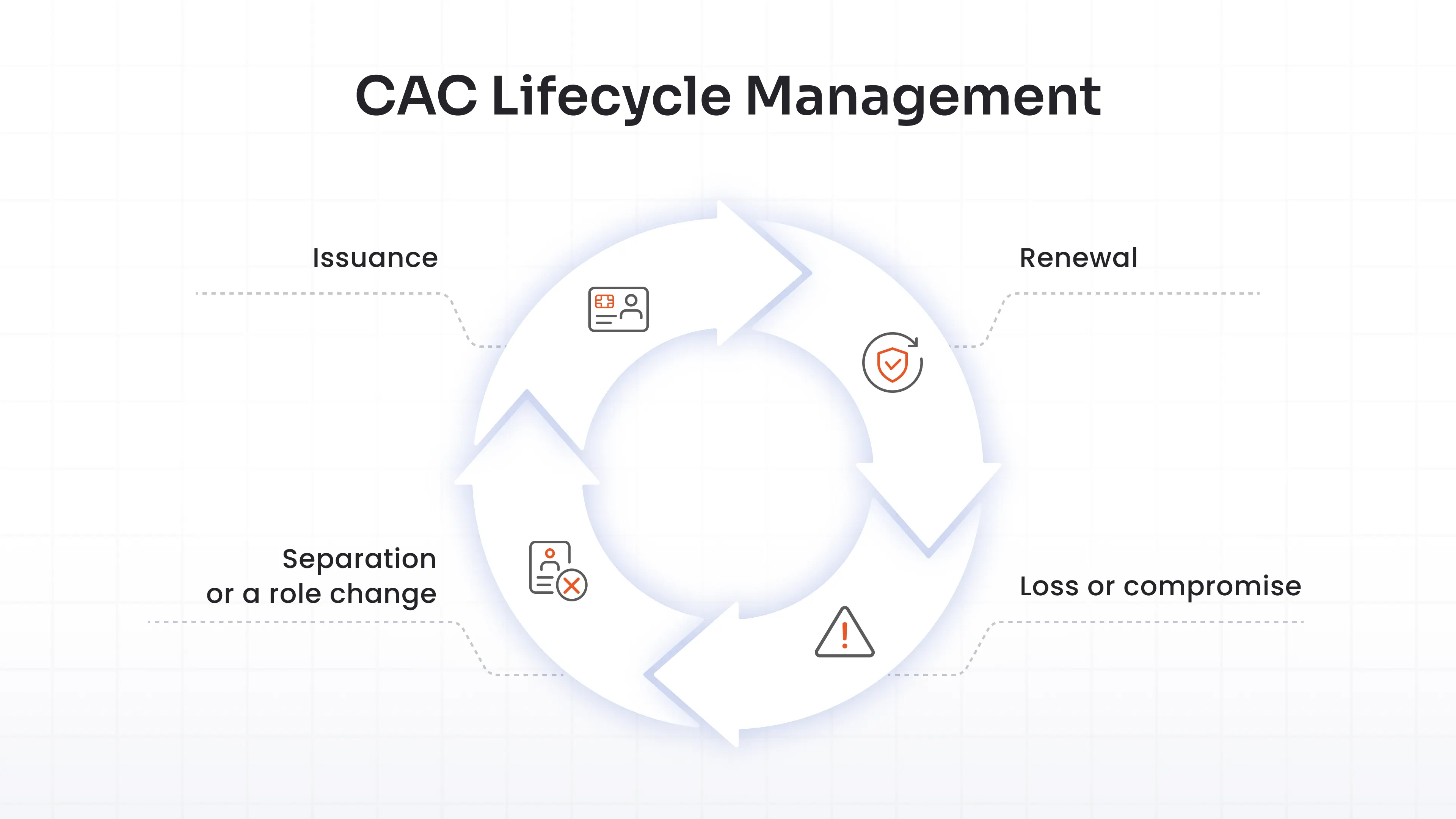
A CAC isn't a one-and-done credential. It moves through stages, and each one matters for security.
- Issuance: This starts with sponsorship, DEERS registration, a background check, and identity verification at a RAPIDS site. Personalization and issuance happen only after all of that clears.
- Renewal: This kicks in before expiration. Eligibility and sponsorship get rechecked, and a new card gets issued if anything about the person's status changed.
- Loss or compromise: This triggers immediate reporting to a security office. The card gets revoked in DEERS/RAPIDS, its certificates hit the CRL, and a replacement goes through the same verification steps as a fresh issuance.
- Separation or a role change: This invalidates the card outright, cutting off network and physical access at the same time.
The lifecycle of CAC sits with DoD, not with whatever authentication platform your organization runs. Worth remembering when you're comparing vendors: no MFA product issues or governs CAC lifecycle. It validates what DoD already issued and keeps validating it until DoD says otherwise.
Common Challenges and Security Risks of CAC Authentication
The lifecycle above is what DoD controls. And everything in this section is what you control, and it's where CAC deployments actually go wrong. CAC security holds up well against phishing, but real deployments still run into the same handful of failure points:
| Risk | What it means in practice |
|---|---|
| Lost or stolen cards | A weak PIN leaves a window of risk open until revocation propagates through DEERS/RAPIDS and OCSP/CRL checks catch up. |
| Middleware and reader problems | Outdated drivers, incompatible readers, and OS updates that quietly break card detection cause more support tickets than actual security incidents |
| Revocation check latency | If a relying system catches an OCSP response too long, or can’t reach a CRL, a revoked card can still get through for a short window. |
| RDP and remote access passthrough | Passing a physical smart card session through RDP widens the attack surface, inheriting every risk of exposing RDP to the internet in the first place. |
| Legacy systems | Apps never updated for certificate-based login fall back to the weaker authentication methods, quietly undoing the point of deploying CAC. |
Treat this table as the checklist for what a relying platform needs to handle correctly before rollout.
Best Practices for Secure CAC Authentication
Match each row in that table to a practice, and most of the risk goes away:
- Enforce strong PIN policies with retry limits and lockouts. A CAC with a weak PIN is only half a two-factor system.
- Make certificate status checks mandatory on every relying system, not optional. OCSP where possible, CRL as fallback, and no silent skip when a responder runs slow.
- Patch middleware and reader drivers on a schedule, the same way you'd patch anything else touching the network.
- Segment systems that accept CAC login so one compromised endpoint doesn't cascade into everything else.
- Secure RDP and remote access separately. Layer MFA directly on top of RDP sessions rather than leaning on smart card passthrough alone; a dedicated MFA layer for Remote Desktop covers this in more depth.
- Audit and log every CAC authentication event. When something goes wrong, you want a trail, not a guess.
Deployment Considerations for CAC Authentication
The best practices above keep a working CAC deployment secure. This is where you decide what "working" even looks like for your organization, before you've picked a platform. Get clear on:
- Middleware and reader compatibility across your actual OS mix (Windows, macOS, Linux), not just whatever your test machine happens to run.
- Revocation checking method and fallback behavior. Ask any vendor directly: what happens when OCSP times out? Does the system fail open or fail closed?
- Coverage across your systems, not just workstation login. VPN, SSH, RDP, legacy web apps, and admin consoles each need certificate-based login configured on their own, and the gaps between them are exactly where fallback to weak authentication creeps in.
- Non-DoD trust requirements, if you're a civilian agency or contractor accepting CAC from partners. Confirm the DoD PKI root chain is actually imported and trusted, not assumed.
- Directory integration (Active Directory, LDAP) for mapping certificate attributes to user accounts. That mapping is what turns a valid certificate into an actual login.
- Rollout sequencing. A pilot with a small group, fallback authentication still available, catches middleware and reader problems before they hit your whole workforce.
- Hardware budget. Readers, occasional reader replacements, and the support overhead of both add up in ways a per-seat software license doesn't capture.
There's also a bigger fork in the road underneath all of this: native OS-level certificate services (built into Windows Server and Active Directory) versus a unified IAM/MFA platform that handles CAC alongside every other authentication method your organization runs.
Native services work fine if your entire population is CAC and everything lives inside one Windows domain. They get harder to justify the moment you're mixing CAC with FIDO2 keys, push notifications, or RADIUS-based VPN logins, since each of those ends up needing its own separate configuration, policy set, and reporting.
A unified platform trades some setup complexity up front for one policy engine and one audit trail across every credential type you support. Which side of that trade-off fits depends entirely on how mixed your environment actually is, and that's usually the first thing worth mapping out before comparing specific vendors.
How miniOrange Supports CAC Authentication?
miniOrange added CAC/PIV smart card authentication as a supported MFA method inside its identity platform. It checks whether a certificate presented by a CAC or PIV card is genuine, current, and tied to a real user account. DoD and DEERS/RAPIDS handle issuing and managing the certificate itself; miniOrange handles validating it.
In practice, that means checking the PKI certificate on the card against trusted roots and matching it to a user record, then making CAC/PIV available alongside miniOrange's other MFA methods, push notifications, FIDO2, hardware tokens, and more, inside the same policy engine.
Most organizations aren't 100% CAC. A contractor might need CAC for DoD-facing systems and a FIDO2 key or push notification for everything else. Running both through a single platform means a single set of access policies and a single audit trail, rather than stitching together separate tools for different credential types.
Here's what that configuration actually looks like inside the miniOrange dashboard:
Admins can walk through the full configuration in the CAC/PIV setup guide. And if you're still deciding whether smart card authentication in general fits your environment before narrowing to CAC specifically, our guide to smart card authentication is a good place to start.
Conclusion
CAC authentication solves a specific problem well: phishing-resistant, hardware-backed identity for DoD and DoD-adjacent systems. That's the whole scope of what it's built for.
The real work isn't understanding CAC in the abstract. It's mapping which of your systems actually need it, which revocation and middleware gaps you're willing to own, and where a broader MFA security solution saves you from running five different tools for five different credential types.
Get those answers first. The vendor conversation gets a lot shorter once you have them.
FAQs
What is a CAC card?
A CAC is a credit-card-sized smart card issued to active service members, DoD civilians, and eligible contractors. It stores certificates, a photo, fingerprints, and identification data on an embedded chip, and doubles as a physical access badge.
What certificates are stored on a Common Access Card?
Typically an identity authentication certificate (aligned with PIV-Auth on newer cards), an email signing certificate, and an email encryption certificate, all anchored to DoD root and intermediate certificate authorities.
Is CAC authentication considered multi-factor authentication?
Yes. It combines something you have (the physical card) with something you know (the PIN), meeting the two-factor bar without any additional app or token.
How do I set up CAC card authentication on my work computer?
You'll need a compatible card reader and the correct middleware installed, plus DoD PKI root and intermediate CA certificates imported into your system's trust store. Most DoD-issued machines come preconfigured; for anything else, your IT or security team handles setup and maps your certificate to your directory account.
How do I get an authentication certificate for CAC?
You don't request it separately. Certificates load onto the card automatically during issuance, once DEERS registration, background checks, and RAPIDS identity verification are complete.
What should I do if my CAC card is lost, stolen, or has expired?
Report a lost or stolen card to your security office immediately so it can be revoked in DEERS/RAPIDS and blocked through CRL and OCSP checks. For an expired card, visit a RAPIDS site for renewal; eligibility and identity get reverified as part of that process.
Why isn't my CAC card being recognized by my computer?
Usually a middleware or driver issue: outdated card reader drivers, an OS update that broke detection, or a reader that isn't seated properly. Reinstalling the middleware or trying a different reader resolves most cases. If the certificate itself has expired or been revoked, no driver fix helps; that points back to renewal.
About the Author

Content Writer
Stutee writes about cybersecurity and identity security, covering technologies such as MFA, IAM, PAM, and endpoint management. Her work focuses on translating what products do into why audiences should care, ensuring technical depth does not come at the cost of readers clarity.
Leave a Comment