
If you're evaluating multi-factor authentication for a bank, a hospital network, a defense contractor, or a government agency, you've probably already run into smart card authentication. It's the method behind the CAC (Common Access Card) and PIV (Personal Identity Verification) cards federal employees badge in with every day. It's also becoming the default authentication method that regulated industries reach for, once passwords and OTP codes stop being good enough.
This guide covers what smart card authentication actually is, how it works, what it costs you in complexity, and where it sits next to other MFA methods. By the end, you should know whether it's the right fit for your organization, and what to ask a vendor before you sign anything.
What is Smart Card Authentication? (And Why Organizations are Adopting It)
Smart card authentication is a method that verifies identity using a physical, chip-embedded authentication card and cryptographic certificates.
The chip holds a digital certificate tied to a Public Key Infrastructure (PKI). When you insert or tap the card and enter a PIN, the system checks that certificate against a trusted authority before letting you in.
That combination, something you have (the card) and something you know (the PIN), makes it a genuine two-factor method on its own. No app to install. No code to type in from a text message a phishing site can intercept.
This is why people call it hardware-backed identity verification. The private key never leaves the chip. It can't be phished, guessed, or reused the way a password can.
Why Organizations are Adopting Smart Card Authentication?
Attackers have gotten very good at defeating password-based MFA. Push notification fatigue, SIM swapping, adversary-in-the-middle phishing kits, all of it targets the same weak link, a shared secret traveling over a network. A smart card doesn't have that weak link. The cryptographic proof happens on the card itself.
But beyond workstation login, enterprises also use smart authentication cards for identity proofing, secure document signing, physical building access, privileged accounts authentication, and approval of high-value business transactions.
How Smart Card Authentication Works?
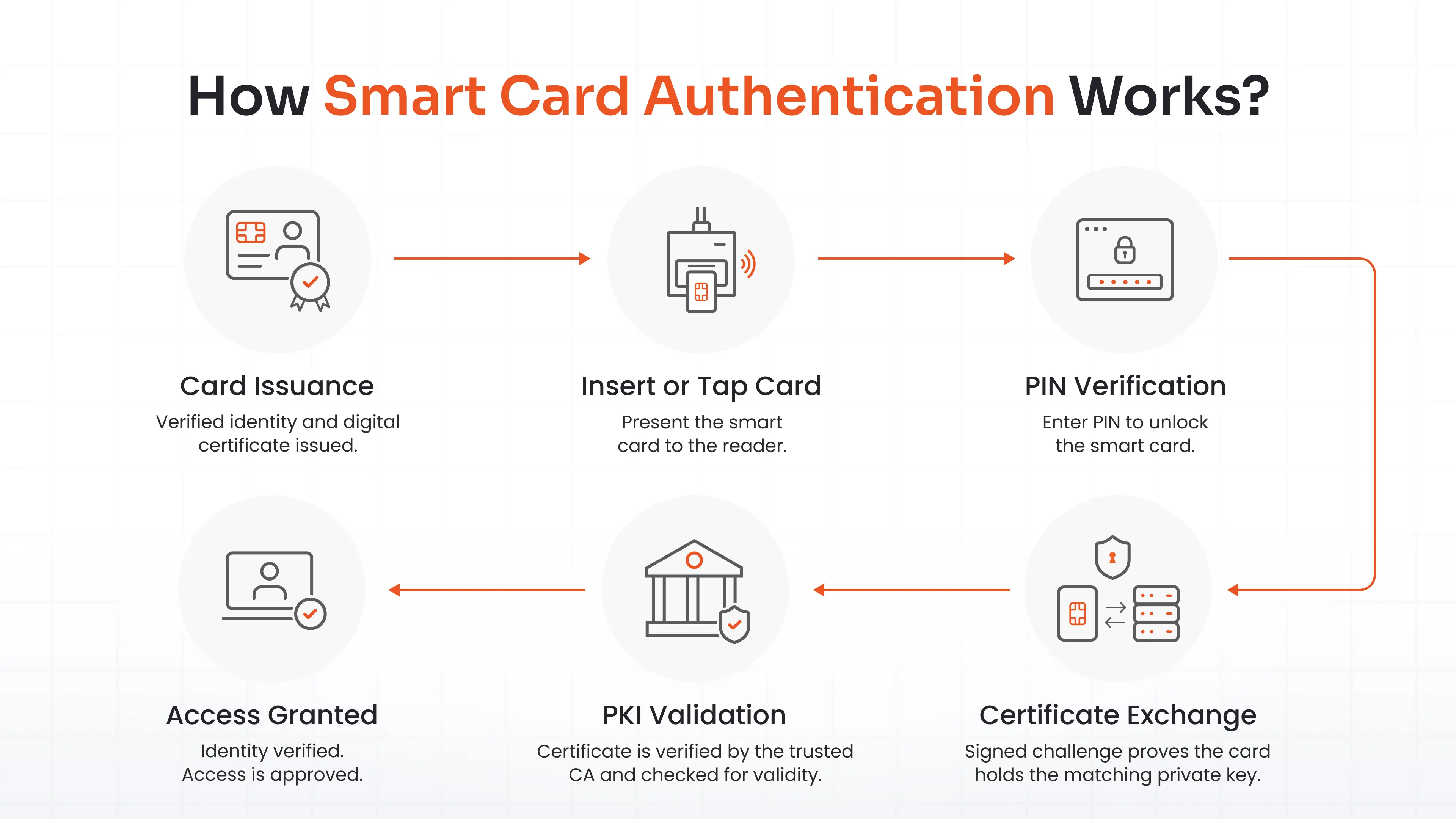
Here's how the process of smartcard authentication works step by step:
- Card Issuance: Your identity gets verified (in person, usually) and a digital certificate is generated and loaded onto the card by a certificate authority. This step anchors trust in everything downstream.
- Insert or Tap the Card: At a workstation, VPN gateway, or building entry point, you present the card to a reader.
- PIN Verification: You enter a PIN, which unlocks the card's cryptographic chip. The PIN never travels anywhere. It just authorizes the chip to operate.
- Certificate Exchange: The system requests your certificate. The card responds with a signed challenge, proving that it holds the matching private key, without ever exposing that key.
- PKI Validation: The server checks the certificate chain: issued by a trusted authority, still valid, not revoked. If any check fails, access gets denied.
- Identity Verification and Access: Once validated, the system maps your certificate to your identity and grants access, often issuing a single sign-on session so you're not repeating this all day.
The whole exchange takes a couple of seconds. Almost all of that complexity stays invisible to the person holding the card.
Smart Card Authentication Lifecycle
Throughout the card’s lifetime, IT teams also manage certificate renewals, replace lost or damaged cards, revoke credentials with employees' leave, and issue certificates as per security policies. Authentication is only one stage of the smart card authentication lifecycle.
Planning for these operational processes is just as important as deploying the authentication technology itself.
Types of Smart Cards Used for Authentication
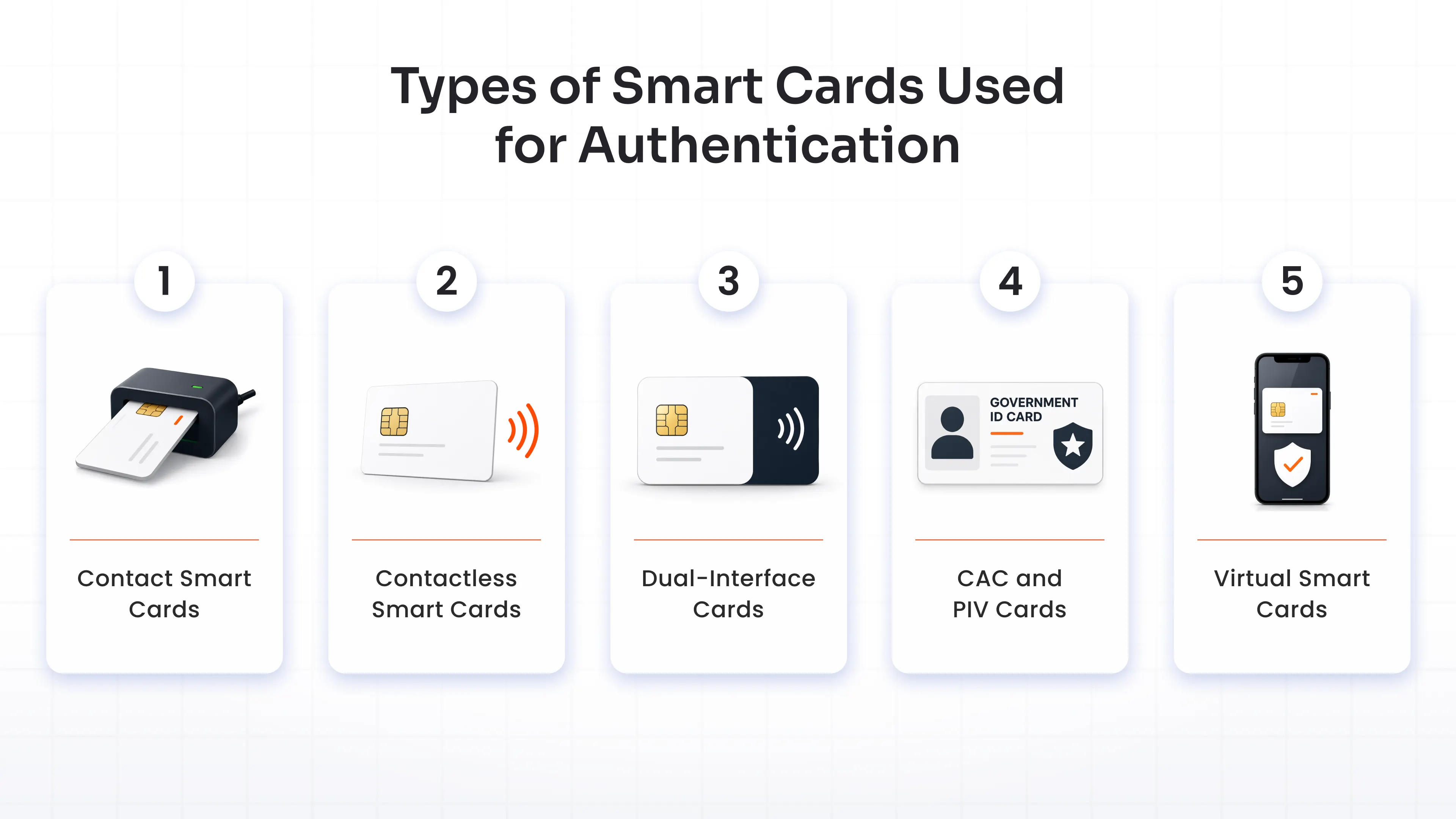
Not all smart cards work the same way, and picking the wrong type is a common planning mistake.
Contact Smart Cards
They have a visible gold chip and require physical insertion into a reader. Government and military organizations use these almost exclusively, largely because CAC and PIV cards are built on this format.
Contactless Smart Cards
They use RFID or NFC to talk to a reader from a short distance, a tap instead of an insert. Manufacturing floors, hospitals, pharma companies, and retail chains favor these because speed matters when hundreds of employees are badging in and out per shift.
Dual-Interface Cards
They support both contact and contactless modes on one card. Useful when you need a single credential for building access (tap) and computer login (insert).
CAC and PIV Cards
These are federal-grade smart card credentials based on FIPS 201. In regulated federal environments, agencies and contractors often must support them as part of identity and access compliance. But the underlying authentication can also be adopted by private enterprises that need the same level of assurance.
Virtual Smart Cards
They skip the physical card and store the certificate in a device's trusted hardware, like a TPM chip. They work well for remote employees or situations where issuing a physical card isn't practical, trading some physical-possession security for convenience.
Most enterprises settle on one primary format and add virtual cards as a secondary option for remote staff. But planning a deployment goes beyond selecting card types.
Enterprises should evaluate endpoint compatibility, reader availability, PKI maturity, credential issuance workflows, certificate lifecycle management, and user onboarding processes before rolling out smart card authentication at scale.
Core Components of a Smart Card Authentication System
Before choosing a smart card solution, it’s important to understand the infrastructure required to support it. This is because smart cards rely on certificate services, identity systems, and authentication servers. So deployment complexity depends on your existing IAM environment as much as it does on the cards themselves.
- Smart Card: It holds the certificate and performs the cryptographic signing.
- Smart Card Reader: It’s plugged into a laptop, built into a badge reader, or embedded in a kiosk, and talks to the card and passes data to the host system.
- Certificate Authority (CA): It issues and manages the digital certificates on each card. This is the trust anchor for the entire system.
- PKI Infrastructure: It ties it together: certificate issuance, validation, and revocation. If a card gets lost or an employee leaves, this is what cuts off their access.
- Identity Provider (IdP): It maps the certificate to a real user identity and enforces which resources that person can reach.
- Authentication server: It handles the real-time handshake: checking the certificate, confirming validity, and deciding whether to grant access.
- IAM Platform: sits on top of it all, connecting smart card authentication to your existing directory (Active Directory, Entra ID, LDAP), your SSO setup, and your applications, so you're not building a parallel identity system from scratch.
In practice, smart card authentication extends your existing identity infrastructure rather than replacing it. Organizations that struggle with deployment usually treat it as a standalone project instead of an extension of the IAM platform they already run.
What are the Benefits of Smart Card Authentication for Enterprises?
Smart card authentication does more than replace passwords. It gives organizations stronger identity assurance, helps meet regulatory requirements, and reduces the risk of phishing attacks by using hardware-backed credentials. While the exact benefits vary by deployment, most organizations gain advantages in four key areas.
- Phishing-Resistant Authentication: The private key never leaves the card, so attackers can't steal credentials through phishing sites, intercepted OTPs, or push notification attacks.
- High Identity Assurance: Smart card MFA is one of the few MFA methods capable of meeting NIST SP 800-63-3 AAL2 and AAL3 assurance levels, making it well suited for regulated industries and government environments.
- Passwordless Workforce Access: Employees authenticate using their smart card and PIN instead of remembering passwords, reducing password-related help desk requests while improving the login experience.
- One Credential For Physical And Digital Access: A dual-interface smart card can be used to enter buildings and log into enterprise systems, simplifying credential management and improving user convenience.
- Built-In Compliance Support: For organizations that must meet standards such as FIPS 201 or support CAC/PIV credentials, smart cards provide an established authentication method that aligns with government identity requirements.
Add those up, and the pitch is simple: fewer credentials floating around, a smaller attack surface, and an audit trail that regulators actually trust.
Where Enterprises Actually Use Smart Card Authentication?
The above-discussed benefits play out differently depending on what you’re protecting. Login is the most common use, but smart cards also secure building access, transactional approval, and identity checks that have nothing to do with a computer screen.
Here’s where that shows up by industry, so you can match your requirements to a use case before you scope a purchase.
- Federal Government and Military: This is where smart card authentication started and where it's most entrenched: CAC cards for the Department of Defense, PIV cards for civilian agencies, both mandatory under federal policy.
- Defense Contractors: Any contractor touching CUI (controlled unclassified information) or DoD networks typically has to support CAC authentication to work with federal clients.
- Financial Services: Banks and investment firms use smart cards to protect access to core banking systems, trading platforms, and customer data, partly for security and partly because examiners expect it.
- Healthcare: Hospitals often pair badge-based building access with clinical workstation login, letting a clinician badge into a shared terminal instead of typing a password dozens of times a shift.
- Manufacturing and Critical Infrastructure: Shared workstations on a plant floor don't work well with phone-based MFA, since workers often can't carry phones on the floor. A tap-to-login smart card solves that cleanly.
- Higher Education and Research: Universities running sensitive federally funded research, national labs, and defense-funded programs especially often need PIV-equivalent authentication for compliance.
Regardless of what use case suits you, smart cards are worth considering if your organization needs a phishing-resistant MFA solution, operates shared workstations, requires physical and logical access with one credential, and can support PKI-based identity verification.
Smart Card Authentication vs. MFA vs. Passwordless Authentication
This trips people up, so worth clearing up: smart card authentication AKA certificate-based authentication, is both a multi-factor authentication (MFA) method and a passwordless authentication method, not a third category sitting apart from the two.
It qualifies as an MFA solution because it combines possession (the card) with knowledge (the PIN). At the same time, it's a passwordless authentication solution because no password is transmitted or verified during the authentication process (the PIN simply unlocks the card's secure chip). By definition, this provides two-factor authentication without requiring an additional authentication factor.
Where it differs is from other MFA and passwordless options, like FIDO2 security keys, passkeys, push notifications, or OTP apps:
| Dimension | Smart Card Authentication (CAC/PIV) | Multi-Factor Authentication (SMS/Push) | Passwordless Authentication (FIDO2/Passkeys) |
|---|---|---|---|
| Assurance level | Highest, certificate-based audit trail regulators ask for | High, strong phishing resistance | Lower, vulnerable to fatigue and interception |
| Hardware dependency | Needs a reader and a physical card | Needs a device the user already carries | Needs a phone and network connection |
| Deployment complexity | Highest complexity, needs PKI and a CA | Moderate, faster to set up | Lowest complexity, has fastest rollout |
| Best for | Regulated, high-assurance environments | Fast rollout across mixed or BYOD workforce | Low-risk, general workforce access |
Understanding this distinction helps you compare smart cards with other phishing-resistant authentication options based on security requirements, deployment complexity, and regulatory obligations.
Challenges and Best Practices for Deploying Smart Card Authentication
Smart card authentication solves real security problems. But it also comes with real trade-offs worth knowing before you commit a budget.
| Deployment Challenge | Recommended Best Practice |
|---|---|
| Upfront infrastructure costs | Pilot with one department before organization-wide rollout |
| Certificate lifecycle management | Automate issuance, renewal, and revocation through IAM integration |
| Legacy application compatibility | Choose a platform with RADIUS, LDAP, and pre-built integrations |
| User lockouts | Maintain emergency access procedures and backup authentication methods |
Plan for these trade-offs upfront and work with a vendor who's deployed smart card authentication before. That's usually enough to keep them from becoming blockers.
How Miniorange Enables Smart Card Authentication?
miniOrange now supports CAC/PIV smart card authentication as part of its phishing-resistant MFA suite, alongside FIDO2 security keys, passkeys, and biometric authentication.
That matters because certificate-based smart card login doesn't have to live in its own silo. miniOrange connects it to the identity infrastructure you already run, Active Directory, your existing IdP, RADIUS, and LDAP, without ripping out what's in place.
With 6,000+ pre-built integrations, smart card authentication extends to VPNs, Windows and Mac logins, Linux and SSH access, network devices, and legacy applications that were never designed for certificate-based login.
Deployment works across cloud, on-premise, and hybrid environments, including offline authentication support for restricted or low-connectivity settings, a detail that matters if you're securing government or field environments.
Organizations including U.S. Customs and Border Protection and the UK's National Crime Agency (NAC) already rely on miniOrange for identity and access management, alongside 30,000+ customers across finance, healthcare, and government worldwide.
Conclusion
Smart card authentication fits a specific kind of organization: federal agencies, defense contractors, banks, and any operation where a compromised login could trigger regulatory action or worse. If that's you, it's one of the few MFA methods built specifically for that level of risk.
Figuring out whether your use case, CAC, PIV, or a broader enterprise deployment, needs a dedicated smart card strategy or fits inside a phishing-resistant MFA rollout you're already planning is the next step.
FAQs
What is smart card authentication?
It's a method of verifying identity using a physical card with an embedded microchip that holds a digital certificate. You insert or tap the card, enter a PIN, and the system validates your certificate against a trusted authority before granting access.
How does smart card authentication work?
The card issuer loads a digital certificate onto the chip. When you present the card and enter your PIN, the card signs a cryptographic challenge with its private key, and the server verifies that signature against the certificate chain before granting access.
What are the benefits of smart card authentication?
Phishing resistance, strong identity assurance up to NIST AAL2 or AAL3, passwordless login, one credential for both building and system access, and built-in compliance with standards like FIPS 201 for federal environments.
Can smart cards be used for multi-factor authentication (MFA)?
Yes. A smart card plus a PIN is possession and knowledge, the two classic MFA factors, combined in a single login step.
What should I do if my smart card is lost, stolen, or stops working?
Report it immediately so IT can revoke the certificate tied to that card. A revoked certificate can't be used to log in, even if someone else has the physical card. Most organizations issue a temporary access method while a replacement gets provisioned.
Can smart card authentication work for remote employees and cloud applications?
Yes, through virtual smart cards or certificate-based authentication tied to a device's trusted hardware, plus IAM platforms that extend smart card support to cloud apps, VPNs, and remote desktops.
About the Author

Content Writer
Stutee writes about cybersecurity and identity security, covering technologies such as MFA, IAM, PAM, and endpoint management. Her work focuses on translating what products do into why audiences should care, ensuring technical depth does not come at the cost of readers clarity.
Leave a Comment