

Over 80% of data breaches involve compromised credentials (Verizon DBIR). Yet most organizations that deploy IAM tools start with SSO, stop at MFA, and never reach lifecycle automation — leaving the most dangerous access gaps untouched.
The problem is not a lack of IAM tools. It is a lack of clarity on what IAM capabilities actually include, which to implement first, and where IAM ends and Identity Governance (IGA) begins. This guide covers all of it: the 10 core IAM capabilities with real-world examples, how IAM and IGA capabilities differ and why you need both, a maturity-based prioritization sequence, compliance framework mapping, and the new frontier every security team is now confronting — AI agents and non-human identities.
What Are IAM Capabilities?
Identity and access management is the discipline of ensuring the right identities have the right access to the right resources at the right time. IAM capabilities are the specific technical and process controls that make this possible. Every IAM capability answers one of three questions:
- Who are you? → Authentication
- What can you access? → Authorization
- Is that access still appropriate? → Governance
That third question is where IAM transitions into IGA — a critical distinction covered in detail below.
The 10 Core IAM Capabilities Every Enterprise Needs
Not every organization needs all 10 at once. Maturity and use case determine the sequence. The prioritization section later in this guide covers exactly that — but here is what each capability does and why it belongs in your roadmap.
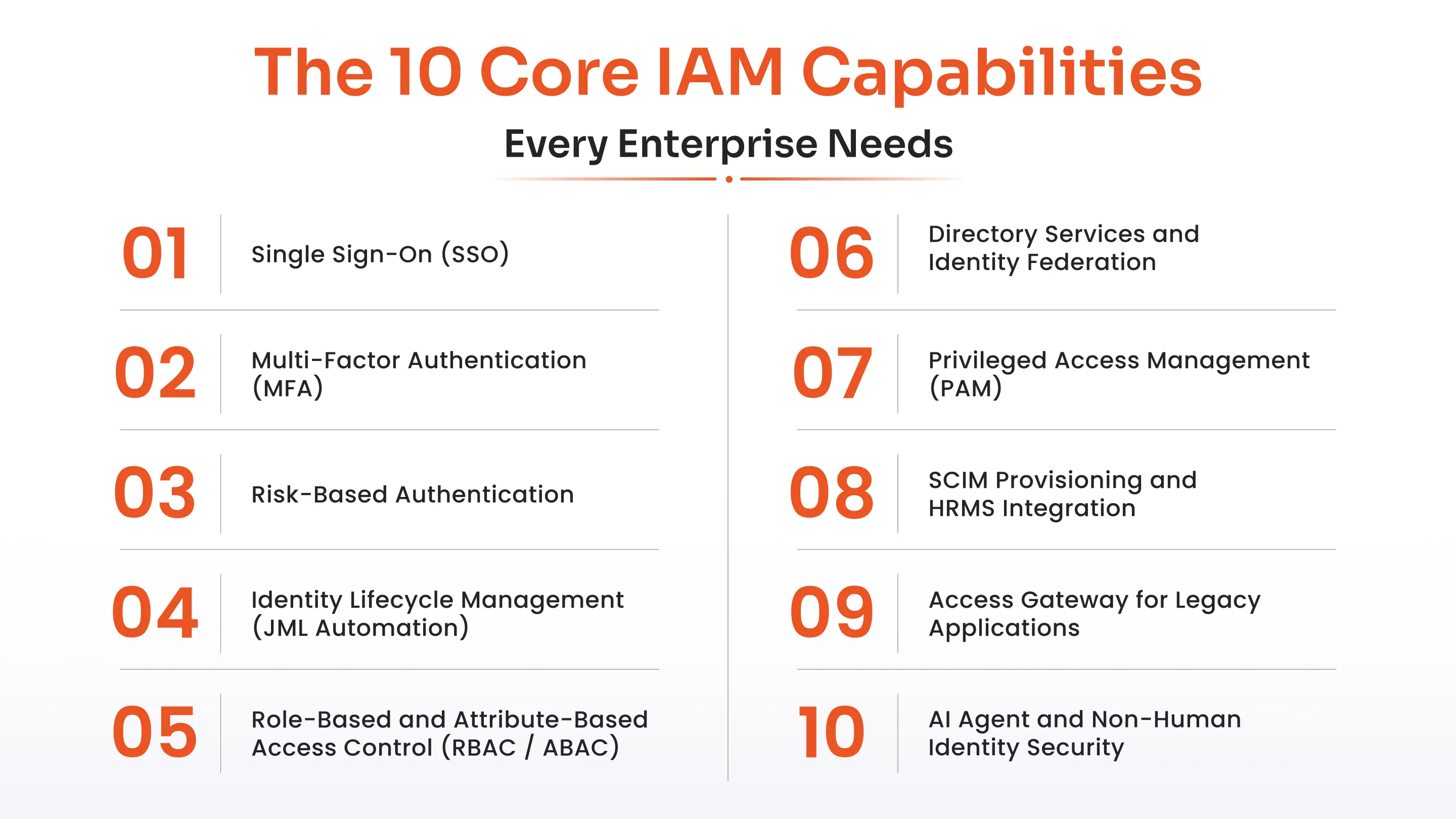
1. Single Sign-On (SSO)
Maturity stage: Foundation — implement first
Single Sign-On allows users to authenticate once and access all connected applications without separate logins. SSO works across SAML 2.0, OAuth 2.0, OIDC, and WS-Federation protocols, acting as a centralized authentication broker for your entire application estate.
Why it matters: SSO creates the single control point that every other IAM capability builds on. Without it, authentication is fragmented across dozens of systems — impossible to monitor, control, or layer security on top of. SSO also eliminates password fatigue and dramatically reduces help desk tickets for password resets.
Real-world example: An employee logs into the company portal and immediately accesses Salesforce, Microsoft 365, Slack, and SAP — all without a separate login for each application.
2. Multi-Factor Authentication (MFA)
Maturity stage: Foundation — implement alongside SSO
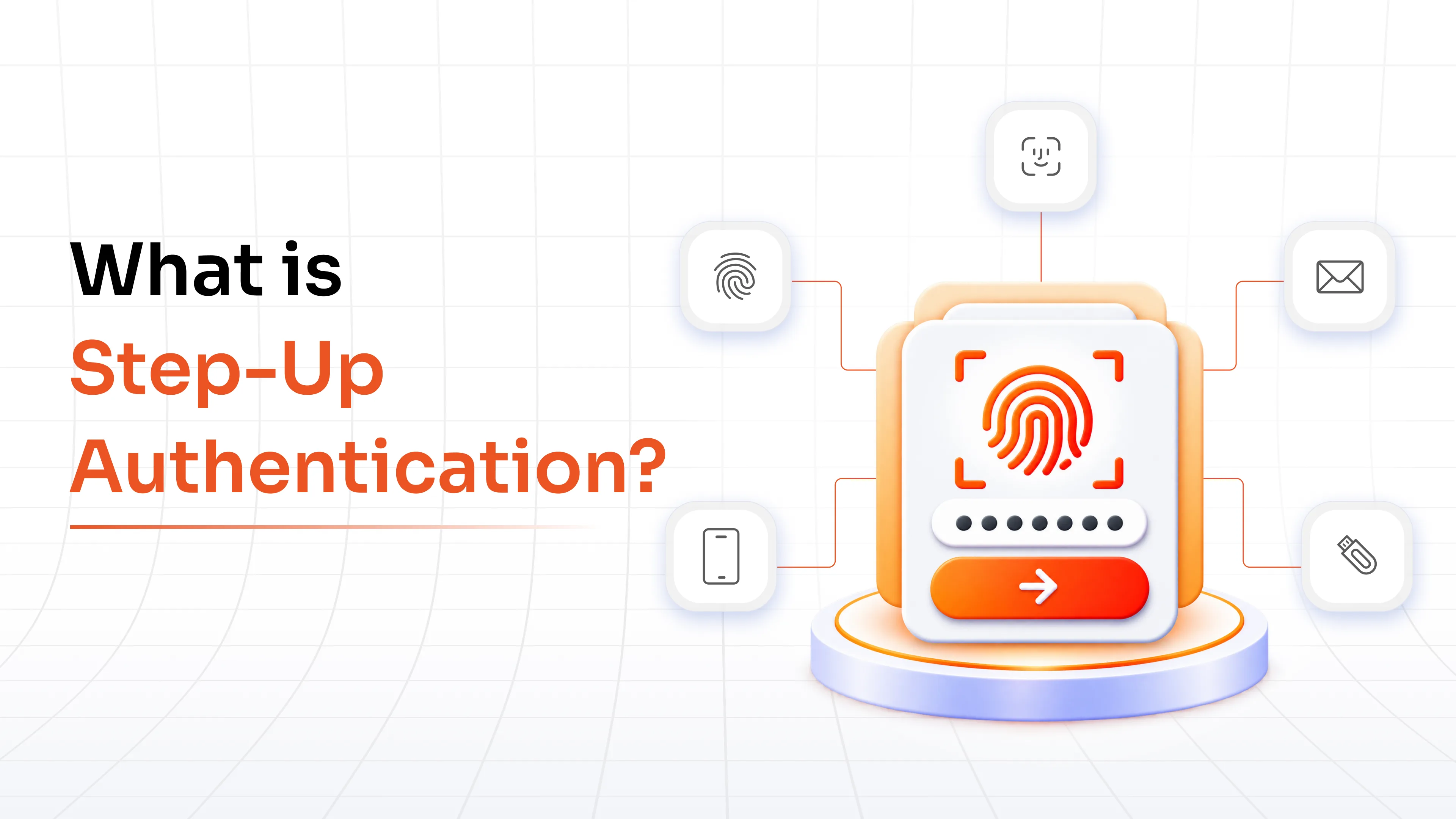
Multi-Factor Authentication requires two or more verification factors to confirm identity. Methods include TOTP authenticator apps, push notifications, hardware tokens, biometrics, SMS OTP, email OTP, and passwordless authentication via passkeys.
Why it matters: Credentials are the most attacked vector in enterprise security. Even when passwords are stolen — through phishing, credential stuffing, or dark web leaks — MFA blocks the majority of credential-based attacks before they succeed. The combination of SSO and MFA is the single highest-leverage starting point for any IAM program.
Real-world example: A finance user logging into the ERP system is prompted for a TOTP code after their SSO login, providing a second verification layer even for already-authenticated sessions.
3. Adaptive / Risk-Based Authentication
Maturity stage: Layer 2 — implement after SSO and MFA are stable
Adaptive Authentication dynamically adjusts authentication requirements based on real-time contextual signals — user location, device posture, login time, behavioral patterns, and a calculated risk score. Low-risk logins proceed without friction. High-risk signals trigger automatic MFA step-up or additional verification.
Why it matters: Not every login carries the same risk. Forcing the same friction on a routine Monday morning login from a trusted office device as on an anomalous login from an unrecognized device in a foreign country frustrates users without improving security. Adaptive authentication strikes the right balance.
Real-world example: A user logging in from their regular laptop in the office is not challenged. The same user logging in from a new device abroad is automatically prompted for MFA and manager approval.
4. Identity Lifecycle Management (JML Automation)
Maturity stage: Layer 2 — high impact, often under-implemented
Identity Lifecycle Management automates the full joiners-movers-leavers (JML) process — provisioning access on hire, updating it on role change, and revoking it immediately on departure. Lifecycle events are triggered by HRMS integrations with platforms like Workday, SAP SuccessFactors, and BambooHR.
Why it matters: A Forrester study found 45% of workforce access violations trace to improper offboarding. Manual processes create orphaned accounts — active credentials for former employees — that attackers actively seek and exploit. Lifecycle automation closes this gap at scale.
Real-world example: When a new employee is added to Workday, their accounts in Active Directory, Microsoft 365, and Salesforce are created automatically with role-appropriate access within minutes of the HR action — no IT ticket required.
5. Role-Based and Attribute-Based Access Control (RBAC / ABAC)
Maturity stage: Layer 2 — implement as part of lifecycle management design
RBAC assigns access based on job role — Finance Manager, IT Admin, Contractor. ABAC extends this by evaluating dynamic attributes — department, location, project assignment, device type — to make real-time, context-sensitive access decisions that RBAC alone cannot handle.
Why it matters: Access based on job function prevents privilege creep and keeps access review cycles manageable at scale. Without defined role structures, every access request is one-off, and every access review requires manually verifying individual entitlements across hundreds of systems.
Real-world example: A contractor hired for a 90-day project is assigned a "Contractor — Project X" role with time-limited, scoped access that automatically expires at project end — no manual follow-up required.
6. Directory Services and Identity Federation
Maturity stage: Foundation — required before SSO can work at scale
Directory Services provides the centralized identity repository that connects Active Directory, LDAP, Azure AD, and cloud directories into a single source of truth. Identity Federation extends this further, enabling identity to be trusted and shared across organizational boundaries without requiring re-authentication.
Why it matters: Most enterprises have identity data fragmented across multiple directories accumulated through years of acquisitions, cloud migration, and departmental IT. Centralizing them eliminates sync errors, duplicate accounts, and conflicting permission states that create both security risk and operational overhead.
Real-world example: A global bank with regional Active Directory domains in 17 markets federates all identities into a central broker, enabling a single consistent login policy across every geography.
7. Privileged Access Management (PAM)
Maturity stage: Layer 2–3 — critical for organizations with sensitive infrastructure
Privileged Access Management controls, monitors, and audits access for privileged accounts — admin accounts, service accounts, and any identity with elevated permissions. Core capabilities include password vaulting, session recording, Just-In-Time (JIT) access provisioning, and least-privilege enforcement.
Why it matters: Privileged accounts are the highest-value targets for attackers. A compromised admin credential can result in full environment takeover, lateral movement across every connected system, and data exfiltration at scale. PAM eliminates persistent privileged credentials and creates a complete audit trail of every privileged action.
Real-world example: A database administrator needing production server access checks out a time-limited password from the vault for their approved session window. The credential rotates automatically when the session closes — no persistent admin password to steal.
8. SCIM Provisioning and HRMS Integration
Maturity stage: Layer 2 — high operational leverage
SCIM Provisioning uses the SCIM 2.0 standard to automate user provisioning and deprovisioning across SaaS and on-premise applications, keeping identity data synchronized with HRMS sources of truth.
Why it matters: Without SCIM, IT teams manually create and remove accounts in every application for every hire, transfer, and departure — a process that does not scale and that introduces delays that leave access active after it should have been revoked.
Real-world example: An employee transferred from the London office to New York has their access to London-specific systems revoked and New York systems provisioned automatically, triggered by a single HR record update in the HRMS.
9. Access Gateway for Legacy Applications
Maturity stage: Layer 3 — necessary for organizations with legacy infrastructure
Access Gateway extends SSO and MFA controls to legacy on-premise applications — Oracle EBS, PeopleSoft, SAP WebGUI, mainframe systems — that pre-date modern identity protocols and cannot natively support SAML or OIDC.
Why it matters: Most enterprises operate a significant portfolio of legacy applications that would otherwise sit outside centralized IAM controls entirely. Access Gateway bridges this gap without requiring application re-development or re-architecture — preserving existing investments while bringing legacy systems under the same security umbrella as modern SaaS.
Real-world example: A manufacturing company with SAP WebGUI deployed on-premise in 2008 routes all authentication through the miniOrange Access Gateway, enabling MFA and SSO without modifying a single line of SAP application code.
10. AI Agent and Non-Human Identity Security (New — 2025)
Maturity stage: Emerging — evaluate now if your organization is adopting AI agents or automation pipelines
AI Agent Identity Security extends IAM controls to non-human identities — AI agents, RPA bots, service accounts, API keys, and automated pipelines. It applies OAuth 2.0-based token authentication, scoped access policies, token lifecycle management with automatic expiry, and audit trails to every non-human identity action.
Why it matters: CyberArk research shows 60% of organizations have no visibility into non-human identities. AI agents now query databases, call APIs, and access files on behalf of users — with no identity governance in place. This is the fastest-growing blind spot in enterprise security, and it compounds with every new AI deployment.
Real-world example: An AI agent built on an LLM is provisioned an OAuth 2.0 token with scoped, time-limited access to the CRM. Every action is logged with full attribution. If the agent begins querying outside its permitted scope, the token is revoked automatically.
IAM Capabilities vs IGA Capabilities: The Distinction That Actually Matters
Here is what makes this distinction concrete: you have SSO deployed, MFA enforced, and most apps integrated. Then an auditor asks — who has access to the finance system, when was it last reviewed, and is it still appropriate? Your IAM tool cannot answer that question. That is what IGA is for.
"IAM controls the door. IGA decides who should be allowed through it and proves it to auditors."
IAM is operational. It handles real-time authentication and authorization — verifying identity at login, enforcing access policies, managing the technical plumbing of who gets in. It is the system that runs every time someone presses "sign in." IAM capabilities are what security operations teams manage day to day.
Identity Governance and Administration is strategic. It handles policy, compliance, and governance — defining which roles should have which access, running periodic access certifications, detecting separation-of-duties violations, and producing the audit evidence that proves access is appropriate. IGA does not run at login time. It runs continuously in the background and on a review schedule. IGA capabilities are what GRC, compliance, and audit teams rely on.
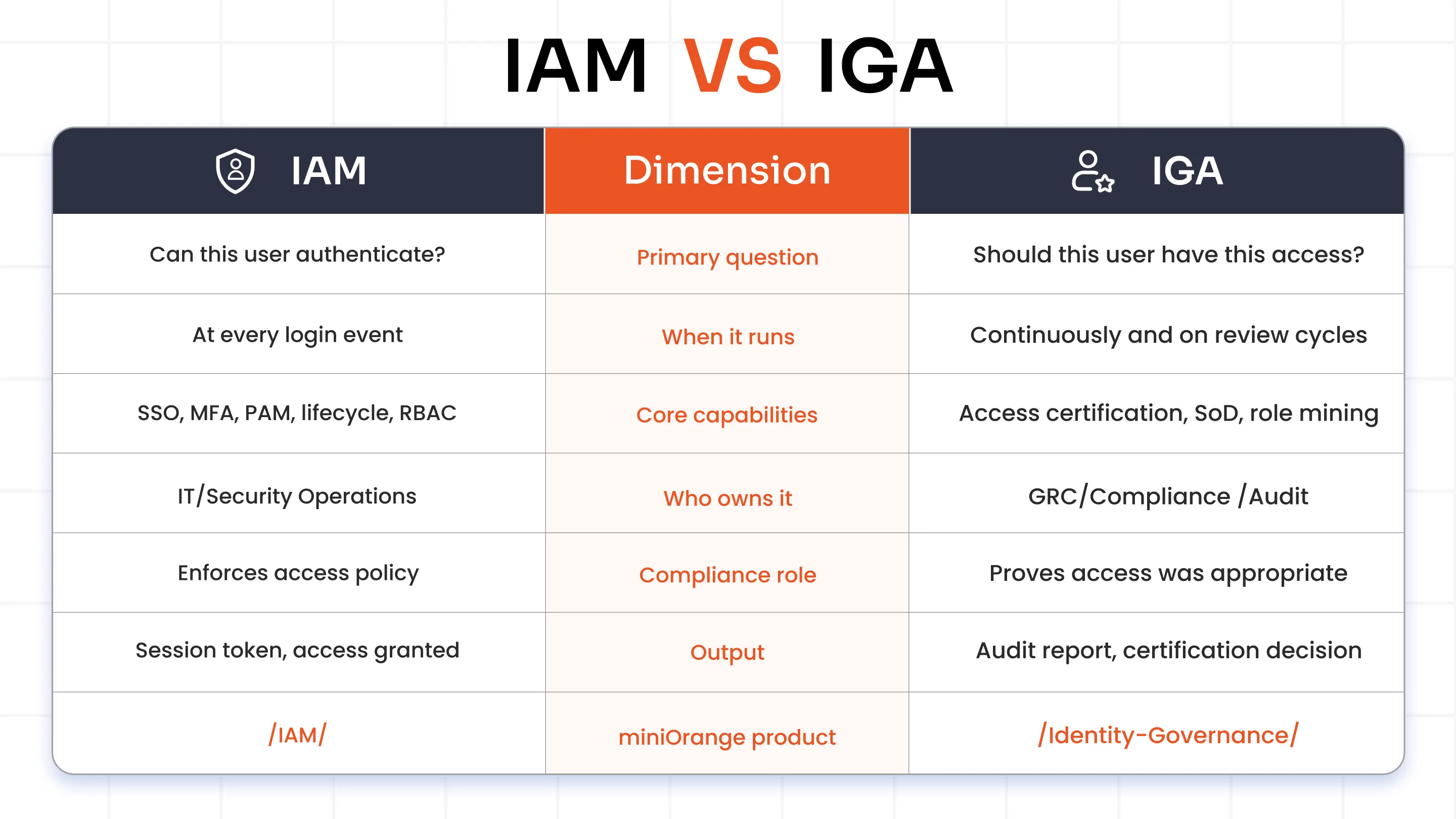
Do I need both? Yes, for any organization subject to SOX, HIPAA, GDPR, or CMMC 2.0. IAM without IGA means you can control access but cannot prove it was appropriate. IGA without IAM means you can govern on paper but cannot technically enforce it.
Which IAM Capabilities Should You Prioritize First?
The order in which you implement IAM capabilities matters as much as which ones you choose. Starting with governance before authentication is in place, or deploying PAM before lifecycle management is stable, creates gaps and expensive rework. Here is the maturity-based sequence that security teams consistently find most effective.
Stage 1 — Foundation (0–6 months, implement first)
- SSO — centralize authentication across your primary application estate
- MFA — layer on top of SSO for all users, starting with high-risk roles and admin accounts
- Directory integration — connect Active Directory, LDAP, and cloud directories
These three capabilities eliminate the majority of credential-based attack surface and create the identity foundation that everything else depends on. Without a centralized authentication point and directory, lifecycle automation and governance have nothing reliable to act on.
Stage 2 — Operational IAM (6–18 months)
- Identity Lifecycle Management (JML automation) — connect to HRMS, automate the joiners-movers-leavers process end to end
- RBAC / ABAC — define role structures and access policies aligned to job function
- Adaptive Authentication — layer risk signals onto MFA decisions
- SCIM Provisioning — standardize provisioning across SaaS and legacy applications
Lifecycle management closes the orphaned account problem. RBAC prevents privilege creep. Together they reduce access risk faster than almost any other capability in this stage.
Stage 3 — Governance and Advanced Security (12–24 months)
- PAM — vault and monitor privileged accounts, implement just-in-time access provisioning
- IGA layer — access certification, separation-of-duties enforcement, role mining, compliance reporting
- AI / NHI Identity Security — token governance for AI agents and service accounts
These capabilities require a stable identity foundation. Deploying governance before provisioning is automated creates manual certification campaigns on inaccurate access data — a common and expensive mistake that undermines confidence in the entire IGA program.
Callout (flag to design team): "Organizations often ask whether to start with SSO or MFA. Start with both simultaneously — they are most effective as a pair and most IAM platforms deploy them together."
IAM Capabilities Required by Compliance Framework
Different compliance frameworks mandate different IAM capabilities. The table below maps the most common enterprise frameworks to the specific IAM and IGA capabilities they require — so your prioritization reflects both security best practice and your actual regulatory obligations. For a full mapping, see miniOrange's compliance documentation.
| Framework | Required IAM Capabilities | IGA Required? |
|---|---|---|
| SOX | MFA, RBAC, access logs, provisioning/deprovisioning | Yes — SoD, access certification, audit trail |
| HIPAA | MFA, role-based access to PHI, session timeout, audit logs | Yes — access reviews for PHI systems |
| GDPR | Data residency controls, access restrictions, breach logging | Yes — access certification, right to erasure |
| CMMC 2.0 | MFA, PAM, privileged session monitoring, least privilege | Yes — access reviews for CUI environments |
| ISO 27001 | Access control policy, user provisioning, audit logs | Yes — periodic access reviews |
| NIST CSF | Identity management, authentication, access control | Recommended |
IAM Capabilities for Non-Human Identities: AI Agents, Service Accounts, and Bots
CyberArk research shows 60% of organizations have no visibility into non-human identities. That number will grow as AI adoption accelerates — and the gap it represents is not theoretical. AI agents, RPA bots, and service accounts already have direct access to your most sensitive systems. Most have no lifecycle management, no access reviews, and no meaningful audit trail.
Governing non-human identity requires applying the same five IAM controls you apply to human identities:
Authentication: OAuth 2.0 client credentials flow for machine-to-machine authentication — not usernames and passwords embedded in configuration files or application code.
Authorization: Scoped, least-privilege access grants. An AI agent querying the CRM should not have write access to the billing system, read access to HR records, or any other permission beyond its defined task scope.
Lifecycle: Tokens must expire automatically. Service accounts must be provisioned and deprovisioned like human accounts — not left running indefinitely after the project or use case that created them has ended.
Audit trail: Every action taken by a non-human identity must be logged with full attribution — not recorded as a generic "system process" that makes forensic investigation impossible.
Revocation: Token revocation must be instantaneous if anomalous behaviour is detected. A service account or AI agent that begins querying outside its permitted scope should be stopped in real time, not flagged in the next morning's report.
The governance question — "should this agent have this access?" — is identical to the human identity question. IGA capabilities apply to non-human identities too, and organizations that build their governance frameworks now will be significantly better positioned as AI adoption scales.
IAM Capabilities Quick Reference
Use the table below to cross-reference capabilities against implementation stage and relevant compliance frameworks at a glance. (Note to design team: style as a highlighted block or sticky table for scanning.)
| Capability | Type | Stage | Compliance |
|---|---|---|---|
| Single Sign-On (SSO) | IAM | Foundation | All frameworks |
| Multi-Factor Authentication (MFA) | IAM | Foundation | SOX, HIPAA, CMMC, GDPR |
| Adaptive / Risk-Based Auth | IAM | Layer 2 | NIST, CMMC |
| Identity Lifecycle Management | IAM/IGA | Layer 2 | SOX, HIPAA, GDPR |
| RBAC / ABAC | IAM | Layer 2 | SOX, HIPAA, ISO 27001 |
| Directory Services / Federation | IAM | Foundation | All frameworks |
| Privileged Access Management (PAM) | IAM | Layer 2–3 | SOX, CMMC, ISO 27001 |
| SCIM Provisioning | IAM | Layer 2 | SOX, GDPR |
| Access Gateway (Legacy Apps) | IAM | Layer 3 | Industry-specific |
| AI / NHI Identity Security | IAM/IGA | Emerging | NIST, EU AI Act |
Building Your IAM Capability Roadmap
Three things to take away from this guide:
- IAM capabilities are layered. Implement them in the maturity sequence — Foundation, then Operational, then Governance — for the best risk-to-effort ratio. Skipping stages creates gaps that require expensive rework.
- IAM and IGA are complementary, not interchangeable. IAM enforces access. IGA governs it. You need both for compliance and for a defensible security posture.
- Non-human identities are the next frontier. Every AI agent and service account in your environment is an identity that needs authentication, authorization, audit, and revocation — just like human users.
FAQs
What is the difference between IAM and IGA capabilities?
IAM capabilities cover authentication, authorization, lifecycle management, and access control — the technical plumbing that controls who gets in. IGA capabilities cover governance, compliance, and oversight — ensuring access is appropriate, regularly reviewed, and audit-ready. IAM enforces the door. IGA decides who should be behind it and proves it to regulators.
Which IAM capability should I implement first — SSO or MFA?
Both, simultaneously. SSO and MFA are the foundational capability pair — SSO centralizes authentication, MFA secures it. Deploying one without the other creates risk. Most organizations implement both within the same project phase using a modern IAM platform.
Do I need both IAM and IGA, or can one replace the other?
They are complementary, not interchangeable. Organizations subject to SOX, HIPAA, GDPR, or CMMC 2.0 need both. IAM without IGA means you control access but cannot prove it was appropriate. IGA without IAM means governance on paper with no technical enforcement.
What IAM capabilities are required for SOX compliance?
SOX requires MFA for financial system access, role-based access controls with least-privilege enforcement, automated deprovisioning when employees leave, detailed audit logs of who accessed what and when, and separation of duties enforcement to prevent fraud. The SoD and access certification components fall under IGA rather than IAM.
Can IAM tools manage AI agents and non-human identities?
Modern IAM platforms extend to non-human identities through OAuth 2.0 machine-to-machine authentication, scoped access tokens, automated token expiry, and audit trails for every agent action. Service accounts, AI agents, and RPA bots should be governed through the same lifecycle and access review processes as human identities — most organizations have not yet done this.
What is the difference between RBAC and ABAC in IAM?
RBAC (Role-Based Access Control) assigns access based on job role — Finance Manager, IT Admin, Contractor. ABAC (Attribute-Based Access Control) evaluates dynamic attributes — department, location, device type, project assignment — for context-sensitive access decisions. RBAC is simpler to implement; ABAC is more flexible for complex organizations. Most enterprise IAM platforms support both, using RBAC as the base and ABAC for fine-grained exceptions.
Leave a Comment