
Many organizations still run identity on systems built for an on-premises network: a directory, a separate SSO tool for some cloud apps, custom provisioning scripts, and spreadsheets to track approvals. Each tool works on its own. Together, they slow down onboarding, leave inactive accounts behind, and make audits harder.
IAM modernization is the process of replacing or upgrading legacy identity and access management (IAM) systems with a centralized platform that manages access to cloud, SaaS, and on-premises applications through open standards and automation. It moves an organization from separate, manual identity tools to one system that authenticates users, provisions their access, and governs that access across its lifecycle.
IAM modernization usually covers these areas:
- Single Sign-On (SSO): SSO solution for accessing cloud, SaaS, and on-premises applications with one login.
- Multi-Factor Authentication (MFA) and passwordless login: Stronger verification than a password alone.
- Provisioning: Automatic creation, update, and removal of user accounts in connected applications.
- Identity lifecycle management: Access changes that follow joiner, mover, and leaver events.
- Identity Governance and Administration (IGA): Access requests, approvals, and policy enforcement.
- Access governance: Reviews and reports that show who has access to what, and why.
This guide covers why organizations modernize legacy IAM, what modernization includes, how a modern IAM architecture works, and the steps, strategies, and IAM modernization services involved.
Why Modernize Legacy IAM Systems?
Organizations modernize legacy IAM when their identity infrastructure can no longer support the applications, users, and environments they run today. The reasons teams modernize IAM fall into two groups: the limits of existing infrastructure and new access requirements.
Legacy IAM Infrastructure
Legacy IAM was designed for a fixed network perimeter, a small set of on-premises applications, and employees working from company offices. Common limitations include:
- On-premises IAM: Identity servers need manual patching, hardware upgrades, and custom code to connect to cloud applications.
- Siloed identity systems: Separate directories and user stores exist for different departments or applications, with no single view of user access.
- Manual provisioning: Accounts are created and removed through IT tickets, emails, and spreadsheets. This delays onboarding and leaves orphaned accounts after employees leave.
- Older authentication protocols: Applications rely on LDAP binds, NTLM, or custom login forms. These applications cannot use SAML or OpenID Connect for SSO and often cannot enforce phishing-resistant MFA.
Changing Identity and Access Requirements
The environment that IAM has to secure has also changed:
- Cloud adoption: Workloads and data now run on platforms such as AWS, Microsoft Azure, and Google Cloud, which legacy IAM tools were not built to manage.
- Hybrid environments: Cloud and on-premises applications run side by side, so authentication and access policies need to apply consistently across both.
- SaaS applications: Each SaaS application adds its own accounts, roles, and permissions to provision, review, and remove.
- More identities and applications: Employees, contractors, partners, service accounts, APIs, and AI agents all need identities with controlled access.
These gaps raise access risk. The 2026 Verizon Data Breach Investigations Report, based on more than 22,000 confirmed breaches, found credential abuse at some stage of 39% of breaches. In Omada's State of Identity Governance 2025 research, nearly 48% of legacy IGA users reported overly permissive access in their organization, compared with 29% of modern IGA users.
What Does IAM Modernization Include?
IAM modernization covers three capability areas: modern authentication and SSO, identity lifecycle and provisioning, and identity governance. Organizations usually modernize all three, often in separate phases.
Modern Authentication and SSO
Modern authentication replaces a separate password for each application with one sign-in through a central identity provider (IdP). It relies on open standards, so any compliant application can connect to the IdP without custom code.
| Standard | What It Does | Typical Use |
|---|---|---|
| SAML 2.0 | Passes signed XML assertions from the IdP to the application (service provider) | SSO for enterprise web and SaaS applications |
| OAuth 2.0 | Lets an application access resources on a user's behalf with access tokens, without receiving the user's password | API access and delegated authorization |
| OpenID Connect (OIDC) | Adds an authentication layer to OAuth 2.0 and returns an ID token that confirms who the user is | Login for modern web and mobile applications |
| FIDO2 and WebAuthn | Uses public-key credentials, such as passkeys or security keys, in place of passwords | Passwordless and phishing-resistant authentication |
Passwordless Authentication
Passwordless authentication replaces the password with a passkey or hardware security key that the user unlocks with a biometric or PIN. The private key never leaves the device, so there is no shared secret to phish or reuse. For most users, it is the most visible change in an IAM modernization project. Read our guide on WebAuthn and passwordless authentication to learn more.
Identity Lifecycle and Provisioning
Identity lifecycle management links access to employment events, so access changes when a person's role changes, without a manual ticket.
- Joiner-Mover-Leaver (JML): The JML process grants baseline access when someone joins, adjusts it when they change roles, and revokes it when they leave.
- Automated provisioning and deprovisioning: User provisioning creates, updates, and disables accounts in connected applications based on changes in the HR system or directory.
- SCIM: The System for Cross-domain Identity Management (SCIM 2.0, RFC 7643 and RFC 7644) is an open standard that defines a REST API for creating, updating, and deleting users and groups in applications.
Identity Governance and Access Management
Identity Governance and Administration (IGA) adds control and evidence on top of authentication and provisioning. It records who has access to what, who approved it, and whether that access is still needed.
- Access requests: Users request access through a self-service portal, and each request goes to the right manager or application owner for approval.
- Access reviews: Managers and application owners confirm or remove existing access through scheduled access certification campaigns.
- Role-based access control (RBAC): Permissions are assigned by job role instead of person by person, which keeps access consistent as teams grow.
- Privileged access: Privileged Access Management (PAM) protects admin and high-risk accounts with credential vaulting, just-in-time access, and session monitoring.
Modern IAM Architecture
A modern IAM architecture places one identity platform between every identity source and every application. Instead of each application storing its own users and passwords, the platform keeps a single identity record for each user, authenticates the user, provisions the required accounts, and governs that access over time.
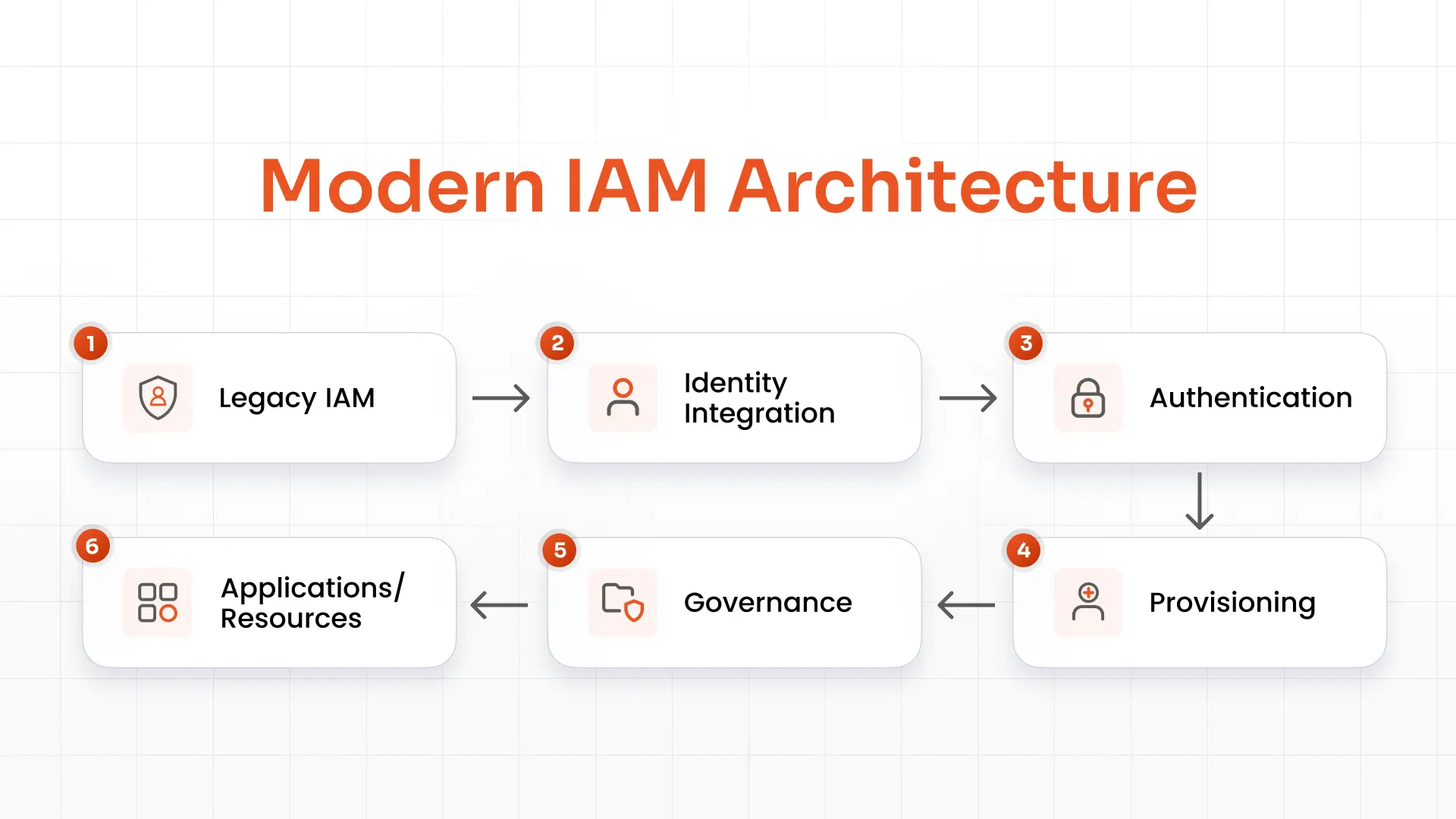
The architecture has four layers:
- Identity sources: HR systems, directories, and existing legacy IAM stores supply user data. The HR system is usually the authoritative source.
- Integration layer: Connectors and directory sync combine that data into one identity record per user.
- Core services: Authentication and SSO, provisioning, and governance run on top of that identity record.
- Applications and resources: SaaS, cloud, and on-premises applications rely on the platform for authentication and account management.
Data moves from top to bottom. When the HR system records a new hire, a role change, or an exit, the platform updates the identity record and then updates sign-in rights, accounts, and access policies in every connected application.
How to Modernize Legacy IAM
An IAM modernization project usually follows four steps: assess the current environment, define the target architecture, migrate capabilities in phases, and integrate applications and identity sources.
Assess the Existing IAM Environment
Start with a complete inventory of the current environment. Document:
- Legacy systems: Every IAM, SSO, MFA, and provisioning tool in use, including custom scripts.
- Applications: All cloud, SaaS, and on-premises applications, and how each one authenticates users today.
- Identity stores: Active Directory, LDAP directories, HR systems, and application-specific user databases.
- Authentication methods: Passwords, MFA factors, and protocols such as SAML, OIDC, LDAP, and Kerberos.
Record current problems as well, such as slow onboarding, orphaned accounts, audit findings, and password reset tickets. These show which capabilities to modernize first.
Define the Modern IAM Architecture
Map the IAM capabilities and integrations the organization needs. Decide which identity source is authoritative (usually the HR system), which applications need SSO and MFA, which need automated provisioning, and which need governance controls such as access reviews and separation of duties (SoD) policies. This target design guides platform selection and the migration plan.
Migrate IAM Capabilities
Migrate in phases instead of in a single cutover. A common order is:
1. Authentication and SSO: Move users to a central identity provider and enforce MFA.
2. Provisioning: Automate account creation and removal, starting with the applications that have the most users.
3. Lifecycle management: Connect HR events to JML workflows so that access follows role changes.
4. Governance: Enable access requests, access reviews, and policy enforcement once identity data is accurate.
Run the legacy and modern systems in parallel during each phase. Retire each legacy component after its users and applications have moved.
Integrate Applications and Identity Sources
Connect the new platform to every system that creates identities or consumes them:
- HR systems such as Workday, BambooHR, or SAP SuccessFactors, as the source of identity data
- Directories such as Active Directory, Microsoft Entra ID (formerly Azure AD), and LDAP
- SaaS applications through SAML, OIDC, and SCIM connectors
- Cloud applications and platforms such as AWS, Microsoft Azure, and Google Cloud
- On-premises applications through agents, reverse proxies, or header-based authentication
For on-premises applications that do not support SAML or OIDC, an access gateway can add SSO and MFA without changes to the application code.
IAM Modernization Strategies
There is no single way to modernize IAM. Strategies depend on the age of the current system, the number of applications that depend on it, and how much change the organization can manage at once. Most IAM modernization programs use one of four approaches, or a combination.
| Strategy | What It Means | Best Fit For |
|---|---|---|
| Replace | Retire the legacy IAM or IGA tool and move to a modern IAM/IGA platform | Products at or near end of support, or with high licensing and maintenance costs |
| Replatform | Move existing IAM capabilities to modern, cloud-hosted infrastructure with minimal redesign | Working processes that run on ageing on-premises servers |
| Integrate | Connect legacy IAM to modern identity services such as cloud SSO or MFA | Legacy applications that cannot be changed yet but need stronger authentication |
| Modernize incrementally | Migrate IAM capabilities in phases, such as SSO first, then provisioning, then governance | Large or complex environments where a single cutover is too risky |
For teams looking at how to replace legacy IAM with modern IGA software, the usual sequence is to run both systems in parallel, migrate identities, roles, and entitlements, rebuild policies in the new platform, and then move applications over in batches.
IAM Modernization Services
IAM modernization services help organizations plan, migrate, and operate a modern identity platform while keeping existing logins and access working during the transition. They typically include the following:
| Service | What It Covers |
|---|---|
| IAM assessment | Inventory of current tools, applications, and identity stores, with a gap analysis and roadmap |
| IAM migration | Moving users, groups, roles, and policies from legacy systems to the new platform |
| Application integration | Connecting cloud, SaaS, and on-premises applications through SAML, OIDC, SCIM, or gateways |
| Identity lifecycle automation | Building JML workflows that link HR events to provisioning and deprovisioning |
| SSO and MFA implementation | Setting up central sign-on, MFA policies, and passwordless options |
| IGA implementation | Configuring access requests, access reviews, RBAC, and SoD policies |
| Legacy IAM replacement | Planning parallel runs, cutover, and decommissioning of the old system |
When you evaluate IAM modernization services, check for support for both cloud and on-premises deployment, pre-built connectors for your main applications, and a phased delivery plan.
Modern IAM vs. Legacy IAM
Modern IAM centralizes identity and automates access across cloud and on-premises systems, while legacy IAM depends on separate tools and manual processes. The table below compares the two.
| Legacy IAM | Modern IAM |
|---|---|
| Siloed identity systems | Centralized identity management |
| Manual provisioning | Automated provisioning |
| On-premises focused | Cloud and hybrid ready |
| Password-focused authentication | SSO, MFA, and passwordless |
| Limited integrations | API and standards-based integrations (SAML, OIDC, SCIM) |
| Manual lifecycle management | Automated JML workflows |
FAQs
Why do organizations modernize legacy IAM?
Organizations modernize legacy IAM because older systems do not integrate well with cloud and SaaS applications. A modern platform centralizes authentication, automates account changes, and produces audit evidence from one place.
How long does IAM modernization take?
IAM modernization timelines depend on the number of applications, identity sources, and capabilities in scope. A focused SSO and MFA rollout can go live in weeks, while a full program that includes provisioning and governance usually runs in phases over several months.
What is the difference between IAM modernization and IAM migration?
IAM migration is the move of users, groups, policies, and application connections from one identity system to another. IAM modernization is broader: it usually includes a migration, but also covers redesigning the architecture, automating lifecycle processes, and adding governance controls.
How can legacy IAM be replaced with modern IGA software?
Legacy IAM can be replaced with modern IGA software by running both systems in parallel, migrating identities, roles, and entitlements, rebuilding approval workflows and policies, and then moving applications over in batches.
About the Author

Content Writer
Pallavi Narang is a content writer with more than 4 years of experience. She specializes in driving brand awareness and lead generation through compelling storytelling and strategic marketing campaigns. With a background in SaaS, cybersecurity, and data analytics, Pallavi excels in translating complex concepts into engaging narratives. Outside of work, she is either learning new languages or reading.
Leave a Comment