
Password-based authentication is slowly disappearing from the login experience in 2026. Instead, users increasingly authenticate with a fingerprint, device PIN, or security key without typing a password.
This is where passwordless authentication and passkeys come in. Built on FIDO2 and WebAuthn, passkeys use cryptographic credentials to make passwordless login simpler for users while reducing exposure to phishing and credential theft.
But passkeys are only one part of the picture. FIDO2 authentication, biometric authentication, MFA, and device security all shape how passwordless authentication works in practice.
Quick Answer
Passwordless authentication allows users to verify their identity without entering a password. Passkeys are a leading passwordless authentication method based on public-key cryptography and FIDO standards.
A passkey creates a public-private key pair. The private key remains protected by the user's device or authenticator, while the public key is registered with the service.
Key facts for 2026:
- An estimated 5 billion passkeys are now in active use worldwide, according to the FIDO Alliance.
- Consumer awareness of passkeys has climbed to 90%, up from 75% the previous year.
- Passkeys measure roughly a 93% login success rate versus about 63% for passwords.
- 68% of organizations have deployed or are actively deploying passkeys for employee sign-in.
- One in three people experienced an account compromise or breach notification tied to password use in the past year.
Why Are Organizations Moving Toward Passwordless Authentication?
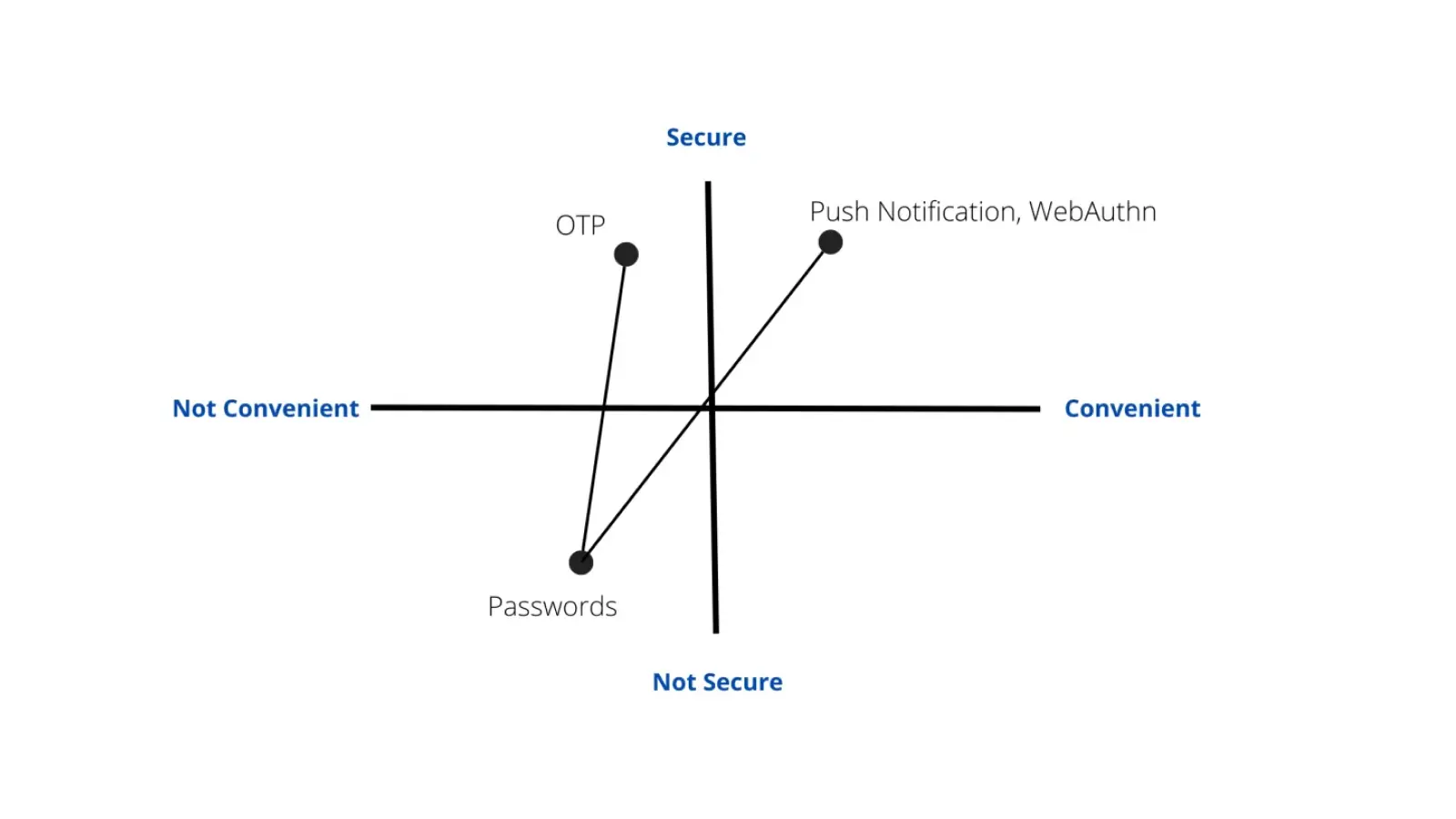
Passwords have remained a weak point in authentication because they can be reused, phished, stolen, and exposed in breaches. MFA adds another layer of protection, but traditional authentication can still depend on a password.
Passwordless authentication removes that dependency.
Passkeys also address a usability problem. Instead of remembering and entering credentials, users can authenticate through a familiar device action such as a fingerprint, facial recognition, or PIN.
The adoption data points in the same direction. Your draft cites growing consumer awareness, increasing enterprise deployment, higher login success rates, and reductions in password-related support activity.
For organizations, the appeal is therefore not just stronger authentication. It is the opportunity to reduce password-related friction while improving resistance to credential-based attacks.
How Do Passkeys Work?
Passkeys replace the password with a cryptographic credential.
The process is straightforward:
1. Registration: The user's device or authenticator generates a public-private key pair. The private key stays protected on the authenticator, while the public key is registered with the service.
2. Authentication: When the user attempts to log in, the service sends a challenge.
3. User verification: The user verifies themselves using a biometric, device PIN, or another supported method.
4. Cryptographic response: The authenticator signs the challenge using the private key.
5. Verification: The service verifies the response using the registered public key.
No password is transmitted or stored as part of this authentication process.
Passkeys can also support different device experiences. Depending on the implementation, they may synchronize across supported devices or remain tied to a specific authenticator.
What Is FIDO2 Authentication?
FIDO2 provides the standards that enable passwordless and strong authentication using modern authenticators.
It brings together:
- WebAuthn, which allows websites and applications to interact with FIDO authenticators.
- CTAP, which enables communication between client devices and external authenticators such as security keys.
This allows FIDO2 authentication to work with both platform authenticators and external devices.
Passkeys are therefore closely connected to the FIDO2 ecosystem, while FIDO2 security keys provide another way to authenticate without relying on passwords.
Complete View to FIDO2 Authentication.
Which Authentication Methods Support Passwordless Login?
Passwordless authentication is not limited to one type of authenticator. The right method can vary based on the user, device, application, and security requirements.
Passkeys
Passkeys provide a convenient passwordless login experience using cryptographic credentials protected by a supported device or authenticator.
FIDO2 Security Keys
A FIDO2 security key provides a dedicated hardware authenticator for passwordless login.
They can be particularly useful for administrators, privileged users, or environments that require a separate hardware-based authentication method.
Biometric Authentication
Biometric authentication can provide local user verification through a fingerprint or facial recognition.
When used with a passkey, the biometric authorizes the credential locally rather than being sent to the application as the authentication secret.
Device PIN
A device PIN can also be used for local user verification when authenticating with a passkey.
Together, these methods allow organizations to build passwordless authentication around different user and device requirements rather than relying on a single authentication experience.
Passwordless Authentication vs MFA
Passwordless authentication and MFA are often discussed together, but they describe different aspects of authentication.
| Features | Passwordless Authentication | Traditional MFA |
|---|---|---|
| Password requirement | Removes the password from the authentication flow | Usually retains a password as one factor |
| Phishing resistance | Passkeys and FIDO2 can provide phishing-resistant authentication | Depends on the additional factor used |
| User experience | Can use a biometric, PIN, or security key | Typically requires password entry plus another factor |
| Credential reuse | Passkeys are tied to the service | Password reuse can remain a risk |
| Authentication methods | Passkeys, FIDO2 security keys, biometrics, and other methods | OTPs, push notifications, biometrics, security keys, and others |
| Role in security strategy | Can replace password-based authentication | Can add another layer to password-based authentication |
Passwordless authentication does not necessarily eliminate MFA. Organizations can use passkeys as part of their broader MFA strategy and apply additional controls where stronger assurance is required.
For a detailed comparison, explore the miniOrange article on Passwordless Authentication vs MFA.
How Does Passwordless Authentication Improve Security?
The security advantage of passwordless authentication comes from changing the credential model.
Phishing Resistance
Passkeys are associated with the service for which they were created. A fake login page cannot simply capture and reuse the credential like a password.
Reduced Credential Reuse
A password can be reused across multiple services. Passkeys are created for specific services, removing the same type of reuse risk.
Less Exposure From Credential Breaches
Instead of storing a reusable password, the service stores the public key associated with the user's credential.
Stronger Device Security
The authenticator becomes an important part of the security model. Device security, local user verification, credential protection, and recovery all need to be considered when deploying passwordless authentication.
How to Implement Passwordless Authentication
Organizations do not need to replace every password-based login at once.
A phased approach can introduce passwordless login alongside existing authentication and expand adoption as users, applications, and recovery processes are ready.
Start With a Hybrid Rollout
Introduce passkeys alongside existing login methods rather than making an immediate hard cutover.
New user enrollment, password recovery, and step-up authentication can provide practical entry points.
Support Platform and Cross-Device Authentication
Not every user will access applications from the same device.
Supporting platform passkeys and cross-device authentication helps accommodate different user environments and reduces friction during adoption.
Plan Recovery Before Deployment
A lost device should not become a permanent account lockout.
Organizations need a defined recovery and re-enrollment process before passwordless authentication becomes the primary login method.
Don't Overlook Legacy Applications
Older applications may not support FIDO2 or WebAuthn directly.
An SSO layer can bridge the gap by authenticating the user through passwordless authentication and then providing verified access to applications that cannot support passkeys natively.
A simplified flow is:
Passkey → Identity Provider → SSO → Application
Measure Adoption
Organizations can track login success rates, passkey enrollment, password reset volume, recovery requests, and phishing-related incidents to understand how the rollout is performing.
Passwordless Authentication Best Practices
A successful passwordless deployment depends as much on the surrounding process as the authentication technology.
Use Platform Passkeys for Everyday Authentication
Platform passkeys can provide a balance of security and convenience without requiring separate hardware for every user.
Reserve FIDO2 Security Keys for Higher-Assurance Scenarios
Administrators and other high-privilege users may benefit from dedicated hardware authenticators.
Keep a Controlled Fallback
A fallback method can help with recovery, but it should not become an easier path for bypassing the passwordless authentication controls.
Secure Passkey Enrollment
Passkey registration should receive the same level of attention as other security-sensitive account events. Weak enrollment or recovery controls can undermine an otherwise strong authentication model.
Explain the Change to Users
Adoption is easier when users understand that passwordless authentication is designed to make login both simpler and more secure.
What Are the Business Benefits of Passwordless Authentication?
Passwordless authentication can affect both security operations and the user experience.
Fewer password reset tickets: Removing passwords can reduce password reset and lockout-related support requests.
Lower phishing exposure: Passkeys provide phishing-resistant authentication without requiring users to identify fraudulent login pages.
Faster authentication: A biometric, PIN, or security key can reduce the steps involved in a traditional password-based login.
Stronger authentication: Passwordless authentication can reduce exposure to credential theft and reuse.
Better user experience: Users have fewer credentials to remember and fewer password-related interruptions.
Who Benefits From Passwordless Authentication?
IT teams can spend less time handling password resets and account lockouts.
Security teams can deploy phishing-resistant authentication without relying entirely on users to recognize phishing attempts.
Employees and customers get a simpler passwordless login experience with fewer credentials to remember.
Compliance teams can adopt authentication methods aligned with increasing requirements for phishing-resistant authentication.
Passwordless Authentication With miniOrange
miniOrange supports passwordless authentication with passkeys as part of its Adaptive MFA and SSO capabilities.
Key capabilities include:
- FIDO2/WebAuthn passkeys for passwordless authentication across supported web and mobile applications.
- 15+ authentication methods, including biometric and hardware-based options.
- FIDO2 security keys for users who require dedicated hardware authentication.
- Adaptive MFA to apply additional authentication controls based on contextual risk.
- SSO to extend passwordless login to legacy and on-premises applications.
- Flexible recovery flows for users who lose or replace their authentication device.
- Cloud, hybrid, and on-premises deployment to support different enterprise environments.
Final Thoughts
Passwordless authentication solution and passkeys are changing the way users authenticate, replacing reusable passwords with cryptographic credentials and modern authenticators.
Passkeys provide a convenient path to passwordless login, while FIDO2 authentication provides the standards that support modern authenticators.
FIDO2 security keys offer a dedicated hardware option, biometric authentication can simplify user verification, and MFA can continue to support authentication requirements where additional controls are needed.
For organizations, passwordless authentication is ultimately about more than removing passwords. It is about creating a secure authentication experience that works across users, devices, applications, and existing identity infrastructure.
FAQs
Are passkeys stored on the device?
Passkeys are credentials managed by an authenticator. Depending on the passkey model, credentials may be synchronized across supported devices or remain device-bound.
Can an organization use both passkeys and FIDO2 security keys?
Yes. Organizations can support different authenticators for different users or access scenarios. For example, platform passkeys may suit everyday users, while FIDO2 security keys can be assigned to administrators or users requiring dedicated hardware authentication.
What happens when an employee gets a new phone?
The outcome depends on how the passkey is managed. Synced passkeys can be available on supported new devices, while device-bound credentials may require a new registration or recovery process.
Are passkeys suitable for privileged users?
They can be. Organizations may also choose FIDO2 security keys or additional authentication controls for privileged accounts where a higher-assurance authentication method is required.
Can users have more than one passkey?
Yes. Users can have passkeys associated with multiple supported devices or authenticators, which can provide additional access options and support recovery.
Does passwordless authentication require biometrics?
No. Biometrics are one form of local user verification. A supported passkey can also be authorized using a device PIN or another authenticator mechanism.
Can passwordless authentication be used for customer-facing applications?
Yes. Passkeys can be used in customer authentication flows where the application's platform and identity infrastructure support the required FIDO standards.
What happens to existing passwords during a passwordless rollout?
Organizations can continue supporting passwords during a phased rollout and gradually reduce their use as passkey adoption, application compatibility, and recovery processes mature.
About the Author

Content Writer
Minal is an experienced B2B content writer. She has written over 250 articles across industries like UI/UX, real estate, automotive, digital marketing, SaaS, AI & ML, and cybersecurity. She brings her interest in cybersecurity to life by creating clear, engaging content tailored for technical, non-technical, and creative pieces. Her aim is to simplify complex topics, highlight product value, and connect with both technical and non-technical audiences.
Leave a Comment