

QR code authentication lets a user prove who they are by scanning a code on one screen with a phone they already trust. The code points to a pending login session, and the phone approves or rejects that session.
Done well, QR code login cuts typing and shortens sign-in.
Done badly, it gives attackers a new way to talk users into approving the wrong session.
The difference comes down to how the system is built.
This guide covers how a QR code authentication system works, where it fits, its benefits, limitations, how attackers go after it, and how to roll it out safely.
What Is QR Code Authentication?
QR code authentication is a method of verifying a user's identity through a QR code generated as part of an authentication process. The code appears on a desktop browser, kiosk, or another screen. The user scans it with a trusted smartphone or authentication app, and the authentication system verifies the session. Depending on the setup, it may also ask for a PIN or biometric before granting access.
A QR code that opens a URL or lists a menu is only a pointer, and nothing gets verified. An authentication QR code is a one-time handle for a pending login, and the phone's response proves the user is present.
WhatsApp Web is a familiar example. The browser shows a QR code, and the user uses the phone, which is already signed in, to scan the web QR code, vouch for the browser, and the chats appear on the laptop with no password typed.
Add a PIN or fingerprint on the phone, and the same flow becomes QR code MFA: the phone is something you have, and the PIN or fingerprint adds a second factor.
How Does QR Code Authentication Work?
Most QR code login authentication follows five steps: generate, display, scan, verify, and authenticate.
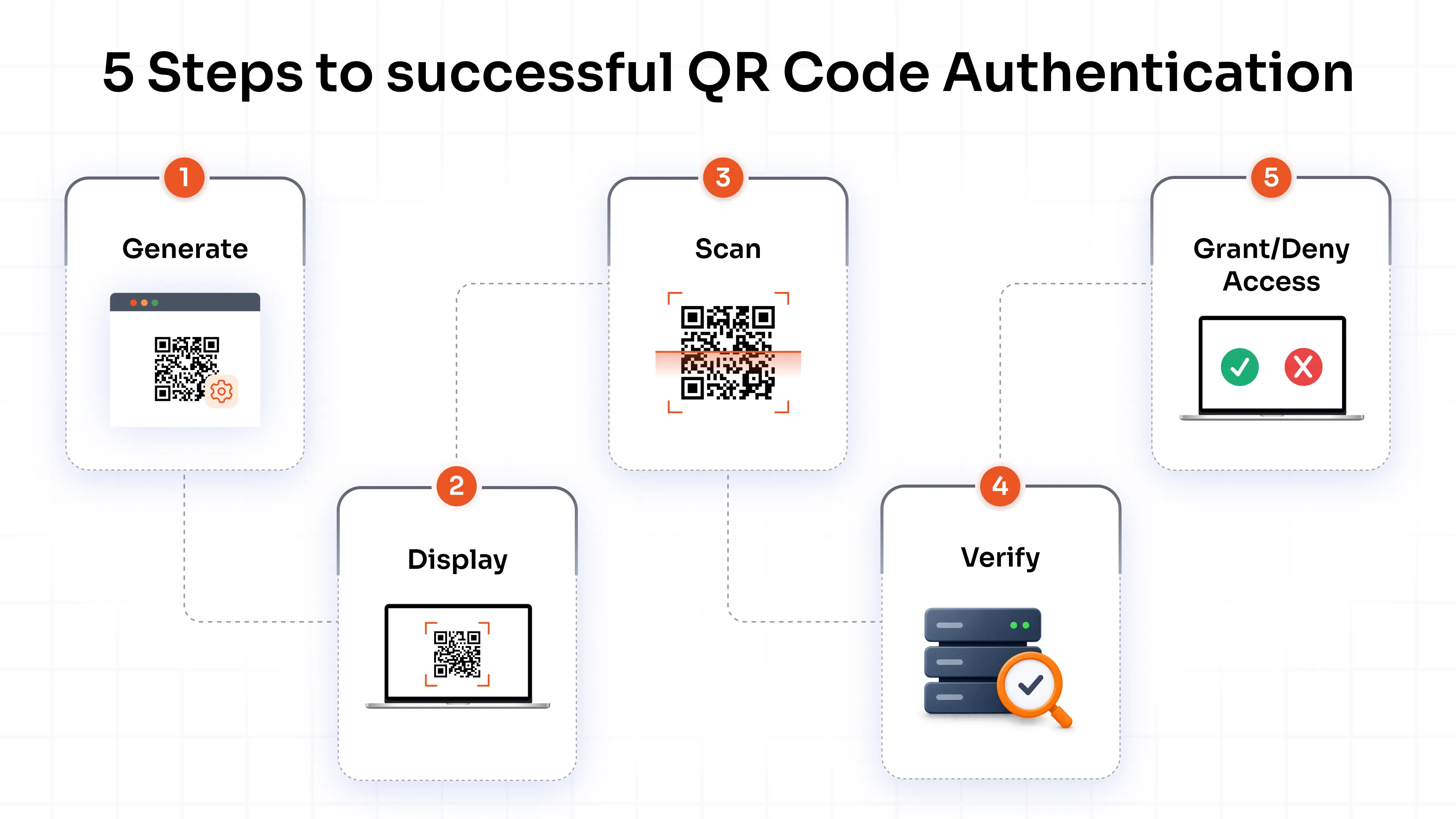
1. Generate: The authentication service creates a unique QR code tied to one pending login session.
2. Display: The code shows up in the application, browser, desktop, or kiosk, and the page keeps checking the server for a result.
3. Scan: The user scans it with a phone camera or authentication app. The app reads the session reference and contacts the server over a secure connection.
4. Verify: The server confirms the session exists, hasn't expired, and hasn't been used. The phone may ask for a PIN or biometric first. This QR code verification step is where the system decides whether to trust the phone.
5. Grant/Deny Access: The server approves or rejects the request, and the waiting screen signs the user in or shows a failure.
Modern implementations keep the code short-lived and specific to one session. It carries an opaque reference to a login attempt instead of a reusable credential, so a photo of it is worth little once it expires.
Also note that scanning and approving should be two separate steps. Some products complete the login the moment the phone reads the code. A confirmation screen is safer, because a scan only proves a camera was pointed at a screen. The better ones show the application name and requesting device before the user taps approve.
What Are the Different Ways QR Codes Are Used for Authentication?
Four patterns cover most deployments. They look alike on screen and behave differently underneath.
1. QR code login: The user scans a code displayed on another device and signs in without typing credentials. Messaging apps use it to link desktop clients, and workforce portals use it on shared screens.
2. QR code for MFA: The code either links an authenticator app during setup or approves a login as the second step, depending on the product. QR code 2FA usually means one of these two.
3. QR code passwordless authentication: The phone holds the credential. In the standard cross-device passkey flow (FIDO calls it hybrid transport), the laptop shows a QR code, the phone scans it, and a Bluetooth check confirms the two devices are close together. The phone then signs the login with a key that never leaves it.
4. QR Code account/identity verification: A QR code can confirm a payment, a visitor pass, or a document check in systems built for it.
Enrollment and login are separate jobs, and mixing them up causes real mistakes. At enrollment, the authentication QR code carries a shared secret, the seed behind every future one-time code, so anyone who photographs it can clone the authenticator. A login QR code carries only a short-lived session reference. Treat the first like a password and the second like a ticket stub.
Is QR Code Authentication Secure?
QR code authentication can be secure when the system behind it applies the right controls. Anyone with a camera can read a QR code, so protection has to come from what surrounds it:
- Short-lived sessions: codes expire within seconds or minutes
- Single-use codes: a used code gets rejected
- Secure communication: encrypted channels between phone and server
- Session binding: approval tied to the browser or app that displayed the code
- Origin verification: the phone shows which site or app is asking
- User verification: a PIN or biometric on the phone
- Replay protection: captured responses get rejected
- Fake code defenses: apps and users check the destination before approving
Dynamic vs. Static QR Codes
In most enterprise cases, dynamic QR codes are the right choice for authentication. Because each code is generated for one single login attempt and expires quickly.
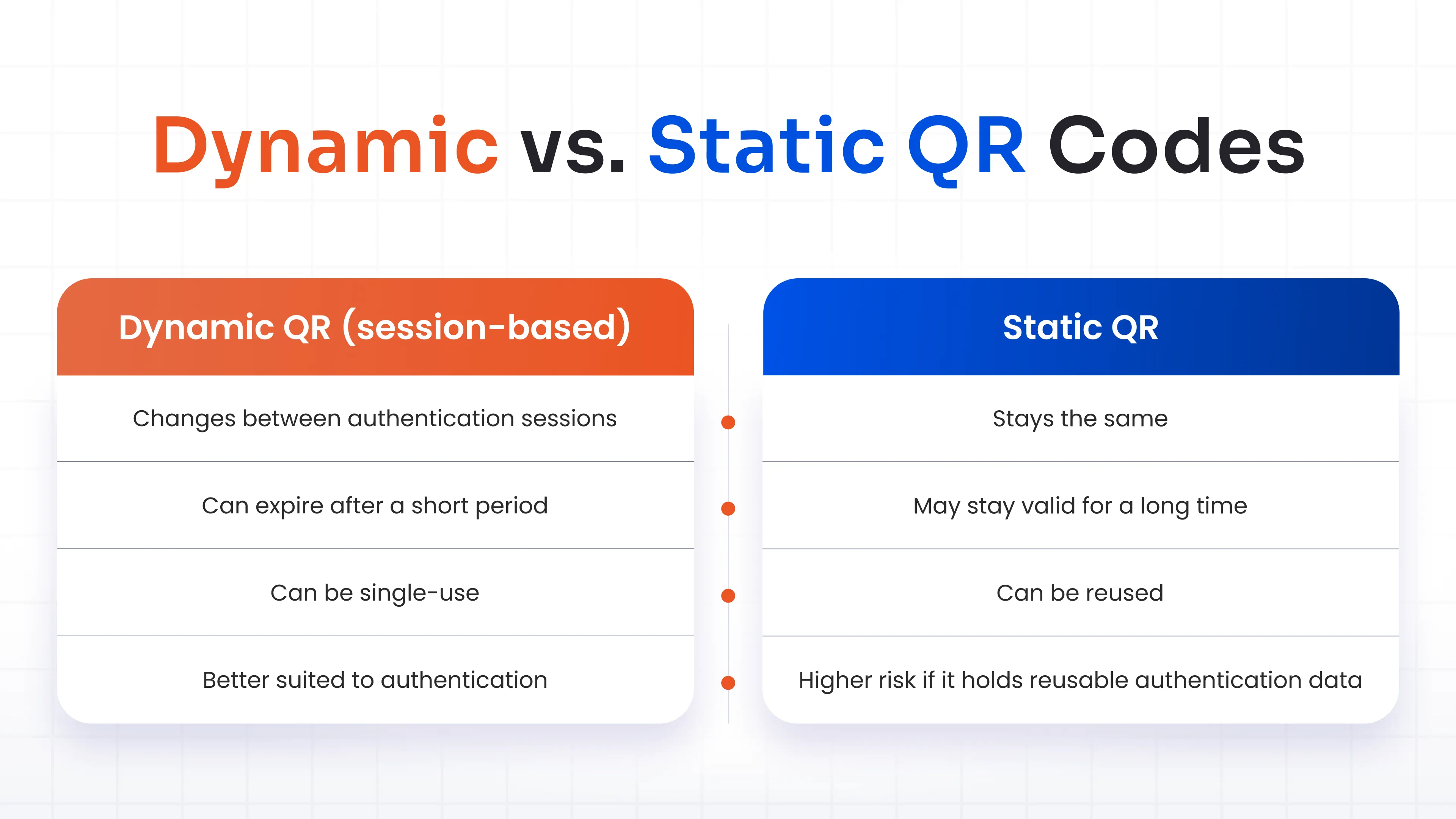
A static code may be acceptable for non-authentication uses such as Wi-Fi sign-in, restaurant menus, or printed posters, but it should never contain a reusable credential, enrollment secret, or long-lived access token.
A Security Note:
QR codes can be phished as well. Its security depends on implementation. A fake code on a poster or in an email sends users to a fraudulent page. A real login code can be relayed too: the attacker opens a genuine sign-in page, copies its QR code onto a lookalike page, and waits for the victim to scan and approve.
A real-world example is the PoisonSeed phishing campaign reported by Expel in 2025. Attackers used the fake corporate login portal to initiate a legitimate cross-device authentication flow, then displayed the resulting QR code to the victim. If the victim scanned it, the flow would have attempted to approve the attacker’s login request. The campaign did not break FIDO2 itself; it tried to abuse the cross-device sign-in feature instead.
The attack also shows why proximity matters. In a properly implemented FIDO cross-device flow, Bluetooth forces the phone to sit physically near the screen that displays the code, so a code relayed from far away fails. Expel later clarified that the attempted attack would have failed without the proximity, because the cross-device authentication request would time out.
Some QR login products skip that check. Ask your vendor whether it's there, and what the phone shows the user before approval.
What Are the Benefits of QR Code Authentication?
The benefits of QR code authentication are practical and show up on both sides of the login screen.
Users get faster, simpler sign-in. There's no password to type, remember, or reset, and the phone they already carry works across laptops and kiosks. That makes it a natural fit for QR code passwordless authentication.
IT teams get fewer reset tickets and fewer credentials worth phishing. QR sign-in also connects with existing MFA and SSO, so it becomes one more option in the policy. Shared workstations and frontline roles gain the most. A nurse or a warehouse picker signs in with a phone in seconds, with no password typed on a shared keyboard.
A FIDO2 hardware key still sets the bar for phishing resistance. QR sign-in earns its place in factors of convenience and reach.
What Are the Risks and Limitations of QR Code Authentication?
The weak points sit in people, phones, and design choices.
Attackers stick fake codes over legitimate posters and drop them into emails. Microsoft's Q1 2026 email threat report recorded a 146% rise in QR code phishing. A phone scan also steps outside the email and endpoint filters that protect a workstation, particularly on a personal device.
The most common failure is a user approving a prompt they didn't start. Never scan an unexpected QR code or approve an authentication request you didn't initiate. Put that rule on the approval screen and in onboarding, next to the app name and device.
Everything rides on one device. A lost, dead, or broken phone locks the user out, and a scratched camera or harsh sunlight can block the scan. Most QR login flows also need the phone to reach the server, so a weak signal stops them.
Poor design adds its own problems. A static code that embeds reusable data is a flaw, whatever users do. Some people can't scan at all, because of a disability or a no-phones rule on the floor. Every deployment needs a secure fallback such as a hardware token or backup codes, held to the same standard as the main method, since attackers like the weakest path.
How Can Organizations Implement QR Code Authentication Securely?
Think of the rollout as six moves: assess, choose, configure, secure, pilot, and monitor.
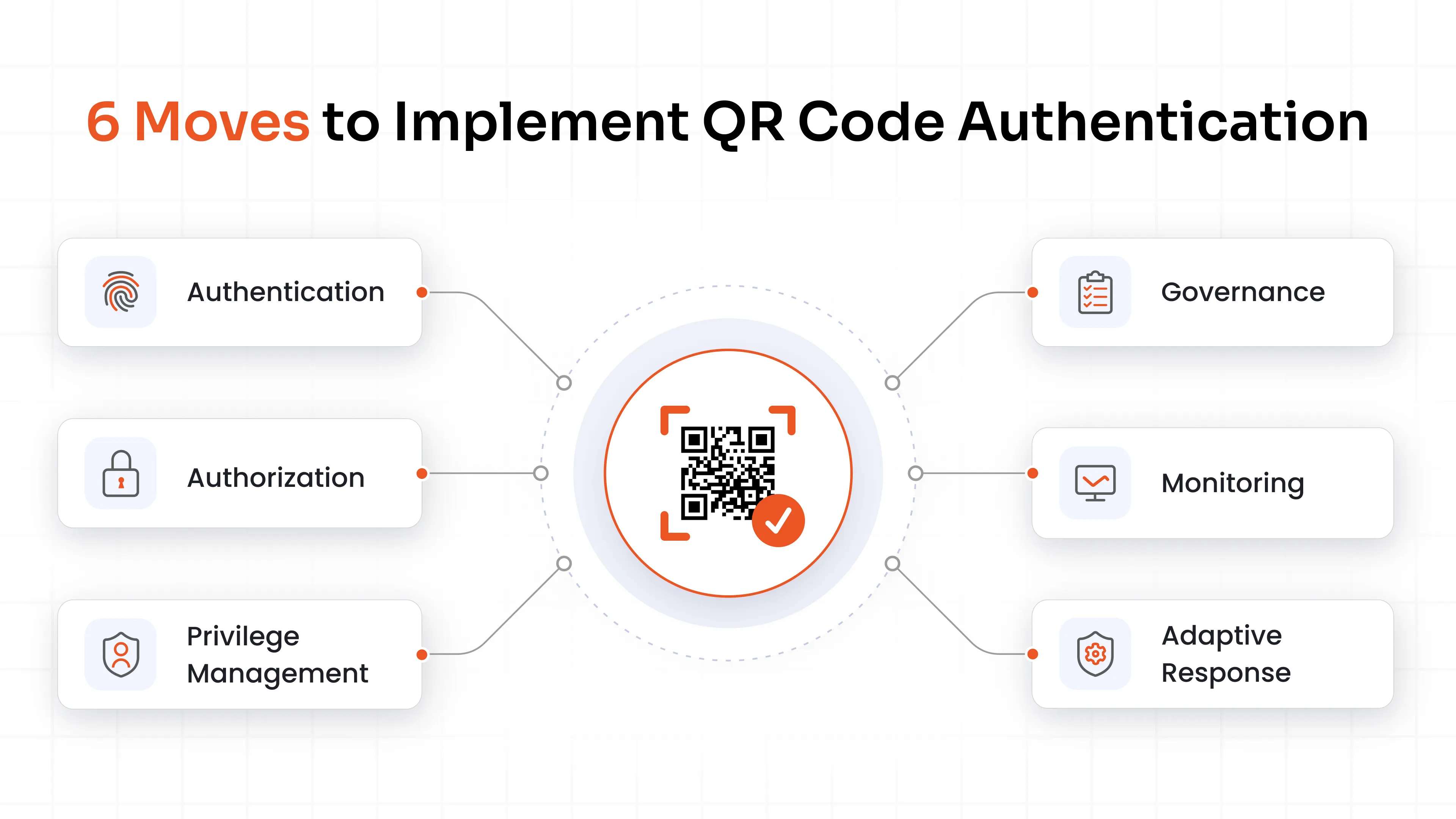
1. Assess: List the applications and user groups where QR sign-in fits, such as shared workstations and frontline staff. Leave the highest-risk admin access for later.
2. Choose: Pick session-based QR authentication and confirm the vendor binds each request to the right session and application. Reusable credentials inside the code are a deal-breaker.
3. Configure: Connect it to your existing IAM, SSO, and MFA setup so policy lives in one place. Set short code expiry and session limits.
4. Secure: Require a PIN or biometric on the phone where the risk calls for it, and make the approval screen show the app and device. Set up a fallback method for users without a phone.
5. Pilot: Test with one team on the phone models and lighting conditions your people use, and teach them about malicious codes before launch.
6. Monitor: Log every authentication event. Alert on repeated failures and approvals from unusual locations, and review any cross-device sign-in nobody asked for.
Where Is QR Code Authentication Used?
Workforce teams use QR code login on shared workstations, hospital carts, and factory terminals, where typing a password on a shared keyboard is slow and risky.
Passwordless application login and step-up authentication are the other common fits: a user attempts a sensitive action, gets a QR prompt, and approves it from a phone.
Customer-facing apps use the same pattern for account login on a TV or kiosk and for confirming payments or other transactions. Physical access and visitor management use QR passes scanned at gates and reception desks.
The security model changes with each of these. A visitor pass carries different risks than a cross-device passkey sign-in, so ask what the code contains, how long it lives, and what the phone proves before copying a pattern from one user to another.
How miniOrange Supports QR Code Authentication
QR sign-in works best as one option inside a wider authentication policy, and miniOrange is built that way.
The miniOrange Authenticator app supports QR code authentication and push notifications. The platform adds FIDO2, passkeys, hardware tokens, smart cards, and one-time backup codes, which cover the fallback gap discussed earlier.
Policies decide who gets which method. Risk-based authentication can require a stronger step when the location or device looks unusual, and the single sign-on solution carries the verified session across your applications, while the MFA software covers MFA for VPNs, Windows MFA logons, RDP and VDI sessions, and you can deploy in the cloud or on your own servers. Everything is managed centrally, so QR code authentication becomes one policy setting.
Conclusion
QR code authentication turns a phone into the credential holder and a QR code into a short-lived link between two devices. It works best with session-based codes, a clear approval screen, proximity checks where the standard offers them, and a fallback for anyone who can't scan.
Start where it saves the most time, such as shared workstations. Pilot it, log what happens, and keep a stronger method in reserve for your highest-risk access.
FAQs
Is QR code authentication secure?
It can be, when codes are short-lived and single-use, tied to the session, and approved on a phone with a PIN or biometric. A static code holding reusable data is risky. Security depends on the implementation, and users should approve only requests they started.
QR codes vs. SMS codes: which is more secure for authentication?
SMS codes travel over carrier networks, where SIM swapping and interception are well documented. A well-built QR flow avoids that path. Its strength still depends on session design, and a FIDO2 key or passkey with proximity checks is stronger than both.
Does QR code authentication work offline?
Most QR login flows need the phone to reach the authentication server, so they stop without a connection. Time-based codes from an authenticator app can still work offline after enrollment, and hardware tokens or backup codes cover weak-signal locations.
Do QR codes collect my personal information and data?
The code usually holds only a session identifier. The system behind it may log device type, IP address, approximate location, and timestamps. Check the vendor's privacy policy for what it collects and how long it keeps it.
How do I get a QR code for an authenticator?
Install an authenticator app, then open the security settings of the account you're protecting and choose the authenticator app option. The service shows a QR code, sometimes with a text key. Scan it, and the app starts generating codes. Don't share a screenshot of it.
Can QR code authentication be phished?
Yes. Fake codes can lead to fraudulent pages, and attackers can relay a real login code to a victim through a lookalike page. Proximity checks, clear approval screens, and a habit of rejecting requests you didn't start reduce the risk.
What is the difference between QR code authentication and QR code-based MFA?
QR code authentication is the broad method: a QR code starts or completes a login. QR code-based MFA uses it as one factor, or as the setup step for an authenticator, alongside a password or another factor. The first can replace the password. The second adds to it.
Can QR code authentication be used for passwordless login?
Yes. In cross-device passkey sign-in, the laptop shows a QR code, the phone scans it, and the phone signs the login with a key that stays on the device. A biometric or PIN on the phone covers user verification.
What happens if I lose the phone used for QR authentication?
Use the fallback your organization set up: backup codes, a hardware token, or an admin-assisted reset after identity checks. Then remove the lost device from the account and enroll a new one. Report the loss quickly, since a stolen phone with no screen lock can approve logins.


Leave a Comment