

Privileged session isolation is a security approach that separates a privileged user from the target system by routing the session through a controlled Privileged Access Management (PAM) gateway instead of allowing a direct connection. This prevents direct connections to critical systems, reducing the risk of malware and unauthorized access to sensitive data.
The PAM gateway authenticates the user, evaluates access policies, retrieves administrative credentials from an encrypted vault, and establishes an isolated session to the target on the user's behalf.
Traditional network defenses like VPNs aren’t enough, as they grant broad network-level access, giving users a direct pipe into your core infrastructure.
Session isolation in cybersecurity addresses this by creating a secure buffer zone. The user never gets to the underlying admin password or SSH key. All clicks and actions are routed through the proxy. In case a malware infection compromises the admin's local laptop, the proxy prevents that malware from hopping onto your core production network.
With privileged access management session isolation, your security team gets a controlled point for privileged session management. The architecture enforces zero-standing privileges, applies real-time policy checks, and terminates risky behavior before damage occurs.
Why Is Privileged Session Isolation Important?
Providing direct admin access creates many security risks. Isolation does not eliminate every risk. But it gives you a controlled point between the user and the sensitive resource. Here are some of the key reasons to use it.
Prevent Credential Exposure
When users log into production systems directly, passwords and private keys are stored on local endpoints or traverse network segments. Attackers get their hands on these secrets using keyloggers, memory dump tools, or man-in-the-middle attacks.
PAM session isolation removes credentials from the endpoint completely. The PAM proxy automatically injects encrypted credentials directly into the proxy session. Users complete administrative tasks without ever knowing the actual password.
Reduce Lateral Movement
Once an attacker gets in, they try to move laterally. They scan the local network for reachable RDP or SSH ports to compromise connected servers.
With isolated privileged sessions, target systems do not accept direct traffic from user endpoints. Target servers only accept connections initiated by the designated PAM gateway. This air-gapping halts lateral movement in its tracks.
Control Privileged Activity
Unrestricted root or admin access allows users to execute high-risk commands or alter system configurations. Session isolation enables granular command filtering and application controls. You can restrict specific terminal commands and limit administrative users exclusively to approved tasks.
Detect Suspicious Activity
A user may successfully authenticate and still behave in a way that does not match their normal activity. You can also integrate privileged user behavior analytics to identify abnormal activity patterns and flag high-risk behaviors instantly.
Support Compliance and Forensics
Regulatory frameworks such as ISO 27001, SOC 2, PCI DSS, HIPAA, and RBI guidelines demand complete auditability of privileged access.
Session isolation automatically records full visual sessions (RDP, VNC, web apps) and text logs (SSH, databases). Every keystroke, mouse movement, and executed query is time-stamped and tied directly to a verified individual identity.
Terminate High-Risk Sessions
With session isolation and monitoring, you can watch privileged activity in real time. Combined with AI-powered anomaly detection, session isolation enables automated or manual intervention. If you spot anything suspicious, you can terminate the session then and there.
How Does Privileged Session Isolation Work?
Privileged session isolation follows a structured, multi-step proxy workflow.
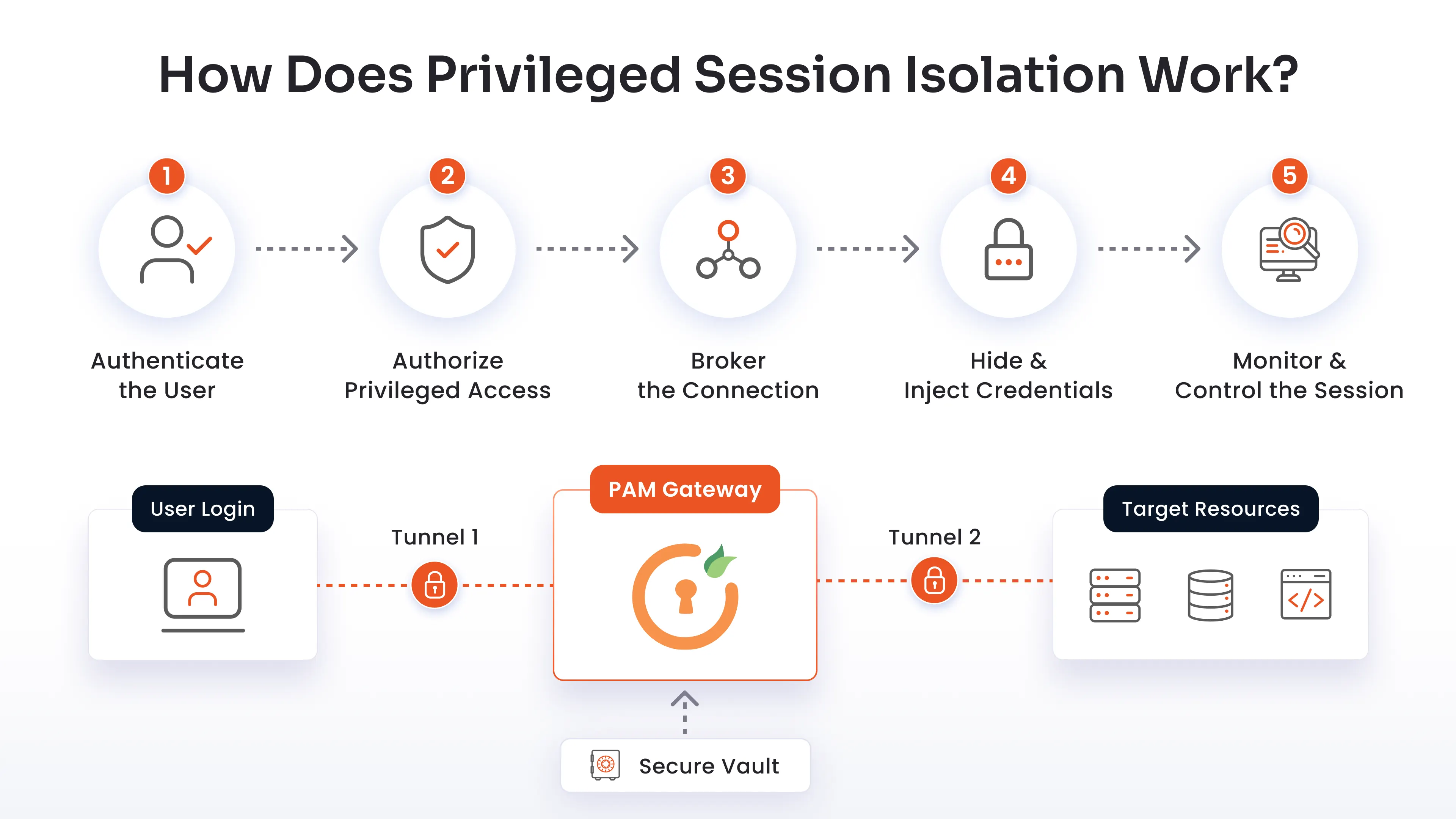
Step 1: Authenticate the User
The user authenticates through a central PAM gateway. The system enforces strong identity verification using Single Sign-On (SSO) and Multi-Factor Authentication (MFA). This ensures that only verified users can request administrative connections.
Step 2: Authorize Privileged Access
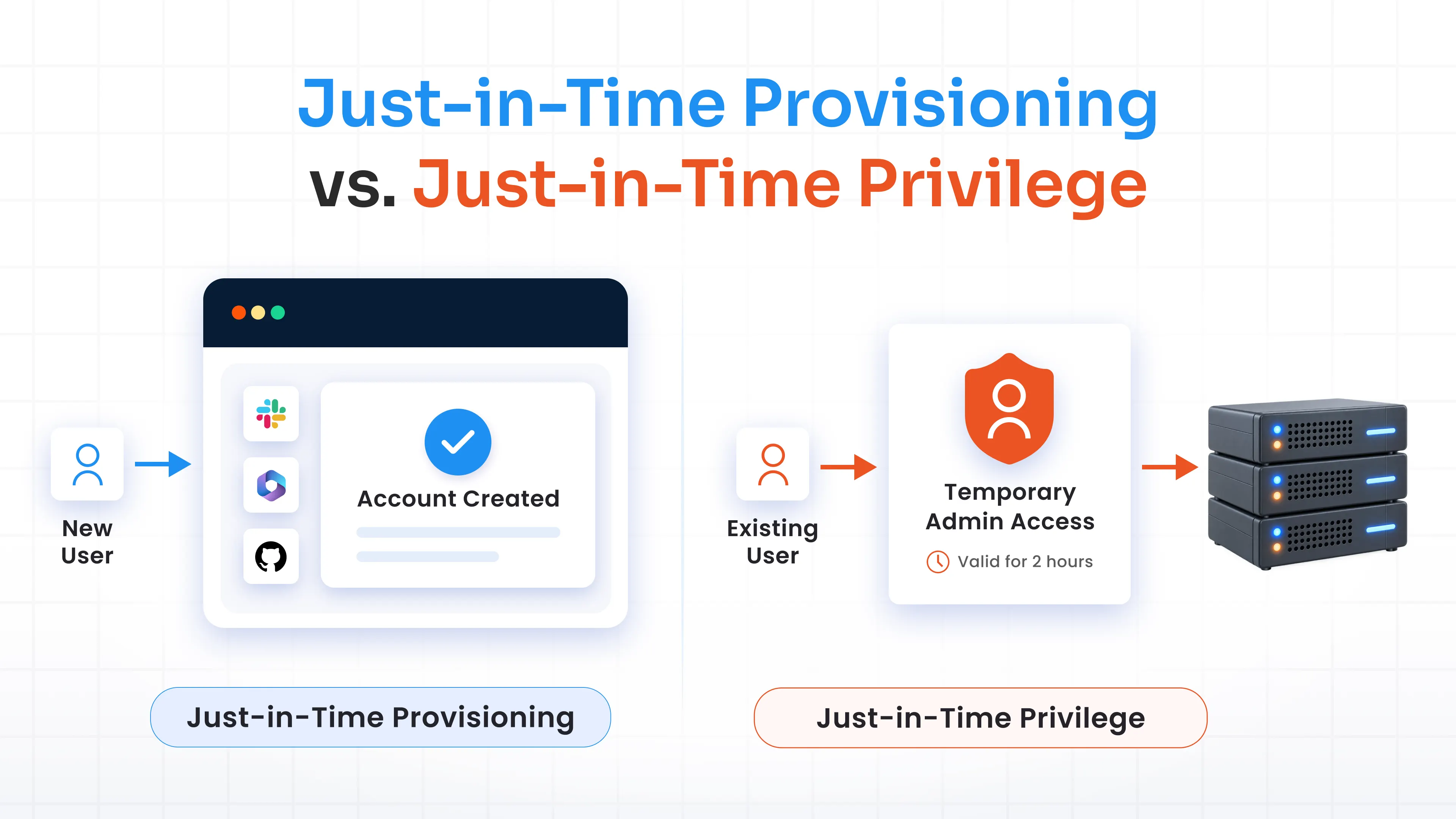
Once authenticated, the PAM policy engine evaluates the user’s access rights. The system applies Role-Based Access Control (RBAC) and Just-In-Time (JIT) access policies. If the request requires approval, an automated workflow notifies administrators. Access is granted only for the approved duration and specific resource scope.
Step 3: Broker the Connection
Instead of opening a direct RDP, SSH, or database connection from the user's device to the target, the PAM gateway brokers the connection. The gateway establishes two separate network tunnels:
- A connection between the user's browser/client and the PAM proxy.
- A separate, isolated connection between the PAM proxy and the target resource.
The user endpoint never connects directly to the production resource or IP segment.
Step 4: Hide and Inject Credentials
The user never enters or sees the target server's root password or administrative secret. Instead, the PAM gateway retrieves the necessary credentials from an encrypted enterprise vault. The proxy automatically injects these credentials into the secondary tunnel to establish the session.
Because credentials remain hidden and rotated regularly, credential theft becomes virtually impossible.
Step 5: Monitor and Control the Session
Throughout the active session, all traffic passes through the PAM proxy. You can monitor it in real time. If you find anything suspicious, you can terminate the session.
Session Isolation vs Direct Privileged Access
To understand the value of session isolation security, consider how it compares with legacy direct access models:
| Security Feature | Isolated Privileged Session | Direct Privileged Access |
|---|---|---|
| Connection Model | PAM proxy brokers separate, dual connections | User connects directly to the target system |
| Credential Visibility | Credentials remain hidden in vault and injected automatically | Passwords/keys exposed to user and stored on endpoints |
| Session Monitoring | Real-time visual recording, text indexing, and live streaming | Minimal or passive system logging |
| Session Control | Instant central session pause, kill, or command blocking | Difficult or slower to terminate active sessions centrally |
| Lateral Movement Risk | Eliminated; target assets do not accept direct endpoint connections | High; compromised endpoints can probe target networks |
| Policy Enforcement | Granular, real-time RBAC, JIT, and command-level restrictions | Hard to enforce granular in-session policies |
Privileged Session Isolation Use Cases
Privileged session isolation can be deployed across multiple areas in your organization.
Remote Server Administration
IT administrators frequently access critical Linux and Windows servers over SSH and RDP. Without isolation, an admin's compromised laptop could leak root keys or introduce malware directly into server subnets.
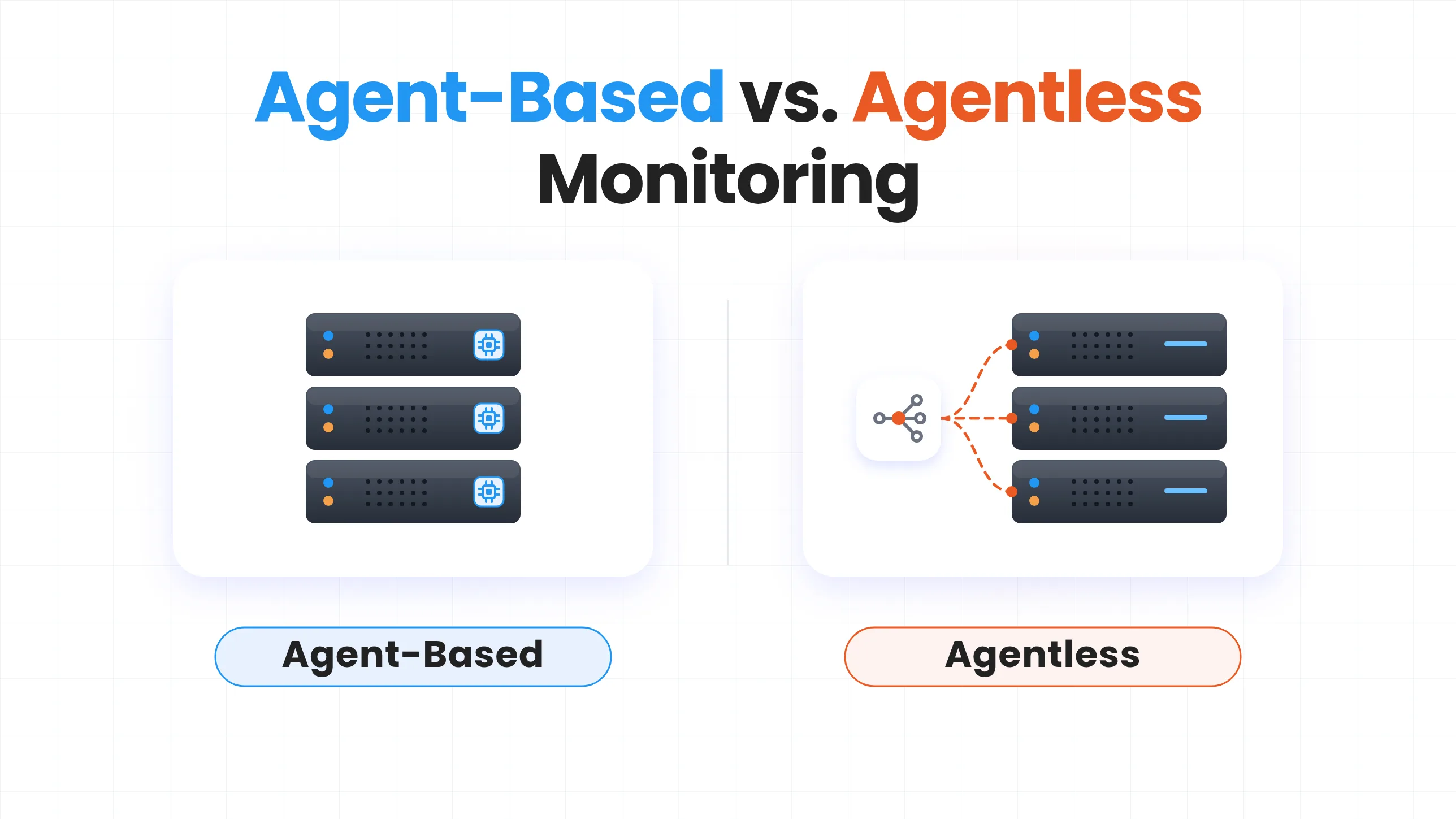
With proxy-based session isolation, SSH and RDP traffic pass through an agentless gateway. Admin users interact through a secure browser window or desktop client without local credential storage. For SSH environments, SSH session monitoring provides additional visibility into commands and activity during privileged sessions.
Database Administration
Database administrators (DBAs) handle sensitive data. When they connect directly to databases, the risk of unmonitored data exfiltration or DROP queries increases.
Proxying database connections (e.g., MySQL, PostgreSQL) allows security teams to inject credentials dynamically, monitor raw queries in real time, and block dangerous operations before execution.
Cloud Infrastructure Access
Managing hybrid and multicloud environments, such as AWS, Azure, and GCP, requires administrative access to cloud consoles and command-line interfaces (CLIs). Session isolation proxies broker access to web applications and cloud consoles, preventing persistent admin sessions and enforcing short-lived, time-bound privileges.
Third-Party Vendor Access
External vendors and contractors often need privileged access. However, granting them standing credentials or VPN access is risky.
With session isolation, you can give them temporary, tokenized access links. They perform work inside a monitored browser session without receiving network access or seeing production passwords.
You can also use session collaboration to join live vendor sessions, supervise actions in real time, and collaborate on complex tasks.
Critical Infrastructure and OT Environments
Operational Technology (OT) and Industrial Control Systems (ICS), such as PLCs, SCADA servers, and HMIs, require a higher level of protection. Direct IP access to OT networks risks operational disruptions. Session isolation provides a controlled jump point over SSH, RDP, or Telnet protocols, ensuring rigid policy control over critical plant assets.
How PAM Enables Privileged Session Isolation
Session isolation works best when it is part of a broader privileged access strategy. That brings together the core components needed to enforce session isolation across your infrastructure.
miniOrange PAM brings several of these capabilities together within its privileged access platform. It has all the features you need, including secure gateway-based access, credential vaulting, JIT access, session monitoring, recording, anomaly detection, and active session controls.
Implementing privileged account and session management with miniOrange PAM is straightforward. You do not have to replace your entire environment.
1. Identify Privileged Users and Assets: Map out all administrative users, contractors, databases, servers, OT devices, and cloud portals across your enterprise.
2. Centralize Privileged Credentials: Import credentials into the enterprise vault and configure automated password rotation policies.
3. Define Access Policies: Establish Role-Based Access Control (RBAC), enforce MFA, and set up Just-In-Time (JIT) request workflows.
4. Broker Privileged Connections: Configure the miniOrange PAM gateway to proxy all inbound administrative connections, cutting off direct endpoint access.
5. Monitor and Record Sessions: Enable real-time session streaming and video recording across active sessions.
6. Respond to Risky Activity: Configure automated alerts, command controls, and session termination rules to respond to threats quickly.
FAQs
How does session isolation work in PAM?
Session isolation in PAM places a controlled layer between the user and the privileged resource. The PAM solution authenticates and authorizes the user, brokers the connection, uses vaulted credentials without exposing them, and monitors the resulting session.
With miniOrange, privileged connections are brokered through the PAM gateway rather than connecting the user directly to the endpoint.
What is the difference between session isolation and session monitoring?
They address different parts of the security problem.
- Session isolation controls the connection between the user and the target system. It can keep privileged credentials hidden and route access through a PAM gateway.
- Session monitoring focuses on visibility into what happens during that connection.
You can use both together. Isolation gives you a controlled access path. Monitoring gives you visibility into activity on that path.
Does session isolation hide privileged credentials?
Yes, a PAM implementation can keep privileged credentials hidden from the user.
miniOrange stores privileged credentials in its vault and uses them to establish brokered sessions without revealing the credentials to the user.
This reduces the need to share privileged passwords or private keys with administrators and vendors.
Can session isolation prevent lateral movement?
It can help reduce lateral movement risk by limiting direct access paths to privileged resources and placing privileged connections behind a controlled gateway.
However, session isolation should not be treated as a complete solution for lateral movement. You should combine it with appropriate access controls, least privilege, authentication, monitoring, and other security controls.
Can PAM isolate RDP and SSH sessions?
Yes. miniOrange Privileged Session Management supports monitoring and recording of privileged SSH and RDP sessions. Its proxy-based access model brokers privileged connections through the PAM gateway.
This gives your security team greater visibility and control over remote administrative access.
Is session isolation the same as a jump server?
Not exactly. A jump server or bastion host can provide a controlled point through which administrators reach internal systems. But privileged session isolation is a broader security approach.
Leave a Comment