Claude Governance & Access Control for Jira & Confluence

Block sensitive data when connecting Claude, ChatGPT, and any MCP client to Jira and Confluence, with granular allow/deny policies scoped to projects, spaces, and user groups enforced before every action, per-user identity, and a complete audit trail.
SAML Single Sign-on

Trusted by 3000+ customers across Atlassian Cloud & Data Center

Can You Safely Connect Claude to Jira & Confluence?

Yes, but only if you control what the AI can do once it’s connected. Connecting Claude to Jira and Confluence hands the model everything the user can reach. It can read every project and space that person can see, and act with every permission they hold, create, edit, delete. Claude Governance & Access Control closes that gap. Every request is checked against your allow/deny policy before it executes, runs under the real user’s own Atlassian permissions, and is logged to a named person.

Why Teams Choose miniOrange

100%
Audit Trail
1
Gateway for All AI Clients
24x7
Developer Support

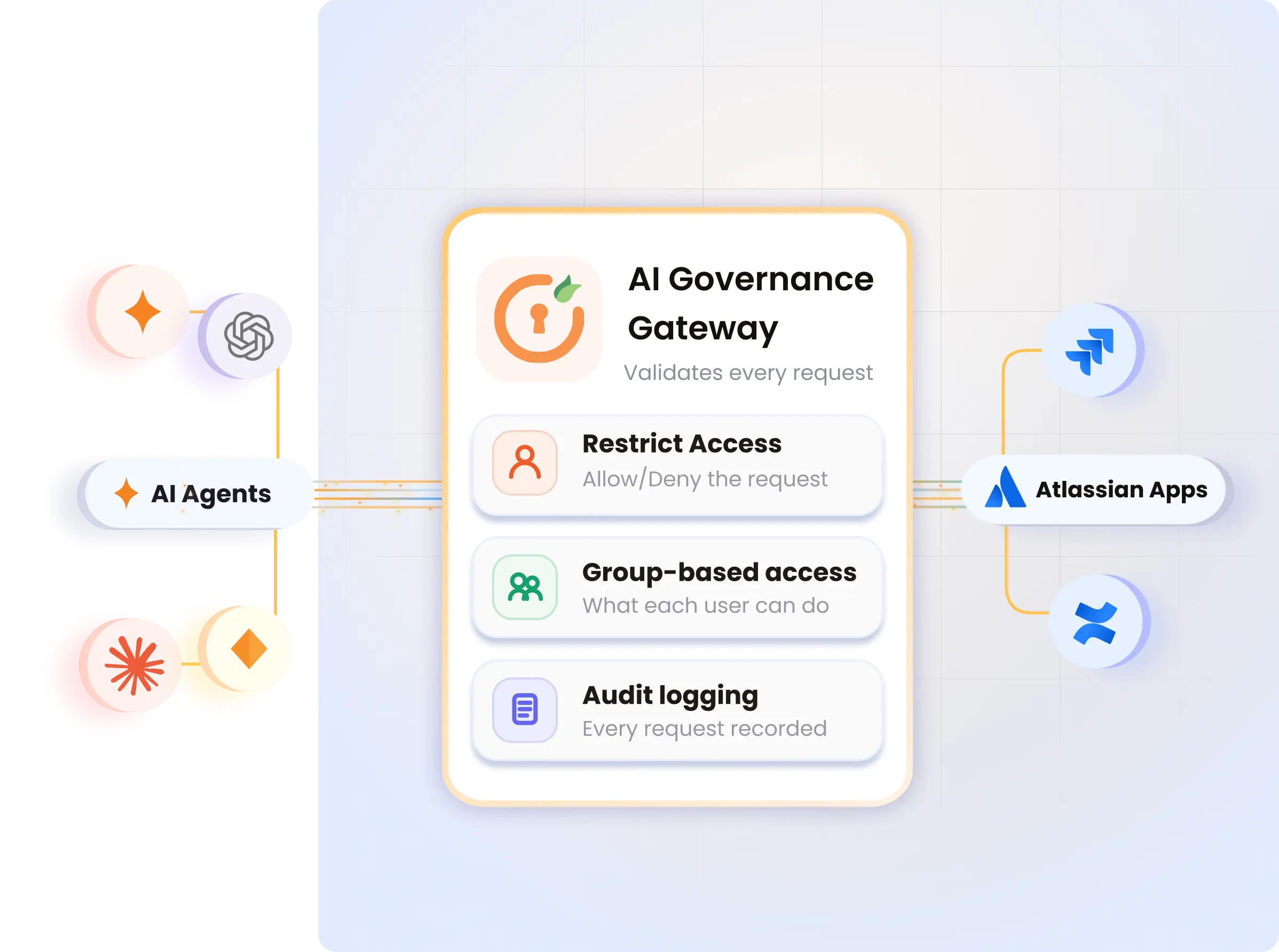
How the AI Governance Gateway Protects Your Teams

  • Keep sensitive projects off-limits to AI

    Scope rules to specific Jira projects or Confluence spaces. Denied projects are never retrieved, even for users who otherwise have full access.

  • Group-based governance and access policy

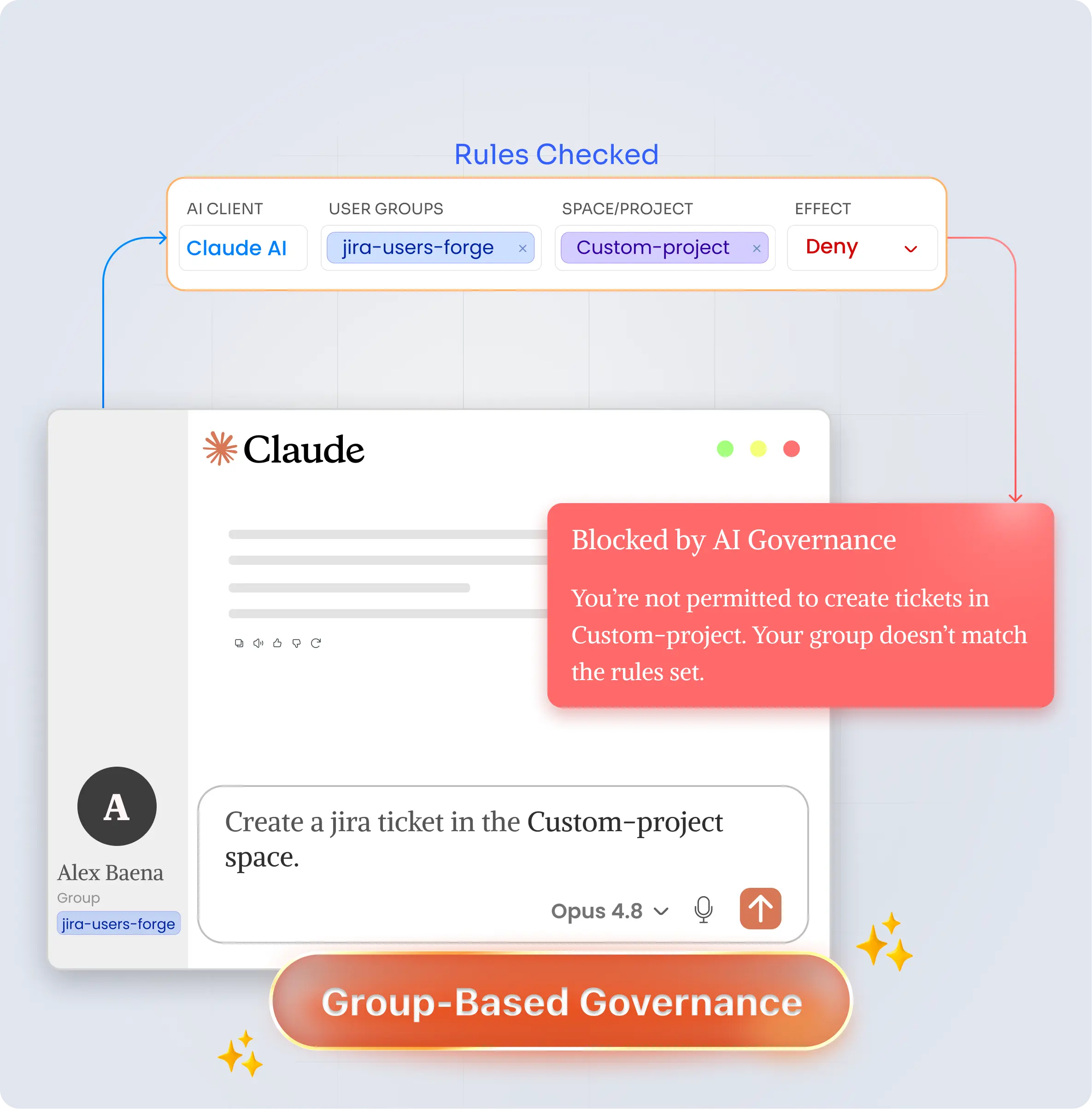
    Target rules to Atlassian user groups, admins, developers, contractors. Contractors can be read-only while admins keep full access, all from one policy set.

  • Blocked before any data leaves Atlassian

    Denied requests stop at the gateway before running. Data is never fetched, nothing reaches Claude. One rule, delete* → Deny, blocks every AI from deleting anything.

  • A complete AI audit trail

    Every action logged: user, AI client, tool, request arguments, matched rule, decision, response size, and latency. Fully searchable, with a detail panel per entry.

  • Runs 100% inside Atlassian Forge

    No external server to harden, no external database to breach, no third party in the path. Your governance and audit data never leave Atlassian’s trust boundary.

AI Governance policy blocking unauthorized Claude request

Claude Governance & Access Control Features for Atlassian Cloud

Enterprise-grade control over AI in your Atlassian stack, fine-grained policy, full visibility, and one consistent gate for every client.

Group-based access policy

Scope rules to Atlassian user groups (admins, developers, contractors). Define once and enforce permissions across the entire group.

Per-operation allow/deny rules

Wildcards like delete* or jira create* allow or block specific actions. First-match logic; changes apply on the next request.

Per-project and per-client scope

Restrict rules to specific Jira projects or Confluence spaces, and to specific AI clients. Target exactly the surface you want to govern.

Searchable activity log

Filter by user, AI client, decision, or operation. Click any row for the full detail panel: arguments, matched rule, latency, and audit JSON.

AI activity dashboard

Track request totals, block rates, and top AI tools across Today, 7 days, or 30 days in a single view.

One gateway for every AI client

Claude, ChatGPT, and any MCP-compatible client pass through the same policies and the same log. A custom MCP option is available too.

How It Works: Connected in 5 Steps

Set up your AI gateway in minutes and securely route every AI request through governed, policy-driven access.

Step 1

Install

Search "Claude Governance & Access Control" on the Atlassian Marketplace. Pick your site.

Step 2

Lock the door

Allow the governed domain in Rovo. Disable native domains and route AI traffic through gateway.

Step 3

Copy URL

Copy your MCP server URL from the Getting Started page.

Step 4

Add to Claude

Open Claude → Settings → Connectors → Add custom connector. Paste the URL. Connect.

Step 5

Sign in once

Approve the Atlassian sign-in. The gateway ties every action to your identity and groups.

Try it

Ask Claude "Search my open Jira issues." Results mean the connection works end to end.

View the Full Setup Guide
miniOrange vs Atlassian

Comprehensive Feature Comparison

Enterprise-grade control over AI in your Atlassian stack, fine-grained policy, full visibility, and one consistent gate for every client.

FEATURES
miniOrange
Atlassian
Restrict AI to specific projects / spaces
Deny AI access to sensitive Jira projects or Confluence spaces, per rule
Yes
Yes
Yes
Yes
Yes
Yes
Yes
No
Group-based governance
Policies scoped to Atlassian user groups
No
Allow/deny per operation
Wildcards, first-match, deny-priority, applied instantly
No
Blocks risky actions before they run
Deny rules stop the request at the gateway
No
Per-user identity on every action
Runs under the user's own OAuth token
No
Complete, searchable audit trail
User, tool, arguments, rule, decision, latency
No
Runs inside Atlassian (no external infra)
100% Forge, no external server or database
Yes

Here's what our awesome customers say

quote icon

We have been using MiniOrange for a long time and are absolutely satisfied with it. It meets our requirements and expectations. When we noticed errors, support was able to help us a lot and find and develop a solution for us. Awesome!

Alexander Naumann

⭐ ⭐ ⭐ ⭐ ⭐
quote icon

We recently installed this plugin for our Jira and found the solution to be very straight-forward and efficient. The support team has been extremely helpful in setting it up and answering all subsequent questions in operating the plugin. Highly recommended!

Maria Grudinina

⭐ ⭐ ⭐ ⭐ ⭐
quote icon

miniOrange support helped us integrate the product! They were very responsive and very professional during the integration process, saved us a lot of valuable time!..

Bhaa Amasha

⭐ ⭐ ⭐ ⭐ ⭐

Frequently Asked Questions

Everything You Need to Know

Setup & Compatibility

Is it safe to connect Claude to Jira and Confluence?
Yes — when traffic goes through Claude Governance & Access Control. Every request is checked against your allow/deny policy before it executes, runs under the real user's Atlassian permissions, and is logged to a named person.
Do I need a paid Claude plan?
You need a Claude plan that supports custom connectors / MCP. The governance gateway itself installs from the Atlassian Marketplace on your Cloud site.
Can I use a custom MCP server instead of Rovo?
Yes. A custom MCP option is available so Claude, ChatGPT, and other MCP-compatible clients can pass through the same policies and the same audit log.

Security, Governance & Audit

Can I set different rules for different Atlassian user groups?
Yes. Scope rules to Atlassian user groups such as admins, developers, and contractors. Define once and enforce permissions across the entire group.
How do the allow/deny rules work?
Use wildcards like delete* or jira create* to allow or block specific actions. First-match logic applies; changes take effect on the next request.
What do the audit logs record?
Every action is logged with user, AI client, tool, request arguments, matched rule, decision, response size, and latency — searchable, with a detail panel per entry.
miniOrange Atlassian Contact Us

Book a Free Consultation with
Our Experts Today!

Schedule a call now!


Contact Us