

What is Automated User Provisioning?
Automation helps the user provisioning process, enabling the creation, modification, and removal of user accounts across multiple applications and systems through completely automated processes. Automation in user provisioning activates at three different points: employee onboarding, role transitions, and employee departure from the organization. It uses established rules that connect to HR events and IAM policies for activation. This enables immediate least privilege access rule deployment, which results in enhanced operational efficiency, reduced errors, and security protection.
Why Automated Provisioning Matters?
Automated user provisioning eliminates manual tasks like creating accounts, assigning permissions, and removing access, allowing IT teams to shift focus from repetitive work to more critical responsibilities. It strengthens security through immediate deprovisioning revoking access the moment an employee leaves while maintaining audit-ready logs for compliance. By ensuring accurate user data and reducing administrative burden, it helps organizations enhance security protocols, stay compliant, and scale efficiently, making automation an essential part of modern, security-first operations.
Key Benefits
1. Faster Onboarding & Offboarding
New employees receive their necessary tools through automated workflows, which activate on their first day of work and disable their access when they depart from the organization. The system maintains team productivity levels while it fights against insider threats.
2. Fewer Errors and Better Data Hygiene
Automation eliminates human errors that result in duplicate or outdated or incorrectly matched user records through its automated process. The organization requires clean data to establish suitable access rights for all its business applications.
3. Enhanced Security Posture
Automated provisioning helps organizations protect themselves from insider threats and unauthorized access through its implementation of least privilege access and its removal of unused accounts.
4. Stronger Compliance & Audit Trails
It tracks all provisioning and deprovisioning operations automatically through its tracking system which generates time-stamped records for enhanced audit processes and regulatory requirements.
5. Consistent User Experience Across Systems
It provides employees with instant access to all applications which include cloud apps and on-prem systems and SaaS platforms, without requiring them to submit IT requests.
6. Scalability for Growing Teams
The organization can manage rising user numbers through automated provisioning because it functions without needing extra administrative efforts.
7. Improved IT Efficiency and Morale
The automation of repetitive account tasks enables IT teams to dedicate their time to essential security projects which they would otherwise spend on performing manual cleanup operations.
8. Better Visibility and Access Governance
Centralized provisioning helps admins monitor active accounts, ensuring only the right users have access to sensitive data and systems.
How Automated User Provisioning Works?
Teams use automated provisioning to establish user access, which synchronizes identities across applications and eliminates manual setup work. The activation process begins when HR events detect organizational changes and trigger security workflows that handle account creation, modification, and deletion operations.
Lifecycle of a Provisioning Workflow
Automation runs on a scheduled workflow that manages user identities from the moment a user joins until they leave. It tracks every change during operations, enforces security controls, and stores a complete activity record to satisfy regulatory and internal audit requirements.
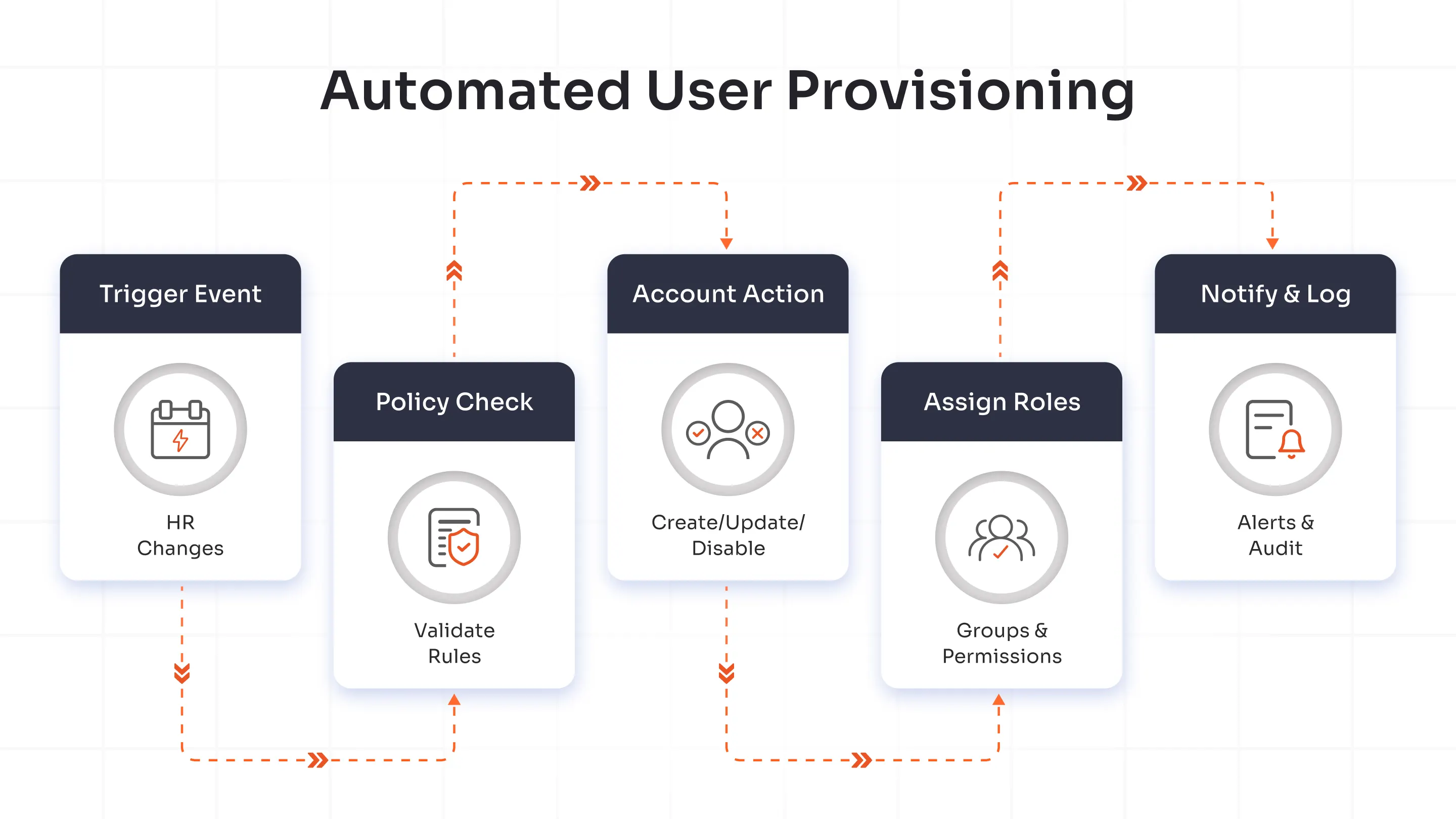
Trigger events
The workflow detects key events such as new hires, role changes, and terminations through integrations with HR systems and directories. It activates immediately so users receive the right access with no onboarding delays.
Policy checks
The engine evaluates user attributes against predefined rules, including role-based access controls and compliance requirements. It validates each requested action and blocks anything that would result in unauthorized access.
Account creation/deactivation
Automated workflows create or update accounts in target applications while also disabling access during offboarding. Real-time changes propagate consistently across cloud and on-premises systems.
Role and group assignments
Provisioning uses user profile data to assign groups and roles that drive access automation. It updates these assignments automatically when employees receive promotions or move between departments, without waiting on IT tickets.
Notifications & logging
The workflow sends alerts to relevant teams about successful actions and failures while it maintains detailed audit logs of every step. This visibility helps teams resolve issues quickly and strengthens operational transparency.
The flowchart shows the provisioning lifecycle: trigger events feed into policy checks, which drive account updates and role assignments, and the process finishes with notifications and centralized logging.
Core Features of Automated Provisioning Systems
| Feature | What It Does |
|---|---|
| Directory Syncing | Automated provisioning operates as a direct interface with enterprise directories, which include Active Directory and LDAP systems. It maintains system-wide consistency through real-time synchronization of user accounts, roles, and group memberships to prevent identity conflicts. |
| Role-Based Access | Access privileges are distributed automatically through predefined roles and user attributes. The least privilege access security principle protects system access while reducing the need for administrative tasks. |
| Approval Workflows | Automated approval functions direct access requests to specific managers or compliance officers for review. Policies run automatically to ensure all access modifications align with organizational security requirements and regulatory standards. |
| Self-Service Requests | Users have access to self-service portals that let them initiate access requests and start provisioning procedures without requiring IT assistance. Automated checks and approval workflows improve fulfillment speed and user satisfaction while allowing organizations to maintain operational control. |
JML Explained: Joiner-Mover-Leaver Lifecycle
The Joiner-Mover-Leaver lifecycle shows how the company handles user identities. The process begins when a new person joins the company. If the person moves to a new job within the company, the company updates their access. When the person leaves, the company takes away the access. If you make this process automatic, you get stronger security, better compliance, and more efficiency in the IT setup.
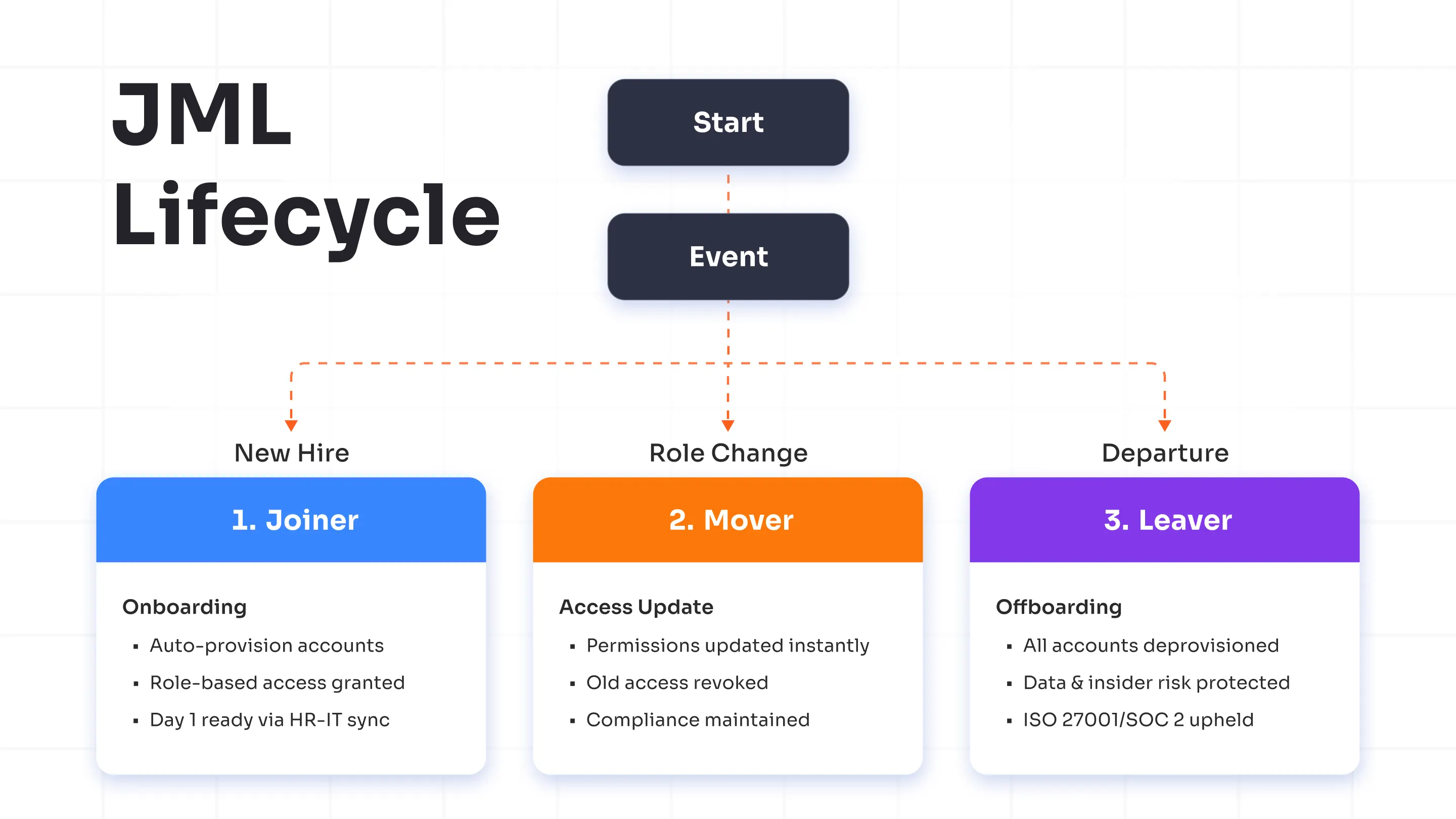
1. Joiner is a fast and safe way to begin.
When a new employee starts:
- Automated provisioning creates user accounts right away.
- It lets people use apps, systems, and tools based on the role each person has.
- HR works with IT. This helps work begin on the first day. People do not need to wait.
2. Mover – Dynamic Access Updates
- The access rights update themselves immediately.
- If you take away old permissions, the risk of over-privileged accounts gets lower.
- The access now fits the defined tasks and follows the regulatory compliance
3. Leaver – Safe and complete offboarding
- Automated de-provisioning removes all accounts and access at once.
- Complete offboarding keeps company data safe and stops threats from people inside the group.
- The compliance standards, such as ISO 27001 and SOC 2, remain.
A fully automated JML lifecycle helps with these steps:
- You can pick who can see or use each thing
- Reduce the security risks
- It was easy to get ready for the audit
- The user experience feels simple from the beginning to the end
Automated Provisioning vs Manual Provisioning
| Factor | Automated Provisioning | Manual Provisioning |
|---|---|---|
| Speed | Deploys user accounts and access instantly across multiple systems via predefined workflows. Saves hours or even days in onboarding and offboarding. | Relies on IT staff to create accounts and assign permissions manually. Slower response times, especially across multiple applications. |
| Accuracy | Reduces human error with rule-based automation and directory synchronization. Maintains consistent access rights across platforms. | High risk of typos, delays, or misconfigurations. Access rights often vary between users or departments. |
| Security | Automatically enforces least-privilege access, timely deprovisioning, and compliance policies. Enhances audit readiness. | Manual errors and oversight may leave orphaned accounts or excessive privileges, increasing security vulnerabilities. |
| Scalability | Scales efficiently as the organization grows. Easily handles hundreds or thousands of accounts without adding IT workload. | Becomes unsustainable with increasing users and applications. Requires proportional IT staffing. |
| Compliance and Auditability | Generates detailed logs for every provisioning action, helping meet regulations like GDPR, SOC 2, and ISO 27001. | Lacks centralized tracking, making compliance audits time-consuming and error-prone. |
| Integration | Connects seamlessly with HR systems, directories, and cloud applications using APIs and identity connectors. | Requires separate configuration for each system, slowing integration efforts. |
| Cost Efficiency | Lowers administrative overhead and security costs by eliminating repetitive manual tasks. | Increases labor costs and time spent fixing errors or handling repetitive administrative work. |
| User Experience | Enables faster onboarding and immediate access to required tools, improving productivity from day one. | Causes onboarding delays and frustration due to slow access provisioning. |
Where Automated Provisioning is Used?
Organizations use automated provisioning to manage essential business operations, which enables them to provide users with faster access while strengthening their security measures. The system enables users to establish new accounts, and they can also update or remove their current ones through automated triggers, which are activated based on HR system changes and employee role modifications.
Common Use Cases
Organizations implement automated provisioning for their essential operations because these systems require immediate and precise delivery of results. It reduces human labor, maintains organizational rules, and allows for growth without requiring additional resources.
HR System Integrations
The HR department uses Workday and SuccessFactors to automate system deployment for new employees during their onboarding process. The tool performs a data synchronization process that populates Active Directory and Microsoft Entra ID systems with employee information, thus enabling immediate access to email and all tools and applications without requiring IT intervention.
The HR system with automated provisioning enables real-time access permission management because it allows users to update promotion and transfer information. It enables the rapid onboarding of new users, which takes only minutes instead of days, while keeping all necessary rules in place.
Cloud Application Access
Users can access SaaS applications, including Salesforce and Slack and AWS, through SCIM protocols, which provide them with uninterrupted access. Automated provisioning uses HR or directory information to create application accounts, which receive their roles through attribute-based assignments such as department or location.
IT administrators stop ticket floods because their system handles multiple application provisioning tasks that connect between cloud and hybrid environments. It maintains its high security standards because it uses just-in-time access and automatic deprovisioning as its security features.
Contractor Onboarding
Organizations establish contractor relationships through automation because this approach allows them to expand their operations quickly while maintaining their business freedom from permanent workforce obligations. It retrieves vendor information from portals before it creates short-term access accounts on Jira and GitHub and VPNs and establishes these accounts to expire when contracts end.
Automated provisioning allows users to accept policies and manage permissions, which accelerates work operations while maintaining complete audit trail records. The offboarding process begins an instant process to eliminate access permissions when a project achieves its completion milestone.
Mergers & Acquisitions
The M&A process enables automated provisioning to merge identity systems between two companies through SCIM or API integration. It used bulk provisioning to move acquired users into the main IAM platform, which created a single access system that applied common policies to all applications.
To lower security risks, teams quickly remove duplicate accounts. IT system integration helps businesses stay compliant while they share data. The method helps organizations to speed up their post-merger integration process while they expand their operations.
Best Practices For Implementing Automated Provisioning
Organizations can automate provisioning through proper execution of their user access management systems and planning processes. These best practices will help you create a protected system that you can scale up.
Define Clear Roles and Access Policies
You need to start by making a list that shows all positions in your organization along with their necessary permission levels. Automated provisioning requires users to identify their access needs for particular systems that they need to perform their job responsibilities. It needs documentation of access policies, which must follow least privilege principles and stay compliant with established standards. Organizations need to define specific terms because this practice helps them avoid incorrect assumptions, which results in unnecessary resource expenditure and better system security protection.
Integrate Identity Sources
Your provisioning system needs to connect with all identity sources that have authorization power, including HR directories, Active Directory and cloud identity providers. It maintains environment data consistency through centralized integration, which also prevents duplicate user identities and ensures proper execution of user lifecycle events, including onboarding and termination processes.
Use RBAC or ABAC
Automated provisioning needs the activation of Role-Based Access Control (RBAC) or Attribute-Based Access Control (ABAC) to provide automatic permission distribution. RBAC enables organizations to handle complex access management through role-based permission organization yet ABAC provides flexible access control through departmental and location-based and job title-based attributes. The two models improve access automation through their enhanced operational efficiency, which provides equal policy enforcement for all users.
Plan a Staged Rollout
The implementation process needs to follow a step-by-step approach because it should not activate provisioning for all systems simultaneously. The process needs to start with non-critical systems and low-risk user groups to get feedback, which will help optimize automation rules. The staged rollout approach minimizes operational disruptions while it detects system configuration problems at the beginning and it helps organization members develop trust in the new system.
Future of Automatically Provisioned Identities
The future of identity management will function automatically because this represents its primary path of development. Organizations that span hybrid environments with shifting user bases require automated provisioning because their existing manual system fails to meet their expanding requirements. The automatic identity provisioning system allows organizations to establish secure identities at high speed, which results in both standardized identity management and decreased chances of human errors during the deployment process. Organizations that implement automation systems during present times will achieve better results in the future through their improved ability to follow regulations and their enhanced capabilities for user account management and faster system integration.
The automated system will achieve better performance through AI and machine learning, which will develop an intelligent provisioning system that operates based on real-time usage data and security rules. It operates as an intelligent identity management system, which performs automatic self-repair operations while upholding organizational standards for access permissions.
Your organization needs to implement miniOrange Automated User Provisioning because this solution enables automated identity lifecycle management, which removes all manual operation requirements. It operates an automated policy-based provisioning system, which functions properly to support your organization's expanding needs.
Schedule a demo for miniOrange Automated User Provisioning today.
FAQs
How do I set up automated user provisioning?
Link your identity system (Active Directory or HR application) with the provisioning service through SCIM or API access, then establish attribute connections and rules. Access the Provisioning section in the miniOrange Admin Console, add your source (e.g., AD connector) to map user attributes such as name/email/role, and activate AWS or Salesforce targets for testing with a pilot group before full rollout.
How does automated provisioning work with Active Directory?
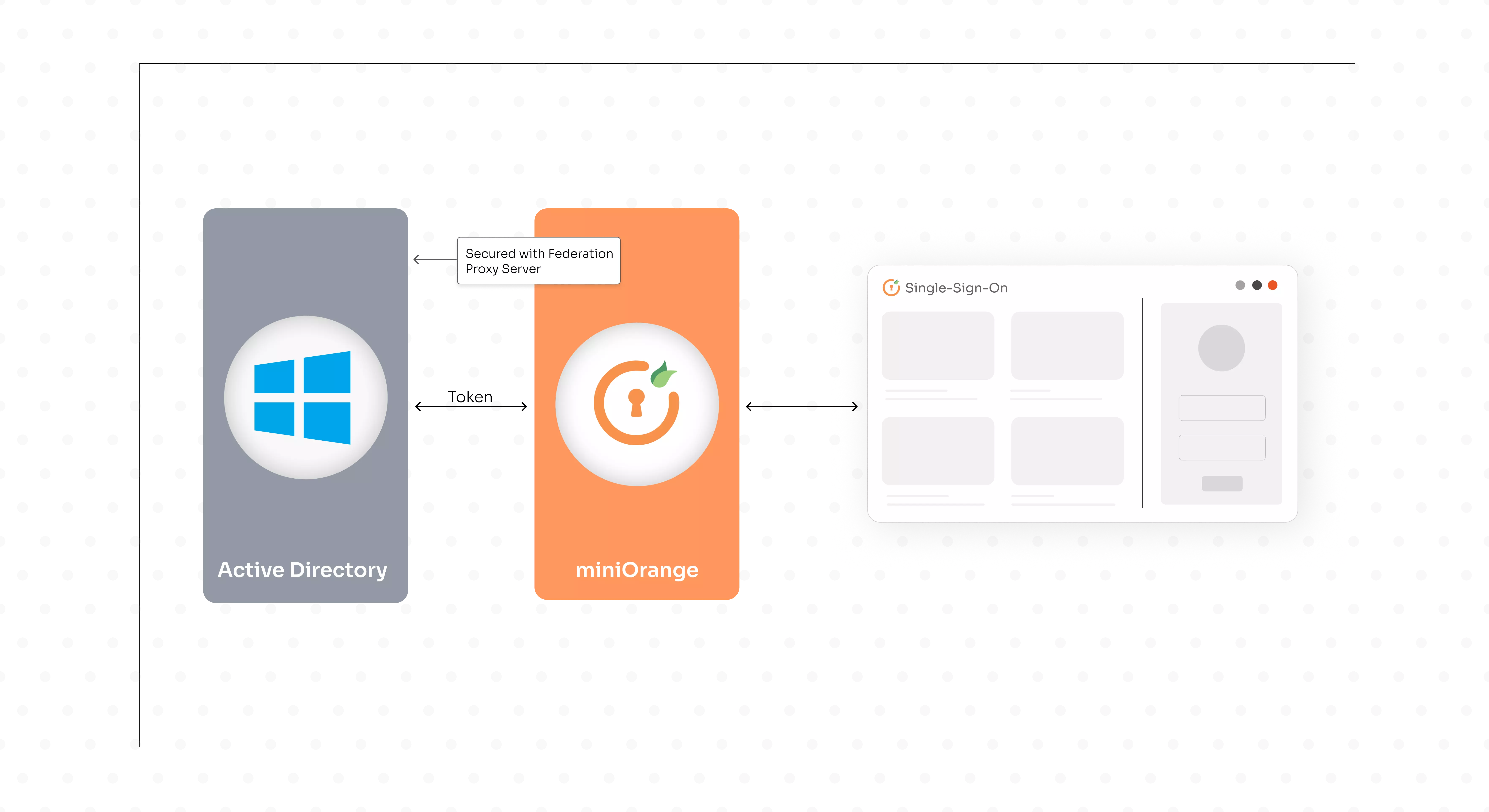
Automated provisioning uses Active Directory (AD) synchronization to transfer user modifications from AD into subsequent applications through connector-based application of AD query results for creates/updates/deletes. The miniOrange AD connector agent enables real-time user data retrieval, performs attribute and group mapping, and creates cloud app accounts for Slack and WordPress platforms. It supports bidirectional synchronization between AD and other systems.
What are common mistakes in automated user provisioning?
Main errors stem from incorrect attribute matching, which results in data inconsistencies and excessive permission grants, failure to apply scoping filters, and insufficient planning for synchronization delays and quarantine procedures. The miniOrange built-in mapping preview, scoping rules for pilot users, and dashboard access to sync logs and deprovisioning tests help avoid these problems.
How do I monitor automated user provisioning?
Ongoing monitoring detects sync log errors, evaluates success rates, identifies attribute mismatches, checks quarantine status, and sets up alerts for high failure rates. The miniOrange Provisioning Dashboard provides real-time views of user/group synchronization status, error details, audit logs, and sync logs to enable quick fixes through attribute remapping and cycle retries.
Can automated provisioning integrate with Salesforce or AWS?
It enables user management through SCIM 2.0 and API interfaces to create or update users, assign permissions, and deprovision them when source system changes occur. miniOrange SCIM connectors provide native Salesforce user and group management and AWS IAM role and SAML authentication through customizable field mapping and automatic user deactivation for regulatory compliance.
Leave a Comment