

An Identity and Access Management (IAM) risk assessment is a structured evaluation of your organization's digital identities. You look closely at access rights, authentication methods, security policies, and technical controls. The goal is to find weaknesses in how you manage identity and access before they get exploited.
This matters because every time someone joins your company, changes roles, uses a new application, or leaves the business, their access changes. With every change, you create, modify, or remove identities and access permissions.
This becomes more complicated as your business scales. Some accounts end up with more permissions than they need, old accounts remain active, and contractors retain access even after the project ends. These issues are easy to miss and can create security risks.
Identity-related exposure is a major practical security concern. Verizon’s 2025 DBIR analyzed more than 22,000 incidents and found credential abuse was the leading known initial access vector, appearing in 22% of breaches.
An IAM risk assessment gives you a structured way to find these gaps. You examine:
- User identities and accounts
- Access rights and permissions
- Authentication and SSO
- Privileged access
- User Provisioning and deprovisioning
- Access reviews and certifications
- IAM policies and governance
- Compliance requirements
- User activity
This guide walks you through the process, common risks, a practical checklist, best practices, and how an IAM platform can help you address the issues you uncover.
Why Is IAM Risk Assessment Important?
Just having strong security tools will not address access risk. The way the controls are configured can also create risk. For instance, vendors may have standing access or dormant accounts. An IAM risk assessment helps identify these risks before they become a concern.
Identify Security Gaps
An IAM risk assessment helps you find weaknesses, like missing Multi-Factor Authentication (MFA) or exposed admin accounts, before they get exploited.
Reduce Excessive Access
In many cases, admins provide access but forget to revoke it. Users end up with permissions they no longer need. Reviewing permissions helps you identify unnecessary access. Least privilege also limits the potential impact if an account is compromised.
Improve Compliance Readiness
Many compliance programs require you to demonstrate appropriate access controls, reviews, approvals, and evidence.
An assessment helps you identify where those controls are missing or inconsistently applied. It does not replace an audit, but it can help you prepare for one.
Streamline IAM Operations
A risk assessment can also help you identify processes that depend too heavily on manual work or inefficient tools like spreadsheets.
Support Better IAM Investments
Financial strategy goes better with data. Use your assessment findings to prove exactly which IAM capabilities need funding and improvement.
Common IAM Risks to Assess
Here are the common red flags to look for during an IAM risk assessment.
Excessive Permissions and Privilege Creep
When a user gets promoted, they get new privileges and permissions. But their existing permissions remain if not removed.
Review accounts and see whether their access still matches current job responsibilities. Pay particular attention to users who have changed roles, moved departments, or accumulated access over several years.
Orphaned and Dormant Accounts
Check whether former employees or contractors still have active accounts after they leave or complete their projects. These accounts are easy to overlook because nobody is actively asking for them. That’s why they provide attackers with easy, unmonitored entry points.
Weak Authentication
Review where your organization still relies on weak or outdated authentication methods. Look for gaps in MFA coverage, weak passwords, and applications that fall outside your primary authentication controls.
Privileged Access Risks
Focus particularly on privileged accounts. They will have the authority to change configurations, access sensitive systems, or create additional accounts, which makes them riskier. Check if privileged access follows least-privilege principles, elevated access is controlled, and privileged activity is monitored.
Incomplete Joiner-Mover-Leaver Processes
If your joiner-mover-leaver process depends on manual updates, access can fall out of sync with employment status. Forgetting to revoke access after an employee leaves can create security gaps, which an IAM risk assessment can find. Automated lifecycle processes can reduce those gaps.
Third-Party and Vendor Access
Vendors, contractors, consultants, and partners may also have access to your systems. Review whether external users still need their permissions and whether access is removed when the relationship ends.
Shadow IT and Unmanaged Identities
Applications and accounts can exist outside your normal IAM processes. For instance, an employee may create a direct account in a SaaS application. IBM found shadow-AI-related incidents in 20% of surveyed organizations, with those breaches adding an average of $200,000 to costs.
Your assessment should look for identities and access paths that do not follow your established controls.
Inconsistent Access Policies
Check whether your different systems have different authentication rules, which can create vulnerabilities. Look for differences between cloud applications, on-premises systems, legacy applications, and other environments.
Non-Human Identity Risks
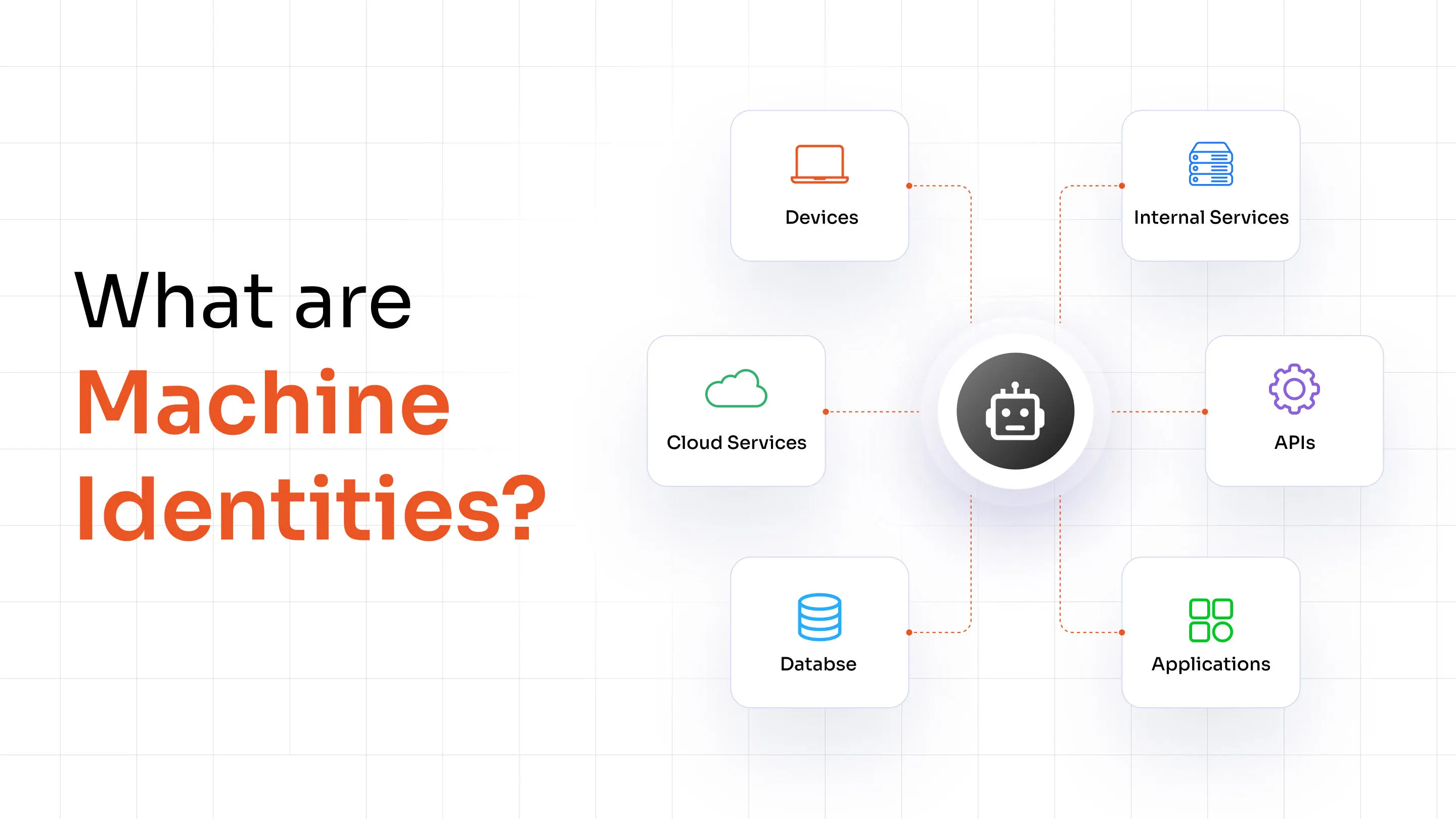
Service accounts, API keys, bots, machine identities, and other non-human identities can hold significant permissions. They can also remain active for long periods without the same review process used for employees. Include these identities in your assessment.
How to Conduct an IAM Risk Assessment
By the end of your IAM risk assessment, you should have a manageable set of findings. Here’s an eight-step process to get there.
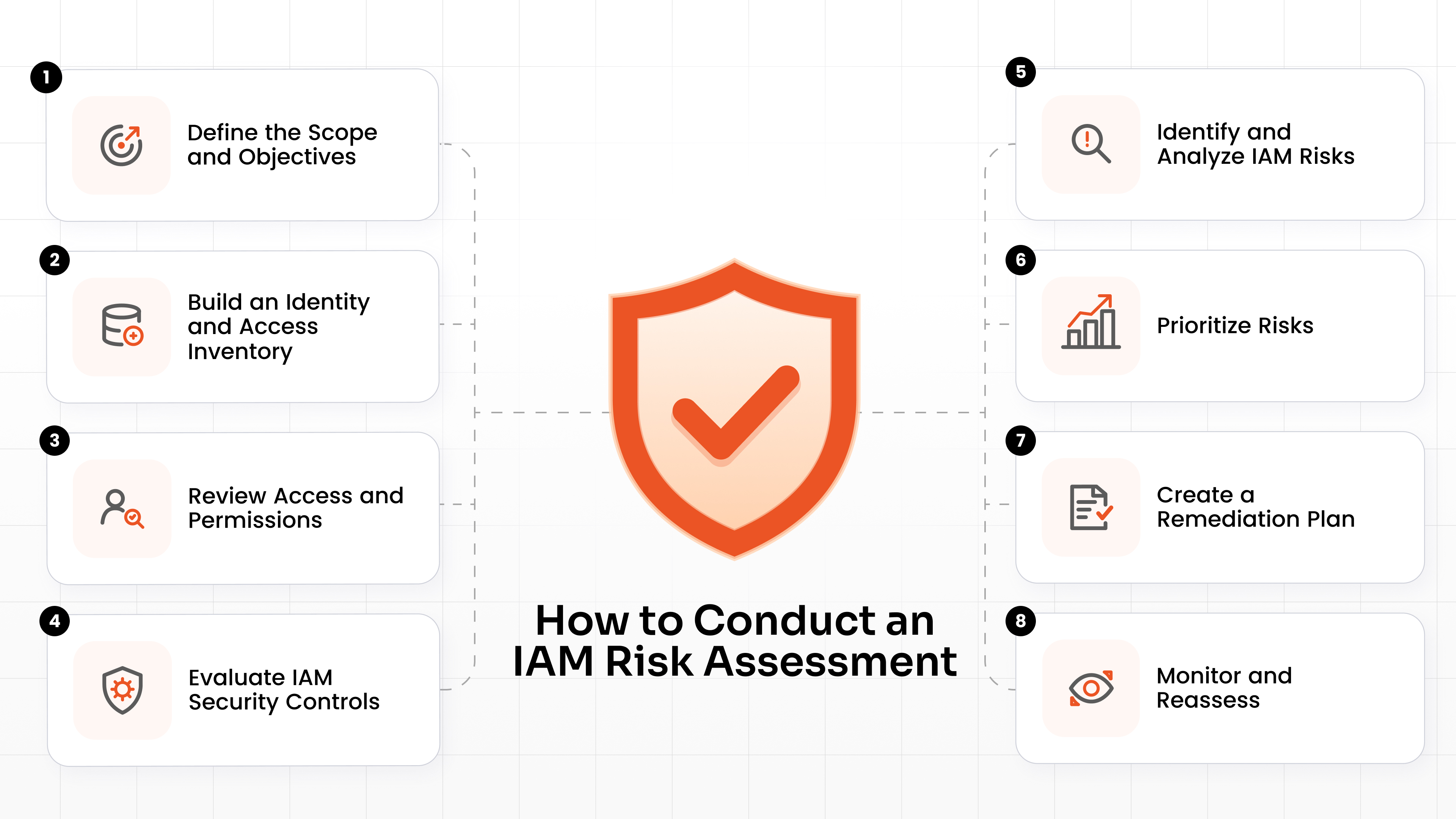
Step 1: Define the Scope and Objectives
You cannot assess everything at once. Identify:
- Critical systems
- Sensitive data
- User groups
- Applications
- Departments
- Assessment objectives
Outline clear assessment objectives before you begin.
Step 2: Build an Identity and Access Inventory
Create an inventory of the identities that can access the systems in scope. Include:
- Employees
- Contractors
- Vendors
- Privileged users
- Service accounts
- Machine identities
- Other relevant non-human identities
Then connect those identities to the applications, systems, roles, groups, and permissions they use.
Step 3: Review Access and Permissions
Review the inventory to determine whether current access levels match users' roles and responsibilities. For higher-risk resources, review access more closely and confirm that the assigned permissions have a clear business reason. Flag anyone with more access than they need.
Step 4: Evaluate IAM Security Controls
Next, test the defenses you currently have in place, such as:
- MFA
- SSO
- Authentication
- RBAC
- Least privilege
- Privileged access
- Access reviews
- Provisioning and deprovisioning
Step 5: Identify and Analyze IAM Risks
Look at the gaps you found. Evaluate each finding based on likelihood, impact, severity, affected systems, and exploitability. Document each finding clearly so your team knows what to investigate and fix.
Step 6: Prioritize Risks
You will probably find more issues than you can fix at once. Create a risk matrix (Risk = Likelihood × Impact). Group your findings into Critical, High, Medium, and Low priorities.
Step 7: Create a Remediation Plan
For every finding, define:
- Risk
- Business impact
- Recommended control
- Owner
- Priority
- Target remediation date
Assign the finding to the right owner and define what needs to change.
Step 8: Monitor and Reassess
Even after the assessment is complete, your environment will continue to change as employees and vendors join, change roles, or leave. That is why an IAM risk assessment should be part of an ongoing risk-management process, not a one-time event.
Continuously monitor your environment and schedule regular reassessments to verify that your remediation actions have addressed the identified risks.
IAM Risk Assessment Checklist
Use this foundational IAM risk assessment checklist to keep your evaluation on track.
| Assessment Area | What to Check |
|---|---|
| Identity Inventory | Are all users, contractors, vendors, privileged accounts, and relevant service accounts identified? |
| Authentication and Authorization | Is MFA enforced for critical access? Do users have only the permissions they need? |
| Privileged Access | Are administrative accounts controlled, reviewed, and monitored? |
| Lifecycle | Are Joiner-Mover-Leaver processes automated where appropriate? |
| Access Reviews | Are permissions reviewed regularly by the right owners? |
| Third-Party Access | Is vendor and contractor access limited, owned, and periodically reviewed? |
| Compliance | Are IAM controls aligned with applicable requirements? |
| Monitoring | Are unusual or unauthorized identity activities detected and investigated? |
| Remediation | Are identified risks assigned owners, priorities, and target dates? |
IAM Risk Assessment vs. IAM Audit
An identity and access management risk assessment and an IAM audit can overlap, but they are not the same. Here is how they differ:
| IAM Risk Assessment | IAM Audit |
|---|---|
| Identifies and evaluates potential risks | Verifies whether defined controls or requirements are being met |
| Focuses on risk exposure | Focuses on adherence |
| Prioritizes vulnerabilities | Records audit findings and exceptions |
| Helps create a remediation roadmap | Provides evidence against a defined requirement, standard, or policy |
| Can be broader and risk-driven | Is usually tied to specific criteria |
IAM Risk Assessment Best Practices
An effective IAM risk assessment helps you create a repeatable way to keep identity risk under control.
Apply Least Privilege
Give users only the access they need to perform their current responsibilities. When roles change, revisit the permissions. Do not assume that old access is harmless simply because nobody has complained about it. This will limit the potential damage if an account is compromised.
Enforce MFA
Passwords are only the first line of defense. MFA reduces the chance that a stolen password alone will be enough to access a protected resource. Prioritize sensitive applications, administrative access, remote access, and other high-risk entry points.
Automate Provisioning and Deprovisioning
Manual lifecycle provisioning is slow and leaves room for errors. Automating account creation, updates, and deprovisioning helps keep application access aligned with changes in user status and role.
Conduct Regular Access Reviews
Conduct routine access reviews to verify that existing permissions remain appropriate for every user. Focus closely on privileged access, sensitive applications, external users, and identities with unusual or broad entitlements.
Monitor Privileged and Unusual Activity
Monitor privileged activity and investigate anomalous access patterns immediately. Here, contextual signals can help you identify suspicious behavior.
Include Third-Party and Non-Human Identities
Do not limit your assessment to full-time employees. Evaluate vendors, contractors, service accounts, API keys, and AI agents. Non-human identities are usually overlooked, making them the biggest risk.
Continuously Monitor IAM Risk
Use ongoing controls, monitoring, reviews, and lifecycle processes to keep risk from building up again. Then repeat your formal IAM risk assessment periodically and when major changes occur.
How IAM Solutions Help Reduce Identified Risks
An IAM solution takes the heavy lifting out of risk mitigation. It solves the vulnerabilities you find.
Automate User Provisioning and Deprovisioning
A lot of risks stem from manual lifecycle changes due to potential delays and chances of human error.
IAM tools connect directly to your HR directory. They automate account creation, updates, role and group changes, and deprovisioning across connected applications. That can help reduce the risk of orphaned accounts and stale application access.
Centralize Authentication and SSO
IAM enables a Single Sign-On (SSO) solution to provide access to enterprise, SaaS, custom, and legacy applications through standards such as SAML, OAuth, OpenID Connect, and WS-Federation. This reduces the chances of passwords being compromised.
It also helps you apply consistent authentication policies across connected applications.
Enforce MFA and Access Policies
Most IAM platforms let you build contextual access policies. You can force MFA prompts based on user location, device health, or application sensitivity. You get more control over how users authenticate and when access is allowed.
Manage User Lifecycle
Easily move users from onboarding to cross-department transfers to eventual offboarding. IAM platforms support Joiner-Mover-Leaver automation using provisioning and RBAC capabilities to create accounts, update access, and remove access as responsibilities change.
Conduct Access Reviews
IAM platforms streamline the review process. Managers get automated alerts to review and approve or revoke their direct reports' access.
Monitor Identity Activity
Get instant visibility into who logs in, where they log in from, and what they try to access. Many IAM platforms include identity threat detection capabilities that use behavioral and contextual signals to identify suspicious identity activity and anomalous access patterns.
Manage Privileged Access
Centralized IAM ensures high-level access is granted securely and monitored closely. Paired with PAM, you get credential vaulting, just-in-time access, privilege controls, and monitored privileged sessions.
The right combination of IAM, IGA, and PAM capabilities depends on the risks identified in your assessment.
When Should You Conduct an IAM Risk Assessment?
While IAM risk assessments should be scheduled regularly, there are certain scenarios that warrant one.
- Before or after major IAM changes, such as a platform rollout or authentication redesign.
- During cloud migrations, when identities, applications, and access paths are changing.
- After mergers and acquisitions, when separate identity environments and access models come together.
- After a security incident, especially when compromised or misused identities were involved.
- After major compliance findings, when existing IAM controls need closer review.
- When introducing new applications or identity sources, so they enter the environment with the right controls.
- When changing your workforce or access model, such as adding contractors, remote users, or new partner access paths.
Why Choose miniOrange for IAM?
Once your assessment shows where the gaps are, you need controls.
miniOrange simplifies identity security through a centralized platform. We provide robust Single Sign-On (SSO) and Multi-Factor Authentication (MFA) to lock down your access points and eliminate weak passwords.
Our platform handles seamless user provisioning and deprovisioning, ensuring deep identity lifecycle management tied directly to your HR systems via simple directory integration.
We help you replace manual IT tasks with workflow automation, giving you a truly centralized IAM environment. Plus, our comprehensive reporting and visibility features give you the data needed for your next audit.
We also offer PAM and IGA platforms that work together with IAM to address identity risks.
FAQs
What are the common IAM risks?
Common IAM risks include excessive permissions, privilege creep, orphaned and dormant accounts, weak authentication, unmanaged privileged access, incomplete Joiner-Mover-Leaver processes, excessive third-party access, inconsistent policies, and unmanaged non-human identities.
What should an IAM risk assessment checklist include?
An IAM risk assessment checklist should cover identity inventory, authentication and authorization, privileged access, lifecycle management, access reviews, third-party access, compliance, monitoring, and remediation. The exact checks should reflect your systems, users, data, and risk profile.
How often should an IAM risk assessment be conducted?
You should conduct formal assessments periodically and repeat them when major changes affect your identity environment. Cloud migrations, acquisitions, security incidents, new applications, new identity sources, and changes to workforce or access models are all good triggers for reassessment.
How can IAM solutions reduce identity-related risks?
IAM solutions can reduce identity-related risks by strengthening authentication, centralizing SSO, automating provisioning and deprovisioning, applying role- and policy-based access controls, supporting access reviews, monitoring identity activity, and controlling privileged access. The right capabilities depend on the specific risks identified by your assessment.
Leave a Comment