
Think about the last time you logged into an app from a new device.
Sometimes, you are asked for extra verification. Sometimes, access is blocked altogether. And occasionally, everything just works without interruption. That difference isn’t random. It’s often driven by something happening quietly in the background called device fingerprinting.
At its core, device fingerprinting is a way for systems to recognize a device without relying only on passwords or cookies. Instead of asking, “Do you know the password?”, it asks, “Does this device look familiar?”
This shift matters because passwords alone are no longer enough. Stolen credentials, phishing attacks, and automated bots have made traditional authentication unreliable. Businesses now need a way to identify how a user is accessing a system, not just who they claim to be.
That’s where device fingerprinting in cybersecurity becomes valuable. In this blog, we will break down what device fingerprinting is, how fingerprinting works, and how businesses use it in real-world security systems, along with practical implementation techniques.
What Is Device Fingerprinting in Cybersecurity?
At a simple level, device fingerprinting is a method used to identify a device based on its unique technical characteristics. Instead of relying on stored data like cookies, it looks at how a device is configured and behaves.
Every device carries small, often unnoticed details. Things like:
- Browser type and version
- Operating system
- Screen resolution
- Time zone and language settings
- IP address and network signals
Individually, these details don’t say much. But when combined, they create a pattern that is surprisingly unique. That pattern becomes a device fingerprint.
In cybersecurity, this fingerprint acts like a digital identity for the device. Even if a user clears cookies or switches sessions, the system can still recognize whether the device looks familiar or not.
This is why device fingerprinting is widely used in authentication systems, fraud detection engines, and identity security platforms. It adds a layer of intelligence that goes beyond usernames and passwords.
Why Device Fingerprinting Matters for Security?
Security teams today are not just dealing with hackers trying to guess passwords. They are dealing with:
- Credential stuffing attacks using leaked passwords
- Bots creating fake accounts at scale
- Phishing attacks that trick users into giving access
- Account takeovers from unknown devices
In many of these cases, the attacker may already have valid credentials. So the real question becomes:
Is this login coming from a trusted device or something new and suspicious?
This is where device fingerprinting becomes extremely useful.
If a user typically logs in from a laptop in India and suddenly there’s a login attempt from a different device in another country, the system can flag it immediately. It doesn’t rely on just identity. It looks at context.
That context helps organizations:
- Detect unusual login behavior
- Block unauthorized access attempts
- Prevent automated bot activity
- Reduce fraud in financial transactions
What makes it powerful is that it works quietly in the background. Legitimate users usually don’t even notice it, while risky activity gets flagged or challenged.
How Does Device Fingerprinting Work?
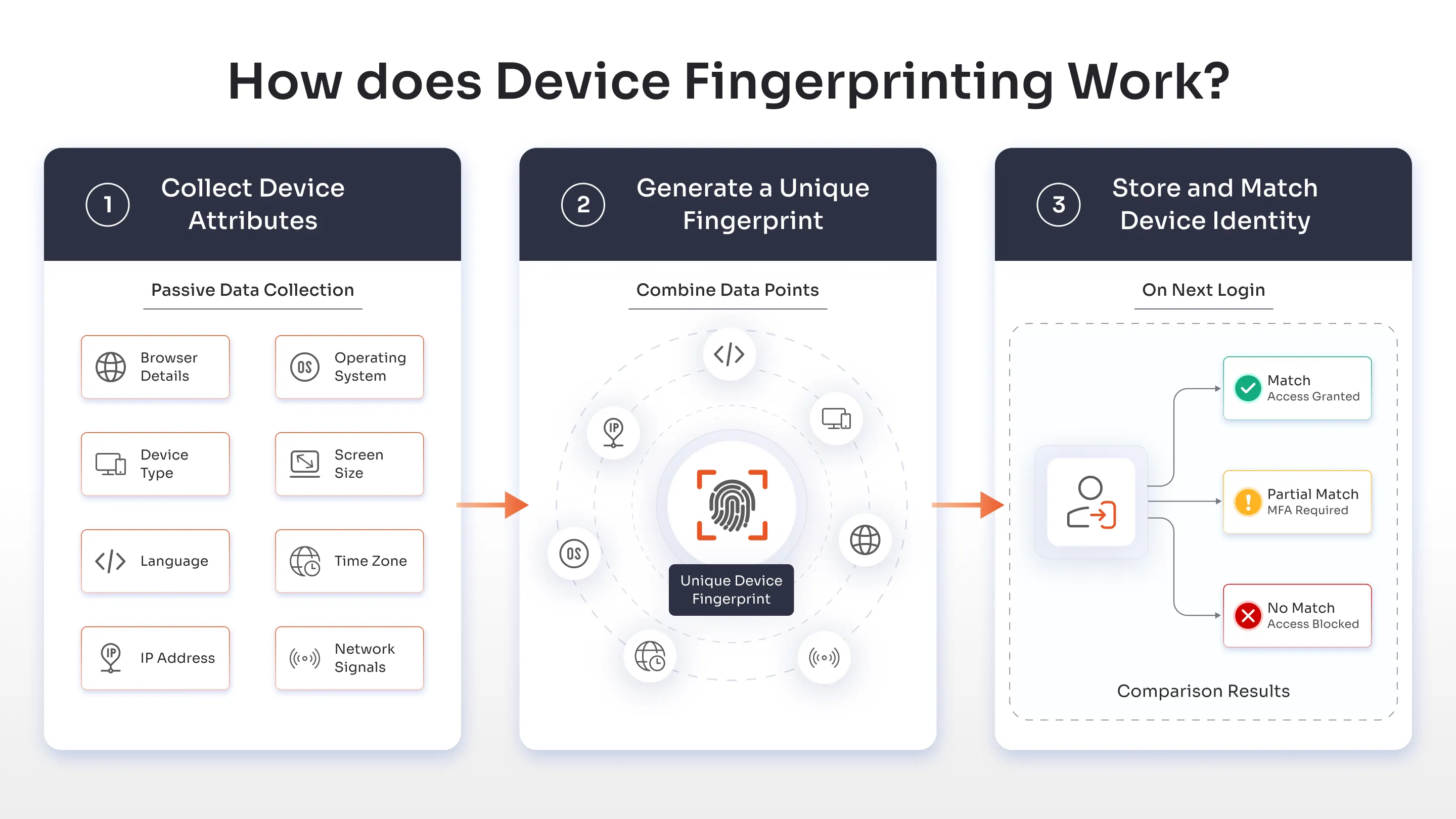
At a glance, how fingerprinting works might seem complex, but the process follows a fairly logical flow. Behind the scenes, systems collect signals, combine them, and use them to recognize devices over time.
Here’s a simplified breakdown.
Step 1: Collect Device Attributes
When a user visits a website or logs into an application, the system begins by collecting device-related information.
This includes:
- Browser details (type, version, plugins)
- Operating system and device type
- Screen size and resolution
- Language and time zone
- IP address and network signals
This data is collected passively, without interrupting the user’s experience. Most users don’t even realize it’s happening.
The goal here is not to track the user personally, but to understand the environment from which the request is coming.
Step 2: Generate a Unique Fingerprint
Once enough attributes are collected, the system combines them to create a unique identifier.
This is usually done using hashing algorithms that convert all those signals into a single fingerprint value.
Think of it like this:
- One data point = not useful
- Multiple combined signals = highly unique
Even if two users have the same device model, slight differences in settings or configurations can result in completely different fingerprints.
This is what makes how device fingerprinting works so effective.
Step 3: Store and Match Device Identity
After generating the fingerprint, the system stores it securely on the server side.
The next time the user logs in, the system compares the new fingerprint with previously known ones.
- If it matches → access continues smoothly
- If it partially matches → step-up authentication may be triggered
- If it doesn’t match → access can be flagged, challenged, or blocked
This is how device fingerprinting solutions help create a balance between security and user experience.
Instead of treating every login the same way, the system adapts based on whether the device is trusted or not.
Device Fingerprinting vs Cookies: What’s the Difference?
Before we break down the differences between device fingerprinting and cookies, it is important to know they may serve a similar purpose but they work in completely different ways. Here’s a quick comparison table.
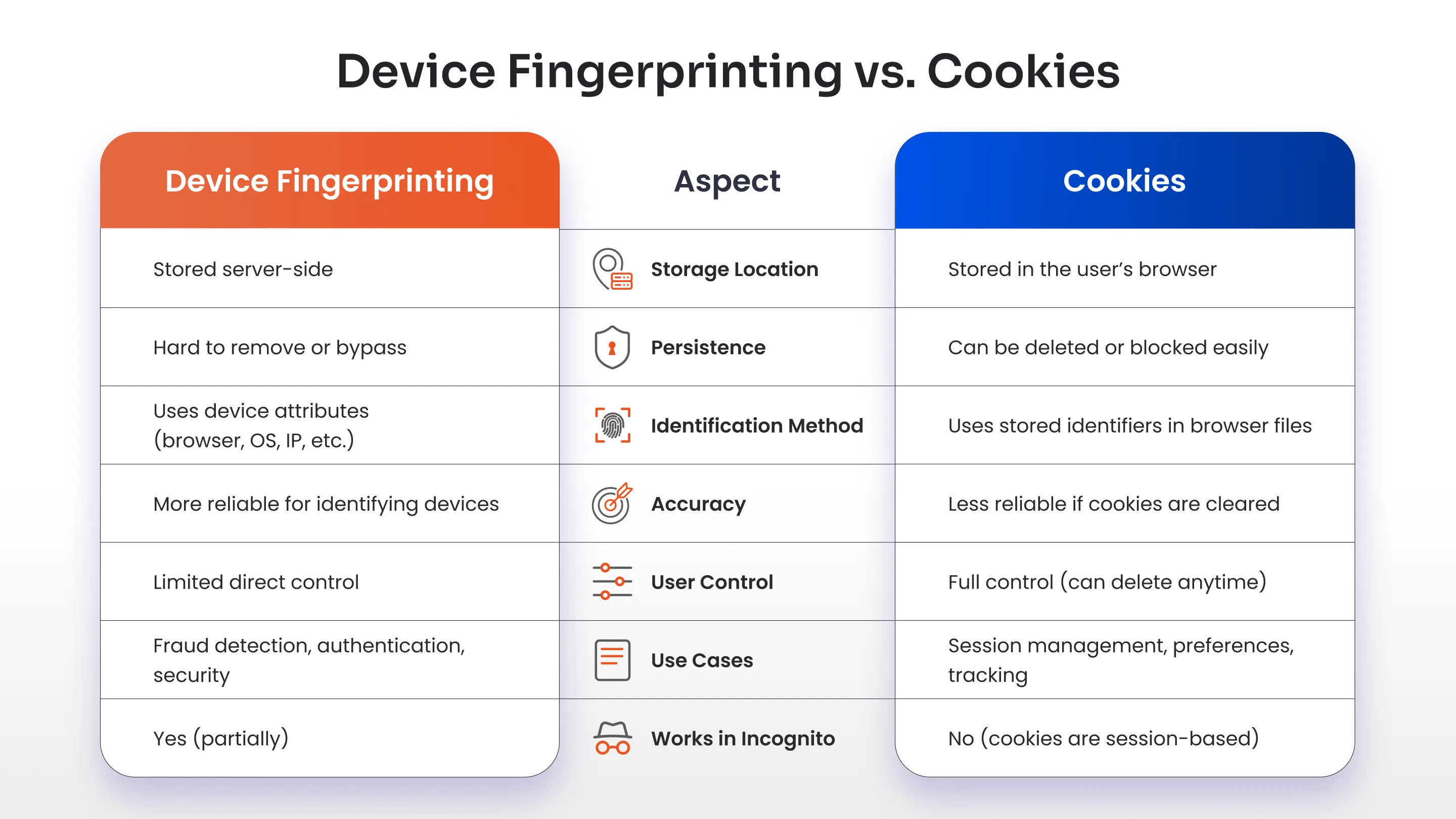
At first glance, device fingerprinting and cookies might seem similar. Both are used to recognize users or devices across sessions. But the way they work is very different.
Cookies are small pieces of data stored directly on a user’s browser. Websites use them to remember things like login sessions, preferences, or shopping carts. The problem is, cookies are easy to delete. Users can clear them manually or block them entirely using browser settings.
Device fingerprinting, on the other hand, does not rely on stored files. It works by analyzing the device itself.
Here’s the key difference in simple terms:
- Cookies: Stored on the device, easy to remove
- Device fingerprinting: Generated from device attributes, harder to bypass
This makes device fingerprinting more persistent. Even if a user clears cookies or uses incognito mode, the system can still recognize the device based on its configuration.
That said, fingerprinting is not meant to replace cookies completely. In most real-world systems, both are used together. Cookies handle session management, while device fingerprinting adds a deeper layer of identity verification.
Types of Device Fingerprinting Techniques
Not all fingerprinting works the same way. Different techniques are used depending on the level of accuracy and security required.
Some methods rely on static device details, while others analyze behavior or system responses.
Browser Fingerprinting
This is the most common form of device fingerprinting. It collects information about the browser environment, such as:
- Browser type and version
- Installed plugins and extensions
- Language settings
- Time zone
Since every user configures their browser slightly differently, these variations help create a unique fingerprint.
Canvas Fingerprinting
Canvas fingerprinting uses HTML5 to generate a hidden image inside the browser.
The interesting part is this:
Different devices render that image slightly differently based on their hardware, graphics card, and system settings.
Even tiny rendering differences are enough to create a unique identifier.
That’s why canvas fingerprinting is considered a more advanced technique in fingerprinting cybersecurity.
Audio Fingerprinting
This method analyzes how a device processes sound.
A small audio signal is played and processed silently in the background. The way the device handles that signal depends on its hardware and software configuration.
These subtle differences create another layer of uniqueness.
It’s not something users can easily see or control, which makes it effective for security use cases.
Behavioral Fingerprinting
Unlike other methods, behavioral fingerprinting focuses on how users interact with a system rather than just the device itself.
It looks at patterns such as:
- Typing speed and rhythm
- Mouse movement
- Scrolling behavior
- Touch gestures on mobile devices
These patterns are difficult to replicate, even if an attacker has stolen credentials.
This is why behavioral signals are increasingly used in modern authentication methods, especially in adaptive MFA or risk-based systems.
Key Data Points Used in Device Fingerprinting
To understand why device fingerprinting is so effective, it helps to look at the kind of data it relies on. On their own, these data points may seem ordinary. But when combined, they create a highly distinctive profile that can identify a device with surprising accuracy.
Most fingerprinting systems don’t depend on just one signal. They collect multiple layers of information to build a more reliable and consistent identity.
Hardware-Level Signals
Every device has physical characteristics that influence how it behaves.
Things like screen resolution, device type, and graphics processing capabilities may sound basic, but they often vary more than expected. Even two devices from the same brand can produce slightly different outputs depending on configuration and hardware differences.
These subtle variations help create a base layer for device fingerprinting.
Software and Browser Environment
The software running on a device adds another layer of uniqueness.
This includes the operating system, browser version, installed fonts, plugins, and extensions. Users rarely configure these settings in exactly the same way, which makes them valuable for identification.
For example, a browser with specific extensions, language settings, and font combinations can stand out even among thousands of similar devices.
This is why browser fingerprinting plays a major role in most fingerprinting systems.
Network and Connection Signals
Network-related data provides important context about where and how a device is connecting.
IP address, network type, and connection patterns help determine whether a login attempt is coming from a familiar environment or something unusual.
For instance, if a user always logs in from one region and suddenly appears from a different location or network type, it becomes a strong risk signal.
Environmental and Regional Settings
Devices also carry regional indicators such as time zone, language preferences, and system locale.
These details might seem minor, but they help strengthen the overall fingerprint when combined with other data points.
A mismatch between expected and current settings can indicate potential risk, especially in authentication and fraud detection scenarios.
Device Fingerprinting and MFA Authentication
On its own, multi-factor authentication (MFA) already improves security by requiring more than just a password. But in many real-world scenarios, even MFA can feel repetitive or disruptive if applied the same way for every login.
This is where device fingerprinting adds real value.
Instead of treating every login attempt equally, modern MFA solutions can use device intelligence to decide when MFA is actually needed, delivering strong security without unnecessary friction.
Risk-Based Authentication
Not every login attempt carries the same level of risk.
If a user logs in from their usual device, in a familiar location, at a typical time, there is very little reason to interrupt them with multiple authentication steps.
But if something changes, such as a new device, different network, or unusual behavior, that’s where additional verification becomes necessary.
Device fingerprinting enables this shift toward risk-based authentication.
By analyzing signals such as device familiarity, login location, IP patterns, and user behavior, the system can dynamically decide whether to:
- Allow access seamlessly
- Trigger step-up authentication
- Block the request entirely
This approach improves both security and user experience at the same time.
Device Trust in MFA
One of the most practical uses of device fingerprinting in authentication methods is establishing device trust.
Over time, systems learn which devices are commonly used by a specific user. These devices can then be treated as trusted environments.
For example:
- A user logging in daily from the same laptop may not be prompted for MFA every time
- The same user logging in from a new device may be required to verify identity through OTP, push notification, or biometric authentication
This reduces unnecessary authentication prompts while still protecting against unauthorized access.
In essence, device fingerprinting helps MFA become smarter, not just stronger.
Role of Device Fingerprinting in Phishing-Resistant MFA
Phishing attacks often succeed because attackers gain access to valid credentials or even OTPs.
However, what attackers usually do not have is the trusted device. This is where device fingerprinting strengthens phishing-resistant MFA.
Even if an attacker steals login credentials, intercepts OTPs, or attempts to mimic user behavior, the system can still detect that the request is coming from an unfamiliar device.
This allows security systems to block suspicious login attempts, require stronger authentication methods, or flag the activity for further review.
When combined with methods like authentication apps, token-based authentication, and biometric verification, device fingerprinting becomes a critical layer in preventing account takeovers.
Real-World Use Cases of Device Fingerprinting
So far, we’ve looked at how device fingerprinting works and how it strengthens authentication. But where does it actually show up in real-world systems?
The answer is almost everywhere security matters.
From banking apps to eCommerce platforms, device fingerprinting quietly helps systems decide whether a user can be trusted or needs additional verification.
Banking and Financial Fraud Detection
Banks deal with some of the highest-risk transactions, which makes device fingerprinting a critical part of their security stack.
Imagine a user who regularly logs in from the same mobile device to check their balance or transfer funds. Over time, the system learns this pattern.
Now consider a situation where a login attempt appears from a completely new device, in a different location, and behaves differently than usual. Even if the correct credentials are used, the system can immediately recognize that something is not right.
In such cases, banks can trigger additional authentication, temporarily block the transaction, or flag the activity for further investigation. This helps prevent account takeovers and unauthorized transfers without disrupting legitimate users.
E-commerce Fraud Prevention
In eCommerce, fraud often shows up in subtle ways.
Attackers may try to create multiple fake accounts, attempt transactions using stolen payment details, or exploit promotional offers. At first glance, these actions may appear normal.
This is where device fingerprinting solutions help uncover patterns.
If multiple accounts are being created from the same device, even with different email addresses, the system can detect suspicious behavior. Similarly, if a returning customer suddenly logs in from a new device during checkout, the platform can respond accordingly.
Depending on the risk, the system may request additional verification, delay the transaction, or block high-risk activity. This helps reduce fraud while maintaining a smooth shopping experience for genuine customers.
Account Security for SaaS Platforms
For SaaS platforms, protecting user accounts is just as important as protecting the data within them.
Users access applications from different devices and locations, which makes it difficult to rely on static security rules.
With device fingerprinting, SaaS platforms can recognize familiar devices and detect unusual login attempts more effectively.
For example, a user logging in from their regular work laptop may access the platform without interruption. However, if the same account is accessed from a new or unknown device, the system can require additional verification before granting access.
This approach ensures that security measures adapt to real-world usage without becoming intrusive.
Bot and Abuse Prevention
Not all threats come from individuals. A significant portion of online abuse is driven by automated bots.
These bots are often used to create fake accounts, scrape data, or launch credential-based attacks at scale.
While traditional defenses like CAPTCHAs can help, they are not always enough.
Device fingerprinting in cybersecurity adds another layer of protection by identifying patterns that bots struggle to replicate. Even when bots attempt to mask their activity, inconsistencies in device characteristics often reveal their presence.
This allows systems to detect automated behavior more accurately, block suspicious activity, and reduce abuse without affecting real users.
Device Fingerprinting Solutions and Tools
As device fingerprinting becomes more widely used in cybersecurity, organizations are looking for ways to implement it without building everything from scratch.
In most cases, fingerprinting is not a standalone system. It works as part of a broader identity and access management setup, alongside authentication, risk analysis, and fraud detection mechanisms.
Modern device fingerprinting solutions typically provide:
- APIs or SDKs to collect device attributes
- Engines to generate and match fingerprints
- Integration with authentication workflows
- Risk scoring based on device behavior
Some solutions focus purely on fraud detection, while others integrate fingerprinting directly into authentication systems.
This is where identity platforms play an important role.
Platforms such as miniOrange combine device intelligence with authentication methods like MFA, adaptive authentication, and Single Sign-On. Instead of treating fingerprinting as an isolated feature, it becomes part of a larger identity security framework.
This allows organizations to use device fingerprinting not just for detection, but for real-time access decisions.
How to Implement Device Fingerprinting?
Implementing device fingerprinting does not require a complete overhaul of your security architecture. It can be introduced gradually by aligning it with your existing authentication and identity workflows.
Here’s how most organizations approach it.
Define Security Objectives
The first step is to clearly define what you want to achieve with device fingerprinting.
Some organizations focus on fraud prevention, while others prioritize strengthening authentication or detecting suspicious logins.
For example, a banking platform may use fingerprinting to prevent unauthorized transactions, while a SaaS application may use it to identify trusted devices and reduce login friction.
Having clear objectives helps determine how fingerprinting should be applied.
Select a Fingerprinting Framework
Once the objectives are defined, the next step is choosing the right approach or solution.
Organizations can either:
- Build custom fingerprinting logic
- Use third-party fingerprinting tools
- Adopt identity platforms that include fingerprinting capabilities
For most businesses, using an integrated solution is more practical. It reduces complexity and ensures better alignment with authentication systems.
Integrate with Authentication Systems
Device fingerprinting becomes most effective when it is connected to authentication workflows.
Instead of simply identifying devices, the system should use that information to influence access decisions.
For instance:
- Trusted devices can be allowed seamless access
- Unknown devices can trigger MFA
- High-risk devices can be blocked or flagged
This integration is what turns fingerprinting into a meaningful security control rather than just a tracking mechanism.
Enable Continuous Device Monitoring
Device behavior is not static. Users switch networks, update devices, and change usage patterns over time.
That’s why fingerprinting should not be treated as a one-time check.
Continuous monitoring helps systems:
- Detect changes in device behavior
- Identify anomalies over time
- Adjust risk levels dynamically
This ensures that security decisions remain accurate even as user behavior evolves.
Device Fingerprinting: Privacy, Compliance, and Ethical Considerations
While device fingerprinting offers strong security benefits, it also raises valid concerns around privacy and data usage.
Unlike cookies, which users can see and control, fingerprinting works in the background. This makes it more powerful, but also more sensitive from a compliance perspective.
Organizations need to be careful about how they collect, store, and use device-related data.
GDPR and Data Protection Regulations
Regulations such as GDPR, CCPA, and DPDP place strict requirements on how user data is handled.
Even though device fingerprinting in cybersecurity is often used for security purposes, it can still fall under personal data processing if it can be linked to an individual.
This means organizations must:
- Clearly define the purpose of data collection
- Ensure data is stored securely
- Limit usage to legitimate security needs
Failing to do so can lead to compliance risks and loss of user trust.
User Consent and Transparency
Transparency plays a big role in building trust.
Users should be informed about how their data is being used, even if it’s for security purposes. This does not always mean asking for explicit consent in every case, but it does mean being clear in privacy policies and disclosures.
When users understand that fingerprinting is used to protect their accounts rather than track them unnecessarily, they are more likely to accept it.
Balancing Security and Privacy
This is where most organizations need to strike a balance.
Overusing fingerprinting can feel intrusive, while underusing it can leave security gaps.
A practical approach is to:
- Use fingerprinting primarily for security and fraud prevention
- Avoid collecting unnecessary data points
- Combine it with other authentication methods
When implemented thoughtfully, device fingerprinting can enhance security without compromising user privacy.
Advantages and Limitations of Device Fingerprinting
Like any technology, device fingerprinting comes with both strengths and trade-offs.
Advantages
- Harder to bypass than cookies: Since fingerprinting does not rely on stored data, users cannot easily delete or block it like cookies.
- Stronger fraud detection: Helps identify suspicious devices even when attackers use valid credentials, reducing risks like account takeovers.
- Works in the background: Does not interrupt users unnecessarily, allowing seamless authentication for trusted devices.
- Supports adaptive authentication: Enables risk-based decisions by identifying whether a device is familiar or unknown.
- Improves bot detection: Detects patterns that automated scripts struggle to replicate, helping prevent large-scale abuse.
Limitations
- Fingerprint changes over time: Device updates, browser changes, or network shifts can affect fingerprint consistency.
- Privacy concerns: Since it works silently, it can raise concerns if not implemented transparently.
- Not completely foolproof: Advanced attackers may attempt to spoof or mask device characteristics.
- Requires proper integration: Works best when combined with authentication systems like MFA, not as a standalone solution.
- Regulatory considerations: Must be implemented carefully to comply with regulations like GDPR and other data protection laws.
The Future of Device Fingerprinting in Cybersecurity
As cyber threats continue to evolve, device fingerprinting in cybersecurity is also becoming more advanced. It is no longer just about identifying devices. It is about understanding context, behavior, and risk in real time.
AI-Driven Fraud Detection
Modern systems are beginning to combine fingerprinting with machine learning models. Instead of relying only on static rules, these systems can analyze patterns over time and detect anomalies more accurately. This helps reduce false positives while improving fraud detection capabilities.
Integration with Zero Trust Security
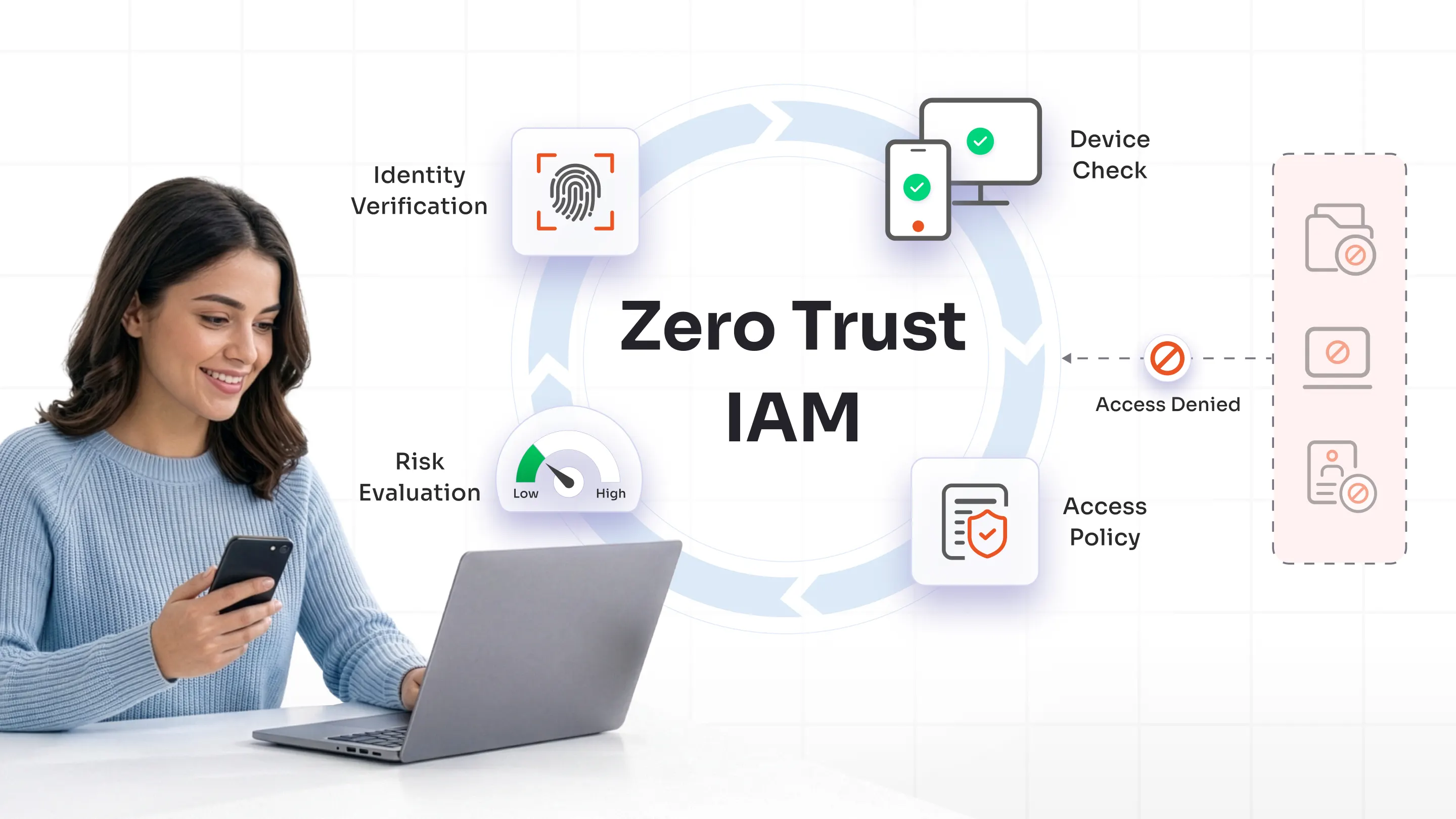
Device fingerprinting is becoming an important component of Zero Trust security models. Since Zero Trust focuses on continuous verification, device identity plays a critical role in determining whether access should be granted. Fingerprinting helps validate not just the user, but also the device being used.
Continuous Authentication Systems
Authentication is gradually moving away from one-time verification. With continuous authentication, systems evaluate user behavior and device signals throughout the session. If something changes, such as unusual activity or a shift in device behavior, the system can respond instantly. Device fingerprinting provides the foundation for this kind of dynamic security.
Best Practices for Using Device Fingerprinting Securely
Implementing device fingerprinting effectively is not just about collecting more data. It’s about using the right signals in the right way to improve security without creating unnecessary friction or privacy concerns.
Here are some best practices organizations should follow.
1. Use Device Fingerprinting as Part of a Layered Security Approach
Device fingerprinting works best when combined with other authentication methods such as MFA, OTP verification, and adaptive authentication.
Relying on fingerprinting alone can create gaps, especially against advanced threats. When used alongside other controls, it strengthens overall security by adding an additional layer of verification.
2. Focus on Relevant and Minimal Data Collection
It can be tempting to collect as many data points as possible, but more data does not always mean better security.
Organizations should focus on collecting only the signals that are necessary for identifying risk. This reduces complexity, improves performance, and helps address privacy concerns more effectively.
3. Integrate Fingerprinting with Authentication Workflows
Device fingerprinting becomes significantly more valuable when it is connected to authentication decisions. Instead of just identifying devices, systems should use fingerprint data to:
- Allow seamless access for trusted devices
- Trigger MFA for unfamiliar devices
- Block or flag high-risk access attempts
This ensures fingerprinting directly contributes to access control and security outcomes.
4. Continuously Monitor and Update Device Profiles
Devices and user behavior are not static. Software updates, browser changes, and network shifts can all affect fingerprint accuracy.
Organizations should continuously monitor device patterns and update fingerprinting logic to ensure it remains reliable over time. This helps reduce false positives and keeps security decisions accurate.
5. Maintain Transparency and Compliance
Since device fingerprinting operates in the background, transparency is essential. Organizations should clearly communicate how device data is used through privacy policies and ensure compliance with regulations such as GDPR and CCPA. A transparent approach builds user trust while reducing legal and compliance risks.
Enhance Your Identity Security with miniOrange Device Intelligence
As organizations move toward stronger identity-based security models, device fingerprinting becomes an important part of modern authentication strategies.
However, fingerprinting alone is not enough. It works best when combined with authentication methods such as OTP-based verification, token-based authentication, authenticator apps, and adaptive MFA.
Identity and access management platforms such as miniOrange bring these capabilities together into a unified system.
By combining device intelligence with authentication and access control, organizations can:
- Recognize trusted devices
- Detect suspicious activity in real time
- Apply adaptive authentication based on risk
- Reduce friction for legitimate users
This approach helps organizations strengthen fingerprinting cybersecurity strategies while maintaining a smooth user experience.
FAQs
What is device fingerprinting?
Device fingerprinting is a method used to identify a device based on its unique combination of technical attributes such as browser, operating system, and network configuration.
How does device fingerprinting work?
Device fingerprinting works by collecting multiple device attributes, combining them into a unique identifier, and using that identifier to recognize devices across sessions.
Is device fingerprinting more secure than cookies?
Device fingerprinting is generally more persistent than cookies because it does not rely on stored data that can be easily deleted. It provides a stronger layer of identification for security purposes.
Can device fingerprinting improve MFA security?
Yes, device fingerprinting enhances MFA by identifying trusted devices and enabling risk-based authentication, reducing unnecessary prompts while strengthening security.
Is device fingerprinting legal?
Device fingerprinting is legal when used responsibly, especially for security purposes. However, organizations must comply with regulations such as GDPR and ensure transparency in how data is used.


Leave a Comment