
One thing common in every breach - someone got into a system who shouldn't have. Not necessarily through a zero-day vulnerability or a sophisticated exploit, but through compromised credentials, human error, or a dormant account that was never revoked.
Identity is the new perimeter, and if your enterprise isn't treating Identity and Access Management (IAM) as the strategic priority, then you're building your defenses on sand.
For large enterprises that manage a huge number of users, applications, and cloud and on-premise environments, IAM shouldn't be just an IT checklist - it's a connective tissue that holds the security posture together.
The numbers back this up - the Identity and Access Management (IAM) market is projected to grow from $25.96 billion in 2025 to $42.61 billion by 2030. The major driver is the exponential growth of the B2B IAM segment because enterprises need scalable and secure identity management solutions for their partners, distributors, suppliers, and external stakeholders.
This post unpacks why IAM is critical for enterprise security and deserves a seat at the executive's table, along with what a mature enterprise IAM architecture actually looks like. It also highlights how miniOrange uplifts an organization's security with its IAM suite.
IAM's Role in Modern Enterprise Security Architecture
The traditional network security was built around a hard perimeter, and the model came crumbling down the moment modern enterprises moved to the cloud, and remote working became the new normal.
In this scenario, IAM became the control plane of the organization's security across users, devices, apps, and APIs. Currently, every security decision boils down to identity - who is accessing what, from where, and on which device.
A mature enterprise IAM suite comprises critical components:
- Single Sign-On (SSO): Ensure a very simple, one-click way to authenticate users and grant them access to all apps and resources with the Single Sign-On solution.
- Multi-Factor Authentication (MFA): Easily add layers of verification beyond just passwords with MFA software.
- Privileged Access Management (PAM): The PAM solution controls and monitors high-risk accounts with elevated permissions.
- User Lifecycle Management (ULM): Organizations manage employee account provisioning and de-provisioning during onboarding and offboarding with the ULM solution.
- Adaptive or Risk-Based Authentication: Adaptive MFA evaluates contextual signals like device, IP, location, and user behavior to allow, deny, or step up authentication.
When these components work in concert, enterprises gain not just security but operational efficiency, fewer help desk tickets, faster onboarding, and cleaner audit trails.
Common IAM Implementation Challenges Enterprises Face
IAM implementation challenges can trip even the most well-established enterprises with a dedicated security team. Understanding these hindrances upfront is essential to upscaling the security levels of your enterprises via advanced IAM solutions.
IAM Challenges that Hinder Enterprise Security are:
- Siloed Identity Management: With Active Directories, SaaS apps, cloud directories, and CRMs maintaining their own user records, there's inconsistency. Also, old permissions linger, and accounts remain dormant, making them a target for hackers.
- Integration Complexity: This happens when enterprises need to deploy modern IAM to legacy apps, which don't support protocols like OAuth, SAML, or OIDC.
- Machine Identities: These are a serious threat and a challenge because they function with weak credentials, no oversight, and with many privileges.
Recognizing these challenges early allows enterprises to integrate an IAM product suite that accounts for real-world complexity, not just textbook scenarios.
Why is IAM Critical for Enterprise Security?
Here's a list of reasons why IAM is critical for enterprise security.
1. Protects Against Identity-Based Attacks
A large chunk of data breaches occurs due to stolen or misused credentials, leading to identity-based attacks. Threat actors don’t just break in anymore; they log in. Every cybersecurity attack, including phishing, credential stuffing, brute force attacks, and more are designed for identity-based attacks.
However, these threats can be neutralized and prevented with a strong suite of identity and access management products, such as adaptive MFA, privileged access management, SSO, user provisioning and de-provisioning, passwordless logins, and MFA/2FA.
Without IAM, one compromised credential can become a threat actor's golden ticket to move laterally across the system and exfiltrate data for weeks, months, and years.
2. Prevents Over-Privileged Access and Insider Threats
One of the hardest things to do in an enterprise is to manage access to resources. Over time, employees accumulate permissions; for instance, temporary access to a project's data never gets revoked, or a role/department change adds permissions without removing the old ones.
The gradual accumulation of rights, permissions, and privileges beyond what employees would need to do their job gives rise to privilege creep or privilege entitlement.
This creates a two-fold problem:
- First, where an employee may exploit those privileges.
- Second, if a hacker gains access to the employee's account, and that employee also has many privileges, then the hacker also gains similar access.
Furthermore, insider threats, whether intentional or not, represent one of the highest-risk scenarios in enterprise security.
IAM introduces the principle of least privilege that gives users only the access they need to do their job. Also, IAM doesn't eliminate insider risk, but it dramatically reduces the blast radius when something goes wrong.
3. Unifies Access Across Cloud, SaaS, and Legacy Applications
On average, enterprises use more than 1295 cloud services. Add on SaaS apps and on-premise infrastructure, and you've a complex ecosystem that is difficult to manage by a human. Enterprise IAM solutions bring all of this under one roof.
SSO, a prominent IAM solution, creates a unified, centralized dashboard or platform where every identity is granted appropriate access across systems, apps, and resources - regardless of where it is stored (Azure, Okta, or Google). This not only improves security but also dramatically reduces the cognitive burden on end users, who no longer need to juggle dozens of credentials.
4. Accelerates the Shift Towards Zero Trust Architecture
Zero trust works on the principle of never trust, always verify. No user, app, or device gets a free pass just because they're inside the network or part of the organization.
IAM is the operational engine that makes Zero Trust possible. Without strong identity verification, continuous authentication, and granular access controls, Zero Trust is just a philosophy with no execution layer.
IAM for large organizations provides the infrastructure to enforce Zero Trust policies at scale, validating every access request.
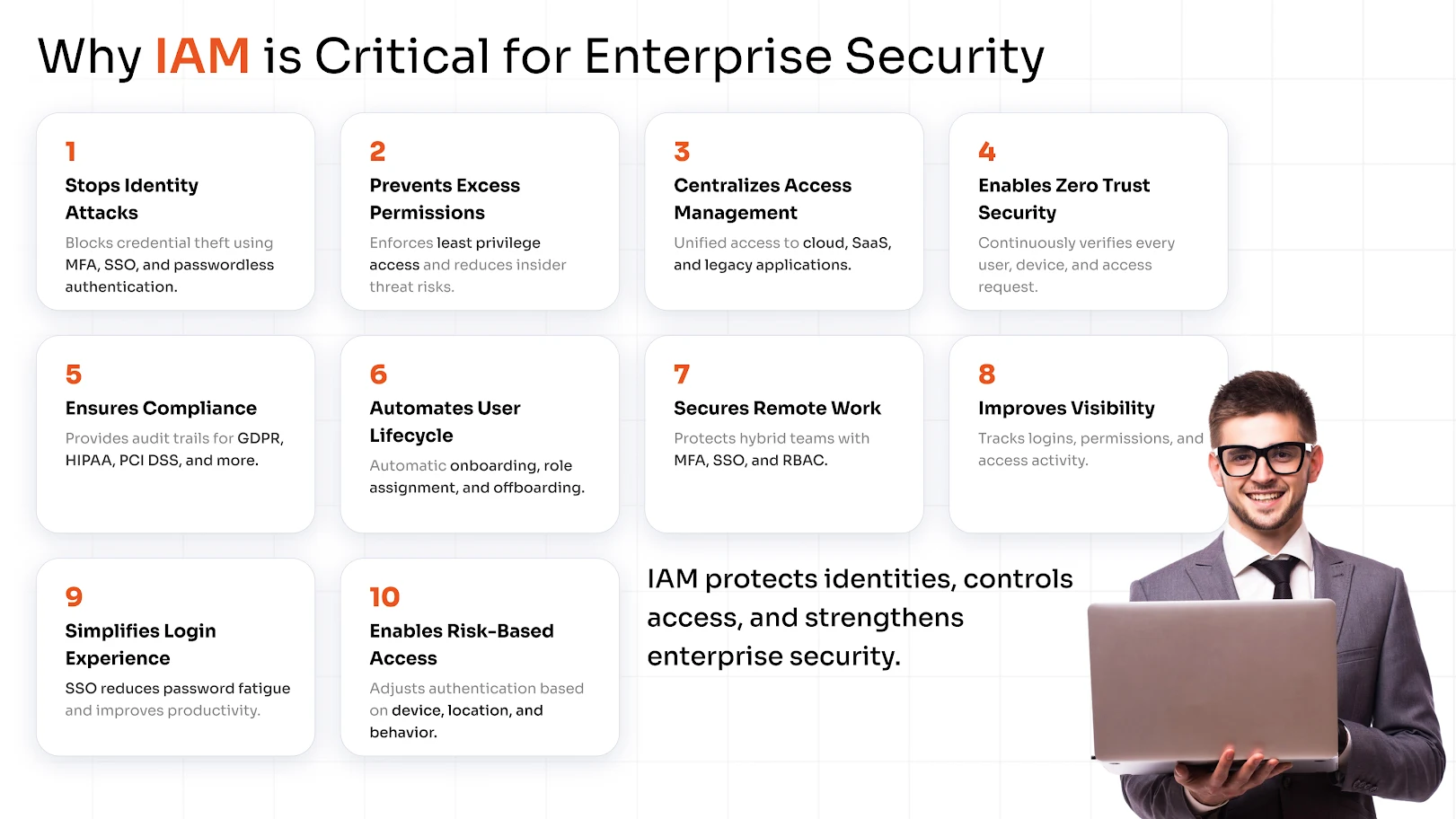
5. Achieves Regulatory Compliance and Audit Readiness
IAM security risks multiply significantly without proper governance. Manual access reviews are error-prone, access certifications are time-consuming, and audit evidence is scattered across multiple systems.
With IAM products, you can prove that only authorized users accessed sensitive data, and that you know exactly who did what and when in a centralized way. This data helps enterprises to comply with various international regulations.
miniOrange helps meet the following compliances:
- General Data Protection Regulation (GDPR)
- Health Insurance Portability and Accountability Act (HIPAA)
- Saudi Arabian Monetary Authority Cyber Security Framework (SAMA)
- Payment Card Industry Data Security Standard (PCI DSS)
- National Institute of Standards and Technology (NIST)
- Digital Personal Data Protection Act (DPDP) 2023
6. Automated Employee Onboarding and Offboarding
The employee onboarding and offboarding process can become tedious or cumbersome if not handled properly.
For example, a new employee can end up waiting for days for the right access, and when an employee leaves, their account may remain in the system for months. These dormant or zombie accounts tied to former employees are underappreciated in the IAM security risks. An attacker is always on the lookout for such accounts.
Automated user provisioning and deprovisioning through IAM ties the user lifecycle directly to HR systems. When someone joins, roles trigger the right access automatically. When they leave, all access is revoked simultaneously across every connected application.
7. Built for Hybrid and Remote Working Models
The pandemic didn't just change the working models; it also altered the security assumptions for enterprises. The VPNs started showing their limits quite early, and the entire enterprise moved to the cloud for better workflows.
The VPNs are vulnerable to data leaks and cannot block phishing attacks. But with MFA for VPNs, the security can be amplified easily. Furthermore, MFA ensures that remote logins require more than a password, especially from unmanaged devices or unfamiliar networks.
Cloud IAM solutions and policies such as SSO, MFA, Role-Based Access Control (RBAC), and the Principle of Least Privilege (PoLP) offer protection against cybersecurity attacks.
8. Transparency of User Activities and Access Logs
You cannot protect what you cannot see. One of the benefits of enterprise IAM is the comprehensive audit trail it creates: every login, every access request, every permission change, and every failed authentication attempt is logged and timestamped.
This visibility serves multiple purposes:
- Security operations teams can correlate IAM logs with Security Information and Event Management (SIEM) data to detect threats earlier.
- Compliance teams have evidence for audits.
- IT teams can troubleshoot access issues without guesswork.
- Forensic teams can conduct investigations faster and more accurately when an incident occurs.
In short, IAM turns access activity from a black box into a searchable, reportable, and actionable data asset.
9. Friction-Free Authentication that Users Actually Embrace
Enterprises today run on dozens of platforms: CRMs, ERPs, collaboration tools, cloud infrastructure, and a growing stack of SaaS applications.
When every platform demands its own login, the result is predictable: employees resort to weak, reused passwords, write credentials on sticky notes, or find workarounds that completely bypass security policy. Password fatigue isn't just a UX inconvenience; it's an active security liability.
This is where SSO and MFA together deliver one of IAM's most tangible benefits. Single Sign-On solution gives employees one secure, verified entry point into every application they need - no repeated prompts, no credential juggling. Combined with MFA, that single login is also properly protected, requiring additional verification only when risk signals warrant it.
10. Contextual and Risk-Based Access Control
Static access policies are increasingly inadequate for dynamic enterprise environments. Risk-Based Access Control (RBAC elevated with context) adjusts authentication requirements in real time based on signals like location, device posture, time of access, and behavioral patterns.
A user logging in from their registered corporate device during business hours? Gets a smooth experience. The same user attempting to access sensitive HR data from an unrecognized device in an unusual location? They're prompted for additional verification or blocked entirely until reviewed.
It allows security teams to enforce tighter controls where risk is highest without adding unnecessary friction for routine, low-risk access.
What CIOs and CISOs Should Evaluate in an Enterprise IAM Solution?
Choosing an IAM solution for an enterprise isn't a procurement decision; it's a strategic one. The wrong choice can mean years of integration headaches, poor adoption, and persistent security gaps.
Here's what security leaders should prioritize during evaluation:
- Integration Breadth: Check whether the solution supports existing apps, directories, and cloud infrastructure.
- Scalability: Make sure that the IAM product handles the current user count and supports growth with seasonal spikes and acquisitions.
- Deployment Flexibility: The IAM solution should be compatible with the cloud, on-premise, or hybrid deployment options that your enterprise prefers.
- Governance: Check for policy enforcement, role management, and access certifications.
Enterprise IAM best practices suggest running a structured proof-of-concept with real use cases and not just a demo environment before committing to a platform. Involve IT, security, compliance, and at least one business unit in the evaluation to surface integration requirements early.
How miniOrange Supports Enterprise-Grade IAM Security
miniOrange is purpose-built for the complexity that enterprise environments demand. Whether you're managing a workforce of 500 or 50,000 across a hybrid infrastructure, miniOrange delivers a comprehensive enterprise identity and access management platform that addresses the full spectrum of IAM needs.
miniOrange understands that IAM implementation is not a one-size-fits-all project. Its professional services team works alongside your security and IT teams to design an IAM architecture that maps to your specific environment, compliance requirements, and business objectives.
Secure your enterprises today - schedule a demo to know more about the IAM product suite or start a 30-day free trial.
FAQs
What is Identity and Access Management (IAM) in enterprise security?
IAM in enterprise security refers to the framework of policies and solutions that manage digital identities and control user access to systems, applications, and data. It ensures that the right people have the right access and that unauthorized access is prevented, detected, and logged.
What should enterprises look for when choosing an IAM solution?
While choosing an IAM solution, modern-day enterprises should evaluate scalability, deployment preferences, user and employee base, compliance, user experience, and more.
Leave a Comment