Hello there!
Need Help? We are right here!

Need Help? We are right here!
Search Results:
×
Explore comprehensive PAM features, integration methods, compliance benefits, and everything you need in one place.
Your download should start now. If not, please email us at idpsupport@xecurify.com.
Please enter a valid email-id

Database masking in Privileged Access Management (PAM) hides sensitive data during active sessions or recordings for users whom you do not want to give permission to view the actual values. The users are presented with scrambled or hashed data without hindering the access they need. As a result, you strengthen your overall database security and dramatically reduce insider threat risks.
This is useful when you need to provide privileged access to third parties, contractors, vendors, developers, or support teams that need temporary access to your systems without exposing sensitive data to them.
Database masking in miniOrange PAM protects sensitive data throughout privileged sessions. Combined with Privileged Session Management, it helps monitor and audit database access.
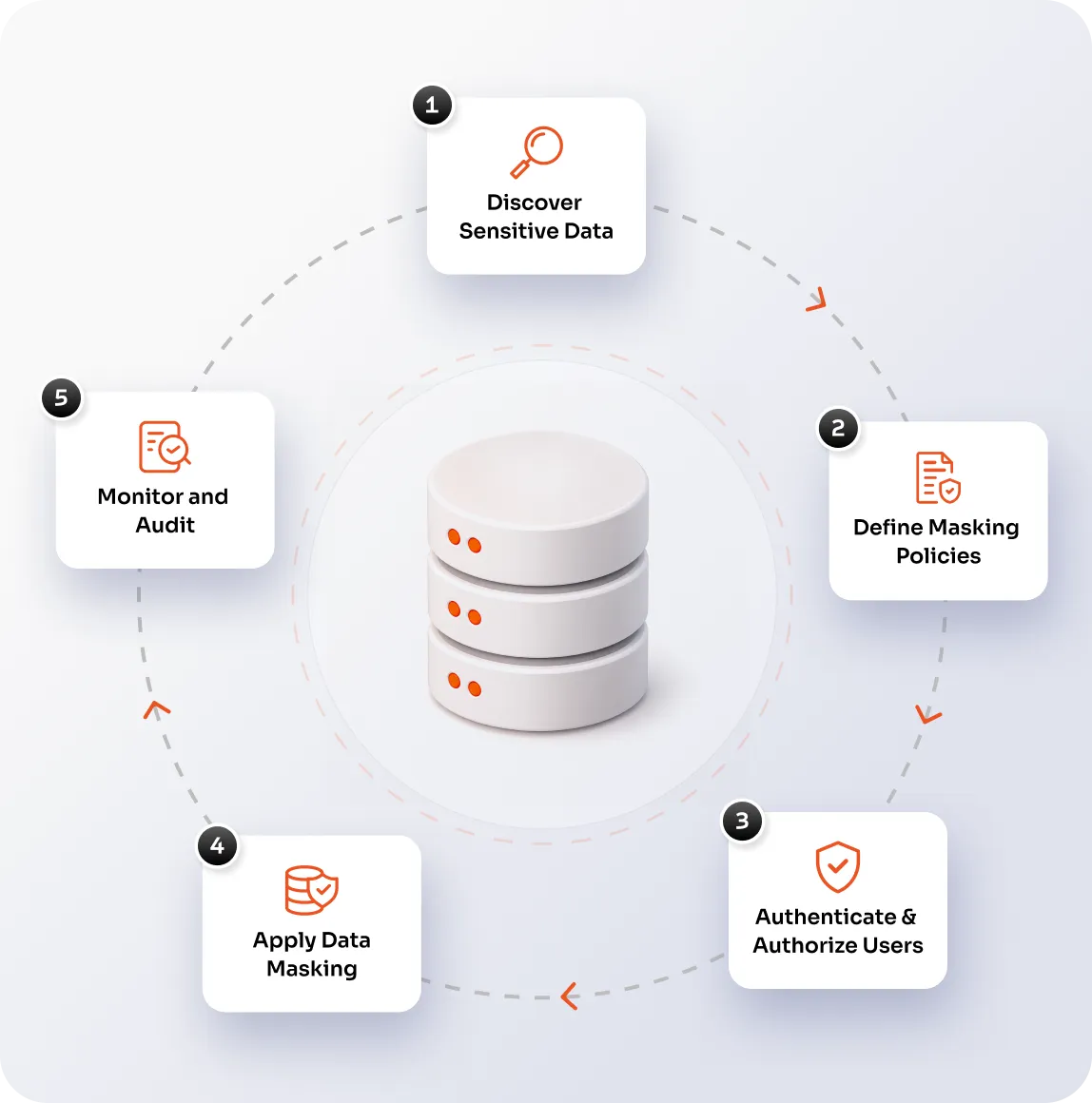
Identify the information that should not be visible to every privileged user, such as PII, payment information, financial records, healthcare information, customer information, and confidential business data.
Determine what information should be masked and under what circumstances. Your database access strategy should align access with business needs. Database masking in PAM helps apply that principle to sensitive database information.
Before users access a protected database, authenticate them and evaluate the access they have been granted. miniOrange PAM supports authentication and granular database access policies.
Obscure confidential data fields dynamically as queries execute according to your defined policy. At the same time, the database remains available for legitimate administrative and operational work.
Track all privileged database access and generate audit trails automatically. This gives security teams a clearer record of privileged database access and helps support investigations and audit requirements.
Mask sensitive data while the user works in your systems. Let the user perform their assigned tasks while avoiding unnecessary exposure to sensitive data. This is useful for third-party vendor sessions, where an external user may need access to troubleshoot a production issue without being exposed to PII.
Mask PII and other sensitive information in privileged session recordings. Give security and compliance teams the necessary visibility for auditing while reducing the exposure of sensitive data in stored recordings.

Database masking limits unnecessary visibility into sensitive records, helping reduce the chance of accidental exposure and misuse.

Combine database masking with granular access controls, MFA, command policies, and controlled access actions to enforce a stronger least-privilege model.

miniOrange PAM supports database auditing, session recording, live monitoring, and detailed activity logs to help security and compliance teams review privileged activity.
miniOrange PAM DB Shield places a secure proxy between users and databases. It can conceal the database’s actual IP address and port while providing a controlled access path.
Set database policies for access actions and control which SQL commands are allowed or blocked. You can also enforce MFA and session controls for database access.
Track database connections and activities, record sessions, detect anomalies and monitor database sessions in real time. Get better visibility into privileged activity.
miniOrange PAM brings privileged credential protection, access controls, just-in-time access, session monitoring, and database security into a broader PAM framework.
Database masking obscures sensitive values so users without the required privilege cannot see the original information. Encryption protects data by transforming it into an unreadable form that requires the appropriate key or mechanism to access.
Privileged users often have access to critical databases because their jobs require it. But broad database access does not always mean they need to see sensitive records.
Database masking in PAM helps reduce unnecessary data exposure while allowing authorized users to carry out administrative, development, support, or operational tasks.
Database masking can help organizations reduce unnecessary exposure to sensitive information by limiting what certain users can see.
When combined with privileged access controls, monitoring, session recording, and audit trails, it can also provide evidence of how sensitive database access is governed.

