

A user signs in to an application and gets access to the dashboard. Later, the same user tries to change account settings or approve a high-value transaction. Suddenly, another verification step appears.
Why? The risk has changed.
Routine access and sensitive actions do not need the same level of protection. Step-up authentication lets organizations add stronger verification when users cross a higher-risk threshold, while keeping everyday access simple.
This gives security teams more control over when users need additional verification and why.
What Is Step-Up Authentication?
Step-up authentication requires users to provide additional verification after their initial login when they attempt to access a sensitive resource or perform a higher-risk action.
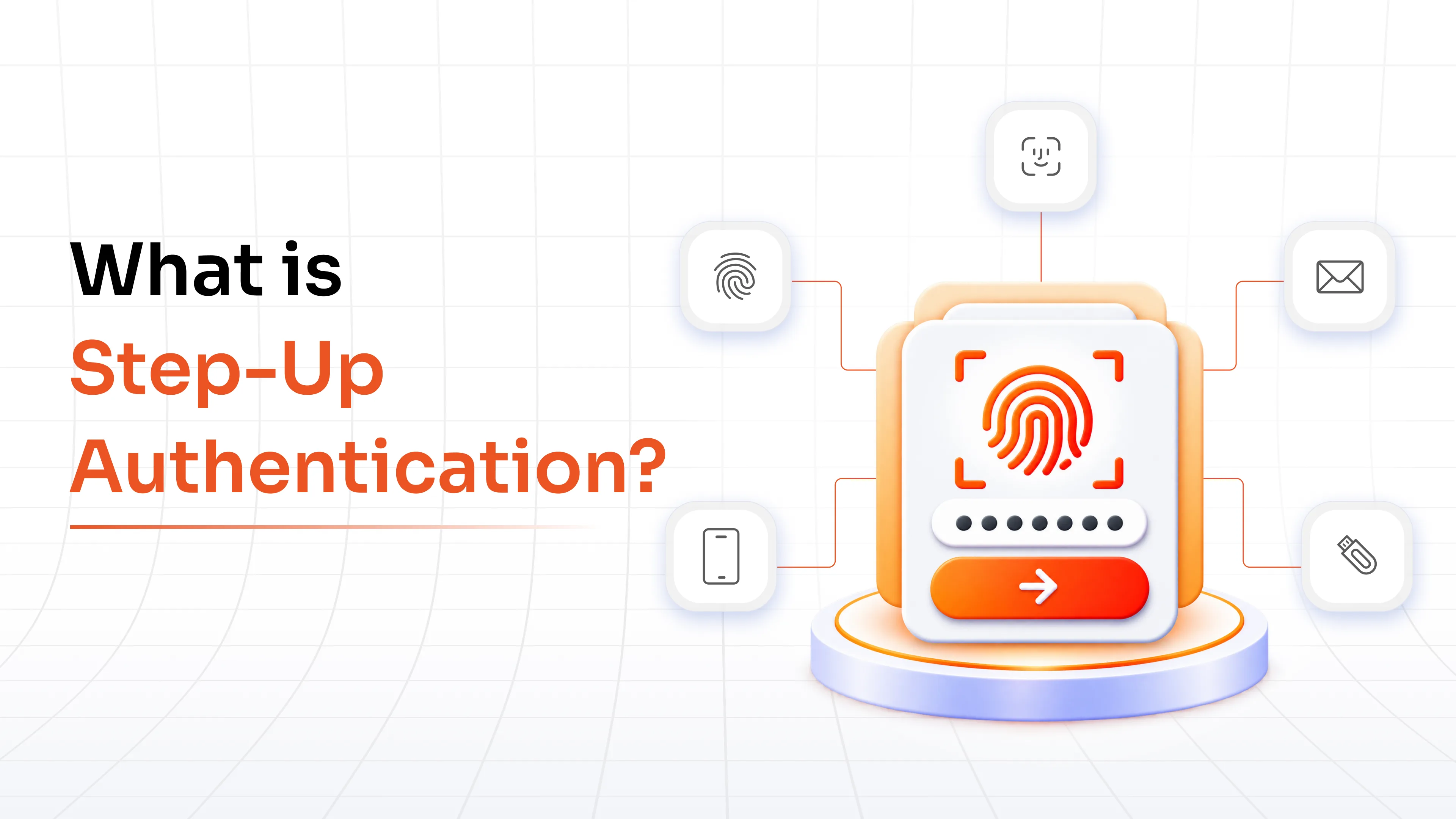
The process starts with the user's normal authentication. The application then checks the requested action against its security policies. If the current authentication level does not meet the requirement, the system asks the user for another authentication factor.
A user might sign in through single sign-on (SSO) and access a business application. The initial authentication gives them access to routine features. When they try to download confidential customer records, the application could request a passkey, biometric verification, or authenticator code.
This creates different levels of authentication assurance within the same session. Routine activities follow the standard authentication flow, while sensitive operations require stronger verification.
The important part is timing. The user does not necessarily need another authentication step at login. The system requests it when the user attempts an action that needs a higher level of identity assurance.
How Does Step-Up Authentication Work?
The process follows a simple sequence:
1. Initial Authentication: The user signs in through the organization's existing authentication process.
2. Sensitive Action or Resource Request: The user attempts to access a protected resource or perform an action with higher security requirements.
3. Policy Evaluation: The application checks whether the user's current authentication level satisfies the requirement. The policy could consider the user's role, resource, application, device, location, or other conditions.
4. Additional Authentication: If stronger verification is required, the system prompts the user for another authentication factor.
5. Identity Verification: The user completes the additional authentication successfully.
6. Elevated Authentication Assurance: The system increases the authentication assurance for the protected operation and grants access.
The policy check makes the difference. The system should not ask users to authenticate again without a clear security reason.
An organization could require basic authentication for standard application access and a stronger level before users perform privileged operations. It can also define how long the elevated authentication remains valid.
When Should You Use Step-Up Authentication?
The right trigger depends on what the user wants to access or change and what could happen if an unauthorized person completes the action.
1. High-Value Transactions: Require additional verification before large payments, wire transfers, purchases, or other financially sensitive operations.
2. Sensitive Data Access: Protect confidential customer, financial, healthcare, employee, or business information.
3. Administrative and Privileged Actions: Add stronger verification before administrators change permissions, security settings, system configurations, or production resources.
4. Account and Profile Changes: Protect password changes, email updates, payment information, recovery settings, and other sensitive account modifications.
5. New or Unfamiliar Devices or Locations: Request another authentication factor when access comes from an unfamiliar device, IP address, or location.
6. High-Risk API Operations: Protect API requests that modify accounts, process transactions, expose sensitive information, or perform privileged functions.
The trigger should match the risk. If every action generates another authentication request, users face unnecessary interruptions. If sensitive actions receive no additional verification, important access points remain exposed.
What Authentication Methods Can Be Used for Step-Up Authentication?
Organizations have several options for the additional authentication factor. The right choice depends on the sensitivity of the action and the security requirements of the environment.
Common step-up authentication methods include:
- Authenticator Apps: Users enter a time-based one-time password generated through an authenticator application.
- Push Authentication: Users approve a push authentication request through a registered device.
- Biometrics: Users verify their identity with a fingerprint, facial recognition, or another supported biometric factor.
- Hardware Security Keys: Users authenticate through a physical security key.
- FIDO2/WebAuthn: Users authenticate with phishing-resistant credentials supported by compatible devices and security keys.
- Passkeys: Users authenticate with a device-based credential using biometrics, a PIN, or another local device unlock method.
You do not need to use the same factor for every step-up event. A standard account change might use an authenticator code, while a highly privileged administrative operation could require FIDO2 or a passkey.
For critical operations, phishing-resistant MFA solution deserves particular attention. Our guide to phishing-resistant MFA explains how methods such as FIDO2 help address attacks that target traditional authentication factors.
Step-Up Authentication vs. MFA vs. Adaptive Authentication
MFA, step-up authentication, and adaptive authentication often appear together, but they solve different problems.
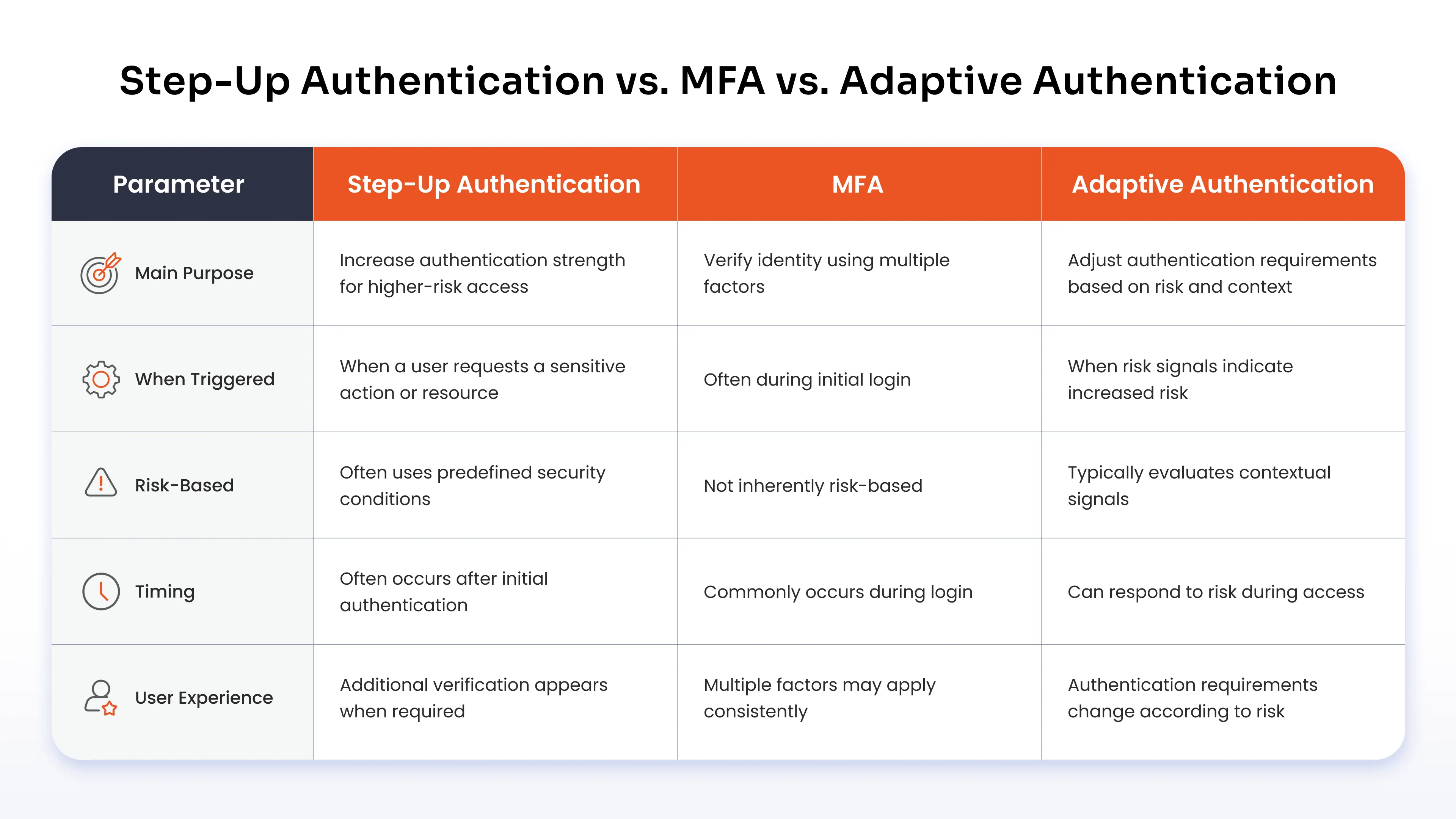
The easiest way to understand the difference is to look at what each control manages.
MFA determines the use of multiple authentication factors. Step-up authentication determines when a user needs stronger verification for a specific action or resource. Adaptive authentication evaluates contextual information and adjusts authentication requirements based on risk.
These controls can work together. A user might complete MFA during login, while an adaptive policy evaluates the access context. A step-up policy could then request stronger verification before the user performs a sensitive operation.
What Are the Benefits of Step-Up Authentication?
Security teams need stronger protection around sensitive operations. Users still need a practical way to access applications and complete routine work.
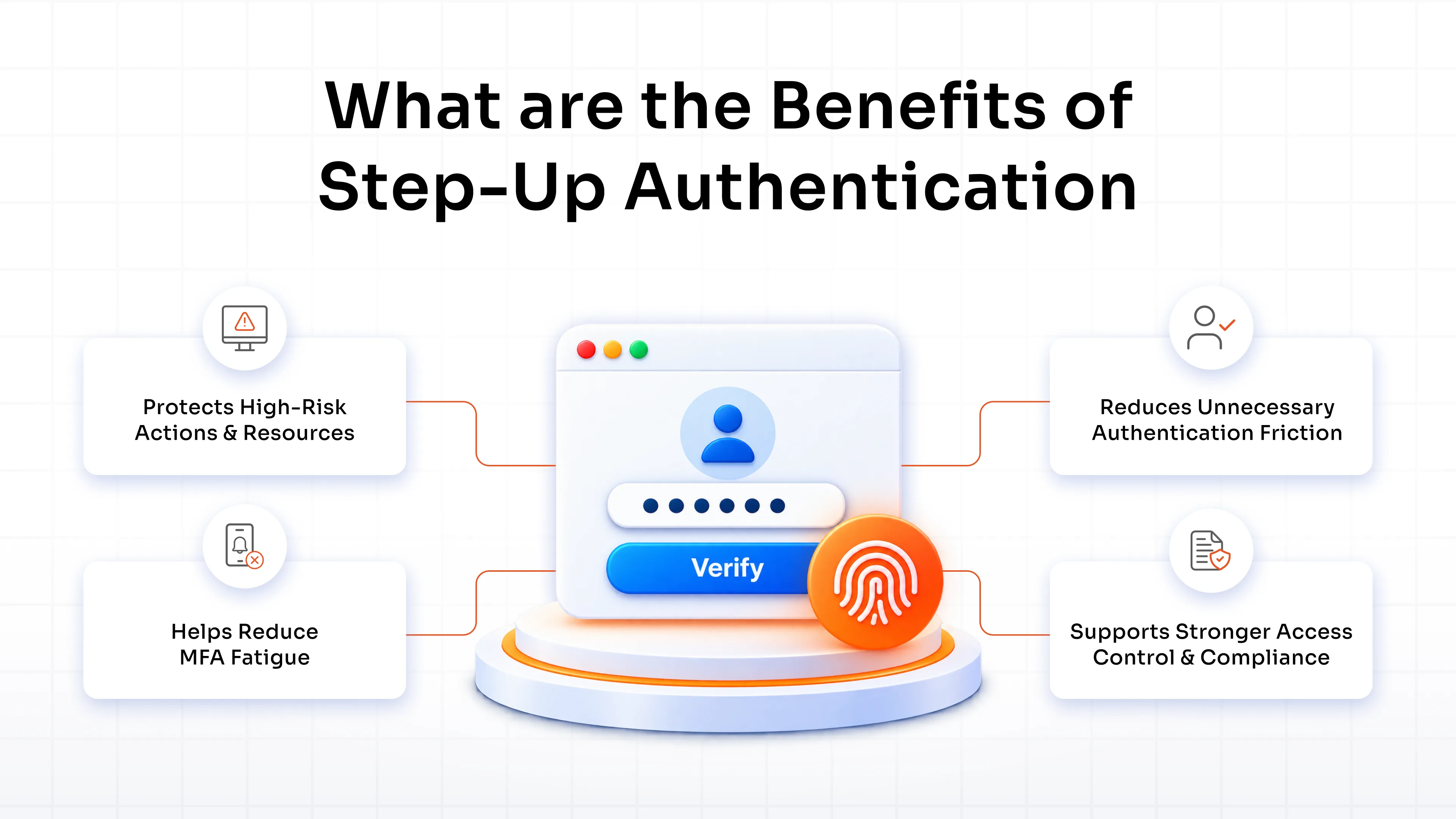
Step-up authentication brings these requirements together by adding verification where the risk increases. Instead of applying the same authentication requirement to every interaction, organizations define which resources and actions need stronger identity assurance.
Here are four key benefits.
1. Protects High-Risk Actions and Resources
Additional verification creates another security barrier before users perform sensitive operations. This helps protect financial transactions, restricted data, privileged functions, and account changes.
2. Reduces Unnecessary Authentication Friction
Users do not need to complete a high-assurance authentication challenge every time they access an application. Additional verification appears when a defined security condition requires it.
3. Helps Reduce MFA Fatigue
Frequent authentication prompts can cause users to approve requests without carefully reviewing them. Targeted step-up policies reduce unnecessary prompts while keeping stronger verification around sensitive actions.
Organizations looking to strengthen their broader authentication strategy can also explore how MFA helps prevent cybersecurity attacks.
4. Supports Stronger Access Control and Compliance
Step-up policies add another control around sensitive resources and privileged operations. Authentication events also provide useful information for security monitoring, access reviews, and compliance activities.
The value comes from applying stronger verification where the risk warrants it. Routine access stays straightforward, while sensitive actions receive additional protection.
Step-Up Authentication Use Cases
Step-up authentication works well when an action carries more risk than routine application access.
Financial Transactions and Payments
A user might sign in to a financial application and review account information without another authentication prompt. When the user initiates a large transfer, the application asks for another authentication factor before processing it.
Why It Is Risky: An attacker with access to the user's credentials or authenticated session could attempt unauthorized transfers or payments.
Step-Up Trigger: A transaction exceeds a predefined amount or meets another high-risk condition.
Authentication Method: The application requests a biometric factor, passkey, security key, or another approved authentication factor.
Sensitive Data and Customer Information
An employee might access standard customer information as part of daily work. Restricted records or sensitive downloads require stronger verification.
Why It Is Risky: Unauthorized access to customer, financial, healthcare, employee, or business information could create privacy, security, and compliance issues.
Step-Up Trigger: The employee attempts to access a restricted dataset or download sensitive information.
Authentication Method: The system requests another authentication factor before granting access.
Privileged and Administrative Access
An administrator might access a management console after completing the organization's standard authentication process. Changing permissions or modifying security configurations requires another verification step.
Why It Is Risky: A compromised administrator account could affect applications, users, data, and security controls across the organization.
Step-Up Trigger: The administrator attempts a privileged operation.
Authentication Method: The organization requires a stronger factor such as FIDO2, WebAuthn, a passkey, or biometrics.
Account Recovery and Profile Changes
Users often change passwords, email addresses, payment information, and recovery settings through their account profiles. These actions need additional protection because they affect future access to the account.
Why It Is Risky: An attacker who changes recovery information could maintain control of a compromised account and make legitimate account recovery more difficult.
Step-Up Trigger: The user attempts to change a password, recovery method, email address, or other sensitive account information.
Authentication Method: The application requests another authentication factor before completing the change.
How to Implement Step-Up Authentication
A practical implementation starts with the resources and actions you need to protect.
1. Identify High-Risk Resources and Actions: List sensitive applications, data, APIs, administrative functions, and account operations that require stronger authentication.
2. Define Step-Up Triggers and Risk Conditions: Decide when the system should request another authentication challenge. Use factors such as transaction value, resource sensitivity, user role, device, location, or action type.
3. Assign Appropriate Authentication Methods: Match each risk level with a suitable authentication factor. Use stronger, phishing-resistant methods for critical operations.
4. Configure Step-Up Policies and Session Assurance: Define the authentication level required for each protected action. Set how long elevated authentication remains valid and when users need to verify their identity again.
5. Test, Monitor, and Tune: Review successful and failed challenges, authentication events, completion rates, and suspicious activity. Adjust policies when they create unnecessary friction or leave sensitive actions underprotected.
Recovery also needs attention. Users need a secure way to regain access if they lose their primary authentication factor. Session timeouts should also prevent elevated authentication from remaining active longer than the organization's security policy allows.
Best Practices for Step-Up Authentication
A few practical rules help keep step-up policies effective:
- Apply additional authentication where the risk justifies it.
- Use phishing-resistant methods for critical operations.
- Explain why users need another verification step.
- Provide secure recovery options for unavailable authentication factors.
- Set appropriate validity periods for elevated authentication.
- Monitor failed challenges and unusual authentication activity.
- Review trigger policies as applications, users, and threats change.
The policy should make sense from both sides. Security teams should know why a challenge appears, and users should understand why the application needs another verification step.
How miniOrange Helps Enable Step-Up Authentication
Security should get stronger as access becomes more sensitive. miniOrange lets you enforce additional authentication when users access critical resources or perform high-risk actions.
With the miniOrange MFA solution, you can define policies based on applications, user roles, and access conditions. Add context with the Adaptive Multi-Factor Authentication (MFA) solution and choose from MFA authentication methods including passkeys, FIDO2/WebAuthn, biometrics, push, and authenticator apps.
Apply stronger verification where it matters, maintain visibility through audit logs, and deploy MFA across cloud, on-premises, or hybrid environments. Contact miniOrange to discuss your step-up authentication requirements and build an authentication strategy around your highest-risk access points.
FAQs
When should a business require step-up authentication instead of standard MFA?
Yes, a business should use step-up authentication when specific resources or actions need stronger verification than the user's initial authentication provides. Standard MFA establishes multi-factor identity verification, while step-up policies request additional verification when users reach higher-risk actions.
What is the difference between step-up authentication and adaptive authentication?
Step-up authentication typically triggers additional verification when a predefined condition requires stronger authentication. Adaptive authentication evaluates contextual signals such as device, location, IP address, and user behavior to determine whether authentication requirements should change.
Which authentication methods can be used for step-up authentication?
Organizations can use authenticator apps, push authentication, biometrics, hardware security keys, FIDO2/WebAuthn, passkeys, and other supported MFA factors. The selected method should match the risk associated with the protected action.
Does step-up authentication work with existing identity and access management systems?
Yes, step-up authentication works with identity and access management (IAM) environments that support additional authentication factors and policy-based access controls. Organizations can integrate step-up policies into existing application authentication flows.
How does step-up authentication help prevent fraud and unauthorized access?
Step-up authentication adds another identity check before a user completes a sensitive action. If an attacker obtains valid credentials or gains access to an authenticated session, the additional verification creates another barrier before the attacker reaches the protected operation.
How can businesses implement step-up authentication?
Businesses should identify sensitive resources, define risk-based triggers, select suitable authentication factors, configure session assurance requirements, and monitor authentication events. They should also test fallback and recovery processes before deployment.
Can step-up authentication prevent fraud?
No, step-up authentication does not prevent every type of fraud. It strengthens verification around sensitive actions and reduces the risk associated with compromised credentials or sessions. Organizations should combine it with MFA, access controls, risk detection, monitoring, and secure account recovery.

Leave a Comment