
Students, teachers, and faculty now move across a growing stack of learning, collaboration, communication, and administrative applications. Every new platform can mean another login to remember and another account for IT teams to manage.
That creates friction for users and a growing access-management burden for institutions.
SSO for education brings these applications behind a central authentication layer, allowing users to access authorized services with one institutional identity. When combined with MFA, provisioning, RBAC, and IAM, it also gives IT teams greater control over who can access what, and for how long.
What does SSO stand for in education?
SSO stands for Single Sign-On.
In education, it refers to using one institutional identity to securely access multiple authorized learning and administrative applications.
It is important to distinguish SSO from simply using the same password everywhere. Password reuse means individual applications may still maintain separate credentials. With an SSO solution, authentication is centralized through a trusted identity provider, reducing the need for users to maintain application-specific passwords.
How does SSO work?
The basic flow is simple:
User → Identity Provider → Authentication → Application Access
When a user opens an SSO-enabled application, the application directs them to the institution's identity provider (IdP). The identity provider authenticates the user and sends the required authentication information back to the application. The application then grants access according to the user's permissions.
Common protocols used for SSO include SAML and OpenID Connect (OIDC). Depending on the environment, institutions may also encounter OAuth 2.0 or legacy protocols such as CAS.
The identity provider becomes the central point for authentication, while each connected application remains responsible for providing its own services.
Why Do Schools and Universities Need SSO?
The challenge is not simply the number of passwords. It is the growing fragmentation of digital access across the education environment.
A student might move from an LMS to an online assessment platform, email, a digital library, and a collaboration tool in a single day. Faculty may add grading, research, and administrative systems to that mix. Meanwhile, IT teams have to manage identities and access across all of them.
SSO addresses several of these challenges at once.
Credential fatigue: More applications mean more credentials, more forgotten passwords, and more login interruptions.
IT support overhead: Password resets and application-specific access issues create repetitive work for already stretched IT teams.
Multiple devices: Students and faculty may use personal laptops, tablets, Chromebooks, mobile devices, and shared campus computers.
Remote learning: Users need secure access to cloud-based learning applications from outside the campus network.
Different access requirements: Students, teachers, faculty, researchers, and administrative staff need different applications and permissions.
Constant identity changes: Students enroll, change programs, graduate, or leave. Employees join, change roles, and leave the institution. Application access needs to follow those changes.
SSO authentication provides the centralized experience. IAM, RBAC, and lifecycle management extend that control to authorization and user access throughout the identity lifecycle.
What Are the Benefits of SSO for Education?
Simplify Access to Learning Applications
Students and faculty can move between connected applications without repeatedly entering credentials. One institutional identity can provide access to the LMS, student information system, email, digital library, collaboration tools, and other approved services.
That means less time navigating login screens and fewer interruptions between the user and the application they need.
Improve Student and Faculty Productivity
Login friction is small until it happens repeatedly.
Reducing unnecessary authentication steps can make it easier for students to get to assignments, classes, and learning resources, while faculty can move between teaching, grading, and administrative applications with fewer interruptions.
The benefit is particularly relevant in environments where several digital platforms are used together during a class or academic workflow.
Strengthen Identity Security
Centralized authentication gives IT teams a consistent place to enforce security policies instead of relying on every application to handle authentication independently.
SSO can work alongside MFA, passwordless authentication, adaptive authentication, conditional access, and session controls. It can also reduce password reuse by removing the need for users to maintain separate passwords for every application.
However, centralization also makes the identity provider a critical security boundary. Protecting it with strong authentication and appropriate administrative controls is essential.
Reduce IT Support Workload
Every standalone application can create its own account and password-management burden.
SSO software reduces that fragmentation by giving IT teams a central authentication layer. This can simplify password-related support, authentication policy management, application onboarding, and access troubleshooting.
When SSO is connected with automated provisioning and deprovisioning, the operational benefits extend beyond login management to the broader user lifecycle.
Support Remote and Hybrid Learning
Learning increasingly happens across classrooms, campuses, homes, and other locations.
SSO provides a consistent authentication experience across supported applications, regardless of where users access them from. Institutions can pair it with MFA and contextual access policies to apply stronger verification when a login presents additional risk.
How to Implement SSO for Education
A successful SSO deployment starts with understanding the institution's identity and application environment. Connecting applications comes after that foundation is clear.
1. Identify Users and Applications
Start by mapping the people who need access: students, teachers, faculty, staff, researchers, contractors, and other users where applicable.
Then map the applications they use, including the LMS, SIS, email, productivity suites, digital libraries, collaboration tools, assessment platforms, and specialized EdTech services.
This also reveals which applications support modern SSO protocols and which may require alternative integration methods.
2. Choose an Identity Provider
The identity provider becomes the central authentication point for connected applications.
Evaluate support for the protocols your applications require, along with integration with existing directories such as Active Directory, LDAP, Microsoft Entra ID, or Google Workspace.
The identity platform should also support the security and lifecycle capabilities you expect to build around SSO, including MFA, passwordless authentication, provisioning, deprovisioning, RBAC, reporting, and audit logs.
3. Configure Applications and SSO Policies
Applications need to be configured to trust the identity provider. This typically involves selecting the appropriate SSO protocol, exchanging configuration details, mapping identity attributes, and defining access policies.
This is also where user groups and roles become important.
A student might automatically receive access to the LMS and student portal, while faculty members receive additional access to grading, research, or administrative applications.
The objective is not simply to connect every application. It is to connect them in a way that reflects how the institution actually manages access.
4. Integrate MFA and Access Controls
SSO makes authentication simpler, but it should not make authentication weaker.
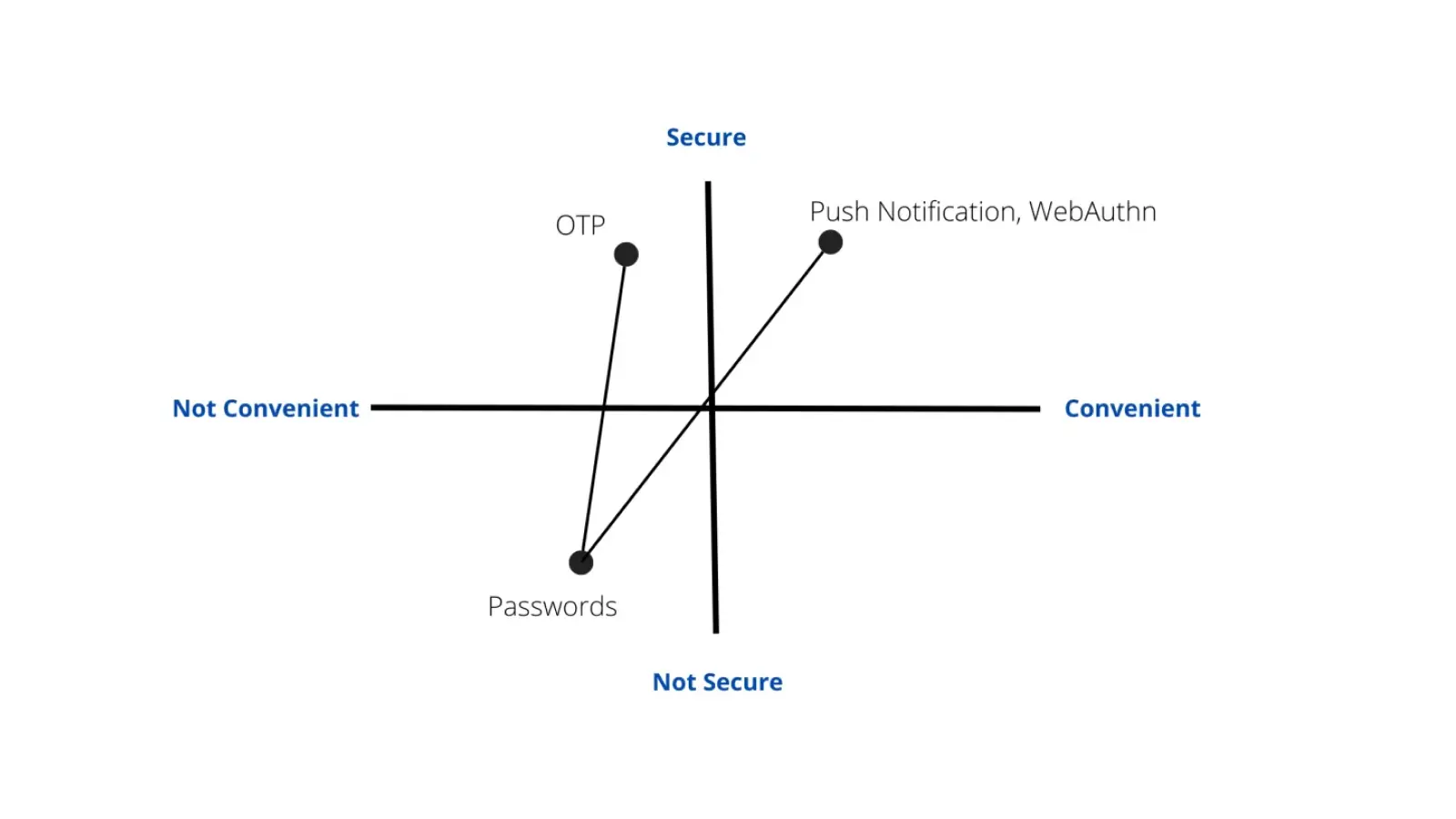
MFA can add another verification factor through methods such as push authentication, one-time passwords, passkeys, biometrics, or FIDO2 security keys.
Institutions can also apply adaptive or conditional access policies based on factors such as the user's role, device, location, application, or risk level.
For example, access to a sensitive administrative system may require stronger authentication than access to a general learning resource.
5. Automate User Provisioning and Deprovisioning
An education identity does not remain static.
A student may enroll, change programs, take a leave, graduate, or leave the institution. Employees may join, change departments, or leave.
Provisioning and deprovisioning connect these identity changes to application access. Compatible applications can use standards such as SCIM to automate account creation, updates, and removal.
This reduces manual administration and helps prevent stale or orphaned accounts from retaining access after a user's relationship with the institution changes.
How to Choose an SSO Solution for Education
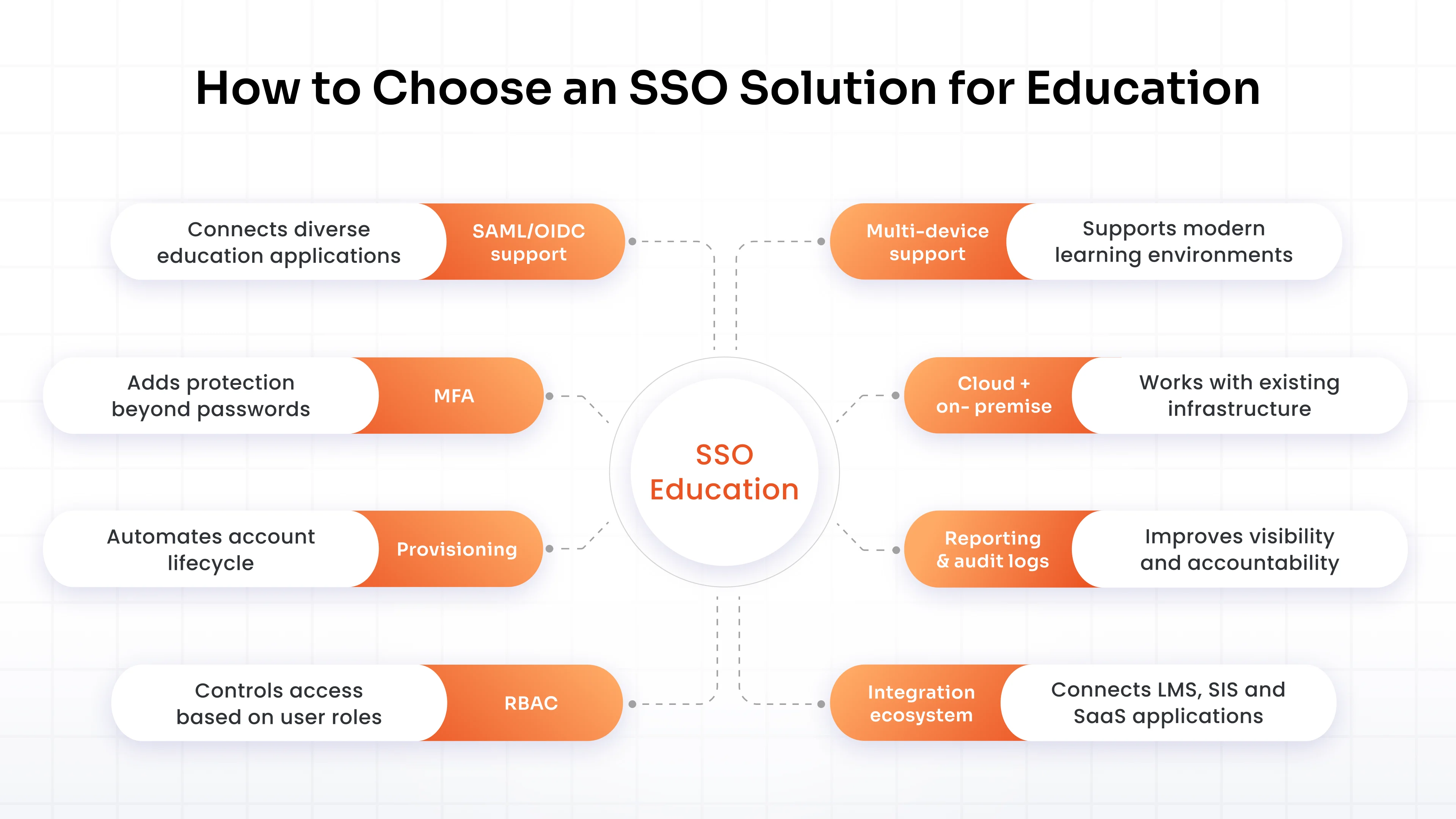
An SSO solution should fit the institution's application ecosystem, identity infrastructure, and user lifecycle rather than simply provide a convenient login page.
| Requirement | Why It Matters |
|---|---|
| SAML/OIDC support | Connects LMS, EdTech, SaaS, and administrative applications |
| MFA | Adds another layer of authentication security |
| Directory integration | Connects existing identity sources with centralized authentication |
| Provisioning | Automates account creation and application access |
| Deprovisioning | Removes access when users leave or change eligibility |
| RBAC | Aligns application access with user roles |
| Multi-device support | Supports laptops, tablets, Chromebooks, mobile, and shared devices |
| Cloud + on-premises support | Accommodates mixed technology environments |
| Reporting and audit logs | Improves visibility into authentication and access activity |
| Scalability | Supports changing student, faculty, and staff populations |
| Integration ecosystem | Connects learning, productivity, collaboration, and administrative applications |
| Passwordless authentication | Provides alternatives to traditional passwords |
| Conditional access | Applies authentication policies based on context |
K-12 and higher education have different requirements
The fundamentals of SSO are similar, but the environment matters.
K-12 schools may need to account for younger users, shared classroom devices, Chromebooks, rotating classes, and grade-level application access.
Universities often manage a more diverse identity population, including students, faculty, researchers, contractors, and administrative staff. They may also have multiple campuses, specialized research applications, departmental systems, and legacy infrastructure.
The right solution should accommodate these differences without creating a separate authentication experience for every group.
SSO Security and Privacy Considerations for Education
Because SSO can become the gateway to multiple applications, its security should be considered as carefully as its convenience.
Protect the identity layer. Use strong authentication, MFA, secure account recovery, and administrative controls to protect the identity provider.
Limit access by role. Authentication establishes who the user is. Authorization determines what they can access. RBAC and least-privilege policies help keep those decisions separate.
Secure sessions. Shared computers and personal devices require appropriate session timeouts, logout controls, and token-management practices.
Monitor access. Audit logs provide visibility into authentication and application access and can support investigation and access reviews.
Evaluate third-party applications. Before connecting an EdTech platform, institutions should understand what identity attributes and student information it receives, what permissions it requires, and how accounts and data are handled.
SSO and student data privacy
Identity security and data privacy are closely connected in education, but they are not the same thing.
For U.S. institutions, FERPA protects the privacy of student education records. The U.S. Department of Education recommends that schools consider privacy and security when using online educational services and third-party applications.
SSO can support a broader security strategy by centralizing authentication and application access. It does not, by itself, make an institution FERPA-compliant or satisfy every privacy obligation.
Institutions still need appropriate policies and controls around data collection, disclosure, third-party vendors, retention, security, and access.
Make Every Login Part of a Better Access Management
For educational institutions, the goal is not simply to reduce the number of passwords students and faculty remember.
It is to create a more consistent, controlled way to manage access across the applications education now depends on.
SSO provides the authentication foundation. MFA strengthens that foundation, RBAC controls authorization, and provisioning keeps access aligned with changing identities.
Together, these capabilities give schools and universities a clearer way to manage digital access while keeping the experience simple for the people who rely on it every day.
Make sure your identity infrastructure can support it without creating more accounts, access gaps, and administrative overhead.
Talk to an Identity Specialist
FAQs
Can students use SSO from personal devices?
Yes. Students can use SSO from supported laptops, tablets, smartphones, and other personal devices. Institutions can combine SSO with MFA, conditional access, and session controls to manage access from unmanaged devices.
Does SSO work for both K-12 schools and universities?
Yes. SSO can support both environments. The implementation should account for differences such as shared devices and younger users in K-12, or multiple campuses, researchers, and larger identity populations in higher education.
Can SSO integrate with Active Directory and cloud directories?
Yes. Depending on the solution, SSO can integrate with Active Directory, LDAP, Microsoft Entra ID, Google Workspace, and other directory or identity services.
Is MFA required when implementing SSO for education?
SSO does not inherently require MFA, but combining the two provides stronger protection for the central authentication layer. MFA is particularly important for administrators and access to sensitive applications.
How does SSO help when students change schools or graduate?
SSO works best alongside provisioning and deprovisioning. When a student's status changes, application access can be updated according to institutional policies. When they graduate or leave, access can be removed without requiring administrators to disable accounts individually across every application.
About the Author

Content Writer
Minal is an experienced B2B content writer. She has written over 250 articles across industries like UI/UX, real estate, automotive, digital marketing, SaaS, AI & ML, and cybersecurity. She brings her interest in cybersecurity to life by creating clear, engaging content tailored for technical, non-technical, and creative pieces. Her aim is to simplify complex topics, highlight product value, and connect with both technical and non-technical audiences.
Leave a Comment