URL-Based SSO for Multi-IdP Environments in Jira & Confluence
Managing access across global teams is no small task especially when different departments or regions rely on separate Identity Providers (IdPs). For organizations running multiple Jira and Confluence instances, delivering a seamless login experience without compromising on security or admin control becomes a growing challenge.
Business Challenge
As organizations scale, the complexity of managing Single Sign-On increases. Admins face a mix of operational and security hurdles:
- Multiple Identity Providers in Use: Different business units or geographic regions often prefer their own IdP (e.g., Azure AD for EMEA, Okta for North America, ADFS for internal apps).
- URL-Based Access Patterns: Users log in through different Jira URLs, each requiring specific SSO behavior depending on the region or team.
- Manual Group Management After Login: Even after authentication, users need to be manually placed into the correct groups to get proper access—an admin burden that doesn’t scale.
- Inconsistent Access Control: Without a way to dynamically tie URLs to specific IdPs, the login process becomes error-prone and difficult to secure.
As one global IT manager put it:
“We operate across 5 regions, each with its own IdP. Managing who logs in through which portal—and ensuring they get the right access—was chaotic without automation.”
Solution Overview
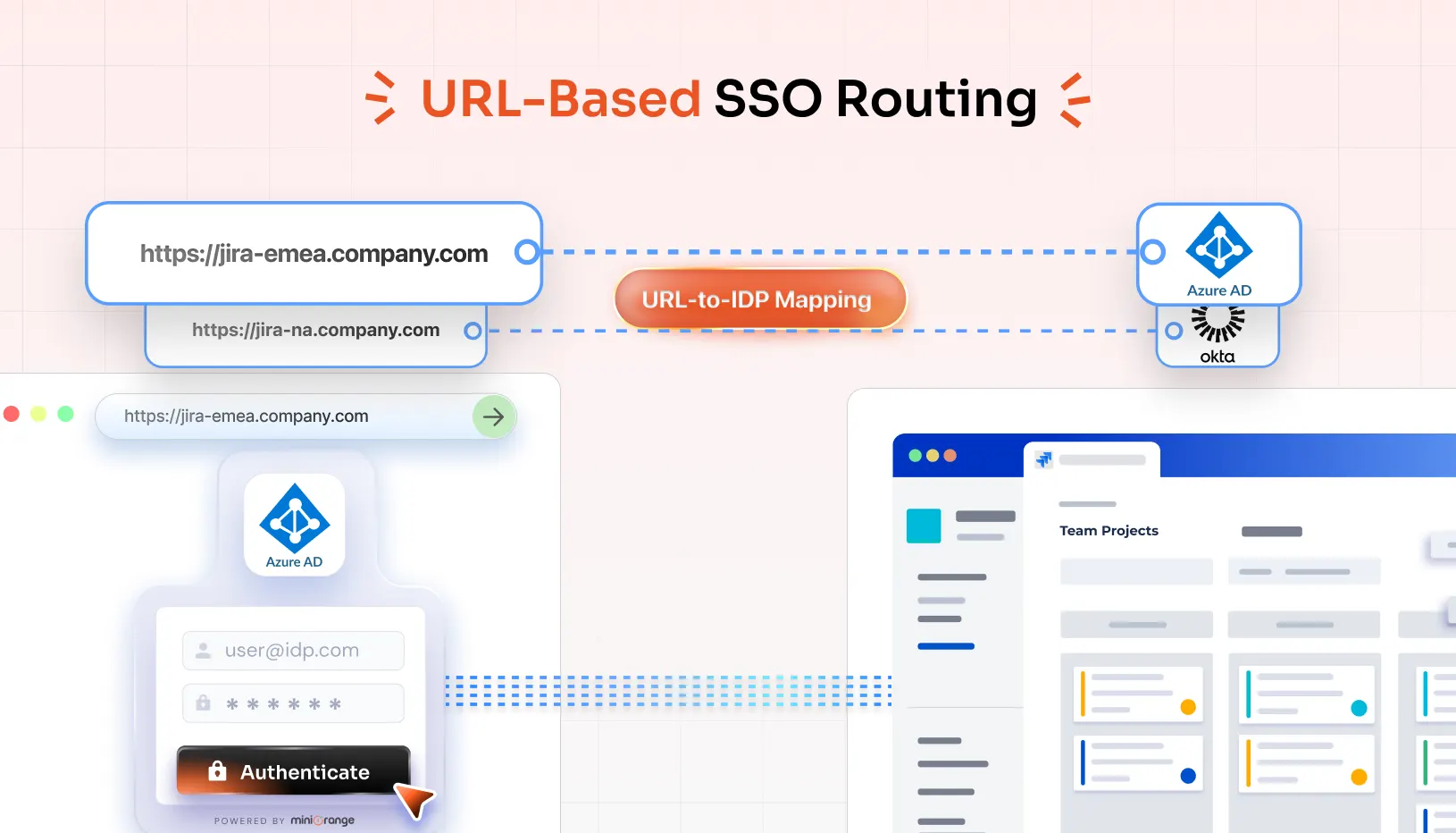
To streamline SSO for complex environments, a URL-based SAML SSO solution was deployed. This setup automatically routes users to the correct IdP based on the Jira or Confluence URL they access—no manual selection needed. It also provisions group access in real time based on IdP and user roles, eliminating post-login admin work.
How It Works
1. URL-to-IdP Mapping
Each Jira or Confluence URL is mapped to a corresponding Identity Provider.
Example:
- https://jira-emea.company.com → Azure AD
- https://jira-na.company.com → Okta
- https://jira-apac.company.com → Ping
When users visit a specific URL, they are automatically redirected to the appropriate IdP without needing to choose or remember it.
2. Seamless SAML Authentication
Once the correct IdP is determined, users are taken to that IdP’s login page for authentication.
- After login, they are sent back to their original Jira or Confluence page—preserving session state and user experience.
3. Automatic Group Provisioning
Upon successful login, users are automatically assigned to predefined groups based on their IdP and role.
Example:
- Azure AD users → “EMEA-engineers” group
- Okta users → “NA-support” group
- ADFS users → “internal-admins” group
No need for post-login mapping or admin intervention.
Real-World Example
A multinational logistics company used URL-based SSO to simplify login for 4,000+ users across three regions. Before implementation:
- Users were confused about which login portal to use.
- IT manually mapped users to groups after login, causing delays.
- Incorrect IdP routing created failed logins and support tickets.
After URL-based SSO:
- Each region’s users had a dedicated Jira URL mapped to their IdP.
- Logins were seamless and automatic.
- Admin overhead dropped by 70% as group provisioning became fully automated.
Key Benefits
The solution provides the following key benefits:
Seamless User Experience
Users are automatically directed to their correct IdP based on URL—no confusion, no extra steps.
Automated Group Assignment
Save time and reduce errors with automatic group provisioning based on IdP and user role.
Enhanced Security
Enforces strict IdP-based login flows, ensuring users authenticate through only their authorized identity provider.
Scalable Across Global Teams
Easily support growth by adding new URLs and IdPs as your organizational structure evolves.
Conclusion
URL-based SAML SSO transforms how enterprises handle authentication across multiple Jira and Confluence instances. It empowers IT admins to deliver a streamlined login experience, maintain tight security controls, and eliminate the burdens of manual user and group management—all while scaling with the business.