

A nurse taps into a shared workstation between rounds. A password, then a fingerprint. Two seconds later, she's in the chart and back to the patient.
That's what MFA should feel like in a hospital: fast for the person who belongs there, locked tight for anyone who doesn't.
Most healthcare organizations still run on passwords alone for far more systems than they'd like to admit. Patient records, remote logins, vendor access, billing platforms. Attackers know exactly what a medical identity is worth, it keeps paying out long after a stolen credit card gets canceled. MFA is the one control that closes the gap attackers rely on most: the single compromised password.
Why Healthcare Needs Stronger Authentication?
Hospitals run on passwords more than most industries realize. Nurses log into Electronic health records (EHR) terminals between patient rounds. Physicians access records remotely from home or between facilities. Billing staff touch insurance systems all day. Vendors, from imaging software providers to lab partners, connect to hospital networks too.
Every one of those logins is a target.
EHRs hold more resale value than credit card numbers on criminal marketplaces. Independent analysis of dark web listings puts the average price for a full health record at around $300, compared to $17 for a stolen credit card, even though cards get most of the public attention around data theft. A card gets cancelled in a day. A medical identity keeps working for years.
This gap in value is part of why healthcare stayed the most expensive industry for data breaches. And roughly half of healthcare breaches trace back to malicious or criminal attacks, not accidents.
Ransomware groups know this. They don't need to break encryption, they just need one set of stolen credentials to get in, lock down systems, and demand payment while patient care stalls. Phishing remains the easiest way in. In May 2026, Microsoft flagged a coordinated phishing campaign hitting healthcare organizations directly, aimed at harvesting credentials tied to patient and financial data, according to AHA's reporting.
Add shared workstations, telehealth logins, and third-party vendor access to the mix, and password-only authentication becomes a liability.
What is Multi-Factor Authentication in Healthcare?
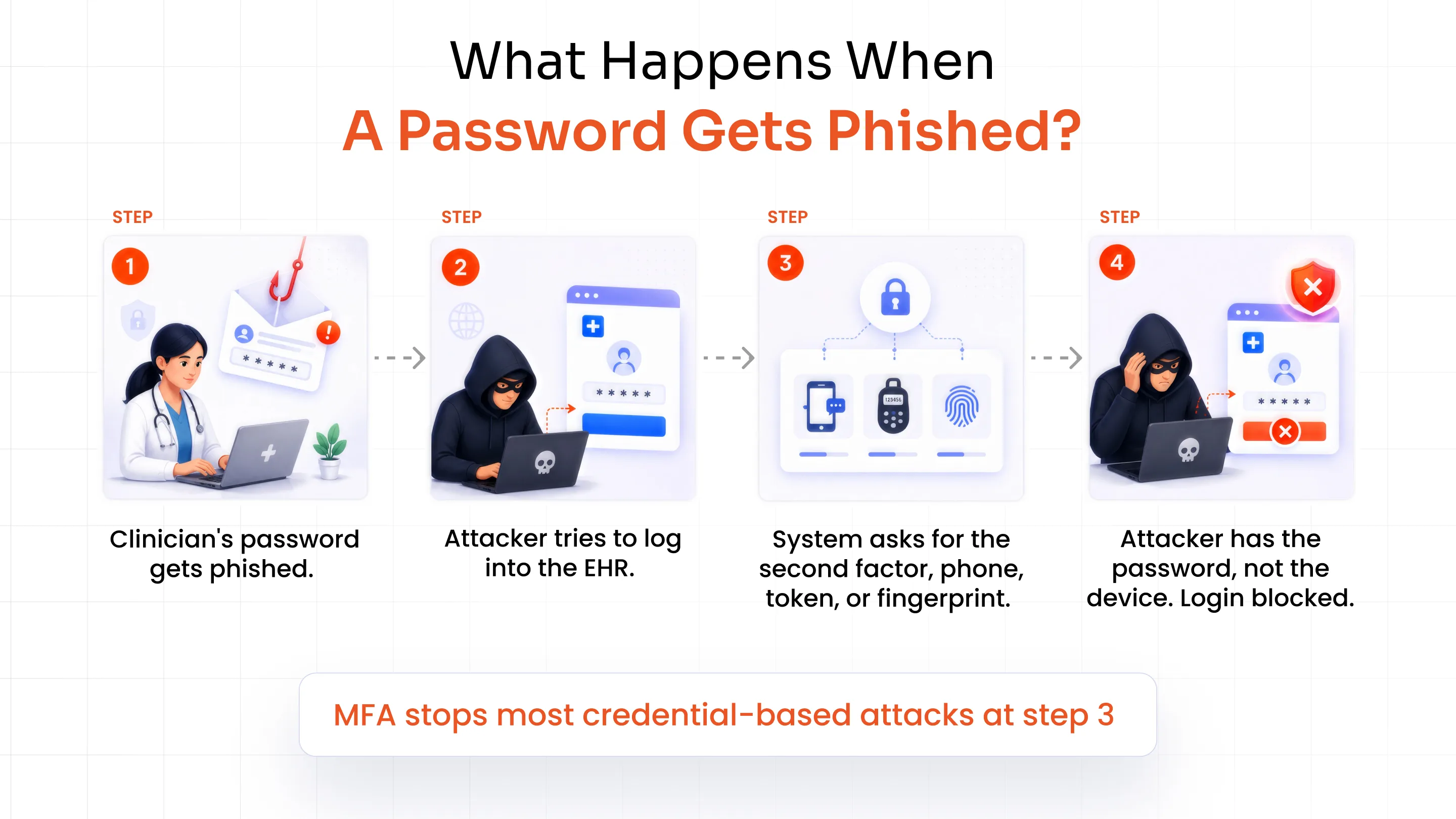
Multi-factor authentication (MFA) means proving your identity with two or more independent factors, not just a password. Something you know (a password or PIN), something you have (a phone, token, or key), or something you are (a fingerprint or face scan).
Two-factor authentication (2FA) is technically a subset of MFA, limited to two authentication factors. A Two-factor authentication (2FA) solution typically combines a password with one additional authentication method, which is common in most healthcare deployments.
Why does this matter for healthcare specifically?
A stolen password alone shouldn't be enough to reach a patient chart. If a clinician's login gets phished, the attacker still needs the second factor, the phone, the token, the fingerprint, to get anywhere. That single requirement blocks most credential-based attacks before they start.
How MFA Protects Healthcare Organizations from Cyber Threats?
Passwords fail healthcare organizations in specific, predictable ways. MFA closes each one.
| Threat | How MFA Helps |
|---|---|
| Phishing | A stolen password alone cannot complete the login. The attacker would need 1 or 2 more authentication steps to get access. |
| Credential stuffing | Reused passwords from other breaches become useless without the second factor |
| Ransomware entry | Blocks the initial account takeover that leads to lateral movement |
| Remote access compromise | Adds a checkpoint that VPN and RDP logins can’t bypass. |
| Privileged account takeover | Protects admin and IT accounts with the widest system reach |
| Third-party vendor compromise | Extends protection to external logins, not just employees |
MFA comes in many forms, and they're not equally strong.
SMS and email OTPs, and basic push notifications, can be intercepted, SIM-swapped, or worn down through MFA fatigue attacks, where an attacker spams push requests until someone taps "approve" out of habit or exhaustion. Newer attack techniques, adversary-in-the-middle proxies that steal session tokens after authentication, can bypass standard MFA entirely.
That's why the U.S. Department of Health and Human Services (HHS) has pushed healthcare organizations toward phishing-resistant MFA, methods like FIDO2 and hardware security keys that can't be intercepted or replayed, as a credential-harvesting mitigation (HIPAA Journal covered HHS's guidance on this directly). For high-risk systems, EHRs, admin accounts, and remote access, the method you choose matters as much as whether you use MFA at all.
MFA Methods for Healthcare
The strongest healthcare MFA solution should combine more than a couple of MFA methods. They should support biometrics, FIDO2, authenticator apps, and tokens to match the risk of each system.
Biometric Authentication
Fingerprint, face, or Touch ID/Face ID logins use biometric authentication to verify identity using something a person is, rather than something they type. For shared clinical workstations, where multiple staff log in and out throughout a shift, biometrics cut login friction without cutting security. Nobody has to remember whose password belongs on which terminal.
FIDO2 and Phishing-Resistant MFA Authentication
FIDO2 uses the WebAuthn protocol to support passwordless logins through security keys, Windows Hello, Touch ID, and Face ID. As a phishing-resistant MFA solution, it relies on cryptographic keys instead of anything a user types or receives, helping resist phishing and replay attacks that can compromise OTP-based methods. For EHR access, admin accounts, and systems handling PHI, this provides a strong authentication option for protecting sensitive healthcare environments.
Authenticator Apps and Push Notifications
Google Authenticator, Microsoft Authenticator, Authy, and the miniOrange Authenticator app generate time-based codes or send push approvals straight to a clinician's phone. Push notifications through the miniOrange app let a user approve or deny a login with one tap, useful for remote and telehealth access where a hardware key isn't practical.
OTP, Email, and SMS Authentication
One-time passcodes sent by SMS, email, or automated call still have a place, particularly for patient portals and lower-risk logins. They're easy to roll out and don't require an app download. Just don't rely on them alone for EHR or admin access, where phishing-resistant methods carry less risk.
Hardware Tokens and Security Keys
YubiKeys and similar devices generate a physical, cryptographic proof of identity that doesn't depend on a phone or network connection. For privileged administrator accounts and offline environments, hardware tokens deliver phishing-resistant security without a mobile dependency.
Which MFA Methods Fit Different Healthcare Use Cases?
Not every login needs the same protection. Match the method to what's actually at risk.
| Healthcare Use Case | Recommended MFA |
|---|---|
| EHR/EMR acceess | FIDO2, biometrics, authenticator app |
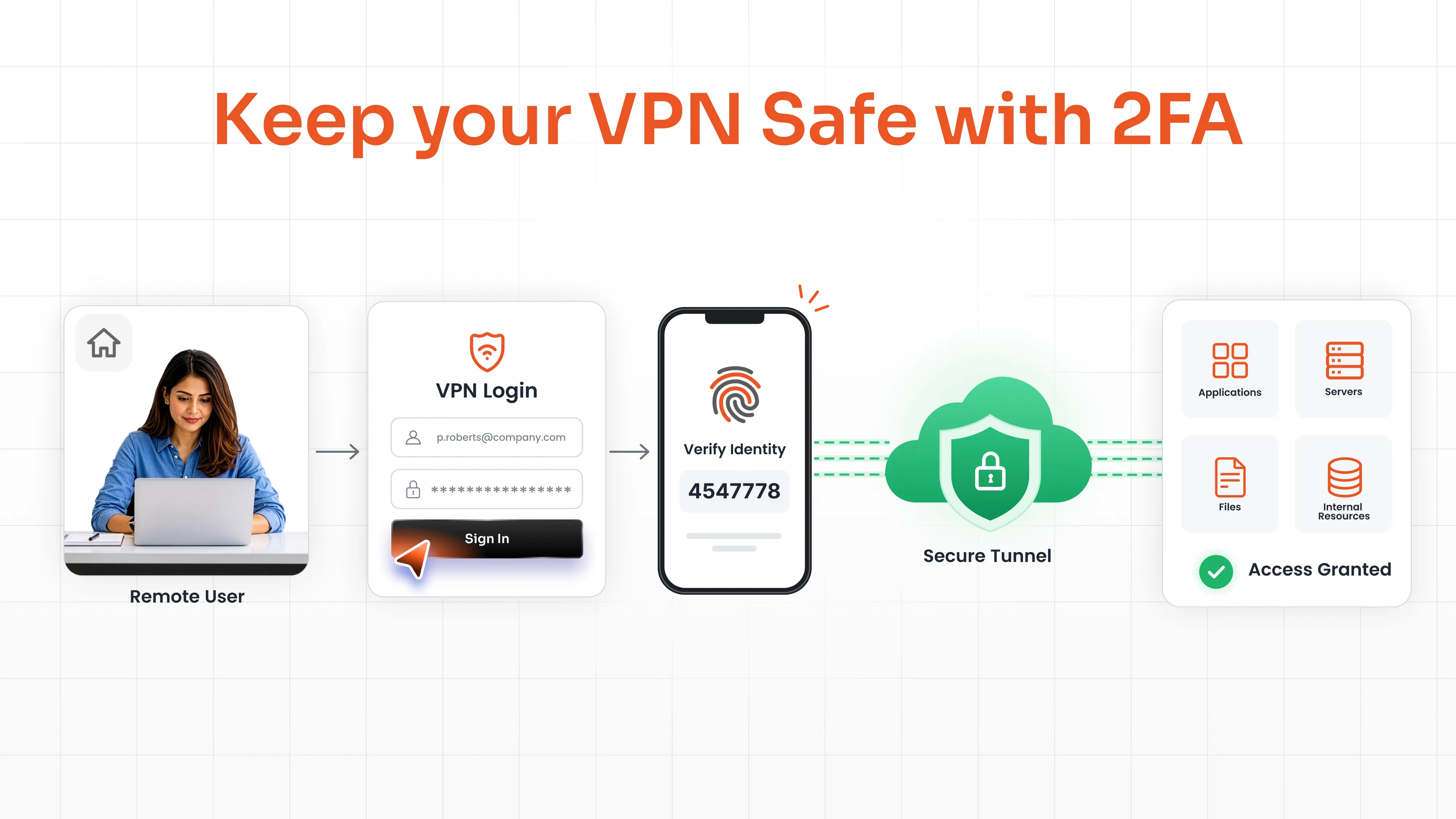
| Remote/VPN access | FIDO2, authenticator app, push notifications |
| Privileged Administrator Access | FIDO2, hardware security keys |
| Shared Clinical Workstations | Biometrics, hardware tokens, Windows MFA |
| Patient Portals | Authenticator app, OTP, biometrics |
| Telehealth Applications | Authenticator app, FIDO2 |
| Third-Party/Vendor Access | Adaptive MFA plus phishing-resistant methods |
| High-Risk Applications | Windows MFA, FIDO2/security keys plus adaptive policies |
Benefits of MFA for Healthcare Organizations
Security gets most of the attention when people talk about MFA, fair, it's the main reason to adopt it. But the value shows up in a few other places too.
- Protects PHI and shrinks the blast radius of a single compromised password
- Cuts help desk tickets tied to password resets, freeing IT from walking people through lockouts all day
- Builds patient trust in portals. Patients use scheduling, messaging, and records features more when login feels secure, not just when it looks secure
- Supports Zero Trust initiatives many health systems are already rolling out
- Strengthens compliance posture ahead of HIPAA Security Rule changes (more on that below)
- Adds flexibility. Self-enrollment lets staff pick a method that fits their role instead of IT provisioning one option for everyone
How to Implement MFA in Healthcare?
Rolling out MFA hospital-wide overnight breaks workflows and burns goodwill with clinical staff. A phased approach works better.
Identify High-Risk Systems and Users
Start with what actually matters: EHR/EMR, VPN and remote access, administrator accounts, email, and any system connected to critical applications or third-party vendors. Map where PHI lives before deciding how to protect it.
Choose Methods Based on Risk
Don't force one method everywhere. A shared nursing station and a remote billing administrator don't need the same authentication method. One calls for biometrics, the other for FIDO2 over VPN. Match method to user, application, risk level, and environment.
Integrate with Existing Healthcare Systems
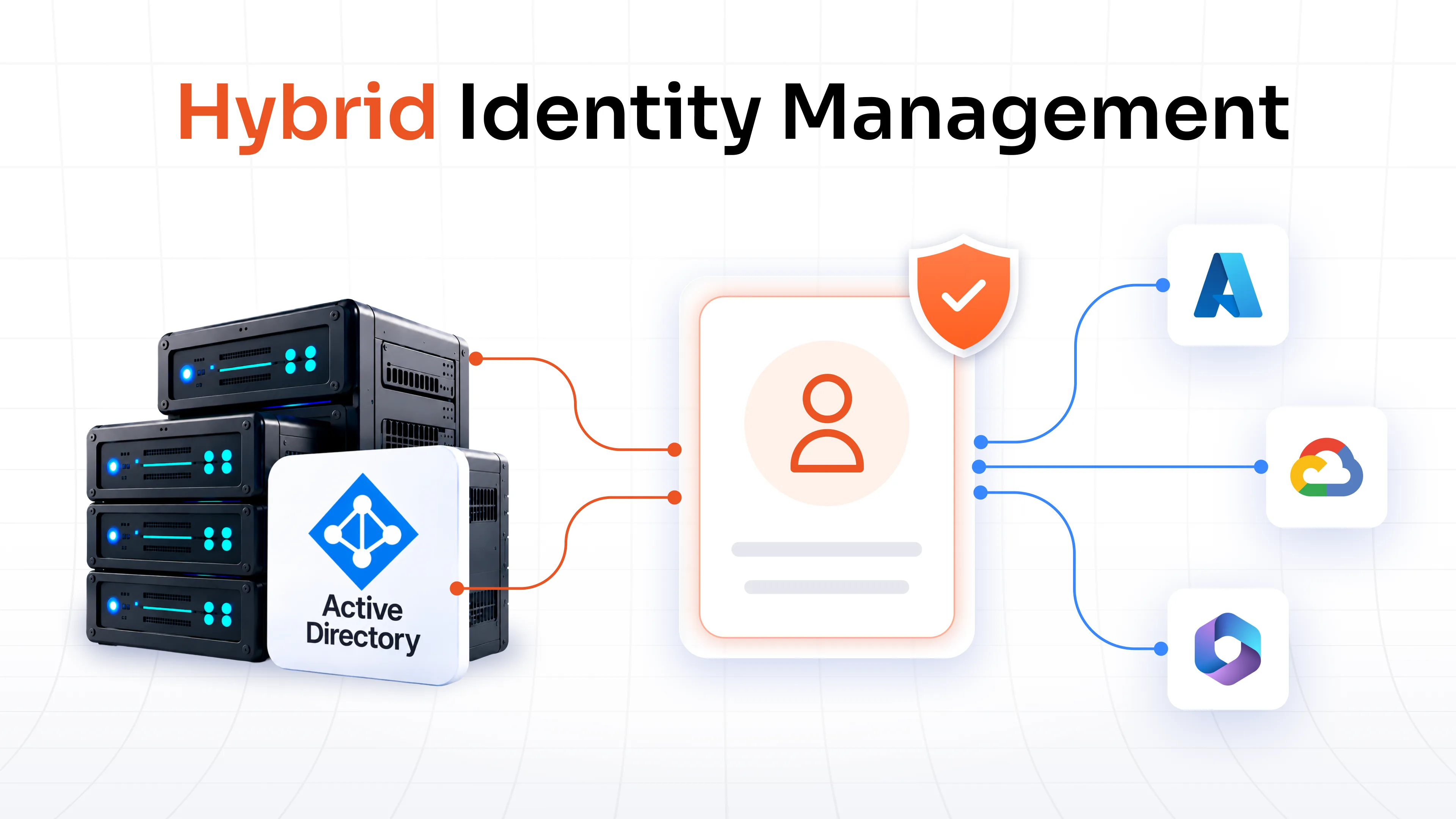
MFA needs to work with what's already running: Active Directory, LDAP, SSO, VPN, RDP, cloud applications, and EHR platforms. miniOrange supports RADIUS and TACACS+ for network devices, no-code integration for legacy apps like Oracle EBS and PeopleSoft, and SAML, OAuth, and JWT for web apps.
Roll Out in Phases
Start with privileged users and remote access, since those accounts carry the most risk if compromised. Expand to critical applications and clinical workflows next, then third parties, then the broader user population. Censinet's healthcare security guidance follows this same order: identity infrastructure and administrative systems first, clinical and billing platforms next, then broader access.
MFA and HIPAA Compliance
The Health Insurance Portability and Accountability Act (HIPAA) doesn't say every healthcare organization must use MFA today. But it comes close enough that treating MFA as optional is a mistake.
The current HIPAA Security Rule requires reasonable safeguards for PHI access, and MFA supports that requirement directly. HHS's Healthcare and Public Health Cybersecurity Performance Goals go further, naming MFA for internet-accessible assets and remote access as an essential practice for healthcare organizations specifically.
In 2024, HHS proposed changes to the Security Rule that would require MFA with limited exceptions. That proposal hasn't been finalized, the current Security Rule remains in effect as written. But the direction is clear, and organizations that wait for a mandate before adopting MFA will be playing catch-up.
Compliance isn't only about prevention, either. Every breach, regardless of size, gets reported to HHS's Office for Civil Rights (OCR), and breaches affecting 500 or more people become part of OCR's public breach list. MFA is one of the more direct ways to keep a breach out of that list in the first place.
HITECH and NIST guidance point in the same direction: strong authentication, ideally phishing-resistant, for anything touching PHI or remote access.
Why Choose miniOrange MFA for Healthcare?
Healthcare IT teams need a different method for every scenario: shared workstations, remote VPN access, billing admins, and third-party vendors.
miniOrange covers that range with:
- 15+ authentication methods, from FIDO2 and biometrics to hardware tokens, are deployable across Active Directory, VPNs, and legacy healthcare systems.
- Adaptive MFA adds risk-based checks (device, location, time, and behavior) to an Adaptive MFA solution, so trusted logins stay fast while unusual activity automatically triggers additional verification.
- Role-based policies let IT assign different methods by department or access level instead of managing exceptions manually.
- Centralized reporting gives compliance teams the audit trail HIPAA reviews ask for, without pulling logs from five different systems.
For healthcare organizations balancing PHI protection, clinical workflow, and compliance pressure all at once, that range matters more than any single feature.
Conclusion
MFA won't fix every security gap in a hospital. It closes the one attackers lean on most: the single stolen password. Start with your highest-risk systems, EHR access, remote logins, admin accounts, and pick methods that match what's actually at stake, not whatever's easiest to roll out.
If you're comparing options for your own environment, our MFA datasheet breaks down every method, from biometrics to FIDO2, with the deployment details healthcare IT teams actually need.
FAQs
How does multi-factor authentication enhance healthcare security?
It adds a second proof of identity beyond a password, so a phished or stolen credential alone can't reach patient records, EHR systems, or admin accounts.
How is MFA used in healthcare?
Healthcare organizations apply MFA to EHR access, remote and VPN logins, patient portals, administrator accounts, and third-party vendor connections, using methods like biometrics, FIDO2, authenticator apps, and OTPs depending on the risk level of each system.
How can healthcare organizations implement MFA?
Start with the highest-risk systems (EHR, remote access, privileged accounts), match methods to risk level, integrate with existing infrastructure like Active Directory and VPNs, then expand in phases from privileged users to the broader workforce.
What MFA methods are best for healthcare providers?
FIDO2 and hardware security keys offer the strongest, phishing-resistant protection for EHR and admin access. Biometrics work well for shared clinical workstations, and authenticator apps or OTPs suit lower-risk, patient-facing logins.
What regulations govern MFA in healthcare?
The HIPAA Security Rule requires reasonable safeguards for PHI access, and HHS's Cybersecurity Performance Goals name MFA as an essential practice for internet-accessible assets and remote access. A 2024 proposal to make MFA mandatory under HIPAA hasn't been finalized.
Can MFA protect EHR and patient data from unauthorized access?
Yes. MFA blocks most credential-based attacks, phishing, credential stuffing, password reuse, that lead to unauthorized EHR access, especially when paired with phishing-resistant methods like FIDO2.
Leave a Comment