
VPNs for remote work are a norm and VPN needs to be secured using an MFA method because of the rising number of attacks by hackers. These are trying to spy on your data and secrets to gain access to
This article aims to solve security problems for VPNs that handle large amounts of data and all the activity over the internet for employees. An employee IAM is the first step to configure for additional security. MFA becomes mandatory with authentication solutions like passwordless and adaptive options for increasing the security of your VPNs. It also sheds light on common attack vectors and threats, architecture, working, use cases and best practices and how miniOrange MFA VPN helps bring security.
Why VPNs Need Extra Security
About 70% of remote workers acknowledge that they still think about the security of their VPNs while performing everyday online activities. If you believe that VPN security is simply a matter of convenience, think again. As the threat landscape keeps on expanding, VPN security if left unattended is like leaving your guards down and letting hackers and attackers compromise your data.
A VPN performs these functions for you:
- It encrypts all information, protecting sensitive data from the claws of hackers and eavesdroppers.
- This secures remote access to employees, allowing secure access to work from any situation or white-hot wi-fi.
- Hides the IP addresses of the company, giving them privacy protection from competitive companies and pirates.
- Allows opening up of all the resources of the earth without restriction, since geo- restrictions are eliminated.
- Is less expensive than hardware firewalls or awkward usage of software.
- More readily lends itself to schemes for securing several devices (laptops, tablets and hybrids) in addition to every other demand of security in such situations.
- Eases the problem of regulatory compliance in that a third- party VPN vendor will see to the notifications necessary to provide secure transmissions, something of considerable importance in industries which guarantee confidential information.
- Reduces support costs in that a third- party vendor will employ their know-how and thus free important IT resources.
A VPN without MFA is essentially a free access gate for the hacker community. If one hacker can get access to your password, then that hacker has the keys to your entire organization. The hacker can spy on you, steal from you and attack you when you least expect it.
The introduction of MFA to a VPN creates a new paradigm. In order for a user to gain access to the VPN, there needs to be something other than just the password, i.e. something you have, something you know or something you are. Adding this second factor makes it difficult for hackers to obtain unauthorized access to a VPN even after obtaining a user's login credentials.
In addition to providing greater security, MFA also helps an organization meet regulatory compliance, drop the risk of phishing attacks and provide visibility into who is using its VPN. MFA is not just another add-on, it is the lock that a VPN needs to be secure.
Virtual Private Networks (VPNs)
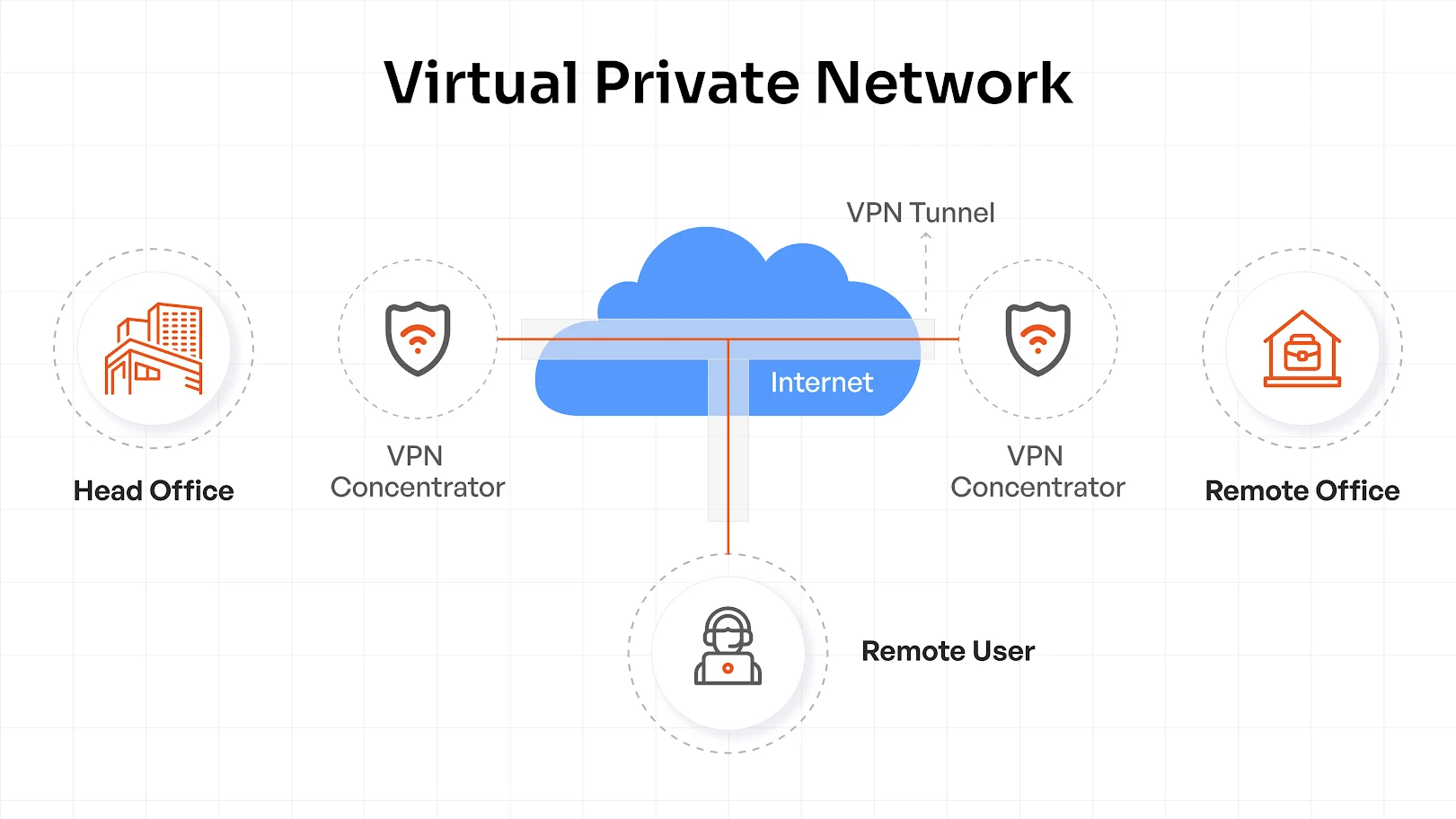
The business climate today is where companies are working with distributed workforces, remote devices and cloud applications. This means secure network access is required.
In simplest terms, a VPN provides a private, encrypted tunnel between users and corporate resources, designed to protect sensitive data from eavesdroppers, man-in-the-middle attacks, unsecured Wi-Fi access, and anything else that threatens the security of data that travels on a network.
VPNs perform two common functions:
- Encryption: It encrypts all data sent to/from your device over the Internet, so that any data that someone intercepts from your connection is unreadable and not exploitable.
- IP Masking: It preserves your actual IP address, obtaining one from the VPN server. Pages, advertisers, or hackers cannot discover your physical location and identity.
VPNs make it possible for global corporations to enjoy seamless remote workflows while keeping business information secure.
What is a VPN, How Does it Work and Who Needs it?
A VPN (Virtual Private Network) is installed to encrypt traffic between a user device and the company network. VPNs mask true IP addresses, keep user identity hidden and ensure that business information makes it safely through public/unsecured networks.
When a user connects through a VPN client, he is authenticated by the VPN server. The client establishes an encrypted tunnel using secure protocols such as IPsec, secure socket layer (SSL) or WireGuard. All traffic through that tunnel is rendered unreadable by outside parties, keeping corporate resources protected from end to end.
All organizations that use remote workers, contract workers, or have a hybrid model of working will need to use a VPN to ensure that all remote workers are able to connect securely and privately to their companies' networks.
When an employee logs in from anywhere they may be located at (home, airport, client site etc.) a VPN will provide them with the ability to remain private while providing their employers with the assurance that their networks and systems remain safe and secure.
A Multi-Factor Authentication (MFA) provides a second layer of protection to a VPN's connectivity by requiring an additional verification process beyond what is provided by a password. The third step in this multi-layered process includes verifying "something you are" (using biometrics, voice recognition, fingerprint etc.), in addition to verifying "something you know", and "something you have" (a token, phone, or smart card).
This multi-layered approach significantly reduces the risk to a companies' systems when an attacker uses a compromised user ID and password to attempt to gain unauthorized access.
VPN MFA solutions today can operate seamlessly as part of a centralized identity management solution that utilizes either RADIUS or SAML, allowing for the centralization of identity management for both cloud-based and on premise solutions.
Additionally, modern VPN MFA solutions include Adaptive MFA, which allows administrators to create customized policies for authentication based on a variety of criteria including; user location, device type, and risk level. In addition, many VPN MFA solutions provide Offline MFA capabilities, which enable users to authenticate even when there is no Internet available.
Users can utilize a wide variety of methods to verify themselves when attempting to connect to a network via VPN MFA, such as; Push Notifications, One-Time Passwords (OTP), Biometric Scans, Hardware Keys etc.
The key to achieving a balance between ease of use and maximum levels of security, when utilizing VPN MFA, lies in selecting a solution that provides multiple methods of authentication that are easy for users to utilize, yet provide the administrator with the confidence that their network is secure.
Key Architectural Components of VPN
- VPN Client: The application installed on user devices that initiates secure connections.
- VPN Server: Authenticates users and enforces access policies.
- Tunnelling Protocols: Standards established for tunneling standards for encryption and encapsulation of data traffic.
- Authentication Gateway: Validates user credentials and applies multi-factor (MFA) policies to support strong identity services.
Major Types of VPNs
- Remote Access VPN: Allows individual employees to securely connect to the corporate network regardless of where they are.
- Site-to-Site VPN: Links full office networks, allowing branches to exchange data securely.
- Client-to-Site VPN: Has flexibility of remote access, with enterprise control of policies, often built in to work with identity platforms such as a miniOrange type for easy application and enforcement of SSO and MFA policies.
Benefits of MFA for VPN Security
Multi-Factor Authentication (MFA) can provide a valuable additional layer of protection for your VPN, which ensures that only approved users will have access to your network.
- Greater authentication protection — Guards against the effects of stolen passwords, passwords which have been reused or shared, these being stopped in their tracks. Guarantees that only the right people with the right credentials have access to your corporate network and provides an additional means of payment by confirming users’ profitability.
- Preparedness for compliance — Helps ensure that you achieve effective security in respect of your security mandates both in respect of ISO 27001 and SOC 2, not only that but that of GDPS compliance, without adding layers of complexity. Ensures your audit preparedness does not decrease, with consistency in your policies for authentication for users and devices remaining the same.
- Protection from phishing — Users are protected from false attempts at log-ins and the breaches of their credentials by the shifting of log-ins. In the event of wide dissemination of a password of a user, attackers do not have the easy means of by-passing the second element of verification.
- Flexibility of users — Redundant checks are automatically provided the users by way of any one of the following: push, OTP tokens or biometric identification. Different means of logging-in have been offered to users, giving the employees simple buying-in because it personalizes their secure login method.
- Seamless integration — Will let it integrate into existing AD systems, RADIUS, SAML providing for quick and easy adoption. It will accommodate without a move away from your present work patterns the necessity for hybrid or at a distance accommodation.
MFA for VPN purposes will move economies from security measure to be considered a matter of long term investment in the areas of trust, transparency and compliance. Embolden each and every remote access agreement and counter attack upon the changing nuances of the changing threats we face, and assure that your workforce has access to a reliable and secured remote access in so far as they will log on.
Common Attack Vectors and Security Threats in VPNs
VPNs are popular with attackers because they are a direct line into networks and with remote connectivity the norm, the attack surface has never been larger. Credential-based attacks include phishing attempts, credential stuffing and brute force methods that use weak or reused passwords to allow the attacker to arrive as a “trusted” user.
Vulnerability attacks concentrate on unpatched vulnerabilities or sloppy configurations in VPNs, rendering old bugs into new attacks. Credential theft and phishing attacks remain the most prevalent types of cyber threats with stealing user credentials allowing attackers to avoid perimeter based defenses altogether.
The rising threats are a consequence of the fact that remote access provides sensitive systems on a password basis, credentials are the current means of exchange in underground markets and the tactics of the attacker are evolving more quickly than many security teams can react.
This need for quick responses make phishing resistant MFA a must for companies that wish to keep their VPNs and reputations intact.
VPN Multi-Factor Authentication (MFA) Solution
Multi-factor authentication (MFA) for VPNs is more than a side benefit of VPN use. It is going to become the standard for secure remote access in the future, as more factors in addition to a password are needed for access, greatly reducing the risk of common attacks such as credential theft, phishing and brute force attacks. To the business, VPN two-factor authentication is the equivalent of locking the front door and installing a deadbolt for security measures.
What is MFA for VPNs? Who Needs it?
VPN MFA uses a combination of something that the user knows (the password), something that the user has (mobile app, hardware token) or something that the user is (biometric). The combined application of these factors makes stolen credentials worthless.
VPN MFA is necessary for:
- Remote employees accessing sensitive internal systems.
- Third-party vendors with limited but critical access.
- Business travelers using public or unknown networks.
- Regulated industries such as finance, healthcare, and legal that need compliance enabled access controls.
How MFA Works?
VPN multi-factor authentication works with existing verification systems like RADIUS or SAML to verify identity before access is granted. More advanced arrangements use adaptive MFA, which requires different factors depending on risk factors, such as where access is attempted from or the health of the device used to access, or any unusual circumstances. Offline MFA is used to ensure continual access in case the users cannot reach the internet for strong verification as needed.
The use of one or the other of these methods depends upon the environment:
- Mobile OTP apps offer users flexibility and ease of deployment.
- Tokens are useful for cases with high assurance and air gap situations.
- Biometric measures offer seamless logins that are resistant to phishing attempts.
- Push notification approvals allow for quick, user-friendly access.
Solutions like miniOrange VPN MFA make all these methods easily available in one application, therefore allowing organizations to balance security, compliance and access convenience without sacrifice.
VPN MFA Use Cases
Modern organizations operate with a hybrid infrastructure, there’s no reason your VPN MFA shouldn't do the same. For your specific use case we have a suitable tailored solution:
- Cloud-first? Use SAML MFA for quick SSO access to Azure AD, Okta, or miniOrange.
- Classic setup? RADIUS MFA secures your on-prem users before they can hit the network.
- Hybrid mix? Use both to protect your cloud and legacy VPNs without having to rewrite your access control policies.
With full SAML–RADIUS flexibility miniOrange protects every VPN gateway equally, regardless of where your users connect from.
miniOrange has incorporated VPN MFA for many of the more popular vendors of VPNs including:
- Palo Alto Networks (GlobalProtect VPN)
- Fortinet
- Cisco ASA
- Check Point VPN
- SonicWall
- Citrix
- AWS Client VPN
- WatchGuard (Firebox SSL VPN)
- Array AG SSL VPN
The seamless integration of the miniOrange environment to these VPNs via either RADIUS for LDAP allows the MFA methods of push notification, soft tokens, Microsoft/Google Authenticator, hard tokens, OTP (One time Password) over SMS/email, etc. to be included. This extensive vendor coverage ensures that miniOrange is well suited for a wider range of enterprise VPN deployments of cloud, on-premises and hybrid infrastructures.
Secure VPN Architecture with MFA
A secure VPN architecture is based on a simple principle: trust no one, trust everyone. A robust deployment of secure VPN consists of a combination of strong encryption, adaptive access control and seamless authentication - without impeding user flow.
Design principles:
Build using the Zero Trust principles of identity-aware gateways and encrypted tunnels. Focus on device authenticity, fine-grained access policies and context-based authentication before establishing a session.
Integration strategies:
Pick an MFA solution that plugs directly into your VPN - whether SSL, IPSec or cloud-based. Solutions like miniOrange integrate seamlessly via RADIUS, SAML or OAuth, enforcing MFA with one-click integration in multiple VPN clients and operating systems.
Scalability and compliance:
Modern VPN solutions where two-factor authentication capability is included make it easy for hybrid or remote teams to scale and assist organizations in achieving compliance requirements such as ISO 27001 and SOC 2. Visibility and accountability can be attained without the added complication of separate policies or a decrease in usability through centralized policy management and audit logs.
Types of MFA for VPN Security in Identity Access Management
Today’s VPNs require increased sophistication in their protective measures than merely the use of passwords. Multi-Factor Authentication imposes key identity-stirring layers which confirm identity based on something the user knows, has, or is bodily. In order to gain a competitive advantage in security, organizations must employ MFA methods which balance the ease of use for the consumer with unyielding legislation. Here is an overview of different types of MFA:
- Biometric Authentication for the VPN: Fingerprint or voice recognition confirms the individual rather than merely the password. By use of Bio-metric Authentication and the miniOrange method, there is safe use of VPNs by the user without the typing of even a single password, which is important with the remote or hybrid user. Quick, phishing-proof, and unobtrusive, this gives both compliance and trust to the organization.
- Token Authentication: Employees must confirm identity by the physical use of tokens, or through the FIDO 2 key to confirm identity through a time-based code or a password-less entry. This is among the safest methods which can be used in settings of high risk such as finance or health.
- Mobile Push Notifications: The user must confirm the signing on request from the mobile device without delay such that any attempt to gain the credentials is thwarted. The use of this method confirms the safety desired with the simplicity necessary for actual use.
- One Time Pass-words: Method employed for sending the temporary numeric password through the cell phone or through messages gives the advantage of alternatiive security layer if necessary. While not as sophisticated as biometric or token measures, nonetheless the OTP’s can be used safely and effectively in cases of immediate implementation or in legitimate VPN settings left for legacy users.
Best Practices to Secure Your VPN Access
Securing access to your VPN isn’t just about getting access credentials right. It’s about implementing continuous controls that seek a balance between improved protection and easy user experience. Here’s your must-do checklist to ensure lockdown of remote and hybrid access is smooth for teams without friction.
- Keep VPN software and components patched – Patch everything. VPN server, clients, authentication plugins. With patched components, hackers are going to have a field day and exploit their favourite vulnerabilities.
- Utilize phishing-resistant MFA everywhere – Where authentication options are stronger, such as FIDO2, biometric or through authenticator apps rather than text-based OTP. MFA in regard to VPN access keeps taken credentials from being the cause of a breach.
- Implement least privilege, granular access control – Issue access only to those users who need it, not far more. Use role-based or attribute based access policies along with VPN authentication to limit user lateral movement.
- Monitor and audit VPN access – Log every login, admin change and unusual authentication patterns. Continuous oversight allows anomalies to be caught early and makes for simpler compliance audits.
- Optimise for integration with SSO and ease of use – Select MFA and VPN technologies that dovetail well and are ‘tight’ throughout your SSO and identity provider. Improved ease of logins leads to improved adoption in regard to the VPNs being used, especially so for remote and mobile workings.
The VPN is only as good as the controls that surround it. Employ phishing-resistant MFA by using solutions such as miniOrange means you to be able to implement simplicity in the building of zero-trust level defence across devices and teams.
Getting Started with miniOrange MFA for VPN
Implementing Multi-Factor Authentication (MFA) on your VPN is a speedy, simple and secure operation with miniOrange. We can provide strong, phishing resistant authentication for your existing setup for Cisco, Fortinet, Palo Alto or OpenVPN based VPNs without inconveniencing your user experience. Our solution integrates effortlessly with your identity provider and offers adaptive policies which verifies a user's login attempt in real time.
Find out more about the configuration steps, our MFA for VPN documentation or peruse our blog pages for use cases and general security tips. There are loads of guides with multitudes of steps available, a product comparison, and ideas for providing your shared workforce with remote access security. If you would like tailored advice, schedule a demo or a trial, please contact our expert - we will help you to eradicate any insecurity in your remote access.
FAQs
How to set up MFA for VPN?
miniOrange MFA for VPNs is simple to install. Just connect the miniOrange authentication module with your VPN gateway, select your parameter for MFA (push, OTP, biometrics, etc.) and for simple end-user enrollment from the admin dashboard.
Why is MFA a better choice than 2FA for VPN security?
MFA is a better choice than 2FA for VPN security because of the extra authentication factors it incorporates such as biometrics or security keys that would make it far too difficult for an attacker to compromise access, even if one of the factors was obtained.
Does every VPN offer support for MFA?
Not all VPNs offer immediate support for MFA, but most of the leading VPN services for businesses do offer support for MFA protocols such as RADIUS or SAML, although differences in availability exist depending on the vendor and product tier.
How to ensure that the VPN is maintained in security after the implementation of MFA?
To ensure that the VPN remains secure after the implementation of MFA, regular auditing of authentication logs should be made, update the VPN systems and MFA systems, enforce strong password practices and review the account permissions made to the accounts to close any gaps in access or configuration.
How to authenticate a VPN?
For VPN authentication, deploy miniOrange’s MFA and enable real-time identity checks for each user login. This makes sure only authorized people connect to the VPN.
How to make sure VPN is secure?
To keep your VPN secure, always enable MFA, update VPN software and configurations, and monitor login attempts regularly. miniOrange MFA solution ensures security across popular VPN platforms, keeping enterprise access airtight and effortless.

Leave a Comment