
JD Edwards environments create daily frustrations with multiple logins across modules, leading to user password fatigue and productivity loss. IT teams grapple with complex user management, frequent reset requests, and risky processes like manual onboarding/offboarding, which spawn orphaned accounts and weak passwords. These issues open doors to breaches and compliance hurdles like SOX or HIPAA violations.
miniOrange delivers proven JD Edwards SSO expertise as a Global Modernized Oracle Partner Network member, with deep experience in Oracle integrations and successful deployments for EnterpriseOne and Enterprise setups. Their solutions power secure access in industries like manufacturing, healthcare, finance, and logistics, bypassing the need for Oracle Access Manager or Internet Directory licenses.
In the JD Edwards context, SSO lets users authenticate once via a corporate IdP like Azure AD or Okta to access all applications seamlessly. It leverages SAML, OAuth 2.0, or JWT for token-based security, cutting login friction while boosting protection and efficiency.
miniOrange's ready-to-deploy JD Edwards SSO connector supports any IdP and deployment, on-prem or cloud, with auto-provisioning via LDAP/SCIM and easy MFA addition using over 15 methods. This setup slashes helpdesk tickets, syncs user data automatically, and ensures audit-ready logs without workflow disruptions.
What is JD Edwards Single Sign-On (SSO)?
JD Edwards SSO allows users to authenticate once through a corporate Identity Provider (IdP) like Azure AD or Okta, then access all JDE applications without re-entering credentials. It works by redirecting login requests from JDE servers to the IdP, which validates users via secure tokens and returns access approval.
Key Components
- Web Server: Handles initial user requests and redirects unauthenticated traffic to the IdP using modules like mod_osso.
- Enterprise Server: Processes business logic and validates tokens passed from the web layer.
- HTML Server: Serves JDE web interfaces and integrates SSO for seamless navigation.
- Identity Provider: External service (e.g., Okta, Azure AD) that manages authentication and issues tokens
Supported Protocols
JDE SSO leverages SAML for XML-based federation, OAuth 2.0 for authorization flows, OpenID Connect for identity layer on OAuth, and Kerberos for enterprise ticket-based auth. These enable token exchange without exposing passwords across legacy and modern setups.
Practical Challenge
Legacy JDE systems complicate SSO due to tight Oracle middleware dependencies like Access Manager and Internet Directory, plus custom code needs for on-prem EnterpriseOne. Integration challenges arise from mismatched user directories, token validation across servers, and avoiding disruptive migrations.
Learn how JD Edwards Single Sign-On (SSO) by miniOrange simplifies this with pre-built connectors.
Benefits of Implementing JDE SSO with Proven Results
Implementing Single Sign-On (SSO) for JD Edwards reduces login complexity and enhances security. It lets users focus on work by providing seamless, secure access to multiple applications through a single login. This boosts productivity, simplifies IT management, and strengthens enterprise security. Here are the benefits of enterprise security with JD Edwards SSO:
- One login across all applications: Users enter credentials once at login and gain instant access to all connected JD Edwards applications without repeated sign-ins. This eliminates password fatigue and streamlines user workflow.
- Centralized authentication for easier user management: IT teams manage user access centrally through an Identity Provider (IdP) like Azure AD or Okta. This reduces helpdesk calls for password resets, and simplifies onboarding and offboarding.
- Improved data security and controlled access: SSO enforces strong authentication and supports Multi-Factor Authentication (MFA). Admins can apply adaptive access policies allowing or blocking access based on device or location, preventing unauthorized entry.
- Compliance with enterprise security standards: SSO centralizes audit trails and access logs, helping organizations easily meet regulatory requirements like SOX, HIPAA, and ISO standards.
- Measurable outcomes: Organizations using miniOrange JDE SSO report up to a 60% reduction in login-related support tickets, faster deployment cycles, and cost savings by avoiding expensive Oracle middleware licenses.
How Does miniOrange Achieve These Results?
The miniOrange JDE SSO solution integrates seamlessly with existing IdPs, supports SAML, OAuth, and OpenID Connect protocols, and automates user provisioning via LDAP or SCIM. It includes 15+ MFA methods and centralized policy controls, delivering proven security and efficiency gains across real-world deployments.
miniOrange’s extensive experience and hundreds of successful JDE SSO projects across industries prove its solution’s effectiveness in simplifying access, improving security, and saving IT costs. This makes it a trusted partner for enterprises looking to modernize JD Edwards login with proven results.
JDE SSO Architecture
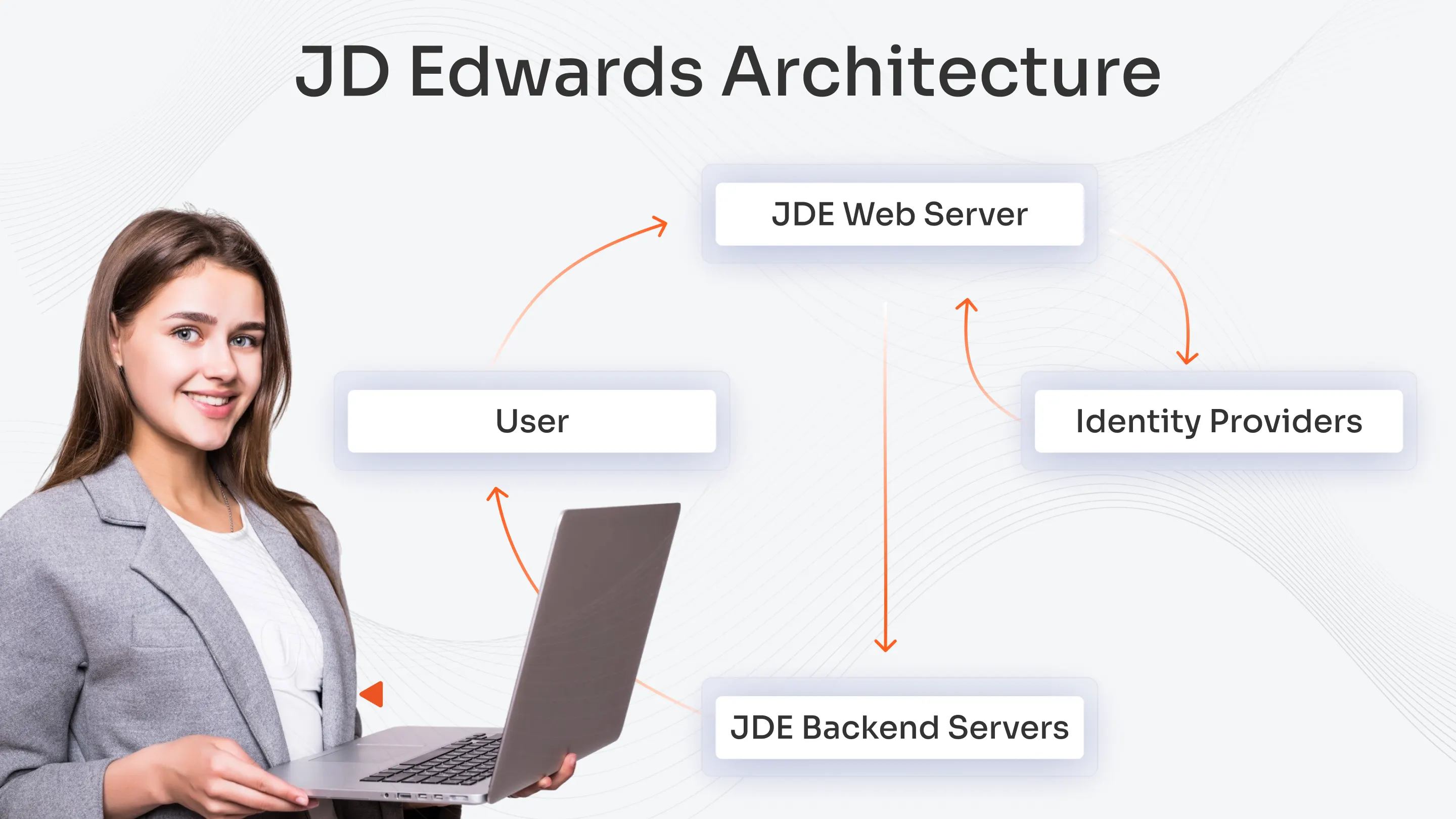
The JDE SSO architecture enables authentication through user request routing from the JDE Web Server to an Identity Provider (IdP). The Web Server intercepts user requests to JDE applications which then redirect users to the IdP for authentication through SAML or OIDC protocols. The IdP authenticates users through secure token generation which the JDE Web Server checks against its configuration to grant access to Enterprise Server and HTML Server components.
The JDE web components function as basic elements which support token verification processes. The web server operates as the SSO gateway, which performs SSO authentication through user attribute extraction from SAML assertions and OIDC tokens for authentication purposes. The system uses extracted attributes to build JDE user profiles, which grant backend server access security without exposing user authentication information.
The integration process involves connecting Azure AD and Okta and Ping Identity and miniOrange as identity providers. The system operates with standard communication protocols through miniOrange's adaptable broker, which supports all versions of the JDE system, from modern to outdated.
The system operates through a basic structure that starts with the IdP (Azure AD/Okta), followed by the JDE Web Server token validation process, before users access EnterpriseOne/HTML Server.
A manufacturing organization with more than 5,000 users transitioned their local JDE authentication system to Azure AD SSO through miniOrange as their identity broker. Users access the JDE portal which redirects them to Azure AD for MFA authentication. The SAML token from Azure AD passes through miniOrange to reach JDE which reduces deployment time to days and creates unified policy management for on-premises and cloud-based JDE systems.
Step-by-Step JDE SSO Practical Guide
The following proven method for JDE Single Sign-On implementation success stems from more than 100 successful deployments. The following steps lead to a successful setup which avoids common mistakes to achieve flawless user authentication functionality.
Step 1 – Assess Your JDE Environment
Start by checking your JD Edwards system version and web server platform and current authentication system configuration. The identification of these elements provides a foundation for achieving successful system integration and compatibility.
The system encounters three main compatibility problems, which stem from version differences and unsupported web servers and authentication system incompatibility. The solution will solve these problems through three methods, which include updating JDE to supported versions, selecting web servers that meet system requirements, and modifying authentication settings to fulfill SSO standards.
Step 2 – Select the Right Identity Provider
Select an Identity Provider (IdP) that matches your organizational environment and security requirements and supports the number of users in your system. The evaluation process requires assessment of three essential factors, which include SAML and OIDC protocol support and system scalability, user-friendly integration with JDE, and dependable vendor maintenance services.
The miniOrange guide provides step-by-step instructions for implementing JD Edwards Single Sign-On (SSO) configuration.
Our recommendation matrix shows:
The enterprise sector benefits from SAML-based IdPs which include miniOrange and Okta as their top choices.
Smaller teams may benefit from simpler OAuth/OIDC providers.
IdPs operate at their best in hybrid cloud environments because they provide adaptable integration solutions.
Step 3 – Establish Trust Between JDE and IdP
The system requires the secure exchange of certificates and metadata configuration between JDE and your selected Identity Provider for trust establishment. The process protects authentication requests and responses through encryption and trust verification.
The system requires users to solve three main problems, which include time synchronization problems and certificate expiration, and metadata configuration errors through clock synchronization and certificate renewal, and metadata URL verification.
Step 4 – Map User Attributes
The system needs an exact mapping of JDE user roles to IdP attributes because this step establishes correct access permissions. The system must match attribute formats and values to the JDE role hierarchy structure to prevent unauthorized system access and login system failures.
The system requires mapping LDAP group attributes to JDE security roles, which include Financial Analyst and HR Manager, and System Administrator, to grant users their correct permissions after SSO login.
Step 5 – Test and Roll Out
The system needs complete testing to confirm user login functionality and session management operations, and backup authentication system activation. The system needs to let users enter their accounts without problems while keeping their active sessions open and offering alternative authentication methods when SSO systems become unavailable.
Our testing checklist follows best practices, which you can use for your assessment.
- Test multiple user roles
- Validate session timeout and renewal
- The system requires verification of fallback authentication system operation.
- The system needs a log monitoring system to monitor all login-related error messages.
- The system requires user acceptance testing before it can start operating in production mode.
This resource presents a detailed method to deploy using JDE SSO guide, which includes solutions for common deployment problems. Organizations can establish user and security personnel trust through their deployment of existing security protocols.
For detailed configuration, visit the miniOrange JDE SSO guide linked in Step 2.
Best Practices for JDE SSO Deployment
Your deployment success depends on starting with established best practices from the beginning. The basic procedures defend security systems while meeting legal standards and ensuring users maintain continuous access to their systems.
- Short-term authentication tokens with proper certificate protection systems. The security risk decreases when authentication tokens have limited usage duration because attackers cannot use stolen tokens for an extended period. The system needs to establish token expiration periods that span between 30 minutes and multiple hours while performing regular certificate rotation tasks. The system protects itself from certificate breaches and authentication breakdowns through automated certificate storage security and automated certificate renewal processes.
- Security enhancement requires Critical accounts to activate Multi-Factor Authentication (MFA) for better protection. Users need to verify their identity through MFA by entering their password, followed by a second authentication method ,which includes smartphone prompts or hardware tokens to achieve enhanced security. MFA protects administrative accounts and financial roles from unauthorized access when credentials become exposed.
- The JDE system and Identity Provider platforms require ongoing software updates to maintain their operational functionality.
- Your organization needs to apply security patches to JD Edwards software and Identity Provider systems because this will defend against new vulnerabilities and enable support for current security protocols. Security vulnerabilities and SSO integration problems will occur when software systems remain unpatched.
- The system requires ongoing monitoring of user access logs together with complete tracking of all login system operations. The system needs active log analysis to detect security threats through monitoring of unusual patterns, which include repeated failed login attempts and unexpected system access duration.
- The system enables incident response and audit compliance and maintains user trust in the SSO system through ongoing monitoring activities.
- Perform complete system tests after every JDE system update. The process of new software version deployment and security update implementation needs complete testing of all SSO operational paths.
- The system needs to test authentication processes and session control and backup authentication systems completely to achieve security and operational success in production environments.
Following these practices helps align your JDE SSO deployment with regulatory compliance requirements like SOX, HIPAA, and GDPR by using strong authentication methods, safeguarding sensitive data, and maintaining detailed audit trails.
Common Mistakes to Avoid in JDE SSO Implementation
Teams quickly implement IAM and hit challenges like time sync issues, poor role mapping, and ignored testing. These errors expose systems to breaches and downtime. Fix them early to build secure access management that scales.
- Time Sync or Certificate Mismatches Clocks drift between servers, breaking authentication flows in SSO or RADIUS setups. Certificates expire unnoticed, locking users out during peak hours. Sync NTP servers and set renewal alerts to keep connections smooth.
- Skipping User Role Mapping Admins assign broad permissions instead of precise roles, granting excess access. Attackers exploit this to move laterally in networks. Map roles to job functions with tools like RBAC for least privilege enforcement.
- Ignoring Session Timeout Configurations Long sessions let idle accounts stay open, inviting unauthorized use. Default settings often fail in hybrid environments. Enforce short timeouts and auto-logout to cut breach windows.
- Missing Pilot Testing Full rollouts without small-group trials crash production systems. Users face login failures, eroding trust. Test with a pilot team first, then scale after fixes.
- Not Setting Backup Admin Login Single admin paths fail during outages or lockouts, halting operations. No fallback means total downtime. Configure secondary logins with multi-admin MFA as standard practice.
Practical Cases to Avoid A financial firm, i.e. Upstream Rehabilitation, lost $4.3M in a breach when ex-contractor admin access lingered due to poor role revocation. A healthcare provider failed HIPAA audits after 200+ dormant accounts held PHI access from ignored lifecycle management. A tech startup leaked customer data when weak MFA configs allowed phishing bypasses, proving misconfigurations invite real attacks.
Why miniOrange for JDE SSO?
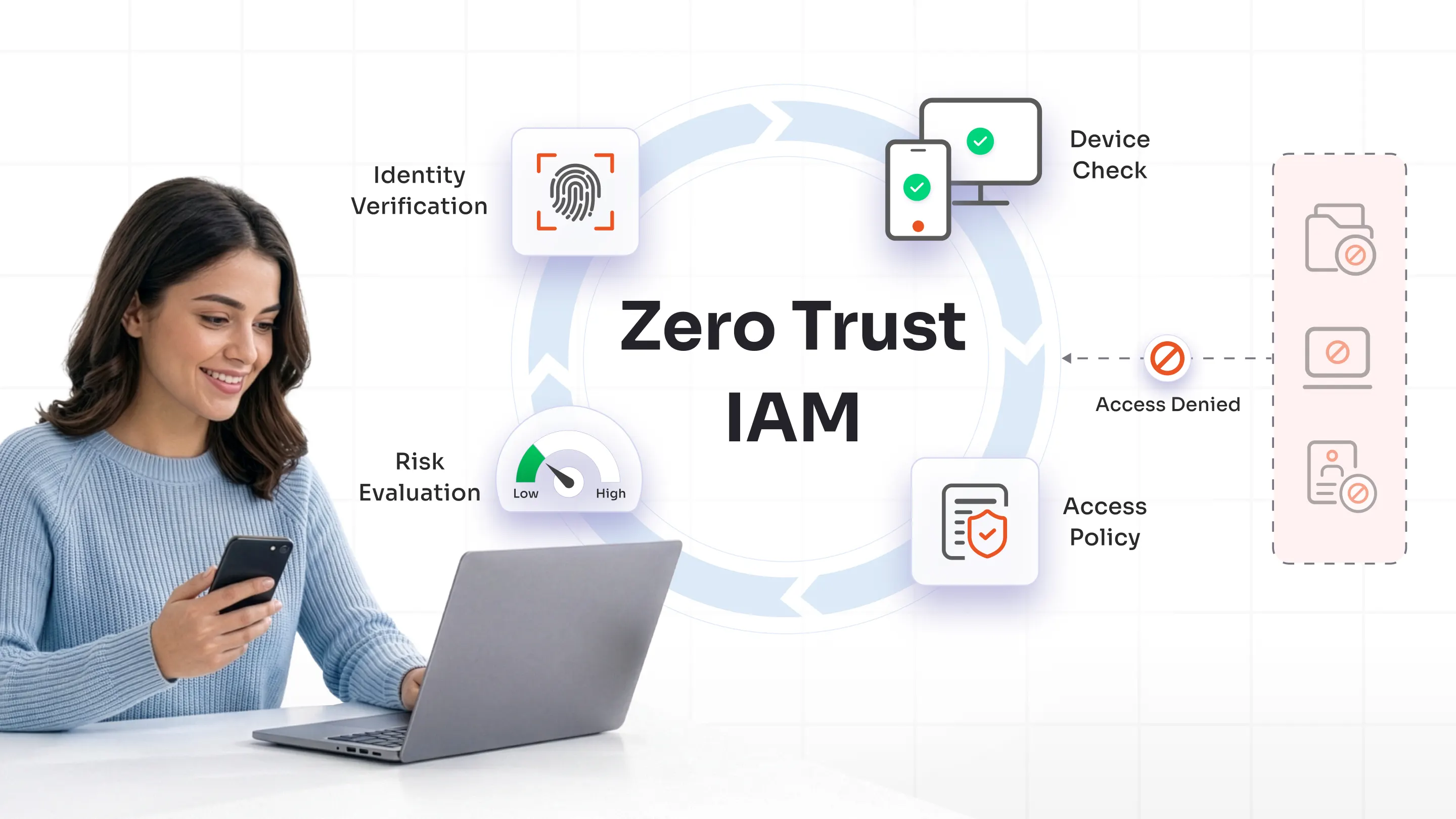
Teams select miniOrange for JD Edwards SSO because it provides complete integration with secure authentication and established success records. The solution enables users to access their accounts through a simple process while maintaining their data protection through Zero Trust security protocols. Your organization needs this reliable IAM solution, which adapts to your expanding enterprise requirements.
Credentials & Track Record
miniOrange provides 13+ years of IAM experience to deliver successful JD Edwards SSO solutions. The company achieved 500+ successful JDE projects, which served financial services and manufacturing and healthcare and retail sectors. The company operates with ISO 27001 certification while using Oracle and Microsoft and Okta for secure compliance standards.
Pre-Built Connector and Flexibility
The JD Edwards connector from miniOrange allows organizations to deploy their solution within days instead of months. The solution enables seamless integration with any Identity Provider system including Azure AD and Okta and Ping Identity through automated configuration without requiring programming. The solution provides complete authentication security through its support of MFA and adaptive access policies and RADIUS authentication.
Deployment Options
The deployment options of miniOrange SSO include cloud-based and on-premise and hybrid configurations which match your current infrastructure setup. The solution enables organizations to use their current JDE versions because it eliminates the requirement for expensive system updates.
Proven Results
The manufacturing organization achieved a 40% reduction in SSO deployment duration and support requests decreased by 60% after implementing miniOrange. Financial organizations operate without interruption during peak audit times through their implementation of flexible MFA policies.
Support and Resources
Users can solve problems efficiently through 24x7 access to expert support which includes video guides and dedicated documentation. The complete guide for JD Edwards Single Sign-On (SSO) by miniOrange is available. The audience shows interest in following IAM development news and learning about JDE optimization techniques.
Getting Started with JDE SSO
JDE SSO simplifies login management and improves security when teams implement it properly. Users log in once through an identity provider like Azure AD, miniOrange or Okta, then access all JD Edwards apps seamlessly. This approach cuts password fatigue and boosts productivity across EnterpriseOne environments.
Follow structured steps for reliable, compliant JDE SSO implementation. Start by verifying your JD Edwards version, web server, and authentication mode for compatibility. Next, configure the miniOrange connector as a proxy between your IdP and JDE servers using SAML or OAuth protocols.
Teams often overlook time sync, role mapping, and testing in JDE SSO setups. Map user roles from IdP attributes to JDE hierarchies like JDEADMIN or ENDUSER for precise access. Run pilot tests on login flows, sessions, and fallbacks before rollout.
Learn from our experience across 500+ deployments in finance, manufacturing, and healthcare. miniOrange handled these projects as a Global Modernized Oracle Partner, delivering zero-downtime integrations without Oracle Access Manager licenses.
Get started with JDE SSO integration through miniOrange. Connect with our team to set up your environment today.
FAQs
Which identity providers work with JDE SSO?
JDE SSO integrates with providers like Okta, Azure AD (Microsoft Entra ID), Ping Identity, ADFS, and miniOrange without needing OAM or OID licenses. Configure header attributes like JDE_SSO_UID mapped to username for seamless authentication. Third-party connectors enable SSO for apps lacking native SAML or OAuth support.
How do you handle multiple JDE accounts in SSO?
Use LDAP configurations pointing to a Global Catalog to integrate multiple Active Directory domains into a single JDE SSO setup. Ensure all domain controllers act as Global Catalog servers to avoid authentication failures across domains. Plan for user account duplication by verifying mappings during setup.
What are best practices for secure JDE SSO implementation?
Conduct quarterly audits of access logs, tokens, and MFA settings, while monitoring performance to avoid login delays. Enable MFA alongside SSO, test thoroughly in non-production, and keep software updated with regular security checks. Choose deployment models (SaaS or on-prem) based on compliance needs and bind sessions securely.
Leave a Comment