

Education is now the most attacked industry in the world. Check Point Research recorded an average of 4,696 weekly cyberattacks per education organization between January and July 2026, more than double the cross-industry average and about 70% higher than government, the next most targeted sector. Almost none of those attacks break through firewalls. They log in, using passwords stolen through phishing and credential theft.
The damage is outsized because of what sits behind a single education login: the student information system, the LMS, email, financial aid, payroll, and research data, often all at once. The December 2024 PowerSchool breach exposed records tied to more than 60 million students and 10 million teachers, and it started with one stolen contractor credential on a support portal that had no MFA.
Passwords alone were never built for this. A single university onboards more users in one August than most enterprises do in a decade, most of them on personal devices IT doesn't manage. At that scale, someone's password is always compromised. The only question is whether that password is enough to get in.
Multi-Factor Authentication (MFA) for education closes that gap. By requiring a second proof of identity beyond the password, MFA turns a stolen credential into a dead end. Microsoft Research measured a 99.22% reduction in account compromise risk, and it layers onto the systems you already run.
Why Do Educational Institutions Need Multi-Factor Authentication?
CISA describes schools as "target rich, cyber poor": institutions that hold enormous amounts of sensitive data but rarely have the budgets or staff to defend it.
The numbers tell the story:
- 82% of K-12 schools in the US experienced at least one cyber incident between July 2023 and December 2024, according to the Center for Internet Security.
- The Verizon 2025 Data Breach Investigations Report logged 1,075 security incidents in education, 851 of them with confirmed data disclosure. System intrusion, human error, and social engineering accounted for roughly 80% of those breaches.
- The December 2024 PowerSchool breach exposed records tied to more than 60 million students and around 10 million teachers, a reminder that one compromised credential in an education platform can cascade across thousands of districts.
- Comparitech found the average ransom demand against education reached $464,000 in 2025, while confirmed attacks exposed 3.9 million records, 27% more than the previous year.
What attackers are after:
Educational institutions concentrate an unusual amount of valuable data behind a single login:
- Student records and personally identifiable information (PII)
- Faculty and staff HR, payroll, and identity data
- Research data and intellectual property
- Financial aid, tuition, and payment information
- Learning Management Systems (LMS) and student portals
- Email and collaboration platforms
- Administrative and ERP systems
How they get in:
Phishing, credential theft, credential stuffing, and account takeover remain the dominant entry points. All of them target passwords, not infrastructure. Once inside, attackers escalate to ransomware, data theft, and extortion.
Education makes this worse structurally. Institutions manage massive, constantly changing user populations: new students enroll every semester, adjuncts come and go, and alumni accounts linger. Most campuses also run bring-your-own-device (BYOD) environments where IT has little control over endpoints. Passwords were never designed to secure any of that, which is why digital security for educational institutions now has to start with identity.
What Is Multi-Factor Authentication (MFA) for Education?
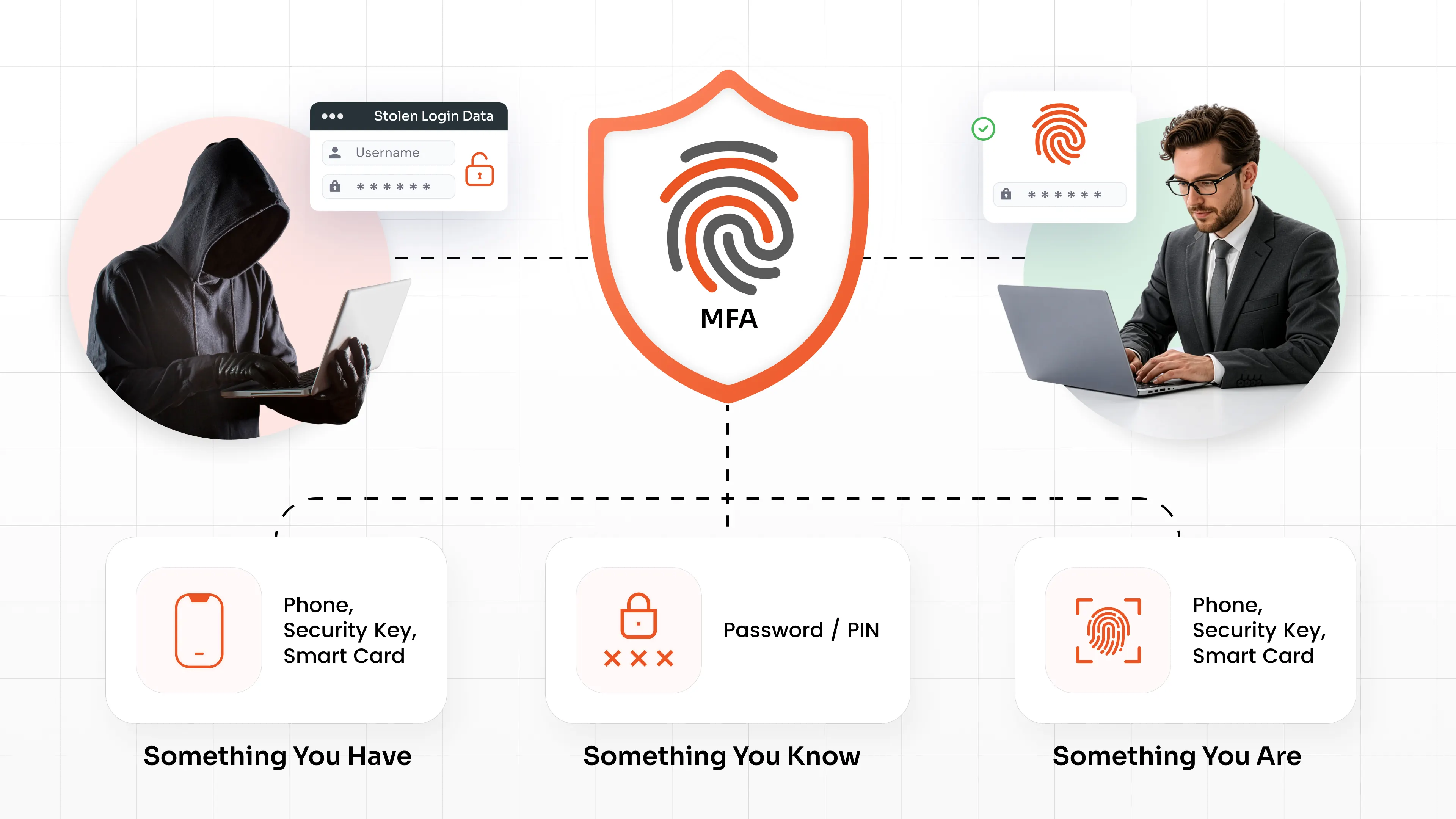
Multi-factor authentication in education is a security process that requires users, whether students, faculty, staff, or administrators, to verify their identity with two or more independent factors before accessing an application or system.
Those factors fall into three categories:
- Something you know: a password or PIN
- Something you have: a phone, security key, smart card, or grid card
- Something you are: a fingerprint or facial scan
With password-only authentication, a phished or leaked credential equals a breach. With MFA, a stolen password is a dead end because the attacker still can't complete the second verification step. Microsoft's research found that MFA blocks more than 99.2% of account compromise attacks, and that over 99.9% of compromised accounts had no MFA enabled at all.
That's exactly why MFA is so effective in education: it neutralizes the phishing and credential-theft attacks that drive the majority of education breaches, without requiring institutions to replace their existing portals, LMS platforms, or directories.
Where Can Educational Institutions Use MFA?
MFA delivers the most value when it protects every point where identities meet institutional data. In practice, that means:
- Student portals: registration, grades, financial aid, and payment systems
- Learning Management Systems (LMS): Moodle, Canvas, Blackboard, and similar platforms
- Faculty and staff accounts: HR, payroll, gradebooks, and email
- Microsoft 365 and Google Workspace: the collaboration backbone of most institutions and the top phishing target
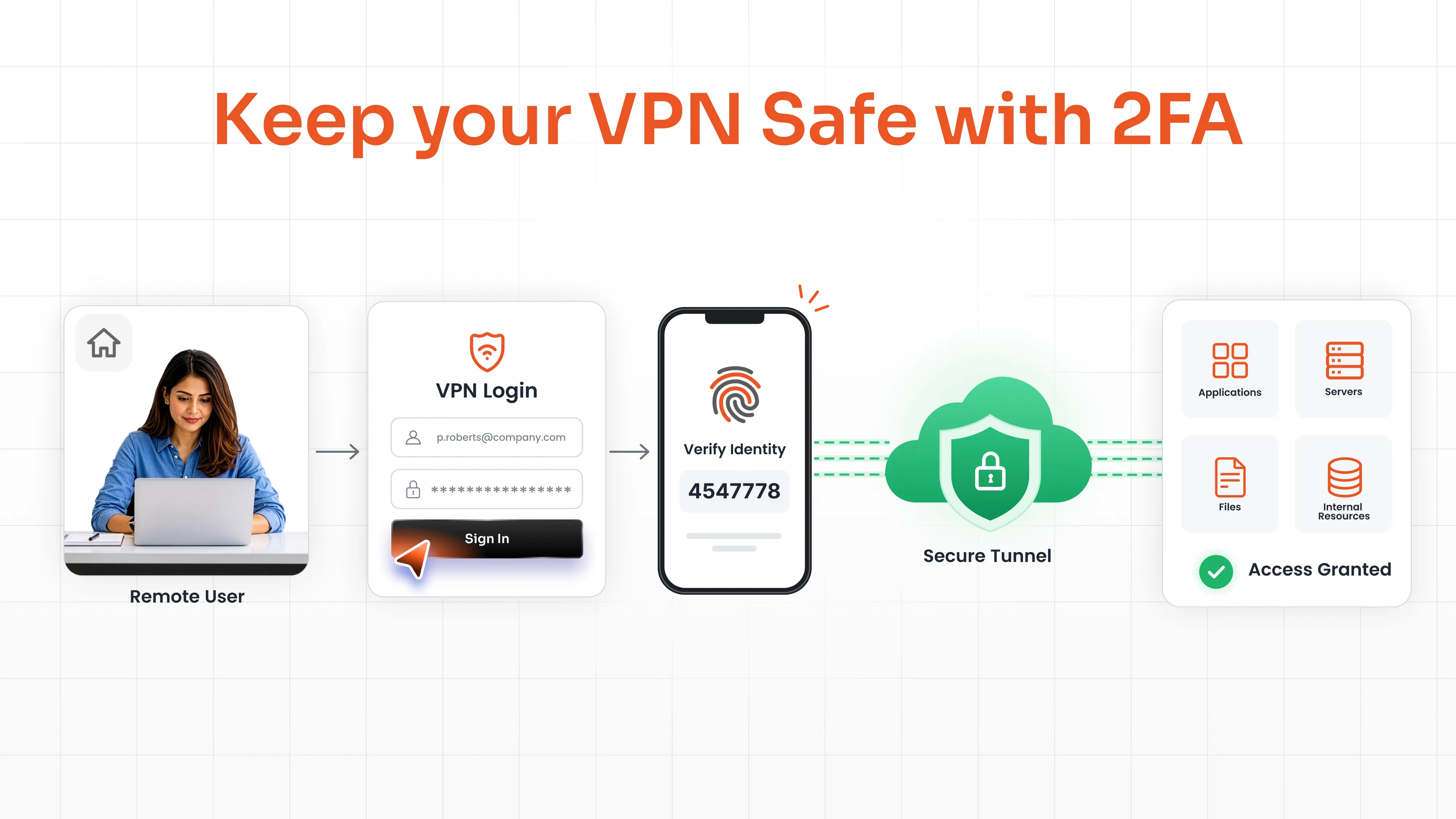
- VPN and remote access: securing remote learning, remote work, and vendor access
- Windows and Active Directory logins: protecting domain-joined lab machines, offices, and shared workstations
- RDP and remote administration: one of the most exploited entry points for ransomware
- Research systems: labs, HPC clusters, and grant-funded data environments
- Administrative applications: SIS, ERP, finance, and admissions systems
- IT administrator and privileged accounts: the accounts attackers want most
If a system holds student data, moves money, or grants administrative control, it should sit behind MFA.
MFA Methods for Schools, Colleges, and Universities
Not every MFA method suits every user, and not every method is equally secure. The strongest strategy matches convenient options to large student populations and phishing-resistant options to administrators and privileged accounts. Below are the authentication methods for education that deliver the most value.
Authenticator Apps and OTP
One-time passwords (OTP) are the workhorse of broad student and staff deployments:
- TOTP via authenticator apps: time-based codes generated by apps like the miniOrange Authenticator or Google Authenticator, which work even offline
- OTP over SMS: codes delivered by text message, familiar to virtually every user
- OTP over Email: a practical fallback for users without a registered mobile number
OTP methods are easy to enroll at scale, making them a strong baseline for tens of thousands of students. They defend well against automated attacks and credential stuffing, though a determined attacker can still phish them. That's why higher-risk accounts should step up to stronger methods.
Push Notifications
Push-based authentication sends a login approval prompt directly to a registered mobile app. The user taps Approve or Deny: no codes to type.
For faculty, staff, and administrators who log in dozens of times a day, push notifications offer the best balance of speed and convenience. Pairing push with adaptive authentication policies helps defend against MFA fatigue attacks, where attackers spam approval requests hoping someone taps Accept.
FIDO2 and Passkeys
FIDO2 and passkeys represent the phishing-resistant end of the spectrum, and the direction the industry is moving.
Instead of a shared code that can be intercepted, FIDO2 uses cryptographic keys bound to the legitimate website. A fake login page simply can't complete the authentication, which makes phishing structurally impossible rather than just unlikely.
miniOrange supports both platform authenticators (fingerprint, Face ID, Windows Hello, and device PIN built into the laptops and phones users already own) and cross-platform FIDO2 security keys for shared or high-security environments. Because passkeys are also passwordless, they remove password-reset tickets from the help desk queue entirely.
Hardware Security Keys
Physical security keys such as YubiKey provide a phishing-resistant MFA solution that doesn't depend on a phone. They're a strong fit for:
- IT administrators and domain admins
- Privileged users with access to student data at scale
- Research environments handling regulated or grant-protected data
- High-value accounts such as finance and registrar systems
A hardware key costs far less than a single breached admin account.
CAC Authentication
Institutions working alongside government, defense, or federally funded programs often have staff who already carry a Common Access Card. CAC authentication uses the PKI certificate on that card to verify identity, so there's no new credential to issue or support.
miniOrange validates the CAC certificate against a trusted certificate authority at login, making it a good fit for:
- Faculty and staff on defense or federally sponsored research
- Institutions partnering with military branches or government agencies
- Users who already carry a CAC/PIV credential for other systems
Smart Card Authentication
Smart card authentication covers certificate-based cards issued by the institution itself: campus ID cards, staff badges, or PIV-compatible cards. The card carries a digital certificate that proves identity cryptographically, with no code to type and nothing an attacker can phish.
It works well for:
- Administrative and privileged users
- Shared or secure workstations where staff tap in and out across a shift
- High-security research and compliance environments
- Campuses already issuing physical ID cards
Because the certificate is bound to the card, smart cards give strong identity assurance where smartphones are impractical or prohibited.
Grid Pattern Authentication
Here's the question every education IT team eventually faces: what about students who don't have smartphones?
Grid pattern authentication answers it. Users authenticate by entering characters from specific positions on a personal grid card. No mobile app, no biometrics, and no internet dependency required.
That makes grid authentication a practical way to deliver MFA for schools with younger K-12 students, users with basic phones, shared computer labs, and campuses with strict BYOD or device-restriction policies.
A note on security tiers: OTP, push, and grid methods dramatically outperform passwords alone, but only FIDO2, passkeys, hardware keys, and smart cards are truly phishing-resistant. A sound strategy uses convenient methods for the broad population and phishing-resistant methods wherever the stakes are highest.
Key Benefits of MFA for Educational Institutions
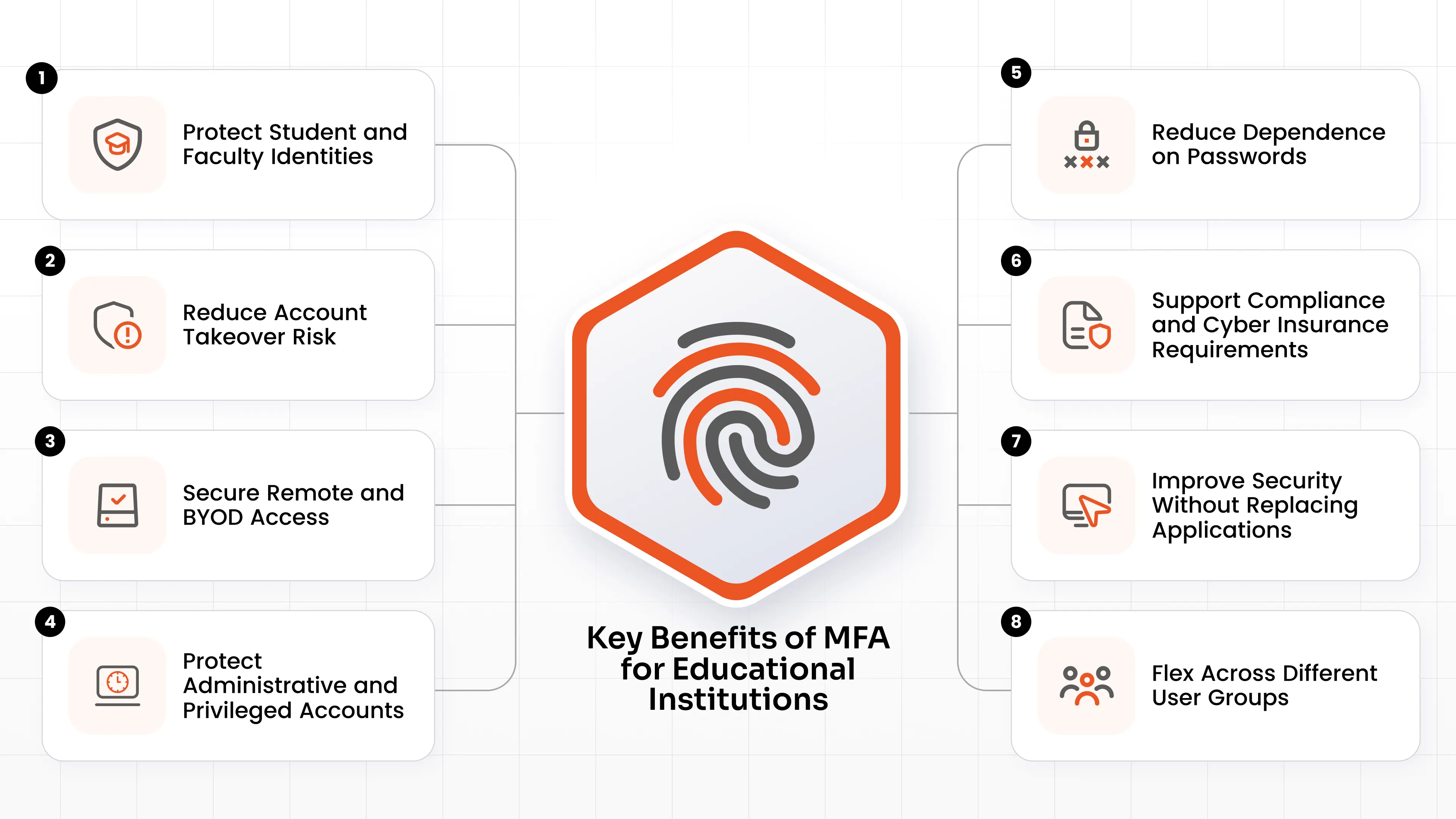
Here's what MFA for educational institutions delivers:
1. Protect Student and Faculty Identities
MFA ensures a phished password can't be turned into access to grades, transcripts, financial aid, or payroll data.
2. Reduce Account Takeover Risk
Microsoft's research shows MFA cuts the risk of account compromise by over 99%. Even when a password has already leaked, the risk reduction is roughly 98.6%.
3. Secure Remote and BYOD Access
MFA verifies the person, not the device, so protection holds up across personal laptops, phones, and off-campus networks.
4. Protect Administrative and Privileged Accounts
Phishing-resistant MFA on admin, finance, and registrar accounts blocks the escalation path most ransomware attacks depend on.
5. Reduce Dependence on Passwords
Passwordless options like passkeys and push notifications cut both breach risk and the password-reset tickets that flood help desks every semester.
6. Support Compliance and Cyber Insurance Requirements
Since June 2023, the FTC's GLBA Safeguards Rule has required Title IV institutions to enforce MFA on systems containing student financial information, and most cyber insurers now treat MFA as a precondition for coverage. MFA also strengthens FERPA-aligned data protection.
7. Improve Security Without Replacing Applications
MFA layers on top of your existing LMS, directory, VPN, and cloud apps. No rip-and-replace required.
8. Flex Across Different User Groups
Students, faculty, researchers, and administrators have different devices, risk levels, and workflows. Flexible MFA policies serve each group appropriately instead of forcing one method on everyone.
Challenges of Implementing MFA in Education
If MFA is so effective, why isn't it universal yet? Because deploying MFA for schools and universities is genuinely harder than deploying it in a typical company:
- Scale: a single university can enroll more users in one August than most enterprises onboard in a decade.
- Students without smartphones: app-based MFA assumes a device that younger students, and some others, simply don't have.
- BYOD restrictions: many K-12 districts can't require students to install institutional apps on personal devices, and some prohibit phones in classrooms altogether.
- Diverse security requirements: a first-year student and a domain administrator should not authenticate the same way.
- Legacy applications: older SIS, ERP, and library systems often lack native support for modern authentication.
- Remote and hybrid learning: access now happens from anywhere, on any network.
- User adoption: faculty and students resist friction, and a poorly communicated rollout generates pushback fast.
- Lost devices and recovery: every lost phone becomes a locked-out user, so enrollment and recovery must be self-service or the help desk drowns.
- Budget constraints: education IT teams need enterprise-grade security without enterprise-sized budgets.
None of these challenges argue against MFA. They highlight the need for choosing MFA software designed for educational environments and built around these realities.
What Should Schools Look for in an MFA Solution?
Use this checklist when evaluating an education MFA solution:
- Multiple authentication methods: One-Time Password (OTP), push notification, biometrics authentication, hardware keys, smart cards, and grid patterns under one platform
- Phishing-resistant options: FIDO2 and passkeys for high-risk users
- Device-independent methods: coverage for students without smartphones
- BYOD-friendly enrollment: self-service setup with no forced app installs where policy forbids them
- Passwordless support: reduce password friction and reset volume
- Adaptive and risk-based authentication: step up verification based on IP, device, location, time, and user behavior instead of challenging every login
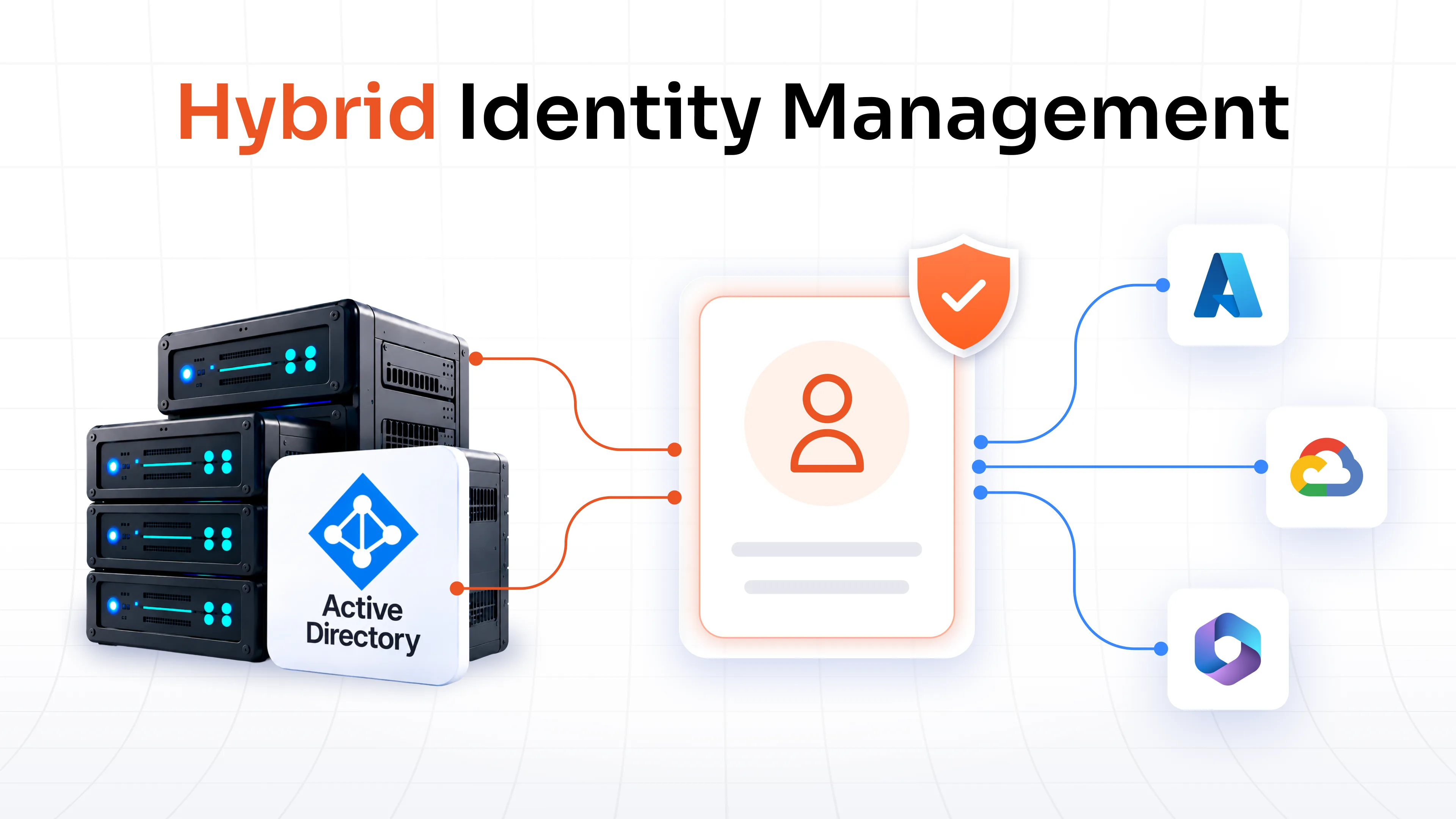
- Active Directory integration: work with the directory and user stores you already run
- Microsoft 365 and Google Workspace support: protect the apps students and staff live in
- VPN and remote access coverage: RADIUS support for Cisco, Fortinet, Palo Alto, and other gateways
- Windows and RDP protection: MFA at the operating system and remote desktop layer
- Centralized administration: one console for policies across every user group
- Reporting and auditing: logs and evidence for compliance reviews and cyber insurance questionnaires
- Flexible deployment: cloud, on-premise, or hybrid to match your infrastructure
- Scalability: built to handle enrollment spikes without breaking budgets
Want to see how one platform maps against this checklist? Our MFA Datasheet covers supported methods, integrations, and deployment options on a single page you can share with your security and procurement teams.
How to Implement MFA Across an Educational Institution?
A successful campus-wide rollout is a phased program, not a single switch-flip:
1. Identify critical applications and users: map where student data, financial systems, and administrative control live.
2. Prioritize administrators and privileged accounts: protect the highest-impact accounts first, ideally with phishing-resistant methods.
3. Choose methods by user group: for example, FIDO2 keys for IT admins, push or authenticator apps for faculty and staff, and grid pattern or OTP for students without smartphones.
4. Integrate with existing identity infrastructure: connect MFA to Active Directory, your identity provider, SSO, and cloud suites rather than creating a parallel identity silo.
5. Pilot with a smaller group: start with IT and one department, then refine enrollment and support flows before scaling.
6. Roll out gradually: staff first, then faculty, then students, with clear communication before each wave.
7. Monitor authentication activity: watch reports for failed attempts, MFA fatigue patterns, and enrollment gaps.
8. Establish recovery and backup methods: define lost-device procedures and backup factors such as email OTP or security questions so lockouts don't become help desk emergencies.
The guiding principle: meet each user group where it is. Security that ignores how students and faculty actually work gets bypassed; security that fits their workflows gets adopted.
Why Choose miniOrange MFA for Education?
miniOrange was built for exactly the kind of environment education runs: large, diverse user populations, mixed legacy and cloud systems, and tight budgets.
One Platform for Every User Group
With 15+ authentication methods, including FIDO2 and passkeys, biometrics, YubiKey and hardware tokens, push notifications, OTP over SMS and email, email links, grid pattern, CAC authentication and smart card authentication, you can give administrators phishing-resistant security and give a smartphone-free student body device-independent access, all from a single console.
Solves the "No Smartphone" Problem
Grid pattern authentication works without mobile apps, biometrics, or internet dependency, so K-12 districts and BYOD-restricted campuses can enforce strong MFA for every student.
Adaptive Authentication That Respects Users' Time
The miniOrange Adaptive MFA Solution evaluates IP restriction, device restriction, location restriction, time restriction, and user behavior to challenge only risky logins. Students on a trusted campus lab machine sail through, while an unusual overseas login to a registrar account gets stepped up or blocked.
Coverage Across Your Real Environment
miniOrange secures Active Directory, Windows logins, RDP, OWA and RD Web, VPNs from major vendors over RADIUS, Microsoft 365, and cloud and on-premise applications, with SSO so users authenticate strongly once instead of repeatedly.
Flexible Deployment
Choose cloud, on-premise, or hybrid deployment to match your infrastructure and data residency requirements.
Built for Institutional Budgets
Get enterprise-grade MFA with straightforward, scalable pricing, so security doesn't have to compete with classroom spending.
The result: fewer compromised accounts, cleaner compliance and insurance audits, and an IT team that spends less time resetting passwords and more time supporting learning.
Wrapping Up
Educational institutions face more cyberattacks per organization than any other industry, and nearly all of those attacks begin the same way: with a stolen or phished password. Multi-Factor Authentication (MFA) for education is the single most effective control against that threat, blocking over 99% of account compromise attempts while layering onto the systems you already run.
The path forward is practical: protect privileged accounts with phishing-resistant methods first, give students and faculty convenient options that fit their devices, and roll out in phases with recovery plans in place. With flexible methods like FIDO2, push, OTP, grid pattern, CAC authentication and smart cards authentication, miniOrange makes that path achievable for institutions of every size.
Ready to secure every identity on your campus? Book a demo with the miniOrange team today.
FAQs
Is MFA necessary for educational institutions?
Yes. Education is the most targeted industry for cyberattacks; MFA blocks over 99% of account compromise attempts, and mandates like the GLBA Safeguards Rule plus most cyber insurers now require it.
How does MFA work in education?
After entering a password, users verify their identity with a second factor such as a push notification, one-time code, security key, or grid pattern. A stolen password alone can no longer open the account.
What are the best MFA methods for schools and universities?
Match the method to the user group: phishing-resistant FIDO2 keys and passkeys for administrators, push notifications or authenticator apps for faculty and staff, and OTP or grid pattern authentication for large student populations.
How can schools implement MFA for students without requiring personal smartphones?
Use device-independent methods such as grid pattern authentication, OTP over email, hardware tokens, or FIDO2 security keys. miniOrange supports all of these, so no student is left out.
How can educational institutions implement MFA without disrupting students and faculty?
Roll out in phases starting with privileged accounts, offer self-service enrollment and backup authentication methods, and use adaptive policies so only risky logins face extra checks.
Can MFA protect Microsoft 365, Google Workspace, VPN, and other educational applications?
Yes. miniOrange MFA secures Microsoft 365, Google Workspace, VPNs from major vendors, Windows and RDP logins, Active Directory, and other cloud and on-premise educational applications.
Leave a Comment